From a Simple Username Field to XSS: How One Input Exposed a Security Flaw in a Government Portal
The login page reflected the username value into the HTML response without output encoding, so a submitted script executed in the browser. An attacker could run JavaScript in a victim's session by getting them to submit a crafted username.
 Published on medium.com
Web Security
The full write-up lives on its author's site
It belongs to its author, so we link to it rather than copy it. The other two tabs are our own rewrites, checked against it.
Context
During web application security testing on a government portal, the login functionality showed an interesting behaviour. What looked like an ordinary username field turned out to be an entry point for Cross-Site Scripting (XSS). No authentication bypass, exploitation framework or complicated payload was involved: a single input field was enough to expose a client-side weakness.
The feature under test is the portal's authentication page. Like most login pages, it has two primary fields:
- Username
- Password
Setup
The report does not describe any accounts, roles, tool versions or other preconditions. Testing was done against the login page and its input parameters, and the request was sent to the application's login processing endpoint. The server response was examined, and the resulting page was rendered in a browser.
Finding it
The researcher started by examining the login page and its input parameters, then tested how the application handled unexpected input in the username parameter. Rather than only submitting normal usernames, the goal was to see whether the application properly validated and encoded special characters and HTML elements. That is where the behaviour became interesting.
Exploitation
Step 1: Submit an XSS payload in the username field
An XSS payload was submitted in the username field. The request went to the login processing endpoint:
POST /jsp/UserLogin.jsp
The report does not reproduce the full request, the payload itself or the response headers and body.
Step 2: Inspect the server response
Examining the server response showed that the submitted username value was reflected back into the HTML response without proper output encoding. The response contained the injected HTML/JavaScript content.
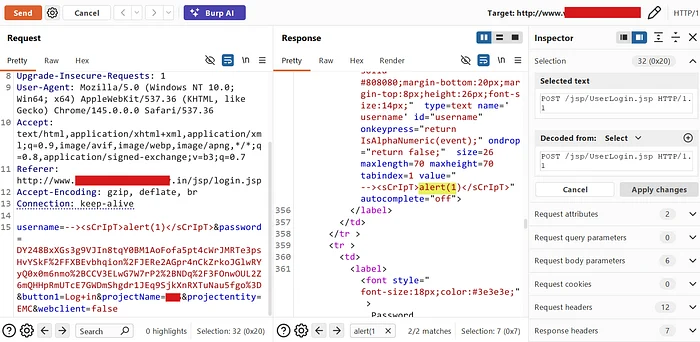
The Burp Repeater screenshot shows the inputted payload reflected as text in the response body.
Step 3: Render the page in the browser
When the resulting page was rendered in the browser, a JavaScript alert dialog appeared.
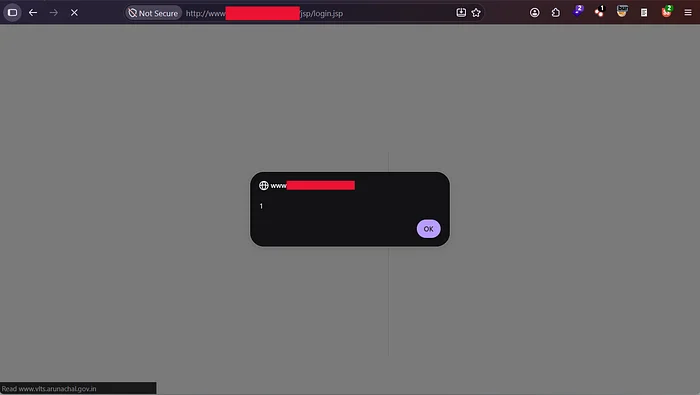
The browser screenshot shows the execution of the JavaScript payload.
Root cause
The username value is reflected into the HTML response without proper output encoding, so user-controlled input reaches the page as markup and script rather than as inert text. The report does not describe the server-side code, so the exact insertion point is not shown; the behaviour is consistent with the value being written directly into the HTML response.
Impact
An attacker who can get a victim to submit or load a crafted username value can have JavaScript execute in the context of the portal's page. The report does not go further into what an attacker could achieve beyond the alert dialog, nor does it describe which users would be affected or under which conditions the reflected value is rendered. The weakness is client-side and requires the crafted input to be reflected and then rendered in a browser.
Fix
The report lists the following remediation steps for developers:
- Implement context-aware output encoding: properly HTML-encode user-controlled values before rendering them.
- Avoid unsafe HTML insertion: use safe templating mechanisms and avoid directly inserting untrusted data into HTML.
- Validate user input: apply appropriate server-side validation to username parameters.
- Implement Content Security Policy: deploy a restrictive CSP as an additional layer of protection.
- Perform security testing: include reflected and stored XSS testing in regular application security assessments.
Variants to test
- Submit HTML and script payloads in other login fields, such as the password parameter, and check whether the response reflects them unencoded. A positive result is the payload appearing as markup in the response body and executing when the page is rendered.
- Try the same payloads in other parameters that are reflected into HTML responses, such as error messages or redirect targets. A positive result is the same unencoded reflection followed by script execution.
- Test whether the reflected value is stored and later rendered to other users, which would turn the reflected issue into stored XSS. A positive result is the payload executing on a page viewed by a different user without resubmitting it.
What happened, in plain words
A security researcher was testing a government portal. He looked at the login page, with its username and password fields, and submitted an XSS payload in the username field instead of a normal name.
The username value came back in the HTML response without proper output encoding, and when the page was rendered the browser ran the injected script. A little pop-up box appeared on screen. That pop-up is the classic sign of a bug called Cross-Site Scripting, usually shortened to XSS.
No complex authentication bypass, advanced exploitation framework or complicated payload was needed. One ordinary text box was enough to show that the site had a weakness in how it handles what people type.
This article walks through what the researcher did, step by step, and explains every term along the way. If you can use a browser and a computer, you can follow it.
The feature being tested: a login page
Almost every website with user accounts has a login page. You type your username, you type your password, you press a button, and the site checks whether those two things match an account it knows about.
Behind the scenes, the page you see is only half the story. When you press the button, your browser sends your username and password to a program running on the website's server. That program is the part that actually checks your details. The page you see is called the front end, and the program on the server is called the back end. They talk to each other over the internet using requests and responses: your browser sends a request, and the server sends back a response.
The login page in this report had two main fields:
- Username
- Password
That is all the report tells us about the page itself. It does not describe the accounts used, the tools' version numbers, or any other setup details.
What XSS means, from zero
A web page is not just text. It is written in a language called HTML, which tells the browser what to display and how. HTML uses tags, which look like <b> for bold text or <img> for an image. A page can also contain JavaScript, a programming language that browsers understand and run. JavaScript is what makes pages interactive: it can open menus, check forms, or show pop-up boxes.
The important thing to understand is that the browser trusts the HTML and JavaScript it receives. If a page contains JavaScript, the browser runs it. That is by design.
Now imagine a website that takes something a visitor typed and pastes it into the page it sends back, without checking it first. If the visitor typed ordinary text, nothing bad happens. But if the visitor typed HTML or JavaScript, the browser cannot tell the difference between that and the website's own code. It runs it.
That is XSS: a website lets a visitor's input become part of the page's code, and the browser executes it. The everyday comparison is a noticeboard where anyone can pin a note. If the person in charge of the board copies whatever is written on a note straight onto the official board without reading it, someone can write instructions on a note and have them treated as official.
There are different flavours of XSS. The one in this report is called reflected XSS, because the input is bounced straight back in the response to the same request. The other common flavour is stored XSS, where the input is saved and shown later to other people.
How the researcher found it
Step 1: Look at the page and its inputs
The researcher started by examining the login page and the fields it sends to the server. This is the normal first move in web security testing: understand what the page does before trying to break it.
He then tested how the application handled unexpected input in the username field. Instead of typing a normal name, he wanted to see whether the site checked and neutralised special characters and HTML elements. In other words: if I type something that looks like code, does the site treat it as harmless text, or does it let it become code?
That question is the heart of the test. A well-built site takes whatever you type and makes it safe before showing it again. A poorly built site passes it through untouched.
Step 2: Send a payload to the login endpoint
He submitted an XSS payload in the username field. A payload here simply means the piece of input designed to test the weakness: text containing HTML or JavaScript that would reveal whether the site handles it safely.
The request went to the application's login processing endpoint:
POST /jsp/UserLogin.jsp
Line by line:
POSTis the type of request. When you fill in a form and press a button, your browser usually sends a POST request, which carries data to the server. A GET request, by contrast, usually just asks for a page./jsp/UserLogin.jspis the address on the server that handles the login. The.jspending tells us the page is built with a technology called JavaServer Pages, a way of generating web pages on the server. The nameUserLoginsuggests this is the program that processes login attempts.
The report does not reproduce the full request, the exact payload, or the response headers and body. What we know is that a payload was placed in the username field and sent to this endpoint.
Step 3: Inspect what came back
After sending the request, the researcher examined the server's response. This is where the problem showed up: the username value he had submitted was reflected back into the HTML response without proper output encoding. The response contained the injected HTML and JavaScript content.
Output encoding is the safety step a website should perform before showing user input on a page. It means converting characters that have special meaning in HTML into harmless versions. For example, the < character, which starts an HTML tag, gets turned into a code that the browser displays as a literal < instead of treating it as the start of a tag. If a site skips this step, your input arrives at the browser as real markup and real script.
The response was inspected, and the screenshot shows the payload reflected as text in the response body. Burp is a well-known security testing tool that sits between your browser and a website, letting you see and change the requests and responses. Repeater is one part of it: you send a request, look at the response, tweak the request, and send it again, as many times as you like. It is like being able to read and rewrite a letter before it goes in the post, and read the reply before it reaches you.
The screenshot shows Burp Repeater with the payload reflected as text in the response body. In plain terms: the code the researcher typed came back inside the page the server sent, unchanged.
Step 4: Open the page in a browser
The next step was to see what happened when the resulting page was rendered in a browser. When the resulting page was rendered in the browser, a JavaScript alert dialog appeared.
Rendering means the browser reading the HTML and JavaScript and turning it into the page you see. An alert dialog is the small pop-up box a browser shows when JavaScript calls the alert function. The report states that when the resulting page was rendered, a JavaScript alert dialog appeared.
The screenshot shows the browser with the JavaScript payload executing, which is the moment the bug is confirmed.
Why it happens: the root cause
The username value is reflected into the HTML response without proper output encoding. That means user-controlled input reaches the page as markup and script rather than as inert text. Inert here means harmless: text that the browser displays but never runs.
The report does not describe the server-side code, so the exact place where the value is inserted is not shown. The behaviour is consistent with the value being written directly into the HTML response, with no safety step in between.
What an attacker could do with it
If an attacker can get a victim to submit or load a crafted username value, JavaScript can run in the context of the portal's page. Context here means the browser treats the script as if it came from the government portal itself, with the same trust the portal's own code has.
The report does not go further into what an attacker could achieve beyond the alert dialog. The weakness is client-side, meaning it happens in the browser rather than on the server, and it requires the crafted input to be reflected and then rendered in a browser.
How to fix it
The report lists five remediation steps for developers:
- Implement context-aware output encoding: properly HTML-encode user-controlled values before rendering them. Context-aware means the encoding matches where the value lands: text inside a page, a value inside an attribute, or a piece of JavaScript each need different treatment.
- Avoid unsafe HTML insertion: use safe templating mechanisms and avoid directly inserting untrusted data into HTML. A templating mechanism is a system that builds pages from a template and fills in the values, and a safe one escapes those values automatically.
- Validate user input: apply appropriate server-side validation to username parameters. Validation means checking input against what is expected, on the server, where an attacker cannot bypass it.
- Implement Content Security Policy: deploy a restrictive CSP as an additional layer of protection. A Content Security Policy is a set of instructions a site sends to the browser saying which sources of script are allowed; a restrictive one limits what can run even if something slips through.
- Perform security testing: include reflected and stored XSS testing in regular application security assessments.
Other places to try the same test
The same idea can be tried in other spots:
- Submit HTML and script payloads in other login fields, such as the password parameter, and check whether the response reflects them unencoded. A positive result is the payload appearing as markup in the response body and executing when the page is rendered.
- Try the same payloads in other parameters that are reflected into HTML responses, such as error messages or redirect targets. A positive result is the same unencoded reflection followed by script execution.
- Test whether the reflected value is stored and later rendered to other users, which would turn the reflected issue into stored XSS. A positive result is the payload executing on a page viewed by a different user without resubmitting it.
Glossary
- XSS (Cross-Site Scripting): a bug where a website lets a visitor's input become part of the page's code, so the browser runs it.
- Reflected XSS: XSS where the input is bounced straight back in the response to the same request.
- Stored XSS: XSS where the input is saved and later shown to other people.
- HTML: the language web pages are written in, using tags to describe what to display.
- Tag: a piece of HTML such as
<b>or<img>that tells the browser what to do. - JavaScript: the programming language browsers run to make pages interactive.
- Payload: the piece of input designed to test a weakness, here text containing HTML or JavaScript.
- Request: a message your browser sends to a server asking for something or sending data.
- Response: the message a server sends back.
- POST: a request type that carries data to the server, typically used when submitting a form.
- GET: a request type that usually just asks for a page.
- Endpoint: the specific address on a server that handles a particular action, here
/jsp/UserLogin.jsp. - JSP (JavaServer Pages): a technology for generating web pages on the server.
- Output encoding: converting characters with special meaning in HTML into harmless versions before showing user input on a page.
- Context-aware encoding: encoding that matches where the value lands, such as text, an attribute, or a script.
- Validation: checking input against what is expected, ideally on the server.
- Server-side: happening on the website's server, where an attacker cannot easily change it.
- Client-side: happening in the browser.
- Rendering: the browser reading HTML and JavaScript and turning it into the page you see.
- Alert dialog: the small pop-up box a browser shows when JavaScript calls the
alertfunction. - Burp Repeater: a part of the Burp security testing tool that lets you send a request, inspect the response, change the request and send it again.
- Content Security Policy (CSP): instructions a site sends to the browser saying which sources of script are allowed.
- Templating mechanism: a system that builds pages from a template and fills in values, ideally escaping them automatically.
- Inert: harmless, displayed but never run.
- Context: the surroundings in which a value appears, which determine how the browser treats it.




