Beyond the wall: command injection still alive.
An image resizing endpoint passed the user-supplied size parameter into an operating system command without sanitisation, allowing an attacker to execute arbitrary commands on the server. The attacker demonstrated this by causing time delays and creating and deleting a file, though output was not visible.
 Published on a-constant.medium.com
After a couple of hours of hunting on the main domain of Kings-Landing didn’t reveal anything interesting, it was time for moving to the next sub-domain in the scope.
The full write-up lives on its author's site
It belongs to its author, so we link to it rather than copy it. The other two tabs are our own rewrites, checked against it.
Context
The target is a company the author calls Kings-Landing, a name used in place of the real one. The work started on the main domain and moved to a subdomain in scope that serves images. The endpoint of interest lives on image-service-prd.Kings-Landing.com and takes a size parameter that controls the dimensions of the returned image:
https://image-service-prd.Kings-Landing.com/v1/images/Daenerys-Targaryen-is-a-b***h.jpg?size=1760x234
The author wondered whether the back end builds something dynamically from the value of size. The question the author asked was whether that size is fixed, or whether the back end builds something dynamically from the value of size.
Setup
The report does not describe accounts, roles or a specific Burp Suite version. The tools used were Burp Suite (Proxy HTTP history, Scanner, Intruder) with the Active Scan++ extension installed, and SQLmap for an unsuccessful SQL injection attempt. The extension is described in the report as extending Burp's active and passive scanning, adding minimal network overhead and identifying application behaviour that may interest advanced testers, with a link to its BApp Store page:
https://portswigger.net/bappstore/[redacted]
Finding it
After a couple of hours on the main domain without anything interesting, the author moved to the next subdomain in scope. The habit that produced the finding was a quick look at Burp's HTTP history before leaving one application for another. In that history was the request to the image service shown above, with size=1760x234.
The reasoning was that if the back end assigns the size dynamically from the parameter, the value is probably being placed into something on the server. The first test was the single quotation mark:
size=1760x234'
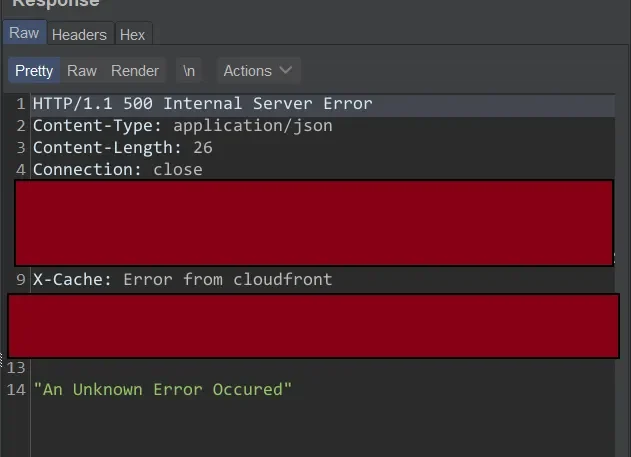
The response was a 500 Internal Server Error.
A second quotation mark was then added:
size=1760x234''
This time the error disappeared and the response was 200 OK again.

The author did not know what caused it, but was sure something was wrong on the server side. The author spent about an hour and a half on manual and automated SQLmap testing for SQL injection, which came to nothing. The problem was visibility: whatever the payloads did, the only thing returned was a CloudFront error message, so there was no output to read.
Before giving up on the endpoint temporarily, the request was sent to Burp's scanner.
Exploitation
Step 1: let the scanner speak
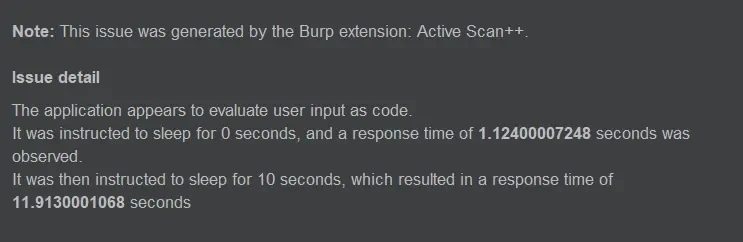
With Active Scan++ running alongside the scanner, the result came back with false positives everywhere: the scanner reported SQL injection. The extension, however, had a different finding, and it was the first time the author had seen output from it since installing it months earlier.

The extension's payload was:
sleep 11
URL-encoded as:
%60sleep%2011%60
The report notes the URL encoding is for the backticks and the space. The payload makes the server sleep for the given number of seconds. To remove doubt, the request was sent to Intruder and issued 50 times with an incrementing sleep value, and the response delay matched every single time.
Step 2: understand what was found
OS command injection arises when an application incorporates user data into an operating system command that it executes. An attacker can manipulate that data so their own commands run, and can then carry out any action the application itself can, including reading or modifying its data and performing privileged actions. The report points to the OWASP page for background:
https://owasp.org/www-community/attacks/Command_Injection
Making the server sleep has no impact on its security by itself, and the CloudFront error still hid the output of any payload. The author searched for a way to exploit the bug and found the technique of making the server send an outbound request with cURL or wget, described in this article:
https://gracefulsecurity.com/command-injection-the-good-the-bad-and-the-blind/
That route was closed: the server or Cloudflare did not allow any outbound traffic, not even ping, and nslookup did not work. So the injection was blind: the output could not be seen and the server could not be made to call back.
Step 3: turn sleep into a yes/no oracle
The remaining signal was time. The server sleeps when told to, and measuring the response time confirms execution. To run other commands and still confirm execution, the author used a conditional IF statement. The first attempt was:
if [ 'a' == 'b' ]; then sleep 0; else sleep 10; fi
The expectation was a 10 second delay, since a is not equal to b, but the server did not sleep at all. The basic sleep payload still worked, so the bug was not patched. The author wondered whether something had got suspicious of the programming keywords in the statement. URL encoding solved it. The final payload was:
And the server fell asleep.
Step 4: prove file creation
To show real impact, the next step was creating a file:
echo 'constant' > cfile.txt | if [ $(cat cfile.txt) == 'constant' ]; then sleep 10; else sleep 2; fi
This writes the string constant into cfile.txt, then reads the file back and sleeps 10 seconds if it contains that string, otherwise 2 seconds. The server slept for 10 seconds, which indicates the file was created.
Step 5: clean up
The file was then deleted with:
rm cfile.txt | if [ $(cat cfile.txt) == 'constant' ]; then sleep 10; else sleep 2; fi
This time the server slept for only 2 seconds, which indicated the file was gone. All of these payloads were URL encoded.
Root cause
The report does not show the server-side code, so the exact construction is not stated. What the behaviour shows is that the value of size reaches an operating system command executed on the server. A single quote produced a 500, two quotes returned a 200, and backtick-wrapped commands executed. The defences in front of the application did not stop it: CloudFront returned its own error page, which hid output, and outbound traffic was blocked. URL encoding solved it, and the server fell asleep.
Impact
With blind command execution, an attacker can run commands on the server. The report describes the potential to compromise the whole back-end server, listing scenarios from uploading a bash shell to deleting the root directory. The author demonstrated only benign actions: a sleep, creating a file and deleting it. Outbound connections were not possible here, so data exfiltration over the network was not shown.
Reporting
The report was written up with the several ways a threat actor could use the bug to compromise the back-end server.

The timeline was:
| Date | Event |
|---|---|
| Oct 27 2020 | Submitted |
| Oct 28 2020 | First response |
| Oct 30 2020 | Bounty received, severity downgraded from critical to high |
Unexpectedly, two other reports from the author, rated Low and Medium, were closed as duplicates, while this critical technical one was accepted.

Fix
The general fix for this class of bug is to stop passing user data into a shell command, for example by validating size strictly against the expected WIDTHxHEIGHT numeric format.
Variants to test
- Image and thumbnail services with a
size,dimensionsorresizeparameter. Send a single quote and then two quotes; a 500 followed by a 200 suggests the value is parsed by a shell or a similar interpreter. Then try a backtick-wrappedsleepand measure the delay. - Any parameter that looks like it feeds a command-line tool (conversion, compression, PDF generation, media processing). Use the same time-based oracle:
sleep Nin backticks, URL-encoded, repeated with increasing values to confirm the delay tracks the input. - Keyword-filtered endpoints. If a plain
if ... then ... else ... fiis rejected butsleepworks, URL-encode the whole statement, as the author did, and check whether the delay returns. - Blind injections with no outbound channel. Use a conditional statement that sleeps differently depending on the result of a command, for example testing for a file's contents, to confirm execution without seeing output.
- Error-page fronting. Where a CDN or WAF replaces responses with its own error page, do not treat the missing output as absence of a bug; switch to timing or another side channel.
Takeaways
The technical lessons the author draws are: always look at the HTTP history, keep Active Scan++ installed, automate so effort can go to logical bugs and odd tool behaviour, and remember URL encoding and double URL encoding. The psychological one is tunnel vision, a very narrow view that prevents seeing beyond a limited viewpoint. Kings-Landing was a public program with dozens of resolved reports and still had this kind of bug.
When lost in the details of testing for one specific bug, step back, take a breath and reevaluate: there may be another way, or another bug, that tunnel vision is hiding.
What happened, in plain words
A security researcher was testing a company's website. He calls the company Kings-Landing, which is not its real name; he changed it so the company cannot be identified. He started on the main website, found nothing interesting for a couple of hours, and moved to another part of the company's systems: a subdomain that serves images.
While looking through Burp's HTTP history, he noticed one request that asked an image service for a picture at a particular size. The size was written in the address itself, as size=1760x234. He wondered whether the server simply reads that number, or whether it takes the text and builds something out of it on the server. To test that, he put a single quotation mark at the end of the value. The server returned an error (500). He then put two quotation marks, and the error disappeared. The author did not know what caused it, but was sure something was wrong on the server side.
He then spent about an hour and a half trying to prove it was an SQL injection, a different kind of bug, and failed. The only thing he could see in response was an error page from CloudFront, the content delivery network in front of the site, so he could not see any output from his attempts. Before giving up, he sent the request to Burp Suite's scanner. The scanner said SQL injection, which was wrong, but an extension called Active Scan++ reported something else: a payload of sleep 11, which makes the server wait 11 seconds. He confirmed the delay was real by sending the request 50 times with different sleep values, and the delay matched every time. The parameter was running operating system commands.
The rest of the story is about proving that fact without being able to see any output. He used a conditional statement, an if ... then ... else ... fi shell construct, so that the server would sleep for different lengths of time depending on whether a command succeeded. He used it to create a file on the server and then to delete it, confirming each step by the length of the delay. He wrote the finding up, the company accepted it, and he was paid a bounty, though the severity was downgraded from critical to high.
The target and the request
The endpoint of interest is on a subdomain called image-service-prd.Kings-Landing.com. The path starts with /v1/images/ and ends with a file name and a query string:
https://image-service-prd.Kings-Landing.com/v1/images/Daenerys-Targaryen-is-a-b***h.jpg?size=1760x234
What each part means:
https://is the secure version of the protocol a browser uses to talk to a website.image-service-prd.Kings-Landing.comis the name of the server. A subdomain is a name that sits under a main domain, like a department inside a company./v1/images/...is the path. An API is a way for one program to ask another program for something, like a waiter taking an order to the kitchen. Here the API returns images.Daenerys-Targaryen-is-a-b***h.jpgis the name of the image file being requested.?size=1760x234is the query string. Everything after the?is a set of values sent along with the request.sizeis the name of the parameter, and1760x234is its value: a width of 1760 pixels and a height of 234 pixels.
The author wondered whether the back end builds something dynamically from the value of size. The question the researcher asked himself was whether that size is fixed in advance, or whether the back end builds something dynamically from the value of size. The back end is the part of a website that runs on the server, out of sight of the visitor; the front end is what you see in the browser.
How the finding was made
The researcher had a habit: before leaving one web application and moving to another, he took a quick look at Burp's HTTP history. Burp Suite is a tool that sits between your browser and the internet, like a recording machine on a phone line, so you can see and change every request and response. The HTTP history is the list of everything that has passed through it. This habit is what produced the finding: the request to the image service was already in the history, and he spotted it there.
First test: one quotation mark
He sent the request again with a single quotation mark added to the value:
size=1760x234'
The response was a 500 Internal Server Error. A 500 is an HTTP status code, a number the server sends back to say how the request went. 200 means OK, 404 means not found, and 500 means the server hit an unexpected problem while handling the request.
The image shows the response: a 500 Internal Server Error.
Why this matters: a quotation mark is a special character in many programming and command languages. It marks the beginning or end of a piece of text. An error suggests the value is being fed into something that tries to interpret it.
Second test: two quotation marks
He then sent the request with two quotation marks:
size=1760x234''
This time the error disappeared and the response was 200 OK again.
The image shows the second response: the error is gone and it is 200 OK again.
Why this matters: in many languages, quotes come in pairs. One quote opens a piece of text and the next one closes it. A single quote leaves the text open, which breaks the command. A second quote closes it again, so the command is balanced and runs.
The wrong path: SQL injection
At this point the researcher thought the bug was SQL injection. SQL is the language used to talk to databases, and SQL injection is when user input is placed into a database query so that the input changes the query. He spent about an hour and a half on manual testing and on SQLmap, a tool that automates SQL injection attempts. It came to nothing.
The problem was visibility. Whatever his payloads did, the only thing that came back was a CloudFront error message. CloudFront is a content delivery network: a service that sits in front of a website, caches content close to visitors and can also block or filter traffic. When it returns its own error page, you cannot see what the application behind it did. So he had no output to read.
Before giving up on the endpoint temporarily, he sent the request to Burp's scanner.
The scanner and Active Scan++
Burp's scanner is an automated feature that sends many test requests and reports possible vulnerabilities. Active Scan++ is an extension, an add-on, that extends Burp's active and passive scanning. The report describes it as adding minimal network overhead and identifying application behaviour that may be of interest to advanced testers. Its BApp Store page is:
https://portswigger.net/bappstore/[redacted]
When the researcher came back, the scanner had reported SQL injection everywhere, which was wrong. But Active Scan++ had a different finding, and it was the first time he had seen output from that extension since installing it months earlier.
The image shows the scanner results: false positives everywhere.
The extension's payload was:
sleep 11
URL-encoded as:
%60sleep%2011%60
What this means, piece by piece:
sleepis a command available on Unix-like operating systems. It does nothing except wait for the number of seconds you give it.sleep 11waits 11 seconds.- The backtick character
`is special in shell languages. Text between two backticks is run as a command, and its output is placed where the backticks were. So wrappingsleep 11in backticks tells the shell to run it. - URL encoding is a way of writing characters that are not allowed or are ambiguous in a web address. Each special character is replaced by a percent sign and two hexadecimal digits.
%60is a backtick, and%20is a space. So%60sleep%2011%60is the same as`sleep 11`once the server decodes it.
Why this matters: if the server takes the size value and puts it inside a shell command, then a backtick-wrapped sleep will make the server wait. The response will arrive late. That delay is a signal you can measure even when you cannot see any output.
The image shows the Active Scan++ finding, with the payload sleep 11.
To remove doubt, the researcher sent the request to Intruder, a Burp feature that repeats a request many times with different values, and sent it 50 times with an incrementing sleep value. The response delay matched every single time. That is strong evidence: a random network delay would not track the number he chose.
What OS command injection is
OS command injection vulnerabilities arise when an application incorporates user data into an operating system command that it executes. An attacker can manipulate the data to cause their own commands to run. This allows the attacker to carry out any action that the application itself can carry out, including reading or modifying all of its data and performing privileged actions.
In everyday terms: imagine a restaurant where the waiter takes your order and shouts it into the kitchen. If you can add words to your order that the kitchen treats as instructions, you are no longer just ordering food; you are giving orders to the kitchen staff. The application here takes the size value and passes it to a command that runs on the server, so the researcher can add his own commands.
For more information, the report points to the OWASP page:
https://owasp.org/www-community/attacks/Command_Injection
At this point, making the server sleep has no impact on the security of the server or the application. It proves the bug exists, but it does not do anything harmful. And because of the CloudFront error page, the researcher still had no way to see the response of his payloads.
Trying to get output out
The researcher searched for ways to exploit the bug and found the technique of making the server send an outbound request with cURL or wget. cURL and wget are command-line tools for fetching things over the network. If the server could be made to call a machine the researcher controlled, the call itself would prove execution.
That route was closed. The server or Cloudflare did not allow any outbound traffic, not even ping, and nslookup did not work. Cloudflare is another content delivery and security service, similar in role to CloudFront. Outbound traffic means connections the server makes to the outside world. ping is a simple tool that checks whether another machine is reachable, and nslookup looks up the address of a domain name. With all of those blocked, the injection was blind: the output could not be seen and the server could not be made to call back.
The article the researcher used is:
https://gracefulsecurity.com/command-injection-the-good-the-bad-and-the-blind/
So he had an OS command, but he could not see the output, and he could not send any request from the server. It seemed he had nothing. But this was the same situation the engineers and scientists who built computers faced: starting from a simple switch with only two options, on and off. The answer is logic.
Turning sleep into a yes/no answer
The remaining signal was time. The server sleeps when told to, and by measuring the response time you can confirm the sleep command ran. To run other commands and still confirm execution, the researcher used a conditional IF statement. A conditional statement runs one thing if a condition is true and another thing if it is false, like a fork in the road.
The first attempt was:
if [ 'a' == 'b' ]; then sleep 0; else sleep 10; fi
Line by line, in plain words:
if [ 'a' == 'b' ]asks a question: is the textaequal to the textb? The square brackets are the shell's way of writing a test.; then sleep 0says: if the answer is yes, wait 0 seconds.; else sleep 10says: if the answer is no, wait 10 seconds.; fimarks the end of theifstatement.fiisifwritten backwards.
The expectation was a 10 second delay, since a is not equal to b. But the server did not sleep at all. The researcher wondered whether the bug had been patched while he was testing, so he returned to the basic sleep payload and it still worked. The bug was not patched. The suspicion was that something had flagged the programming keywords in the statement.
URL encoding solved it. The final payload was:
And the server fell asleep.
What the encoded string contains, decoded piece by piece:
%60is a backtick, opening the command.%69%66isif.%20is a space.%5bis[.%27%61%27is'a'.%20%3d%20is=.%27%62%27is'b'.%20%5d%3bis];.%20%74%68%65%6e%20isthen.%73%6c%65%65%70%20%30%3bissleep 0;.%20%65%6c%73%65%20iselse.%73%6c%65%65%70%20%31%30%3bissleep 10;.%20%66%69%60isfifollowed by a closing backtick.
Why this matters: the plain-text version was blocked or altered somewhere along the way, but the URL-encoded version got through and the shell decoded it back into the same statement. The delay of 10 seconds told the researcher the else branch ran, which means the whole statement executed.
Proving real impact: creating a file
Making a server sleep proves the bug, but it does not show damage. To show real impact, the next step was creating a file:
echo 'constant' > cfile.txt | if [ $(cat cfile.txt) == 'constant' ]; then sleep 10; else sleep 2; fi
Line by line:
echo 'constant'prints the textconstant.> cfile.txtredirects that output into a file calledcfile.txt. The>symbol means write to a file, replacing whatever was there.|is a pipe. It passes the output of the left side to the right side. Here the left side produces no output, so the pipe mainly serves to chain the commands together.$(cat cfile.txt)runscat cfile.txt, which reads the file, and puts its contents in place. This is called command substitution.if [ $(cat cfile.txt) == 'constant' ]asks: does the file contain the textconstant?then sleep 10waits 10 seconds if yes.else sleep 2waits 2 seconds if no.fiends the statement.
The server slept for 10 seconds, which indicates the file was created and contained the expected text.
Cleaning up
The file was then deleted with:
rm cfile.txt | if [ $(cat cfile.txt) == 'constant' ]; then sleep 10; else sleep 2; fi
Line by line:
rm cfile.txtdeletes the file.rmstands for remove.- The rest is the same test as before: read the file, sleep 10 seconds if it contains
constant, otherwise 2 seconds.
This time the server slept for only 2 seconds, which indicated the file was gone. All of these payloads were URL encoded.
Why clean up: leaving files on someone else's server is untidy and could cause problems. Removing the file also proves the deletion worked, because the delay changed.
Reporting
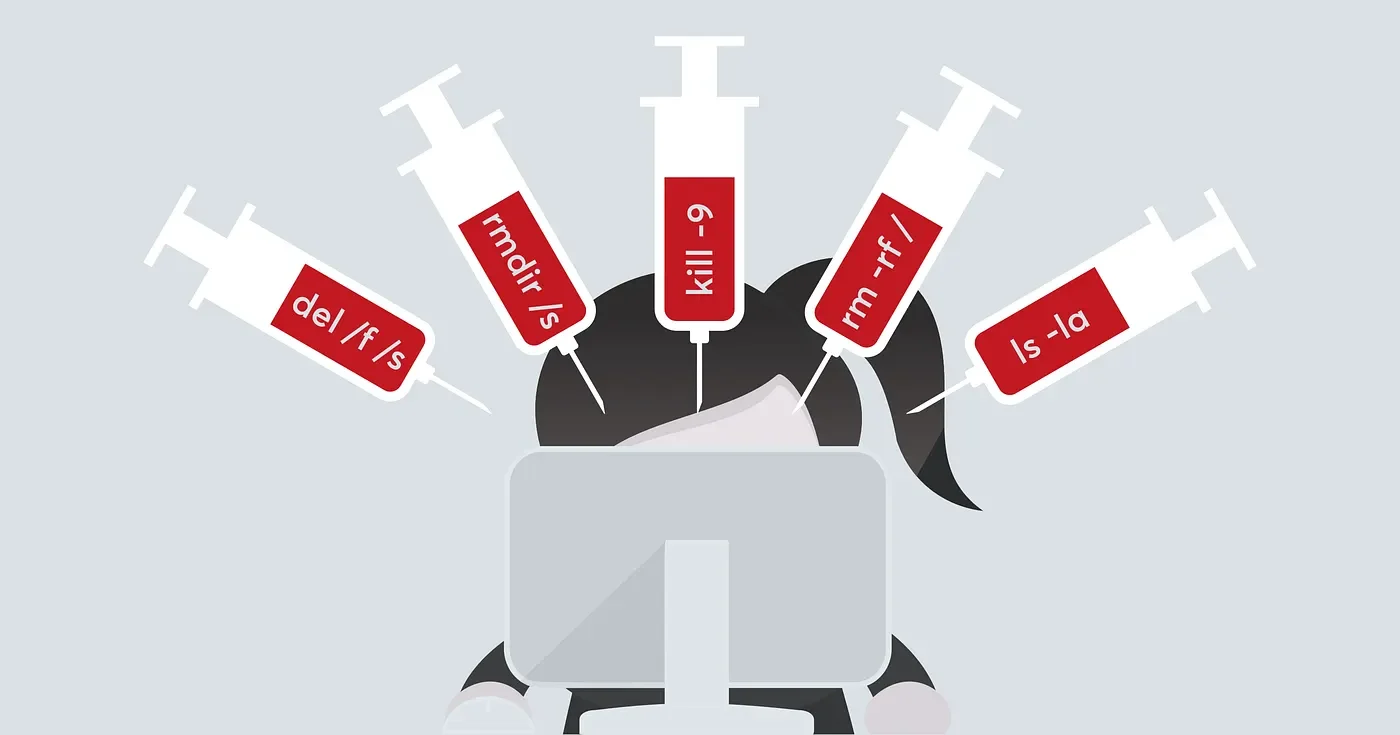
At this point the researcher wrote a detailed report. It stated several ways a threat actor could use the bug to compromise the whole back-end server, from uploading a bash shell to deleting the root directory. A threat actor is anyone who might abuse the bug. A bash shell is a program that lets you type commands and run them on a machine; uploading one would give an attacker a way to run commands at will. The root directory is the top level of a filesystem, so deleting it would destroy the server's files.
The image illustrates that there are many scenarios, yet the end is the same.
The timeline was:
| Date | Event |
|---|---|
| Oct 27 2020 | Submitted |
| Oct 28 2020 | First response |
| Oct 30 2020 | Bounty received, severity downgraded from critical to high |
A bounty is a payment a company makes to a researcher who reports a valid security bug. Severity is a rating of how serious a bug is; critical is the highest level, high is one step below.
Unexpectedly, two other reports from the researcher, rated Low and Medium, were closed as duplicates, while this critical technical one was accepted. A duplicate is a report of a bug that has already been reported by someone else, so it earns no reward.
The image shows the researcher's reaction: really?
What the report does not say about the fix
The report does not say what the company changed. The general fix for this class of bug is to stop passing user data into a shell command, for example by checking size strictly against the expected WIDTHxHEIGHT numeric format.
Other places to look for the same bug
- Image and thumbnail services with a
size,dimensionsorresizeparameter. Send a single quote and then two quotes. A 500 followed by a 200 suggests the value is parsed by a shell or a similar interpreter. Then try a backtick-wrappedsleepand measure the delay. - Any parameter that looks like it feeds a command-line tool, such as conversion, compression, PDF generation or media processing. Use the same time-based test:
sleep Nin backticks, URL-encoded, repeated with increasing values to confirm the delay tracks the input. - Endpoints that filter keywords. If a plain
if ... then ... else ... fiis rejected butsleepworks, URL-encode the whole statement, as the researcher did, and check whether the delay returns. - Blind injections with no outbound channel. Use a conditional statement that sleeps differently depending on the result of a command, for example testing for a file's contents, to confirm execution without seeing output.
- Error pages from a CDN or WAF. A WAF, or web application firewall, is a filter that inspects traffic and blocks some of it. Where a CDN or WAF replaces responses with its own error page, do not treat the missing output as absence of a bug. Switch to timing or another side channel.
Takeaways
The technical lessons the researcher draws are: always look at the HTTP history, keep Active Scan++ installed, automate so effort can go to logical bugs and odd tool behaviour, and remember URL encoding and double URL encoding.
The psychological lesson is tunnel vision: a very narrow view, an inability to see beyond a limited viewpoint. Kings-Landing was a public program with dozens of resolved reports and still had this kind of bug.
When you get lost in the details while testing for one specific bug, it helps to step back, take a breath and reevaluate. There may be another way, or another bug, that tunnel vision is hiding.
Glossary
- API: a way for one program to ask another program for something, like a waiter taking an order to a kitchen.
- Active Scan++: a Burp Suite extension that extends its active and passive scanning and reports behaviour of interest to advanced testers.
- Back end: the part of a website that runs on the server, out of sight of the visitor.
- Bash shell: a program that lets you type commands and run them on a machine.
- Blind injection: an injection where you cannot see the output of your payloads, so you have to infer success from indirect signals such as time.
- Bounty: a payment a company makes to a researcher who reports a valid security bug.
- Burp Suite: a tool that sits between your browser and the internet so you can see and change every request and response.
- CloudFront: a content delivery network that sits in front of a website, caches content and can return its own error pages.
- Cloudflare: a content delivery and security service, similar in role to CloudFront.
- Command substitution: putting the output of one command in place of the command itself, written with
$(...)or backticks. - Conditional statement: a statement that runs one thing if a condition is true and another if it is false, like a fork in the road.
- Content delivery network (CDN): a service that caches content close to visitors and can filter traffic.
- cURL: a command-line tool for fetching things over the network.
- Duplicate: a report of a bug that has already been reported by someone else, so it earns no reward.
- Endpoint: a specific address on a server that accepts requests, such as a particular API path.
- Extension: an add-on that adds features to a tool such as Burp Suite.
- Front end: what you see in the browser.
- HTTP history: the list of every request and response that has passed through Burp Suite.
- HTTP status code: a number the server sends back to say how a request went, such as 200 OK or 500 Internal Server Error.
- Intruder: a Burp Suite feature that repeats a request many times with different values.
- nslookup: a tool that looks up the address of a domain name.
- OS command injection: a vulnerability where user data is placed into an operating system command, letting an attacker run their own commands.
- Outbound traffic: connections a server makes to the outside world.
- Parameter: a named value sent with a request, such as
sizein a query string. - ping: a simple tool that checks whether another machine is reachable.
- Pipe: the
|symbol, which passes the output of one command to another. - Query string: the part of a web address after the
?, containing named values. - Redirection: the
>symbol, which writes a command's output into a file. - Root directory: the top level of a filesystem.
- Scanner: an automated Burp Suite feature that sends many test requests and reports possible vulnerabilities.
- Severity: a rating of how serious a bug is, from low to critical.
- Shell: a program that reads commands and runs them on an operating system.
- sleep: a command that waits for a given number of seconds and does nothing else.
- SQL injection: a vulnerability where user input is placed into a database query so that the input changes the query.
- SQLmap: a tool that automates SQL injection attempts.
- Subdomain: a name under a main domain, like a department inside a company.
- Threat actor: anyone who might abuse a bug.
- Tunnel vision: a very narrow view, an inability to see beyond a limited viewpoint.
- URL encoding: writing special characters as a percent sign and two hexadecimal digits, such as
%20for a space. - WAF (web application firewall): a filter that inspects traffic and blocks some of it.
- wget: a command-line tool for fetching things over the network.



