Blind SSRF in URL Validator
The application's URL validation feature made HTTP requests to user-supplied links, but direct attempts to reach internal addresses were blocked. By hosting a redirect script on an attacker-controlled server, the attacker could make the server follow a redirect to localhost on a chosen port, and infer whether that port was open from the response time.
 Published on yasshk.medium.com
Hello Amazing Hackers! I’m Yash Kandekar, and In this blog I’ll be sharing an Interesting bug which led me to my first paid Blind SSRF :)
The full write-up lives on its author's site
It belongs to its author, so we link to it rather than copy it. The other two tabs are our own rewrites, checked against it.
Context
Yash Kandekar (@Neutron__) describes a blind SSRF found in a heavily tested program that relied on APIs. The real target name is not disclosed, so throughout the write-up it is called cheems.com.
The application had a feature to post anything on your feed, including browse-able links. The comparison drawn is with Twitter: when you paste a link into a post, the platform makes an interaction with that link to validate it. Here the same idea existed, but with an HTTP interaction. The API makes a request to the supplied link to validate it:
POST /api/validateHost : cheems.com<Other Headers>url=http://ourlink.example.com
The author is explicit that this is an intended feature and not a bug in itself. The bug is in how the URL validator can be abused.

The image shows the placeholder target, captioned http://cheems.com is our Target.
Setup
The researcher's side of the test needs two things running at the same path:
- An ngrok tunnel exposing port 80.
- A PHP built-in server on
[redacted]:80so the PHP script executes when requests arrive.
$ ngrok http 80 #This will start our ngrok server
$ PHP -S [redacted]:80 #This will let the php script execute, once requests are received.
The attacker-controlled script is a small PHP file, redir.php, which redirects incoming requests to another destination:
<?php header("Location: <http://[redacted]:443>");?>
The idea came from a report by SirLeeroyJenkins, which used an attacker server hosting a script (PHP, for example) that redirects incoming requests to another destination. The author notes that the server can be set up with ngrok and PHP.
Finding it
The starting point was ordinary testing on a program that had already been tested heavily by many good hackers, with no valid bugs found. What stood out was that the program relied on APIs, and APIs are not always 100% properly configured.
The URL validator was the interesting surface. The obvious approach, putting localhost, [redacted] or [redacted] directly in the url section and hoping for a positive reply from cheems.com, did not work. The author spent nearly 1 to 2 hours on a lot of payloads, including different encodings of [redacted], with no positive response from the server. Payloads such as [redacted]:25 for port scanning were also not working.
Exploitation
The technique is to make the validator follow a redirect from an attacker-controlled host to an internal destination, and then use response timing to learn whether a port is open.
Step 1: Host the redirect script
Prepare redir.php so that any request reaching it is answered with a redirect to the internal address and port you want to probe:
<?php header("Location: <http://[redacted]:443>");?>
Start ngrok on port 80 and the PHP server on [redacted]:80, both from the same path, as shown in the Setup section.
Step 2: Submit the ngrok URL to the validator
Navigate to cheems.com and add the ngrok URL with the script path to the post:
POST /api/validate Host : cheems.com <Other Headers> url=http://uniqid.ngrok.io/script.php
The url parameter points at the attacker's script rather than at an internal address. The server fetches the script, and the script answers with a redirect to [redacted] on the chosen port.
Step 3: Probe an open port
Forward the request with the port in the script set to 443. The response comes back noticeably faster. cheems.com first visits http://uniq.ngrok.io.script.php and is then redirected to itself; because 443 was an open port, the result is a faster response.

The image is captioned requesting a Valid port and sits next to this step.
Step 4: Probe a closed port
Change the port from 443 to something potentially inactive, such as 54321. Once the request is sent, the response is delayed, because cheems.com searches for this port and tries to make a connection, which fails.
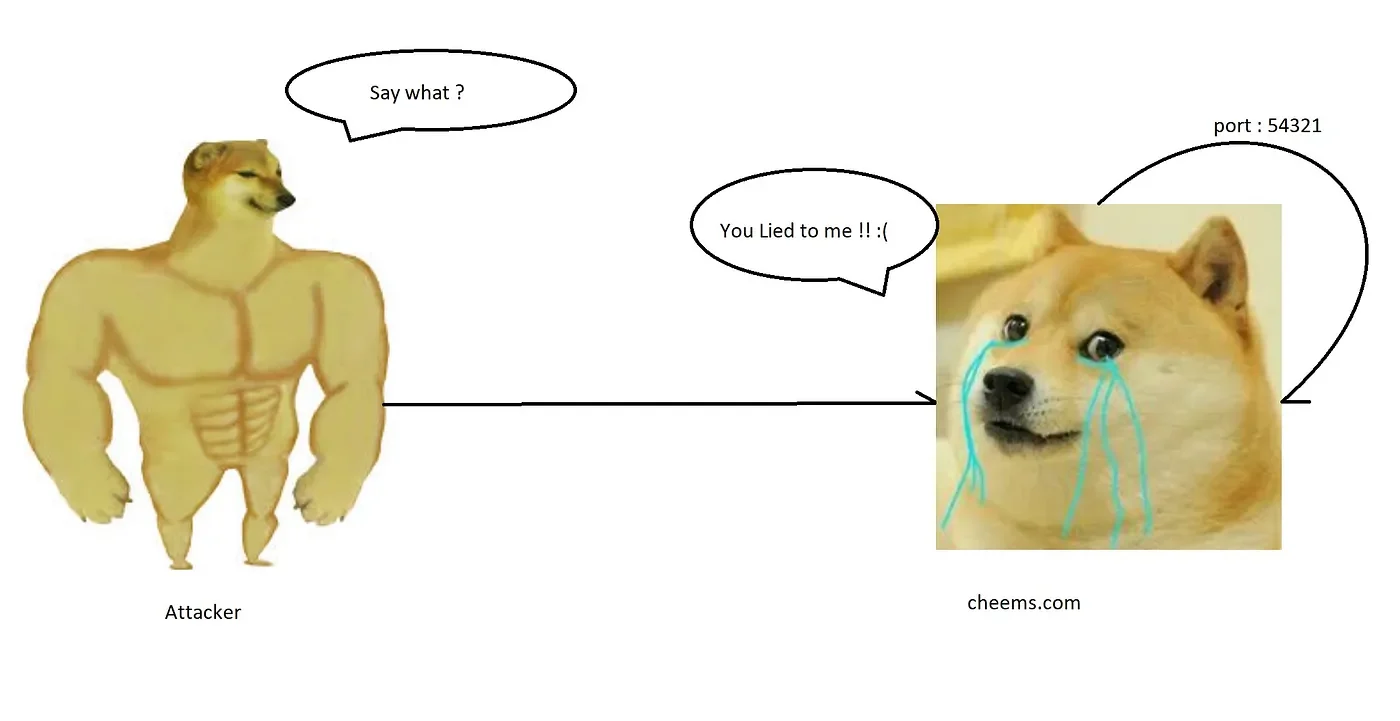
The timing difference between the two responses is the signal the author used.
Limits
The author tried to increase the impact by switching the protocol to gopher, but cheems.com was protected with various filters. The write-up does not describe any internal response content being read back; the result is blind, inferred from timing.
Root cause
The validator performs a server-side HTTP request to a user-supplied URL. The validator fetches a user-supplied URL, and the author used a redirect from his own server to reach an internal address. The author's phrasing is that the program relied on APIs and APIs are not always 100% properly configured; the exact validation logic is not shown, so
Impact
The result is a blind SSRF: the attacker can make the server issue requests to internal addresses and infer, from response timing, whether a given port on [redacted] is open. This allows inferring whether a given port on [redacted] is open. Reading data back from internal services was not demonstrated, and the gopher attempt was blocked by filters. The author describes this as their first paid blind SSRF.
Fix
The write-up does not state what the program changed.
Variants to test
- Redirect-based probing on other validators: host a script that redirects to
http://[redacted]:<port>and compare response times for open and closed ports. A positive result is a consistently faster response for one port than for an inactive one. - Redirect to cloud metadata addresses: point the script at
[redacted]instead of loopback. - Protocol switching: try
gopher://or other schemes in the redirect target. A positive result is the server following the scheme rather than rejecting it; oncheems.comthe gopher attempt was blocked by filters. - Encoding bypasses on the submitted URL: the author tried different encodings of
[redacted]without success on this target, but the same encodings are worth trying where the filter is weaker. A positive result is the server reaching the internal address directly.

The closing image accompanies the author's advice to stick to one program, crediting zseano, and the sign-off.
What happened, in plain words
A security researcher, Yash Kandekar, found a bug in a website that let him make the website's own server send requests to addresses on its internal network. He could not read the replies, but by timing how long the server took to answer, he could tell whether a particular internal port was open. That kind of bug is called a blind SSRF (server-side request forgery), and this was his first one that paid a bounty.
The site is not named in the write-up, so it is called cheems.com throughout. The bug was in a feature that checks links you paste into a post, similar to how Twitter checks a link before showing it. The site's API (the part of the site that other software talks to) fetched the link to validate it. By pointing that fetch at a script the researcher controlled, and having the script redirect to an internal address, he could probe the internal network.
The image shows the placeholder name used for the target, captioned http://cheems.com is our Target.
The feature that was abused
The application let you post anything on your feed, including links. When you pasted a link, the platform made an HTTP request to that link to check it was valid. The author compares this to Twitter: paste a link in a tweet and Twitter interacts with it to validate it. Here the same idea existed, but the interaction was a direct HTTP request from the server.
The API call looked like this:
POST /api/validateHost : cheems.com<Other Headers>url=http://ourlink.example.com
This is a request to the path /api/validateHost on the server cheems.com. POST is the HTTP method used when you send data to a server (as opposed to GET, which just asks for a page). <Other Headers> stands for extra information the browser or client sends along with the request, such as cookies or the type of content. The important part is the parameter url=http://ourlink.example.com: the address the server should fetch and validate. The author is clear that this feature is intended and not a bug by itself. The bug is in how that URL validator can be abused.
Why the obvious attempts failed
The first idea anyone has is to put an internal address directly into the url parameter. Internal addresses are things like localhost (your own machine), [redacted] (the loopback address, meaning "this computer"), or [redacted] (a special address used by cloud providers to give a server information about itself, called the metadata service). If the server fetched one of those, you could reach things that are not on the public internet.
That did not work here. The author spent nearly one to two hours trying many payloads, including different encodings of [redacted] (ways of writing the same address so a filter might not recognise it), but got no positive response. He also tried payloads like [redacted]:25 to scan ports, and those did not work either. A port is a numbered channel on a computer; different services listen on different ports, and port scanning means checking which ports are open.
The idea that worked: a redirect
The researcher found a public report by SirLeeroyJenkins that described a technique: host a script on a server you control, and have that script redirect incoming requests to another destination. The server under test fetches your public script, which is allowed, and then follows the redirect to an internal address. The server fetches your public script, which is allowed, and then follows the redirect to an internal address.
To do this you need two things running on your own machine, from the same folder:
- An ngrok tunnel. Ngrok is a tool that gives your local server a public web address, so the target server can reach it over the internet.
- A PHP built-in web server on
[redacted]:80, so that when a request arrives, your PHP script runs. PHP is a programming language commonly used for web scripts.
The commands are:
$ ngrok http 80 #This will start our ngrok server
$ PHP -S [redacted]:80 #This will let the php script execute, once requests are received.
The first line starts ngrok and tells it to forward public traffic to port 80 on your machine. The second line starts PHP's built-in server listening on [redacted] port 80. Both must run from the same directory so that PHP can find your script file.
The script itself is a tiny PHP file called redir.php:
<?php header("Location: <http://[redacted]:443>");?>
This script does one thing: it sends an HTTP header called Location with the value http://[redacted]:443. A Location header tells the client (here, the target server) to go to that address instead. So any request that reaches redir.php is answered with a redirect to [redacted] on port 443. Port 443 is the standard port for HTTPS, so it is often open on a web server.
Step by step: probing an open port
- Start ngrok and the PHP server as shown above.
- Go to
cheems.comand create a post containing your ngrok URL with the script path. The request looks like:
POST /api/validate Host : cheems.com <Other Headers> url=http://uniqid.ngrok.io/script.php
Here uniqid.ngrok.io is the public address ngrok gave you, and /script.php is the path to your redirect script. The url parameter points at your public script, not at an internal address. The server fetches your script, and your script replies with a redirect to [redacted]:443.
- Send the request. Because port 443 was open, the overall response comes back noticeably faster. The author explains it as:
cheems.comfirst visitshttp://uniq.ngrok.io.script.php, then is redirected to itself; since 443 was open, the connection succeeds and the response is faster.
The image is captioned requesting a Valid port and sits next to this step.
- Now change the port in the script from
443to something likely inactive, such as54321. Send the request again. This time the response is delayed, becausecheems.comtries to connect to that port and the connection fails. The delay is the signal the author used.
The author tried to increase the impact by switching the protocol in the redirect to gopher (an older protocol that can be used to talk to some internal services), but cheems.com was protected with various filters that blocked it. The write-up does not show any internal content being read back; the result is blind, inferred only from timing.
Why this works
The validator makes a server-side HTTP request to a URL supplied by the user. The validator fetches a user-supplied URL, and the author used a redirect from his own server to reach an internal address. The author's summary is that the program relied on APIs and APIs are not always 100% properly configured. The exact validation logic is not shown, so
What the impact was
The result is a blind SSRF: the attacker can make the server issue requests to internal addresses and infer, from response timing, whether a given port on [redacted] is open. This allows inferring whether a given port on [redacted] is open. Reading data back from internal services was not demonstrated, and the gopher attempt was blocked by filters. The author describes this as his first paid blind SSRF.
How to fix it
The write-up does not state what the program changed.
Variants to test
- Redirect-based probing on other validators: host a script that redirects to
http://[redacted]:<port>and compare response times for open and closed ports. A positive result is a consistently faster response for one port than for an inactive one. - Redirect to cloud metadata addresses: point the script at
[redacted]instead of loopback. - Protocol switching: try
gopher://or other schemes in the redirect target. A positive result is the server following the scheme rather than rejecting it; oncheems.comthe gopher attempt was blocked by filters. - Encoding bypasses on the submitted URL: the author tried different encodings of
[redacted]without success on this target, but the same encodings are worth trying where the filter is weaker. A positive result is the server reaching the internal address directly.
The closing image accompanies the author's advice to stick to one program, crediting zseano, and the sign-off.
Glossary
- API: a set of rules that lets one piece of software talk to another; here, the part of the website that accepts requests and performs actions.
- Blind SSRF: a server-side request forgery where the attacker cannot see the response from the internal request, only infer things from side effects such as timing.
- Encoding: a way of writing data in a different format, often used to bypass filters that look for a specific string.
- Gopher: an older internet protocol for retrieving documents; sometimes abused in SSRF to craft arbitrary requests to internal services.
- Header: extra information sent with an HTTP request or response, such as
LocationorContent-Type. - HTTP: the protocol browsers and servers use to exchange web pages and data.
- Location header: an HTTP response header that tells the client to go to a different address (a redirect).
- Loopback address:
[redacted], meaning "this computer"; traffic to it never leaves the machine. - Metadata service: a special internal address (often
[redacted]) that cloud servers use to get information about themselves, such as credentials. - Ngrok: a tool that creates a public tunnel to a server running on your own machine.
- PHP: a programming language commonly used for web scripts.
- Port: a numbered channel on a computer that a service listens on; for example, 80 for HTTP and 443 for HTTPS.
- Port scanning: checking which ports on a computer are open, to learn what services are running.
- POST: an HTTP method used to send data to a server.
- Redirect: an HTTP response that tells the client to request a different URL instead.
- SSRF: server-side request forgery, a bug where an attacker can make a server send requests to a destination of the attacker's choosing.
- URL: the address of a resource on the internet, such as
http://example.com/page. - Validator: a feature that checks whether something (here, a URL) is valid, often by fetching it.




