Multi Domain DOM Cross Site Scripting
A DOM-based cross-site scripting flaw existed because a URL query string was passed to a navigation sink, allowing an attacker to run JavaScript in the victim's browser. The same flaw was found on multiple paths and subdomains, giving 12 vulnerable endpoints.
 Published on coffeejunkie.me
DOM Cross Site Scripting is a XSS attack where the attack payload is being executed in the DOM environment which tends to execute in the victim’s browser which allows to run JavaScript code in an unintented manner. This kind of flaw is a result of an “attacker-controllable” source being passed to the sink that may…
The full write-up lives on its author's site
It belongs to its author, so we link to it rather than copy it. The other two tabs are our own rewrites, checked against it.
Context
DOM Cross Site Scripting is an XSS attack where the payload is executed in the DOM environment, in the victim's browser, allowing JavaScript to run in an unintended manner. The flaw results from an attacker-controllable source being passed to a sink that may support dynamic code execution. For background on common DOM XSS flaws, the author points to the PortSwigger Academy DOM XSS Labs and the DOM Goat Labs.
A few months before writing, while looking into a favourite program with wide scope on the Synack Red Team, the author became interested in certain endpoints with an html extension that had been reported as DOM-based Cross Site Scripting. The goal was to replicate the vulnerability and then check whether the flaw could be exploited in several more subdomains belonging to the client. It ended up being exploitable in 3 more subdomains, which together shared 12 vulnerable endpoints.
Information about the client's name and paths is not fully disclosed in the write-up because of the vulnerability disclosure policy.
Setup
The work was done on a Synack Red Team program with wide scope. The tools used were:
- ffuf, for fuzzing paths.
- httpx, for testing alive subdomains.
- The english-words repository, as a wordlist of common English words.
No accounts, roles or special preconditions are described. The starting point was a set of known endpoints with an html extension that had already been reported as DOM XSS, plus a list of alive subdomains.
Finding it
When identifying and replicating the vulnerable endpoint, it displayed a blank HTML page with the following source code.
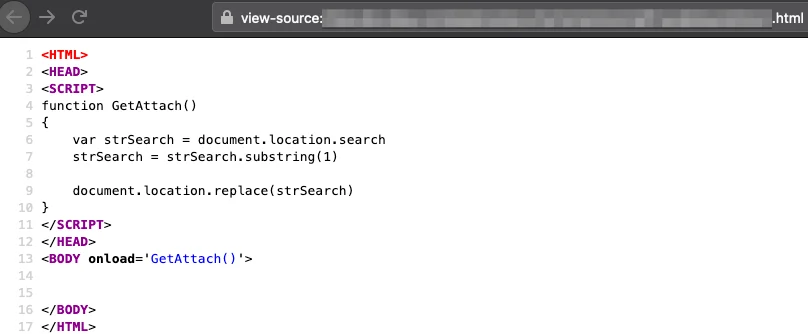
From that code, the author worked out how the JavaScript is used. Three key points stood out:
- The function
GetAttach()is executed every time the user loads the page, because of the<BODY onload='GetAttach()'>HTML tag containing theonloadevent. - The variable
strSearchis controlled by the attacker, who can inject code after a question mark(?), because of thelocation.searchproperty. In this case it works as an attacker-controlled source from the URL. - The value of
strSearchis later passed todocument.location.replace, which triggers the XSS flaw every time the page loads, sincestrSearchis controlled by the attacker from the URL and is passed todocument.location.replacein the DOM.
In short, the attacker-controlled source from the URL is strSearch, fed by the location.search property, and the sink is document.location.replace, which uses the strSearch variable and so allows JavaScript code to be injected into the DOM.
Exploitation
Step 1: Proof of concept on the first endpoint
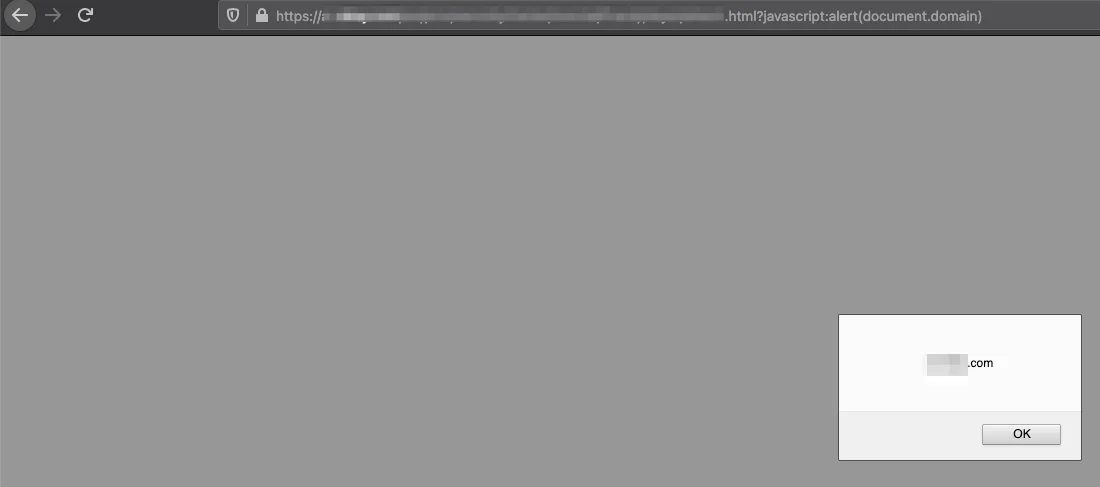
To create a proof of concept, the attacker injects the payload javascript:alert(document.domain) after the question mark (?), which triggers the DOM XSS flaw:
http://sub.domain.ca/web/source/tutorial/fraud/play/flaw.html?javascript:alert(document.domain)
The payload sits in the query string, so it becomes part of location.search and therefore of strSearch, which is passed to document.location.replace.
Step 2: Fuzz for other vulnerable paths
Once the flaw had been discovered and successfully exploited, the next step was to see which other paths were affected by the same flaw. The recommendation is to fuzz common English words gathered from the english-words repository, to find vulnerable paths that may contain the same flaw. This can be done with ffuf as follows:
ffuf -c -v -w english-words.txt -u http://sub.domain.ca/web/source/tutorial/FUZZ/play/flaw.html -mc 200
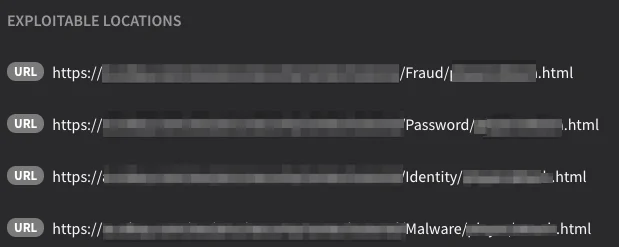
After fuzzing English words in the vulnerable URL path, the following were found:
http://sub.domain.ca/web/source/tutorial/fraud/play/flaw.htmlhttp://sub.domain.ca/web/source/tutorial/password/play/flaw.htmlhttp://sub.domain.ca/web/source/tutorial/identity/play/flaw.htmlhttp://sub.domain.ca/web/source/tutorial/malware/play/flaw.html
Step 3: Test the paths across subdomains
With the vulnerable paths gathered, the next step was to see which other subdomains were affected. This can be done with a list of alive subdomains and httpx. The following command tests which alive subdomains are affected, and it has to be repeated for every vulnerable path:
cat alive-subdomains.txt | httpx -path /tutorial/fraud/play/flaw.html -status-code -content-length -mc 200
After recognising more vulnerable paths, 3 more subdomains were found to be affected with the same 4 vulnerable endpoints, giving a total of 12 vulnerable endpoints.
Step 4: Report
With all 12 vulnerable endpoints identified, the vulnerability was reported. It was accepted and awarded a 6.1 CVSS score.
Root cause
The page takes a value from the URL through location.search into the variable strSearch, and then passes that variable to document.location.replace. Because the value is attacker-controlled and reaches a sink that supports navigation to a javascript: URI, an attacker can execute JavaScript in the DOM. The onload handler on the body, <BODY onload='GetAttach()'>, makes the flow run automatically every time the page loads, so no further user interaction with the page is needed beyond visiting the crafted URL.
The write-up does not describe any server-side or client-side defence that was present and bypassed.
Impact
An attacker who can get a victim to open a crafted URL on an affected endpoint can run JavaScript in the victim's browser in the context of the page's domain, as demonstrated with alert(document.domain). The flaw was present on 4 paths on the original subdomain and on the same 4 paths on 3 further subdomains, 12 endpoints in total. The write-up does not describe what data or actions were reachable from the executed code, nor any additional conditions beyond loading the crafted URL.
Fix
The code shown passes an attacker-controlled value from location.search directly to document.location.replace; the general remedy for this pattern is to avoid passing untrusted input to a navigation sink that accepts javascript: URIs, and to validate or encode the value before it reaches the sink.
Variants to test
- Other paths on the same host. Fuzz the path segment with a wordlist and keep 200 responses, as in the ffuf command above. A positive result is another path that returns the same blank page with the
GetAttach()/strSearch/document.location.replaceflow. - Other subdomains. Run the httpx command against a list of alive subdomains for each vulnerable path.
- Other sinks fed by
location.search. Look for pages where a value fromlocation.searchreaches a navigation or code-execution sink. A positive result is a crafted query string that executes JavaScript when the page loads. - Other sources.
Conclusion
If you are a Synack Red Teamer, the analytics section can be a good way to start understanding a target, as Ozgur explained in his article "Using Vulnerability Analytics Feature Like a Boss by Ozgur Alp". On other platforms, CrowdStream or Hacktivity can be used for publicly available programs. Feedback and future recommendations are always welcome, and the author can be reached by direct message on Twitter.
What happened, in plain words
A security researcher was looking at a bug bounty program on the Synack Red Team, a platform where companies invite researchers to test their systems and pay for problems that are found. The program had a wide scope, meaning many of the company's websites and subdomains were fair game. The researcher noticed that some pages ending in .html had already been reported as having a particular kind of bug called DOM Cross Site Scripting. Rather than stop at the one page that was already known, the researcher reproduced the bug, then searched for the same mistake on other pages and other subdomains. The bug turned out to exist on 3 more subdomains, and together those subdomains had 12 vulnerable pages. The vulnerability was accepted and awarded a CVSS score of 6.1.
This article walks through the same steps in beginner terms: what the bug is, how the researcher spotted it in a page's source code, how the proof of concept was built, how the other pages and subdomains were found, and what the result was.
The bug class: DOM Cross Site Scripting
Before anything else, three ideas need unpacking.
JavaScript is the programming language that runs inside your browser. It is what makes pages interactive: it can read what you type, change what is on screen, and send requests to servers. Because it runs on your computer with the page's permissions, it is powerful, and that power is exactly why a bug that lets an attacker run their own JavaScript is serious.
The DOM (Document Object Model) is the browser's in-memory model of the page. When the browser loads an HTML file, it builds a tree of objects representing every element, and JavaScript can read and change that tree. If an attacker can get their own text into that tree in a place where it is treated as code, the browser will run it.
Cross Site Scripting (XSS) is the family of bugs where an attacker manages to get their own JavaScript executed in someone else's browser, in the context of a legitimate website. The classic version happens on the server: the server takes something the attacker supplied and puts it into the HTML it sends back. The DOM-based version happens entirely in the browser: the page's own JavaScript takes a value from somewhere the attacker controls, such as the URL, and feeds it into a place that executes or navigates to code. No server involvement is needed for the execution itself.
Two more terms are used constantly in this kind of bug:
- A source is where attacker-controlled data enters the page. In a browser, the URL is a common source, because the attacker can send a victim a link with anything in it.
- A sink is a place where that data is used in a way that can execute code or navigate somewhere dangerous. If a source flows into a sink without being checked, you have a DOM XSS bug.
The researcher recommends two free resources for learning this properly: the PortSwigger Academy DOM XSS Labs and the DOM Goat Labs. Both let you practise on deliberately vulnerable pages.
Background behind the flaw
A few months before writing the report, the researcher was looking into a favourite program with wide scope on the Synack Red Team. Certain endpoints with an html extension had already been reported as DOM-based Cross Site Scripting. An endpoint here simply means a specific page or URL path on the website. The researcher's plan was to replicate the known bug first, then check whether the same mistake existed on several more subdomains belonging to the client. A subdomain is a prefix on a domain name: if the main site is example.com, then shop.example.com and blog.example.com are subdomains. Companies often run many of them, and a bug on one is often present on the others because they share code.
The flaw ended up being exploitable in 3 more subdomains, which together shared 12 vulnerable endpoints.
One note on disclosure: the client's name and the exact paths are not fully disclosed in the write-up because of the vulnerability disclosure policy. That policy is the agreement between the researcher and the company about what may be made public and when.
Reconnaissance: reading the page
When identifying and replicating the vulnerable endpoint, it displayed a blank HTML page with the following source code.
The researcher read that source code and worked out how the JavaScript is being used. Three key points came to mind:
- The function
GetAttach()is executed every time the user loads the web page, because of the<BODY onload='GetAttach()'>HTML tag containing theonloadevent. A function is a named block of code that does something when it is called. Theonloadattribute on the<BODY>tag is an instruction to the browser: run this code as soon as the page has finished loading. SoGetAttach()runs automatically, without the visitor clicking anything. - The variable
strSearchis controlled by the attacker, who can inject code after a question mark(?), because of thelocation.searchproperty. A variable is a named box that holds a value.location.searchis a built-in browser property that contains everything in the address bar from the?onwards, including the?. That part of a URL is called the query string, and it is entirely under the control of whoever writes the link. SostrSearchis the attacker-controlled source. - The value of
strSearchis later passed todocument.location.replace, which triggers the XSS flaw every time the page loads, sincestrSearchis controlled by the attacker from the URL and is passed todocument.location.replacein the DOM.document.location.replaceis a browser instruction that sends the page to a new address, replacing the current one in the history. If the address it is given starts withjavascript:, the browser does not navigate to a website; it runs the text after the colon as JavaScript. That makes it the sink.
In short, the attacker-controlled source from the URL is strSearch, fed by the location.search property, and the sink is document.location.replace, which uses the strSearch variable and so allows JavaScript code to be injected into the DOM.
A useful everyday comparison: imagine a receptionist who is told to read out any note left at the front desk. Normally the notes are room numbers, and the receptionist directs visitors to those rooms. But if someone leaves a note saying "set off the fire alarm", the receptionist reads it out and the alarm goes off. The note desk is the source, the receptionist reading it out is the sink, and the missing check on what a valid note looks like is the bug.
Exploitation
Step 1: Proof of concept on the first endpoint
A proof of concept (PoC) is the smallest, clearest demonstration that a bug is real. It is not an attack on real users; it is a controlled test that shows the effect, usually something harmless and visible such as a pop-up box. To create the proof of concept, the attacker injects the payload javascript:alert(document.domain) after the question mark (?), which triggers the DOM XSS flaw:
http://sub.domain.ca/web/source/tutorial/fraud/play/flaw.html?javascript:alert(document.domain)
Line by line, in plain words:
http://is the scheme, telling the browser to fetch a page over the web.sub.domain.cais the host, the placeholder for the affected subdomain./web/source/tutorial/fraud/play/flaw.htmlis the path to the page that contains the vulnerable code.?starts the query string. Everything after it is data, not part of the path.javascript:alert(document.domain)is the payload.javascript:is a pseudo-scheme that tells the browser to execute what follows instead of loading a page.alert(...)is a built-in function that opens a pop-up box with the given text.document.domainis the domain of the current page. So the payload, if executed, pops up a box showing the site's domain, which proves the code ran in the context of that site.
The payload sits in the query string, so it becomes part of location.search and therefore of strSearch. When the page loads, GetAttach() runs and passes that value to document.location.replace, which navigates to the javascript: URI and executes the code in the context of the page's domain.
Why this step matters: it confirms the whole chain end to end. Reading code tells you a bug might exist; a working PoC tells you it does. It also gives you a repeatable test you can run against other pages later.
Step 2: Fuzz for other vulnerable paths
Once the flaw had been discovered and successfully exploited, the next step was to see which other paths were affected by the same flaw. Websites often reuse the same template or code across many sections, so if one path is broken, its siblings often are too. Checking them by hand would be slow, so the researcher automated it.
The recommendation is to fuzz common English words gathered from the english-words repository, to find vulnerable paths that may contain the same flaw. Fuzzing means sending many automatically generated requests, each with a different guess in a chosen position, and looking at which guesses produce an interesting response. A wordlist is simply a text file with one guess per line; the english-words repository is a public collection of English words used as that list. This can be done with ffuf as follows:
ffuf -c -v -w english-words.txt -u http://sub.domain.ca/web/source/tutorial/FUZZ/play/flaw.html -mc 200
Line by line, in plain words:
ffufis the name of the fuzzing tool being run.-w english-words.txtnames the wordlist file. Each line of that file is tried in turn.-u http://sub.domain.ca/web/source/tutorial/FUZZ/play/flaw.htmlis the URL template. The wordFUZZis a placeholder: ffuf replaces it with each word from the list. So the first request might usefraud, the nextpassword, and so on.
The FUZZ keyword replaces the path segment between tutorial/ and /play/flaw.html, and -mc 200 keeps only responses with status code 200. After fuzzing English words in the vulnerable URL path, the following were found:
http://sub.domain.ca/web/source/tutorial/fraud/play/flaw.htmlhttp://sub.domain.ca/web/source/tutorial/password/play/flaw.htmlhttp://sub.domain.ca/web/source/tutorial/identity/play/flaw.htmlhttp://sub.domain.ca/web/source/tutorial/malware/play/flaw.html
Why this step matters: the four results share the same structure, differing only in one word. That pattern is the signature of a shared template, which is exactly the kind of thing that spreads a bug across a site. Each of these four paths is a candidate to test with the PoC from step 1.
Step 3: Test the paths across subdomains
With the vulnerable paths gathered, the next step was to see which other subdomains were affected. The same code is often deployed to many subdomains, so a bug on one is a strong hint about the others. This can be done with a list of alive subdomains and httpx. An alive subdomain is one that actually responds, as opposed to a name that no longer exists. The following command tests which alive subdomains are affected, and it has to be repeated for every vulnerable path:
cat alive-subdomains.txt | httpx -path /tutorial/fraud/play/flaw.html -status-code -content-length -mc 200
Line by line, in plain words:
cat alive-subdomains.txtprints the contents of the file, one subdomain per line.catis a standard command that reads a file and writes it out.|is a pipe. It takes the output of the command on the left and feeds it as input to the command on the right, like passing a list from one person to the next.httpxis a tool that makes HTTP requests to many hosts quickly and reports what came back.-path /tutorial/fraud/play/flaw.htmltells httpx to request that specific path on each host it is given.
Each subdomain from alive-subdomains.txt is requested with the given path, and the status code and content length are printed, keeping only 200 responses. After recognising more vulnerable paths, 3 more subdomains were found to be affected with the same 4 vulnerable endpoints, giving a total of 12 vulnerable endpoints.
Why this step matters: it turns a finding on one host into a finding across the client's estate. The instruction to repeat the command for every vulnerable path is important, because each path is a separate test; a subdomain might serve one of the four paths and not the others.
Step 4: Report
With all 12 vulnerable endpoints identified, the vulnerability was reported. It was accepted and awarded a 6.1 CVSS score. CVSS is a standard scoring system for the severity of a vulnerability, producing a number that helps a company prioritise. The write-up gives the score but not the individual measurements behind it.
Root cause
The page takes a value from the URL through location.search into the variable strSearch, and then passes that variable to document.location.replace. Because the value is attacker-controlled and reaches a sink that supports navigation to a javascript: URI, an attacker can execute JavaScript in the DOM. The onload handler on the body, <BODY onload='GetAttach()'>, makes the flow run automatically every time the page loads, so no further user interaction with the page is needed beyond visiting the crafted URL.
The write-up does not describe any server-side or client-side defence that was present and bypassed.
In everyday terms: the page trusts whatever is written after the ? in the address bar and hands it straight to an instruction that can run code. There is no check that the value is a safe address rather than a javascript: instruction.
Impact
An attacker who can get a victim to open a crafted URL on an affected endpoint can run JavaScript in the victim's browser in the context of the page's domain, as demonstrated with alert(document.domain). Running code in the page's context means the code can do anything the site's own JavaScript could do in that browser tab. The flaw was present on 4 paths on the original subdomain and on the same 4 paths on 3 further subdomains, 12 endpoints in total. The write-up does not describe what data or actions were reachable from the executed code, nor any additional conditions beyond loading the crafted URL.
Fix
The code shown passes an attacker-controlled value from location.search directly to document.location.replace; the general remedy for this pattern is to avoid passing untrusted input to a navigation sink that accepts javascript: URIs, and to validate or encode the value before it reaches the sink. Validating means checking that a value has the expected shape, for example that it is a relative path or an https address. Encoding means transforming special characters so they are treated as plain text rather than as instructions.
Variants to test
If you want to look for the same pattern yourself, these are the directions the write-up points to. Each one is a way of asking the same question in a different place.
- Other paths on the same host. Fuzz the path segment with a wordlist and keep 200 responses, as in the ffuf command above. A positive result is another path that returns the same blank page with the
GetAttach()/strSearch/document.location.replaceflow. - Other subdomains. Run the httpx command against a list of alive subdomains for each vulnerable path.
- Other sinks fed by
location.search. Look for pages where a value fromlocation.searchreaches a navigation or code-execution sink. A positive result is a crafted query string that executes JavaScript when the page loads. - Other sources. The fragment is the part of a URL after a
#, which is normally used to jump to a section of a page but is also readable by JavaScript.
Conclusion
If you are a Synack Red Teamer, the analytics section can be a good way to start understanding a target, as Ozgur explained in his article "Using Vulnerability Analytics Feature Like a Boss by Ozgur Alp". On other platforms, CrowdStream or Hacktivity can be used for publicly available programs. Feedback and future recommendations are always welcome, and the author can be reached by direct message on Twitter.
Glossary
- Bug bounty program: an arrangement where a company invites researchers to test its systems and pays for valid security findings.
- Synack Red Team: the researcher platform named in the write-up, on which the program was hosted.
- Scope: the set of systems a program allows you to test.
- Subdomain: a prefix on a domain name, such as
shop.example.comunderexample.com. - Endpoint: a specific page or URL path on a website.
- JavaScript: the programming language that runs in the browser and makes pages interactive.
- DOM (Document Object Model): the browser's in-memory tree representation of the page, which JavaScript can read and change.
- XSS (Cross Site Scripting): a bug class where an attacker gets their own JavaScript to run in someone else's browser in the context of a legitimate site.
- DOM XSS: XSS where the page's own JavaScript takes attacker-controlled data and feeds it to a dangerous sink, entirely in the browser.
- Source: where attacker-controlled data enters the page, such as the URL.
- Sink: a place where data is used in a way that can execute code or navigate somewhere dangerous.
- Query string: the part of a URL after the
?, containing data rather than a path. - Fragment: the part of a URL after a
#. - Variable: a named box in code that holds a value.
- Function: a named block of code that runs when called.
location.search: a browser property holding everything in the address bar from the?onwards.document.location.replace: a browser instruction that navigates the page to a new address, replacing the current entry in history.javascript:URI: a pseudo-address that tells the browser to execute the text after the colon as JavaScript instead of loading a page.alert(): a built-in JavaScript function that opens a pop-up box with the given text.document.domain: a browser property holding the domain of the current page.- Proof of concept (PoC): the smallest, clearest demonstration that a bug is real, usually harmless and visible.
- Fuzzing: sending many automated requests with different guesses in a chosen position and looking at the responses.
- Wordlist: a text file with one guess per line, used as input to a fuzzing tool.
- ffuf: a command-line fuzzing tool;
FUZZin its URL marks where each word is inserted. - httpx: a command-line tool that makes HTTP requests to many hosts quickly and reports the results.
- HTTP status code: the three-digit number a server returns to say how a request went;
200means OK. - Content length: the size of the response body, useful for spotting identical pages on different hosts.
- Pipe (
|): a shell operator that feeds the output of one command into another. - Alive subdomain: a subdomain that actually responds to requests.
- CVSS: a standard scoring system for the severity of a vulnerability.
- Validating: checking that a value has the expected shape before using it.
- Encoding: transforming special characters so they are treated as plain text rather than instructions.
- Vulnerability disclosure policy: the agreement between researcher and company about what may be made public and when.




