Blink XT2 Camera System Command Injection Flaws
The Blink XT2 sync module has an exposed debug port with hardcoded credentials and multiple command injection flaws in update and network configuration scripts. An attacker with physical access or network position could execute commands as root, potentially compromising the user's account and cameras.

medium.com
Published on medium.com
Blink home security camera systems, owned and operated by Amazon, contain a number of security flaws that could allow attackers or other actors to compromise the devices.
The full write-up lives on its author's site
It belongs to its author, so we link to it rather than copy it. The other two tabs are our own rewrites, checked against it.
Context
Blink home security camera systems, owned and operated by Amazon, contain a number of security flaws that could allow attackers or other actors to compromise the devices. Blink's camera solutions are marketed as budget-friendly and long-lasting, aimed at everyday consumers and small businesses. Tenable Research disclosed a number of findings regarding the Blink XT2 home security camera systems in a security advisory.

In short, the research found three-ish vectors of attack that allow a full compromise of the sync module, which could potentially allow attackers to take further action against an end user's entire account and associated cameras. The flaws sit in its debug interface, in the scripts it uses to fetch updates and report network information, and in the handling of wireless network configuration parameters.
Setup
The work required physical access to a sync module for the first vector, and access to the wireless network configuration parameters at the time of device setup for the last one. The get_network() function was verified by manually triggering it on the device. The report does not list specific tooling beyond a serial connection to the debug port and the mobile app's settings prompt.
Finding it
Compromising the devices via physical access is trivial. It is common for vendors and manufacturers to leave debug ports and other such connectors enabled for production runs of the devices. While intended for developers, there is nothing preventing someone else from connecting to these interfaces.
Generally speaking, this is not the biggest deal in the world: it is useful for researchers, homebrewers, and other people that like to modify their devices or poke around a bit. In Blink's case, however, the ease of connecting to the sync module's debug port stands out. For many devices, to access these ports you would need to disassemble the whole device, solder wires to some internals, and then make all your connections. For Blink, connecting is as simple as popping off the front cover and attaching to the already provided header pins.
Beyond the physical interface, the researchers found command injections on the sync module via the cloud communication endpoints for providing updates or obtaining network information, and further command injections via the wireless network configuration parameters. In each case the flaw is a failure to sanitise user-supplied input in internal management scripts.
Exploitation
Step 1: Serial console on the debug port
Pop off the front cover and attach to the header pins that are already provided on the board. From there, connecting is as simple as supplying some hardcoded credentials, which happen to be "root" and "willoXXX" where XXX is the last 3 digits of the device's serial number, easily found in large text on the device itself.
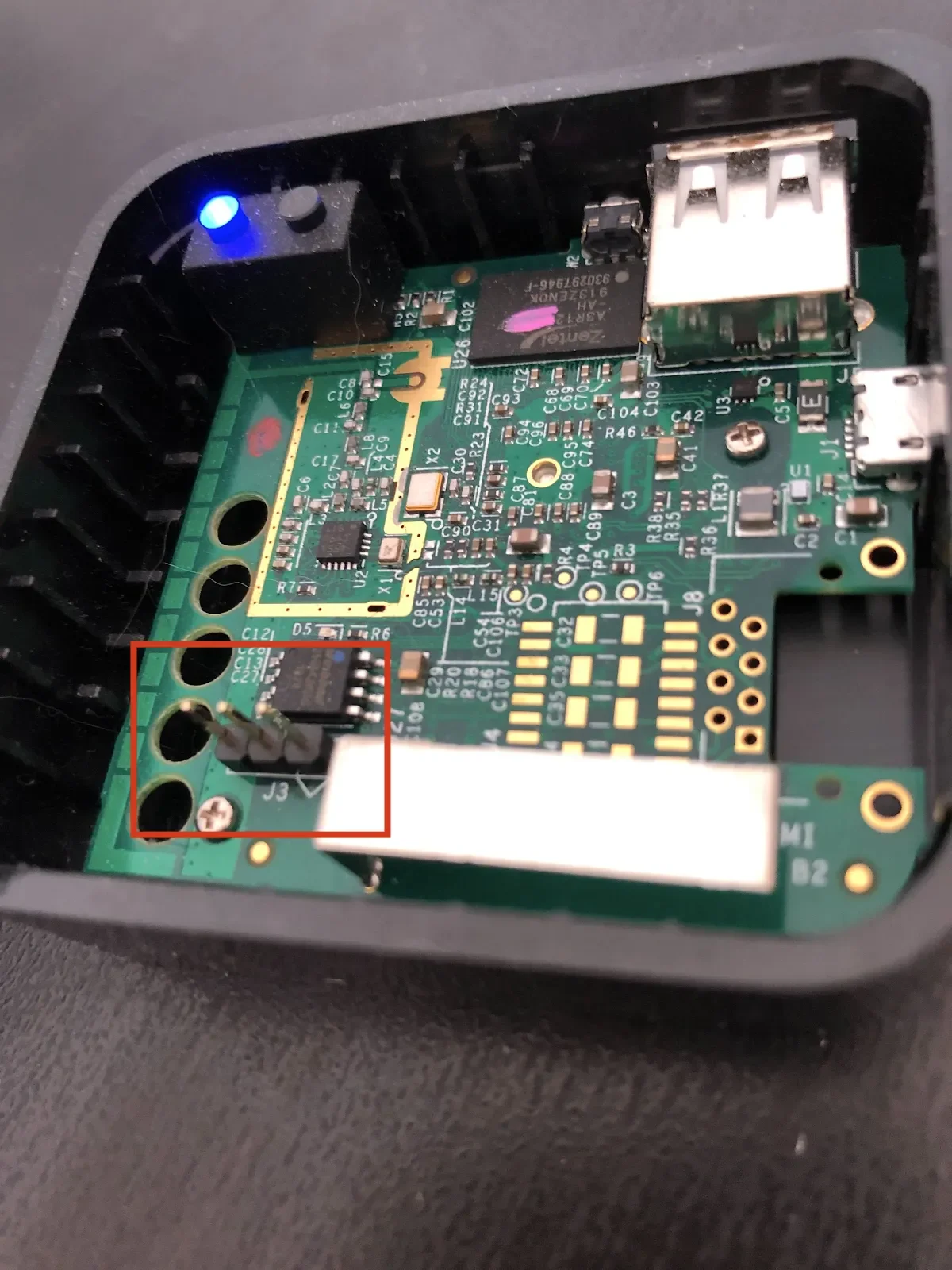
See header pins in the bottom left
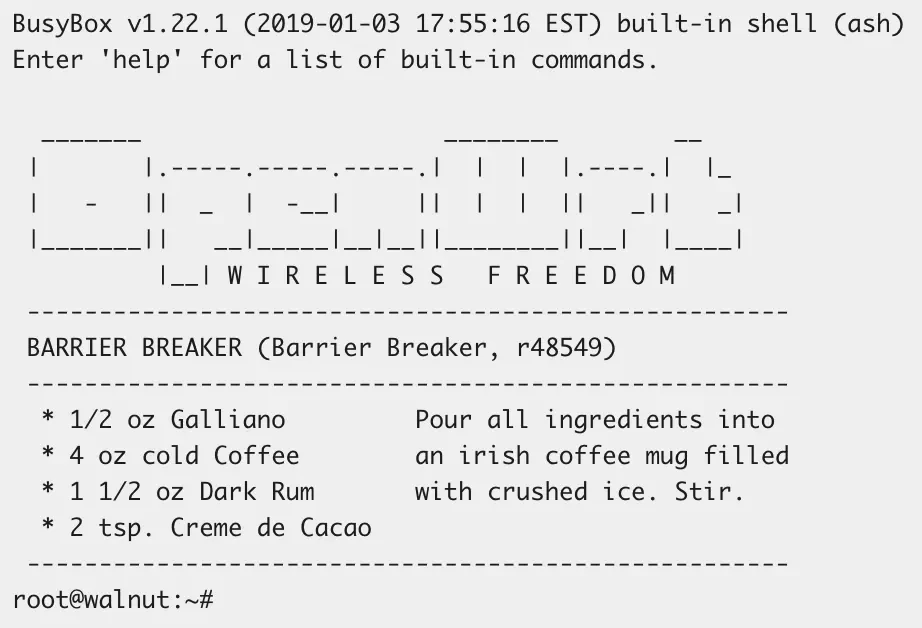
Shell available via serial connection
The credentials are derived from data printed on the outside of the device, so anyone holding the unit can log in without any prior secret.
Step 2: Command injection through the update helper script
When checking for updates, the device first obtains an update helper script (sm_update) from the web, and then immediately runs the content of this script with zero sanitation.
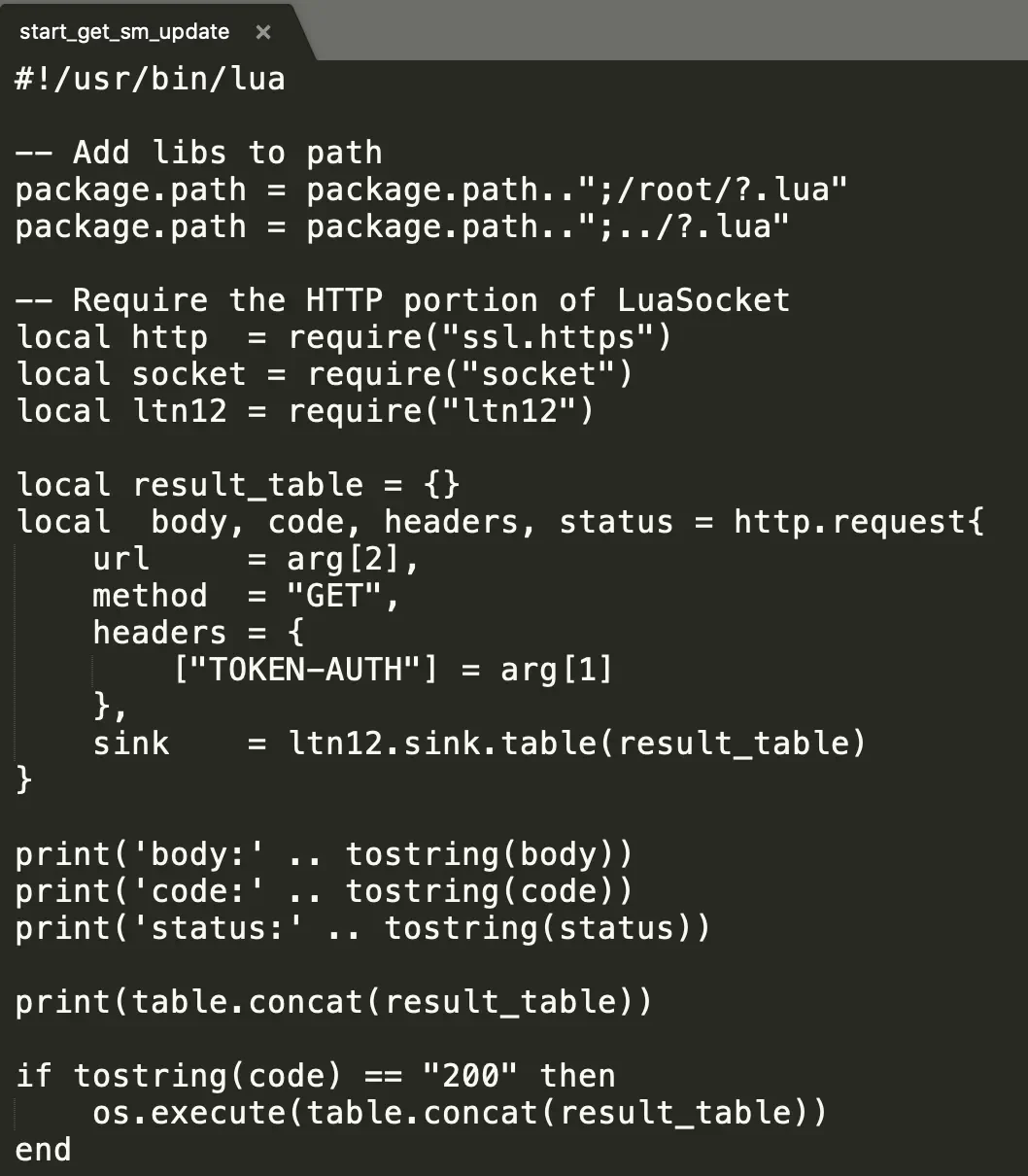
Retrieval of helper script and immediate execution
If an attacker is able to MitM this request, either directly or indirectly through some sort of DNS poisoning or hijacking, they can modify the contents of this response to suit their own needs or desires. Because the fetched script is executed as-is, the attacker controls what runs on the sync module.
Step 3: Command injection in get_network()
Similarly, a function called "get_network()" exists in other helper scripts on the device. While this function does not appear to be used during the course of normal operation, if it ever is, another command injection point exists due to failed sanitation. The researchers manually triggered this function in order to verify this flawed functionality. Below is the full context of this function as it exists on the device.
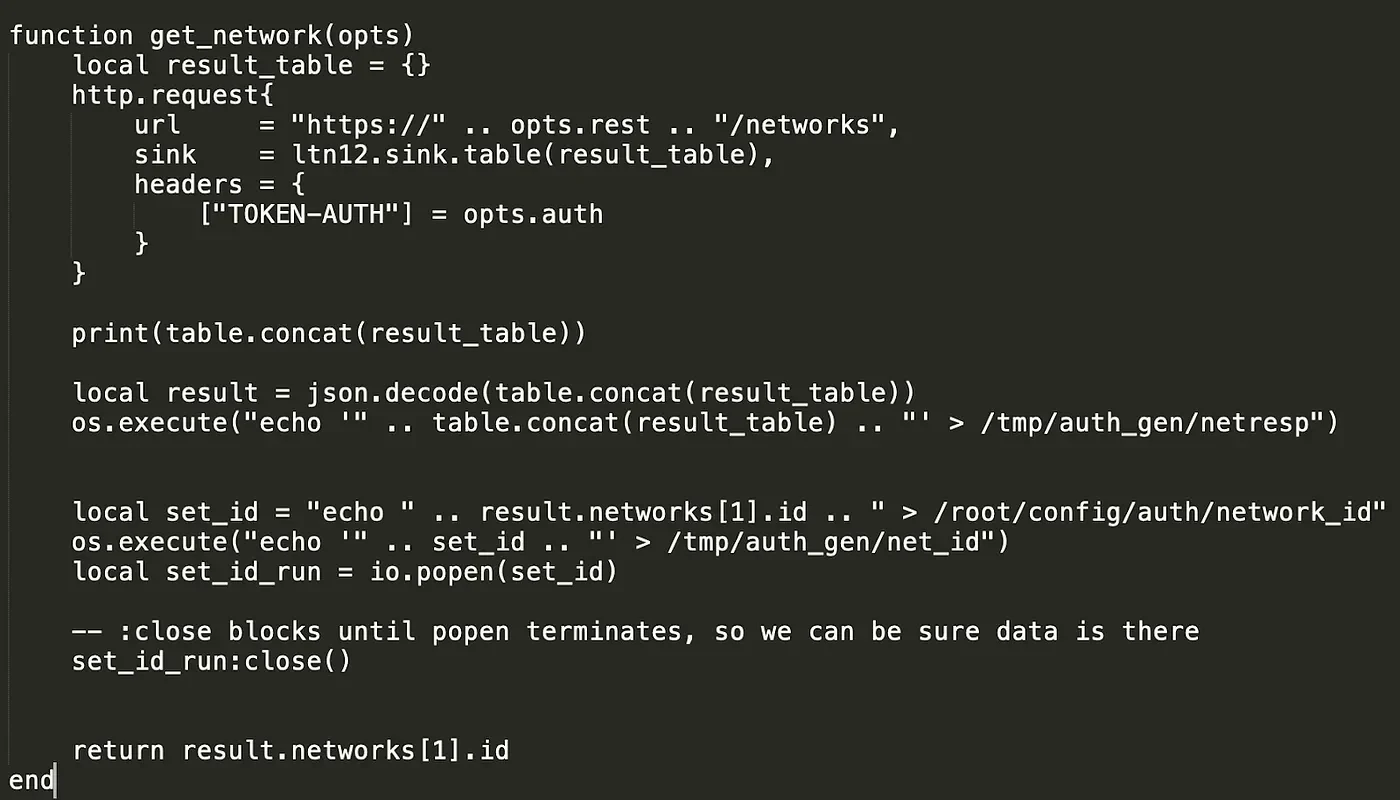
Vulnerable "get_network()" function
Step 4: Command injection through Wi-Fi configuration parameters
Additional command injections exist via the wireless network configuration parameters. As above, the flaws here are simply due to a failure to sanitise user-supplied input in some of the internal management scripts.
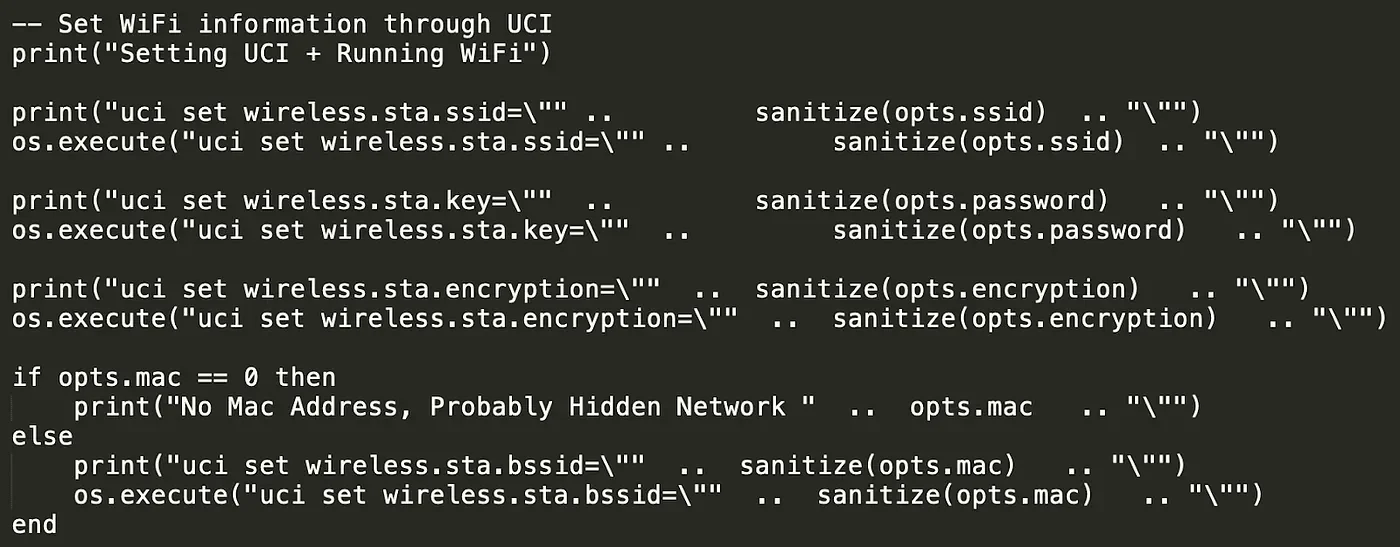
Sample entry-points for command injection via wifi parameters
These parameters are all passed and executed without sufficient sanitisation, which allows command injection as the root user. The "sanitise()" function seen in use above is easily bypassed. For example, entering the following from the settings prompt in the mobile app is enough to start an SSH server on the sync module:
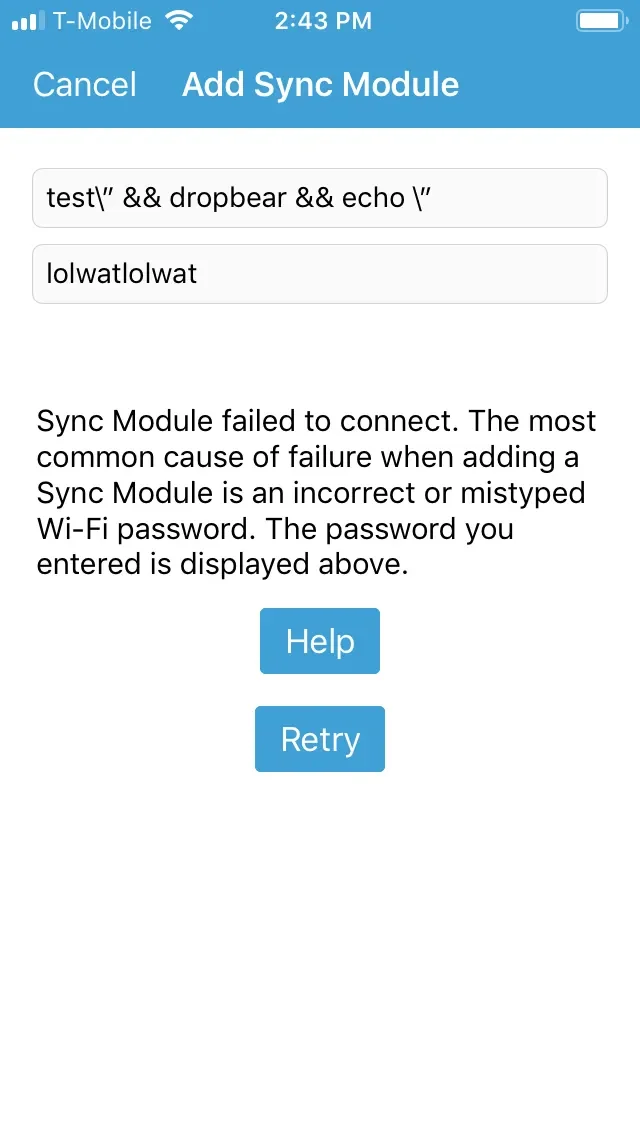
The report does not reproduce the exact string entered in the settings prompt.
Root cause
The common thread is a failure to sanitise input before it reaches a shell. The update path fetches a helper script (sm_update) from the web and immediately runs its content with zero sanitation, so the integrity of that response is the only thing standing between a network attacker and code execution. The get_network() helper and the internal management scripts that handle wireless network configuration parameters pass user-supplied values into execution without sufficient sanitisation, and the sanitise() function used in those scripts is easily bypassed. The Wi-Fi parameters are executed without sufficient sanitisation, which allows command injection as the root user.
The debug port exposes a shell protected only by hardcoded credentials derived from the serial number printed on the device, so physical access is enough to log in.
Impact
The three-ish vectors allow a full compromise of the sync module, which could potentially allow attackers to take further action against an end user's entire account and associated cameras.
The physical flaw is not a major concern for everyday consumers: an attacker needs to be able to directly interact with the device for at least a few minutes. The most obvious attack scenario is some sort of insider threat, such as babysitters, house or petsitters, Airbnb guests, or anyone else with somewhat privileged access to your home.
The Wi-Fi configuration parameter flaws are unlikely to be abused by a malicious actor because they would require access to these parameters at the time of device setup. These flaws, along with the unprotected UART interface, are more likely to be abused by researchers or tinkerers rather than someone with wholly malicious intent.
The other findings do have a significant impact. While remote exploitation of the command injection via network endpoint flaws is theoretically possible, it is highly unlikely due to many external factors. These attacks are most likely to happen directly from a user's home network.
Fix
The report does not describe a vendor fix or a patch. It notes that, due to the way the Blink cameras and sync modules connect to and communicate with the Blink cloud infrastructure, updates are generally automatic and strictly enforced, and that consumers should make sure their devices are always updated to the latest versions. Detecting already compromised devices is tricky since it is possible to bypass or fool these update checks; other than manually inspecting the devices for rogue functionality or verifying firmware integrity, there is not much the typical consumer can do on their own to check if they are already compromised.
Variants to test
- Fetch-and-execute update paths: look for a device that downloads a helper script and runs it without validation. A positive result is a response you can alter (for example via a proxy or DNS poisoning) that changes what executes on the device.
- Dormant helper functions: enumerate helper scripts for functions such as get_network() that are not called during normal operation but pass input to a shell. A positive result is command execution when the function is triggered manually.
- Custom sanitisers: identify scripts that call a sanitise() function before execution and try inputs that the function does not account for. A positive result is a command running as root, for example starting an SSH server from the mobile app's settings prompt.
- Debug interfaces in production: check whether header pins or UART are present and enabled on shipping units, and whether console access uses hardcoded or device-derived credentials. A positive result is a shell obtained after opening the case.
Looking forward
Throughout the research process, Tenable's Zero Day team dug into the Blink API to enumerate useful endpoints and commands that can be utilized to control cameras, view stored pictures and videos, add rogue devices to a user's account, disable or remove devices, and obtain potentially sensitive information. Additionally, they developed methods to intercept and manipulate commands used in radio communications to and from the cameras and sync modules. They said they will be releasing this information as well as a more detailed write-up of the findings sometime in the future.
What happened, in plain words
Blink makes home security cameras. Blink is owned by Amazon. A group of security researchers at Tenable looked closely at one of Blink's products, the Blink XT2 camera system, and found several weaknesses. If someone used these weaknesses, they could take control of a small box called the sync module. The sync module is the part of the system the researchers compromised. If an attacker controls the sync module, they may be able to do things to the owner's whole Blink account and to all the cameras linked to it.
Blink's cameras are marketed as budget-friendly and long-lasting, aimed at everyday consumers and small businesses.
The researchers describe "three-ish" ways in. "Three-ish" is their own wording: there are three main groups of problems, and some of them contain more than one spot where things go wrong. The three groups are:
- A physical connection point on the sync module that lets someone log in with a password that is easy to work out.
- A part of the sync module's software that downloads a small script (a list of instructions for the device to carry out) from the internet and runs it without checking it first. A script is simply a text file of commands, like a recipe the device follows step by step.
- Other places where information the user types in, such as Wi-Fi settings, is passed to the device's internal commands without being cleaned up first.
Before going further, two ideas need explaining, because they come back throughout this article.
What is a command injection? A device like the sync module runs small programs, and those programs sometimes run other commands on the device's operating system (the software that manages the hardware). If a program takes text from a user or from the network and passes it to the operating system without checking it, an attacker can put extra commands inside that text. The device then runs the attacker's commands as if they were its own. Think of a form at a hotel reception: you write your name, and the receptionist reads it out to the kitchen. If you write "John, and also send a free dinner to room 12", a careless receptionist might read the whole line out and the kitchen would send the dinner. Cleaning up input ("sanitising" it) means removing anything that looks like an extra instruction before it is used.
What is a shell? A shell is a program that accepts typed commands and runs them. When you see a "shell available" message, it means someone has a prompt where they can type commands and the device will execute them. Getting a shell on a device is usually the goal of an attacker, because from there they can do almost anything the device is allowed to do.
Setup
To test the first problem, the researchers needed to physically hold a sync module. To test the last one, they needed access to the wireless network settings at the moment the device is set up. To confirm the get_network() flaw, they triggered the affected function on the device by hand.
The report does not list specific tools beyond a serial connection to the debug port and the settings screen in the mobile app. A serial connection is a simple cable link between a computer and a device, used to send text back and forth; it is the same kind of connection old computers used for mice and modems.
Finding it
Getting into the device by physical access is described as trivial. It is common for manufacturers to leave debug ports and similar connectors switched on in the devices they sell, even though those ports were meant for developers during testing. Nothing stops someone else from plugging into them.
Usually this is not a big deal. Debug ports are useful to researchers, hobbyists and anyone who likes to modify their own devices. In Blink's case, though, the ease of connecting stands out. On many devices you would have to take the whole thing apart, solder wires to components inside, and then make your connections. On the Blink sync module, you pop off the front cover and attach to header pins that are already there. Header pins are the small metal pins sticking up from a circuit board, the kind you can push a connector onto.
Beyond the physical connector, the researchers found command injections on the sync module through the cloud communication endpoints used for delivering updates or reporting network information. An endpoint is a specific address on a server that a device or app sends a request to, like a particular counter at a bank: the building is the server, the counter is the endpoint. They also found further command injections through the wireless network configuration parameters. A parameter is one named piece of information in a request, for example the name of a Wi-Fi network. In every case the underlying flaw is the same: input supplied by a user or by the network is not sanitised before the device's internal management scripts use it.
Exploitation
Step 1: Serial console on the debug port
The first step is physical. Pop off the front cover and attach to the header pins already provided on the board. From there, logging in is as simple as supplying some hardcoded credentials: the username is "root" and the password is "willoXXX", where XXX stands for the last three digits of the device's serial number. That serial number is printed in large text on the device itself, so anyone holding the unit can read it and work out the password.
See header pins in the bottom left
The image above shows the inside of the sync module with the header pins visible in the bottom left corner. These are the pins the researchers connected their serial cable to.
Shell available via serial connection
The second image shows the result: a shell prompt on the device, reached over the serial connection. In plain terms, the researchers now had a text prompt where they could type commands and the sync module would run them.
Why does this matter? "Hardcoded credentials" means a username and password written into the device's software by the manufacturer and never changed. Here the password is not even a fixed secret: it is built from the serial number, which is printed on the outside of the product. Anyone who can hold the device for a few minutes can read the serial number, guess the password, and log in. No prior secret knowledge is needed.
Step 2: Command injection through the update helper script
When the sync module checks for updates, it first fetches a small helper script called sm_update from the web, and then immediately runs the content of that script with zero sanitation. In other words, it does not check where the script came from, whether it was tampered with, or what it contains. It simply runs it.
Retrieval of helper script and immediate execution
The image above shows the device fetching the helper script and running it straight away.
If an attacker can get in the middle of that request, they can change the contents of the response to whatever they like. Getting in the middle is called a MitM, short for man-in-the-middle: the attacker sits between the device and the server, like a postal worker who opens your letters, rewrites them, and passes them on. The report mentions two ways this could happen: directly, or indirectly through DNS poisoning or hijacking. DNS is the internet's address book: it turns a name like a website into the numeric address of the server. DNS poisoning means tampering with that address book so the device is sent to the attacker's server instead of the real one.
Because the fetched script is executed exactly as received, the attacker decides what runs on the sync module. This finding does not require opening the device at all: it only requires interfering with a network request.
Step 3: Command injection in get_network()
There is also a function called get_network() in other helper scripts on the device. A function is a named block of instructions inside a program; when the program calls the function by name, that block runs. This particular function does not appear to be used during normal operation. But if it ever is used, it is another command injection point, again because input is not sanitised. The researchers triggered the function by hand to confirm the flaw was real. The image below shows the full context of the function as it exists on the device.
Vulnerable "get_network()" function
The image shows the function's code on the device. The point to take away is that the function passes values into commands without cleaning them first, so anything that reaches it could carry extra commands along.
Why does a function that is not normally used still matter? Because software changes. A future update might start calling it, or another part of the system might reach it in a way the manufacturer did not expect. A flaw that is dormant today can become live tomorrow, so it is worth reporting.
Step 4: Command injection through Wi-Fi configuration parameters
There are additional command injections through the wireless network configuration parameters. As with the earlier findings, the problem is a failure to sanitise input supplied by the user in some of the internal management scripts.
Sample entry-points for command injection via wifi parameters
The image above lists sample places where values from the Wi-Fi settings flow into commands. These parameters are all passed along and executed without sufficient sanitisation, which allows command injection as the root user. "Root" is the name of the all-powerful account on a Linux-style system: the account that can do anything. So an injection here does not just run a command; it runs it with the highest possible privileges.
The sanitize() function that the scripts use to clean input is easily bypassed. A sanitiser is meant to strip out dangerous characters before the text is used, like a security guard checking bags at a door. If the guard only checks one pocket, it is easy to walk through with something in the other. The researchers showed that entering a particular string in the settings prompt of the mobile app was enough to start an SSH server on the sync module. SSH is a standard way to log in to a device remotely over a network, with an encrypted connection; starting an SSH server on the device means opening a remote login door that was not there before.
The report does not reproduce the exact string that was entered in the settings prompt.
Root cause
The common thread across all the findings is a failure to sanitise input before it reaches a shell. The update path fetches the helper script sm_update from the web and runs its content with zero sanitation, so the only thing standing between a network attacker and code execution is the integrity of that response. The get_network() helper and the internal management scripts that handle wireless network configuration parameters pass user-supplied values into execution without sufficient sanitisation, and the sanitize() function used in those scripts is easily bypassed. The Wi-Fi parameters are executed without sufficient sanitisation, which allows command injection as the root user.
The debug port exposes a shell and is protected only by hardcoded credentials derived from the serial number printed on the device. Physical access is therefore enough to log in.
Impact
The three-ish vectors allow a full compromise of the sync module, which could potentially let attackers take further action against an end user's entire account and all the cameras linked to it.
The physical flaw is not a major concern for everyday consumers, because an attacker needs to be able to interact directly with the device for at least a few minutes. The most obvious scenario is an insider threat: babysitters, house or pet sitters, Airbnb guests, or anyone else with somewhat privileged access to your home. In other words, the person has to be inside your house with the device in their hands.
The Wi-Fi configuration parameter flaws are unlikely to be abused by a malicious actor, because they require access to those parameters at the time the device is set up. These flaws, along with the unprotected UART interface, are more likely to be used by researchers or tinkerers than by someone with wholly malicious intent. UART is the technical name for the kind of serial connection described in step 1: a simple two-way text link between chips.
The other findings do have a significant impact. Remote exploitation of the command injection through the network endpoints is theoretically possible, but highly unlikely because of many external factors. These attacks are most likely to happen directly from a user's home network.
Fix
The report does not describe a vendor fix or a patch. It notes that, because of the way the Blink cameras and sync modules connect to and communicate with the Blink cloud, updates are generally automatic and strictly enforced, and that consumers should make sure their devices are always updated to the latest versions. Detecting an already compromised device is tricky, since it is possible to bypass or fool these update checks. Other than manually inspecting the devices for rogue functionality or verifying firmware integrity, there is not much the typical consumer can do on their own to check whether they are already compromised. Firmware is the software built into a device, as opposed to software you install on a computer.
Variants to test
For anyone testing similar devices, the researchers' findings suggest four things to look for:
- Fetch-and-execute update paths. Look for a device that downloads a helper script and runs it without validation. A positive result is a response you can alter, for example through a proxy or DNS poisoning, that changes what executes on the device. A proxy is a program that sits between two parties and can inspect or change the traffic passing through it.
- Dormant helper functions. Go through helper scripts for functions such as
get_network()that are not called during normal operation but still pass input to a shell. A positive result is command execution when the function is triggered manually. - Custom sanitisers. Find scripts that call a
sanitize()function before execution and try inputs the function does not account for. A positive result is a command running as root, for example starting an SSH server from the mobile app's settings prompt. - Debug interfaces in production. Check whether header pins or UART are present and enabled on units sold to customers, and whether console access uses hardcoded or device-derived credentials. A positive result is a shell obtained after opening the case.
Looking forward
During the research, Tenable's Zero Day team dug into the Blink API to list useful endpoints and commands that can be used to control cameras, view stored pictures and videos, add rogue devices to a user's account, disable or remove devices, and obtain potentially sensitive information. An API is the set of addresses and rules a program uses to talk to another program; here it is how the Blink app and the Blink cloud talk to each other. The team also developed methods to intercept and manipulate the commands used in radio communications to and from the cameras and sync modules. They said they will be releasing this information as well as a more detailed write-up of the findings sometime in the future.
Glossary
- API: the set of addresses and rules one program uses to talk to another, for example how the Blink app talks to the Blink cloud.
- Cloud: computers on the internet run by the manufacturer that devices connect to for storage, updates and remote control.
- Command injection: a flaw where text supplied by a user or the network is passed to the operating system as commands, so an attacker can slip extra commands in.
- Credentials: a username and password (or similar) used to prove who you are when logging in.
- Debug port: a connector on a device left in place for developers to test it, which can also be used by anyone else who can reach it.
- DNS: the internet's address book, turning names into numeric server addresses.
- DNS poisoning: tampering with DNS answers so a device is sent to the wrong server.
- Endpoint: a specific address on a server that a device or app sends a request to.
- Firmware: the software built into a device, as opposed to software installed on a computer.
- Function: a named block of instructions inside a program that runs when called by name.
- Hardcoded credentials: a username and password written into the device's software by the manufacturer and never changed.
- Header pins: small metal pins on a circuit board that a connector can be pushed onto.
- MitM (man-in-the-middle): an attacker positioned between two parties who can read and change the traffic passing between them.
- Parameter: one named piece of information in a request, such as the name of a Wi-Fi network.
- Privileges: the permissions an account has; root privileges are the highest.
- Proxy: a program that sits between two parties and can inspect or change the traffic passing through it.
- Root: the all-powerful account on a Linux-style system, able to do anything.
- Sanitise: to clean input by removing or escaping anything that could be treated as an instruction.
- Script: a text file of commands that a device or computer follows step by step.
- Serial connection: a simple cable link that sends text back and forth between a computer and a device.
- Shell: a program that accepts typed commands and runs them.
- SSH: a standard, encrypted way to log in to a device remotely over a network.
- Sync module: the hub that Blink cameras talk to and that communicates with the Blink cloud.
- UART: the technical name for the simple two-way text link between chips, the kind of connection used by the debug port.



