Blog Post: Bypassing an Admin Panel with SQL Injection
A login page was vulnerable to SQL injection in the 'id' parameter, allowing an attacker to bypass authentication and access the admin panel. The same injection also allowed retrieval of all database names using sqlmap.

r3aper | https://hackerone.com/r3aper?type=user
The full write-up lives on its author's site
It belongs to its author, so we link to it rather than copy it. The other two tabs are our own rewrites, checked against it.
Context
This is a write-up of a SQL injection found in a web application's admin login. The entry point was an XML endpoint that presents a login prompt and submits credentials as GET parameters. The researcher demonstrated two outcomes from the same weakness: bypassing the login and reaching the admin panel, and dumping the database contents with sqlmap.
The report does not name the affected organisation or product; the host is shown as redacted.com throughout. The vulnerable page is reached at https://redacted.com/redacted/redacted_admin.xml, and the login form sends the username, password and a uniqueId value in the query string.
Setup
The researcher describes this as a self-taught journey, starting from PortSwigger labs and YouTube content, with no formal IT training. No specific accounts, roles or application versions are given. The tools used were a browser, the page's own JavaScript (read to understand how the login request is built), and sqlmap run against a saved raw request. The sqlmap invocation routes traffic through a local proxy at http://[redacted]:8080.
Finding it
On visiting the admin XML page, the researcher was shown a login prompt. Submitting credentials produced a GET request with the credentials in the URL:
GET /redacted/redacted_admin.xml?id=admin&pswd=admin&uniqueId=0.5331820440279285 HTTP/1.1 2
The request carries id, pswd and a uniqueId decimal value; the report does not explain what each parameter holds. The obvious admin:admin combination did not work. Reading the JavaScript on the page did not provide a way in, so the researcher moved to testing SQL injection against the login parameters.
Exploitation
Step 1: Bypass the login with an injected id
After trying a range of payloads, the one that worked targeted the id parameter:
-6513%27%20OR%20%28SELECT%20INSTR2%28NULL%2CNULL%29%20FROM%20DUAL%29%20IS%20NULL--%20SpSw
URL-decoded, this is a negative numeric value followed by a single quote, an OR condition built around INSTR2(NULL,NULL) selected FROM DUAL, an IS NULL comparison, and a comment (-- ) terminated with the string SpSw. The FROM DUAL construct and INSTR2 are Oracle-specific, which points to the backend database. The payload closes the value, adds an `OR ...
The full request was:
Visiting that URL returned the admin panel:
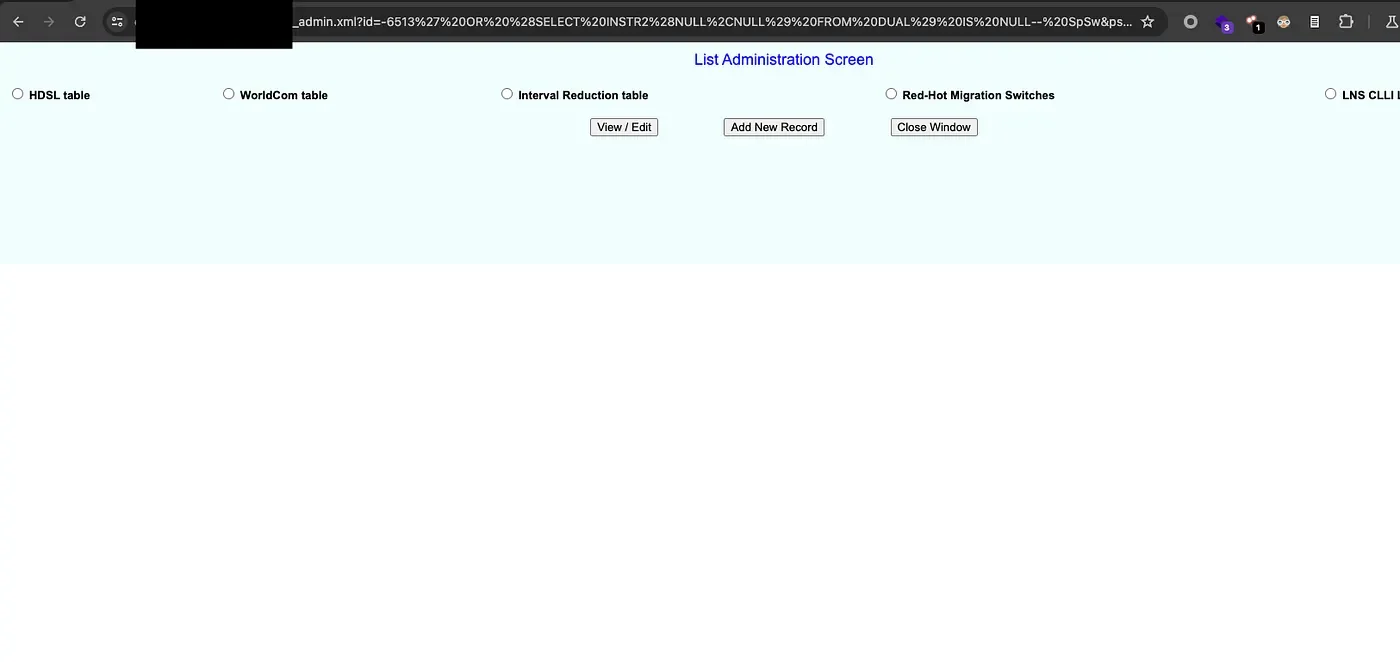
The screenshot follows the injected request that gave access to the admin panel.
Step 2: Dump the databases with sqlmap
The researcher also ran sqlmap against the raw request captured in Step 1 to enumerate the databases:
sqlmap -r request.txt --random-agent --dbs --proxy=http://[redacted]:8080 --force-ssl --batch --risk 3 --level 3
The tool returned the databases as expected:
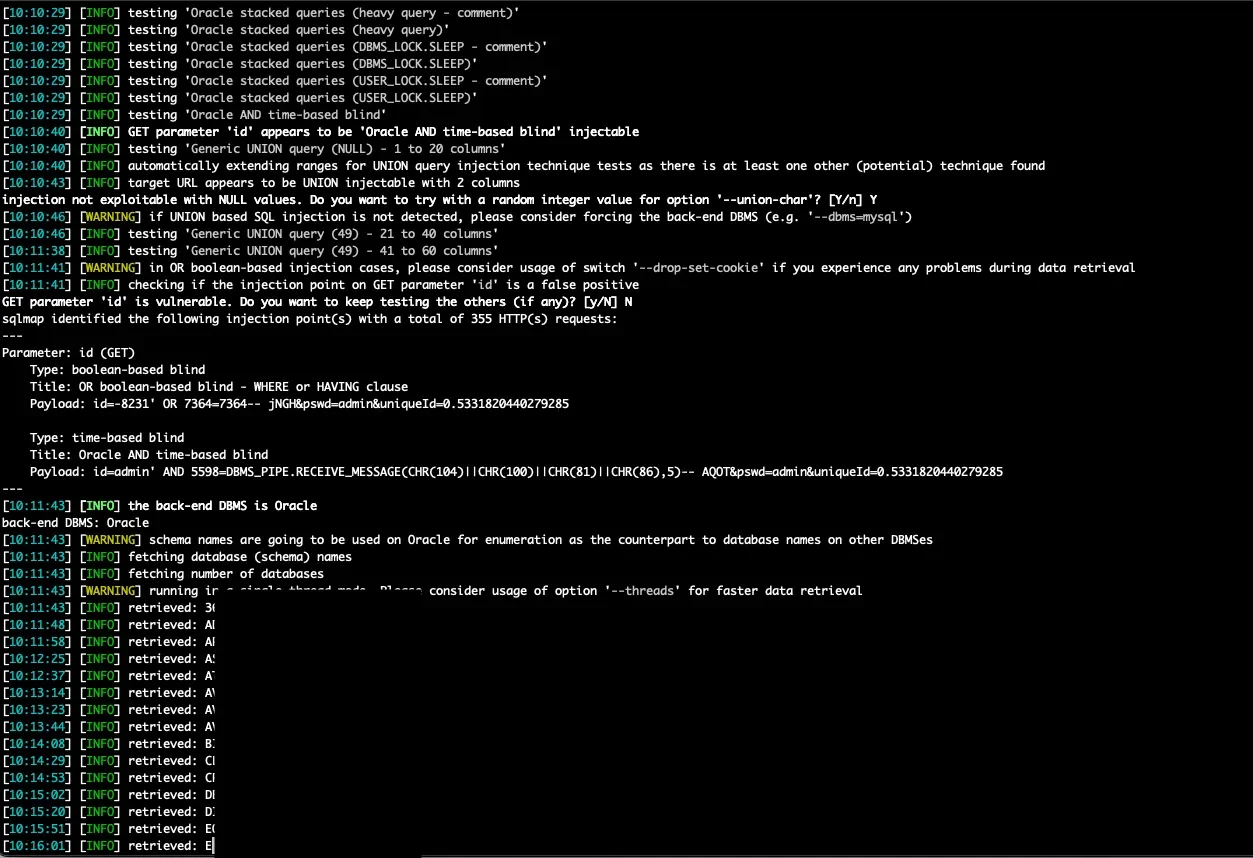
The screenshot follows the sqlmap run that returned the databases.
Root cause
The report does not include the server-side code, so the exact mistake is not shown. What the behaviour implies is that the value of id is concatenated into an SQL query used for the login check without proper parameterisation or validation, so injected syntax changes the logic of that query. The payload contains an OR ... The payload uses INSTR2andFROM DUAL`, which are Oracle-specific constructs. Why the application's existing input handling did not stop the payload is not described.
Impact
Under the conditions shown, an unauthenticated attacker who can reach the login endpoint can bypass authentication and access the admin panel. The same injection point also allowed sqlmap to enumerate all databases. The report frames the impact generally: SQL injection lets attackers bypass security measures and access sensitive information. It does not enumerate which data was exposed beyond the database names, nor which administrative actions the panel allowed.
Fix
Its recommendation is the standard one: developers should validate and sanitise user input to prevent SQL injection. In practice that means building the login query with parameterised statements or prepared statements so that user-supplied values cannot alter the query structure, rather than concatenating them into SQL.
Variants to test
- Login forms that submit credentials in the query string. Look for GET-based logins where the username lands in a parameter such as
id. A positive result is a response that differs from the failed-login response, for example the protected page being returned. - Oracle-flavoured boolean payloads. Where other payloads fail, try expressions using
FROM DUALand functions such asINSTR2, wrapped in anOR ... IS NULLcondition and closed with a comment. A positive result is a successful login or a response that changes consistently with a true condition. - Comment-terminated injections. Append a comment (
--followed by a marker string) after the injected value to see whether the remainder of the original query is discarded. A positive result is the same behaviour as the uncommented payload, or a cleaner true/false difference. - Replaying the captured request with
sqlmap. Save the raw login request and runsqlmap -r request.txt --dbs(with proxy and TLS options as needed). A positive result is the tool identifying the injection and listing database names. - Cache-buster parameters. Parameters like
uniqueIdthat carry random decimals are worth keeping in the request when replaying, in case the application ties the session or request to them.
What happened, in plain words
A security researcher found a login page on a website that was supposed to be for administrators only. The page asked for a username and password, but the way it checked those details was flawed. By sending a specially crafted value in the id parameter, the researcher made the login check pass even though no valid password was supplied. That let them walk straight into the admin panel.
The same flaw had a second consequence. Because the login check was built by gluing the user's text directly into a database command, the researcher could also use a tool called sqlmap to ask the database to list all of its databases. The report does not name the organisation or the product; the website address is shown as redacted.com throughout.
This is a beginner's walkthrough of that report. Every technical idea is explained from scratch, and every request and command is copied exactly as it appeared, followed by a plain-words explanation of what each part does.
Background: what the researcher brought to this
The researcher describes themselves as self-taught, with no formal IT or technology training. They learned by working through PortSwigger's labs and watching educational videos on YouTube, and this was their first blog post about a bug bounty finding. A bug bounty is a scheme where a company invites people to look for security problems in its systems and report them, sometimes for a reward.
The report does not mention any specific accounts, user roles or software versions. The tools involved were:
- A normal web browser, used to visit the page and try the crafted link.
- The page's own JavaScript, which the researcher read to understand how the login request is put together. JavaScript is the programming language that runs inside a web page in your browser; reading it can reveal what the page sends to the server and how.
sqlmap, a free tool that automates the testing and exploitation of SQL injection. It can take a saved copy of a request and try many variations automatically.- An intercepting proxy listening at
http://[redacted]:8080. A proxy is a middleman program that sits between your browser and the website, letting you see and save the exact requests your browser sends. The address[redacted]means "this same computer", so the proxy was running locally. Thesqlmapcommand routes traffic through a local proxy athttp://[redacted]:8080.
The idea behind SQL injection
Most websites store their information in a database. Think of a database as a very large, very organised spreadsheet, kept by a program that answers questions written in a language called SQL (Structured Query Language). When you log in, the website asks the database something like "is there a user whose name is this and whose password is that?".
SQL injection is a class of vulnerability where the website builds that question by pasting your input straight into it, as if you were finishing the sentence yourself. If the website does not check or clean up what you typed, you can include SQL words of your own, and the database will treat them as part of the question rather than as ordinary text. The result can be that the question means something completely different from what the developer intended.
A simple comparison: imagine a form that asks for your name, and a clerk who writes on a slip "Let in the person named ___" and then fills in whatever you wrote. If you write "Alice, and also let in everyone else", the clerk copies that faithfully and the instruction now says something the clerk's boss never intended. SQL injection works the same way with database questions.
The researcher notes that injection most often happens in URL parameters, both in GET requests and POST requests. A GET request is what your browser sends when you type an address or click a link; the values travel visibly in the address bar, after a ?. A POST request is what a form usually sends when you press a submit button; the values travel in the body of the request rather than the address. The researcher also notes that SQL syntax can sometimes be used to bypass login screens, not just to read data. This finding demonstrated both: bypassing the login panel and returning the database contents.
Finding the vulnerable login page
The researcher visited this address:
https:// is the secure version of the web's addressing scheme. redacted.com is the site's domain name, hidden here to protect the organisation. The path /redacted/redacted_admin.xml points to a particular page on that site; the .xml ending suggests the page is built from XML, a text format for structured data. Visiting it produced a login prompt: a box asking for a username and password.
When credentials are entered and the login button is clicked, the application sends a GET request with the credentials in the address, like this:
GET /redacted/redacted_admin.xml?id=admin&pswd=admin&uniqueId=0.5331820440279285 HTTP/1.1 2
Line by line:
GETis the method, the verb telling the server "please give me this resource"./redacted/redacted_admin.xmlis the path being requested.?marks the start of the query string, the part of the address that carries values.id=adminis the first parameter: the nameidis set to the valueadmin.&separates parameters from each other.pswd=adminis the second parameter: the password field, here set toadmin.uniqueId=0.5331820440279285is a third parameter holding a long random-looking decimal number.HTTP/1.1is the version of the protocol the request speaks.
The researcher first tried the obvious combination admin:admin, meaning username admin and password admin, and it did not work. They read the JavaScript on the page and then decided to try SQL injection. So they moved on to testing SQL injection against the login parameters. The reasoning is straightforward: if the login check is built by pasting the username into a database question, then a cleverly written username might change the question's meaning.
Step 1: bypassing the login with an injected id
After trying a range of payloads, the one that worked targeted the id parameter:
-6513%27%20OR%20%28SELECT%20INSTR2%28NULL%2CNULL%29%20FROM%20DUAL%29%20IS%20NULL--%20SpSw
This text is URL-encoded. In a web address, certain characters cannot appear literally, so they are written as a percent sign followed by two hexadecimal digits. Decoding it piece by piece:
-6513is a negative number. Starting with a number that cannot match any real user id is a common trick: it makes the original comparison false, so any change in behaviour must come from the injected part.%27is the encoded form of a single quote'. In SQL, text values are wrapped in single quotes, so a quote is how you close the string the developer opened and start writing SQL of your own.%20is an encoded space.ORis the SQL keyword for "or": the overall condition becomes true if either side is true.%28and%29are encoded(and).SELECTasks the database to return a value.INSTR2%28NULL%2CNULL%29decodes toINSTR2(NULL,NULL), a call to a database function namedINSTR2with two null values.NULLin SQL means "no value".INSTR2andFROM DUALare Oracle-specific constructs.FROM%20DUALdecodes toFROM DUAL.DUALis a special one-row table that Oracle provides for evaluating expressions without needing a real table.IS%20NULLdecodes toIS NULL, a comparison that asks whether something has no value.--%20decodes to--, which in SQL starts a comment: everything after it is ignored by the database. This is used to swallow whatever the application appends after your input, so the rest of the original question disappears.SpSwis a marker string placed after the comment. It is not SQL; it is there so the comment has a clear, recognisable end.
The payload contains a negative value, an OR ... The report does not include the server-side code, so the exact query is not shown; what the behaviour implies is that the id` value is pasted into the login query without proper parameterisation or validation.
The full request was:
This is the same address as before, with the id value replaced by the payload and the other two parameters left as they were: pswd=admin and the random uniqueId. Visiting that link returned the admin panel:
The screenshot follows the injected request that gave access to the admin panel. In other words, the site believed a valid administrator had logged in, even though the password was never correct.
Step 2: listing the databases with sqlmap
The researcher also ran sqlmap against the raw request captured in Step 1, which helped retrieve all the databases. sqlmap is a command-line tool: you run it from a terminal by typing its name followed by options. The command used was:
sqlmap -r request.txt --random-agent --dbs --proxy=http://[redacted]:8080 --force-ssl --batch --risk 3 --level 3
Line by line:
sqlmapis the program being run.-r request.txttells it to read a saved raw HTTP request from the filerequest.txt, rather than being given a URL directly. This is the request captured earlier through the proxy.--random-agentmakes it send a different, randomly chosen User-Agent with each request. The User-Agent is a header in which browsers identify themselves; randomising it makes automated traffic look less uniform.--dbsasks the tool to enumerate database names.--proxy=http://[redacted]:8080routes the tool's traffic through the local proxy on port 8080, so the researcher can watch what it sends.--force-sslforces the tool to use TLS, the encryption behindhttps://.--batchruns without stopping to ask interactive questions, accepting the default answers.--risk 3 --level 3raises the intensity of the tests. Higher levels try more payload variations and heavier techniques, at the cost of more requests and more noise.
The tool returned the databases, as expected:
The screenshot follows the sqlmap run that returned the databases. Being able to list every database on the server shows the injection point gives access beyond the single login check.
Why it worked
The report does not include the server-side code, so the exact mistake is not shown. What the behaviour implies is that the value of id is concatenated into an SQL query used for the login check, without proper parameterisation or validation, so injected syntax changes the logic of that query. The payload contains an OR ... The payload uses INSTR2andFROM DUAL`, which are Oracle-specific constructs. Why the application's existing input handling did not stop the payload is not described.
Impact
Under the conditions shown, an unauthenticated attacker, meaning someone with no account at all, who can reach the login endpoint can bypass authentication and access the admin panel. The same injection point also allowed sqlmap to enumerate all databases. The report frames the impact generally: SQL injection lets attackers bypass security measures and access sensitive information. It does not enumerate which data was exposed beyond the database names, nor which administrative actions the panel allowed.
Fix
Its recommendation is the standard one: developers should validate and sanitise user input to prevent SQL injection. In practice that means building the login query with parameterised statements or prepared statements, so that user-supplied values are treated purely as data and cannot alter the query structure, rather than concatenating them into SQL. Validating input means checking that it has the expected shape; sanitising means cleaning it so that dangerous characters cannot take effect.
Variants to test
- Login forms that submit credentials in the query string. Look for GET-based logins where the username lands in a parameter such as
id. A positive result is a response that differs from the failed-login response, for example the protected page being returned. - Oracle-flavoured boolean payloads. Where other payloads fail, try expressions using
FROM DUALand functions such asINSTR2, wrapped in anOR ... IS NULLcondition and closed with a comment. A positive result is a successful login or a response that changes consistently with a true condition. - Comment-terminated injections. Append a comment (
--followed by a marker string) after the injected value to see whether the remainder of the original query is discarded. A positive result is the same behaviour as the uncommented payload, or a cleaner true/false difference. - Replaying the captured request with
sqlmap. Save the raw login request and runsqlmap -r request.txt --dbs(with proxy and TLS options as needed). A positive result is the tool identifying the injection and listing database names. - Cache-buster parameters. Parameters like
uniqueIdthat carry random decimals are worth keeping in the request when replaying, in case the application ties the session or request to them.
Glossary
- Admin panel: a protected area of a website intended only for administrators, usually offering control over content, users or settings.
- Authentication: the process of proving who you are, typically with a username and password.
- Authentication bypass: getting past a login check without valid credentials.
- Bug bounty: a programme in which an organisation invites people to find and report security problems in its systems.
- Cache-buster: a changing value added to a request so that browsers and servers do not reuse an old stored copy of a response.
- Comment (SQL): text starting with
--that the database ignores, used to remove the rest of a query. - Concatenation: joining pieces of text end to end; here, pasting user input directly into an SQL query.
- Database: an organised store of information, managed by a program that answers questions written in SQL.
- DUAL: a special one-row table in Oracle databases used to evaluate expressions without a real table.
- GET request: a request that asks the server for a resource, with values carried visibly in the URL after
?. - Header: extra information sent alongside a request or response, such as the User-Agent.
- Hexadecimal: a base-16 way of writing numbers, using digits 0 to 9 and letters A to F; used in URL encoding.
- HTTPS / TLS: the encrypted version of the web's protocol, so that traffic cannot be read or altered in transit.
- Intercepting proxy: a program that sits between browser and server so you can see, save and modify requests.
- JavaScript: the programming language that runs inside web pages in the browser.
- NULL: in SQL, the absence of a value.
- Oracle: a brand of database management system;
FROM DUALandINSTR2are specific to it. - Parameter (URL): a name and value pair in a query string, such as
id=admin. - Parameterised statement / prepared statement: a way of building a database query where user values are supplied separately from the query text, so they cannot change its structure.
- Payload: the crafted input an attacker sends to trigger a vulnerability.
- POST request: a request that sends values in its body, typically from a form submission.
- Query string: the part of a URL after
?that carries parameter values. - Sanitise: clean input so that dangerous characters cannot take effect.
- SQL (Structured Query Language): the language used to ask questions of and give instructions to a database.
- SQL injection: a vulnerability where user input is pasted into an SQL query and can change its meaning.
- sqlmap: a tool that automates the detection and exploitation of SQL injection.
- User-Agent: a request header in which the client identifies itself, such as which browser it is.
- Validate: check that input has the expected shape or format.
- XML: a text format for structured data; the vulnerable page's path ends in
.xml. - URL encoding: writing characters that are not allowed in a URL as a percent sign plus two hexadecimal digits, such as
%27for a single quote.



