Breaking a Healthcare Platform : Payment Bypass → Account Takeover
The application trusted a client-side response flag to decide whether to bypass the Razorpay payment step, and it also trusted a user ID cookie to identify the logged-in user. An attacker could modify the response to skip payment and change the user ID cookie to log in as another user, leading to account takeover.
 Published on anupamsimonmasih.medium.com
Hacking
The full write-up lives on its author's site
It belongs to its author, so we link to it rather than copy it. The other two tabs are our own rewrites, checked against it.
Context
A healthcare platform offered a booking feature: users could book a session and pay for it through Razorpay. The same application also kept user identity information in cookies. Two separate weaknesses in that combination are described here: a payment bypass driven by a client-trusted response field, and an account takeover driven by a client-trusted user identifier.
Setup
The testing was done against the live website with Burp Suite as an intercepting proxy, plus the browser's developer tools for inspecting cookies. The write-up does not name the platform, list any accounts or roles used, or give software versions. The only precondition visible in the text is an ordinary user session able to reach the booking and payment flow.
Finding it
While walking through the site's functionality, the researcher focused on the booking flow and its Razorpay payment step, on the principle that payment functionality is worth understanding at the protocol level. Requests were intercepted in Burp Suite, which surfaced the order-creation API. The response to that call contained a field whose name suggested a switch controlling whether the Razorpay step is skipped:
{ "success": true, "bypassRazorpay": false, "id": "...", "amount": 29900, "currency": "INR"}
The response looked normal, and the server was returning bypassRazorpay: false as it should. What drew attention was the parameter name itself: the author wondered what would happen if the value were changed.
Exploitation
Step 1: Intercept the order-creation request
With Burp Suite proxying the browser, the booking flow produced this API call:
POST /api/booking/create-razorpay-order
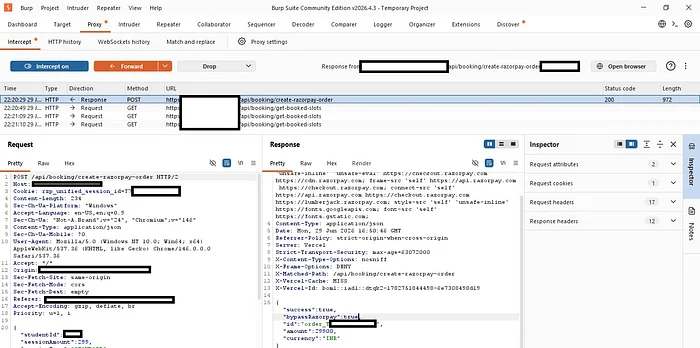
The request was forwarded and the response inspected. It carried success: true, an order id, amount: 29900, currency: INR, and the bypassRazorpay flag set to false.
Step 2: Rewrite the response in flight
Because the decision appeared to be made on the client, the test was performed on the response rather than the request. The server response was intercepted in Burp Suite and the value changed from:
bypassRazorpay: false
to:
bypassRazorpay: true
The modified response was then forwarded to the application.
Step 3: Observe the flow
The application accepted the modified response and continued through the booking flow as though the Razorpay bypass condition had been enabled. The frontend was trusting a value from the response to decide whether the payment step should be skipped, so flipping one boolean removed the payment requirement from the client's point of view.
Root cause
The server behaved correctly: it returned bypassRazorpay: false. The mistake was architectural. A control decision about whether payment can be skipped was exposed to the client and evaluated there, so the client could influence the payment flow by editing the response.
Impact
An attacker able to intercept and modify the response could turn false into true and bypass the intended Razorpay payment step. As the author puts it, this could potentially allow a user to proceed with a booking without completing the required payment, leading to financial loss for the organisation and abuse of the booking system. The write-up does not show a completed unpaid booking end to end, so the impact is stated as potential.
Account takeover using the User ID cookie
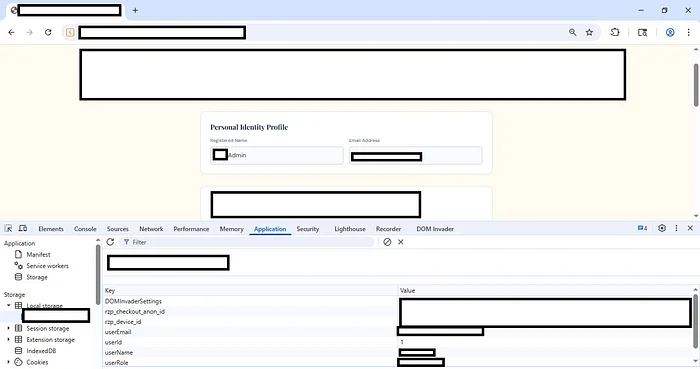
After the payment testing, the researcher turned to how the application handled user information and opened the browser's developer tools to inspect cookies. Several user-related values were present:
userEmailuserIduserNameuserRoleuserId
The userId value stood out, raising the obvious question: what happens if the User ID is changed?
Step 1: Swap the identifier
The User ID was changed to another valid user's ID and the application was refreshed.
Step 2: Observe the result
The application logged the tester into the other user's account. This was more serious than merely viewing another user's information: the tester could access the account as that user. As the author lists it, an attacker could potentially:
- Access another user's account
- View their account information
- Perform actions on their behalf
- Book appointments using their account
Root cause
The application trusted the userId value supplied by the client. There was no proper server-side verification that the user making the request actually belonged to that userId, so changing the ID changed the identity of the account being accessed. The author classifies this as an account takeover caused by broken access control, specifically an insecure direct object reference.
Fix
Based on the two root causes, the fixes would be:
- Remove
bypassRazorpayfrom anything sent to the client, and make the payment decision entirely server-side, confirming with Razorpay that the order was actually paid before the booking is treated as complete. - Stop trusting identity from a client-controlled cookie. Derive the user from a server-side session or a signed token, and verify on every request that the authenticated user is authorised for the object being accessed.
Variants to test
- Look for boolean flags in JSON responses whose names suggest control decisions (
bypass*,skip*,isPaid,verified,isAdmin) and flip them in the intercepted response. A positive result is the client proceeding down the privileged or unpaid path. - Check whether payment completion is confirmed server-side by replaying or forging the post-payment callback. A positive result is a booking or order marked complete without a matching payment record.
- Inspect cookies and local storage for identity values (
userId,userEmail,userRole) and swap them for another account's values. A positive result is being served the other account's data or session. - Change role values in the same stores from a normal user to an administrative one. A positive result is access to administrative functionality.
- Test sequential or predictable object identifiers in API paths and bodies for the same missing ownership check. A positive result is reading or modifying another user's objects.
What happened, in plain words
A healthcare website let people book a session and pay for it online through a payment service called Razorpay. While testing that booking flow, the researcher found two separate problems.
The first problem was in the payment step. The website's server sent a small message back to the browser containing a switch labelled bypassRazorpay, set to false. The browser trusted that switch to decide whether to skip payment. By catching the server's reply on its way to the browser and changing false to true, the researcher made the site behave as if payment could be skipped. The server had done nothing wrong; the mistake was letting the browser make that decision at all.
The second problem was in how the site remembered who you are. It stored your user identity in a cookie, a small piece of data your browser keeps and sends back with every request. One of those values was your userId. When the researcher changed that value to another person's ID and refreshed the page, the site logged them straight into that other person's account. The site never checked on its own side whether the person making the request really was that user.
Together these are two classic beginner-level lessons: never let the browser decide something the server should decide, and never trust an identity value just because the browser sent it.
The setting
The target was a healthcare platform with a booking feature: a user picks a session, then pays for it through Razorpay. The same application also kept user information in cookies.
To follow along you only need to understand a few ideas:
- A website is two halves. Your browser (the client) shows pages and buttons. A computer somewhere else (the server) holds the data and makes the real decisions. They talk by sending messages back and forth.
- An API is the set of message addresses the browser uses to ask the server for things or tell it to do things. Think of it as a restaurant menu of requests: each entry has an address (a URL path) and a method (like
POST, meaning "here is some data, please act on it"). - A request is the browser asking the server to do something. A response is the server's reply. Both are just text with a structure.
- JSON is a common text format for those messages: curly braces hold labelled values, like
{"name": "value"}. It is how most modern sites exchange data. - A cookie is a small labelled value the server asks your browser to store and send back on every later request. It is how a site remembers you between page loads, a bit like a cloakroom ticket: you hand it in and get your coat back.
- Burp Suite is a tool that sits between your browser and the server and lets you read, pause and edit the messages going each way. Think of a postal worker who can open every letter, change a word, and reseal it before delivery.
- The browser's developer tools are built into every browser (usually opened with F12) and let you look at cookies, network traffic and page data.
The write-up does not name the platform, list any accounts or roles used, or give software versions. The only precondition visible is an ordinary user session that can reach the booking and payment flow.
Finding the payment problem
The researcher walked through the site's features and focused on the booking flow and its Razorpay payment step. The reasoning is simple and worth internalising: payment functionality is where money is involved, so it is worth understanding exactly how the browser and server talk to each other there.
With Burp Suite acting as a middleman, the booking flow revealed this API call:
POST /api/booking/create-razorpay-order
Line by line:
POSTis the method: the browser is sending data to the server, not just asking for a page./api/booking/create-razorpay-orderis the address. Reading it left to right: it is an API endpoint (not a normal web page), it belongs to the booking feature, and its job is to create a Razorpay order, meaning the server sets up a payment record with Razorpay and hands back the details the browser needs.
When that request was sent and the reply inspected, the server returned:
{ "success": true, "bypassRazorpay": false, "id": "...", "amount": 29900, "currency": "INR"}
Line by line:
success: truesays the order was created without error.bypassRazorpay: falseis a switch. The name literally means "skip Razorpay". Set tofalse, it says payment should not be skipped.id: "..."is the identifier of the order that was just created. The write-up shows it as..., so the actual value is not given.amount: 29900is the price. Payment amounts are usually in the smallest currency unit, so this is a number the site uses internally; the write-up does not spell out the unit.currency: "INR"says the currency is Indian rupees.
Everything looked normal, and the server was returning bypassRazorpay: false exactly as it should. What drew attention was the name of the field. A switch that decides whether payment is skipped has no reason to travel to the browser at all. If the browser reads it, then whoever controls the browser can rewrite it.
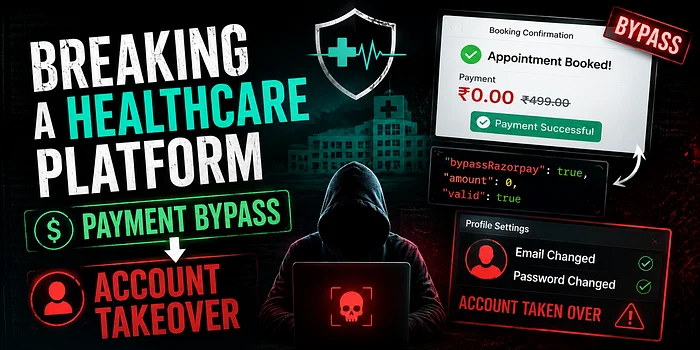
The image shows the point in the booking and payment flow where the requests were being intercepted.
Exploiting the payment problem
Step 1: Intercept the order-creation request
With Burp Suite in the middle, the booking flow produced the POST /api/booking/create-razorpay-order call above. The request was forwarded and the response inspected. It carried success: true, an order id, amount: 29900, currency: INR, and the bypassRazorpay flag set to false.
Why do this? Because you cannot change what you cannot see. Pausing the traffic lets you read exactly what the server says before the browser acts on it.
Step 2: Rewrite the response in flight
Because the decision appeared to be made in the browser, the test was performed on the response rather than the request. That is the key insight: the researcher was not asking the server to skip payment, they were changing the server's own words on the way to the browser.
The server response was intercepted in Burp Suite and the value changed from:
bypassRazorpay: false
to:
bypassRazorpay: true
The modified response was then forwarded to the application.
Line by line:
bypassRazorpayis the label of the switch.falsemeans "do not skip payment";truemeans "skip payment".- Changing
falsetotrueflips the meaning of the switch before the browser ever sees it.
The image shows the intercepted server response with the value changed before it was forwarded on.
Step 3: Watch what the site does
The application accepted the modified response and continued through the booking flow as though the Razorpay bypass condition had been enabled. The browser was trusting a value from the response to decide whether the payment step should be skipped, so flipping one true/false value removed the payment requirement from the browser's point of view.
Why the payment problem happened
The server behaved correctly: it returned bypassRazorpay: false. The mistake was in the design. A decision about whether payment can be skipped was sent to the browser and evaluated there, so the browser could influence the payment flow by editing the reply.
A useful comparison: a bouncer at a club should check your ID at the door. Here, the club printed "this person is over 18: false" on a card, handed it to the visitor, and let the visitor decide whether to show it. Anyone can print a new card.
What the payment problem could allow
An attacker able to intercept and modify the response could turn false into true and bypass the intended Razorpay payment step. As the author puts it, this could potentially allow a user to proceed with a booking without completing the required payment, which could lead to financial loss for the organisation and abuse of the booking system. The write-up does not show a completed unpaid booking end to end, so the impact is stated as potential.
Account takeover using the User ID cookie
After the payment testing, the researcher turned to how the application handled user information and opened the browser's developer tools to inspect cookies. Several user-related values were present:
userEmailuserIduserNameuserRoleuserId
Line by line:
userEmailis the user's email address.userIdis the user's identifier the site uses to tell accounts apart.userNameis the user's display name.userRoleis the user's role.userIdappears again, which is how the write-up lists it.
The userId value stood out, raising the obvious question: what happens if the User ID is changed?
The image is captioned "ACCOUNT TAKEOVER USING IDOR" and shows the cookies being inspected.
Step 1: Swap the identifier
The User ID was changed to another valid user's ID and the application was refreshed.
Why do this? Because a cookie is stored on your own machine. If the site trusts whatever number is in it, then you can put any number there. Refreshing simply makes the browser send the new cookie to the server and ask for the page again.
Step 2: Watch the result
The application logged the tester into the other user's account. This was more serious than merely viewing another user's information: the tester could access the account as that user. As the author lists it, an attacker could potentially:
- Access another user's account
- View their account information
- Perform actions on their behalf
- Book appointments using their account
Why the account takeover happened
The application trusted the userId value supplied by the browser. There was no proper server-side verification that the user making the request actually belonged to that userId, so changing the ID changed the identity of the account being accessed. The author classifies this as an account takeover caused by broken access control, specifically an insecure direct object reference.
Two terms to unpack:
- Broken access control means the site does not properly check whether you are allowed to do what you are asking. It is like a hotel where every room key opens every door.
- Insecure direct object reference (IDOR) is a specific kind of that: the site uses a simple identifier (here,
userId) to point at a record, and never checks that the record belongs to you. Change the number, get someone else's record.
How to fix both problems
Based on the two root causes, the fixes would be:
- Remove
bypassRazorpayfrom anything sent to the browser, and make the payment decision entirely on the server, confirming with Razorpay that the order was actually paid before the booking is treated as complete. - Stop trusting identity from a cookie the browser controls. Derive the user from a server-side session or a signed token, and verify on every request that the logged-in user is authorised for the object being accessed.
Things worth trying on other sites
- Look for true/false flags in JSON responses whose names suggest a decision (
bypass*,skip*,isPaid,verified,isAdmin) and flip them in the intercepted response. A positive result is the browser proceeding down the privileged or unpaid path. - Check whether payment completion is confirmed on the server by replaying or forging the post-payment callback. A positive result is a booking or order marked complete without a matching payment record.
- Inspect cookies and local storage for identity values (
userId,userEmail,userRole) and swap them for another account's values. A positive result is being served the other account's data or session. - Change role values in the same places from a normal user to an administrative one. A positive result is access to administrative functionality.
- Test sequential or predictable object identifiers in API paths and bodies for the same missing ownership check. A positive result is reading or modifying another user's objects.
Glossary
- API: the set of addresses and rules a browser uses to ask a server to do things, separate from normal web pages.
- Account takeover: gaining control of someone else's account, so you can act as them.
- Boolean: a value that is either true or false.
- Broken access control: a flaw where the site fails to check whether you are allowed to do what you are asking.
- Browser developer tools: built-in browser panels (usually F12) for inspecting cookies, network traffic and page data.
- Burp Suite: a tool that sits between browser and server and lets you read, pause and edit messages in both directions.
- Client: the browser side, the half of the conversation running on your own machine.
- Cookie: a small labelled value a site asks your browser to store and send back with later requests, used to remember you.
- Currency unit: the smallest unit of a currency used internally by payment systems; the write-up does not spell out the unit for
29900. - Endpoint: a specific address an API request is sent to.
- IDOR (insecure direct object reference): a flaw where a simple identifier points at a record and the site never checks the record belongs to you.
- JSON: a text format for structured data, using curly braces and labelled values.
- POST: an HTTP method meaning the browser is sending data to the server for it to act on.
- Razorpay: a payment service used by the site to take payments.
- Request: a message from the browser asking the server to do something.
- Response: the server's reply to a request.
- Server: the remote computer that holds data and makes the real decisions.
- Session: the period during which a site remembers who you are, usually via a cookie.
- Signed token: a value the server can verify has not been altered, unlike a plain cookie value.
- Switch/flag: a true/false value that turns a behaviour on or off.



