Broken Authentication Login With Google

systemweakness.com
Published on systemweakness.com
Bug Bounty
The full write-up lives on its author's site
It belongs to its author, so we link to it rather than copy it. The other two tabs are our own rewrites, checked against it.
Context
The target was an Indonesian startup, and the feature involved was the site's "Login With Google" flow. The researcher describes the issue as broken authentication: the sign-in flow trusted an email address carried in a client-controlled part of the request, so changing that email changed which account the login was completed for.
The report does not name the product, the endpoint, the parameter names or the server responses. What it does show is the sequence of actions and the point in the flow where the value was edited.
Setup
The work was done in January and February 2022, with the bug found on 15 February 2022. The tools listed are:
- BurpSuite
- base64decode
- Nox Emulator
The researcher used a Google account to sign in and captured the resulting request in BurpSuite. No versions, accounts or roles beyond that are given.
Finding it
The researcher went through the normal Google sign-in and then inspected the request that carried the result of that sign-in. Part of that request was a base64-encoded value, which the researcher calls the signature. The captured value was then base64-decoded. The researcher changed the email in the decoded value, re-encoded it, and sent the modified request. That is the whole of the observation: the flow accepted an email supplied by the client rather than one it had established itself.
Exploitation
Step 1: Open the login page
The researcher starts at the site's login page.
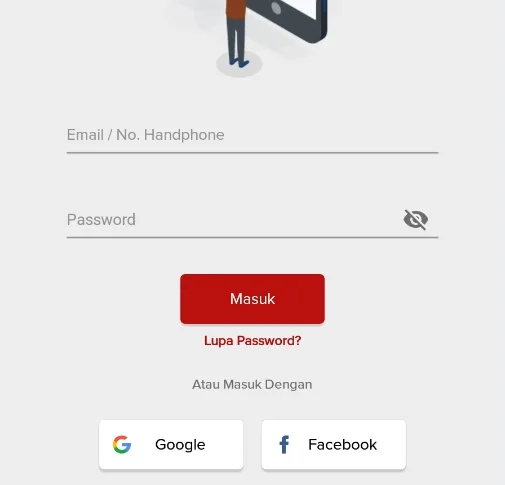
The screenshot shows the login page from which the flow begins.
Step 2: Sign in with Google
The researcher chooses the Google sign-in option and completes it with a Google account.
Step 3: Choose an email to use
During the Google flow an email is selected. This is the email that later appears inside the encoded value.
Step 4: Capture the request in BurpSuite
With BurpSuite intercepting, the researcher captures the request produced by the Google login.
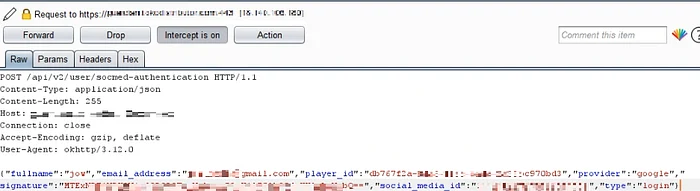
The screenshot shows the captured login-with-Google request.
Step 5: Decode the signature with base64
The captured value is base64-decoded. The report's wording is "Decode signature use bash64", and the tool list names base64decode.
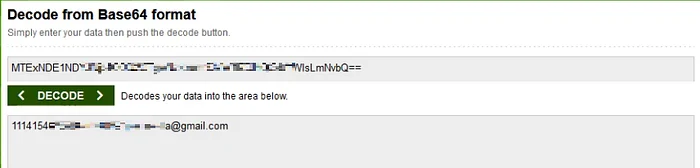
The screenshot shows the decoded signature.
Step 6: Change the email and re-encode
The email inside the decoded value is replaced with a different one, and the value is encoded again.
Step 7: Send the modified request
The re-encoded request with the changed email is sent.
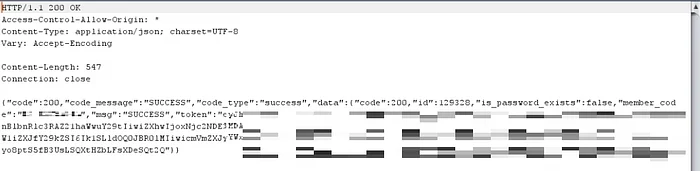
The screenshot is captioned 'Success Login'.
No raw request, header, parameter name or response body is reproduced in the report, so the exact shape of the edited value cannot be given here.
Root cause
The login flow appears to carry the authenticated identity as a base64-encoded email in a client-supplied part of the request, and the server appears to accept that value without verifying that it was issued for the account that actually completed the Google sign-in. Base64 is an encoding, not a protection: anyone who can read the value can also rewrite it. Likely the server either did not sign the value or did not check the signature, and did not bind the value to the Google identity it had just verified. The report does not describe the server-side check, so this is inferred from the behaviour.
Impact
An attacker who can complete a Google sign-in and capture their own request can change the email in the encoded value and resend it. The report demonstrates a successful login after the change but does not describe what the resulting session could access, nor whether the attacker needs to know a valid email in advance. The team classified the report as valid and HIGH.
Fix
The report states that the bug was fixed on 16 February, one day after it was reported, but does not say what was changed. The fix that addresses the root cause is for the server to derive the identity from the verified Google sign-in itself, or to sign the value it hands to the client and reject any value whose signature does not verify, rather than trusting an encoded email from the request.
Timeline
| Event | Date |
|---|---|
| Bug reported | 15 Feb 2022 |
| Team confirmed valid (HIGH) | 16 Feb 2022 |
| Bug fixed | 16 Feb 2020 (as written in the report) |
| CEO sent reward | 18 Feb 2022 |
Variants to test
- Decode every base64-looking value in an OAuth or social-login callback and look for an email, user ID or username. A positive result is a readable identity field that you can change and re-encode.
- Change the email to another account you control and see whether the session becomes that account. A positive result is being logged in as the second account.
- Change the value to a non-existent email and observe whether an account is created or the login is rejected. A positive result is account creation or a session for an identity that never authenticated.
- Try the same edit on other identity fields in the same request, such as a user ID or role, and check whether the server re-derives them. A positive result is any field the server accepts from the client.
- Test whether the value is signed by flipping a single character and re-sending. A positive result is acceptance of a modified value with no signature error.
What happened, in plain words
A security researcher was testing a website run by an Indonesian startup. The website had a "Login With Google" button, which is the common feature where you click a button, Google asks you to confirm which Google account you want to use, and then the website logs you in as that person without you having to type a separate password for the site.
When you click that button, your browser sends a message to the website's server saying, in effect, "Google has confirmed this person, here are the details." The researcher used a tool called BurpSuite to pause that message and look inside it. Part of the message was a lump of text encoded in a format called base64. Base64 is not encryption: it is just a way of writing data using only ordinary letters and digits, and anyone can turn it back into readable text in seconds. The researcher decoded the value with base64.
The researcher then changed the email address to a different one, re-encoded the text, and sent the message on to the server. That is the bug: the server trusted an email address that the visitor's own browser had supplied, instead of working out for itself which Google account had just signed in.
This kind of flaw is called broken authentication. Authentication is the process of proving who you are. When a site lets the visitor decide who they are, the proof is worthless.
Background concepts
Before walking through the steps, here are the ideas you need. Each one is explained from scratch.
What a login flow is
A login flow is the sequence of screens and messages that happens between you clicking "Sign in" and the site showing you your account. In a normal username-and-password login, you type your details, the browser sends them to the server, the server checks them against its records, and if they match it gives your browser something that proves you are logged in for the rest of your visit.
What "Login With Google" does
Many sites do not want to store passwords themselves, so they let Google do the checking. You click the Google button, Google shows you a list of Google accounts you are already signed into, you pick one, and Google tells the website "this person is who they say they are." The website then creates or finds its own account for that email and logs you in. This arrangement is often called social login or OAuth, and the message Google sends back is called a callback.
What a request is
Every time your browser does something on a website, it sends a request to that website's server. A request is a short text message with a few parts: the address being asked for, some headers (extra information such as what kind of browser you use), and sometimes a body (data you are submitting, such as a form). The server replies with a response, which contains the page or data you asked for.
What an API is
An API (application programming interface) is the set of addresses and rules a website's own pages use to talk to its server behind the scenes. Think of a restaurant: the menu and the waiter are the API. You do not walk into the kitchen yourself; you tell the waiter what you want using the menu's names, and food comes back. When you click "Login With Google," your browser is placing an order with the kitchen through one of these addresses.
What BurpSuite is
BurpSuite is a program that sits between your browser and the website, like a postal worker who opens every letter, reads it, and can rewrite it before delivering it. Security testers use it to see exactly what their browser is sending and to change it before it reaches the server. Without a tool like this, you only see the web page; with it, you see the messages underneath.
What base64 is
Base64 is a way of writing data using 64 ordinary characters (letters, digits, plus and slash). It exists because some systems can only carry plain text and cannot carry raw binary data. Encoding something in base64 makes it look scrambled, but it is not secret at all: decoding is a mechanical step that any tool or website can do instantly. A useful comparison is writing a word backwards. It looks odd, but anyone who knows the trick can read it. Base64 is an encoding, not a protection.
What a token or cookie is
After you log in, the server needs a way to recognise you on your next click, because the web does not remember you between requests. It gives your browser a small piece of text, usually stored as a cookie or a token, and your browser sends it back with every request. The server reads it and says "ah, this is the person from earlier." If an attacker can forge or edit that piece of text, they can pretend to be someone else. That is exactly the risk in this report.
What broken authentication means
Broken authentication is a broad label for any flaw that lets someone log in as another person, skip a login step, or trick the server about who they are. It is not one specific bug; it is a category. Here, the specific problem is that the server accepted an identity value from the client instead of establishing it itself.
The tools used
The researcher lists three tools:
- BurpSuite
- base64decode
- Nox Emulator
BurpSuite is the intercepting proxy described above. base64decode is a website or utility that turns base64 text back into readable text and back again. Nox Emulator is an Android emulator, a program that runs a phone's operating system on a computer, which testers use to run mobile apps and capture their traffic.
Finding it, step by step
The work happened in January and February 2022, and the bug was found on 15 February 2022. The researcher used a Google account to sign in and BurpSuite to capture the resulting request. No versions, accounts or roles beyond that are given.
Step 1: Open the login page
The researcher starts at the site's login page.
The screenshot shows the login page from which the flow begins.
Why this step: you cannot test a login flow without starting where a real user starts. Opening the page in a browser with BurpSuite already running means every request from that point on is captured.
Step 2: Sign in with Google
The researcher chooses the Google sign-in option and completes it with a Google account.
Why this step: the goal is to produce the exact request that a normal, successful login generates. You need a real one before you can study or modify it.
Step 3: Choose an email to use
During the Google flow an email is selected. This is the email that later appears inside the encoded value.
Why this step: Google may offer several accounts. Picking one deliberately means you know which email should appear in the request, so you can recognise it later when you decode the text.
Step 4: Capture the request in BurpSuite
With BurpSuite intercepting, the researcher captures the request produced by the Google login.
The screenshot shows the captured login-with-Google request.
Why this step: this is the moment the browser tells the site's server that Google has confirmed the user. If the server is going to make a mistake about identity, it will be here.
Step 5: Decode the signature with base64
The captured value is base64-decoded. The report's wording is "Decode signature use bash64", and the tool list names base64decode.
The screenshot shows the decoded signature, with the email address visible in it.
Why this step: a long string of mixed letters and digits is unreadable by eye. Decoding it turns it into ordinary text, and if the text contains an email address, that tells you the server is being handed an identity in a form you can edit.
Step 6: Change the email and re-encode
The email inside the decoded value is replaced with a different one, and the value is encoded again.
Why this step: seeing an email in the decoded text only proves it is readable. Changing it and putting it back proves whether the server actually trusts it. Re-encoding is necessary because the server expects base64, not plain text.
Step 7: Send the modified request
The re-encoded request with the changed email is sent, and the login succeeds for that email.
The screenshot is captioned 'Success Login'.
Why this step: this is the proof. The report shows the edited request being sent and a screenshot captioned 'Success Login'.
No raw request, header, parameter name or response body is reproduced in the report, so the exact shape of the edited value cannot be given here.
Why it works (root cause)
The login flow appears to carry the authenticated identity as a base64-encoded email in a client-supplied part of the request, and the server appears to accept that value without verifying that it was issued for the account that actually completed the Google sign-in. Base64 is an encoding, not a protection: anyone who can read the value can also rewrite it. Likely the server either did not sign the value or did not check the signature, and did not bind the value to the Google identity it had just verified. The report does not describe the server-side check, so this is inferred from the behaviour.
In everyday terms: imagine a club where the bouncer checks your ID at the door, then hands you a paper slip with your name written on it in a simple code. Inside, the bar staff read the slip and serve you. If you can rewrite the slip, you can drink as anyone. The bouncer did their job; the problem is that the slip was trusted afterwards without being checked against the bouncer's record.
Impact
An attacker who can complete a Google sign-in and capture their own request can change the email in the encoded value and resend it. The report demonstrates a successful login after the change but does not describe what the resulting session could access, nor whether the attacker needs to know a valid email in advance. The team classified the report as valid and HIGH.
Fix
The report states that the bug was fixed on 16 February, one day after it was reported, but does not say what was changed. The fix that addresses the root cause is for the server to derive the identity from the verified Google sign-in itself, or to sign the value it hands to the client and reject any value whose signature does not verify, rather than trusting an encoded email from the request.
In plain words: the server should either look up the identity from Google's own confirmation, or stamp the value with a cryptographic signature that only the server can produce, and refuse anything that does not carry a valid stamp. Encoding is not a stamp.
Timeline
| Event | Date |
|---|---|
| Bug reported | 15 Feb 2022 |
| Team confirmed valid (HIGH) | 16 Feb 2022 |
| Bug fixed | 16 Feb 2020 (as written in the report) |
| CEO sent reward | 18 Feb 2022 |
The fixed date is written as 2020 in the report, which is almost certainly a typo for 2022, but it is reproduced as written.
Variants to test
If you want to look for the same class of bug on other sites, these are the checks to try. Each one is a small experiment with a clear pass or fail.
- Decode every base64-looking value in an OAuth or social-login callback and look for an email, user ID or username. A positive result is a readable identity field that you can change and re-encode.
- Change the email to another account you control and see whether the session becomes that account. A positive result is being logged in as the second account.
- Change the value to a non-existent email and observe whether an account is created or the login is rejected. A positive result is account creation or a session for an identity that never authenticated.
- Try the same edit on other identity fields in the same request, such as a user ID or role, and check whether the server re-derives them. A positive result is any field the server accepts from the client.
- Test whether the value is signed by flipping a single character and re-sending. A positive result is acceptance of a modified value with no signature error.
Glossary
- Authentication: the process of proving who you are to a system, usually by logging in.
- Broken authentication: a category of security flaw where a system can be tricked about who a user is, for example by letting the user supply their own identity.
- Base64: a way of writing data using 64 ordinary characters so it can travel through systems that only handle text. It is reversible by anyone and provides no secrecy.
- Encoding: converting data into a different format for transport or storage. Unlike encryption, it does not require a key and does not hide the data.
- Decoding: turning encoded data back into its original form.
- Request: the message your browser sends to a server asking for a page or sending data.
- Response: the message the server sends back.
- Header: an extra piece of information attached to a request or response, such as the browser type or a cookie.
- Body: the part of a request or response that carries the actual data being submitted or returned.
- API: the set of addresses and rules a website's pages use to talk to its server, like a menu and waiter in a restaurant.
- Endpoint: a specific address on a server that accepts a particular kind of request.
- Parameter: a named value sent with a request, such as an email or a user ID.
- OAuth: a standard way for one website to let another confirm your identity, commonly used for "Login With Google" style buttons.
- Social login: logging into a site using an account from another service, such as Google.
- Callback: the message a service like Google sends back to the website after you sign in, carrying the result.
- Token: a piece of text given to your browser after login and sent back with later requests so the server can recognise you.
- Cookie: a small piece of text a website stores in your browser and receives back on each request, often used to hold a session token.
- Session: the period during which a server remembers you as logged in, usually tied to a token or cookie.
- Signature: in this context, a value the server can check to confirm that data it issued has not been altered. The report uses the word loosely for the encoded value it decoded.
- Client: your browser or app, the side that sends requests. The opposite is the server.
- Server: the computer that hosts the website and answers requests.
- Client-controlled: a value that comes from the visitor's browser and can therefore be edited by the visitor.
- BurpSuite: a tool that sits between your browser and a website so you can read and modify the traffic.
- Intercepting proxy: a program that pauses traffic between your browser and a server so you can inspect and change it.
- base64decode: a utility or website that converts base64 text back to readable text and back again.
- Nox Emulator: a program that runs an Android phone environment on a computer, used to test mobile apps.
- Root cause: the underlying reason a bug exists, as opposed to its visible symptom.
- Impact: what an attacker could actually do if they exploited the bug.
- HIGH: a severity rating meaning the issue is serious and should be fixed quickly.
- Reward / bounty: money a company pays a researcher for reporting a valid security bug.



