Broken Email Change Flow leads to Email Verification Bypass
The email change flow sent the verification OTP to the original email address instead of the newly requested one after multiple rapid changes. An attacker could verify an email address they do not control, potentially leading to account takeover.

medium.com
Published on medium.com
Hackerone
The full write-up lives on its author's site
It belongs to its author, so we link to it rather than copy it. The other two tabs are our own rewrites, checked against it.
Context
This write-up covers a flaw in the email change and email verification flow of an account-management feature. The application lets a signed-in user change the email address on their account and then verify ownership of the new address by entering a one-time password (OTP) delivered to that address.
The security property the flow is supposed to guarantee is simple: the verification code must be bound to the exact email address that is currently being verified. In the expected flow, the OTP goes to the new address:
Old Email: [redacted]
New Email: [redacted]
OTP → [redacted]
What the researcher found is that this relationship was not maintained once the email was changed more than once in a short sequence. The application kept treating the original address as the verification destination, even though the pending email on the account had already moved on.
The author reports the issue as Critical, categorised as Broken Authentication / Improper Email Verification / Account Takeover, with a potential account takeover impact. The target application, its endpoints, parameters and headers are deliberately omitted from the write-up, so none of those details appear here.
Setup
- A single account controlled by the researcher, starting at
[redacted]. - Two further email addresses under the researcher's control,
[redacted]and[redacted], used only for testing. - The application's standard account-management interface: the change-email form and the Verify Email option.
- No special tooling is described in the report.
Finding it
The functionality appeared to work normally at first. The interesting behaviour appeared only when the researcher performed multiple email changes in sequence. After changing the account email several times in a short window, the application was still sending the email-verification OTP to the original email address rather than to the newly requested one.
The simplified flow the author gives is:
Attacker Account
       │
       ▼
Change Email → [redacted]
       │
       ▼
Change Email Again → [redacted]
       │
       ▼
Click "Verify Email"
       │
       ▼
OTP sent to ORIGINAL email
       │
       ▼
Attacker retrieves OTP
       │
       ▼
Verification succeeds
In other words, the application was treating the old email address as the verification destination even though the account's current pending email had already been changed. That mismatch between the address being verified and the address receiving the code is the trust-boundary problem: whoever controls the original inbox can complete verification of an address they do not own.
Exploitation
All testing used accounts and email addresses under the researcher's control.
Step 1: Create or log in to an attacker-controlled account
The researcher logged into an account they controlled.
Current Email: [redacted]
Step 2: Change the email address
The account email was changed to a second attacker-controlled address.
[redacted]
        ↓
[redacted]
Step 3: Change the email again before verifying
Before completing the previous verification flow, the email was changed a second time, to a third address used for testing.
[redacted]
        ↓
[redacted]
In a real-world attack the final address could belong to another user. The point of the step is that the pending email is now an address the attacker does not control, while the first verification flow has never been completed.
Step 4: Request email verification
The researcher then clicked the application's Verify Email option.
At this point the expected destination for the OTP was the pending address:
[redacted]
Instead, the OTP was delivered to:
[redacted]
That is the original email address, the one the account started with. This was the key observation: the code was bound to the first address in the chain rather than to the address currently pending on the account.
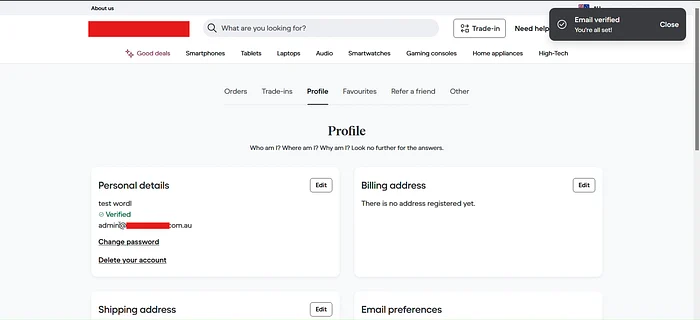
Because the attacker still has access to the original inbox, the code can be retrieved and entered, and the verification succeeds.
Root cause
The application does not keep the verification code tied to the email address that is currently pending. When the email is changed again before the first flow completes, the verification step still resolves the destination from the original address rather than from the current pending value. The report does not include the code or the request handling behind this, so the exact mechanism is not shown; the observable behaviour is that the OTP destination lags behind the pending email.
The failure is in the state relationship between the pending email and the verification destination, not in the strength of the OTP. As the author puts it, an application can have strong password hashing, secure OTP generation and properly implemented authentication, and still fail if the relationship between those components is broken.
Impact
Depending on how the application's authentication and recovery mechanisms are implemented, the author lists the following possible consequences:
- Potential account takeover of another user's account.
- Potential takeover of privileged or administrator accounts.
- Bypass of email ownership verification.
- Unauthorised access to sensitive account data.
- Potential privilege escalation.
- Circumvention of email-based recovery protections.
- Persistent account compromise if the attacker can change recovery credentials.
The impact is especially serious where email addresses are used as the primary authentication or account-recovery identifier. These are stated as potential outcomes that depend on the rest of the application's design, not as confirmed results against the live system.
Fix
The report does not describe a fix or a vendor change; at the time of writing the author had received no response from the company. The property that should be enforced is the one stated at the start: the verification code must be bound to the exact email address currently being verified.
Variants to test
- Rapid successive email changes. Submit two or three email changes before completing verification, then request the code. A positive result is the OTP arriving at an address other than the current pending one.
- Change email, request code, change email again, then submit the first code. A positive result is the code for the old pending address being accepted against the new pending address.
- Reuse of an old OTP after the email changes. Request a code for address A, change to address B, and submit the code from A. A positive result is verification of B succeeding with A's code.
- Parallel requests. Fire the change-email and verify-email requests close together, or repeat the verify request, and observe which address receives the code. A positive result is a race where the destination and the pending value disagree.
- Cancelled or abandoned flows. Start a change, abandon it, start another, and check whether the abandoned flow's destination is still used. A positive result is the code going to the abandoned address.
- Recovery flows built on the same state. Trigger password reset or recovery-email changes after an unverified email change. A positive result is a recovery message going to an address that is no longer pending, or verification of an address the attacker does not control.
What happened, in plain words
Imagine you move house and tell your bank your new address. The bank says it will post a security code to your new address to confirm it is really yours. But if you tell the bank about a second move before the first letter arrives, the bank gets confused and posts the code to your very first address instead. Anyone still living at that first address can then read the code and pretend to be you.
That is the shape of the bug in this report. A website let a signed-in user change the email address on their account, then confirm the new address by typing a one-time password (OTP) sent to it. If the user changed the email more than once in quick succession, the website kept sending the code to the original email address rather than the newest one. The person who controls that original inbox can therefore finish verifying an address they do not own.
The author rates the issue Critical and calls it Broken Authentication / Improper Email Verification / Account Takeover. The target application, its web addresses, its request parameters and its headers are deliberately left out of the report, so they are not here either.
Before going further, a few everyday ideas:
- Account-management feature: the part of a website where you edit your own profile, such as your name, password or email address.
- Email verification: proving you really own an email address by receiving a message at it and sending something back, usually a short code.
- OTP (one-time password): a short code that works once and expires. Like the code a bank texts you before a card payment.
- Trust boundary: the line between what one person is allowed to do and what another person is allowed to do. Here the line is between "the address I own" and "the address someone else owns".
The expected email change flow
The security rule the feature is supposed to follow is simple: the verification code must be tied to the exact email address that is currently being verified. If you ask to move to a new address, the code goes to that new address, and only someone who can read that inbox can finish the change.
In the normal case the report shows it like this:
Old Email: [redacted]
New Email: [redacted]
OTP → [redacted]
Line by line:
Old Email: [redacted]is the address the account currently uses. The name[redacted]is a placeholder the author uses for an address he controls.New Email: [redacted]is the address the user wants to move to.OTP → [redacted]means the one-time password is sent to the new address. The arrow just means "goes to".
That is how it should work. The problem the researcher found is that this link between the code and the address being verified was not kept once the email was changed more than once in a short sequence. The website carried on treating the original address as the place to send the code, even though the account's pending email had already moved on.
Setting up the test
The report does not describe any special software. The setup was:
- One account controlled by the researcher, starting at
[redacted]. - Two more email addresses under the researcher's control,
[redacted]and[redacted], used only for testing. - The website's normal account screens: the change-email form and the Verify Email option.
Think of it as starting a checkout on a shopping site and opening a second checkout in another tab before paying for the first: the site now has two half-finished states and has to decide which one is real.
Finding it
At first everything looked normal. The interesting behaviour only appeared when the researcher changed the email several times in a row. After a few changes in a short window, the website was still sending the verification OTP to the original email address instead of the newly requested one.
The author draws the simplified flow like this:
Attacker Account
       │
       ▼
Change Email → [redacted]
       │
       ▼
Change Email Again → [redacted]
       │
       ▼
Click "Verify Email"
       │
       ▼
OTP sent to ORIGINAL email
       │
       ▼
Attacker retrieves OTP
       │
       ▼
Verification succeeds
Line by line:
Attacker Accountis the starting point: an account the researcher controls.Change Email → [redacted]is the first change, to a second address he controls. The arrow means "becomes" or "moves to".Change Email Again → [redacted]is a second change, made before the first one was verified. The name[redacted]is a placeholder for an address that, in a real attack, could belong to someone else.Click "Verify Email"is the user asking the site to send the confirmation code.OTP sent to ORIGINAL emailis the bug: the code goes to the first address, not the newest one.Attacker retrieves OTPmeans the researcher opens the inbox of that original address, which he controls, and reads the code.Verification succeedsmeans the site accepts the code and marks the address as verified.
So the website was using the old email address as the place to send the code, even though the account's current pending email had already been changed. That mismatch is the trust-boundary problem: whoever controls the original inbox can complete verification of an address they do not own. It is like a hotel giving a new room key to the guest who checked out yesterday.
Proof of concept
All testing used accounts and email addresses under the researcher's control. A proof of concept (often shortened to PoC) is a small, safe demonstration that a bug is real, done without harming anyone.
Step 1: Create or log in to an attacker-controlled account
The researcher logged into an account he controlled.
Current Email: [redacted]
This line records the address the account starts with. It is the "original" address that later receives the code by mistake. The step matters because the whole bug depends on the attacker still being able to read that first inbox.
Step 2: Change the email address
The account email was changed to a second address the researcher controlled.
[redacted]
        ↓
[redacted]
Line by line:
[redacted]is the address before the change.↓means "is replaced by" or "moves to".[redacted]is the new address the account is asking to use.
This step starts the first verification flow. The site should now be waiting for a code sent to [redacted]. The researcher deliberately does not finish it, because the bug needs a half-finished change.
Step 3: Change the email again before verifying
Before completing the previous verification flow, the email was changed a second time, to a third address used for testing.
[redacted]
        ↓
[redacted]
Line by line:
[redacted]is the address that was pending a moment ago.↓means "is replaced by".[redacted]is the third address, now the pending one.
In a real-world attack the final address could belong to another user. The point of the step is that the pending email is now an address the attacker does not control, while the first verification flow has never been completed. The site is now holding two pieces of state: an unfinished change to [redacted] and a newer change to [redacted].
Step 4: Request email verification
The researcher then clicked the website's Verify Email option.
At this point the expected destination for the OTP was the pending address:
[redacted]
Instead, the OTP was delivered to:
[redacted]
Line by line:
[redacted]is where the code should have gone, because that is the address currently waiting to be verified.[redacted]is where it actually went: the original address, the one the account started with.
This was the key observation. The code was tied to the first address in the chain rather than to the address currently pending on the account. The site had confused "the address we started with" with "the address we are verifying now".
Because the attacker still has access to the original inbox, the code can be read and typed in, and the verification succeeds.
Why it happens
The application does not keep the verification code tied to the email address that is currently pending. When the email is changed again before the first flow completes, the verification step still works out its destination from the original address rather than from the current pending value. The report does not include the code or the request handling behind this, so the exact mechanism is not shown. What can be observed is that the OTP destination lags behind the pending email, like a parcel delivered to your previous address because the shop kept the first label it printed.
The failure is in the relationship between the pending email and the verification destination, not in the strength of the OTP. As the author puts it, an application can have strong password hashing, secure OTP generation and properly implemented authentication, and still fail if the relationship between those components is broken. A strong lock on the front door is no help if the key is handed to the wrong person.
Impact
Depending on how the application's login and recovery mechanisms are implemented, the author lists the following possible consequences:
- Potential account takeover of another user's account.
- Potential takeover of privileged or administrator accounts.
- Bypass of email ownership verification.
- Unauthorised access to sensitive account data.
- Potential privilege escalation.
- Circumvention of email-based recovery protections.
- Persistent account compromise if the attacker can change recovery credentials.
A few of those terms in plain words:
- Account takeover: someone else gains control of your account, as if they had your keys.
- Privileged or administrator account: an account with extra powers, such as managing other users.
- Bypass: getting past a check without satisfying it.
- Privilege escalation: moving from a low-power account to a higher-power one.
- Recovery credentials: the details used to get an account back, such as a recovery email address.
The impact is especially serious where email addresses are used as the main way to log in or to recover an account. These are stated as potential outcomes that depend on the rest of the application's design, not as confirmed results against the live system.
Fix
The report does not describe a fix or a vendor change; at the time of writing the author had received no response from the company. The rule that should be enforced is the one stated at the start: the verification code must be tied to the exact email address currently being verified. In everyday terms: when a customer gives you a new address, throw away the old label before printing a new one.
Variants to test
These are other ways to probe the same weakness. Each one is a small experiment, and each has a clear sign that the bug is present.
- Rapid successive email changes. Submit two or three email changes before completing verification, then request the code. A positive result is the OTP arriving at an address other than the current pending one.
- Change email, request code, change email again, then submit the first code. A positive result is the code for the old pending address being accepted against the new pending address.
- Reuse of an old OTP after the email changes. Request a code for address A, change to address B, and submit the code from A. A positive result is verification of B succeeding with A's code.
- Parallel requests. Fire the change-email and verify-email requests close together, or repeat the verify request, and observe which address receives the code. A positive result is a race where the destination and the pending value disagree. A race here means two actions happening so close together that the site handles them in an unexpected order.
- Cancelled or abandoned flows. Start a change, abandon it, start another, and check whether the abandoned flow's destination is still used. A positive result is the code going to the abandoned address.
- Recovery flows built on the same state. Trigger password reset or recovery-email changes after an unverified email change. A positive result is a recovery message going to an address that is no longer pending, or verification of an address the attacker does not control.
Glossary
- Account takeover: a situation where an attacker gains control of someone else's account.
- Account-management feature: the part of a website where a signed-in user edits their own profile details.
- Administrator account: an account with extra powers, such as managing other users or settings.
- Authentication: the process of proving who you are, usually by logging in.
- Broken Authentication: a class of bug where the login or identity checks can be fooled.
- Bypass: getting past a security check without meeting its conditions.
- Credential: a piece of information used to prove identity, such as a password or a recovery email address.
- Email verification: confirming that a user really owns an email address, usually by sending a code to it.
- Endpoint: the specific web address a browser or app sends a request to. The report leaves these out on purpose.
- Header: extra information sent along with a web request or response, such as the type of content being sent.
- Impact: the harm a bug could cause if someone abused it.
- Improper Email Verification: a bug where the email-confirmation step does not correctly prove ownership of the address.
- OTP (one-time password): a short code that can be used once, usually to confirm identity.
- Parameter: a named value sent with a web request, such as an email address in a form.
- Pending email: a new email address that has been requested but not yet confirmed.
- PoC (proof of concept): a small, safe demonstration that a bug is real.
- Privilege escalation: moving from a low-power account to one with more powers.
- Race condition: a bug that appears when two actions happen so close together that the system handles them in an unexpected order.
- Recovery flow: the steps a site offers to help someone get back into an account, such as a password reset.
- Root cause: the underlying reason a bug exists, as opposed to its visible symptom.
- Severity: a rating of how serious a bug is, often from low to critical.
- State: the information a website remembers about a half-finished action, such as an email change waiting to be confirmed.
- Trust boundary: the line between what one person is allowed to do and what another is allowed to do.
- Vendor: the company that owns or runs the affected application.
- Verification destination: the email address to which a confirmation code is sent.
- Vulnerability: a weakness in software that someone could abuse to cause harm.



