Bug Bounty { How I found an Sensitive Information Disclosure( Reconnaissance ) }
An exposed IP address belonging to the organisation hosted a file containing usernames and hashed passwords for an internal system. An attacker who found this IP could access the file and potentially use the credentials to compromise internal accounts.

I amS Rahul, working as a Information Security Analyst at NUK 9 Auditors and A Bug bounty hunter at Hackerone, Bugcrowd etc. A well-rounded IT professional with 2+ years of cyber security experience.
The full write-up lives on its author's site
It belongs to its author, so we link to it rather than copy it. The other two tabs are our own rewrites, checked against it.
Context
This is a reconnaissance story: the finding is not a flaw in an application's logic but an exposed host that should not have been reachable. The researcher picked a bug bounty program from a Google Dork, and because of the program's responsible disclosure policy the organisation is not named. Throughout the write-up the target is called target.com.
The exposed material was a file named password_control on an IP address that turned out to belong to the organisation. According to the write-up, that file contained sensitive information such as usernames and hashed passwords for some internal systems. The weakness class is information disclosure.
Setup
The researcher describes himself as an information security analyst and bug bounty hunter with more than two years of cyber security experience. No accounts, roles or credentials were needed on the target: the whole exercise is external reconnaissance followed by browsing to discovered IP addresses.
The tools used, as listed in the report:
- Search engines for origin IP discovery: Censys, Shodan, SecurityTrails, FOFA and ZoomEye (the manual approach).
uncover, the ProjectDiscovery tool, for the automated approach. The report describes it as a Go wrapper that uses well-known search engine APIs to find exposed hosts, built with automation in mind, able to query multiple search engines at once, with support for Shodan, Censys, FOFA, Hunter, Quake and ZoomEye.- For the earlier, broader reconnaissance on live domains:
nmap,webanalyze,waybackurls,naabu, the403-bypasstool on 403 forbidden domains, andnuclei. - The Open Multiple URLs browser extension, which the report suggests for opening the discovered IP addresses to save time.
whois, Firefox and Chrome.
The program was selected with a Google Dork. The exact dork used was:
responsible disclosure bounty r=h:uk
Finding it
Before any manual testing, the researcher spent time on reconnaissance. He collected live domains and ran the tools above in separate terminals. None of that produced anything interesting.
The pivot was to run uncover against the target domain to obtain IP addresses, then look at those IPs directly in a browser rather than only at the domain names.
Exploitation
Step 1: enumerate IPs with uncover
The command run against the target was:
uncover -q "target.com" -e censys,fofa,shodan,shodan-idb | httpx | tee ips.txt
cat ips.txt
The output is piped through httpx and written to ips.txt with tee. tee ips.txt writes the result to a file while still printing it, and cat displays the file. After a few seconds the researcher had a list of IP addresses.
Step 2: open every IP in the browser
He opened the IPs manually in the web browser, and notes that the Open Multiple URLs extension can be used to open all of them at once to save time. Reviewing the list, one IP served files that stood out.
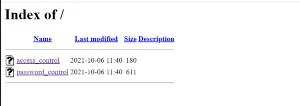
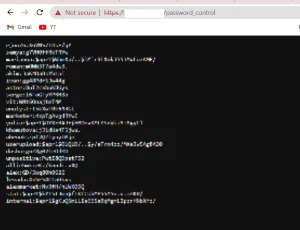
The host included a file named password_control. Per the write-up, that file contained sensitive information such as usernames and hashed passwords of some internal systems.
Step 3: confirm the IP belongs to the organisation
An exposed file is only a finding if the host is in scope, so the next question was ownership. He ran whois on the IP:
whois ip
This did not give much information. He then opened the IP in Firefox.
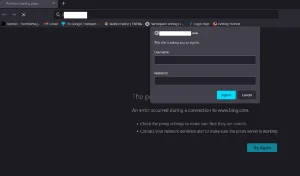
In Firefox the host asked for credentials before granting access, and it showed a domain name. In Chrome, the same IP gave direct access. He searched for the domain shown in Firefox and visited its home page, where there was a bug bounty page. Clicking it redirected to the bug bounty policy page of target.com, which confirmed that the IP belonged to the organisation.
Step 4: report
He prepared a proof of concept and reported it to the program. The report was submitted on 5 September 2022. The response came on 9 September 2022, thanking him for finding the vulnerability and stating that the team was ready to pay and asking for a PayPal invoice link.
Root cause
The report does not analyse the server configuration, so the underlying mistake is only implied. What the evidence shows is an internet-facing host belonging to the organisation that served a directory containing a file with internal usernames and password hashes, reachable directly from Chrome. The likely cause is that the host was never meant to be public, or that access control on it was applied inconsistently: Firefox prompted for credentials while Chrome returned the content directly, but the report does not say what produced that difference.. The report does not say what produced that difference.
Impact
An unauthenticated visitor who found the IP could read the password_control file and obtain usernames and hashed passwords for internal systems. Hashes are not plaintext credentials, but they are crackable offline, and combined with valid usernames they are a serious risk to internal systems.. The exposure depends on the host remaining reachable and on the file staying in place; the report gives no detail on how long it had been exposed or who else had found it.
Fix
Variants to test
- Run
uncoverwith different engine sets on other programs and open every returned IP, not just the domain. A positive result is a host that answers over HTTP with content that is clearly not meant to be public, such as directory listings or backup files. - Look for files with names like
password_controlin exposed directories. A positive result is a file containing credentials or hashes for internal systems. - Open each discovered IP in more than one browser. A positive result is a host that challenges for credentials in one browser and serves content directly in another, as happened here.
- When
whoisis uninformative, open the IP and follow any domain name it reveals to the organisation's own site, then check whether that site links to the same bug bounty policy. A positive result confirms ownership and scope.
What happened, in plain words
A security researcher was looking for bugs in a company's systems as part of a bug bounty programme. A bug bounty programme is a deal offered by an organisation: if you find a security problem in our systems and tell us about it privately, we may pay you a reward. The researcher did not break into anything. He used public search engines that catalogue what is visible on the internet, found a computer (an IP address) belonging to the organisation, opened it in a web browser, and found a file sitting there in the open that listed usernames and scrambled passwords for some of the company's internal systems. He reported it, and the company said it would pay him.
The important idea here is that the problem was not a clever flaw in a login form or a shopping cart. It was a machine that should have been hidden from the public internet but was not, and a file on it that should have been private but was readable by anyone. Security people call this kind of mistake information disclosure: private information is exposed to people who should not be able to see it.
The researcher does not name the organisation, because the programme's responsible disclosure policy asks researchers not to publish details that could harm the company. Throughout his write-up he calls the target target.com. We will do the same.
Some background before we start
Who the researcher is
He introduces himself as S Rahul, an information security analyst and a bug bounty hunter who works on platforms such as HackerOne and Bugcrowd, with more than two years of cyber security experience. That background matters only to set expectations: this was not his first time looking at a target. But the technique itself needs no special access. He had no account on the target, no password, no insider help. Everything he did was done from the outside, the same way any member of the public could.
What an IP address is
Every computer connected to the internet has at least one number that other computers use to reach it, called an IP address. You can think of it like a street address for a building: the domain name (such as target.com) is the name people use, and the IP address is the actual location the post gets delivered to. One organisation can own many IP addresses, and some of them may host things that are not linked from the main website at all. Those unlinked machines are exactly what this story is about.
What a domain name is
A domain name is the human-friendly label you type into a browser, such as target.com. Behind the scenes the browser looks up which IP address that name points to, then connects to that address. A company's website might live on one address while other services live on others, and those other addresses are not always obvious from the public site.
What a search engine for internet devices is
Ordinary search engines like Google index web pages. A different family of search engines indexes machines and services that are reachable on the internet: what software they run, what ports they answer on, what pages they serve. Censys, Shodan, SecurityTrails, FOFA and ZoomEye are examples. Security researchers use them to map out what an organisation has exposed, often finding hosts that the organisation has forgotten about.
What an API is
An API (application programming interface) is a way for one piece of software to ask another piece of software for information in a structured way, without a human clicking around a website. A useful comparison is a restaurant: the menu is the API. You do not walk into the kitchen and cook; you pick something from the menu and the kitchen sends it out. The search engines above each offer an API so that tools can ask them questions automatically and get answers back in a machine-readable form.
What a command-line tool is
Some of the tools in this story are run by typing a command into a terminal, a text window where you type instructions instead of clicking buttons. It looks intimidating but each command is just a short instruction with some options attached.
How the researcher found the programme
He did not pick a target at random. He used a Google Dork, which is simply a carefully worded Google search designed to surface specific kinds of pages. In this case he was looking for bug bounty programme pages, so that he would be working on a target that had agreed to receive reports. The exact search he used was:
responsible disclosure bounty r=h:uk
In plain words: find pages that mention responsible disclosure and bounty. This is a way of finding organisations that run bounty programmes and have published a policy. Because the programme he chose has a responsible disclosure policy, he keeps the organisation anonymous and calls it target.com.
The tools he used
Before the main technique, he lists the tools involved. You do not need to install any of them to follow the story, but knowing roughly what each one does makes the steps easier to understand.
- Censys, Shodan, SecurityTrails, FOFA, ZoomEye: search engines that index internet-facing machines. This is the manual approach: a person searches these sites by hand.
- uncover: a tool from ProjectDiscovery that automates the manual approach. The report describes it as a Go wrapper that uses well-known search engine APIs to find exposed hosts quickly. "Go" is a programming language; a "wrapper" is a program that puts a convenient layer around other services so you can use them with one command. It is built with automation in mind, can query multiple search engines at once, and supports Shodan, Censys, FOFA, Hunter, Quake and ZoomEye.
- nmap, webanalyze, waybackurls, naabu, 403-bypass, nuclei: tools he ran earlier, in separate terminals, against the live domains he had collected. Broadly, these are used to discover hosts, identify what software they run, collect old URLs, scan ports, try to get around pages that return "403 Forbidden", and run automated checks. None of that produced anything interesting.
- Open Multiple URLs: a browser extension that opens a list of addresses all at once, so you do not have to paste them one by one.
- whois: a command that asks public records who owns a domain name or an IP address.
- Firefox and Chrome: two different web browsers. The difference between them turns out to matter later.
The first phase: broad reconnaissance that found nothing
Before doing anything manual, the researcher gave himself time for reconnaissance. Reconnaissance means gathering information about a target before attacking anything: what domains exist, what addresses they resolve to, what software answers. It is the equivalent of walking around a building and noting the doors and windows before trying any of them.
He collected all the live domains he could find and ran the tools listed above in different terminals. Nothing interesting came out of that work. This is normal and worth saying plainly: a lot of reconnaissance produces nothing, and the value is in moving on to a different angle rather than forcing the first one.
The pivot: looking at IP addresses instead of domain names
The change of approach was to stop looking only at the domain names and start looking at the IP addresses behind them. Websites are the front door; IP addresses are the building itself, and sometimes other things are reachable at the same building that are not linked from the front door.
Step 1: get a list of IP addresses with uncover
He ran uncover against the target domain:
uncover -q "target.com" -e censys,fofa,shodan,shodan-idb | httpx | tee ips.txt
cat ips.txt
Line by line, in plain words:
uncoveris the program being run.-q "target.com"supplies the query. The-qflag means "query", and the text in quotes is what to search for: the target's domain name.-e censys,fofa,shodan,shodan-idbselects which search engines to ask. The-eflag means "engines", and the comma-separated list names Censys, FOFA, Shodan, and Shodan's internet-wide scan database (shodan-idb). Asking several at once increases the chance of finding something one of them missed.- The
|symbol is a pipe. It takes the output of the command on its left and feeds it as input to the command on its right, like passing a bucket along a line of people. httpxreceives that list and keeps only the hosts that actually answer over HTTP, the protocol web browsers use. In other words, it filters out addresses that are listed in the search engines but do not respond as web servers.tee ips.txtwrites the result into a file calledips.txtwhile still showing it on screen. The name comes from a plumbing tee that splits a flow in two directions.- The second command,
cat ips.txt, simply prints the contents of that file.catis short for concatenate and is one of the most basic ways to display a file's contents.
After a few seconds he had a list of IP addresses. That list is the raw material for the next step.
Step 2: open every IP address in a browser
He opened the addresses manually in a web browser. He notes that the Open Multiple URLs extension can open all of them at once, which saves time when the list is long. The reasoning is simple: a search engine tells you an address exists, but it does not tell you what is on it. You have to look.
While reviewing the list, one address stood out because it served files that clearly were not meant to be public.
The screenshot shows what he saw on that host, including the file named password_control. Among the files was one named password_control.
According to the write-up, that file contained sensitive information such as usernames and hashed passwords of some internal systems.
A hash deserves a short explanation, because it is central to why this mattered. A hash is the result of running a password through a one-way mathematical function. You cannot turn the hash back into the password by reversing the calculation, but you can take a guess, hash it the same way, and see if the results match. So a file full of hashes is not the same as a file full of plain passwords, but it is close enough to be dangerous: an attacker can guess passwords offline, at their own speed, without the company noticing. Combined with real usernames, that is a serious head start for anyone trying to get into internal systems.
Step 3: check whether the IP really belongs to the organisation
This is the step beginners most often skip, and it is the one that decides whether you have a finding at all. Finding an exposed file on some random server on the internet is not a vulnerability in anyone's system; it is just a server. To report it, you need to show that the machine belongs to the organisation whose programme you are working on. This is called confirming scope: the set of systems a programme has authorised you to test.
He first tried whois on the IP address:
whois ip
In plain words: ask the public ownership records about this address. whois is the command, and ip stands for the address being looked up. The result did not give him much information, which is common: ownership records often point to a hosting provider rather than the company using the machine.
So he opened the IP address in Firefox instead.
In Firefox, the host asked for credentials before letting him in, and it displayed a domain name. In Chrome, the same address gave him direct access, with no prompt. That difference between browsers is odd, and the report does not explain what caused it, but it is a useful observation: the same address behaved differently depending on how it was visited.
He then searched for the domain name that Firefox had shown, visited its home page, and found a bug bounty page there. Clicking that link redirected him to the bug bounty policy page of target.com. That closed the loop: the machine he had found was connected to the same organisation whose programme he was working on, so the exposed file was in scope and worth reporting.
Step 4: write it up and report it
He prepared a proof of concept, usually shortened to PoC. A PoC is the smallest, clearest demonstration that a problem is real: here, the address, the file, and what was in it, enough for the company to reproduce what he saw. He submitted it to the programme.
The report was submitted on 5 September 2022. The response came on 9 September 2022. The company thanked him for finding the vulnerability, said it was ready to pay, and asked him to send a link to a PayPal invoice so it could make the payment.
Why this happened
The report does not analyse the server configuration, so the underlying mistake is only implied. What the evidence shows is an internet-facing host belonging to the organisation that served a directory containing a file with internal usernames and password hashes, reachable directly from Chrome.
What the impact was
An unauthenticated visitor who found the address could read the password_control file and obtain usernames and hashed passwords for internal systems. Hashes are not plaintext credentials, but they are crackable offline, and combined with valid usernames they are a serious risk to internal systems.. The exposure depends on the host remaining reachable and on the file staying in place; the report gives no detail on how long it had been exposed or who else had found it.
What the fix would be
Things you can try yourself
- Run
uncoverwith different engine sets on other programmes and open every returned IP address, not just the domain. A positive result is a host that answers over HTTP with content that is clearly not meant to be public, such as directory listings or backup files. - Look for files with names like
password_controlin exposed directories. A positive result is a file containing credentials or hashes for internal systems. - Open each discovered IP address in more than one browser. A positive result is a host that challenges for credentials in one browser and serves content directly in another, as happened here.
- When
whoisis uninformative, open the IP address and follow any domain name it reveals to the organisation's own site, then check whether that site links to the same bug bounty policy. A positive result confirms ownership and scope.
The researcher's own tip
He ends with a practical tip: always open an IP address in Chrome as well as Firefox, because sometimes you get different information from different browsers. That is exactly what happened in this case: Firefox showed a login prompt and a domain name, while Chrome showed the content directly, and the domain name Firefox revealed was what allowed him to confirm ownership.
Glossary
- API: a way for one piece of software to ask another for information in a structured way, without a human clicking around a website.
- Bug bounty programme: an arrangement where an organisation invites people to report security problems privately and may pay a reward for valid reports.
- Censys, Shodan, SecurityTrails, FOFA, ZoomEye: search engines that index machines and services reachable on the internet, rather than web pages.
- Command-line tool: a program you run by typing an instruction into a text terminal instead of clicking buttons.
- Directory listing: a web page a server shows when a folder has no index page and visitors are allowed to browse its files.
- Domain name: the human-friendly label for a website, such as
target.com, which the browser translates into an IP address. - Google Dork: a carefully worded Google search designed to surface specific kinds of pages.
- Hash: the result of running a password through a one-way mathematical function; it cannot be reversed, but guesses can be hashed and compared, so hashes can be cracked offline.
- HTTP: the protocol web browsers use to request and receive pages from web servers.
- Information disclosure: a weakness where private information is exposed to people who should not be able to see it.
- IP address: the numeric address of a computer on the internet, like a street address for a building.
- Open Multiple URLs: a browser extension that opens a list of addresses all at once.
- Pipe (
|): a symbol that passes the output of one command as input to the next. - PoC (proof of concept): the smallest, clearest demonstration that a problem is real, enough for the owner to reproduce it.
- Port: a numbered channel on a computer that a particular service listens on; scanning ports is how tools discover which services a host offers.
- Reconnaissance: gathering information about a target before testing it, such as which domains, addresses and services exist.
- Responsible disclosure policy: a published set of rules for reporting security problems privately and keeping details out of public view.
- Scope: the set of systems a bug bounty programme has authorised researchers to test.
- Terminal: a text window where you type commands instead of clicking.
- uncover: a ProjectDiscovery tool that queries several internet search engines at once to find exposed hosts.
- Unauthenticated: without logging in or proving who you are.
- Web root: the folder on a web server whose contents are served to visitors.
- whois: a command that asks public records who owns a domain name or IP address.
- Wrapper: a program that puts a convenient layer around other services so they can be used with one command.




