Bug Bounty { How I found an SSRF ( Reconnaissance ) }
The webinar page accepted URL parameters for API endpoints and fetched them server-side without validation, allowing an attacker to make the server request arbitrary hosts. This enabled internal port scanning and disclosure of internal IP addresses.

Hello everyone, I am S Rahul, working as a Information Security Analyst at NUK 9 Auditors and A Bug bounty hunter at Hackerone, Bugcrowd etc. A well-rounded IT professional with 2+ years of cyber security experience.
The full write-up lives on its author's site
It belongs to its author, so we link to it rather than copy it. The other two tabs are our own rewrites, checked against it.
Context
This is a write-up of a Server-Side Request Forgery (SSRF) finding that the author, S Rahul, describes as leading to internal port scanning. The affected program is not named: the author says he selected it through Google Dorks and that its responsible disclosure policy prevents him from disclosing it, so throughout the article the domain is called target.com.
The vulnerable feature is a webinar page on a subdomain. The URL the author found carries a room identifier, a display name, an access token, a peer identifier, and several parameters whose values are themselves URLs, among them apiEvent and accessUrl. The report does not describe what the webinar feature normally does beyond the shape of these parameters; the two URL-valued parameters are the ones that drew his attention.
SSRF, as the author defines it, is a web security vulnerability that lets an attacker induce the server-side application to make HTTP requests to an arbitrary domain of the attacker's choosing. The server can be made to connect back to itself, to other web-based services inside the organisation's infrastructure, or to external third-party systems. Such attacks often exploit trust relationships to escalate from the vulnerable application and perform unauthorised actions.
Setup
The work is reconnaissance-driven. The tools used are:
- subfinder, for subdomain enumeration;
- httprobe, to keep the live domains;
- waybackurls, a Golang tool that crawls domains and fetches known URLs from the Wayback Machine archives;
- httpx, to identify status, title and technology for each URL;
- Burp Suite, including the Intruder and Burp Collaborator.
The author does not give versions for any of these tools. The only stated precondition is access to the target's public web surface; no account or role on the target is mentioned.
Finding it
The reconnaissance ran in four stages. First, subdomain enumeration with subfinder, saving the output to domains.txt. Second, probing those domains for live HTTP services with httprobe, saving to live_domains.txt.
subfinder -d target.com > domains.txt
cat domains.txt | httprobe > live_domains.txt
Third, collecting archived URLs for the live domains with waybackurls.
cat live_domains.txt | waybackurls > urls.txt
Fourth, running httpx over the collected URLs to record status code and title, saving to status.txt.
cat urls.txt | httpx — status-code-title > status.txt
With the live, accessible URLs sorted and the non-working ones removed, the author went through status.txt looking for sensitive information: parameters, usernames, passwords, tokens and sensitive files. The keywords he searched for were:
password, username, mail.com, token, access_token, url=, redirect_url=, api, id=, accessUrl=, payment, etc.
After about 30 minutes of crawling and sorting, one URL stood out. It pointed at a webinar page on a subdomain and carried a long list of parameters, two of which had URL values:
What drew his attention were the parameters apiEvent and accessUrl. Both take a full URL as their value, which is the shape of a possible server-side fetch: if the application takes the URL from the request and requests it from the backend, the client controls where the server connects.
Exploitation
Step 1: point the URL parameters at a Collaborator server
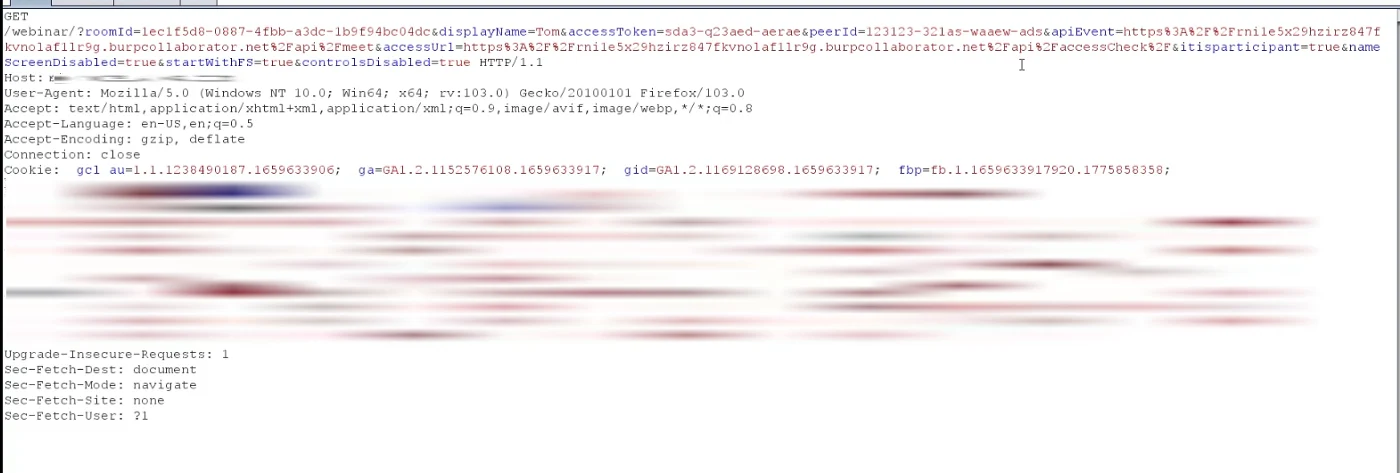
The author replaced the values of apiEvent and accessUrl with his Burp Collaborator host, keeping the rest of the query string intact:
He opened this URL in the browser. The Collaborator server received DNS and HTTP interactions, and he obtained an internal IP address of the target organisation. That is the confirmation of SSRF: the Collaborator server received interactions after he opened the URL in the browser.
Step 2: confirm whose IP it is
To check whether the address belonged to the organisation or to a third party, he ran a whois lookup on it:
whois ip
The result confirmed that the IP was an internal IP of the organisation. This matters because an SSRF that only reaches third-party infrastructure is far less interesting than one that reaches the target's own network.
Step 3: turn it into internal port scanning with Burp Intruder
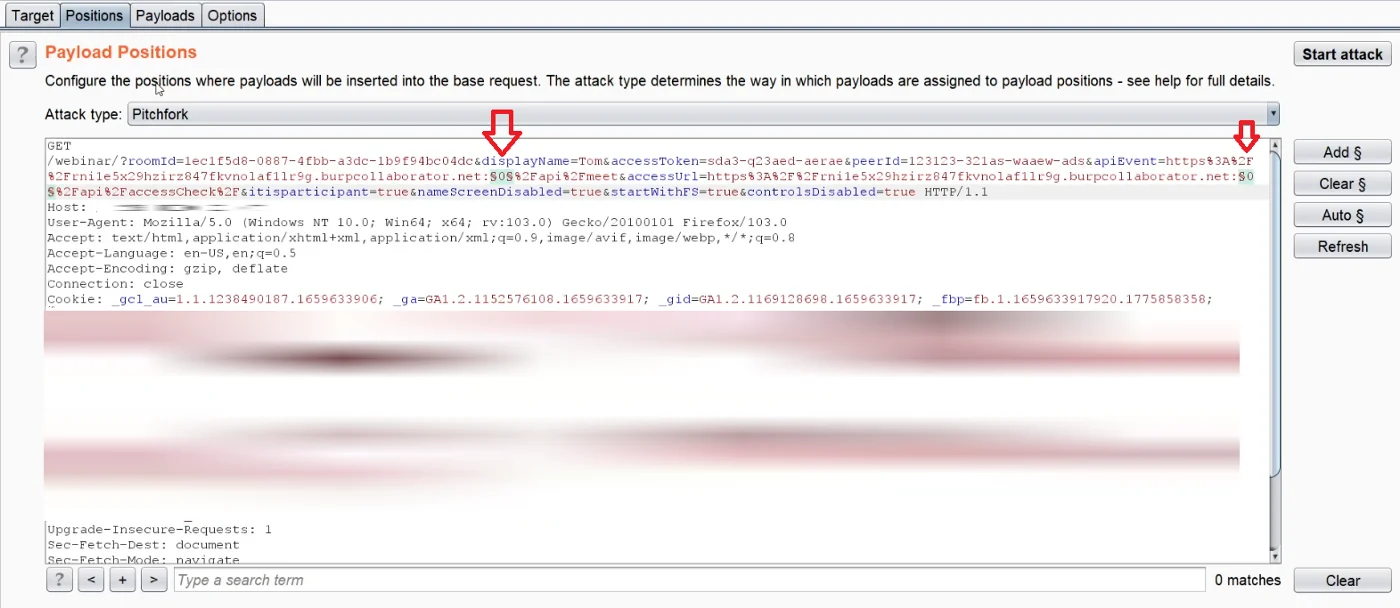
To increase the impact, the author moved to Burp Suite and automated the request. His sequence was:
- capture the same request in Burp Suite;
- send it to Intruder;
- select a pitchfork attack type;
- add position payloads at the end of the two URLs;
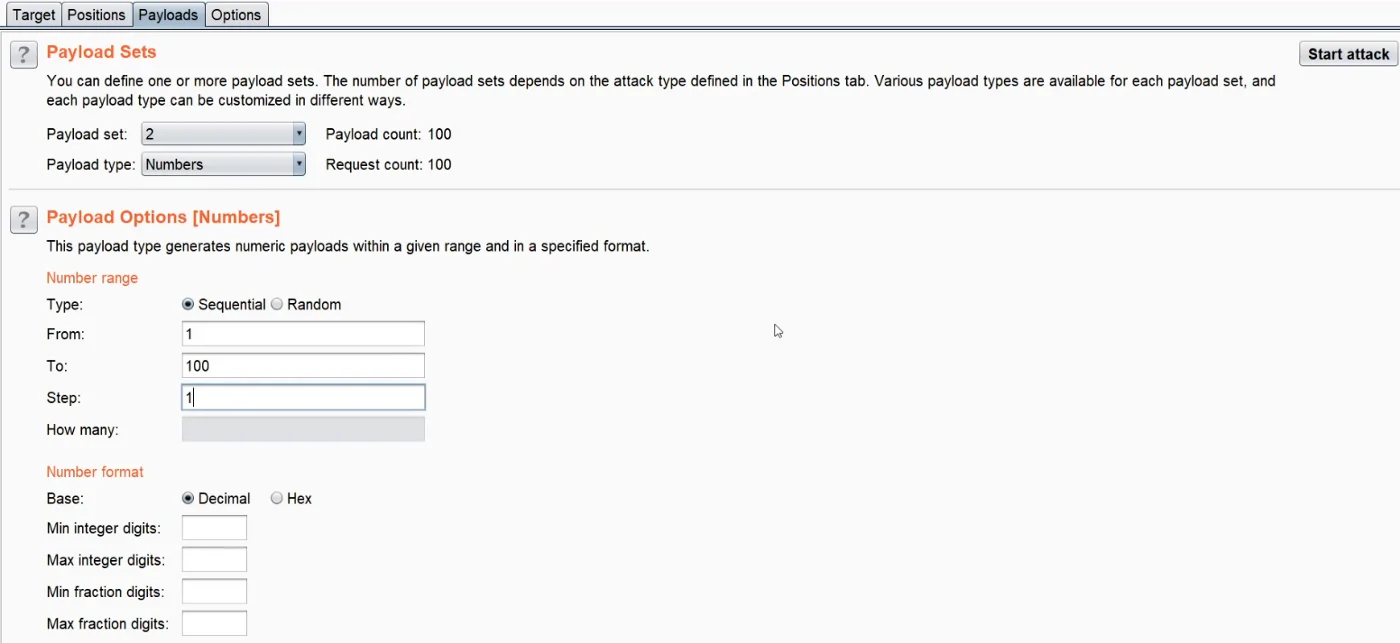
- set the loop request to 100;
- start the attack;
- observe HTTP, DNS and SMTP requests.
Step 1
Step 2,3,4
Step 4,5
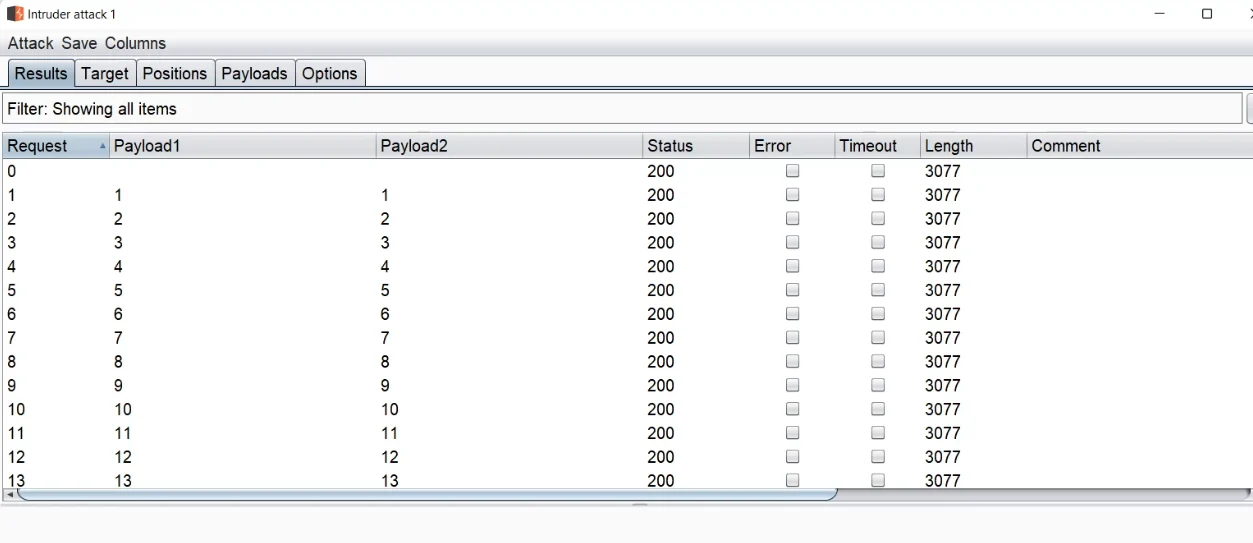
Step 6
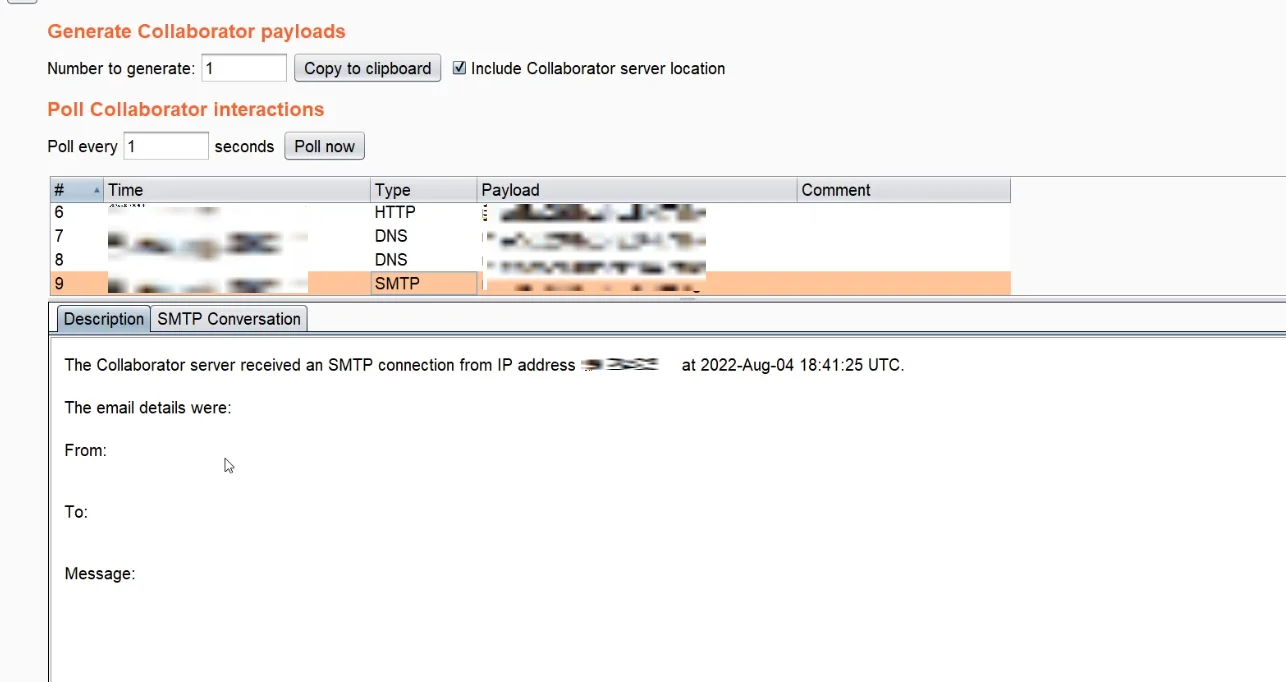
Step 7
The report does not include the Intruder payload list or the exact request as sent by Intruder, so the port numbers tested are not shown. What it does record is the outcome: the Collaborator server received DNS and HTTP requests as well as an SMTP request. An SMTP interaction is notable because it is a protocol other than HTTP arriving at the Collaborator server. On that basis the author concluded he was able to perform internal port scanning through the SSRF.
Step 4: report
He made a proof of concept and reported it to the program. The report was submitted on 5 August 2022. On 12 August 2022 the program replied asking what the best way to exploit the vulnerability was, what consequences he saw in using it, and whether it was just information disclosure or could be exploited in some other way. He answered with a brief description of what an attacker can do and the possible ways to exploit it, listing two consequences: SSRF leading to internal IP disclosure, and SSRF leading to internal port scanning. On 18 August 2022 the report was triaged and rewarded with a bounty. The amount is not stated.
Root cause
The webinar page accepts full URLs in the apiEvent and accessUrl parameters and the server-side application requests them. There is no visible restriction on where those URLs may point: the author was able to substitute his own Collaborator host and received DNS, HTTP and SMTP interactions. In other words, the application used a user-supplied URL as the destination of a backend request. The report does not show the server-side code, so the exact validation logic, if any, is not known.
Impact
Under the conditions shown, an attacker who can reach the webinar page can make the target's server issue requests to a destination of the attacker's choosing. The author demonstrated two consequences: disclosure of an internal IP address, which whois confirmed as internal to the organisation, and internal port scanning, evidenced by DNS, HTTP and SMTP interactions arriving at his Collaborator server. The report does not go further than that; it does not claim access to internal services, data exfiltration or remote code execution, and the program's own question about whether the issue was only information disclosure or could be exploited otherwise is answered only with the two consequences above.
Fix
Based on the behaviour described, the fix would be to stop treating the apiEvent and accessUrl values as arbitrary destinations: validate them against an allowlist of expected hosts and schemes, resolve the hostname and reject internal and loopback address ranges, and restrict outbound requests from the application to the services it actually needs. Which of these was applied is not stated.
Variants to test
- Other URL-valued parameters. Search archived URLs for parameters whose values are full URLs, such as
url=,redirect_url=,accessUrl=andapiEvent=. A positive result is a DNS or HTTP interaction on your Collaborator host after you substitute your own URL. - Different schemes and ports. Repeat the Intruder run with payloads that target ports other than 80 and 443. A positive result is an interaction of a different protocol, such as the SMTP request seen here, arriving at your Collaborator server.
- Internal address ranges. Point the parameter at loopback and private ranges rather than at your Collaborator host. A positive result is a response that differs from the error returned for an unreachable host, which indicates the server attempted the internal connection.
- Redirect-based bypasses. If a host allowlist is present, host a URL on an allowed domain that redirects to an internal address. A positive result is an interaction from the internal network after the redirect.
Get the Medium app


What happened, in plain words
A security researcher was looking through old, archived web addresses belonging to a company's bug bounty program. A bug bounty program is a deal a company makes with independent researchers: find a security problem in our systems, tell us privately, and we may pay you a reward (a bounty). The researcher found a page for online webinars (live video meetings) that took two web addresses from the visitor, which he suspected the server might fetch. By swapping in an address he controlled, he could make the company's server talk to him. That is the bug class called Server-Side Request Forgery, or SSRF. He then used the same trick with Burp Intruder and saw DNS, HTTP and SMTP interactions arrive at his Collaborator server, which he described as internal port scanning. He reported it on 5 August 2022, the company asked a couple of questions on 12 August, and on 18 August the report was triaged (accepted as a real issue) and rewarded with a bounty.
The company is not named. The author says he picked the program through Google Dorks (search queries crafted to find particular pages) and that the program's responsible disclosure policy stops him from naming it, so throughout the article the domain is called target.com.
What SSRF is
A normal web page works like this: your browser asks a website's server for something, and the server answers. In SSRF, the attacker does not ask the server directly. Instead the attacker gives the server a web address and says, in effect, "please go and fetch this for me". The server, which sits inside the company's network and is trusted by the other machines there, does the fetching. So the request comes from the server, not from the attacker's computer.
A simple comparison: imagine a receptionist who will phone any number you write on a form. You are not allowed into the building, but the receptionist is, and the receptionist's phone can reach internal extensions you could never dial yourself. SSRF is writing an internal extension on that form.
The author's own definition: server-side request forgery is a web security vulnerability that allows an attacker to induce the server-side application to make HTTP requests to an arbitrary domain of the attacker's choosing. In typical examples the attacker might cause the server to make a connection back to itself, or to other web-based services within the organisation's infrastructure, or to external third-party systems. SSRF attacks often exploit trust relationships to escalate an attack from the vulnerable application and perform unauthorised actions. Those trust relationships might exist in relation to the server itself, or to other back-end systems within the same organisation.
The reconnaissance tools
Before the bug, there is the searching. The author calls this reconnaissance, or recon: gathering information about what a company exposes on the internet before trying anything. The tools he used are:
- subfinder: finds subdomains. A subdomain is a smaller name under a main domain, like
shop.example.comunderexample.com. Companies often have many, and some are forgotten. - httprobe: takes a list of names and checks which ones actually answer as live web servers.
- waybackurls: a tool written in Go (a programming language) that crawls domains and fetches known URLs from the Wayback Machine, an archive that keeps copies of web pages over time. Old pages often still exist on the live site even if nobody links to them any more.
- httpx: for each address, records the HTTP status code (the number a server returns, like 200 for OK or 404 for not found), the page title and the technology in use.
- Burp Suite: a toolkit for testing web applications. Two parts matter here: Intruder, which repeats a request many times with different values, and Burp Collaborator, a service that gives you a unique address you can put in a request and then watch for anything that arrives at it.
The author gives no version numbers for any of these tools. Nothing in the report mentions needing an account or a particular role on the target.
Finding it
The recon ran in four stages. First, subdomain enumeration with subfinder, saving the output to domains.txt. Second, probing those domains for live web services with httprobe, saving to live_domains.txt.
subfinder -d target.com > domains.txt
Line by line: subfinder is the program being run. -d target.com tells it which domain to look under. > means "send the output into a file instead of showing it on screen", and domains.txt is that file. So: find every subdomain of target.com and write the list to a file.
cat domains.txt | httprobe > live_domains.txt
Line by line: cat domains.txt prints the contents of the file. The vertical bar | is a pipe: it hands that output to the next program as input. httprobe checks each name and keeps the ones that respond. > live_domains.txt writes the surviving names to a new file. So: take the subdomain list, keep only the ones that are actually live, and save them.
Third, collecting archived URLs for the live domains with waybackurls.
cat live_domains.txt | waybackurls > urls.txt
Line by line: print the live domains, pipe them into waybackurls, which looks each one up in the Wayback Machine and prints every known URL it finds, and save all of those URLs to urls.txt. The point is to find pages that exist but are not advertised anywhere, which is exactly where forgotten features live.
Fourth, running httpx over the collected URLs to record status code and title, saving to status.txt.
cat urls.txt | httpx — status-code-title > status.txt
Line by line: print the collected URLs, pipe them into httpx, ask it to show the status code and the page title for each, and save the result to status.txt. The status code tells you whether the page still works; the title gives a hint about what the page is.
With the live, accessible URLs sorted and the non-working ones removed, the author went through status.txt looking for sensitive information: parameters, usernames, passwords, tokens and sensitive files. A parameter is the part of a web address after a question mark, made of name and value pairs separated by &, like ?colour=blue&size=large. A token is a short string that acts like a temporary key or password, proving that whoever holds it is allowed in. The keywords he searched for were:
password, username, mail.com, token, access_token, url=, redirect_url=, api, id=, accessUrl=, payment, etc.
Why these words? Because they are the names people give to the interesting things: credentials, identifiers, and above all parameters whose value is itself a web address (url=, redirect_url=, accessUrl=). A parameter that takes a web address is the shape of a server-side fetch, so it is the first place to look for SSRF.
After about 30 minutes of crawling and sorting, one URL stood out. It pointed at a webinar page on a subdomain and carried a long list of parameters, two of which had URL values:
Line by line: https://subdomain.target.com/webinar/ is the page, a webinar (online meeting) page. After the ?, each name=value pair is a setting the page receives. roomId identifies which meeting room. displayName=mack is the name shown to other participants. accessToken is the temporary key that proves the visitor may join; it is redacted here because it is a secret. peerId identifies the visitor's connection. apiEvent=https://example.com/api/meet and accessUrl=https://example.com/api/accessCheck/ are the two that matter: their values are full web addresses. An API (application programming interface) is simply a way for one piece of software to talk to another, usually over web addresses like these. The remaining pairs (itisparticipant, nameScreenDisabled, startWithFS, controlsDisabled) are on/off switches for the meeting interface.
What drew his attention were the parameters apiEvent and accessUrl. Both take a full URL as their value. If the application takes the URL from the request and requests it from the backend, the visitor controls where the server connects. That is the whole idea of the test.
Exploitation
Step 1: point the URL parameters at a Collaborator server
The author replaced the values of apiEvent and accessUrl with his Burp Collaborator host, keeping the rest of the query string intact:
Line by line: everything is the same as the original address except the two URL values. apiEvent now points at the Collaborator host instead of example.com, and so does accessUrl. The Collaborator host is a unique address that only the researcher can see traffic for, so anything arriving there proves that something fetched it. The display name was changed to Tom; the rest of the switches are unchanged.
He opened this URL in the browser. The Collaborator server received DNS and HTTP interactions, and he obtained an internal IP address of the target organisation. DNS is the system that turns names like example.com into numeric addresses; an HTTP interaction is an actual web request arriving. The key point: the Collaborator server received interactions after he opened the URL in the browser, which he took as confirmation of SSRF.
Step 2: confirm whose IP it is
To check whether the address belonged to the organisation or to a third party, he ran a whois lookup on it:
whois ip
Line by line: whois is a lookup service that tells you who a numeric address or domain is registered to. ip stands in for the address he had seen. The result confirmed that the IP was an internal IP of the organisation. This matters because an SSRF that only reaches third-party infrastructure is far less interesting than one that reaches the target's own network: the first shows the server can make requests, the second shows it can reach things outsiders cannot.
Step 3: turn it into internal port scanning with Burp Intruder
A port is a numbered door on a machine. One server can run many services, each listening on its own port: web pages usually on 80 or 443, mail on 25, and so on. Port scanning means trying many doors to see which ones answer. Doing that from outside is blocked; doing it through a server that is already inside is the trick here.
To increase the impact, the author moved to Burp Suite and automated the request. His sequence was:
- capture the same request in Burp Suite;
- send it to Intruder;
- select a pitchfork attack type;
- add position payloads at the end of the two URLs;
- set the loop request to 100;
- start the attack;
- observe HTTP, DNS and SMTP requests.
A few of those words need unpacking. Capturing a request means letting Burp sit between the browser and the site so the researcher can see and edit exactly what is sent. Intruder is the part of Burp that repeats a request many times, each time with a different value in a chosen spot. A pitchfork attack uses several lists of values at once, one list per chosen spot, advancing them together. A payload is simply the value inserted at that spot. SMTP is the protocol used to send email, so an SMTP interaction means the server-side request reached a mail service, not a web service.
Step 1
Step 2,3,4
Step 4,5
Step 6
Step 7
The report does not include the Intruder payload list or the exact request as sent by Intruder, so the port numbers tested are not shown. What it does record is the outcome: the Collaborator server received DNS and HTTP requests as well as an SMTP request. The SMTP interaction is notable because it is a protocol other than HTTP arriving at the Collaborator server. On that basis the author concluded he was able to perform internal port scanning through the SSRF.
Step 4: report
He made a proof of concept (a short, repeatable demonstration that the bug is real) and reported it to the program. The report was submitted on 5 August 2022. On 12 August 2022 the program replied asking what the best way to exploit the vulnerability was, what consequences he saw in using it, and whether it was just information disclosure or could be exploited in some other way. Information disclosure means the bug leaks information without giving the attacker control of anything. He answered with a brief description of what an attacker can do and the possible ways to exploit it, listing two consequences: SSRF leading to internal IP disclosure, and SSRF leading to internal port scanning. On 18 August 2022 the report was triaged and rewarded with a bounty. The amount is not stated.
Why it worked
The webinar page accepts full URLs in the apiEvent and accessUrl parameters and the server-side application requests them. There is no visible restriction on where those URLs may point: the author was able to substitute his own Collaborator host and received DNS, HTTP and SMTP interactions. In other words, the application used a visitor-supplied URL as the destination of a backend request. The report does not show the server-side code, so the exact validation logic, if any, is not known.
What an attacker could do
Under the conditions shown, an attacker who can reach the webinar page can make the target's server issue requests to a destination of the attacker's choosing. The author demonstrated two consequences: disclosure of an internal IP address, which whois confirmed as internal to the organisation, and internal port scanning, evidenced by DNS, HTTP and SMTP interactions arriving at his Collaborator server. The report does not go further than that; it does not claim access to internal services, data exfiltration or remote code execution, and the program's own question about whether the issue was only information disclosure or could be exploited otherwise is answered only with the two consequences above.
How it should be fixed
The report does not say what the program changed. Based on the behaviour described, the fix would be to stop treating the apiEvent and accessUrl values as arbitrary destinations: validate them against an allowlist of expected hosts and schemes, resolve the hostname and reject internal and loopback address ranges, and restrict outbound requests from the application to the services it actually needs. Which of these was applied is not stated.
Other places to try the same idea
- Other URL-valued parameters. Search archived URLs for parameters whose values are full URLs, such as
url=,redirect_url=,accessUrl=andapiEvent=. A positive result is a DNS or HTTP interaction on your Collaborator host after you substitute your own URL. - Different schemes and ports. Repeat the Intruder run with payloads that target ports other than 80 and 443. A positive result is an interaction of a different protocol, such as the SMTP request seen here, arriving at your Collaborator server.
- Internal address ranges. Point the parameter at loopback and private ranges rather than at your Collaborator host. A positive result is a response that differs from the error returned for an unreachable host, which indicates the server attempted the internal connection.
- Redirect-based bypasses. If a host allowlist is present, host a URL on an allowed domain that redirects to an internal address. A positive result is an interaction from the internal network after the redirect.
Get the Medium app
Glossary
- API: a way for one piece of software to talk to another, usually over web addresses.
- Allowlist: a list of things that are explicitly permitted; anything not on it is refused.
- Bounty: a reward, often money, paid for a valid security report.
- Bug bounty program: a scheme where a company invites researchers to report security problems privately, often for a reward.
- Burp Collaborator: a service that gives you a unique address and records any traffic that reaches it.
- Burp Intruder: the part of Burp Suite that repeats a request many times with different values.
- DNS: the system that turns names like example.com into numeric addresses.
- Google Dorks: search queries crafted to find particular pages or files.
- HTTP: the protocol browsers and servers use to exchange web pages and data.
- HTTP status code: the number a server returns with a response, such as 200 for OK or 404 for not found.
- httprobe: a tool that checks which domain names answer as live web servers.
- httpx: a tool that records status code, title and technology for a list of URLs.
- Information disclosure: a bug that leaks information without giving the attacker control of anything.
- Internal IP: a numeric address used inside an organisation's own network, not reachable from the public internet.
- Intruder payload: the value inserted into a chosen spot in a request when Intruder repeats it.
- Loopback address: an address that points a machine back at itself.
- Parameter: a name and value pair in a web address after the question mark, separated by
&. - Payload: a value you insert into a request to test how the application handles it.
- Pitchfork attack: an Intruder mode that uses several lists of values at once, one per chosen spot.
- Port: a numbered door on a machine where a particular service listens.
- Port scanning: trying many ports to see which ones answer.
- Proof of concept (PoC): a short, repeatable demonstration that a bug is real.
- Reconnaissance (recon): gathering information about what a company exposes before trying anything.
- Redirect: a server response that tells the client to go to a different address instead.
- Remote code execution: a bug that lets an attacker run their own code on someone else's machine.
- Responsible disclosure policy: a company's rules for how security problems should be reported and when they may be made public.
- SMTP: the protocol used to send email.
- SSRF (Server-Side Request Forgery): a vulnerability that lets an attacker make a server fetch a web address of the attacker's choosing.
- Subdomain: a smaller name under a main domain, like shop.example.com under example.com.
- subfinder: a tool that finds subdomains.
- Token: a short string that acts like a temporary key or password, proving the holder is allowed in.
- Triage: the step where a program reviews a report and accepts it as a real issue.
- URL: a web address.
- Wayback Machine: an archive that keeps copies of web pages over time.
- waybackurls: a tool that fetches known URLs for a domain from the Wayback Machine.
- Webinar: a live online meeting or presentation.
- whois: a lookup service that tells you who an address or domain is registered to.



