Bug bounty - PHI/PII critical data exposure
A public API endpoint returned the full details of everyone on a waiting list, including names, addresses and phone numbers, to any anonymous visitor. An attacker could enumerate public waiting lists and harvest personal and health information from them.

This is one of my first bug bounty finding, and at this time I didn’t want to spend weeks on famous bug bounty programs, and I wasn’t looking for rewards. So I decided to look for a program not registered on famous bug bounty platforms so I could get a better chance to find something.
The full write-up lives on its author's site
It belongs to its author, so we link to it rather than copy it. The other two tabs are our own rewrites, checked against it.
Context
This was one of my first bug bounty findings. At the time I did not want to spend weeks on well-known bug bounty programs, and I was not chasing rewards. So I picked a program that was not listed on the famous bug bounty platforms, hoping that fewer researchers had already looked at it.
After some Google dorking I found a SaaS application that provides a simple service. Picture a hair salon manager: the app lets them create virtual waiting lists where customers register and give some information, such as "I want to change my hair colour". Those waiting lists are public by design, so that anyone can register on them.
The scope of the program was:
- company.com
- v2.company.com
- api.company.com
- app.company.com
Setup
I started using the SaaS app as a business owner, to understand how the waiting list system works. No special tooling was needed for the discovery: I used Firefox developer tools rather than Burp Suite. I started using the SaaS app as a business owner and published a waiting list of my own.
Finding it
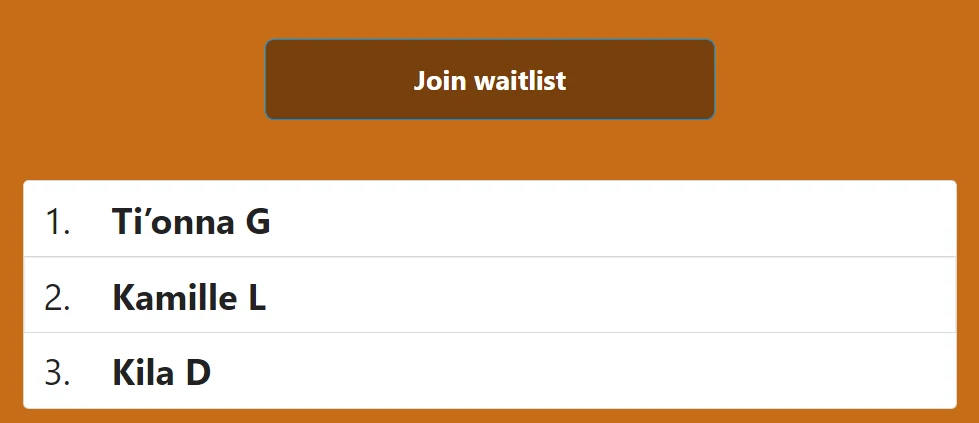
After publishing and playing with my first waiting list, I understood how simple the system is. A waiting list shows your position in the queue, and lets you register.
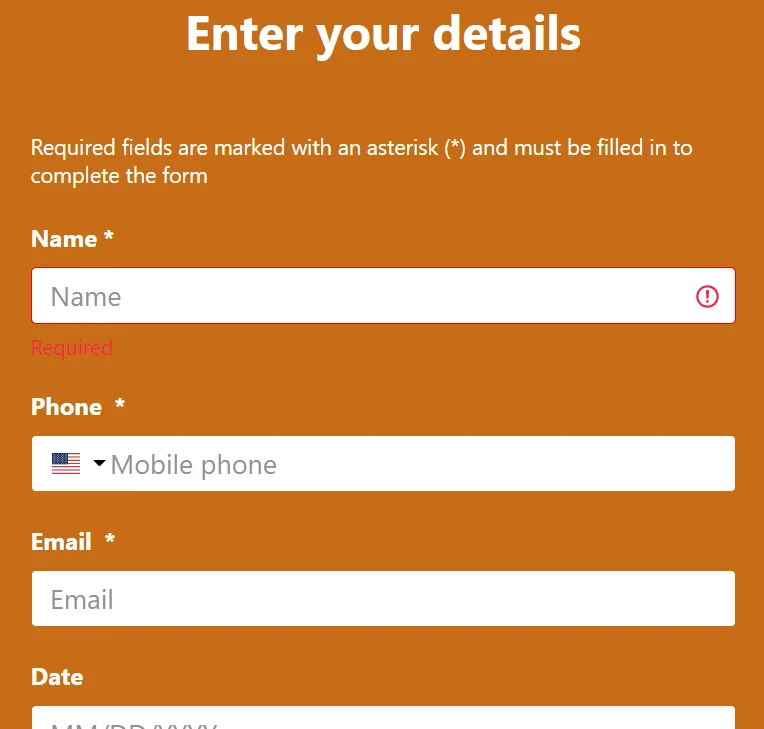
When you click the register button, the business owner invites you to provide some information, and after you send the form you are added to the waiting list.
What surprised me was that, as an anonymous user, I could see the names of the previous and next persons waiting. That should not be visible to an anonymous visitor, so I opened Firefox developer tools to see how the list of waiting people was retrieved.
Exploitation
Step 1: Inspect the request that loads the queue
Firefox developer tools showed that a subsequent request was sent to the API:
https://api.company.com/v2/public/visits/nameofmywaitinglist?limit=200
The API returns a JSON object with the list of the 200 first people waiting, and it exposes all the information those people provided on the registering page. The endpoint sits under /v2/public/.
Step 2: Find real waiting lists
My own data was not real, so I looked for real waiting lists. This was easy because every waiting list is hosted at a predictable URL:
https://company.com/l/nameofmywaitinglist
I used Google dorking to retrieve public waiting lists:
site:company.com inurl:/l/
Step 3: Read the exposed data
For a lot of the waiting lists I found, the most interesting data exposed was:
- First name
- Last name
- Address
- Phone number
The API exposes all the information those people provided on the registering page. The severity depends entirely on the sensitivity of the business. For example, I was able to retrieve a lot of health information for health institutions that required patients to provide personal health information.
Root cause
The public API endpoint that serves the waiting list returns the full set of fields submitted by each person in the queue, not just the minimum needed to display the queue. The lists are discoverable through search engines, so a visitor can pull the records of lists they can find.
Impact
An anonymous visitor can retrieve the personal data of people waiting in public waiting lists they can find. In the cases I found, that included first name, last name, address and phone number, and for health institutions it included personal health information. The real severity depends on the sensitivity of the business running the list: a hair salon and a health institution expose very different things through the same feature.
Fix
I reported the issue and within 2 business days I had a positive answer for a 150 USD reward.
A few weeks later a new version was released that allows business owners to encrypt fields of the registration form. In my view this is not a true solution, because the APIs are still very talkative and business owners often do not encrypt sensitive data. In my view the API still returns too much, and business owners often do not encrypt sensitive data.
Variants to test
- Look for public, unauthenticated API endpoints that back a public-facing page and check whether they return more fields than the page displays. A positive result is a JSON response containing fields such as address, phone number or free-text notes that never appear in the UI.
- Try the
limitparameter with larger values than the UI uses, and check whether the server caps it. A positive result is a response with more records than the page ever requests. - Enumerate list or record identifiers through search engine dorks on the public URL pattern, then request the corresponding API resource anonymously. A positive result is real user data returned without a session.
- Check whether the same endpoint is reachable on older or alternate API versions and hostnames in scope, such as a
v2subdomain, without authentication. A positive result is the same data returned by a host the developers may have forgotten to protect. - For multi-tenant SaaS features, register as a business owner, create a record, and confirm whether other tenants' records can be read through the same public endpoint. A positive result is data belonging to a list you do not own.
What happened, in plain words
A small company runs a website that lets businesses (for example a hair salon) create a virtual waiting list. Customers open a public page, put themselves in the queue and type in some details about what they want. The page is public on purpose, because anyone should be able to join the queue.
The problem was that the page asked a server behind the scenes for the list of people waiting, and that server exposed all the information those people provided on the registering page. Anyone visiting the page, without logging in, could see the names of the people before and after them in the queue. By searching Google for other businesses using the same service, the researcher found many more lists and could read the same details for a lot of them. For health institutions, that included personal health information.
The researcher reported it and received a 150 USD reward within two business days. A later version of the product lets business owners encrypt fields of the registration form, but the researcher does not consider that a real fix.
Background: what the product does
The service is a SaaS application. SaaS means "software as a service": instead of installing a program, a business signs up on a website and uses it there. Picture a hair salon manager. They log in, create a waiting list, and share its public link with customers. A customer opens the link, sees their position in the queue, and clicks a button to register. The form then asks for some information, for example "I want to change my hair colour".
The important design point is that these waiting lists are public by design. Anyone with the link can join, so the page itself is not secret. What should stay private is the information each person submits.
The bug bounty program (a company's offer to pay researchers who report security problems) covered these addresses:
- company.com
- v2.company.com
- api.company.com
- app.company.com
The scope of the program was these addresses. Staying inside the agreed list is a basic rule of bug bounty work.
How the researcher got started
This was one of the researcher's first bug bounty findings. At the time they did not want to spend weeks on the famous, crowded bug bounty programs, and they were not chasing rewards. So they picked a program that was not listed on the well-known bug bounty platforms, hoping that fewer researchers had already looked at it. Fewer eyes on a target means a better chance of finding something that others missed.
After some Google dorking, they found this SaaS application. Google dorking means using special search operators in Google to find pages that match a pattern, rather than searching for ordinary words. It is a way of asking a search engine to list pages that share a structure.
The researcher then started using the app as a business owner, to understand how the waiting list system works. No special tooling was needed for the discovery: they used Firefox developer tools rather than Burp Suite. Firefox developer tools are built into the browser: you press a key, a panel opens, and you can see every request the page makes and every response it receives. Burp Suite is a separate program that does the same kind of inspection for security testing. The researcher started using the app as a business owner and published a waiting list of their own.
Finding it
After publishing and playing with their first waiting list, the researcher understood how simple the system is. A waiting list shows your position in the queue, and lets you register.
The screenshot shows a waiting list page: you can see your position in the waiting list, and you can register.
When you click the register button, the business owner invites you to provide some information, and after you send the form you are added to the waiting list.
The second screenshot shows the registration form that appears after clicking the register button.
What surprised the researcher was that, as an anonymous user, they could see the names of the previous and next persons waiting. Anonymous means not logged in: an ordinary visitor with no account. Those names should not be visible to an anonymous visitor, so the researcher opened Firefox developer tools to see how the list of waiting people was retrieved.
Exploitation
Step 1: Inspect the request that loads the queue
Firefox developer tools showed that a subsequent request was sent to the API:
https://api.company.com/v2/public/visits/nameofmywaitinglist?limit=200
Line by line:
https://is the secure web protocol. The browser and the server encrypt the traffic so nobody in between can read it.api.company.comis the host. An API (application programming interface) is the part of a service that answers requests with data rather than with a web page. Think of it as the kitchen of a restaurant: the page you see is the dining room, and the API is where the actual orders are prepared and handed back. Here the API lives on its own subdomain, separate from the main website./v2/public/visits/is the path.v2suggests a second version of the API.nameofmywaitinglistis the identifier of the waiting list. Each list has its own name in the address, so the address tells the server which queue you want.?limit=200is a parameter. Everything after the question mark is extra information sent with the request. Here it asks for the first 200 entries.
The API returns a JSON object with the list of the 200 first people waiting, and it exposes all the information those people provided on the registering page. JSON is a plain text format for structured data: curly braces, names in quotes, and values. It is how one program hands data to another in a form both can read.
The endpoint sits under /v2/public/. Authentication means proving who you are, usually by logging in. A public endpoint does not ask for that proof at all.
Step 2: Find real waiting lists
The researcher's own data was not real, so they looked for real waiting lists. This was easy because every waiting list is hosted at a predictable URL:
https://company.com/l/nameofmywaitinglist
Line by line:
company.comis the main website, the one customers see./l/is a fixed path prefix. Every waiting list lives under it, followed by the list's name. Because the pattern never changes, once you know one list address you know the shape of all of them.
To find lists belonging to real businesses, the researcher used Google dorking:
site:company.com inurl:/l/
Line by line:
site:company.comtells Google to return only results from that domain.inurl:/l/tells Google to return only pages whose address contains/l/.
Together they ask Google for pages on the target site that sit under the waiting list path, so the results are pages that belong to real businesses using the service. The researcher did not have to guess list names one by one: the search engine did the listing.
Step 3: Read the exposed data
For a lot of the waiting lists found this way, the most interesting data exposed was:
- First name
- Last name
- Address
- Phone number
The API exposes all the information those people provided on the registering page. The severity depends entirely on the sensitivity of the business. For example, the researcher was able to retrieve a lot of health information for health institutions that required patients to provide personal health information.
This is why the same technical flaw can be minor for one customer and serious for another. A hair salon leaking a first name and a phone number is a privacy problem. A clinic leaking what a patient needs treatment for is a much bigger one.
Root cause
The public API endpoint that serves the waiting list returns the full set of fields submitted by each person in the queue, not just the minimum needed to display the queue. The lists are discoverable through search engines, so a visitor can pull the records of lists they can find. Enumerable means you can list them all out, one after another, instead of having to know a secret name in advance.
In everyday terms: the page only needs to show a name and a position, but the server behind it hands over the whole form. The page hides the rest, but hiding something on screen is not the same as not sending it. Anyone who opens the developer tools can read what actually arrived.
Impact
An anonymous visitor can retrieve the personal data of people waiting in public waiting lists they can find. In the cases found, that included first name, last name, address and phone number, and for health institutions it included personal health information. The real severity depends on the sensitivity of the business running the list: a hair salon and a health institution expose very different things through the same feature.
Fix
The researcher reported the issue and within 2 business days had a positive answer for a 150 USD reward.
A few weeks later a new version was released that allows business owners to encrypt fields of the registration form. Encryption means scrambling data so that only someone with the right key can read it. In the researcher's view this is not a true solution, because the APIs are still very talkative and business owners often do not encrypt sensitive data. In the researcher's view the API still returns too much, and business owners often do not encrypt sensitive data.
Variants to test
These are patterns to look for on other targets, written for someone starting out:
- Look for public, unauthenticated API endpoints that back a public-facing page and check whether they return more fields than the page displays. A positive result is a JSON response containing fields such as address, phone number or free-text notes that never appear in the UI. The UI is the part you see on screen; the API response is what the browser actually received.
- Try the
limitparameter with larger values than the UI uses, and check whether the server caps it. A positive result is a response with more records than the page ever requests. If the page asks for 20 and the server happily returns 2,000, the server is not protecting the data. - Enumerate list or record identifiers through search engine dorks on the public URL pattern, then request the corresponding API resource anonymously. A positive result is real user data returned without a session. A session is the state of being logged in; without one, the server should treat you as a stranger.
- Check whether the same endpoint is reachable on older or alternate API versions and hostnames in scope, such as a
v2subdomain, without authentication. A positive result is the same data returned by a host the developers may have forgotten to protect. Old versions are often left running after a new one ships. - For multi-tenant SaaS features, register as a business owner, create a record, and confirm whether other tenants' records can be read through the same public endpoint. A positive result is data belonging to a list you do not own. Multi-tenant means one service shared by many separate customers; each customer's data should stay separate.
Glossary
- Anonymous: not logged in; a visitor with no account and no proof of identity.
- API: the part of a service that answers requests with data instead of web pages; the kitchen behind the dining room.
- Authentication: proving who you are, usually by logging in.
- Bug bounty program: a company's offer to pay researchers who report security problems in its systems.
- Burp Suite: a separate program used to inspect and modify web traffic during security testing.
- Encryption: scrambling data so only someone with the right key can read it.
- Endpoint: a specific address on a server that accepts requests, such as a particular API path.
- Enumerable: able to be listed out one by one, rather than requiring a secret name in advance.
- Firefox developer tools: panels built into the Firefox browser that show the requests a page makes and the responses it receives.
- Google dorking: using special search operators to find pages that match a pattern.
- Host: the server name in an address, such as
api.company.com. - Identifier: the name or value that tells the server which specific item you want, such as a waiting list name.
- JSON: a plain text format for structured data, using braces, quoted names and values.
- Multi-tenant: one service shared by many separate customers, whose data should stay separate.
- Parameter: extra information sent with a request, after the question mark in the address, such as
limit=200. - Path: the part of an address after the host, such as
/v2/public/visits/. - PHI / PII: personal health information and personally identifiable information; data that identifies a person or describes their health.
- Public endpoint: an address that answers requests without requiring a login.
- SaaS: software as a service; a program used through a website instead of being installed.
- Session: the state of being logged in during a visit.
- Severity: how serious a security problem is, which depends on what data is exposed and to whom.
- UI: the user interface, the part of a page you see and interact with on screen.