How I compromised 1500 accounts/month with no technical skill
Airlines sent SMS feedback links containing survey URLs with reservation details, including the booking reference (PNR) and passenger last name, which are also the credentials for the airline's web application. Anyone reading those SMSs on a public phone-number site could log in to passengers' bookings and access personal data or take over accounts.

For the past few months, I investigated what I call Public SMS Service (PSS), which are simple websites proposing virtual phone numbers for free, to receive SMSs e.g. SMS To Me.
The full write-up lives on its author's site
It belongs to its author, so we link to it rather than copy it. The other two tabs are our own rewrites, checked against it.
Context
Public SMS Services (PSS) are websites that hand out virtual phone numbers for free so that anyone can receive SMS messages on them, for example SMS To Me. People use them for testing and for privacy, but every message received on such a number can be read by anyone who visits the site. The researcher spent several months reading those messages, and this article is about what that habit turned up: a survey link sent by an airline that carried enough reservation data to log into the airline's web application.
The target is referred to throughout as AirLine. The survey itself is hosted on Qualtrics, a SaaS product used to build surveys and forms. The feature under scrutiny is the feedback SMS: a short thank-you message with a link to a satisfaction survey.
Setup
No accounts, roles or product versions are described. The only precondition is access to a public SMS receiving site. The researcher chose https://receive-smss.com/ because it was easy to automate, and built a Python Flask web app, SMS Explorer, to parse and analyse the messages found there.
The app does three things:
- It collects all SMSs and extracts URLs (and domains).
- It analyses domains and tags them as interesting.
- It automates data collection by navigating to URLs.
The simplified database scheme from the report:
# SMSid | content | url | has_data1 | Hello, [...] | https://domain1.net/some/path | True2 | Hello, [...] | https://domain2.net/some/path | True3 | Hello, [...] | https://domain3.net/some/path | False4 | Some ad | - | False# TARGETSid | domain | is_interesting | is_automated1 | domain1.net | True | True2 | domain2.net | True | True3 | domain3.net | True | False# DATAid | url | data1 | https://domain1.net/some/path | {"some":"json"}2 | https://domain2.net/some/path | {"some":"json"}
After adding metadata and letting it run for a few weeks, the interface looked like this.
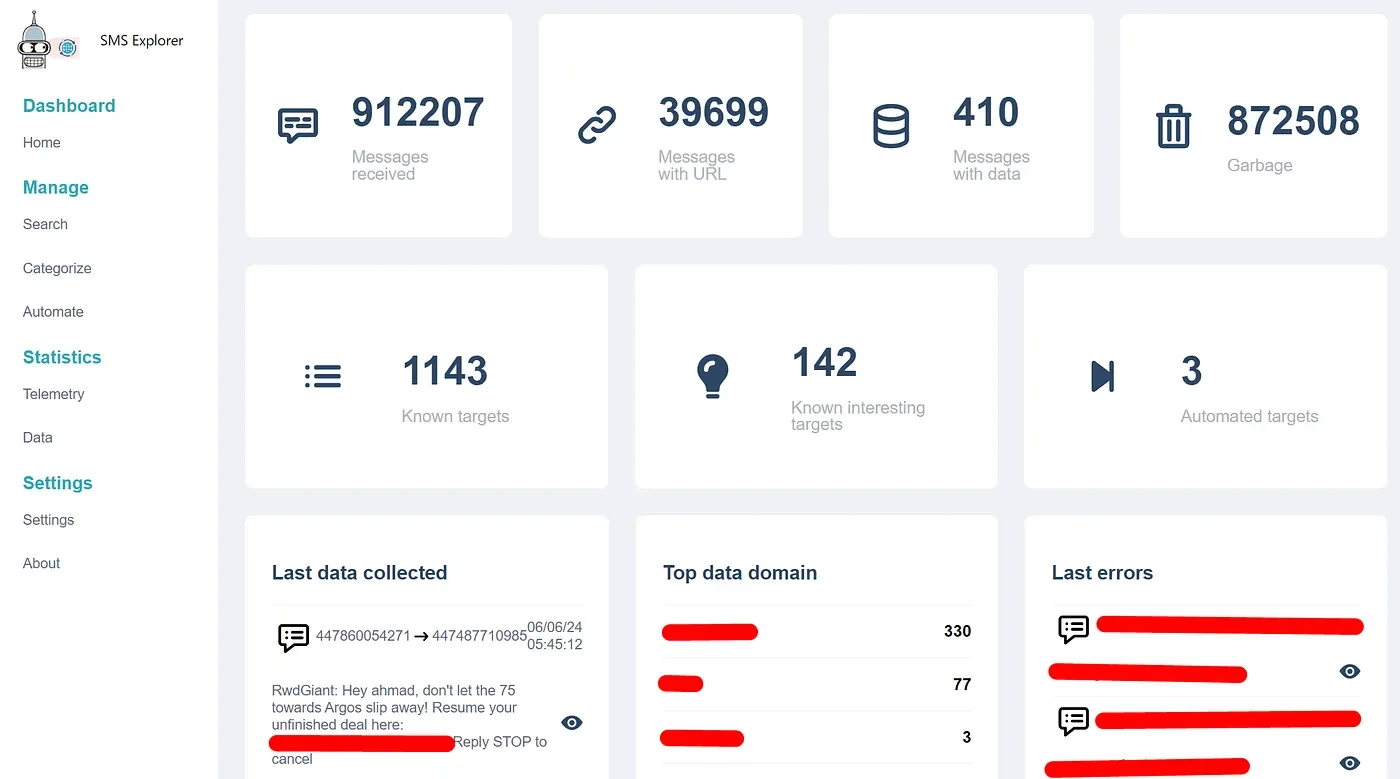
Some statistics from the collected corpus:
- 4% of SMSs contain a URL; the remaining 96% are mainly garbage.
- The SMS rate is approximately 2200 SMS/hour.
- Most SMSs arrive on UK phone numbers, but once the count is divided by the number of numbers available per country, Indian numbers are the most active.
- More than 50% of SMSs containing a URL are scams or ads.
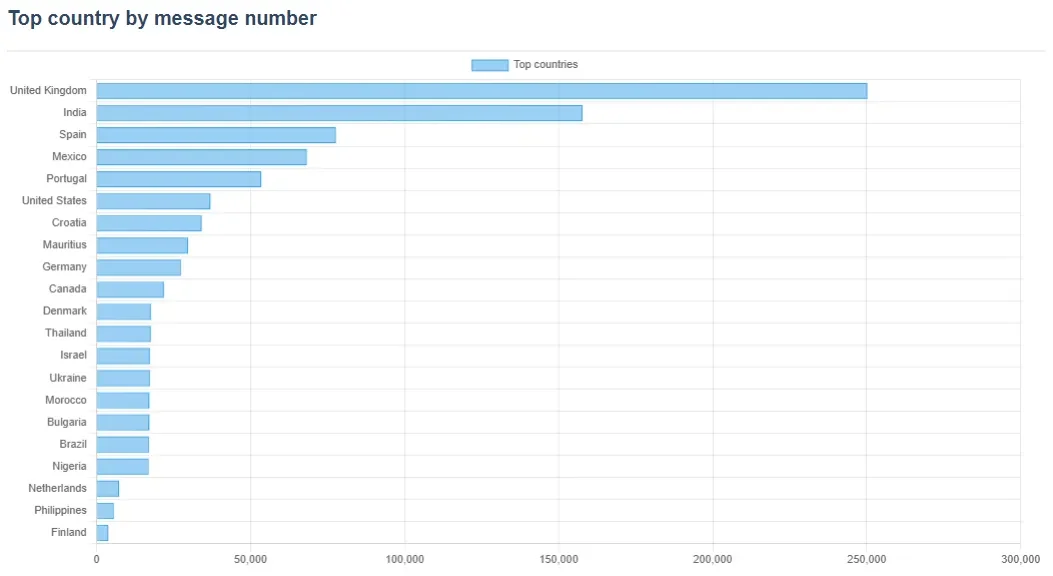
The researcher collected millions of SMSs at different stages of development and notes that analysing every target takes a tremendous amount of time, so the share of URLs that lead to data leaks or account takeovers is not known.
Finding it
What started the whole investigation was a single message of the kind that should never reach a public inbox:
Hi [redacted], your new access code is 458953. You can now connect on https://REDACTED.com.

Free credentials!
The researcher configured an anonymisation pipeline and logged into the account. It belonged to a cryptocurrency application that let users reach their different wallets, and it exposed personal information plus a significant amount of 65 Bitcoins. Three hypotheses were considered:
- Human mistake: the owner used a PSS without understanding the consequences.
- Development environment: the account is not real, or is a test account with mock data.
- Aggressive honeypot: the message leaks the three pieces of information needed to log in (website, username and password), which seemed too obvious to be genuine.
The domain had been created three months earlier and not all features were implemented, so it was probably a development environment.
The general risk is that a user who registers on an application with a public number does not know what the application will later send there: a password reset URL, a URL leaking information such as an order summary, or a URL that grants an authenticated session on the account.
Exploitation
Step 1: search the corpus for the airline pattern
Working on the final version of SMS Explorer, the researcher picked a case observed a few days earlier, AirLine. A quick search returned a list of hundreds of SMSs looking like this:
Thank you for flying with us. Please, rate your experience : https://sub.airline.tld/rEDaCt3d, AirLine

SMS Explorer, Search feature
Step 2: follow the link to the survey
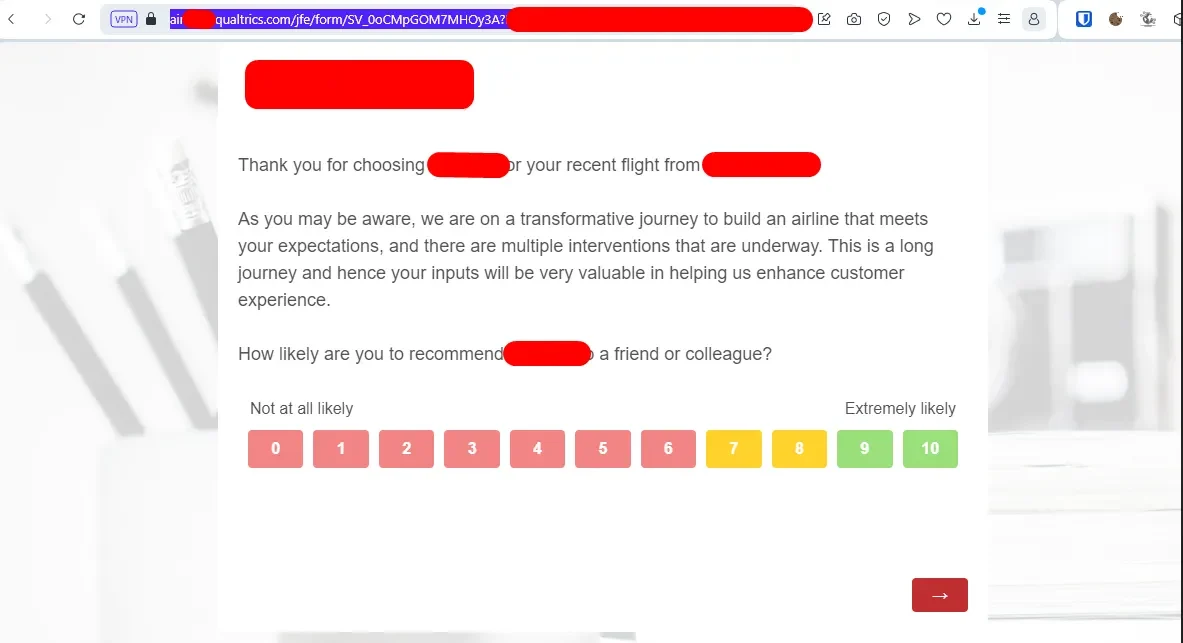
Navigating to the URL redirects to a survey hosted at https://airline.qualtrics.com. The URL looks like this:
https://airline.qualtrics.com/jfe/form/Un1Qu3_1D3nt1f13R?param1=a&par[…]
Step 3: read the parameters
The URL carries a full set of reservation-related parameters, summarised in the report's table.
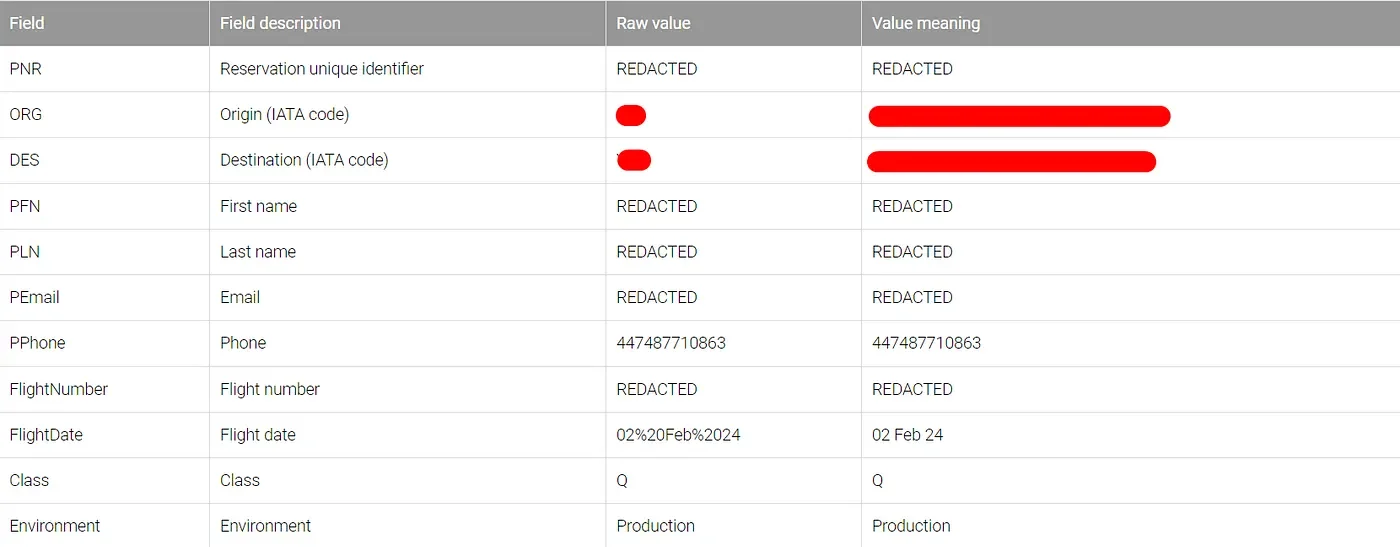
Qualtrics parameters
The values were cross-checked against web apps such as https://flightstats.com/. Beyond the personal information, which is a data leak on its own, two fields stand out: PNR (Passenger Name Record) and PLN (Passenger Last Name). These are the credentials used to log into the AirLine web application, as with many airlines.

Credentials!
Step 4: log in with PNR and last name
Using the PNR and PLN from the survey URL, the researcher reached the booking. The information available is shown below.
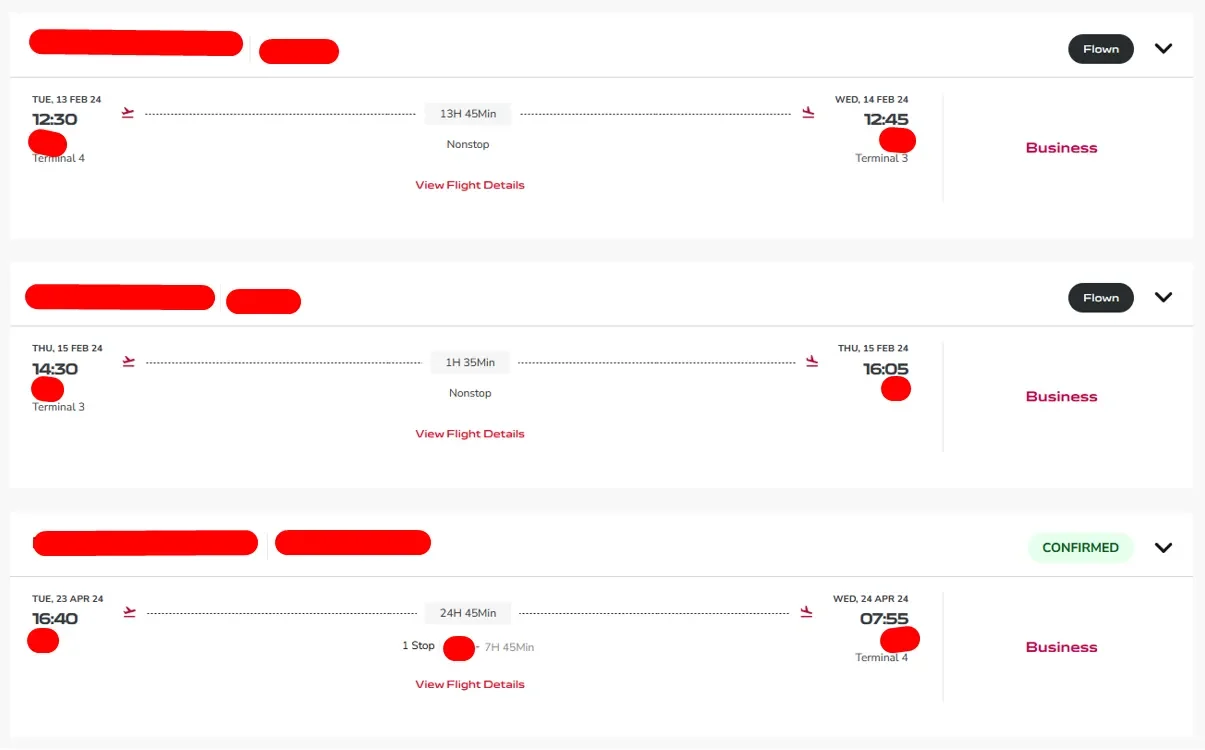
List of flights for a given PNR
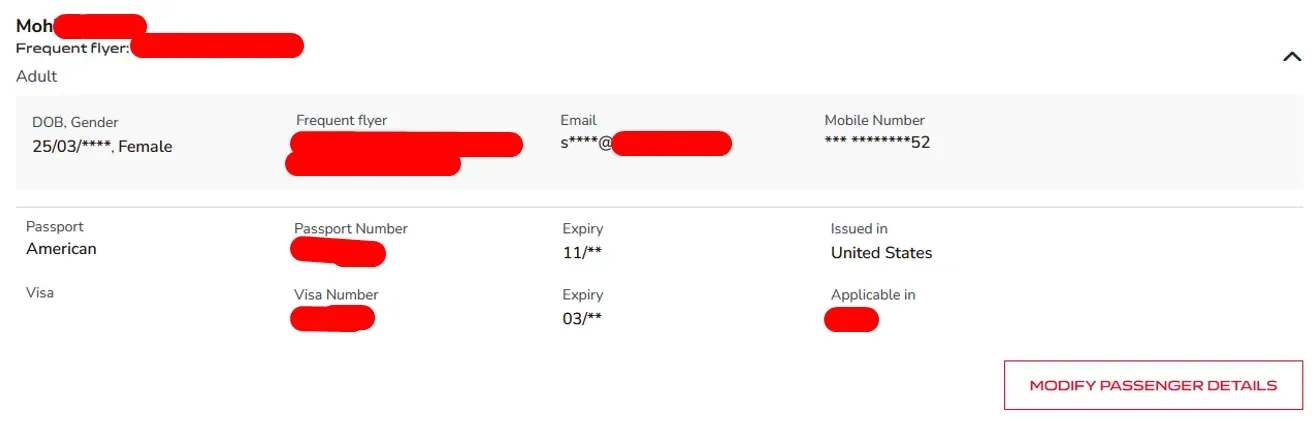
PNR detailed information
Some fields are obfuscated with stars in the interface, but they are in clear text in the session storage. The only thing that cannot be retrieved is the payment card information.
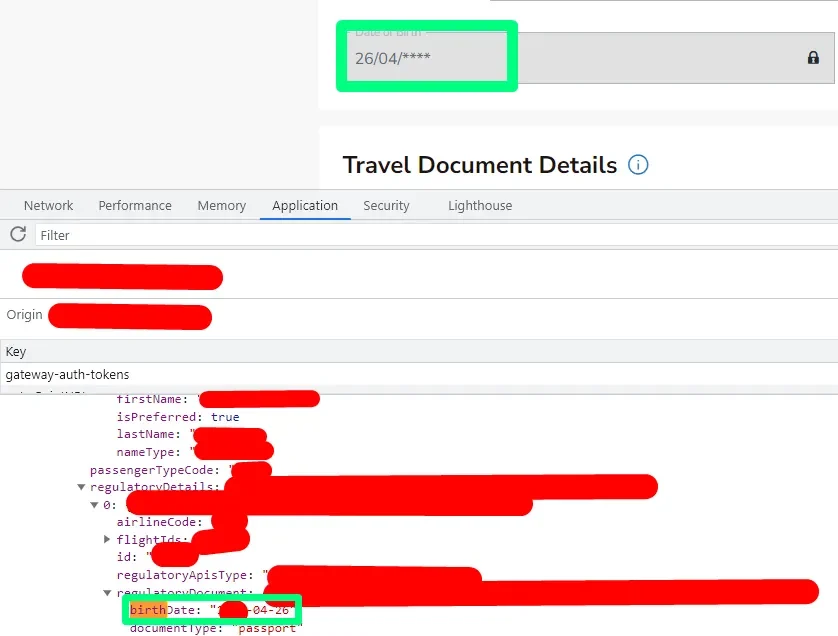
Session storage data
Root cause
The survey is built so that it reads its answers from URL parameters, a pattern Qualtrics approves of. The mistake is the number of parameters passed: the link carries the reservation data, including the two values that double as login credentials, so anyone who obtains the link can authenticate. The link is delivered by SMS, and when the receiving number is a public one, the link is effectively published.
Impact
An attacker can connect and manage flights, even after the flight has taken place. Once connected, the report lists the following:
- Access more data, such as birth date and future and past flights.
- Take over the account by editing contact details and resetting the password.
- Contact AirLine support to change the flight (first name, last name and so on), which would let an attacker pay only for a change rather than a flight, though it may be very expensive.
- Add extra services and cause a price increase for the end customer; the real user may need to re-validate payment, so this one is uncertain.
The researcher started collecting SMSs about 6 months before writing and estimates 1500 leaked users per month, which gives at least 9000 records leaked. A detail worth noting: the survey is meant to collect feedback about reservation, check-in, in-flight meal, arrival and exit, but it appears to be sent immediately after tickets are bought, before the flight date.
Fix
To understand how the survey works, the researcher built a test survey that reads a URL parameter Name and displays its value in the first question, with examples for Molx and Bender. Passing parameters this way is approved by Qualtrics; the problem is how many are passed. The PNR alone would be enough for AirLine to match its travellers database and prevent accounts from being compromised.
On the disclosure side, the researcher contacted a national CERT, which quickly acknowledged. The issue took a few months to fix. At the time of writing no SMS asking for feedback was visible any more, though new SMSs are expected to be sent, safely it is hoped.
A final point from the report: although using public phone numbers to register is a user mistake, such numbers can be filtered at registration. When no data is leaked, using a public number remains a good way of improving end-user privacy.
Variants to test
- Survey and feedback links in SMS: collect messages that contain a URL and open each one. A positive result is a form pre-filled from URL parameters with identifiers, names, booking references or contact details.
- Credential-shaped parameters: look for short reference codes paired with a surname, booking ID, order number or ticket number. A positive result is a pair that the target's login or booking lookup accepts.
- Hidden fields in the rendered page: compare what the interface shows with what the browser stores. A positive result is starred or masked values present in clear text in session storage or in the page source.
- Cross-checking leaked values: validate flight, booking or order data against independent services to confirm the records are real rather than test data.
- Registration phone filtering: check whether an application accepts numbers from public SMS sites at sign-up. A positive result is a successful registration on a number whose inbox is publicly readable.
- Message timing: note when feedback or survey messages are sent relative to the transaction. A positive result is a message sent immediately after purchase, widening the window in which the link is live and readable.
What happened, in plain words
A security researcher spent several months reading text messages that were never meant for them. Not by breaking into a phone company, but by visiting websites that give out free, public phone numbers so that anyone can receive SMS on them. Because those inboxes are public, every message that lands on one can be read by any visitor.
Most of what arrives there is junk. But one day the researcher saw a message containing an email address, an access code and a login link. That led to a cryptocurrency account. Later, a different kind of message turned up: an airline thanking a passenger for flying and asking them to rate the experience, with a link to a survey. The link carried the passenger's booking details in the address itself, and two of those details were exactly what the airline's website asks for when you log in. Anyone who could read that message could open the link, read the booking, and sign in to the passenger's account.
This article walks through how that was found, what it means, and how it was addressed, explaining each idea from scratch along the way.
A little bit of context
What a Public SMS Service is
A Public SMS Service (PSS) is a website that hands out virtual phone numbers for free. You pick a number, and any SMS sent to it appears on a public web page. Examples include SMS To Me. People use these numbers for testing (for example, to receive a verification code without giving away their real number) and for privacy.
The catch is in the name: public. There is no password on the inbox. Anyone who opens the site can read every message that arrives on that number, including yours.
Think of it like a shared letterbox in the hallway of a building. You can have post delivered there, but so can everyone else, and everyone can open the flap and look inside.
Why the researcher was reading them
If you browse SMS To Me or similar sites, you will mostly see nothing sensitive. So why spend months reading? Because one message stood out:
Hi [redacted], your new access code is 458953. You can now connect on https://REDACTED.com.
Free credentials!
That single message contains three things at once: the address of a website, a username (the email address) and a password (the access code). In security terms, those are credentials, the pieces of information you use to prove an account is yours. The image shows the message as it appeared in the public inbox.
What happened next
The researcher set up what the report calls an anonymisation pipeline and logged into the account. An anonymisation pipeline, in plain terms, is a set of steps that hides who is doing the looking: for example, routing traffic through other machines so the website does not see the researcher's real location. The report does not describe the pipeline in more detail.
The account belonged to a cryptocurrency application, a site where users reach their different wallets. A wallet is the part of a crypto service that holds a user's coins. The researcher could see personal information and a significant amount of 65 Bitcoins.
Before going further, the researcher considered three explanations:
- This is a human mistake. The owner used a public SMS service without realising the consequences.
- This is a development environment. A development environment is a copy of a website used for building and testing, not for real customers. The account might be fake, or a test account filled with mock data.
- This is some kind of aggressive honeypot. A honeypot is a trap: a fake system set up to attract intruders and watch what they do. Because the message leaked all three things needed to log in, it seemed too obvious to be genuine.
In the end, the domain had been created three months earlier and not all features were implemented, so it was probably a development environment. The researcher moved on.
The security risk for ordinary users
People sometimes register on websites with a public number to avoid sharing their real one. The report is blunt about this: this is a mistake. As an end user, you do not know what an application will later send to that number:
- An SMS with a password reset URL. A password reset URL is a special link that lets whoever opens it set a new password for the account.
- An SMS with a URL that leaks information, for example an order summary.
- An SMS with a URL that opens the account already logged in.
Any of those, landing in a public inbox, hands your account to a stranger.
SMS Explorer
That first message caught the researcher's attention, so they built a tool to find more. It is a Python Flask web app called SMS Explorer. Two terms there:
- Python is a programming language, a way of writing instructions a computer can run.
- Flask is a toolkit for Python that makes it easy to build a small website or web service.
A web app is simply a program you use through a browser rather than installing on your computer.
The tool reads messages from https://receive-smss.com/, chosen because it was easy to automate. To automate something means to have a program do it repeatedly, without a person clicking each time.
The app does three things:
- It collects all SMSs and extracts URLs (and domains).
- It analyses domains and tags them as interesting.
- It automates data collection by navigating to URLs.
A URL is a web address, the thing you type in the browser bar. A domain is the main part of that address, the bit that identifies the site, such as example.com. Extracting them means pulling the addresses out of the message text so the program can work with them as links rather than as words.
Here is the simplified database scheme from the report:
# SMSid | content | url | has_data1 | Hello, [...] | https://domain1.net/some/path | True2 | Hello, [...] | https://domain2.net/some/path | True3 | Hello, [...] | https://domain3.net/some/path | False4 | Some ad | - | False# TARGETSid | domain | is_interesting | is_automated1 | domain1.net | True | True2 | domain2.net | True | True3 | domain3.net | True | False# DATAid | url | data1 | https://domain1.net/some/path | {"some":"json"}2 | https://domain2.net/some/path | {"some":"json"}
What this shows, piece by piece:
- A database is an organised store of information, like a set of spreadsheets the program can search. A scheme here means the layout: which tables exist and which columns each one has.
- The first table,
SMS, keeps one row per message.idis a unique number for the row.contentis the message text.urlis the address found inside it, or-when there is none.has_datais a yes/no flag (TrueorFalse) recording whether opening that address produced any data. - The second table,
TARGETS, keeps one row per domain the tool has seen.is_interestingrecords whether the domain looked worth following.is_automatedrecords whether the tool is set to visit it automatically. - The third table,
DATA, stores what was collected.urlis the address that was visited, anddataholds the result, shown here as{"some":"json"}. JSON is a common text format for structured data, a way of writing information so a program can read it back reliably.
After adding some metadata and waiting a few weeks, the interface looked like this.
Metadata means data about the data: extra labels such as when a message arrived or which country its number belongs to. The screenshot shows the tool's interface after it had been running and gathering material for a while.
Some statistics
Before getting to the data leak, the report gives numbers from the collected messages:
- 4% of SMSs contain a URL; the remaining 96% are mainly garbage.
- The SMS rate is approximately 2200 SMS/hour.
- Most SMSs are received on UK phone numbers. But if you divide that count by the number of phone numbers available per country, Indian phone numbers are the most active.
- More than 50% of SMSs that contain a URL are scams or ads.
The last point is worth pausing on. A scam is a message trying to trick you, for example into paying or handing over details. An ad is unsolicited marketing. So of the small slice of messages that contain a link, most are not worth following at all.
The researcher collected millions of SMSs at different stages of the tool's development. Analysing every target takes a tremendous amount of time, so the report cannot say what share of URLs lead to data leaks or account takeovers.
The airline hack
Two notes before starting:
- The researcher began collecting SMSs about 6 months earlier and estimates 1500 leaked users per month, which gives at least 9000 records leaked.
- Because the matter was still confidential, the company is called AirLine throughout.
Step 1: search the collected messages
While working on the final version of SMS Explorer, the researcher picked a case seen a few days earlier: the AirLine case. A quick search returned a list of hundreds of SMSs looking like this:
Thank you for flying with us. Please, rate your experience : https://sub.airline.tld/rEDaCt3d, AirLine
SMS Explorer, Search feature
This is an ordinary-looking feedback message: a thank-you, a request to rate the flight, and a link. The screenshot shows the search feature of SMS Explorer returning a batch of these messages. The reason to search for them is that a feedback link is a link a company sends to a customer, and it often carries information about that customer so the survey can be tied to their booking.
Step 2: follow the link
Opening the URL redirects to a survey hosted at https://airline.qualtrics.com.
A redirect is when one web address automatically sends your browser to another. Qualtrics is a SaaS product. SaaS stands for Software as a Service: software you use over the internet instead of installing, like webmail. Qualtrics is used to create various things, including surveys. So AirLine did not build the survey itself; it used Qualtrics to host it.
The URL looks like this:
https://airline.qualtrics.com/jfe/form/Un1Qu3_1D3nt1f13R?param1=a&par[…]
To read that address, split it at the question mark. Everything before the ? identifies the page: the site (airline.qualtrics.com), then a path to a form with an identifier (Un1Qu3_1D3nt1f13R). Everything after the ? is the query string, a list of parameters: name-and-value pairs joined by &. In the visible part, param1=a means the parameter named param1 has the value a. The […] shows the address continues beyond what is printed.
Parameters are how a website can be told things through its address alone. A familiar everyday example is a search engine: the address after you search contains your search words as a parameter. That is convenient, but it also means anything placed in the address travels with the link wherever it is shared.
Step 3: read the parameters
The URL carries a full set of reservation-related parameters, summarised in the report's table.
Qualtrics parameters
The table lists the parameters found in the link. The values were cross-checked against web apps such as https://flightstats.com/, a service that shows flight information. Cross-checking matters: it confirms the data describes real flights rather than test data.
Beyond the personal information, which is a data leak on its own, two fields stand out: PNR (Passenger Name Record) and PLN (Passenger Last Name).
- A PNR is the short reference code an airline gives a booking. It identifies the reservation.
- The PLN is simply the passenger's surname.
These two are the credentials used to log into the AirLine web application, as with many airlines. In other words, the survey link contained a username and a password in plain sight.
Credentials!
Step 4: log in with the PNR and last name
Using the PNR and last name taken from the survey URL, the researcher reached the booking. The information available is shown below.
List of flights for a given PNR
PNR detailed information
The first screenshot shows the list of flights attached to a booking; the second shows the detail of that booking. No password cracking, no special tools: the login details were in the link.
Some fields are obfuscated with stars in the interface, but they are in clear text in the session storage. The only thing that cannot be retrieved is the payment card information.
Session storage data
Session storage is a small store inside your browser where a website can keep data for the duration of your visit. It is not shown on the page, but it is not secret either: anyone using the browser can open the developer tools and read it. So masking a value with stars on screen hides it from a casual onlooker, not from someone who knows where to look. The screenshot shows the stored values in clear text.
Why it worked
The survey is built so that it reads its answers from URL parameters, a pattern Qualtrics approves of. The mistake is the number of parameters passed: the link carries the reservation data, including the two values that double as login credentials. Anyone who obtains the link can authenticate.
The link is delivered by SMS. When the receiving number is a public one, the link is effectively published: the message sits in an inbox that anyone can open. The chain is simple: a public inbox exposes the link, the link contains the credentials, the credentials open the account.
Impact
An attacker can connect and manage flights, even after the flight has taken place. Once connected, the report lists the following:
- Access more data, such as birth date and future and past flights.
- Take over the account by editing contact details and resetting the password. Account takeover means gaining lasting control of someone else's account, here by changing where messages go and then resetting the password.
- Contact AirLine support to change the flight (first name, last name and so on), which would let an attacker pay only for a change rather than a flight, though it may be very expensive.
- Add extra services and cause a price increase for the end customer; the real user may need to re-validate payment, so this one is uncertain.
One detail is worth noting: the survey is meant to collect feedback about reservation, check-in, in-flight meal, arrival and exit, but it appears to be sent immediately after tickets are bought, before the flight date. That timing means the link is sent before the flight date.
Fixing the issue
To understand how the survey works, the researcher built a test survey that reads a URL parameter Name and displays its value in the first question, with examples for Molx and Bender.
Those two links do the same thing with different values: the Name parameter at the end of the address is picked up by the survey and shown in the first question. It is a harmless demonstration of the mechanism, and it shows that passing parameters this way is approved by Qualtrics. The problem is not the mechanism but how many parameters are passed. The PNR alone would be enough for AirLine to match its travellers database and prevent accounts from being compromised.
On the disclosure side, the researcher contacted a national CERT, which quickly acknowledged. A CERT is a national team that receives reports of security problems and coordinates the response. The issue took a few months to fix. At the time of writing no SMS asking for feedback was visible any more, though new SMSs are expected to be sent, safely it is hoped.
A final point from the report: although using public phone numbers to register is a user mistake, such numbers can be filtered at registration. When no data is leaked, using a public number remains a good way of improving end-user privacy.
Variants to test
The report closes with a list of things to try on other targets, useful if you want to look for similar problems yourself:
- Survey and feedback links in SMS: collect messages that contain a URL and open each one. A positive result is a form pre-filled from URL parameters with identifiers, names, booking references or contact details.
- Credential-shaped parameters: look for short reference codes paired with a surname, booking ID, order number or ticket number. A positive result is a pair that the target's login or booking lookup accepts.
- Hidden fields in the rendered page: compare what the interface shows with what the browser stores. A positive result is starred or masked values present in clear text in session storage or in the page source.
- Cross-checking leaked values: validate flight, booking or order data against independent services to confirm the records are real rather than test data.
- Registration phone filtering: check whether an application accepts numbers from public SMS sites at sign-up. A positive result is a successful registration on a number whose inbox is publicly readable.
- Message timing: note when feedback or survey messages are sent relative to the transaction. A positive result is a message sent immediately after purchase, widening the window in which the link is live and readable.
Glossary
- Anonymisation pipeline: a set of steps that hides who is doing the looking, for example by routing traffic so a website does not see the real location.
- Account takeover: gaining lasting control of someone else's account, often by changing contact details and then resetting the password.
- Automate: have a program do a task repeatedly without a person clicking each time.
- CERT: a national team that receives reports of security problems and coordinates the response.
- Credentials: the pieces of information used to prove an account is yours, such as a username and password or a booking code and surname.
- Database: an organised store of information that a program can search, like a set of linked spreadsheets.
- Development environment: a copy of a website used for building and testing rather than for real customers.
- Domain: the main part of a web address that identifies the site, such as
example.com. - Flask: a toolkit for the Python language that makes it easy to build a small website or web service.
- Honeypot: a fake system set up to attract intruders and observe what they do.
- JSON: a common text format for structured data, readable by both people and programs.
- Metadata: data about data, such as when a message arrived or which country its number belongs to.
- Parameter: a name-and-value pair in a web address, after the
?, that tells the page something. - Password reset URL: a special link that lets whoever opens it set a new password for an account.
- PLN (Passenger Last Name): the passenger's surname, used together with the PNR to log in to an airline site.
- PNR (Passenger Name Record): the short reference code an airline gives a booking.
- Public SMS Service (PSS): a website that gives out virtual phone numbers whose incoming messages anyone can read.
- Python: a programming language used to write instructions a computer can run.
- Query string: the part of a web address after the
?, holding the parameters. - Redirect: when one web address automatically sends your browser to another.
- SaaS (Software as a Service): software you use over the internet instead of installing, like webmail.
- Scam: a message trying to trick you, for example into paying or handing over details.
- Session storage: a small store inside your browser where a website keeps data for the duration of your visit, readable through developer tools.
- URL: a web address, the thing you type in the browser bar.
- Wallet: the part of a cryptocurrency service that holds a user's coins.
- Web app: a program you use through a browser rather than installing on your computer.