Bug Chain leads to Mass Account Takeover!
A publicly accessible SQL backup exposed user credentials, and the password reset flow allowed setting a new password after only validating username and email, without sending a reset link or OTP. An attacker could combine these to take over any user's account.
 Published on medium.com
I have always thought of finding a P1 or P2 bug to write a medium article which would mean that I have really done some good research and have gotten better at bug hunting. Fortunately, I did some good research and got my hands on few bugs, which I chained, leading to mass account takeover.
The full write-up lives on its author's site
It belongs to its author, so we link to it rather than copy it. The other two tabs are our own rewrites, checked against it.
Context
This write-up covers a chain of bugs found on a private bug bounty program. To keep the program private, the researcher refers to the target throughout as redated.in. The site is a web application with user registration and login, and a password reset feature that is meant to let a user recover access to their account.
The chain combines three separate issues:
- A default SQL data dump left reachable on the web server.
- A password reset flow that validates the account and then lets the requester set a new password directly, without any reset link or OTP.
- The ability to register a new username against an email address that is already in use.
Together these allow an attacker to take over the accounts of all users who have ever registered, and to leave those users unable to recover their accounts.

Setup
The researcher was hunting on a private program as a hobby, with no special role or tooling described. The attack relies on the target exposing the endpoints described below and on the attacker having a victim's username and email address, which the data dump supplies. The data dump supplies exactly that.
Finding it
While testing the website, the researcher came across a few interesting endpoints. Two of them make up the data dump.
Exploitation
Step 1: Trigger and download the backup
The first endpoint is redated.in/backup. Visiting it updated the backup database from the main database and returned a response.
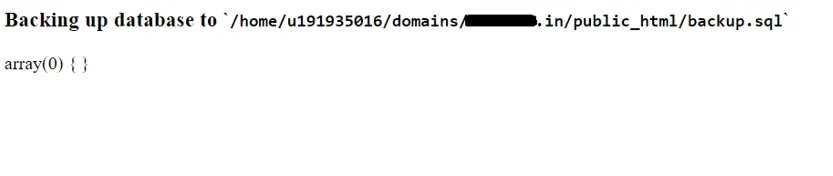
Response of visiting redated.in/backup
The second endpoint is redated.in/backup.sql, which dumped the backed-up data.
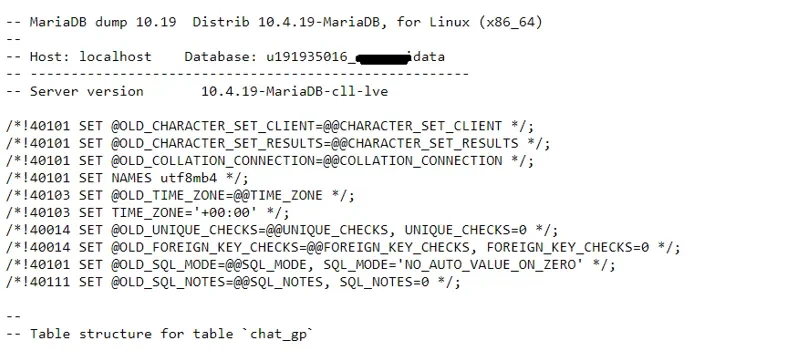
Response of visiting redated.in/backup.sql
The dump contained all users' login information: usernames, passwords (MD5 hashed), and email addresses or phone numbers depending on which mode the user used to register. The researcher confirmed this by locating their own record in the dump, where their username, hashed password value and email appeared.
Step 2: Abuse the password reset logic
When the researcher tried to recover their own account by resetting the password, they found that the reset page takes the username and email to validate whether the account exists. Upon validation, it directly gives an option to set a new password, without sending any password reset link or OTP.
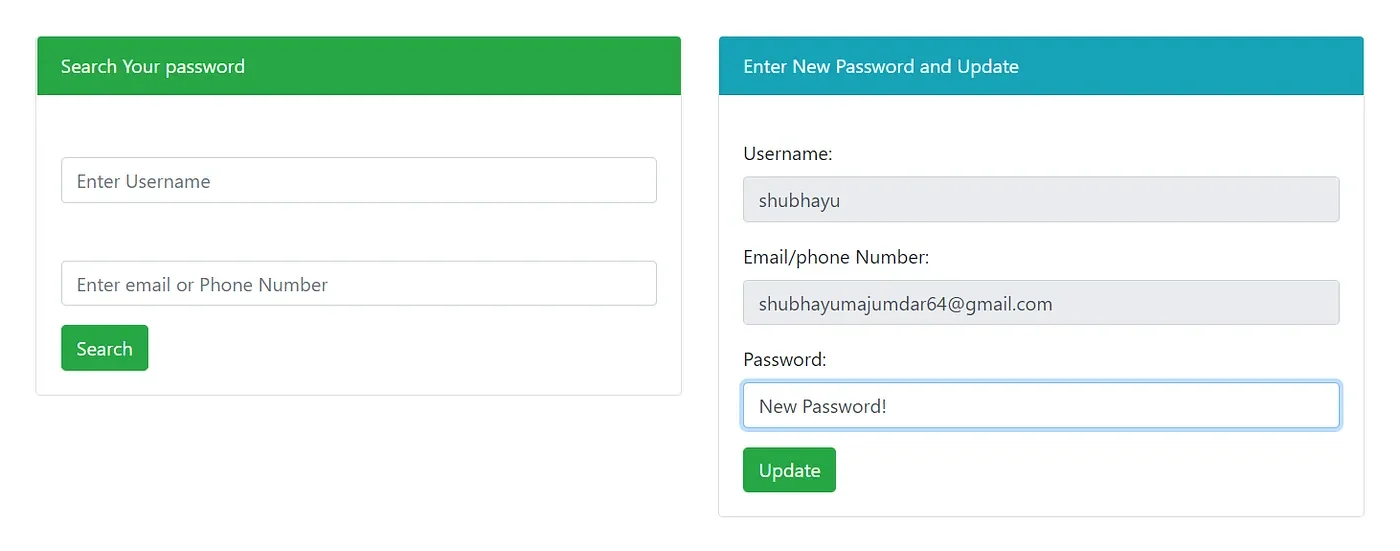
Password reset page of redated.in
Because the only inputs required are the username and email, and both are present in the SQL dump, an attacker can reset the password of any user in the dump.
Step 3: Block recovery with re-registration
The researcher also found that it was possible to register a different username with an already used email. This created a problem: for some reason, both accounts could then no longer reset their passwords. The researcher notes this is a major vulnerability in itself.
Step 4: Chain the bugs
- Pull the victim's username and email address from the SQL data dump.
- Use the password reset page with those values to set a new password and take over the account.
- Register another account with a random username and the same email address as the victim.
Step 3 ensures the victim cannot recover their account via password reset. As the researcher puts it:
Every user who has created an account and every user who would have created their accounts in future are vulnerable to lose their accounts that too permanently.
Root cause
The password reset flow trusts the username and email pair as sufficient proof of ownership. It validates that the account exists and then immediately offers the password change, with no out-of-band secret (reset link or OTP) that only the mailbox or phone owner would receive. Anyone who knows the pair can reset the password.
The SQL dump makes that pair available for every user, and the registration logic does not enforce uniqueness of the email address, which is what allows the attacker to register a second account with the victim's email. The report does not describe the server-side code, so the exact implementation is not shown; the behaviour above is what was observed.
Impact
An attacker can take over the account of every user who has ever created an account on the website, and, by re-registering with the victim's email, prevent those users from recovering their accounts. The researcher states that every existing user and every future user is vulnerable to losing their account permanently. The dump also exposes MD5-hashed passwords; the report does not go into cracking them.
Fix
The researcher suggests two changes:
- Send a password reset link or an OTP during password reset, so that possession of the email or phone is proven before the password can be changed.
- Prevent the creation of multiple accounts with the same email address.
The report does not say whether these fixes were applied.
Variants to test
- Backup endpoints. Try common paths such as
/backup,/backup.sql,/dump.sqland/db.sqlon other targets. A positive result is a response that triggers a backup or returns SQL content. - Password reset without proof of ownership. Submit a username and email to the reset flow and see whether the next step offers a password change without a token or OTP. A positive result is a password change form reachable directly after validation.
- Email uniqueness on registration. Register a second account with an email already in use. A positive result is a successful registration, and ideally a subsequent reset failure for both accounts.
- Reset token predictability. Where a token is used, check whether it is tied to the user and single-use. A positive result is a token that can be reused or guessed.
- Enumeration through reset. Compare responses for existing and non-existing accounts. A positive result is a clear difference that reveals which accounts exist.
What happened, in plain words
A security researcher was testing a website as part of a private bug bounty program. A bug bounty program is an arrangement where a company invites researchers to look for security problems in its systems and rewards them for reporting what they find. Because the program was private, the researcher does not name the real site and calls it redated.in throughout. The site lets people create an account, log in, and reset their password if they forget it.
While testing, the researcher found three separate problems and combined them. Combined, they let an attacker take over the account of every user who had ever registered, and also stop those users from getting their accounts back.
The three problems were:
- A backup of the site's database was left reachable on the web server, so anyone could download it.
- The password reset page checked that an account existed and then simply let the person set a new password, without sending any reset link or one-time code to prove they owned the account.
- It was possible to register a new username using an email address that was already in use by someone else.
The image above is the title card of the write-up: mass account takeover via password reset functionality.
Before going further, a few ideas need explaining, because the whole story depends on them.
What a database is. A database is where a website keeps its records: user accounts, posts, orders, and so on. Think of it as a very large, well organised spreadsheet that the website's software reads from and writes to. Each user's row in that spreadsheet typically holds their username, their email address, and their password.
What a password hash is. Websites should not store passwords as plain text, because anyone who sees the database would then know everyone's password. Instead they store a hash: the result of running the password through a mathematical function that always produces the same output for the same input, but from which you cannot easily work backwards to the original. MD5 is one such function. It is old and fast, which makes it a poor choice for passwords today, because fast functions let an attacker try huge numbers of guesses quickly. The report notes the passwords were MD5 hashed but does not go into cracking them.
What an endpoint is. An endpoint is a specific address on a website that does a specific job. When you type a web address into your browser, you are asking the server at that address to do something and send something back. Some addresses show pages meant for people; others are meant for the site's own software to talk to. Either way, if an address is reachable from the internet, anyone can visit it.
What an account takeover is. An account takeover means an attacker gains full control of someone else's account: they can log in as that person, read their data, and change things. The researcher defines it as gaining unauthorised and full access to the victim's account by exploiting a flaw in how the application checks who you are.
What a password reset flow is. When you forget your password, a site normally proves you own the account before letting you choose a new one. The usual proof is a reset link sent to your email address, or a one-time code (OTP, a short number that is valid once) sent to your email or phone. Only someone who can read that email or phone receives the link or code, so only the real owner can finish the reset. The whole security of the reset rests on that step.
Finding it
The researcher was hunting as a hobby, with no special access or tools described. The attack relies on the site exposing the addresses described below and on the attacker having a victim's username and email address. The database backup supplies exactly that information.
While testing the website, the researcher came across a few interesting endpoints. Two of them together make up the data dump.
Exploitation
Step 1: Trigger and download the backup
The first endpoint is redated.in/backup. Visiting it caused the site to update its backup database from the main database, and returned a response.
This is what a browser sends when you visit that address: a request for the page at /backup on the site redated.in. The important part is what the server did with it. A backup is a copy of a database kept so it can be restored if something goes wrong. Normally, making a backup is an administrative job done from inside the server, not something a visitor can trigger by loading a web page. Here, simply visiting the address updated the backup database from the main database. That is the first flaw: the action was reachable by visiting a public address.
Response of visiting redated.in/backup
The image shows what came back when the researcher visited that address.
The second endpoint is redated.in/backup.sql, which dumped the backed-up data.
Again, this is an ordinary request for the address /backup.sql. The .sql ending is the usual file extension for a file containing SQL, the language used to store and retrieve data in databases. A file with that extension typically holds a series of database commands, or the contents of database tables. Requesting it here returned the backed-up data itself, so the browser downloaded the database contents instead of a web page.
Response of visiting redated.in/backup.sql
The image shows the response to that second request.
The dump contained all users' login information: usernames, passwords (MD5 hashed), and email addresses or phone numbers, depending on which mode the user had used to register. The researcher confirmed this by finding their own record in the dump, where their username, hashed password value and email appeared. Finding your own row is a simple way to be sure the file really is live user data and not a sample or an old copy.
Why does this step matter so much? Because the next two flaws need two pieces of information about a victim: their username and their email address. The dump hands both over for every user at once, in a single download.
Step 2: Abuse the password reset logic
When the researcher tried to recover their own account by resetting the password, they found that the reset page takes the username and email to validate whether the account exists. Upon validation, it directly gives an option to set a new password, without sending any password reset link or OTP.
Password reset page of redated.in
The image shows the reset page: it asks for a username and an email address, and after checking them it offers a field to set a new password.
Think about what this means. The page is asking the visitor to prove they own the account, but the only proof it accepts is knowing the username and the email address. Those are not secrets. Those are not secrets in the way a password or a one-time code is. The step that should prove ownership, sending a link or a code to the real owner's mailbox or phone, is missing entirely. So anyone who knows the pair can set a new password on the account.
Because the only inputs required are the username and email, and both are present in the SQL dump, an attacker can reset the password of any user in the dump. The researcher notes they did not expect a site to have such poor password reset logic.
Step 3: Block recovery with re-registration
The researcher also found that it was possible to register a different username with an already used email. In other words, the sign-up form did not check whether the email address already belonged to an account; it accepted a second account with the same email under a new username.
This created a problem: for some reason, both accounts could then no longer reset their passwords. The report does not explain why; it only records the behaviour. The researcher notes this is a major vulnerability in itself, because it means a victim cannot use the reset feature to get their account back.
Step 4: Chain the bugs
Chaining means using one flaw to make another possible, so that the combined effect is worse than any single one. Here is the chain:
- Pull the victim's username and email address from the SQL data dump.
- Use the password reset page with those values to set a new password and take over the account.
- Register another account with a random username and the same email address as the victim.
Step 1 gives the attacker the two pieces of information the reset page asks for. Step 2 turns that information into control of the account. Step 3 makes sure the victim cannot recover the account via password reset afterwards, because both accounts could then no longer reset their passwords. As the researcher puts it:
Every user who has created an account and every user who would have created their accounts in future are vulnerable to lose their accounts that too permanently.
Root cause
The password reset flow trusts the username and email pair as sufficient proof of ownership. It validates that the account exists and then immediately offers the password change, with no out-of-band secret (reset link or OTP) that only the mailbox or phone owner would receive. Anyone who knows the pair can reset the password.
The SQL dump makes that pair available for every user, and the registration logic does not enforce uniqueness of the email address, which is what allows the attacker to register a second account with the victim's email.
Impact
An attacker can take over the account of every user who has ever created an account on the website, and, by re-registering with the victim's email, prevent those users from recovering their accounts. The researcher states that every existing user and every future user is vulnerable to losing their account permanently. The dump also exposes MD5-hashed passwords; the report does not go into cracking them.
Fix
The researcher suggests two changes:
- Send a password reset link or an OTP during password reset, so that possession of the email or phone is proven before the password can be changed.
- Prevent the creation of multiple accounts with the same email address.
Variants to test
If you want to look for similar problems on sites you are allowed to test, these are the same ideas in a form you can try:
- Backup endpoints. Try common paths such as
/backup,/backup.sql,/dump.sqland/db.sqlon other targets. A positive result is a response that triggers a backup or returns SQL content. - Password reset without proof of ownership. Submit a username and email to the reset flow and see whether the next step offers a password change without a token or OTP. A positive result is a password change form reachable directly after validation.
- Email uniqueness on registration. Register a second account with an email already in use. A positive result is a successful registration, and ideally a subsequent reset failure for both accounts.
- Reset token predictability. Where a token is used, check whether it is tied to the user and single-use. A positive result is a token that can be reused or guessed.
- Enumeration through reset. Compare responses for existing and non-existing accounts. A positive result is a clear difference that reveals which accounts exist.
Glossary
- Account takeover: gaining full control of someone else's account, so you can log in and act as them.
- Backup: a copy of a database kept so it can be restored if the original is lost or damaged.
- Bug bounty program: an arrangement where a company invites researchers to look for security problems and rewards them for reporting them.
- Chaining: combining several separate flaws so that together they achieve something worse than any one alone.
- Database: the organised store where a website keeps its records, such as user accounts.
- Data dump: a file containing the contents of a database, often exported for backup or transfer.
- Email uniqueness: the rule that one email address may belong to only one account.
- Endpoint: a specific web address that performs a specific job on a server.
- Enumeration: learning which accounts exist by comparing how the site responds to real and fake ones.
- Hash (MD5): the output of a one-way mathematical function applied to data such as a password; MD5 is an old, fast function, so it is weak for protecting passwords.
- OTP (one-time password): a short code valid for a single use, usually sent to an email address or phone to prove you own it.
- Out-of-band secret: proof of ownership sent through a separate channel, such as a link or code delivered to your mailbox or phone.
- Password reset flow: the series of pages a site uses to let you choose a new password after forgetting the old one.
- Private program: a bug bounty program that only invited researchers may take part in, so the target is not named publicly.
- Request: the message a browser sends to a server asking for a page or an action.
- Response: what the server sends back, such as a web page, a file, or an error.
- Root cause: the underlying design or coding mistake that makes a vulnerability possible.
- SQL: the language used to store and retrieve data in databases;
.sqlfiles usually contain database commands or table contents. - Token: a value used to prove that a step in a process belongs to the same person who started it; a reset token should be tied to one user and usable once.
- Vulnerability: a weakness in a system that someone can use to do something the owners did not intend.
- Web server: the computer and software that answer requests from browsers and send back pages and files.



