Bugbounty journey from LFI to RCE
 Published on medium.com
Bug Bounty
The full write-up lives on its author's site
It belongs to its author, so we link to it rather than copy it. The other two tabs are our own rewrites, checked against it.
Context
Avinash Jain (@logicbomb) reported a Local File Inclusion (LFI) in one of India's popular property buy/sell companies, and escalated it to Remote Code Execution (RCE). The vulnerable feature is a forum attachment endpoint that serves files by name. The report does not describe what the attachment feature normally does beyond that, but the parameter it takes, name, is used to build a path to a file on disk.
The endpoint as shown in the report is:
https://www.victimsite.com/forum/attachment-serve?name=../../../../../../../../../../etc/shadow&path=.
Setup
The report does not describe any accounts, roles or specific tool versions. The researcher used a proxy to intercept and modify HTTP requests and Burp Intruder to iterate over file descriptor numbers.
Finding it
While searching for vulnerabilities, the researcher found that the name parameter was vulnerable to LFI. The proof was a traversal out of the web root to /etc/shadow:
https://www.victimsite.com/forum/attachment-serve?name=../../../../../../../../../../etc/shadow&path=.
The name parameter carries a relative path with ten ../ sequences followed by /etc/shadow. The path parameter is set to . in the same request.
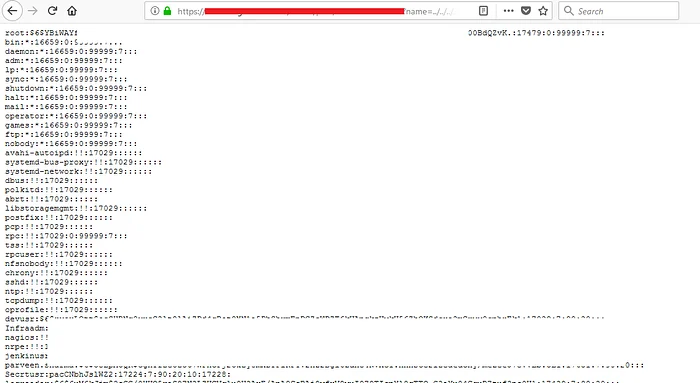
The screenshot shows the response for the /etc/shadow request, confirming that the file was read through the name parameter.
Exploitation
With LFI confirmed, the goal was to escalate to RCE. The researcher had read articles on getting RCE from LFI, and cites one in particular, "LFI to RCE via access log injection" by p4c3n0g3, as having helped. The idea was to reach a file that records user-controlled input, such as a log file, so that a command could be written into it and then executed through the inclusion.
Step 1: Try to read log files directly
The first attempt was to read access logs and error logs from various locations.
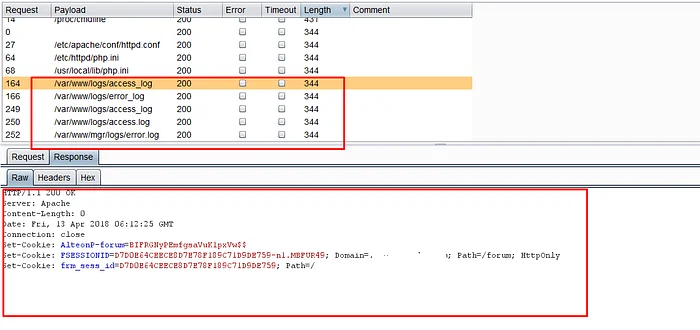
The response suggested that the user the web application runs as did not have access to the access log files.
Step 2: Look at /proc/self/fd
After some reading and research, the researcher learned that /proc/self/fd provides symbolic shortcuts to logs and various other system-related files. The plan was to read through those entries in search of access logs.
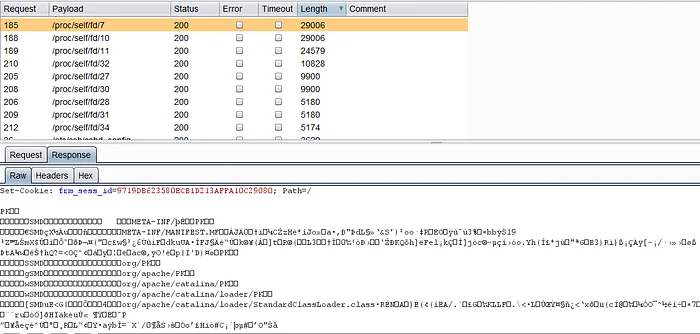
The screenshot shows the /proc/self files being read through the inclusion.
Step 3: Brute force the file descriptor numbers
The researcher ran Intruder over /proc/self/fd/{number}, substituting each number into the path. One of the file descriptor entries gave access to the access logs.
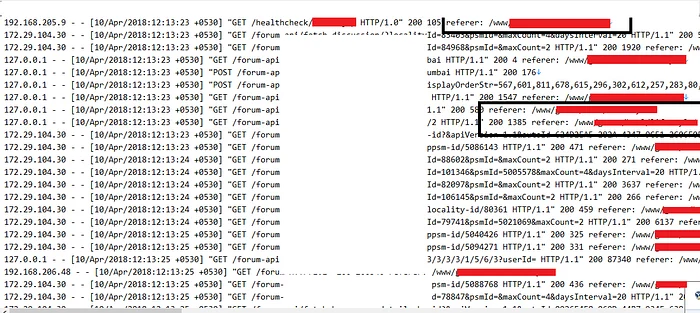
The screenshot shows the access log file returned through the file descriptor.
Step 4: Inject a command through the Referer header
In the access log, the referer header caught the researcher's attention, because it is user-controlled input. The next step was to execute a command. The researcher added a referer header to the HTTP request, set its value to system(id), and forwarded it.
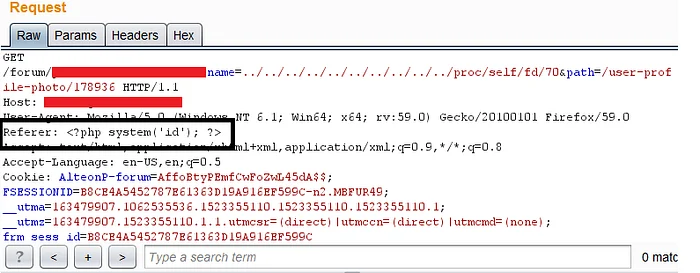
The screenshot shows the request with the injected referer header.
Step 5: Read the command output
The response came back with the output of the command.
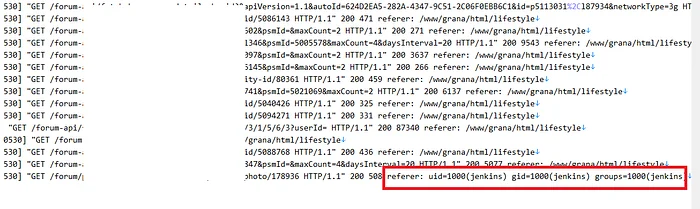
The screenshot shows the RCE response.
That is how the researcher went from LFI to RCE.
Root cause
The name parameter of the attachment endpoint is passed into a file path without being sanitised, so traversal sequences such as ../ let the caller read arbitrary files the web user can access.
The escalation works because the same inclusion primitive can read /proc/self/fd/{number}, which exposes the process's open file descriptors, including the access log. The access log records the referer header, which is attacker-controlled, so a command placed there is written to the log.
Impact
An attacker who can reach the attachment endpoint could read /etc/shadow and escalate to running a command on the server. The researcher's own framing is that the approach taken is what turns a lower-impact LFI into a much higher-impact finding.
Fix
The report states that the bug was reported to the company on 13 April 2018, marked fixed on 16 April 2018, and that the researcher re-tested and confirmed the fix on the same day. A robust fix would be to resolve the requested path to its canonical form and reject anything outside the intended attachment directory, and to avoid passing user input into file read functions at all where a lookup by identifier would do.
Variants to test
- Try traversal in any parameter that looks like a filename or path, such as
name,file,path,templateordownload. A positive result is a response containing the contents of a file outside the web root, such as/etc/passwdor/etc/shadow. - If direct log paths are unreadable, enumerate
/proc/self/fd/{number}. A positive result is a file descriptor that returns log content or another system file. - Once a log is readable, inject a marker into a user-controlled header such as
refereroruser-agentand then include the log. A positive result is the marker appearing in the included output, which confirms the injection point before attempting command execution. - Test whether the inclusion evaluates code rather than only reading it, for example by writing a benign function call into the log and including it. A positive result is the function's output appearing in the response.
- Check whether the endpoint is reachable without authentication, since that determines whether the finding is pre-auth or post-auth.
What happened, in plain words
A security researcher found a way to make a website show files that were never meant to be seen. He then used that same flaw to run his own commands on the server. This is the story of how he did it, step by step, in a way that anyone who uses a browser can follow.
The website belongs to a popular company in India that helps people buy and sell property. The site had an endpoint that served files by name, and it had a bug: it let you ask for files outside the intended directory. That kind of bug is called Local File Inclusion, or LFI for short. The researcher turned that into Remote Code Execution, or RCE, which means he could run commands on the server as if he were sitting at its keyboard.
The vulnerable feature
The forum has a feature to serve attachments. When you click a link to download an attachment, your browser sends a request to a web address that looks like this:
https://www.victimsite.com/forum/attachment-serve?name=../../../../../../../../../../etc/shadow&path=.
Let's break that down. The part before the question mark, https://www.victimsite.com/forum/attachment-serve, is the address of the attachment service. Everything after the ? is extra information sent to the server, called parameters. Parameters come in pairs: a name and a value, separated by =, and multiple pairs are joined by &.
nameis the parameter that tells the server which file to serve. Normally it would be something likereport.pdf.pathis another parameter, set to.here. A single dot means "the current directory" in file paths.
The value of name in this request is not a normal filename. It is ../../../../../../../../../../etc/shadow. The .. sequence means "go up one directory" in a file path. Ten of them in a row climb up ten directory levels before the path continues to /etc/shadow. Then /etc/shadow is a file on Linux systems that stores password hashes for user accounts. It is normally readable only by the root user.
So the request is asking the server: "Please serve me the file at the top of the disk called /etc/shadow." And the server did.
The screenshot shows the response: the contents of /etc/shadow displayed in the browser. That confirmed the bug. The name parameter was not checking what it was given; it just passed the value into a file path and read whatever file was there.
Why this matters
Reading /etc/shadow is already serious: it can expose password hashes that an attacker might crack offline. But the researcher's goal was bigger. He wanted to run commands on the server. To do that, he needed a file that the server would both write to and later read back, and that he could put his own text into. Log files are perfect for this: they record things like which pages were visited and which browser was used, and some of that information comes from the visitor.
Step 1: Try to read log files directly
First, he tried to read the web server's access logs and error logs from common locations. Access logs record every request; error logs record problems. If he could read an access log, he could later inject a command into it.
The response showed that the user account the web application runs under did not have permission to read the access log files. On a shared server, the web user is often restricted, and log files are owned by the administrator. So this direct route was blocked.
Step 2: Learn about /proc/self/fd
After some reading and research, the researcher learned about a special directory on Linux: /proc/self/fd. In Linux, /proc is a virtual file system that gives a window into running processes. self refers to the current process (the web server handling the request). fd stands for file descriptors: numbers the operating system uses to keep track of open files. Each open file has a number, and /proc/self/fd/3 (for example) is a symbolic link to the actual file. This can be a shortcut to files that are open but not directly readable by the web user, including log files.
The screenshot shows /proc/self files being read through the same LFI.
Step 3: Brute force the file descriptor numbers
File descriptor numbers are just integers. He did not know which number pointed to the access log, so he used a tool called Burp Intruder to try many numbers automatically. Intruder is part of Burp Suite, a proxy tool that lets you intercept and modify web requests. You mark a part of the request as a placeholder, give it a list of values, and Intruder sends one request per value.
He ran Intruder over /proc/self/fd/{number}, replacing {number} with each integer in turn. One of those requests returned the access log.
The screenshot shows the access log file served through one of the file descriptor numbers. Now he had a file that records visitor input, and that he could read through the LFI.
Step 4: Inject a command through the Referer header
Looking at the access log, he noticed the referer header. HTTP headers are extra pieces of information sent with every request and response. The referer header tells the server which page you came from when you clicked a link. Crucially, the value of referer is set by the browser, which means the visitor controls it. An attacker can put anything in that header.
His plan: send a request with a referer header containing a command. The server would write that header into the access log. Then, using the LFI, he would include the access log file. If the server treats the included file as code, it would execute the command.
The command he chose was system(id). In PHP, a popular language for web applications, system() runs a shell command and prints the output. id is a standard Linux command that prints the current user's identity. So system(id) means "run the id command and show me the result."
He added a referer header to the HTTP request, set its value to system(id), and forwarded it.
The screenshot shows the request with the injected referer header.
Step 5: Read the command output
The response came back with the command output.
The screenshot shows the RCE response. That is how a file-read bug became a command-execution bug.
Timeline
The researcher reported the bug to the company on 13 April 2018. It was marked fixed on 16 April 2018, and he re-tested and confirmed the fix the same day. A reward was in progress. The report does not say what the fix was.
Glossary
- LFI (Local File Inclusion): A vulnerability where a web application lets an attacker read files on the server that are not meant to be accessible, by manipulating a parameter that is used to build a file path.
- RCE (Remote Code Execution): A vulnerability where an attacker can run their own commands or code on a remote server.
- Parameter: A name-value pair sent in a URL after the
?, used to pass information to the server. - Path traversal: Using
../sequences to move up directories and access files outside the intended directory. /etc/shadow: A Linux file that stores password hashes for user accounts; normally readable only by the root user.- Access log: A file where a web server records every request it receives, often including headers like
refereranduser-agent. - Error log: A file where a web server records errors and warnings.
/proc/self/fd: A Linux directory that provides symbolic links to the open file descriptors of the current process.- File descriptor: A number the operating system assigns to an open file or socket, used to identify it.
- Burp Intruder: A tool in Burp Suite that automates sending many requests with different values in a chosen part of the request.
- HTTP header: Extra information sent with a request or response, such as
RefererorUser-Agent. refererheader: An HTTP header that tells the server the address of the page from which the current request was made; its value is controlled by the client.system(): A PHP function that executes a shell command and outputs the result.id: A Linux command that prints the current user's ID and group information.- PHP: A programming language commonly used for web applications.


