Bugcrowd — Tale of multiple misconfigurations!! ❌
 Published on medium.com
Welcome to this new article. This article is a story about misconfigurations found on a domain.
The full write-up lives on its author's site
It belongs to its author, so we link to it rather than copy it. The other two tabs are our own rewrites, checked against it.
Context
This is a story about misconfigurations found on a private Bugcrowd program, so the target is referred to throughout as redacted.com. The application was a simple e-commerce website with a lot of deals to grab. The scope was huge, but rather than going deep into subdomain scanning and recon, the authors decided to start testing the main application directly.
On sites like this the authors usually look for business logic vulnerabilities, but this time the authentication mechanism drew their attention. Two features are involved: the sign-up flow, which offers both an email and password registration and an OAuth registration, and the forgotten password flow, which resets a password using a 6-digit OTP sent by email.

Setup
The authors used two dummy accounts. The second dummy account was used for the OAuth checks, and the first dummy account was later used to create an OAuth account for an address already registered with email and password. The OAuth testing methodology came from the Pentest Book. Burp was used to intercept requests and, crucially, responses. No versions of the application or its components are given.
Finding it
The first thing was to create an account. What caught the authors' attention was the OAuth mechanism, so they started checking for OAuth vulnerabilities using the Pentest Book methodology and the second dummy account. They found nothing there.
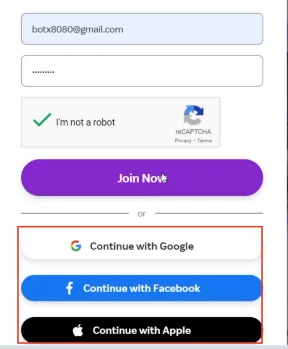
Email SignUp
But the basic vulnerability check had been forgotten. They tried to create an OAuth account using the first dummy account, the one already registered with email and password, and it worked: two accounts existed for the same email ID.
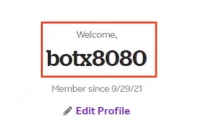
Account Created using Email Signup
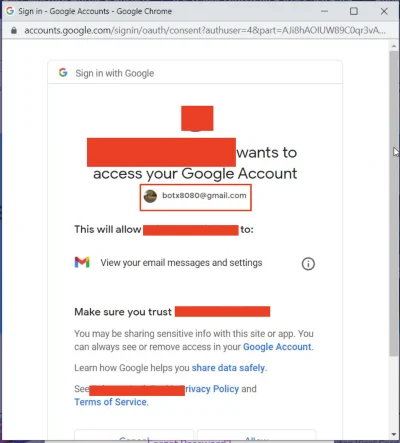
OAUTH login using same email
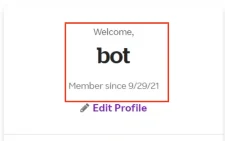
Misconfigured Oauth to Pre Account Takeover
Exploitation
Step 1: duplicate account through OAuth
The whole procedure, as the authors summarise it:
- Visit the website and click on Sign Up.
- Create an account using an unregistered victim email (say [redacted])
- Create another account using the OAuth mechanism and using the same OAuth account.
The account created with email and password should have been invalidated once the OAuth account was created for the same address, but it was not. The attacker can still log in with the credentials used during the email registration, which the authors describe as a pre-account takeover.
Step 2: the password reset mechanism
With one finding in hand, the authors moved to the forgotten password functionality. The reset mechanism worked as follows:
- The user enters his email.
- A 6-digit OTP is generated and sent to the email of the user
- The user sets a new password.
They first tried a straightforward authentication bypass: enter their own email, request an OTP, enter a wrong OTP, capture the response and try response manipulation. That did not work.
What they did notice was that the application used AJAX to perform the password reset. AJAX allows web pages to be updated asynchronously by exchanging small amounts of data with the server behind the scenes. The reset flow used AJAX, so the response could be intercepted and rewritten.
Step 3: harvest a valid response from your own account
- Go to Sign in page and click on forgot password
- Enter attackers email (i.e my email say [redacted] )
- Now enter the correct OTP received on [redacted] and Capture the Response and save it .
- You will be redirected to set new password page but DONT SET THE PASSWORD instead Again go to Sign in page and click on forgot password
Step 4: request a reset for the victim
- Enter victims email i.e. [redacted] ( in our case it was [redacted] )
Enter Victim Email
Step 5: submit a random OTP and intercept the response
- Enter random OTP i.e. 000000 and Intercept the request using burp and Do intercept > Response to this request
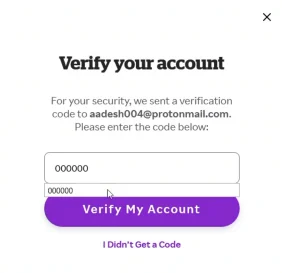
Enter Random OTP
The OTP is wrong, so the server will reject it. The interception is set on the response, not the request, because the request itself is not going to be modified.
Step 6: rewrite the response
- IN THE RESPONSE MANIPULATE THE RESPONSE TO :
{"successTextKey":"success","errors":null}
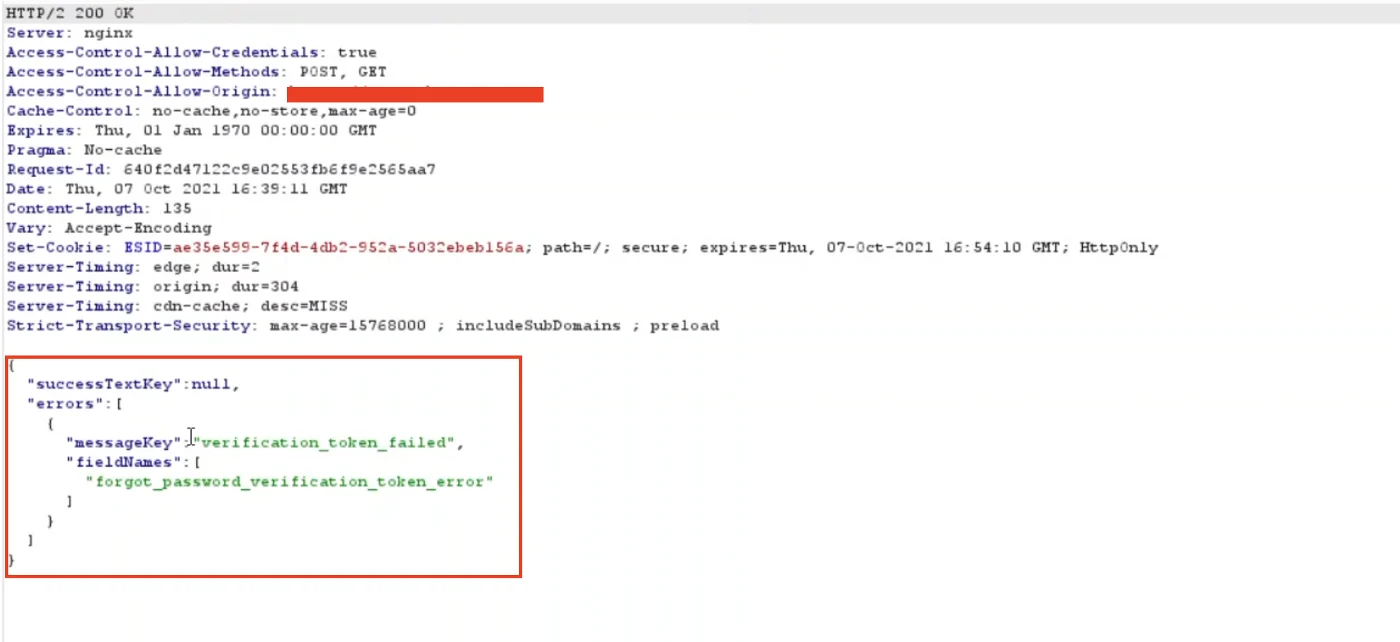
Generated Response
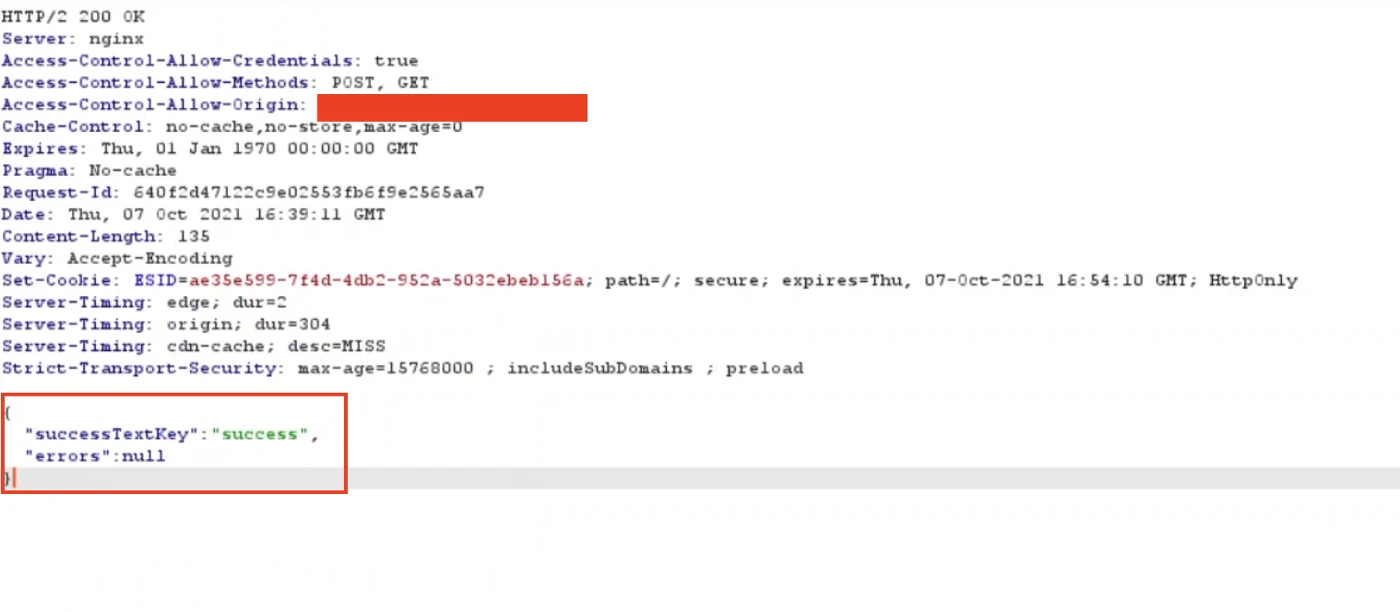
Response Manipulation
The response body is replaced with a success shape: a success key and no errors.
Step 7: set the new password
- Forward the request and You will be redirected to Set new password . This time Set the password and boom ACCOUNT TAKEOVER .
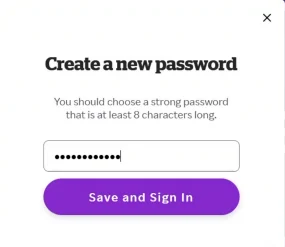
Set New Password

Account Takeover
After forwarding the manipulated response, the user was redirected to the set new password page, where the attacker could set a new password for the victim's account. The authors close by asking readers to share their own stories about misconfigurations.
Root cause
Two separate design mistakes combine here.
On registration, the application did not treat an email address as a unique identity across authentication methods. Creating an OAuth account for an address that already had an email and password account did not invalidate the original credentials, so two accounts could exist for one email. The authors' impact statement is explicit that the email and password account should get invalidated but does not.
On password reset, the flow used AJAX, and manipulating the response to a wrong OTP moved the user on to the set new password page. Rewriting the body in the browser was enough to unlock the next page. The report does not show whether the final password change request was itself validated server side against the OTP; what it shows is that the flow could be driven to the set new password step with a random OTP.
Impact
The pre-account takeover condition means an attacker who registers an email address with a password keeps working credentials even after the legitimate owner signs up through OAuth with the same address, so the attacker can still log in with those credentials. The password reset manipulation means an attacker can enter the victim's email, submit a random OTP, manipulate the response and reach the set new password page, which the authors describe as account takeover. Both depend on the described flows behaving as observed on this program; the report gives no bounty, severity or CVSS.
Fix
The report does not say what was changed. Based on the findings, the fixes would be: invalidate or refuse the email and password account when an OAuth account is created for the same address, so one email maps to one identity; and make the password reset decision server side, so that the set new password step is only reachable and only accepted when the server has verified the OTP for that reset session, rather than relying on a response body the client can rewrite.
Variants to test
- Register with email and password, then sign up with OAuth using the same address. A positive result is two accounts for one email and the original password still working.
- Reverse the order: create the OAuth account first, then try to register the same address with email and password. A positive result is the email registration succeeding and both logins working.
- Run the OTP reset flow with a random OTP and intercept the response. A positive result is that rewriting the body to the success shape moves the client to the set new password page.
- After reaching the set new password page with a manipulated response, submit the new password and then log in as the victim. A positive result is a successful login with the attacker-chosen password.
- Try the same response manipulation on other AJAX-driven steps in the reset flow, such as the OTP verification call itself, and check whether the server independently enforces the OTP when the password is finally set.
- Check whether the OTP is bound to the session or to the email address, for example by requesting an OTP for one address and using the resulting state against another.
What happened, in plain words
Two security researchers, Vaibhav Lakhani and Dhir Parmar, were testing a private bug bounty program on Bugcrowd. A bug bounty program is an arrangement where a company invites independent researchers to look for security problems in its systems and report them, often for a reward. Because the program was private, the researchers were not allowed to name the company, so throughout the article the target is called redacted.com.
The website was a simple e-commerce site, the kind where you browse deals and buy things. The researchers found two separate mistakes in how the site handled user accounts:
-
You could end up with two accounts for one email address. The site let you sign up with an email and password, and it also let you sign up with OAuth (a way of signing in through another service, such as Google). If you first registered with email and password and then signed up again through OAuth using the same email address, the site created a second account instead of rejecting the second sign-up or invalidating the first one. The original password kept working. The researchers call this a pre-account takeover: an attacker who registers someone else's email address keeps working login credentials even after the real owner signs up.
-
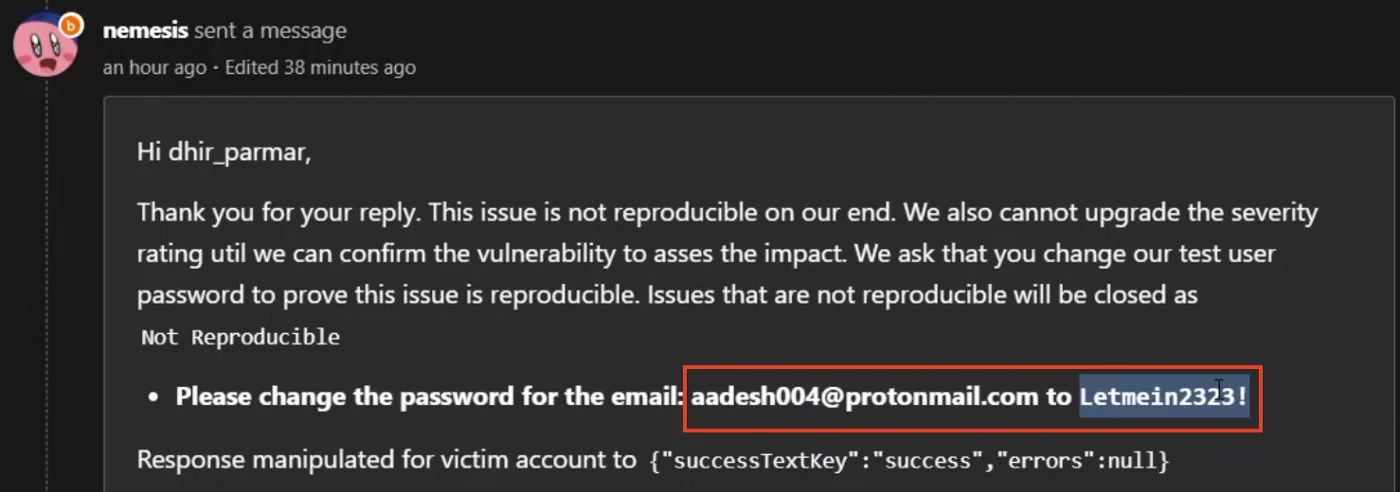
You could reset someone else's password without knowing their one-time code. The forgotten-password flow asked for a 6-digit OTP (one-time password, a short code sent to your email). If you typed a wrong code, the server rejected it, but the researchers could catch the reply in Burp and rewrite it to look like a success. The researchers found they could catch that reply in a tool called Burp, rewrite it to look like a success, and the page would move them to the set new password screen, which the authors describe as account takeover.
Neither finding needed any special software beyond a browser and Burp, a program that sits between your browser and the website so you can read and change the messages going back and forth.
The scope of the application was huge, but instead of spending time on subdomain scanning and other reconnaissance, the researchers decided to start testing the main application directly. On sites like this they usually look for business logic vulnerabilities (flaws in the rules of how a feature is supposed to work, rather than in the code itself), but this time the authentication mechanism caught their eye. Authentication means proving who you are when you log in. Two features are involved: the sign-up flow, which offered both email-and-password registration and OAuth registration, and the forgotten-password flow, which reset a password using a 6-digit OTP sent by email.
Setting up
The researchers used two dummy accounts. The second dummy account was used for the OAuth checks, and the first dummy account was later used to create an OAuth account for an address already registered with email and password. For the OAuth testing they followed a methodology from the Pentest Book. They used Burp to intercept requests and, crucially, responses. The report gives no versions of the application or its components.
Finding the first bug
The first thing was to create an account. What caught their attention was the OAuth mechanism, so they started checking for OAuth vulnerabilities using the Pentest Book methodology and the second dummy account. They found nothing there.
Email SignUp
But the basic vulnerability check had been forgotten. They tried to create an OAuth account using the first dummy account, the one already registered with email and password, and it worked: two accounts existed for the same email ID.
Account Created using Email Signup
OAUTH login using same email
Misconfigured Oauth to Pre Account Takeover
Exploiting the first bug: a duplicate account through OAuth
The whole procedure, as the researchers summarise it:
- Visit the website and click on Sign Up.
- Create an account using an unregistered victim email (say [redacted])
- Create another account using the OAuth mechanism and using the same OAuth account.
The account created with email and password should have been invalidated once the OAuth account was created for the same address, but it was not. The attacker can still log in with the credentials used during the email registration, which the researchers describe as a pre-account takeover.
Why does this matter? Think of an email address as a person's name on a guest list. If two different doors into the same building both check the guest list, then once someone has signed in at one door, the other door should recognise them as the same person. Here, the two doors kept separate lists. An attacker could put a victim's email address on the email-and-password list with a password of the attacker's choosing, and when the real owner later came in through the OAuth door, the attacker's entry was never removed. The attacker could keep using it.
Finding the second bug: the password reset mechanism
With one finding in hand, the researchers moved to the forgotten-password functionality. The reset mechanism worked as follows:
- The user enters his email.
- A 6-digit OTP is generated and sent to the email of the user
- The user sets a new password.
They first tried a straightforward authentication bypass: enter their own email, request an OTP, enter a wrong OTP, capture the response and try response manipulation. That did not work.
What they did notice was that the application used AJAX to perform the password reset. AJAX allows web pages to be updated asynchronously by exchanging small amounts of data with the server behind the scenes. In plain terms, the page does not reload; it quietly asks the server a question in the background and then changes what you see based on the answer. The reset flow used AJAX, so the response could be intercepted and rewritten.
Step 3: harvest a valid response from your own account
- Go to Sign in page and click on forgot password
- Enter attackers email (i.e my email say [redacted] )
- Now enter the correct OTP received on [redacted] and Capture the Response and save it .
- You will be redirected to set new password page but DONT SET THE PASSWORD instead Again go to Sign in page and click on forgot password
It is like asking a shop assistant what a valid receipt looks like, so you can copy the format later.
Step 4: request a reset for the victim
- Enter victims email i.e. [redacted] ( in our case it was [redacted] )
Enter Victim Email
Step 5: submit a random OTP and intercept the response
- Enter random OTP i.e. 000000 and Intercept the request using burp and Do intercept > Response to this request
Enter Random OTP
The OTP is wrong, so the server will reject it. The interception is set on the response, not the request, because the request itself is not going to be modified. In Burp, a request is the message your browser sends to the server ("here is my email and my code"), and a response is the message the server sends back ("wrong code"). Intercepting the response means pausing that reply before the browser sees it, so you can edit it first.
Step 6: rewrite the response
- IN THE RESPONSE MANIPULATE THE RESPONSE TO :
{"successTextKey":"success","errors":null}
Generated Response
Response Manipulation
This is a small piece of JSON, a text format for structured data that web pages and servers commonly exchange. Reading it piece by piece:
{and}mark the start and end of one object, a bundle of named values."successTextKey":"success"is a pair: the namesuccessTextKeywith the value"success". It tells the page that the operation succeeded."errors":nullsays there are no errors.nullmeans "nothing here".- The comma separates the two pairs.
The response body is replaced with a success shape: a success key and no errors.
Step 7: set the new password
- Forward the request and You will be redirected to Set new password . This time Set the password and boom ACCOUNT TAKEOVER .
Set New Password
Account Takeover
After forwarding the manipulated response, the user was redirected to the set new password page, where the attacker could set a new password for the victim's account. The researchers close by asking readers to share their own stories about misconfigurations.
Why it worked
Two separate design mistakes combine here.
On registration, the application did not treat an email address as a unique identity across authentication methods. Creating an OAuth account for an address that already had an email and password account did not invalidate the original credentials, so two accounts could exist for one email. The researchers' impact statement is explicit that the email and password account should get invalidated but does not.
On password reset, the flow used AJAX, and manipulating the response to a wrong OTP moved the user on to the set new password page. Rewriting the body in the browser was enough to unlock the next page. The report does not show whether the final password change request was itself validated server side against the OTP; what it shows is that the flow could be driven to the set new password step with a random OTP.
What an attacker could do
The pre-account takeover condition means an attacker who registers an email address with a password keeps working credentials even after the legitimate owner signs up through OAuth with the same address, so the attacker can still log in with those credentials. The password reset manipulation means an attacker can enter the victim's email, submit a random OTP, manipulate the response and reach the set new password page, which the authors describe as account takeover. Both depend on the described flows behaving as observed on this program; the report gives no bounty, severity or CVSS.
How to fix it
The report does not say what was changed. Based on the findings, the fixes would be: invalidate or refuse the email and password account when an OAuth account is created for the same address, so one email maps to one identity; and make the password reset decision server side, so that the set new password step is only reachable and only accepted when the server has verified the OTP for that reset session, rather than relying on a response body the client can rewrite.
Variants to test
- Register with email and password, then sign up with OAuth using the same address. A positive result is two accounts for one email and the original password still working.
- Reverse the order: create the OAuth account first, then try to register the same address with email and password. A positive result is the email registration succeeding and both logins working.
- Run the OTP reset flow with a random OTP and intercept the response. A positive result is that rewriting the body to the success shape moves the client to the set new password page.
- After reaching the set new password page with a manipulated response, submit the new password and then log in as the victim. A positive result is a successful login with the attacker-chosen password.
- Try the same response manipulation on other AJAX-driven steps in the reset flow, such as the OTP verification call itself, and check whether the server independently enforces the OTP when the password is finally set.
- Check whether the OTP is bound to the session or to the email address, for example by requesting an OTP for one address and using the resulting state against another.
Glossary
- AJAX: A technique where a web page talks to the server in the background without reloading, then updates what you see based on the reply.
- Authentication: The process of proving who you are, usually by logging in.
- Authentication bypass: Getting past a login or verification step without the correct credentials or code.
- Bug bounty program: A scheme where a company invites outside researchers to find and report security problems, often for a reward.
- Burp: A tool that sits between your browser and a website so you can read, pause and change the messages going each way.
- Business logic vulnerability: A flaw in the rules of how a feature is meant to work, rather than in the underlying code.
- Client: The part of a system running on the user's side, such as the browser and the page it displays.
- Credentials: The details used to log in, such as an email address and password.
- CVSS: A standard scoring system for rating the severity of a security flaw.
- E-commerce: A website where goods or services are bought and sold.
- Email and password registration: Signing up by choosing an email address and a password directly on the site.
- Impact: What an attacker could actually do if the flaw is exploited.
- Intercept: To pause a message in transit so you can inspect or change it before it reaches its destination.
- JSON: A text format for structured data, made of names and values inside braces, commonly used between web pages and servers.
- Misconfiguration: A setting or design choice that leaves a system less secure than it should be.
- OAuth: A way of signing in to one site using an account you already have on another service, without giving the first site your password.
- OTP (one-time password): A short code, valid for one use, sent to you to prove you control an email address or phone.
- Pre-account takeover: A situation where an attacker sets up credentials for someone else's email address before the real owner registers, and those credentials keep working afterwards.
- Private program: A bug bounty program that only invited researchers can take part in, and whose target is usually kept secret.
- Recon (reconnaissance): The early information-gathering phase of a test, such as finding subdomains.
- Request: The message a browser sends to a server, for example when you submit a form.
- Response: The message a server sends back to the browser.
- Response manipulation: Editing a server's reply before the browser sees it, so the page behaves as if something succeeded when it did not.
- Root cause: The underlying reason a flaw exists.
- Server: The computer that runs the website and stores its data, and that the browser talks to.
- Session: A period during which a server remembers who you are across several requests.
- Subdomain: A section of a larger domain name, such as
shop.example.comunderexample.com. - Takeover (account takeover): Gaining control of someone else's account, for example by changing their password.
- Victim: The person whose account an attacker is trying to compromise.


