Business Logic Error on Registration Leads to SMS Validation Bypass
The registration flow used a step parameter in requests, and by changing the email confirmation request's step to the SMS confirmation step, the application accepted the email code as valid for SMS verification. This allowed bypassing the SMS validation and proceeding to set credentials without confirming the phone number.

Hello, fellow hunters. It is time for another write-up.
The full write-up lives on its author's site
It belongs to its author, so we link to it rather than copy it. The other two tabs are our own rewrites, checked against it.
Context
The target was a financial services company. The researcher notes that the company itself has nothing to do with the story, and that the program had very few assets in scope: a registration and log-in panel, plus a few static websites with no functionality. Because only the registration panel had functionality, the researcher decided to test it briefly and then move on to other programs. The application is referred to throughout as redacted.com, and no screenshots of the app are included because the program does not allow disclosure of details about the bug. The evidence shown is taken from the researcher's Burp Suite logs.
The feature under test is the multi-step registration flow, which walks a new user through identity details, email confirmation, SMS confirmation and finally credential creation.
Setup
The only tool mentioned is Burp Suite, used as an intercepting proxy so that every request and response in the registration flow could be logged and later modified. No accounts, roles or versions are described beyond that. The precondition for the attack is simply the ability to register, that is, to reach the registration flow as an ordinary user and to intercept the requests it generates.
Finding it
The researcher's first move was to use the application like a normal user and understand the flow thoroughly, with Burp Suite running and logging all requests and responses. The registration process was mapped as follows:
- Navigate to redacted.com/registration.
- The user is asked to enter First Name, Last Name, Email Address and Phone Number. The application forwards the user to redacted.com/registration/api/email-confirmation.
- After providing the required information, a 6-digit alphanumeric confirmation code is sent to the email address. The user enters the code and proceeds to the next step on another endpoint, redacted.com/registration/api/confirm-mobile.
- On this step, a 6-digit numeric confirmation code is sent to the user's phone by SMS. The user enters the code and is redirected to redacted.com/registration/api/user-credentials.
- As the last step, the user is asked to enter a username and password. Registration is completed when the credentials are provided.
What stood out was the shape of the requests behind steps 3 and 4. On step 3, when the user enters the confirmation code sent to their email, a POST request is sent with the following request body:
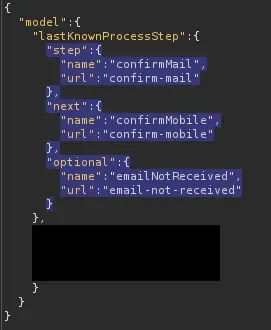
Step 3) Email confirmation
The body carries the current step, the next step, and an optional parameter. The researcher's reading is that the optional parameter does not really matter, and that the only parts that matter are the current step and the next step.
On step 4, when confirming the code sent by SMS, another POST request is initiated with the following body:
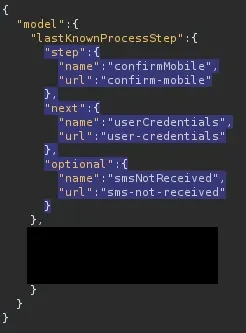
Step 4) SMS confirmation
The two bodies resemble each other closely.
Exploitation
Step 1: swap the step values in the email confirmation request
On step 3, turn intercept on and enter the confirmation code sent to the email address. In the body, as shown in the first picture, the current step is specified to be email confirmation. Before forwarding the request, replace the highlighted area in picture 1 with the highlighted area in the second picture, then forward the request.
In other words, the body of the email confirmation request is replaced with the body of the SMS confirmation request, while the email code itself is the one that was actually received.
Step 2: observe the state after the swap
The user is asked to enter the verification code sent by SMS, which means the user is now on step 4, and the URL is currently redacted.com/registration/api/confirm-mobile.
Step 3: skip the SMS code and re-enter the flow
Without entering the SMS code, navigate to redacted.com/registration.
After this third step, the researcher was prompted to enter a username and a password for the account, which indicated that the SMS validation had been successfully bypassed.
Root cause
When the body of the email confirmation request was changed to the body of the SMS confirmation request, the application accepted the email code as valid. It also assumed that SMS confirmation had been done, because the body parameters had been changed and the response was successful. When redacted.com/registration was then entered manually, the application assumed the SMS code verification had already been completed and redirected to the page asking for a username and a password.
The application accepted the email code as valid and also assumed SMS confirmation was done because the body parameters had been changed and the response was successful. The application accepted the email code as valid and assumed SMS confirmation was also done.
Impact
An attacker could complete registration without entering the SMS code, bypassing the SMS validation. The report frames this as a bypass of SMS validation on registration and does not go further into what the verified phone number is used for on this particular application, so the downstream consequences beyond completing registration are not stated. The researcher notes that the functionality was directly specified in the program's scope, that the report was therefore of great importance, and that it resulted in a payout of $$$.
Fix
The report does not say what the vendor changed.
Variants to test
- Step parameter tampering in any multi-step wizard. Intercept the request for an early step and replace its step fields with those of a later step, keeping the genuine code for the early step.
- Direct navigation to the post-verification URL. After completing only the first verification, request the endpoint that follows the second verification (here redacted.com/registration/api/user-credentials) directly.
- Replaying a later step's body against an earlier step's endpoint. Take the body captured from the SMS confirmation request and submit it to the email confirmation endpoint with a valid email code.
- Removing or reordering optional parameters. Since the report notes an optional parameter in the body that does not matter, try dropping it or changing the order of the fields.
- Skipping back and forth between steps. After triggering the swap, navigate to the registration entry point again, as in step 3 of the exploitation.
What happened, in plain words
A company had a sign-up page where a new user had to prove two things before getting an account: that they owned an email address, and that they owned a phone number. Proving the phone number meant typing a short code that arrived by text message (SMS). The researcher found that by editing one request in their browser's traffic, they could make the website believe the phone number had already been confirmed, without typing the SMS code. They then got straight to the final step of sign-up, where they were prompted to choose a username and password.
This is called a business logic error. Most security bugs are about breaking a lock: guessing a password, injecting code, crashing a server. A business logic error is different. The lock works fine. The problem is the order of steps the website follows, and the assumptions it makes about what the user has already done. A useful everyday comparison is a form at a doctor's office: the receptionist is supposed to check your insurance card before sending you to the nurse, and the nurse is supposed to check it again before the doctor sees you. If the receptionist simply believes you when you say "the nurse already checked it", the rule exists on paper but not in practice. That is what happened here.
Before going further, a few words that will come up constantly.
- A website is a program running on someone else's computer (the server) that your browser talks to. Your browser asks for things; the server answers.
- An API (Application Programming Interface) is the part of a website that is designed to be talked to by a program rather than read by a human. When you fill in a form and press a button, your browser usually sends a small message to an API behind the scenes, and the API replies with a short answer like "ok" or "wrong code". You never see this message on screen, but it is what actually does the work.
- A request is that message your browser sends. A response is the server's reply. Every click that changes something on a website is really a request going out and a response coming back.
- Burp Suite is a tool that sits between your browser and the website, like a postal worker who opens every letter, writes down what it says, and can even swap the contents before delivering it. Security testers use it to see and edit requests that a normal browser hides from you.
- Intercept is a Burp Suite mode where it holds each request and waits for you to press forward, so you can change it first.
- A POST request is a request that carries information to the server, as opposed to a request that just asks to see a page. Filling in a form and pressing submit normally produces a POST request.
- The request body is the part of a POST request that carries the actual data, for example the code you typed or your name.
- An endpoint is one specific address on a website that does one specific job.
redacted.com/registrationis one endpoint;redacted.com/registration/api/confirm-mobileis another. - SMS is a text message sent to a mobile phone. A validation code (or confirmation code) is a short string of characters that the website sends you and expects you to type back, to prove you can receive messages at that address or number.
- Bypass means getting past a check without satisfying it.
The target and the feature
The target was a financial services company. The researcher says the company itself has nothing to do with the story, and that the program had very few assets in scope. Scope is the list of things a company explicitly allows a tester to look at; anything outside it is off limits. Here the scope contained a registration and log-in panel, plus a few static websites with no functionality. A static website is one that only shows fixed pages and does not let you do anything, so there is little to test. Because only the registration panel actually did something, the researcher decided to test it briefly and then move on to other programs.
The application is called redacted.com throughout, and no screenshots of the app are included because the program does not allow disclosure of details about the bug. The evidence shown is taken from the researcher's Burp Suite logs, which are text records of the requests and responses.
The feature under test is the multi-step registration flow. A flow is a sequence of pages that must be completed in order, like a checkout in an online shop: address, then payment, then confirmation. This one walks a new user through identity details, email confirmation, SMS confirmation and finally credential creation. Credentials here means the username and password the user will log in with later. The flow walks a new user through identity details, email confirmation, SMS confirmation and finally credential creation.
Setup
The only tool mentioned is Burp Suite, used as an intercepting proxy. A proxy is a middleman: your browser is configured to send all its traffic through Burp Suite instead of straight to the website, so Burp Suite can record every request and response and let you pause and edit them. No accounts, roles or versions are described beyond that. The precondition for the attack is simply the ability to register, that is, to reach the registration flow as an ordinary user and to intercept the requests it generates. No special access, no insider knowledge, nothing that a normal visitor could not do.
Finding it
The researcher's first move was to use the application like a normal user and understand the flow thoroughly, with Burp Suite running and logging all requests and responses. This is the most important habit in this kind of testing: before trying to break something, walk through it exactly as it is meant to be used, and write down every step. You cannot spot a wrong assumption until you know what the right sequence looks like.
The registration process was mapped as follows:
- Navigate to redacted.com/registration.
- The user is asked to enter First Name, Last Name, Email Address and Phone Number. The application forwards the user to redacted.com/registration/api/email-confirmation.
- After providing the required information, a 6-digit alphanumeric confirmation code is sent to the email address. The user enters the code and proceeds to the next step on another endpoint, redacted.com/registration/api/confirm-mobile.
- On this step, a 6-digit numeric confirmation code is sent to the user's phone by SMS. The user enters the code and is redirected to redacted.com/registration/api/user-credentials.
- As the last step, the user is asked to enter a username and password. Registration is completed when the credentials are provided.
A few things to notice in that list. The word alphanumeric means the code can contain both letters and numbers; the SMS code is numeric, meaning digits only. Each step has its own endpoint, and the names tell you what each one is for: email-confirmation handles the email code, confirm-mobile handles the phone code, user-credentials handles the username and password. The /api/ part of the address is a strong hint that these are API endpoints, the kind that answer programs rather than show pages.
What stood out was the shape of the requests behind steps 3 and 4. On step 3, when the user enters the confirmation code sent to their email, a POST request is sent with the following request body:
Step 3) Email confirmation
The body carries the current step, the next step, and an optional parameter. Read that again, because it is the whole bug in one sentence: the request itself says which step the user is on and which step comes next. The researcher's reading is that the optional parameter does not really matter, and that the only parts that matter are the current step and the next step. In other words, the two fields that describe progress through the flow are the interesting ones, because if the server believes whatever they say, then anyone who can edit a request can claim to be further along than they really are.
On step 4, when confirming the code sent by SMS, another POST request is initiated with the following body:
Step 4) SMS confirmation
The two bodies resemble each other closely. Client means your side, the browser. Server-side state means information the server keeps about you on its own, such as "this account has passed the email check but not the phone check". If the server keeps that record itself, you cannot lie about it. If it asks your browser to tell it where you are in the flow, you can lie, and that is exactly the suspicion the researcher formed here.
Exploitation
Step 1: swap the step values in the email confirmation request
On step 3, turn intercept on and enter the confirmation code sent to the email address. In the body, as shown in the first picture, the current step is specified to be email confirmation. Before forwarding the request, replace the highlighted area in picture 1 with the highlighted area in the second picture, then forward the request.
In other words, the body of the email confirmation request is replaced with the body of the SMS confirmation request, while the email code itself is the one that was actually received. This is the key move, so it is worth spelling out why it was done. The researcher had a genuine email code, so the email check would pass honestly. But the request also carries the step fields, and those fields are what the server uses to decide where the user is. By pasting in the step fields from the SMS request, the researcher was effectively saying "I am on the SMS step and it is done", while still sending a real email code. The application accepted the email code as valid and also assumed SMS confirmation was done.
Step 2: observe the state after the swap
The user is asked to enter the verification code sent by SMS, which means the user is now on step 4, and the URL is currently redacted.com/registration/api/confirm-mobile.
This step is observation, not attack. After the swap, the site behaves as if the email step is finished and the SMS step is the one pending. That is the normal, expected behaviour for someone who has just completed the email step, so it does not by itself prove anything. What matters is what happens next.
Step 3: skip the SMS code and re-enter the flow
Without entering the SMS code, navigate to redacted.com/registration.
Here the researcher deliberately did not type the SMS code. Instead they went back to the starting address of the registration flow, the same address a brand new visitor would use. The idea is to see what the server thinks the account's status is when the flow is entered fresh. If the server had correctly recorded that the SMS step was still pending, it would send the user back to the SMS page. If it had been fooled, it would let the user continue.
After this third step, the researcher was prompted to enter a username and a password for the account, which indicated that the SMS validation had been successfully bypassed. The site jumped straight to the final step, the one that is only supposed to be reachable after both codes have been verified.
Root cause
When the body of the email confirmation request was changed to the body of the SMS confirmation request, the application accepted the email code as valid. It also assumed that SMS confirmation had been done, because the body parameters had been changed and the response was successful. When redacted.com/registration was then entered manually, the application assumed the SMS code verification had already been completed and redirected to the page asking for a username and a password.
The application accepted the email code as valid and also assumed SMS confirmation was done because the body parameters had been changed and the response was successful. A useful comparison is a nightclub where the bouncer asks you "has anyone already checked your ID?" and lets you in if you say yes. The check exists, but it is being performed by the wrong person.
The application accepted the email code as valid and assumed SMS confirmation was also done. Sequencing means the required order. The codes were strong; the order was not enforced. A signed token would be a small piece of data the server issues and can later verify has not been altered, so the browser cannot simply edit it.
Impact
An attacker could complete registration without entering the SMS code, bypassing the SMS validation. The report frames this as a bypass of SMS validation on registration and does not go further into what the verified phone number is used for on this particular application, so the downstream consequences beyond completing registration are not stated.
The researcher notes that the functionality was directly specified in the program's scope, that the report was therefore of great importance, and that it resulted in a payout of $$$. Payout means the company paid a reward, often called a bounty, for the report.
Fix
The report does not say what the vendor changed. In plain terms, the server should keep its own checklist for each account and only move to the next item when it has itself seen the correct code, rather than asking the browser where it thinks it is.
Variants to test
These are the same idea applied in slightly different ways. Each one is a way of asking the same question: does the server decide the order, or does it let the browser decide?
- Step parameter tampering in any multi-step wizard. A wizard is any flow split across several screens, such as a checkout, a booking, or a password reset. Intercept the request for an early step and replace its step fields with those of a later step, keeping the genuine code for the early step.
- Direct navigation to the post-verification URL. After completing only the first verification, request the endpoint that follows the second verification (here redacted.com/registration/api/user-credentials) directly. Typing an address into the browser bar is the simplest way to do this.
- Replaying a later step's body against an earlier step's endpoint. Take the body captured from the SMS confirmation request and submit it to the email confirmation endpoint with a valid email code.
- Removing or reordering optional parameters. Since the report notes an optional parameter in the body that does not matter, try dropping it or changing the order of the fields.
- Skipping back and forth between steps. After triggering the swap, navigate to the registration entry point again, as in step 3 of the exploitation.
Glossary
- API: the part of a website built to be talked to by a program rather than read by a person; it receives small messages and sends short answers.
- Alphanumeric: containing both letters and numbers.
- Body (request body): the part of a POST request that carries the actual data, such as a code or a name.
- Burp Suite: a tool that sits between your browser and a website so you can record, pause and edit the requests and responses.
- Business logic error: a flaw in the rules or order of steps a website follows, rather than in its locks or encryption; the checks exist but can be worked around.
- Bypass: getting past a check without actually satisfying it.
- Client: your side, meaning your browser and computer.
- Credentials: the username and password used to log in.
- Endpoint: one specific address on a website that performs one specific job.
- Flow: a sequence of pages that must be completed in order.
- Intercept: a mode in Burp Suite that holds each request until you let it continue, so you can change it first.
- Intercepting proxy: a middleman program that all your browser traffic passes through, allowing it to be recorded and edited.
- Numeric: containing digits only.
- Payout: a reward paid by a company for a valid security report.
- POST request: a request that sends information to the server, typically produced by submitting a form.
- Request: the message your browser sends to a website.
- Response: the website's reply to a request.
- Scope: the list of systems a company explicitly allows a tester to examine.
- Sequencing: the required order in which steps must be completed.
- Server: the computer that runs the website and answers requests.
- Server-side state: information the server keeps about you on its own, which your browser cannot change.
- Signed token: a small piece of data issued by the server that it can later verify has not been altered.
- SMS: a text message sent to a mobile phone.
- Static website: a site that only shows fixed pages and does not let visitors do anything.
- Validation code (confirmation code): a short string sent to your email or phone that you type back to prove you can receive messages there.
- Wizard: any task split across several screens that must be completed in order.




