Bypassing Filters to Achieve UNION-Based SQL Injection on a Search Endpoint
An unauthenticated auto-suggest search endpoint built dynamic SQL from the user-supplied query parameter without adequate filtering. An attacker could inject a UNION-based query to read the active database name and enumerate table names, proving full read access to the database.

Bug Bounty Tips
The full write-up lives on its author's site
It belongs to its author, so we link to it rather than copy it. The other two tabs are our own rewrites, checked against it.
Context
During an assessment, the researcher probed an unauthenticated search feature on a target running an Apache Tomcat backend. The application exposed an auto-suggest endpoint, /autosuggest.htm, which processed user queries through a q parameter. Auto-complete features like this frequently build dynamic SQL queries behind the scenes to fetch matching results in real time, which makes them a prime target for injection flaws.
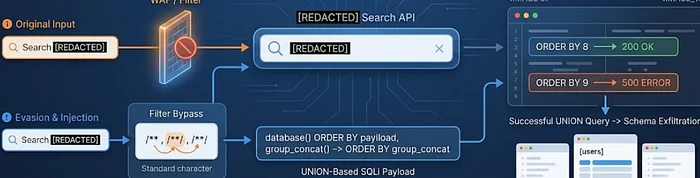
The endpoint was reachable without authentication:
http://www.target.com/autosuggest.htm?q=
Setup
No accounts, roles or tooling are described beyond the target itself. The only precondition stated is that the search feature was unauthenticated and that the backend was Apache Tomcat, with a Spring/Tomcat stack visible in error output later on. The report does not name the product or the program.
Finding it
The entry point was the q parameter of the auto-suggest endpoint. The reasoning was that auto-complete functionality often constructs dynamic SQL to return matching results in real time, so user input reaching that query is worth testing for injection.
Exploitation
Step 1: Mapping the query structure with ORDER BY
The first step was to determine whether user input broke out of the query context and how many columns the original statement selected. The researcher probed with ORDER BY clauses:
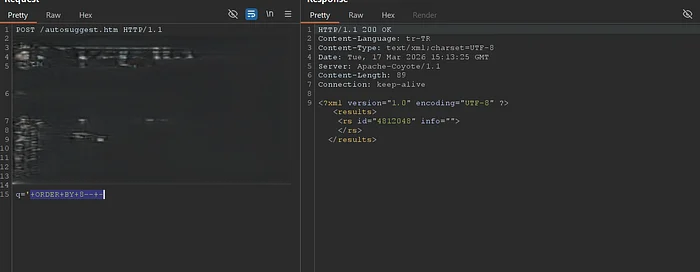
q=test' ORDER BY 8-- -returned a standard200 OKresponse with XML results, confirming the query had at least 8 columns.
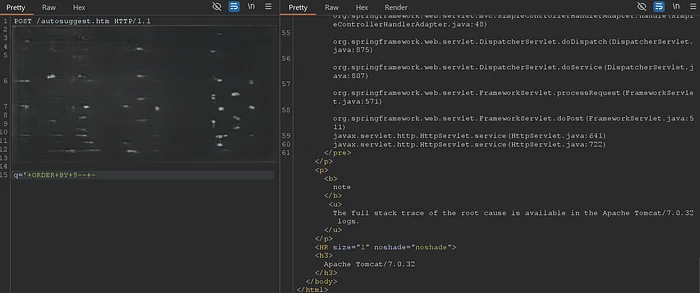
q=test' ORDER BY 9-- -triggered a500 Internal Server Error, showing a stack trace from the underlying Spring/Tomcat framework. This confirmed that the query strictly expected 8 columns.
Step 2: Bypassing the string filter with inline comments
With the column count established, the researcher attempted a standard UNION SELECT payload to extract data. Basic space-delimited keywords were blocked or sanitised by an inline filter.
To bypass this simple token detection, standard whitespace was replaced with inline MySQL comments (/**/ or //). By prepending a non-existent value (-1') to nullify the primary query results, the application was forced to reflect the output of the injected UNION statement.
Step 3: Extracting the active database name
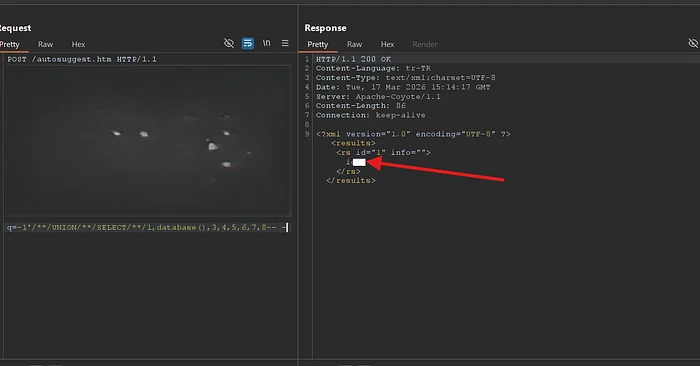
POST /autosuggest.htm HTTP/1.1Host: [REDACTED]Content-Type: application/x-www-form-urlencodedq=-1'/**/UNION/**/SELECT/**/1,database(),3,4,5,6,7,8-- -
The payload places database() in the second column of an eight-column UNION SELECT, with /**/ standing in for spaces so the filter does not see space-delimited keywords. The leading -1' makes the original query return nothing, so only the injected row is reflected.
Response:
<?xml version="1.0" encoding="UTF-8" ?><results> <rs id="1" info="">[REDACTED_DB_NAME]</rs></results>
Step 4: Enumerating the database schema
With a working execution vector and filter bypass, the researcher queried the information_schema.tables catalogue to dump the table structure:
POST /autosuggest.htm HTTP/1.1Host: [REDACTED]Content-Type: application/x-www-form-urlencodedq=-1'UNIONSELECT1,group_concat(table_name),3,4,5,6,7,8FROMinformation_schema.tablesWHEREtable_schema='[REDACTED_DB_NAME]'-- -
Here the spaces are removed entirely rather than replaced with comments, and group_concat(table_name) sits in the second column.
Response:
<?xml version="1.0" encoding="UTF-8" ?><results> <rs id="1" info="">CandidateNames,CountRegistry,Hierarchy,LSID,NCBI,NameMetadata,Publications,Ranks,users</rs></results>
Step 5: Stopping at the proof of concept
At this point full read access to the database was proven. The researcher stopped testing immediately upon confirming table access, so that no PII or sensitive user credentials were exfiltrated from the users table.
The report ultimately turned out to be a duplicate, but the researcher notes the process was still worthwhile: overcoming the filter with comments (/**/), mapping the exact column structure and extracting the schema.
Root cause
The single quote in test' broke out of the string context, and the application did not stop the query from being assembled from raw input. The application did apply an inline filter that blocked or sanitised basic space-delimited keywords, but it did not block inline comment sequences such as /**/. The filter was therefore a token-level defence against a class of payloads rather than a structural fix. The report does not describe the filter's implementation, so the exact matching logic is not stated.
Impact
Under the conditions shown, an unauthenticated attacker could read arbitrary data from the database through the search endpoint: the active database name and the full list of table names were extracted, including a users table. The researcher stopped at that point and did not attempt to read the contents of users, so the report does not demonstrate extraction of credentials or PII, only that table access was confirmed.
Fix
A general fix for this class of flaw is to use parameterised statements for the auto-suggest query, so that quotes and comment sequences are treated as data. Input filtering alone is not sufficient here, since the filter was bypassed with comment syntax.
Variants to test
- Auto-suggest and search endpoints on other targets. Send a single quote in the query parameter and look for a change in response, an error page or a different result set. A positive result is a database error or a response that differs from the baseline in a way that tracks the quote.
- Column counting with
ORDER BY. Increment the number until the response flips from normal results to a server error. A positive result is a clean boundary, as with 8 succeeding and 9 failing here, which tells you the column count for aUNION. - Space-filter bypass with inline comments. Replace spaces in keywords with
/**/and see whether the request now reaches the query. A positive result is a normal response where the space-delimited version was blocked or sanitised. - Space removal as an alternative bypass. Strip spaces entirely between keywords and identifiers, as in the
information_schemapayload above. A positive result is the same reflected output without needing comment sequences. - Nullifying the original query. Prepend a non-existent value such as
-1'before theUNION SELECTso only the injected row is returned. A positive result is output that contains only your chosen columns, not a mix with legitimate rows. - Schema enumeration through
information_schema. Usegroup_concat(table_name)againstinformation_schema.tablesfiltered by the current schema. A positive result is a comma-separated list of table names in the response.
What happened, in plain words
A security researcher was testing a website's search box. When you type into a search box, the website has to ask its database (a large, organised store of information) for matching results. If the website builds that question by gluing your typed text directly into it, a cleverly crafted piece of text can change the question itself. That is called SQL injection: SQL is the language databases understand, and injection means slipping your own instructions into the conversation.
The researcher found that the search box on this site was vulnerable in exactly that way. The site tried to defend itself with a simple filter that blocked or sanitised space-delimited keywords, but the researcher got around it by writing the same instructions in a slightly different way. Once past the filter, the researcher could ask the database to reveal its own name and the names of all its tables, including one called users. The researcher then stopped, without reading any actual user data. The report was later marked as a duplicate (someone else had reported the same issue first), but the technique is still a useful lesson.
Background: the pieces involved
Before walking through the steps, here are the basic ideas you need.
- A web request: your browser asks a server for something, and the server sends back a response. Every time you load a page or type in a search box, requests fly back and forth.
- An endpoint: a specific address on a server that does one job. Think of a building with many service windows: each window handles one kind of request.
/autosuggest.htmis one such window. - A parameter: the part of a request that carries your input. In a web address, everything after the
?is a parameter. In?q=hello, the parameter is namedqand its value ishello. - Auto-suggest: the feature that shows a dropdown of suggestions as you type. To produce suggestions instantly, sites frequently query their database on every keystroke.
- A database: an organised collection of data, like a very large, very fast spreadsheet system. It stores information in tables (like sheets), each with columns (like fields) and rows (like records).
- SQL: the language used to ask a database questions. A typical question looks like
SELECT name FROM users WHERE name LIKE 'sam%', meaning "give me the names from the users table that start with sam". - SQL injection: when a website pastes your input straight into an SQL question without checking it, you can add your own SQL. It is like a form that says "write your name here" and you write "Alice. Also, please hand me the keys to the safe."
- Apache Tomcat: a popular piece of software that runs Java web applications. The report says the target ran on Tomcat, and later error messages showed a Spring/Tomcat stack (Spring is another Java framework).
- XML: a text format for structured data, using tags like
<results>...</results>. The site's search responses came back in XML. - HTTP status codes: three-digit numbers in every response.
200 OKmeans success;500 Internal Server Errormeans the server crashed or hit an unexpected problem while handling the request.
1. Finding the entry point
The researcher was looking at an unauthenticated search feature, meaning you did not need to log in to use it. The endpoint was /autosuggest.htm, and it took input through a parameter called q.
The reasoning: auto-suggest features must query the database on every keystroke to fetch matching results in real time. That makes them a prime target for injection, because the site is constantly building database questions from whatever the user types.
The endpoint was reachable without authentication:
http://www.target.com/autosuggest.htm?q=
Line by line:
http://tells the browser to use the ordinary web protocol.www.target.comis the site's address (the real one is hidden in the report)./autosuggest.htmis the endpoint, the specific service window that handles suggestions.?q=starts the parameters.qis the name of the input, and it is currently empty. Whatever you put after the=is what the site will search for.
2. Mapping the query structure with ORDER BY
The first goal was to answer two questions: does my input actually change the database question, and how many columns does the original question select? A column is one field of data, like "name" or "price". Knowing the column count matters because of a technique called UNION SELECT, explained shortly.
The researcher probed with ORDER BY clauses. ORDER BY is SQL for "sort the results by column number N". If you ask to sort by a column that does not exist, the database complains. So you can count columns by increasing the number until the site breaks.
q=test' ORDER BY 8-- -returned a standard200 OKresponse with XML results, confirming the query had at least 8 columns.
q=test' ORDER BY 9-- -triggered a500 Internal Server Error(a stack trace from the underlying Spring/Tomcat framework), confirming that the query strictly expected 8 columns.
What each part of the payload does:
testis an ordinary search term, so the site behaves normally at first.'is a single quote. In SQL, text values are wrapped in single quotes, like'test'. By adding a quote of your own, you close the site's text value early and step outside it, into the SQL code itself. This is the moment of injection.ORDER BY 8is the injected instruction: sort by the eighth column.-- -is a comment in SQL. Everything after--is ignored by the database. It is used here to throw away whatever SQL the site had written after your input, so the rest of the original question does not cause a syntax error.
So ORDER BY 8 succeeding means the question has at least eight columns. ORDER BY 9 failing with a server error means there is no ninth column. The boundary is exactly eight.
3. Bypassing the string filter with inline comments
Now the researcher wanted to use UNION SELECT. UNION is SQL for "combine the results of two questions into one list". If the site's question returns eight columns, your injected question must also return eight columns, and then the site will display both sets of results together. That is how you make the database hand you data it was never meant to show.
A standard UNION SELECT payload was blocked or sanitised by an inline filter. A filter is a piece of code that inspects your input and removes or rejects anything that looks suspicious. This one apparently looked for keywords separated by ordinary spaces, such as UNION SELECT.
To get around it, the researcher replaced standard whitespace with inline MySQL comments (/**/ or //). In SQL, /**/ is a comment that can sit between words. The database treats it as whitespace, but a simple filter looking for the literal text UNION SELECT with a space does not recognise it.
By prepending a non-existent value (-1') to nullify the primary query results, the application was forced to reflect the output of the injected UNION statement. In plain words: the site's own question is made to return nothing, so the only rows left to display are the ones you injected.
Extracting the active database name
POST /autosuggest.htm HTTP/1.1Host: [REDACTED]Content-Type: application/x-www-form-urlencodedq=-1'/**/UNION/**/SELECT/**/1,database(),3,4,5,6,7,8-- -
Line by line:
POST /autosuggest.htm HTTP/1.1is the start of an HTTP request.POSTmeans "I am sending data in the body of this request", and/autosuggest.htmis the endpoint.HTTP/1.1is the protocol version.Host: [REDACTED]names the site being contacted. The real hostname is hidden in the report.Content-Type: application/x-www-form-urlencodedtells the server the body is formatted like a web address's parameters,name=valuepairs.q=-1'/**/UNION/**/SELECT/**/1,database(),3,4,5,6,7,8-- -is the actual payload, sent as the value ofq.-1'closes the site's text value and supplies a value that matches nothing, so the original results are empty./**/stands in for spaces, so the filter does not see space-delimited keywords.UNION SELECTcombines the site's question with yours.1,database(),3,4,5,6,7,8provides eight values, one per column.database()is a built-in MySQL function that returns the name of the current database. The other seven are just filler numbers, because the column count must match.-- -comments out the rest of the original SQL.
Response:
<?xml version="1.0" encoding="UTF-8" ?><results> <rs id="1" info="">[REDACTED_DB_NAME]</rs></results>
Line by line:
<?xml version="1.0" encoding="UTF-8" ?>is the standard XML declaration, saying this is XML version 1.0 in UTF-8 text encoding.<results>opens the outer container for the search results.<rs id="1" info="">is one result row, with an identifier and an info field.[REDACTED_DB_NAME]is where the database name appeared. It is hidden here, but the point is that the site displayed it, proving the injecteddatabase()call ran.</rs></results>closes the row and the container.
4. Enumerating the database schema
With a working execution vector and filter bypass, the researcher queried the information_schema.tables catalogue to dump the table structure. information_schema is a special built-in database that describes the database itself: its tables, columns and so on. It is like the index at the back of a book, telling you what is inside.
POST /autosuggest.htm HTTP/1.1Host: [REDACTED]Content-Type: application/x-www-form-urlencodedq=-1'UNIONSELECT1,group_concat(table_name),3,4,5,6,7,8FROMinformation_schema.tablesWHEREtable_schema='[REDACTED_DB_NAME]'-- -
Line by line:
- The request line,
HostandContent-Typeheaders are the same as before. q=-1'UNIONSELECT1,group_concat(table_name),3,4,5,6,7,8FROMinformation_schema.tablesWHEREtable_schema='[REDACTED_DB_NAME]'-- -is the payload. Here the spaces are removed entirely rather than replaced with comments. The database still understands it because SQL does not strictly need spaces around keywords and punctuation.-1'again nullifies the original results.UNIONSELECTisUNION SELECTwith the space removed.1,group_concat(table_name),3,4,5,6,7,8provides eight values.group_concat(table_name)collects all table names into one comma-separated string, so you get everything in a single row instead of one row per table.FROMinformation_schema.tablessays to read from the catalogue of tables.WHEREtable_schema='[REDACTED_DB_NAME]'limits the results to the current database, so you do not get every table on the server.-- -comments out the rest.
Response:
<?xml version="1.0" encoding="UTF-8" ?><results> <rs id="1" info="">CandidateNames,CountRegistry,Hierarchy,LSID,NCBI,NameMetadata,Publications,Ranks,users</rs></results>
Line by line:
- The XML structure is the same as before.
- The content between
<rs ...>and</rs>is a comma-separated list of table names:CandidateNames,CountRegistry,Hierarchy,LSID,NCBI,NameMetadata,Publications,Ranksandusers. The presence ofusersis the important part: it is the table whose contents the researcher chose not to read.
5. Stopping at the proof of concept
At this point full read access to the database was proven. The researcher stopped testing immediately upon confirming table access, so that no PII or sensitive user credentials were exfiltrated from the users table. PII means personally identifiable information: names, addresses, anything that identifies a real person.
This is the ethical line in security testing: prove the problem exists, then stop. Reading actual user data would turn a demonstration into a data breach.
The report ultimately turned out to be a duplicate, but the researcher notes the process was still worthwhile: overcoming the filter with comments (/**/), mapping the exact column structure and extracting the schema.
Why it worked
The single quote in the input broke out of the string context, so user input was reaching the SQL query as code. Concatenation means gluing strings together, like "SELECT ... WHERE name LIKE '" + input + "'". Bound parameters (also called prepared statements) are a safer way: the input is sent separately from the SQL, so the database treats it purely as data, never as code.
The application did apply an inline filter that blocked or sanitised basic space-delimited keywords, but it did not block inline comment sequences such as /**/. The filter was therefore a token-level defence against a class of payloads rather than a structural fix. In other words, it tried to block specific suspicious words rather than fixing the underlying problem of building SQL from user text.
What the impact was
Under the conditions shown, an unauthenticated attacker could read arbitrary data from the database through the search endpoint: the active database name and the full list of table names were extracted, including a users table. The researcher stopped at that point and did not attempt to read the contents of users, so the report does not demonstrate extraction of credentials or PII, only that table access was confirmed. The report does not state the severity assigned or any bounty outcome, only that the submission was a duplicate.
How to fix it
The report does not describe any remediation that was applied. A general fix for this class of flaw is to use parameterised statements for the auto-suggest query, so that quotes and comment sequences are treated as data. Input filtering alone is not sufficient here, since the filter was bypassed with comment syntax.
Variants to test
If you want to practise the same ideas on systems you are authorised to test:
- Auto-suggest and search endpoints on other targets. Send a single quote in the query parameter and look for a change in response, an error page or a different result set. A positive result is a database error or a response that differs from the baseline in a way that tracks the quote.
- Column counting with
ORDER BY. Increment the number until the response flips from normal results to a server error. A positive result is a clean boundary, as with 8 succeeding and 9 failing here, which tells you the column count for aUNION. - Space-filter bypass with inline comments. Replace spaces in keywords with
/**/and see whether the request now reaches the query. A positive result is a normal response where the space-delimited version was blocked or sanitised. - Space removal as an alternative bypass. Strip spaces entirely between keywords and identifiers, as in the
information_schemapayload above. A positive result is the same reflected output without needing comment sequences. - Nullifying the original query. Prepend a non-existent value such as
-1'before theUNION SELECTso only the injected row is returned. A positive result is output that contains only your chosen columns, not a mix with legitimate rows. - Schema enumeration through
information_schema. Usegroup_concat(table_name)againstinformation_schema.tablesfiltered by the current schema. A positive result is a comma-separated list of table names in the response.
Glossary
- API: a defined way for one piece of software to talk to another, like a service counter with specific rules for what you can ask.
- Apache Tomcat: a server program that runs Java web applications.
- Auto-suggest: a search feature that shows suggestions as you type, querying the database on each keystroke.
- Column: one field of data in a database table, such as a name or a price.
- Comment (SQL): text the database ignores, written as
--or/**/; used to remove unwanted parts of a query. - Concatenation: gluing strings of text together, often the cause of injection when user input is glued into SQL.
- Database: an organised store of data, made of tables, columns and rows.
- Duplicate: a bug report that describes an issue someone else already reported.
- Endpoint: a specific address on a server that handles one kind of request.
- Filter: code that inspects input and blocks or removes suspicious content.
- HTTP status code: a three-digit number in a response;
200means success,500means server error. - information_schema: a built-in database that describes the database itself, including its tables and columns.
- Inline comment: a comment placed between words in SQL, such as
/**/, which the database treats like a space. - ORDER BY: SQL instruction to sort results by a column number; useful for counting columns.
- Parameter: the part of a request that carries input, such as
qin?q=hello. - Parameterised statement (prepared statement): a way of sending SQL and data separately so input is never treated as code.
- Payload: the crafted input sent to exploit a vulnerability.
- PII: personally identifiable information, data that identifies a real person.
- POST: an HTTP method for sending data in the request body.
- Schema: the structure of a database, or a named collection of tables within it.
- SQL injection: slipping your own SQL into a site's database question by way of unchecked input.
- Stack trace: an error message showing the internal code path that failed, often revealing software details.
- Table: a collection of related data in a database, like a sheet with rows and columns.
- UNION SELECT: SQL that combines the results of two questions into one list, used to make the database return data you injected.
- Unauthenticated: reachable without logging in.
- XML: a text format for structured data using tags.



