Bypassing OTP Verification by Modifying the Server Response
The OTP verification response could be intercepted and changed from 'Failed' to 'OK', and the application then redirected the tester to the account. If the server does not independently enforce OTP verification, an attacker could bypass this authentication step and access an account without the valid OTP.

medium.com
Published on medium.com
Bug Hunting
The full write-up lives on its author's site
It belongs to its author, so we link to it rather than copy it. The other two tabs are our own rewrites, checked against it.
Context
The target was an authentication flow on a service whose identity the author deliberately omitted for responsible disclosure. The feature in question is OTP verification during login: after the user starts the login process, the application asks for a one-time code and decides whether to let the session continue based on the result of that check.
The author found that the login process could be made to continue without entering the correct code, by intercepting the OTP verification response and changing its result from "Failed" to "OK".
Setup
The write-up names only one tool: Burp Suite, used to intercept the verification traffic. The author created an account and logged out before testing, so the flow under test was a normal login for an existing user. No versions, endpoints, parameters or headers are given.
Finding it
While testing the authentication flow, the author intercepted the OTP verification response and changed its result from "Failed" to "OK". That made the verification result a candidate for tampering: if the client trusts the response to decide whether the login proceeds, an attacker who controls the response can decide the outcome.
Exploitation
The author followed these steps:
- Created an account and logged out.
- Started the login process and entered an invalid OTP.
- Intercepted the verification traffic using Burp Suite.
- Changed the verification response from "Failed" to "OK".
- Forwarded the modified response.
Step 1: Create an account and log out
An account is needed so that the login flow has a real user to authenticate. Logging out returns the application to an unauthenticated state, which is the precondition for testing the login path.
Step 2: Start login and submit an invalid OTP
Entering an invalid code is what makes the test meaningful: any success that follows cannot be attributed to knowing the correct OTP.
Step 3: Intercept the verification traffic
Burp Suite is placed between the client and the server so that the OTP verification response can be held and edited before the client sees it.
Step 4: Change the response from "Failed" to "OK"
The verification result in the response is replaced with a success value. The report does not show the raw response, so the exact field, format or encoding of this value is not documented.
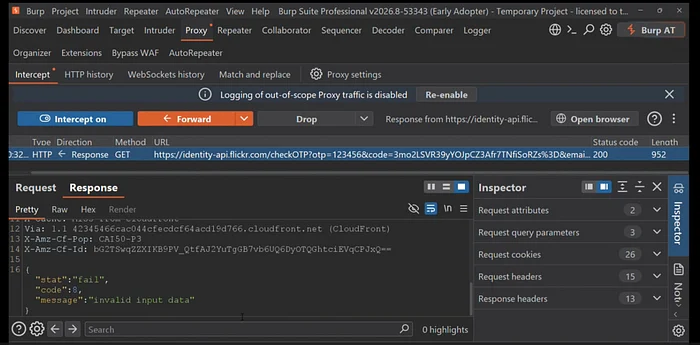
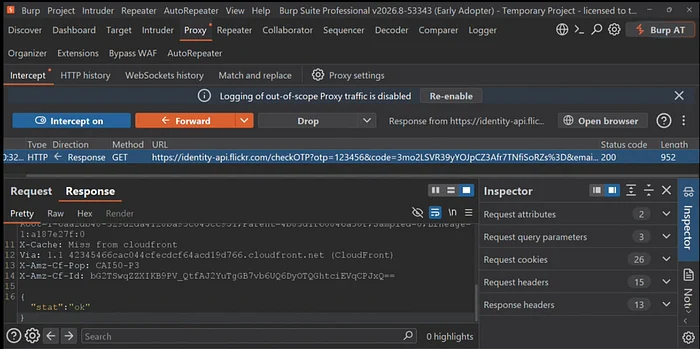
Step 5: Forward the modified response
The application accepted the verification result and redirected the author to the account.
Root cause
The application allowed the client to act on a verification result supplied in the response, rather than the server independently enforcing that the OTP was correct. In the author's words, if the server does not independently enforce OTP verification, an attacker may bypass this authentication step and gain access to an account without knowing the valid OTP.
Why the existing defences did not stop this is not described in the report.
Impact
The demonstrated impact depends on whether the server actually grants authenticated access based on the modified response, or whether the result is only a client-side UI change. The author is explicit about this limit: the redirect to the account was observed, but the report does not establish whether the server itself treated the session as authenticated. Where the server does grant access on the basis of the tampered result, an attacker could bypass this authentication step and reach an account without knowing the valid OTP.
Fix
The author's conclusion is that authentication decisions must be enforced on the server side, and that a client must never be trusted to determine whether an OTP is valid. The report does not say whether the affected service changed anything.
Variants to test
- Other multi-step flows with a result field in the response. Look at password reset, e-mail or phone verification, MFA enrolment and step-up authentication. A positive result is the flow advancing after you edit only the response and submit a wrong or missing code.
- Boolean and status fields rather than strings. Try flipping values such as a success flag or a status code in the intercepted response. A positive result is the same redirect or state change you saw with the string edit.
- Replaying the edited response against the server. If the client is redirected but the server still rejects the session on the next request, the issue is client-side only; if authenticated requests succeed, the server accepted the tampered result.
- Direct requests that skip the verification step. Try calling the endpoint that follows verification without completing it. A positive result is an authenticated response without a valid OTP.
What happened, in plain words
A security researcher was testing how a website handles logging in with a one-time password (OTP). An OTP is the short code, often six digits, that a site sends you by text message or email and asks you to type in to prove it is really you. The researcher found that the login process could be made to continue without knowing the correct code. The trick was to catch the website's reply to a wrong code and change that reply from "Failed" to "OK" before the browser saw it. The application accepted the verification result and redirected the researcher to the account.
This matters because the whole point of an OTP is to be a second lock on the door. If the lock can be opened by editing a message that passes through your own computer, the lock is not really there. The report is careful to say that the full impact depends on whether the server itself, the computer that holds the accounts, also accepted the edited answer, or whether only the browser's display changed. The researcher saw the redirect into the account but did not establish which of those two things happened.
The feature being tested
The target was the login flow of a service. The author deliberately did not name the service, to follow responsible disclosure, which is the practice of telling the owner privately before telling the world. The feature is OTP verification during login: you start logging in, the application asks for a one-time code, and it decides whether to let your session continue based on the result of that check.
A useful comparison is a nightclub with a doorman. You show your ID (your username and password), then the doorman asks a second question (the OTP). Only if both answers are right does he let you in. The concern is that the doorman may not be checking the second answer himself, but reading it off a note that you could rewrite on the way past.
The tool: Burp Suite
The write-up names only one tool: Burp Suite. Burp Suite is a program that sits between your browser and the website, like a postal worker who opens every letter going both ways. You can set your browser to send its traffic through Burp, and Burp shows you each request (what your browser sends to the server) and each response (what the server sends back). You can pause a message, edit it, and then let it continue. Security testers use it to see and change traffic that a normal browser hides.
No versions, endpoints, parameters or headers are given in the report, so there is nothing more specific to describe about the setup.
Finding it
While testing the authentication flow, the author intercepted the OTP verification response and changed its result from "Failed" to "OK". In plain terms: the server sent back a message saying whether the code was right, and the browser (the client) used that message to decide what to do next. That made the verification result a candidate for tampering. If the client trusts the response to decide whether the login proceeds, an attacker who controls the response can decide the outcome.
Think of a referee who asks an assistant whether the ball went in, and the assistant's answer is written on a card that a spectator can swap. The referee is not cheating, but the process is broken because the answer is not checked independently.
Exploitation
The author followed these steps:
- Created an account and logged out.
- Started the login process and entered an invalid OTP.
- Intercepted the verification traffic using Burp Suite.
- Changed the verification response from "Failed" to "OK".
- Forwarded the modified response.
Step 1: Create an account and log out
An account is needed so that the login flow has a real user to authenticate. Logging out returns the application to an unauthenticated state, which is the precondition for testing the login path. In everyday terms, you need a house with a door before you can test the lock, and you need to be outside the house before you can try the door.
Step 2: Start login and submit an invalid OTP
Entering an invalid code is what makes the test meaningful: any success that follows cannot be attributed to knowing the correct OTP. The application responds to this submission with a verification result of "Failed".
Step 3: Intercept the verification traffic
Burp Suite is placed between the client and the server so that the OTP verification response can be held and edited before the client sees it. The browser sends the code you typed to the server; the server replies with a verdict; Burp pauses that reply so you can look at it and change it.
Step 4: Change the response from "Failed" to "OK"
The verification result in the response is replaced with a success value. The report does not show the raw response, so the exact field, format or encoding of this value is not documented. What is documented is the change itself: the word "Failed" became "OK".
Step 5: Forward the modified response
The application accepted the verification result and redirected the author to the account. Forwarding means letting the edited message continue on its way to the browser, as if the postal worker had resealed the letter after changing one word.
Root cause
The application allowed the client to act on a verification result supplied in the response, rather than the server independently enforcing that the OTP was correct. In the author's words, if the server does not independently enforce OTP verification, an attacker may bypass this authentication step and gain access to an account without knowing the valid OTP.
Why the existing defences did not stop this is not described in the report. A comparison: a teacher who asks the class "did everyone do their homework?" and accepts a show of hands, instead of checking the notebooks, can be fooled by one raised hand.
Impact
The demonstrated impact depends on whether the server actually grants authenticated access based on the modified response, or whether the result is only a client-side UI change. The author is explicit about this limit: the redirect to the account was observed, but the report does not establish whether the server itself treated the session as authenticated. Where the server does grant access on the basis of the tampered result, an attacker could bypass this authentication step and reach an account without knowing the valid OTP.
In plain terms: we know the browser was told "you are in". We do not know from this report whether the server would also have opened the door on the next request, for example when loading private data. That difference decides whether this is a cosmetic bug or a serious account takeover.
Fix
The author's conclusion is that authentication decisions must be enforced on the server side, and that a client must never be trusted to determine whether an OTP is valid. The report does not say whether the affected service changed anything. The everyday version: the doorman must check the ID himself, not read a note handed to him by the visitor.
Variants to test
These are ideas for further testing, not findings from this report.
- Other multi-step flows with a result field in the response. Look at password reset, e-mail or phone verification, MFA enrolment and step-up authentication. A positive result is the flow advancing after you edit only the response and submit a wrong or missing code.
- Boolean and status fields rather than strings. Try flipping values such as a success flag or a status code in the intercepted response. A positive result is the same redirect or state change you saw with the string edit.
- Replaying the edited response against the server. If the client is redirected but the server still rejects the session on the next request, the issue is client-side only; if authenticated requests succeed, the server accepted the tampered result.
- Direct requests that skip the verification step. Try calling the endpoint that follows verification without completing it. A positive result is an authenticated response without a valid OTP.
Glossary
- OTP (one-time password): a short code, valid once, used as a second proof of identity during login.
- Authentication flow: the sequence of screens and messages a user goes through to prove who they are and get into an account.
- OTP verification: the step where the application checks whether the code the user typed is the correct one.
- Server: the computer that holds the accounts and makes the real decisions.
- Client: the program on your side, usually the browser, that shows screens and sends requests.
- Request: a message from the client to the server asking for something or submitting data.
- Response: the server's reply to a request.
- Burp Suite: a tool that sits between browser and server so you can view, pause and edit traffic.
- Intercept: to pause a message in transit so it can be inspected or changed before it continues.
- Forward: to let a paused message continue to its destination.
- Tampering: deliberately changing data in transit to alter the outcome.
- Bypass: getting past a check without satisfying it.
- Client-side: happening in the browser, on the user's machine.
- Server-side: happening on the server, under the owner's control.
- UI (user interface): what you see and click on screen.
- Redirect: an instruction that sends the browser to another page.
- Session: the period during which the server remembers that you are logged in.
- Endpoint: a specific address on the server that handles a particular action.
- Parameter: a named value sent with a request, such as a username or a code.
- Header: extra information attached to a request or response, such as the type of content.
- Boolean: a value that is either true or false.
- Status code: a number in a response that summarises the result, such as success or failure.
- Replay: sending a captured message again later.
- MFA (multi-factor authentication): logging in with more than one kind of proof, such as a password plus a code.
- Step-up authentication: asking for extra proof when you try to do something sensitive.
- Responsible disclosure: telling the owner of a service about a flaw privately before making it public.
- Root cause: the underlying reason the flaw exists.
- Impact: the harm that could result if the flaw is exploited.
- Account takeover: gaining control of someone else's account.



