Bypassing rate limit abusing misconfiguration rules
The application's rate limiting was implemented by IP address, but a misconfiguration allowed requests with a spoofed header claiming to come from localhost to bypass the limit. An attacker could then perform brute force attacks on login and other forms.

Hacker
The full write-up lives on its author's site
It belongs to its author, so we link to it rather than copy it. The other two tabs are our own rewrites, checked against it.
Context
This write-up describes a rate limit bypass found in a private bug bounty program. The researcher does not name the target or the product; the only asset information available is that the work was published on medium.com. Every function of the application, according to the report, was protected by a rate limit, and the goal was to find a way to ignore that algorithm so that brute force attacks could be run against several of those functions.
The report opens with a short definition of the mechanism being attacked:
A rate limiting algorithm is used to check if the user session (or IP-address) has to be limited based on the information in the session cache.
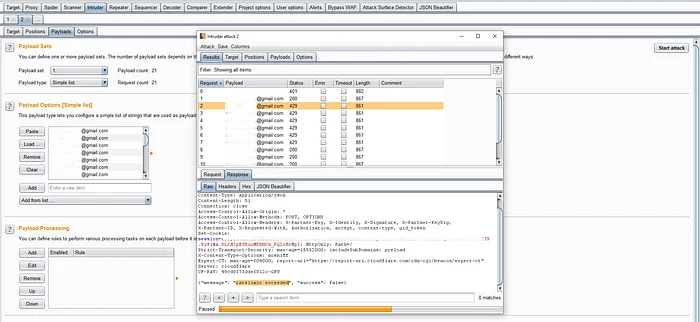
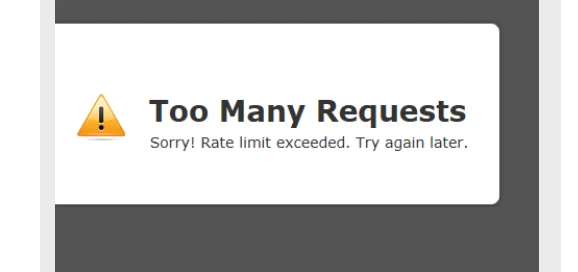
In case a client made too many requests within a given timeframe, HTTP-Servers can respond with status code429: Too Many Requests.
Setup
The report does not describe accounts, roles or specific tool versions. The tools involved are a proxy for replaying and editing requests (the tips section refers to Burp Suite and to Burp Intruder) and a Burp Suite extension that automatically inserts bypass headers into every HTTP request, linked from the PortSwigger BApp Store. The precondition for the attack is simply that the target enforces its rate limit and that the attacker can add or modify request headers.
Finding it
During the discovery phase the researcher confirmed that all application functions were protected by a rate limit. The interesting question was how to get around the algorithm, because a bypass would allow brute force against multiple functions, for example:
- Creating multiple users through brute force
- Brute force attacks on the Sign In page
- 2FA bypass (the report notes that the application did not implement 2FA methods)
First attempt: rotate the source IP
The first test was to trigger the rate limit on purpose and then change IP address. After changing IP, the researcher could send 4 more requests before being blocked again. From this, the researcher concluded that the rate limit rule was being applied per IP address, and that the application was constantly checking how many requests were made from the remote IP. After changing IP, the researcher could send 4 more requests before being blocked again, which suggested the rule was applied per IP address.
Second attempt: the localhost exception
The researcher then considered a common implementation error: a rate limit rule created to block brute force from remote IPs, with an exception for IP [redacted] (localhost). If the application trusts a client-supplied header to determine the remote address, that exception can be reached from anywhere.
Exploitation
Step 1: add the bypass header
The header added to the HTTP request was:
X-Remote-IP: [redacted]
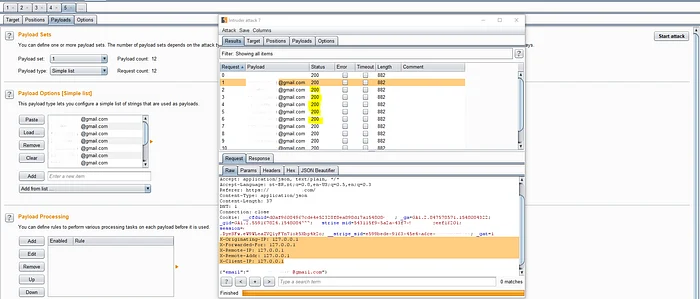
With that header in place, the report states that the rate limit bypass was successfully completed.
Step 2: brute force the login page
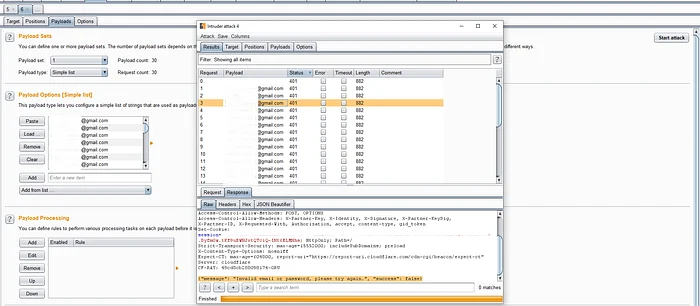
With the limit no longer applying, the researcher could perform brute force on the login page, which had been protected by the rate limit. The report shows this scenario in the screenshot above.
Step 3: password change spam
The same bypass allowed repeated password change requests to be sent. The report illustrates this with two screenshots.

Step 4: automate the header with Burp
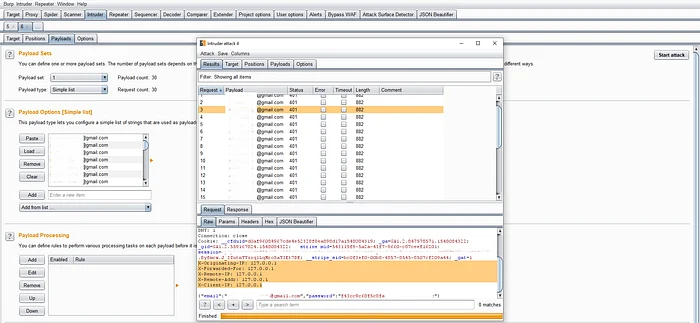
To avoid inserting the header manually in every request, the researcher points to a Burp Suite extension that automatically inserts the bypass headers into all HTTP requests. This makes it possible to run Burp Intruder attacks without editing each request by hand. The report shows the resulting attack configuration.
Root cause
The researcher's hypothesis was that the rate limit rule was applied per source IP and that the application derived that IP from a client-controlled header (X-Remote-IP) rather than from the actual connection. Because the rule exempted [redacted], any client could claim to be localhost and escape the limit. The likely explanation is that the rate limit was evaluating a value the attacker supplies rather than the real peer address. The report presents this as a likely misconfiguration rather than showing the server-side code.
Impact
Under the conditions described, the bypass allowed brute force on the login page and repeated password change requests, and the report lists other scenarios it opened up. The report also notes that if two-factor authentication had been enabled, the same bypass could have been used against users' passwords, but no such mechanism was enabled at the time.
Fix
The implied correction is to derive the client address from the connection or from a trusted proxy chain rather than from a client-supplied header, and to avoid blanket exemptions for localhost in rules that are reachable from the internet.
Variants to test
- Send
X-Remote-IP: [redacted]on a rate-limited endpoint. A positive result is that requests continue to be processed after the normal limit would have blocked you. - Try other headers that proxies and frameworks use to carry the client address, such as
X-Forwarded-For,X-Real-IPandX-Originating-IP, with[redacted]as the value. A positive result is the same: the limit stops applying. - Rotate the value of the header on each request (for example different loopback or private addresses) and watch whether the counter resets. A positive result is that each new value gets a fresh allowance.
- Combine the header with Burp Intruder using the extension mentioned in the report, so the header is added to every request automatically. A positive result is a sustained brute force run against a login or password change form without blocks.
- Test the same header against 2FA verification endpoints if the target has them. A positive result is that code guessing is no longer throttled.
What happened, in plain words
Imagine a nightclub with a bouncer who is told: "If someone tries to get in more than four times in a row, stop letting them in." That rule is called a rate limit. It exists to slow down anyone who is trying thousands of passwords or flooding a form with requests. Now imagine the bouncer does not look at the person's face. Instead, the bouncer reads a sticky note the visitor hands over, and the note says where the visitor is from. If the note says "I am the manager, I am allowed in", the bouncer steps aside. That is essentially what happened here.
A security researcher was testing a private bug bounty program. In a bug bounty program, a company invites independent researchers to try to break its systems, and pays or thanks them for reporting what they find. The researcher noticed that every form in the application was protected by a rate limit, meaning the server would stop answering after too many requests in a short time. The researcher found that adding a header claiming the request came from [redacted] bypassed the rate limit. With the limit gone, the researcher could send as many requests as wanted, for example guessing passwords on the login page.
The whole trick came down to adding one line to each request:
X-Remote-IP: [redacted]
That line is a header. A header is a small piece of text that travels with every request, like the label on a parcel. The label said "this request comes from [redacted]", which is the address a computer uses to talk to itself (localhost). The bypass suggests the server trusted the header rather than the real connection.
The image above is the title card of the write-up, showing the article name, the author Daniel "V" Morais, a reading time of 3 minutes and the date Feb 15, 2019.
The idea behind a rate limit
The report starts by explaining the mechanism it attacks. A rate limit is a rule that counts how many requests arrive from someone in a given window of time. If the count goes over the allowed number, the server refuses to do more work for that someone until the window resets. The report quotes this definition:
A rate limiting algorithm is used to check if the user session (or IP-address) has to be limited based on the information in the session cache.
In case a client made too many requests within a given timeframe, HTTP-Servers can respond with status code429: Too Many Requests.
Let us unpack the words in that quote, because each one matters later.
- A session is the server's memory of who you are between requests. When you log in, the server gives your browser a small piece of data, often called a cookie, and your browser sends it back with every request. The server uses it to recognise you. Think of it as a wristband you get at an event: you show it at the door and you are let in without showing your ID again.
- An IP address is the number that identifies a computer on a network, a bit like a postal address for parcels. Every request that reaches a server comes from some IP address.
- A session cache is a fast, temporary store where the server keeps counters and session data so it can answer quickly. It is like a notepad by the door where the bouncer tallies how many times each visitor has come in.
- HTTP is the language browsers and servers use to exchange requests and responses. A request is what your browser sends ("give me this page"), a response is what the server sends back (the page, or an error).
- A status code is a three-digit number in the response that says what happened. 200 means fine, 404 means not found, and 429 means "too many requests, slow down".
The image above sits right after the definition and illustrates the 429 response, the "Too Many Requests" status the server sends when the limit is hit.
Why does this matter for a beginner? Because a rate limit is often the only thing standing between an attacker and a correct password. If a login form lets you try a password once per second, guessing a long password is hopeless. If it lets you try thousands per minute, guessing becomes practical. So when a rate limit can be bypassed, the login form becomes a target.
The setup: what tools were used
The report does not describe accounts, roles or specific tool versions. The tools involved are:
- A proxy for replaying and editing requests. A proxy is a program that sits between your browser and the server, like a postman who opens every letter, lets you read it, change it, and then delivers it. The report refers to Burp Suite, a well-known proxy used in security testing.
- Burp Intruder, a part of Burp Suite that sends the same request many times with small changes each time. It is the automated version of trying every key on a keyring until one opens the door.
- A Burp Suite extension that automatically inserts bypass headers into every HTTP request, linked from the PortSwigger BApp Store. An extension is an add-on that gives the main program extra abilities, like a plugin in a browser.
The only precondition for the attack is that the target enforces a rate limit and that the attacker can add or change request headers. In other words, the attacker needs to be able to write on the label of the parcel before it is delivered.
Finding it: the discovery phase
During the discovery phase, the researcher confirmed that all application functions were protected by a rate limit. "All application functions" means every form and action the application offers: signing in, creating an account, changing a password, and so on. The interesting question was how to get around the algorithm, because a bypass would allow brute force against multiple functions.
Brute force means trying many possibilities in a row until one works, like trying every combination on a padlock. It is not clever, it is just fast and patient. The report lists what a bypass would enable:
- Creating multiple users through brute force
- Brute force attacks on the Sign In page
- 2FA bypass (the report notes that the application did not implement 2FA methods)
2FA, or two-factor authentication, means logging in with two things: something you know (a password) and something you have (a code from your phone, for example). It makes guessing much harder because a stolen password alone is not enough. The report notes that this application did not have 2FA, so that particular scenario was not possible here.
First attempt: change the IP address
The first test was simple in idea: trigger the rate limit on purpose, then change IP address. The researcher wanted to see whether the counter followed the person or the address. If the counter followed the person (the session), changing address would not help. If it followed the address, a new address would get a fresh allowance.
After changing IP, the researcher could send 4 more requests before being blocked again, which suggested the rule was applied per IP address. The researcher concluded that the rate limit rule was being applied per IP address, and that the application was constantly checking how many requests were made from the remote IP.
Why does this matter? Because if the rule is tied to the address, then anything that changes what the server thinks the address is will reset the counter. The researcher now had a hypothesis: the server is not looking at the real connection, it is looking at something the client can influence.
Second attempt: the localhost exception
The researcher then considered a common implementation error. Many systems have a rule that blocks brute force from remote IPs but makes an exception for [redacted], which is localhost. Localhost is the address a computer uses to refer to itself. It is like the back door of a building that staff use so they do not have to go through the front security desk. The idea behind the exception is convenience: the server's own internal checks should not be blocked by the rule meant for outsiders.
The mistake is trusting a client-supplied header to decide whether a request is local. If the application reads a header that the client writes, then any client anywhere can write "I am localhost" and be treated as staff. The header the researcher tried was X-Remote-IP.
Exploitation
Step 1: add the bypass header
The header added to the HTTP request was:
X-Remote-IP: [redacted]
Line by line:
X-Remote-IPis the name of the header. Headers with anX-prefix are custom headers, meaning they are not part of the standard set that every browser and server must understand. They are invented by whoever built the system, so their meaning depends entirely on that system. Here the name suggests "the IP address of the remote client".- The colon separates the name from the value.
[redacted]is the value. It is the standard loopback address, the address a machine uses to talk to itself. Whenever a program connects to[redacted], it is connecting to the same computer it is running on.
With that header in place, the report states that the rate limit bypass was successfully completed. In plain words: the bouncer read the sticky note, saw "manager", and waved the visitor through.
The image above shows the moment the bypass worked: the request carries X-Remote-IP: [redacted] and the report notes that the rate limit bypass was successfully completed.
Step 2: brute force the login page
With the limit no longer applying, the researcher could perform brute force on the login page, which had been protected by the rate limit. The report shows this scenario in the screenshot above. The point of this step is to show the practical consequence: a form that was designed to slow down guessing now accepts as many guesses as the attacker wants to send.
Step 3: password change spam
The same bypass allowed repeated password change requests to be sent. "Spam" here means sending the same action over and over, far more often than a human would. The report illustrates this with two screenshots.
The two images above show the password change requests being repeated without being blocked, which is what the rate limit was supposed to prevent.
Step 4: automate the header with Burp
Inserting the header by hand in every request is slow and error-prone. To avoid that, the researcher points to a Burp Suite extension that automatically inserts the bypass headers into all HTTP requests. This makes it possible to run Burp Intruder attacks without editing each request by hand. The report shows the resulting attack configuration.
The image above shows the attack configuration in Burp, with the header being added automatically to every request the tool sends.
Why it worked
The researcher's hypothesis was that the rate limit rule was applied per source IP and that the application derived that IP from a client-controlled header (X-Remote-IP) rather than from the actual connection. Because the rule exempted [redacted], any client could claim to be localhost and escape the limit. The likely explanation is that the rate limit was evaluating a value the attacker supplies rather than the real peer address. The report presents this as a likely misconfiguration rather than showing the server-side code.
A useful comparison: a bouncer who checks a name on a list is doing security. A bouncer who asks visitors to write their own name on the list is doing theatre. The rate limit was real, but the input it relied on was written by the visitor.
What an attacker could do with it
Under the conditions described, the bypass allowed brute force on the login page and repeated password change requests, and the report lists other scenarios it opened up. The report also notes that if two-factor authentication had been enabled, the same bypass could have been used against users' passwords, but no such mechanism was enabled at the time. The report does not state a severity, CVSS score or bounty amount.
How to fix it
The implied correction is to derive the client address from the connection or from a trusted proxy chain rather than from a client-supplied header, and to avoid blanket exemptions for localhost in rules that are reachable from the internet. In everyday terms: the bouncer should look at where the visitor actually came from, not at what the visitor wrote on a note.
Other things worth trying
These are variations on the same idea, useful if you are learning and testing your own systems:
- Send
X-Remote-IP: [redacted]on a rate-limited endpoint. A positive result is that requests continue to be processed after the normal limit would have blocked you. - Try other headers that proxies and frameworks use to carry the client address, such as
X-Forwarded-For,X-Real-IPandX-Originating-IP, with[redacted]as the value. A positive result is the same: the limit stops applying. - Rotate the value of the header on each request (for example different loopback or private addresses) and watch whether the counter resets. A positive result is that each new value gets a fresh allowance.
- Combine the header with Burp Intruder using the extension mentioned in the report, so the header is added to every request automatically. A positive result is a sustained brute force run against a login or password change form without blocks.
- Test the same header against 2FA verification endpoints if the target has them. A positive result is that code guessing is no longer throttled.
Glossary
- 2FA (two-factor authentication): logging in with two different things, usually a password plus a code from a phone, so a stolen password alone is not enough.
- API: a way for one program to talk to another, like a waiter taking your order to the kitchen; here it refers to the endpoints the application exposes for actions such as login and password change.
- Brute force: trying many possibilities in a row until one works, for example guessing passwords one after another.
- Burp Intruder: the part of Burp Suite that sends the same request many times with small changes, used for automated guessing.
- Burp Suite: a program used in security testing that sits between your browser and a server so you can read and change requests.
- Cookie: a small piece of data a server gives your browser so it can recognise you on later requests, like a wristband at an event.
- Endpoint: a specific address on a server that performs an action, such as the login form or the password change form.
- Extension: an add-on that gives a program extra abilities, like a plugin in a browser.
- Header: a small piece of text sent with every request or response, like the label on a parcel, carrying information such as the client address or the content type.
- HTTP: the language browsers and servers use to exchange requests and responses.
- IP address: the number that identifies a computer on a network, like a postal address for parcels.
- Localhost: the address a computer uses to refer to itself, written
[redacted]. - Loopback address: another name for
[redacted], the address that always points back to the same machine. - Misconfiguration: a setting that is wrong or unsafe, rather than a bug in the code itself.
- PortSwigger BApp Store: the online catalogue of extensions for Burp Suite.
- Private program: a bug bounty program that is not open to everyone; researchers are invited or approved before they can test.
- Proxy: a program that sits between your browser and a server, letting you read and change requests before they are delivered.
- Rate limit: a rule that counts requests from someone in a time window and refuses more once the count is too high.
- Remote IP: the address the server believes a request came from.
- Request: what a browser or tool sends to a server, asking it to do something.
- Response: what the server sends back, such as a page or an error.
- Session: the server's memory of who you are between requests, usually carried by a cookie.
- Session cache: a fast, temporary store where the server keeps session data and counters.
- Status code: a three-digit number in a response saying what happened, such as 200 for fine or 429 for too many requests.
- 429 Too Many Requests: the status code a server sends when a rate limit has been hit.
- X-Remote-IP: a custom header whose name suggests it carries the client's IP address; the application trusted it, which was the flaw.
- X-Forwarded-For, X-Real-IP, X-Originating-IP: other headers that proxies and frameworks sometimes use to carry the client address, worth testing in the same way.





