Some critical vulnerabilities found with passive analysis on bug bounty programs explained
Three vulnerabilities are described: an exposed invitation URL that allowed signing up as an employee and accessing company data, a Calendly calendar takeover that let an attacker manage support calls, and a source code leak on an uncommon open port found via Shodan. An attacker could join a company as an employee, control scheduled calls, and access sensitive files.

This post describes three vulnerabilities found by me on bug bounty programs along with an overview about how it was found and the performed steps. The main goal of this post is to show how to find critical/high vulnerabilities without touching the company’s assets or tampering with the requests.
The full write-up lives on its author's site
It belongs to its author, so we link to it rather than copy it. The other two tabs are our own rewrites, checked against it.
Context
This write-up covers three separate findings made across bug bounty programs, all reached through passive analysis rather than by tampering with requests or touching the company's assets directly. The author's stated aim is to show that critical and high severity issues can be found without active exploitation of the target's infrastructure.
The three findings are:
- An exposed endpoint containing the invitation URL of enterprise accounts, which allowed an attacker to join a company as an employee.
- A takeover of a Calendly calendar mapped on a Contact page, which allowed the attacker to manage scheduled client calls with the support team.
- Source code and sensitive information disclosure on a public company IP with an uncommon open port, found through Shodan.
The affected assets are not named in the report; the target domains and the company IP are redacted.
Setup
The work relies on open-source tooling and manual review. The tools named in the report are:
| Tool | Purpose in the report |
|---|---|
| subfinder, amass | Enumerating company assets in scope |
| gau | Retrieving URLs and endpoints crawled by third parties |
| grep | Filtering results for sensitive keywords |
| Shodan | Searching for hosts by SSL certificate name and inspecting open ports |
| ffuf | Brute forcing directories and endpoints |
For the first finding, the only precondition was a personal email address (the report uses a @gmail.com address) to create an account. For the second, a new Calendly account was needed. For the third, no account was needed at all: the service was reachable from the internet.
Finding it
Finding 1: the invitation endpoint
The first step was OSINT: retrieving endpoints and URLs that third parties had already crawled. The command used was:
printf target.com | gau
The output was then reviewed manually, with attention to a list of sensitive keywords:
invoice, discount, promo-code, redirect, reset_password, reset-password, password, TrackOrder, token, invite
The invite keyword stood out among the target's endpoints.

The screenshot shows the gau output where the invitation-related URL appears.
Finding 2: the Calendly calendar
After roughly five minutes of interacting with the different pages of the application as a normal user, the author clicked a calendar icon on the bottom left side of a Contact page. It opened a blank page with an error from Calendly's service.
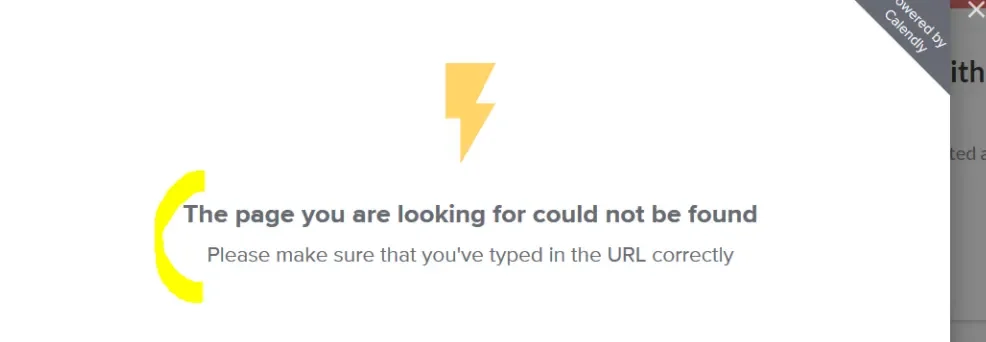
Inspecting the page revealed a GET request to target-v2/call, which is the registered calendar name from the third-party Calendly service. That name is what the target application uses to embed the calendar.
Finding 3: the open port
A manual Shodan analysis started with a dork to gather information about the target:
ssl:target.com
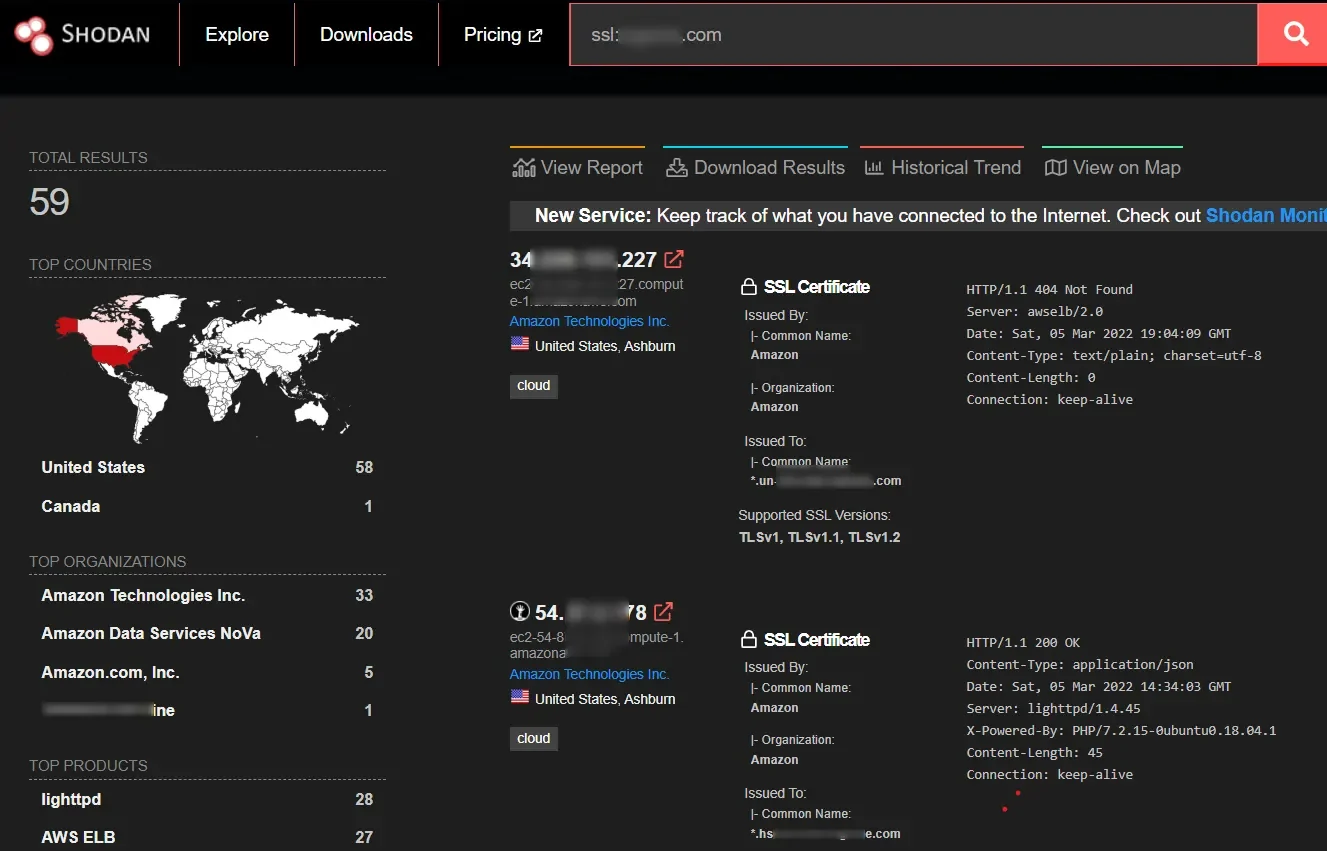
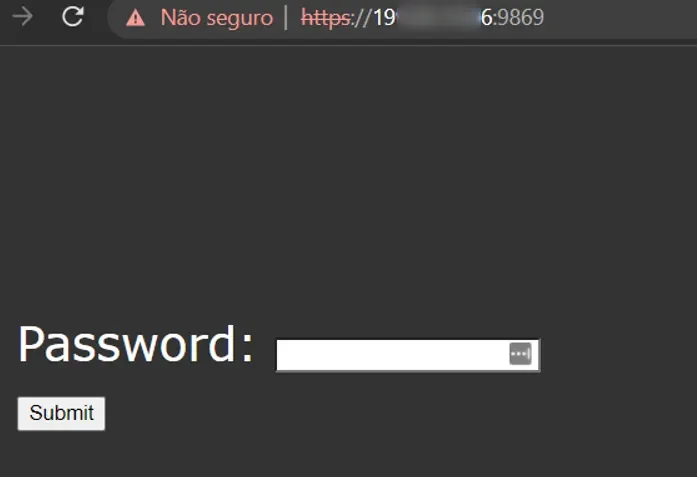
Using the "View Report" option, the author looked manually for uncommon open ports. One host had port 9869 open. Accessing it led to a password protected page.
Exploitation
Step 1: joining a company through the invitation URL
- Clicking the suspicious URL from the gau output took the author to a sign-up page.
- A new account was created with a personal email (
@gmail.com). - After sign-up, the application redirected to the company's page inside the target application, listing all invited employees and other sensitive information.
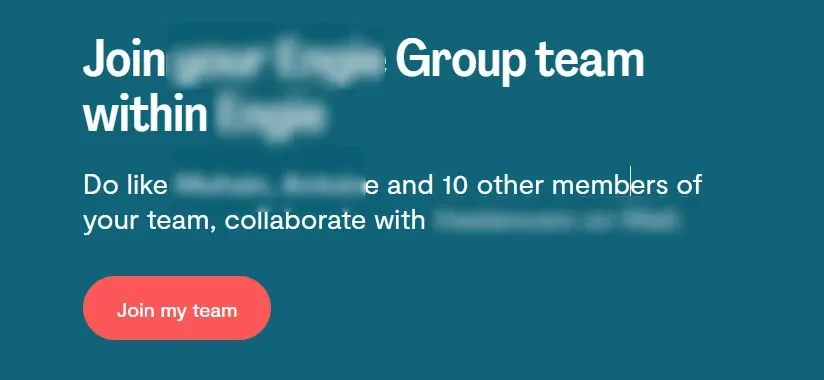
The sign-up page that led to access to the company's team.
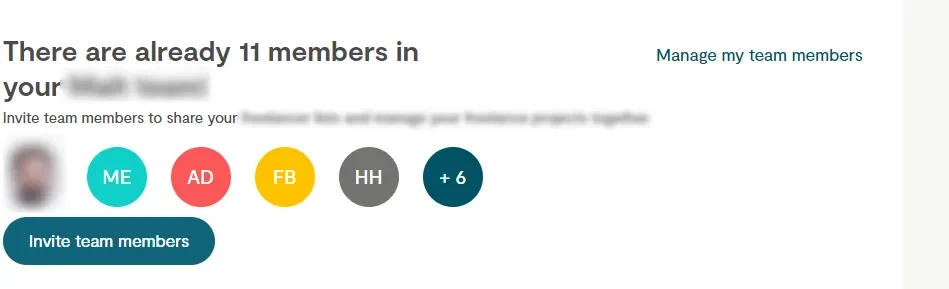
Employee PII visible after joining.
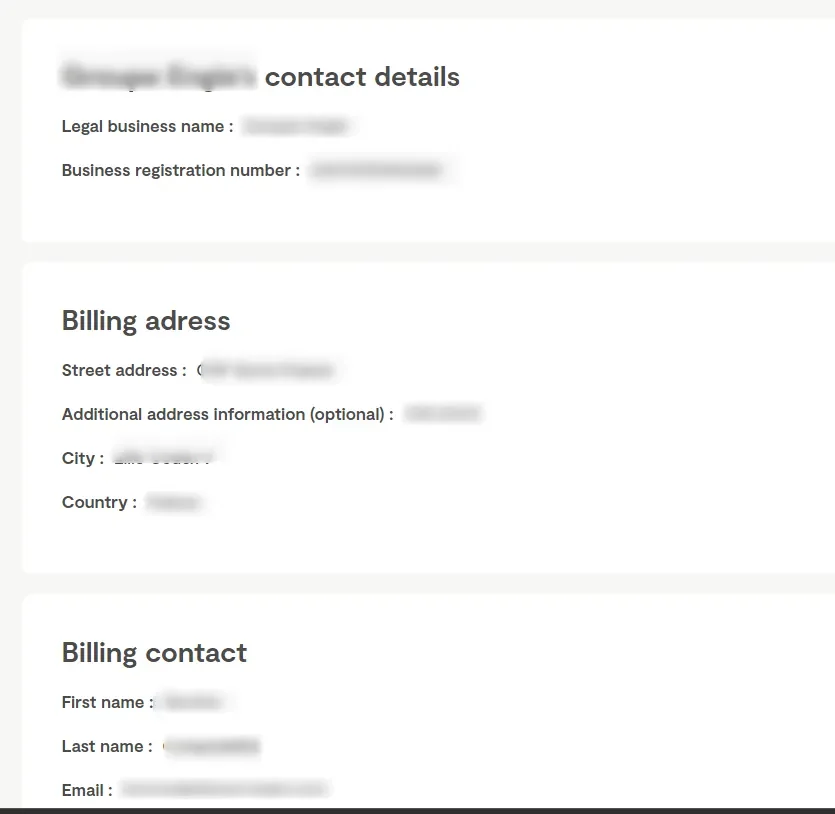
Further sensitive company data visible in the same area.
The steps recorded by the author were:
- Search for all company assets in scope using open-source tools (subfinder, amass and similar).
- Use gau to retrieve a list of URLs and endpoints from the discovered domains.
- Grep the results for sensitive keywords, in this case
invite:
grep -r "invite"
- Manually access the URLs to see their content and follow the page instructions, which led to signing up as an employee for many different companies registered under the affected target application.
The key point is that the invitation URL was mapped by third-party crawlers, so it could be discovered by anyone running the same passive collection.
Step 2: claiming the Calendly calendar
- Sign up for a new Calendly account.
- Create a new calendar. Calendly asks for a unique name that will be attached to the URL.
- Provide
target-v2as the calendar name, matching the value seen in the GET request totarget-v2/callon the target's Contact page. - Complete the creation.
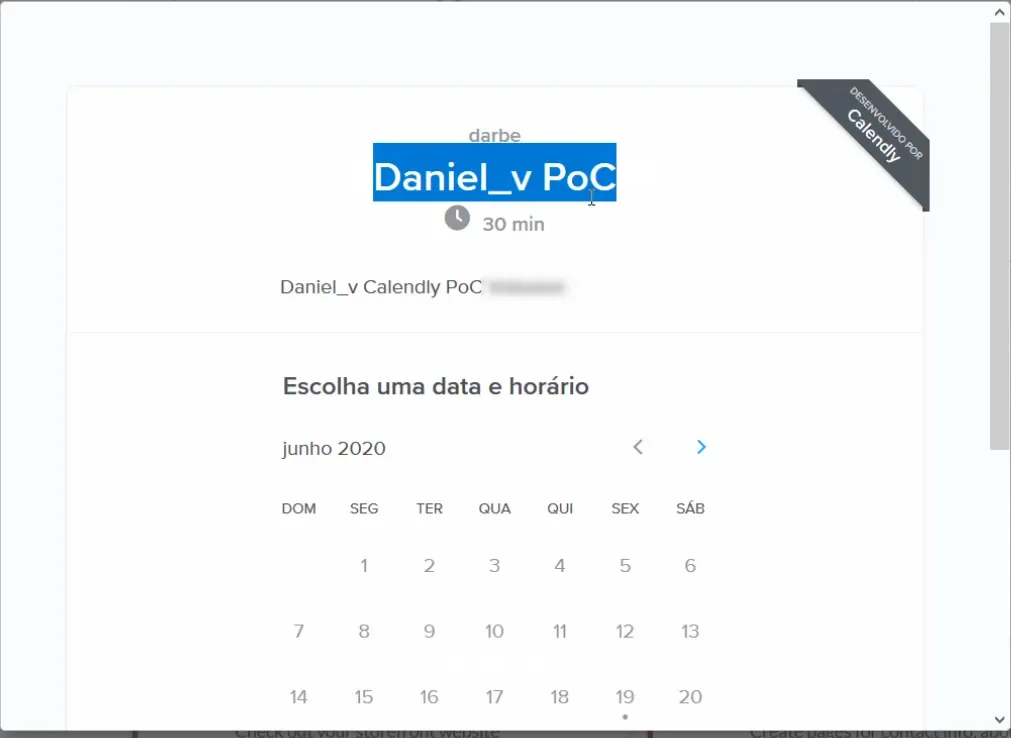
The newly created calendar then appeared on the Contact page of the target's domain. Any visitor who scheduled a call with the support team was in fact scheduling with the attacker.
The steps recorded by the author were:
- Manually analyse the application's functionality and pages as a normal user.
- Find the third-party scheduling calendar (Calendly) integrated on the Contact page.
- Consider a takeover of calendars on that platform: sign up, study calendar creation, and register the name used by the target application.
- The calendar was instantly linked to the Contact page, and scheduled calls with the support team were then managed by the attacker.
Step 3: reaching the exposed files
- Access port
9869on the host found through Shodan. It returned a password protected page. - Run a brute force attack with ffuf to find directories and endpoints, which produced good results.
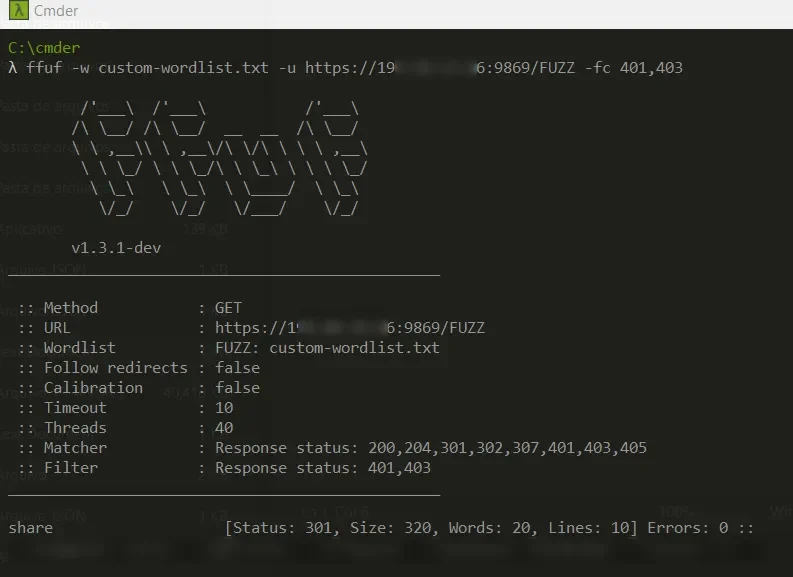
- One of the discovered endpoints was
share. Accessing it exposed the source code of the company's project through a directory listing.
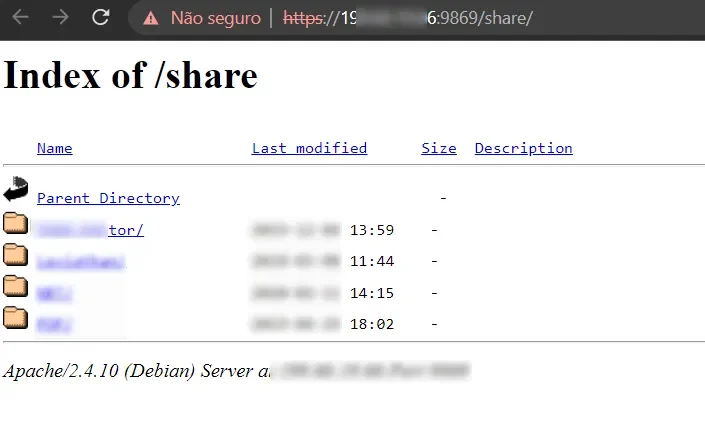
The steps recorded by the author were:
- Start with a simple Shodan dork to filter all domains matching the company SSL certificate name.
- Manually search for uncommon open ports.
- Access them; one host led to a password protected page, which was highly suspicious.
- Brute force with ffuf to discover hidden endpoints or directories that bypass the password page, and find one.
- Access the
shareendpoint, where the sensitive files were exposed.
Root cause
Finding 1. The invitation URL for enterprise accounts was exposed and mapped by third-party crawlers. Following the invitation URL led to a sign-up page, and creating an account with a personal email landed the author inside the company's page. The report does not describe the server-side validation behind the invitation, so the exact check that was missing is not stated; likely the invitation token was not bound to a specific recipient or email domain, or it did not expire.
Finding 2. The Contact page embedded a Calendly calendar by name (target-v2), and that name had not been claimed on Calendly. Calendly lets any account register an unused calendar name, so the first person to register it controls what the target's Contact page displays.
Finding 3. A service on port 9869 was exposed to the internet behind a password page, but the password page only protected the root. The share endpoint was found with ffuf and served a directory listing containing project source code and sensitive files. The report does not describe how the password page was implemented or how the share endpoint related to it.
Impact
Finding 1. Any user could sign up as an employee on the target application using URLs mapped by different crawlers. This disclosed PII and sensitive information about the company to attackers, and the author notes it worked for many different companies registered under the affected application.
Finding 2. Any user could take over the third-party calendar used to schedule support calls. This allowed phishing attacks and gave the attacker control over all scheduled calls with the target's clients.
Finding 3. Any user on the web could find the service and access sensitive company files, including project data and source code.
Fix
Based on the findings, the fixes would be:
- Invitation endpoint: require authentication and validate the invitation server-side, binding it to the intended recipient and an expiry, rather than treating the link itself as the credential. Remove the endpoint from public crawl exposure where possible.
- Calendly calendar: claim the calendar name on Calendly under a company-controlled account, and verify ownership of the embedded calendar so an unclaimed name cannot be registered by a third party.
- Exposed service: apply the password protection to the whole service rather than individual paths, remove directory listings, and close port
9869to the internet if it does not need to be public.
Variants to test
- Crawled invitation and onboarding URLs. Run gau or similar collectors against in-scope domains, grep for
invite,signup,join,registerandtoken, and open each result in a private window. A positive result is a sign-up flow that completes without an existing account and lands inside an organisation's workspace. - Third-party embeds keyed by name. Inspect Contact and support pages for embedded schedulers, forms or chat widgets. If the embed references a name or slug, try registering that name on the third-party platform. A positive result is your own content appearing on the target's page.
- Uncommon ports on certificate-matched hosts. Use a Shodan dork such as
ssl:target.com, review open ports, and access any that look unusual. A positive result is a login page or service that is not part of the documented public surface. - Path-level protection bypass. Where a service returns a password page at the root, run ffuf against it and check discovered paths individually. A positive result is a path that returns content without the password prompt, especially a directory listing.
Takeaways
The author's conclusion is to perform passive analysis over the target using as many tools, searches and dorks as possible. The larger the company, the more OSINT results are available, and the more chances there are of finding a critical vulnerability of the kind described here.
What happened, in plain words
This article walks through three separate security problems that the author found on bug bounty programs. A bug bounty program is an arrangement where a company says: if you find a security problem in our systems, tell us, and we may pay you a reward. The author's point is that none of the three findings required breaking into anything. He did not tamper with requests, did not attack servers, and did not touch the company's assets in an aggressive way. He simply looked at information that was already public, and followed it.
The three findings are:
- A web address (a URL) that was meant to invite employees into a company account was publicly reachable. Anyone who found it could sign up with a personal email address and end up inside the company's workspace, seeing the list of employees and other sensitive information.
- A Contact page on the target's website displayed a scheduling calendar from a third-party service called Calendly. The calendar was referenced only by a name, and that name had not been claimed on Calendly. The author registered the name himself, and his own calendar started appearing on the target's Contact page. From then on, anyone booking a support call through that page was booking it with him.
- A server belonging to the company was reachable on the internet on an unusual port (a numbered door into a machine). It showed a password page, but a hidden folder behind it exposed the company's source code and other sensitive files.
The report does not name the companies involved; the domains and the IP address are redacted.
Before going further, a few words on the tools the author used. They are all free and open source, meaning anyone can download and use them:
| Tool | What it does in this report |
|---|---|
| subfinder, amass | Find the company's web assets (domains and subdomains) that are in scope |
| gau | Collects URLs and endpoints that third parties have already crawled and recorded |
| grep | Searches text for a word or pattern |
| Shodan | A search engine for internet-connected machines, which can be filtered by certificate name and open ports |
| ffuf | Tries many possible folder and file names on a web server, quickly |
For the first finding, the only thing needed was a personal email address (the report uses a @gmail.com address) to create an account. For the second, a new Calendly account was needed. For the third, no account was needed at all: the service was reachable from the open internet.
Finding it
Finding 1: the invitation endpoint
The first step was OSINT. OSINT stands for open-source intelligence: gathering information from public sources, the way a journalist or a curious person would, without touching the target's systems. One of the first things the author does is retrieve endpoints and URLs that third parties have already crawled. An endpoint is simply a specific address on a web server that does something, for example a page, a form handler or a small service. Crawlers are programs that visit web pages and record the links they find, a bit like a librarian who walks every aisle and writes down every book title.
The command used was:
printf target.com | gau
Line by line:
printf target.comprints the texttarget.comto the screen. Here it is used to feed that domain name into the next program.- The vertical bar
|is a pipe. It takes the output of the command on the left and hands it to the command on the right as input, like passing a note from one person to another. gauis the tool that, given a domain, fetches URLs and endpoints that third parties have already recorded for that domain.
So the whole line means: take the domain target.com and ask gau to list every URL it knows about for it.
The output was then reviewed manually, with attention to a list of sensitive keywords:
invoice, discount, promo-code, redirect, reset_password, reset-password, password, TrackOrder, token, invite
Why these words? Because each one hints at a feature that might be sensitive. reset_password and password suggest account recovery flows. token suggests a secret value used to prove identity. invite suggests an invitation flow, which is exactly the kind of feature that lets someone join an organisation. The author is not attacking anything yet; he is reading a list of addresses and looking for the ones that sound interesting.
The invite keyword stood out among the target's endpoints.
The screenshot shows the gau output where the invitation-related URL appears.
Finding 2: the Calendly calendar
After roughly five minutes of interacting with the different pages of the application as a normal user, the author clicked a calendar icon on the bottom left side of a Contact page. It opened a blank page with an error from Calendly's service.
This is worth pausing on. A normal visitor would see a broken calendar and move on. The author saw an error message from a third-party service and asked: why is this page trying to load something from Calendly, and what exactly is it asking for? That curiosity is the whole technique here.
Inspecting the page revealed a GET request to target-v2/call, which is the registered calendar name from the third-party Calendly service. That name is what the target application uses to embed the calendar.
A GET request is the simplest kind of request a browser makes: it asks a server for something, like asking a shop assistant to show you an item. Inspecting the page means using the browser's built-in developer tools, which let you see the requests the page makes behind the scenes. The request went to a path containing target-v2/call, and the important part is target-v2: that is the name of the calendar on Calendly. The target's website does not store the calendar itself; it just tells the visitor's browser to fetch the calendar with that name from Calendly. That design is the seed of the problem.
Finding 3: the open port
A manual Shodan analysis started with a dork to gather information about the target:
ssl:target.com
Line by line:
ssl:is a Shodan filter. It restricts results to machines whose SSL certificate matches the value that follows.target.comis the name on the certificate.
An SSL certificate is the digital document a website presents to prove its identity and to encrypt traffic. Companies often use the same certificate name across several machines, so searching by certificate name is a way to find machines that belong to the same organisation even when their addresses are not obvious. A dork is simply a search query crafted to find something specific.
Using the "View Report" option, the author looked manually for uncommon open ports. One host had port 9869 open. Accessing it led to a password protected page.
A port is a numbered channel on a machine. If an IP address is a building's street address, ports are the numbered doors into it. Common doors are 80 and 443 for websites, 22 for secure remote login. Port 9869 is not one of the usual doors, which is why it caught the author's eye: unusual doors often lead to services that were set up for internal use and forgotten about.
Exploitation
Step 1: joining a company through the invitation URL
- Clicking the suspicious URL from the gau output took the author to a sign-up page.
- A new account was created with a personal email (
@gmail.com). - After sign-up, the application redirected to the company's page inside the target application, listing all invited employees and other sensitive information.
The sign-up page that led to access to the company's team.
Employee PII visible after joining. PII stands for personally identifiable information: details that identify a real person, such as names, email addresses or phone numbers.
Further sensitive company data visible in the same area.
The steps recorded by the author were:
- Search for all company assets in scope using open-source tools (subfinder, amass and similar).
- Use gau to retrieve a list of URLs and endpoints from the discovered domains.
- Grep the results for sensitive keywords, in this case
invite:
grep -r "invite"
Line by line:
grepis the search tool.-rmeans recursive: search inside every file in the current folder and its subfolders, not just one file."invite"is the word being searched for, in quotes so the shell treats it as one piece of text.
In practice this filters a large pile of collected URLs down to the few that contain the word invite, which is far faster than reading everything by hand.
- Manually access the URLs to see their content and follow the page instructions, which led to signing up as an employee for many different companies registered under the affected target application.
The key point is that the invitation URL was mapped by third-party crawlers, so it could be discovered by anyone running the same passive collection. Authentication means proving who you are, usually by logging in. The invitation link behaved like a door left open in a public corridor: whoever walked past could use it.
Step 2: claiming the Calendly calendar
- Sign up for a new Calendly account.
- Create a new calendar. Calendly asks for a unique name that will be attached to the URL.
- Provide
target-v2as the calendar name, matching the value seen in the GET request totarget-v2/callon the target's Contact page. - Complete the creation.
The newly created calendar then appeared on the Contact page of the target's domain. Any visitor who scheduled a call with the support team was in fact scheduling with the attacker.
Think of it like a shop that puts a sign on its door saying "book appointments at the desk labelled target-v2". If nobody has rented that desk yet, anyone can walk into the building, rent the desk under that label, and sit behind it. Customers still see the shop's sign, but they are now talking to the person behind the desk. The target's website never checked that the calendar it displayed actually belonged to the company.
The steps recorded by the author were:
- Manually analyse the application's functionality and pages as a normal user.
- Find the third-party scheduling calendar (Calendly) integrated on the Contact page.
- Consider a takeover of calendars on that platform: sign up, study calendar creation, and register the name used by the target application.
- The calendar was instantly linked to the Contact page, and scheduled calls with the support team were then managed by the attacker.
Step 3: reaching the exposed files
- Access port
9869on the host found through Shodan. It returned a password protected page. - Run a brute force attack with ffuf to find directories and endpoints, which produced good results.
A brute force attack here means trying many possible names automatically, one after another, instead of guessing by hand. It is like trying every key on a large keyring until one opens a door. The author is not guessing passwords; he is guessing folder and file names on the web server, because those names are often predictable words such as admin, backup or share.
- One of the discovered endpoints was
share. Accessing it exposed the source code of the company's project through a directory listing.
Source code is the human-written instructions that make up a program. A directory listing is what a web server shows when it is asked for a folder and has no page to display: instead of a web page, it prints the list of files in that folder, like a cupboard with the doors open. Anyone who reaches it can click through the files.
The steps recorded by the author were:
- Start with a simple Shodan dork to filter all domains matching the company SSL certificate name.
- Manually search for uncommon open ports.
- Access them; one host led to a password protected page, which was highly suspicious.
- Brute force with ffuf to discover hidden endpoints or directories that bypass the password page, and find one.
- Access the
shareendpoint, where the sensitive files were exposed.
Root cause
Finding 1. The invitation URL for enterprise accounts was exposed and mapped by third-party crawlers. Following the invitation URL led to a sign-up page, and creating an account with a personal email landed the author inside the company's page. The report does not describe the server-side validation behind the invitation, so the exact check that was missing is not stated; likely the invitation token was not bound to a specific recipient or email domain, or it did not expire. A token, in this context, is a secret value inside a link that is meant to prove the holder was invited.
Finding 2. The Contact page embedded a Calendly calendar by name (target-v2), and that name had not been claimed on Calendly. Calendly lets any account register an unused calendar name, so the first person to register it controls what the target's Contact page displays.
Finding 3. A service on port 9869 was exposed to the internet behind a password page, but the password page only protected the root. The share endpoint was found with ffuf and served a directory listing containing project source code and sensitive files.
Impact
Finding 1. Any user could sign up as an employee on the target application using URLs mapped by different crawlers. This disclosed PII and sensitive information about the company to attackers, and the author notes it worked for many different companies registered under the affected application.
Finding 2. Any user could take over the third-party calendar used to schedule support calls. This allowed phishing attacks and gave the attacker control over all scheduled calls with the target's clients. Phishing is tricking someone into trusting a fake channel so they hand over information or click something harmful; here the fake channel was a real calendar on the real website, which makes it especially convincing.
Finding 3. Any user on the web could find the service and access sensitive company files, including project data and source code.
Fix
Based on the findings, the fixes would be:
- Invitation endpoint: require authentication and validate the invitation server-side, binding it to the intended recipient and an expiry, rather than treating the link itself as the credential. Remove the endpoint from public crawl exposure where possible.
- Calendly calendar: claim the calendar name on Calendly under a company-controlled account, and verify ownership of the embedded calendar so an unclaimed name cannot be registered by a third party.
- Exposed service: apply the password protection to the whole service rather than individual paths, remove directory listings, and close port
9869to the internet if it does not need to be public.
Variants to test
- Crawled invitation and onboarding URLs. Run gau or similar collectors against in-scope domains, grep for
invite,signup,join,registerandtoken, and open each result in a private window. A private window is useful because it starts with no saved logins, so you see what a stranger would see. A positive result is a sign-up flow that completes without an existing account and lands inside an organisation's workspace. - Third-party embeds keyed by name. Inspect Contact and support pages for embedded schedulers, forms or chat widgets. If the embed references a name or slug, try registering that name on the third-party platform. A slug is the short readable identifier used in a URL. A positive result is your own content appearing on the target's page.
- Uncommon ports on certificate-matched hosts. Use a Shodan dork such as
ssl:target.com, review open ports, and access any that look unusual. A positive result is a login page or service that is not part of the documented public surface. - Path-level protection bypass. Where a service returns a password page at the root, run ffuf against it and check discovered paths individually. A positive result is a path that returns content without the password prompt, especially a directory listing.
Takeaways
The author's conclusion is to perform passive analysis over the target using as many tools, searches and dorks as possible. The larger the company, the more OSINT results are available, and the more chances there are of finding a critical vulnerability of the kind described here. In other words: before you try to break anything, read what the internet already says about it.
Glossary
- API: a way for one program to talk to another, like a service counter where you ask for something and get a defined answer.
- Authentication: proving who you are, usually by logging in.
- Authorisation: what you are allowed to do once you are known.
- Brute force: trying many possibilities automatically until one works.
- Bug bounty program: a scheme where a company rewards people for reporting security problems in its systems.
- Calendly: a third-party service for scheduling appointments through a shareable calendar.
- Crawler: a program that visits web pages and records the links it finds.
- Directory listing: a web server page that shows the files in a folder instead of a normal web page.
- Dork: a search query crafted to find something specific.
- Endpoint: a specific address on a web server that performs an action or serves content.
- ffuf: a tool that tries many folder and file names on a web server quickly.
- gau: a tool that collects URLs and endpoints already recorded by third parties for a domain.
- GET request: the basic request a browser makes to ask a server for something.
- grep: a command-line tool that searches text for a word or pattern.
- IP address: the numeric address of a machine on a network.
- OSINT: open-source intelligence, information gathered from public sources.
- PII: personally identifiable information, details that identify a real person.
- Phishing: tricking someone into trusting a fake channel to obtain information or actions.
- Port: a numbered channel on a machine through which a service is reached.
- Private window: a browser window that starts without saved logins or history.
- Shodan: a search engine for internet-connected machines and their open ports.
- Slug: the short readable identifier used in a URL.
- Source code: the human-written instructions that make up a program.
- SSL certificate: a digital document a website presents to prove its identity and encrypt traffic.
- subfinder, amass: tools that enumerate a company's domains and subdomains.
- Token: a secret value, often inside a link, used to prove the holder is allowed to do something.
- URL: a web address.


