Bypassing XSS filters using Double Encoding
A reflected cross-site scripting vulnerability existed in a search input field because the application decoded user input twice, allowing double-encoded payloads to bypass a single-decoding filter. An attacker could execute arbitrary JavaScript in a victim's browser when they visited a crafted URL.

Hello Hackers, Recently I started my bug hunting journey and got an XSS by Bypassing Cloudflare WAF. Now I am back with another XSS by Double Encoding.
The full write-up lives on its author's site
It belongs to its author, so we link to it rather than copy it. The other two tabs are our own rewrites, checked against it.
Context
This write-up describes a reflected cross-site scripting (XSS) finding obtained by double URL encoding a payload, so that a filter that decodes user input only once is bypassed. The researcher frames it as a follow-up to an earlier XSS that bypassed a Cloudflare WAF, and describes the technique in general terms: the attack consists of encoding user request parameters twice in hexadecimal format to bypass security controls or cause unexpected behaviour from the application, which is possible because the web server accepts and processes client requests in many encoded forms.
The target described in the report is an input field on one of the researcher's targets, encountered while testing input fields such as search boxes. The report does not name the application, the endpoint, the parameter or the server technology.
Setup
The researcher states that they had recently started bug hunting and were using very basic methods while trying to find bugs and improve by learning more methods. No accounts, roles, tools or versions are listed. The only precondition shown is a reflected input field that decodes user input before it reaches the page.
Finding it
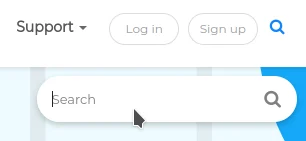
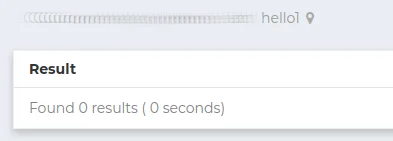
The reasoning is stated plainly: if there is an input field, there is a chance of cross-site scripting. While going through targets and testing input fields such as search boxes, the researcher found an interesting input field and entered the usual input, then checked the source code.
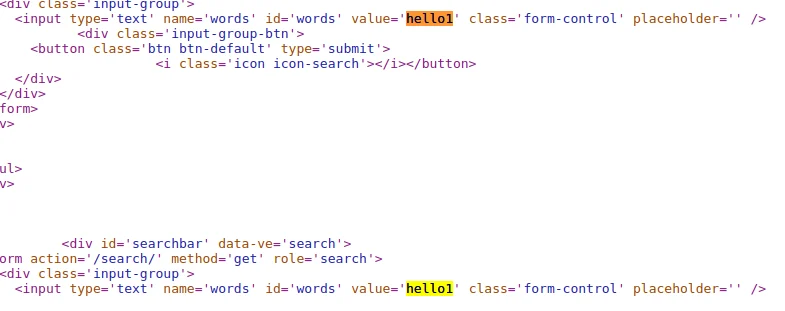
The next probe was a single quote. The application filtered it and replaced it with hello1 & in some places and with ‘&’ in the target fields.
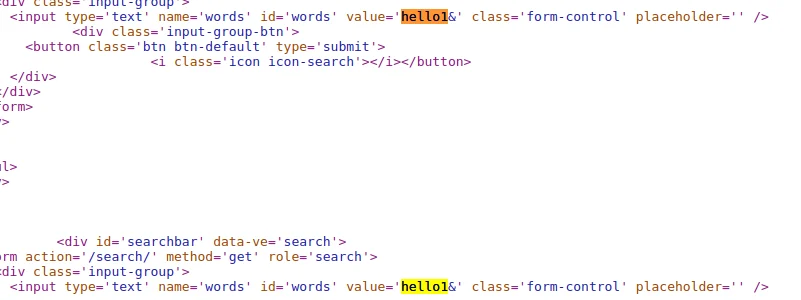
URL encoding was tried next and produced the same output, which the researcher read as the application decoding the input. That observation is what motivated double encoding: if the filter only decodes once, a value that is still encoded after the first decode can survive to a second decoding step.
Exploitation
Step 1: Confirm the double decoding
The researcher explains the mechanism as follows: by using double encoding it is possible to bypass security filters that only decode user input once, and the second decoding process is executed by the backend platform or modules that properly handle encoded data but do not have the corresponding security checks in place.
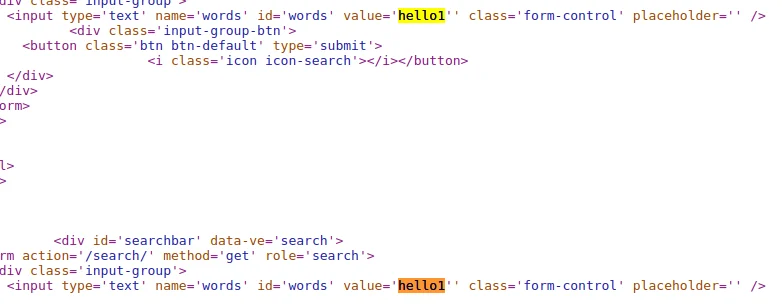
The report states that it worked.
Step 2: Try the basic script payload
The basic payload was taken and double encoded:
'><script>alert(1)</script>
%2527%253E%253Cscript%253Ealert%25281%2529%253C%252Fscript%253E
Each % of the ordinary URL encoding is itself encoded as %25, so ' becomes %2527, > becomes %253E, < becomes %253C, ( becomes %2528, ) becomes %2529 and / becomes %252F. After the first decode the server sees the single-encoded form, and after the second decode it sees the original characters.
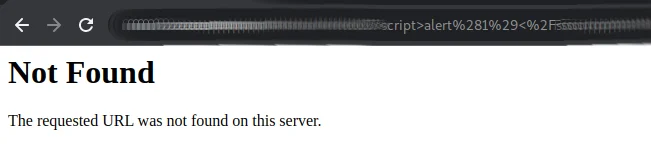
This attempt created an error.
Step 3: Switch to an event handler attribute
Because the script tag route failed, the researcher searched for attributes of the input tag to exploit, and settled on onfocus: the onfocus event occurs when an element gets focus.
The payload and its double-encoded form:
' onfocus='alert(1)'
%2527%2520onfocus%253D%2527alert%25281%2529%2527%2520
Here %2520 is a double-encoded space and %253D is a double-encoded =. The leading quote is intended to close the existing attribute value, and the trailing quote is intended to close the injected attribute so the rest of the tag stays syntactically valid.
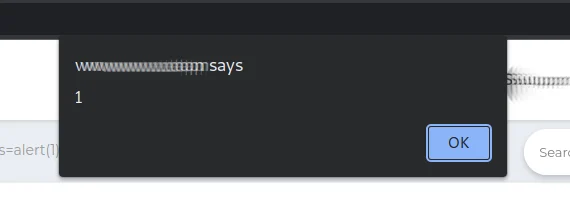
Clicking on the search bar gave the element focus and the popup alert appeared.
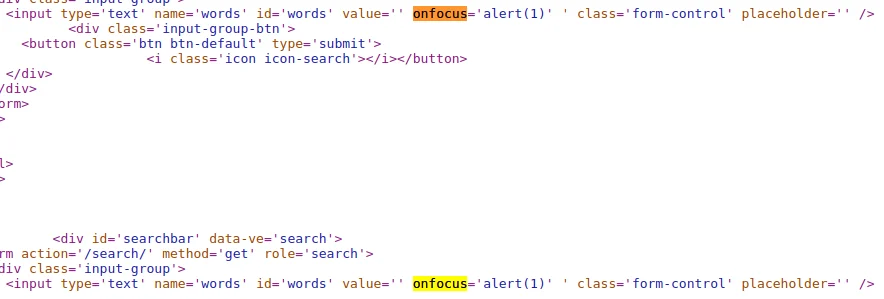
Step 4: Make it fire without interaction
The researcher then modified the payload with autofocus, which makes the text field automatically get focused upon page load and creates the popup alert while visiting the page itself.
' onfocus='alert(1)' autofocus='
%2527%2520onfocus%253D%2527alert%25281%2529%2527%2520autofocus%253D%2527
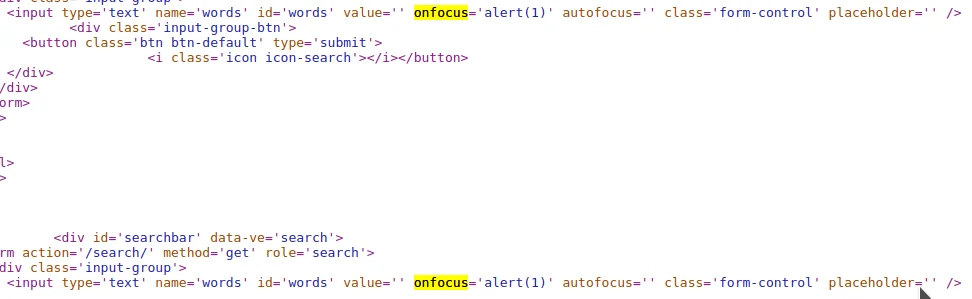
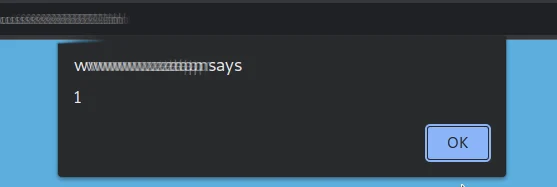
The report states that it worked.
Step 5: Alternative handler
The report also gives a mouse-based variant:
' onmouseover='alert(1)'
%2527%2520onmouseover%253D%2527alert%25281%2529%2527%2520
This one requires the victim to move the pointer over the affected element rather than relying on focus.
Root cause
The report attributes the bypass to a filter that decodes user input only once while a later component decodes it again. The first decode turns the double-encoded payload into a single-encoded one, which the filter does not recognise as dangerous, and the second decode, performed by the backend platform or modules that handle encoded data without the corresponding security checks, restores the raw characters into the page. The single quote filtering seen earlier shows that some validation exists. The exact component responsible for the second decode is not identified in the report.
Impact
The report demonstrates that the injected event handler runs JavaScript, showing an alert popup, in the context of the site. With the autofocus variant no interaction beyond visiting the page is needed. The report does not describe what session data, cookies or privileges were at stake, and does not state which users or roles were affected.
Fix
No remediation is described in the report. Based on the mechanism it describes, the fix would be to apply output encoding at the point of rendering, so that the value is escaped for its HTML context after all decoding has taken place, and to make sure that any decoding step is followed by validation rather than preceded by it. Which of these was actually applied is not stated.
Variants to test
- Double-encode a single quote and a closing angle bracket in a reflected parameter and inspect the source. A positive result is a raw
'or>appearing in the HTML after the server has decoded twice. - Double-encode an event handler such as
onfocusoronmouseoverwithautofocus. A positive result is an alert on page load with no user interaction. - Compare the response to a single-encoded payload with the response to a double-encoded one. A positive result is the single-encoded form being neutralised while the double-encoded form reaches the page intact.
- Try the same technique on other contexts, such as values placed inside attributes or inside JavaScript strings, watching for the second decode restoring characters that break out of the context.
- Test whether the filter behaves differently in different fields of the same application, since the report notes the single quote was replaced differently in different places.
What happened, in plain words
A security researcher was testing websites for a common bug called cross-site scripting, usually shortened to XSS. In an XSS bug, a website takes something a visitor types and puts it back into the page without cleaning it up properly. If an attacker can put JavaScript code into that spot, the code runs in the browser of anyone who visits the crafted page, as if the website itself had written it.
On one of the sites the researcher was testing, there was a search box. The site did some cleaning of what was typed into it: when the researcher typed a single quote character, the site replaced it with something else. The researcher tried a standard trick called URL encoding, where special characters are written in a coded form, and the site still cleaned it. So the researcher tried encoding the input twice instead of once. The site's cleaning step only decoded the input once, so after that first decode the input still looked coded and harmless. A later part of the site decoded it a second time, and at that point the raw characters appeared in the page. That let the researcher inject an event handler, a small piece of JavaScript that runs when something happens to an element, and get an alert popup to appear.
The report does not name the website, the page, the search parameter or the server software. It only describes the behaviour of the input field.
Background: what the pieces mean
Before walking through the steps, here are the ideas you need. None of them require any prior security knowledge.
- A web page and its source code. When you visit a page, your browser receives a file written in HTML. HTML is a markup language: it describes the structure of the page using tags such as
<input>for a text box or<script>for a block of code. You can see this file in most browsers by right-clicking and choosing something like "View page source". The researcher repeatedly looked at the source code because that is where you can see whether what you typed was placed into the page as-is or cleaned up. - An input field. A box on a page where you type something, such as a search box. Whatever you type is sent to the website's server, the computer that runs the site, and the server usually sends something back, for example "no results for X" where X is your text.
- Reflected input. If the server sends your text straight back into the page, security people call it reflected. It is like saying something to a person and hearing the exact same words repeated back. If the server repeats your words without cleaning them, and your words happen to be HTML or JavaScript, the browser will treat them as instructions rather than as text.
- Cross-site scripting (XSS). The bug class where a site lets a visitor's input become code in the page. The classic demonstration is making the browser show a popup with
alert(1). A popup by itself is harmless; it is used as proof that code ran, because if an attacker can runalert(1)they can usually run other code too. - URL encoding (also called percent encoding). Web addresses cannot contain every character safely, so special characters are written as a percent sign followed by two hexadecimal digits. Hexadecimal is just a number system that uses 0 to 9 and A to F. For example, a single quote
'becomes%27, a space becomes%20, and<becomes%3C. When the server receives%27, it decodes it back to'before using it. Think of it like spelling a word letter by letter over the phone because the person on the other end cannot hear it directly. - Double encoding. If you encode something that is already encoded, the percent sign itself gets encoded. A percent sign is
%25in URL encoding, so%27becomes%2527. The server decodes once and sees%27; if something decodes it a second time, it sees'. This is the whole trick in this report. - A filter or WAF. A filter is any check that inspects input and blocks or rewrites dangerous parts. A WAF, web application firewall, is a filter that sits in front of a website. The researcher mentions an earlier finding where a Cloudflare WAF was bypassed, and frames this report as a follow-up using the same double-encoding idea.
- An event handler attribute. HTML elements can have attributes, which are settings written inside the tag, such as
onfocus. An event handler is an attribute whose value is JavaScript that runs when a particular thing happens.onfocusruns when the element receives focus, meaning it becomes the active element, for example because someone clicked into it.onmouseoverruns when the pointer moves over the element.autofocusis an attribute that tells the browser to focus the element automatically when the page loads, with no click needed.
The setup
The researcher says they had recently started bug hunting and were using very basic methods, trying to improve by learning more techniques. No tools, accounts or versions are mentioned. The only precondition shown is an input field that reflects what you type after decoding it.
Finding the input field
The reasoning is simple: if there is an input field, there is a chance of XSS. While testing input fields such as search boxes on various targets, the researcher found an interesting one, typed the usual input, and then checked the source code to see what came back.
The screenshots show the input field and the page source after the ordinary input was submitted.
The next probe was a single quote character. A single quote is interesting because in HTML it is used to open and close attribute values. If you can inject one and it is not cleaned, you can often break out of an attribute and add your own. Here the site filtered it: in some places it was replaced with hello1 & and in the target fields with ‘&’.
That replacement is a sign that some validation exists. The site is not passing the quote through untouched.
Next the researcher tried URL encoding the quote, writing it as %27 instead of '. The output was the same, which the researcher read as the site decoding the input before filtering it. In other words, the filter sees the decoded character, not the coded one, so coding it once does not help.
That observation is what led to double encoding. If the filter only decodes once, then a value that is still encoded after that first decode can survive the filter and be decoded again later.
Exploitation
Step 1: Confirm the double decoding
The researcher explains the mechanism like this: double encoding can bypass filters that only decode user input once, and the second decoding is done by the backend platform or modules that handle encoded data but do not have the matching security checks in place.
The report says this worked, but does not show the intermediate value used to confirm it.
Step 2: Try the basic script payload
The researcher took the classic XSS payload and double encoded it:
'><script>alert(1)</script>
%2527%253E%253Cscript%253Ealert%25281%2529%253C%252Fscript%253E
Line by line, in plain words:
- The first block is the payload as a human would write it. The leading
'>is meant to close whatever attribute the input sits inside, so the following<script>tag starts fresh HTML. The<script>alert(1)</script>is the code that should run. - The second block is the same payload after being URL encoded twice. Every
%of the ordinary encoding has itself become%25, so'becomes%2527,>becomes%253E,<becomes%253C,(becomes%2528,)becomes%2529and/becomes%252F. - After the first decode, the server sees the single-encoded form. After the second decode, it sees the original characters.
This attempt produced an error.
The screenshot shows the error that appeared.
Step 3: Switch to an event handler attribute
Because the script tag route failed, the researcher looked for attributes of the input tag that could be used instead, and chose onfocus: the onfocus event occurs when an element gets focus.
The payload and its double-encoded form:
' onfocus='alert(1)'
%2527%2520onfocus%253D%2527alert%25281%2529%2527%2520
Line by line:
- The first block starts with a single quote, which is meant to close the existing attribute value in the input tag. Then a space, then
onfocus='alert(1)', which adds a new attribute whose value is the alert code. The final quote is meant to close the injected attribute so the rest of the tag stays valid HTML. - The second block is the same thing double encoded.
%2520is a double-encoded space and%253Dis a double-encoded=sign. The quotes and parentheses are encoded the same way as before.
Clicking on the search bar gave the element focus, and the popup alert appeared.
The screenshot shows the alert popup after the click.
Step 4: Make it fire without interaction
The researcher then added autofocus, which makes the text field automatically get focused when the page loads, so the popup appears just by visiting the page.
' onfocus='alert(1)' autofocus='
%2527%2520onfocus%253D%2527alert%25281%2529%2527%2520autofocus%253D%2527
Line by line:
- The first block is the previous payload with
autofocus='added before the closing quote. The browser readsautofocusas an instruction to focus this element as soon as the page is ready, which triggersonfocusand therefore the alert, with no click from the visitor. - The second block is the double-encoded version, with the space and equals sign encoded the same way as before.
The report says it worked.
Step 5: An alternative handler
The report also gives a mouse-based variant:
' onmouseover='alert(1)'
%2527%2520onmouseover%253D%2527alert%25281%2529%2527%2520
Line by line:
- The first block is the same structure as before, but with
onmouseoverinstead ofonfocus. This handler runs when the pointer moves over the element. - The second block is the double-encoded form, with the same encoding rules.
This variant needs the victim to move the pointer over the affected element, rather than relying on focus.
Why it works
The report puts the bypass down to a filter that decodes user input only once while a later component decodes it again. The first decode turns the double-encoded payload into a single-encoded one, which the filter does not recognise as dangerous. The second decode, done by the backend platform or modules that handle encoded data without the matching security checks, restores the raw characters into the page. The single quote filtering seen earlier shows that some validation exists, but it works on a representation of the input that is not the one finally rendered. The report does not identify the exact component that performs the second decode.
What an attacker could do
The report demonstrates that the injected event handler runs JavaScript, showing an alert popup, in the context of the site. With the autofocus variant, no interaction beyond visiting the page is needed. The report does not describe what session data, cookies or privileges were at stake, and does not say which users or roles were affected.
How to fix it
No remediation is described in the report. Based on the mechanism it describes, the fix would be to apply output encoding at the point of rendering, so the value is escaped for its HTML context after all decoding has taken place, and to make sure any decoding step is followed by validation rather than preceded by it. Which of these was actually applied is not stated.
Variants to test
- Double-encode a single quote and a closing angle bracket in a reflected parameter and inspect the source. A positive result is a raw
'or>appearing in the HTML after the server has decoded twice. - Double-encode an event handler such as
onfocusoronmouseoverwithautofocus. A positive result is an alert on page load with no user interaction. - Compare the response to a single-encoded payload with the response to a double-encoded one. A positive result is the single-encoded form being neutralised while the double-encoded form reaches the page intact.
- Try the same technique on other contexts, such as values placed inside attributes or inside JavaScript strings, watching for the second decode restoring characters that break out of the context.
- Test whether the filter behaves differently in different fields of the same application, since the report notes the single quote was replaced differently in different places.
Glossary
- Attribute: a setting written inside an HTML tag, such as
onfocusorautofocus. - autofocus: an HTML attribute that makes the browser focus an element automatically when the page loads.
- Backend: the part of a website that runs on the server, as opposed to the part that runs in the browser.
- Cross-site scripting (XSS): a bug where a site lets a visitor's input become code in the page, so the code runs in other visitors' browsers.
- Decode: turn an encoded representation back into the original characters.
- Double encoding: encoding something that is already encoded, so that a second decode is needed to recover the original.
- Encode: turn characters into a safe representation, such as
%27for a single quote. - Event handler: an attribute whose value is JavaScript that runs when something happens to an element, such as focus or a mouse hover.
- Filter: any check that inspects input and blocks or rewrites dangerous parts.
- Focus: the state of being the active element on a page, for example after clicking into a text box.
- Hexadecimal: a number system using 0 to 9 and A to F, used in URL encoding.
- HTML: the markup language that describes the structure of a web page.
- Input field: a box on a page where a visitor types something, such as a search box.
- onfocus: an event handler that runs when an element gets focus.
- onmouseover: an event handler that runs when the pointer moves over an element.
- Payload: the piece of input an attacker sends to try to trigger a bug.
- Percent encoding: another name for URL encoding, where special characters become a percent sign and two hexadecimal digits.
- Reflected input: input that the server sends straight back into the page.
- Server: the computer that runs a website and responds to requests from browsers.
- Source code: the HTML file a browser receives, visible through the browser's view-source feature.
- URL encoding: writing special characters as a percent sign and two hexadecimal digits so they can travel safely in a web address.
- WAF (web application firewall): a filter that sits in front of a website and inspects incoming requests.





