Chaining Bugs to get my First Bug Bounty
The report describes chaining an open redirect, a clickjacking-vulnerable login page, and a CSRF-vulnerable password reset form to achieve account takeover. An attacker could trick a victim into entering credentials on a fake login page, which then submits a password reset request to change the victim's password.

This writeup is about my first bug bounty in which the submission was duplicate, even though they rewarded me for chaining the bugs and reported it with an effective approach of a real-life attack scenario.
The full write-up lives on its author's site
It belongs to its author, so we link to it rather than copy it. The other two tabs are our own rewrites, checked against it.
Context
This is a write-up of a first bug bounty submission. The researcher calls the target example.com to protect its privacy, so the real product and feature set are not described. What the report does describe is a chain of three weaknesses on that site: an open redirection, a login page that can be framed (clickjacking), and a password reset form that accepts a request without a CSRF token.
The password reset form is the feature at the centre of the attack. Normally it lets a signed-in user change their password. The report notes that the form asks for the current password as well as the new one, which is why the CSRF on its own was not enough.
The submission was marked as a duplicate, but the researcher was still rewarded for chaining the bugs and presenting them as a realistic attack scenario.
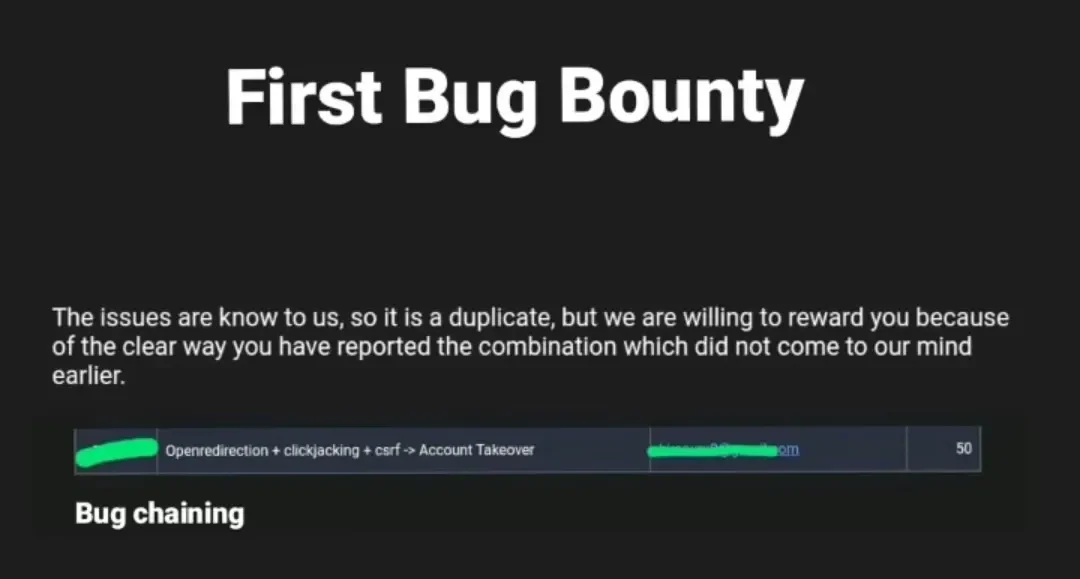
The report opens with the chain in one line: open redirection plus clickjacking plus CSRF leads to account takeover.
Setup
The report does not list accounts, roles, tool versions or a test environment. The tools named are Burp Suite, used while browsing the site and to generate a CSRF proof of concept during a password reset, and a public clickjacking PoC from https://github.com/shifa123/clickjackingpoc as the basis for the fake login page. The only precondition stated is that the victim must interact with the attacker's page: enter their email and current password into what they believe is the login form, and click login.
Finding it
While browsing the site through Burp Suite, the researcher found several open redirection issues, pages that could be framed, a page with no CSRF token, and other related problems. Most of these were out of scope, so the researcher kept looking.
The CSRF-vulnerable page was the password reset form. At first it looked directly exploitable, but the required inputs include the current password. After some discussion the researcher concluded that when a password confirmation is required, CSRF cannot be exploited directly, so another route was needed.
The login page was vulnerable to clickjacking, and an open redirection was already available. The idea was to combine them into a real-life scenario: send the victim through the open redirect to the clickjacking-framed login page, capture the credentials they type there, and feed them straight into the password reset form with JavaScript so the victim's password becomes the attacker's password.
Exploitation
Step 1: Redirect to the attacker's page through the target
The open redirect on the target is used to send the victim to a page the attacker controls, but with the link starting on the target's own domain:
https://www.example.com/?option=oauthredirect&redirect_url=https://example.com
In the report this URL redirects to example.com. In the report this URL redirects to example.com, which is the open redirection. Because the link begins with the target's host, it is more convincing to a victim than a link to an unknown domain.
Step 2: Host a fake login page that frames the real one
The attacker page uses clickjacking against the real login page. The researcher built it from the public clickjacking PoC and notes that the original login page can be used here, hosted somewhere and reached through the target's own redirect.
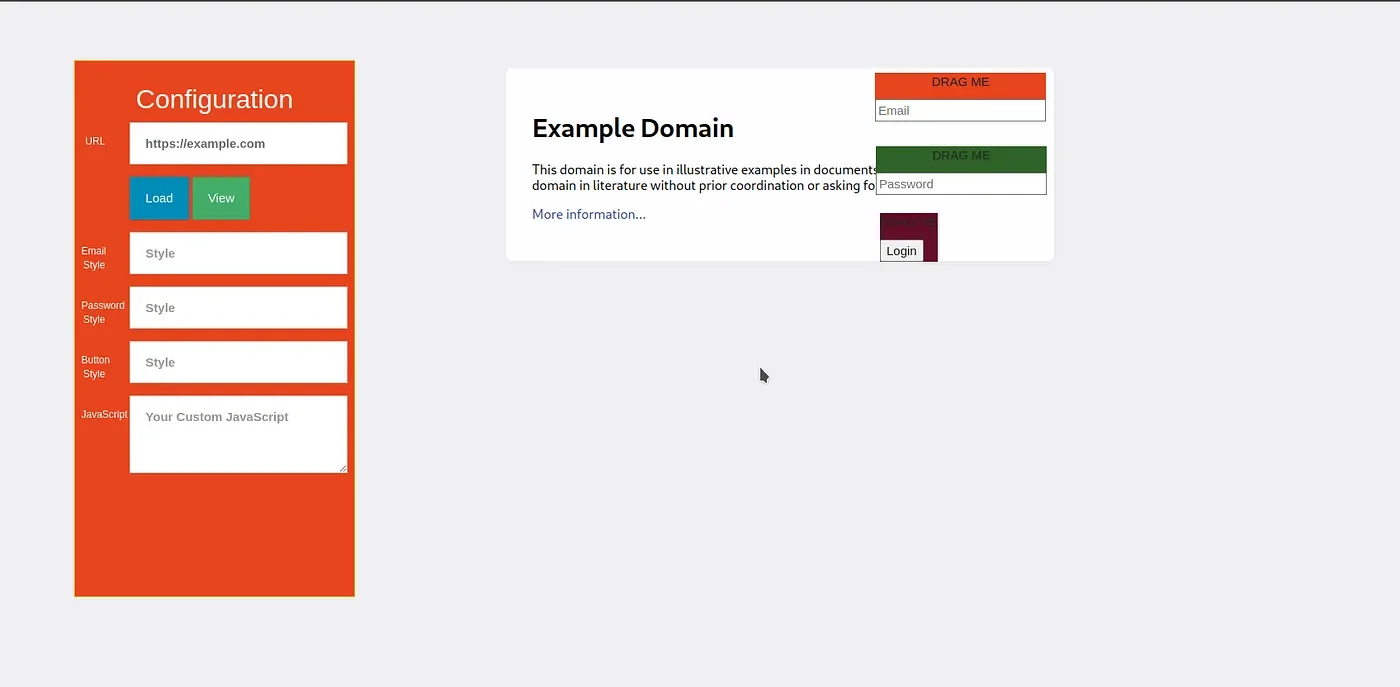
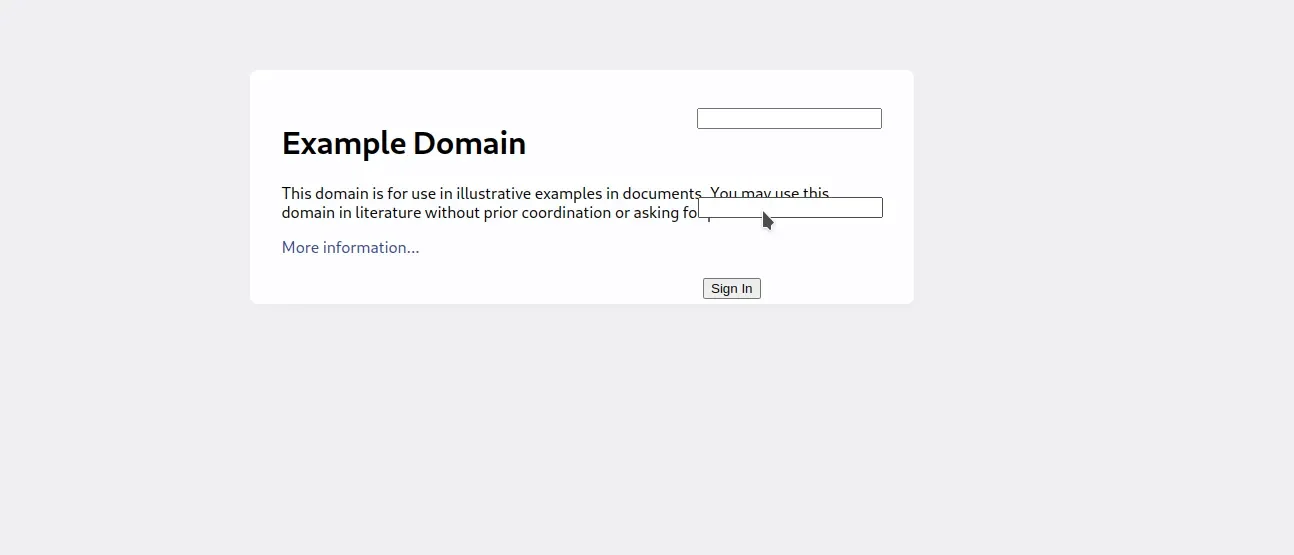
The fake page is shown as a login form. When the victim enters their credentials there, the values are passed by JavaScript into the password reset form. The report says the CSRF PoC generated by Burp Suite during a password reset can be combined with this page, so the reset happens in one click after the credentials are entered.
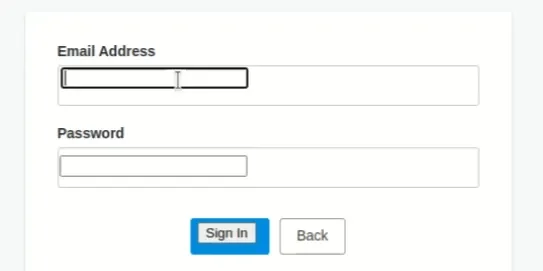
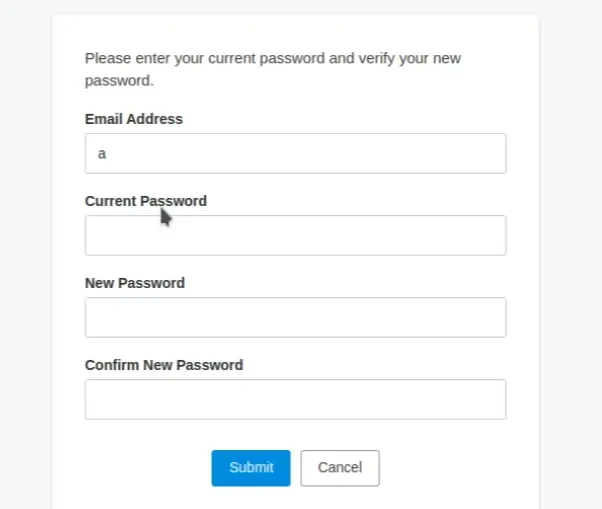
The login page as framed in the attack.
Step 3: Submit the captured credentials to the password reset form
The password reset endpoint used in the chain is:
https://www.example.com/etcetc?etc=abcd&Target=PasswordResetForm¶ms=test
This is the page the report identifies as vulnerable to CSRF. The victim's email and current password, captured in step 2, are submitted here. The report states that when the victim enters the email and current password and clicks login, the password is reset to the password chosen by the attacker.
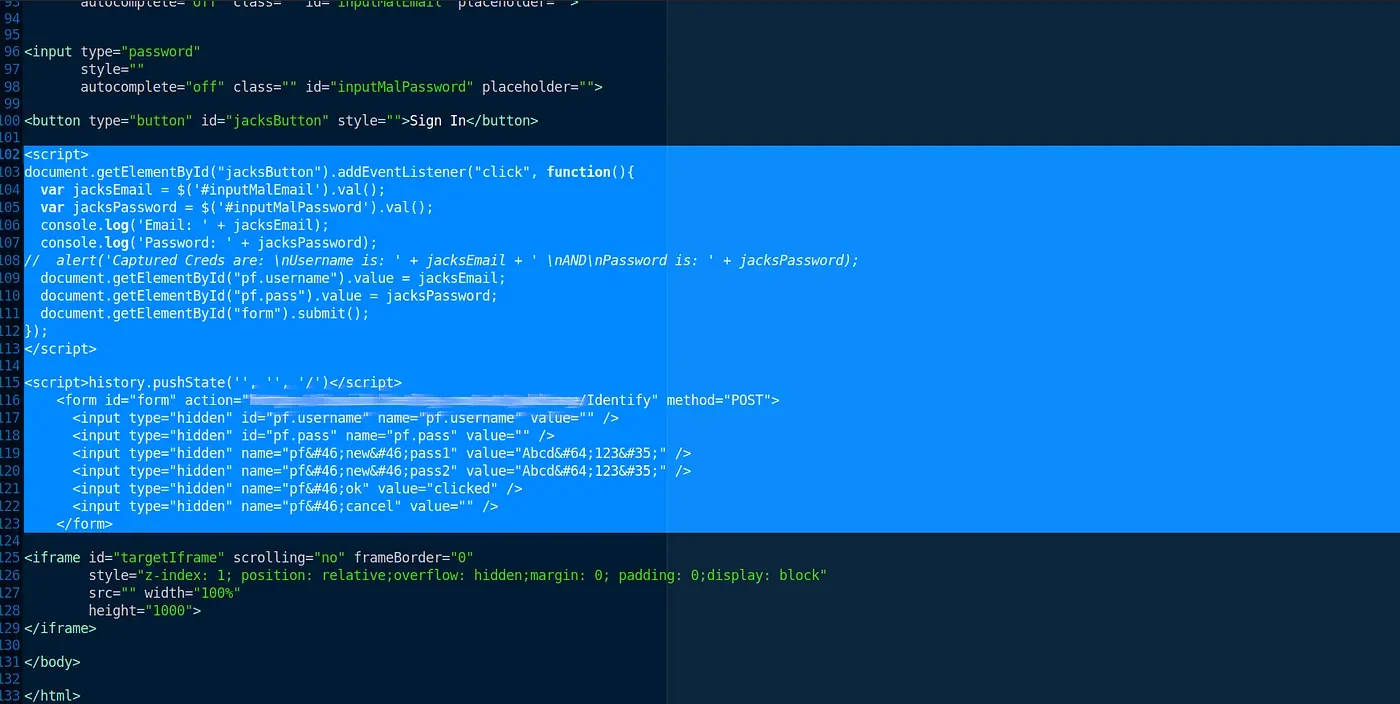
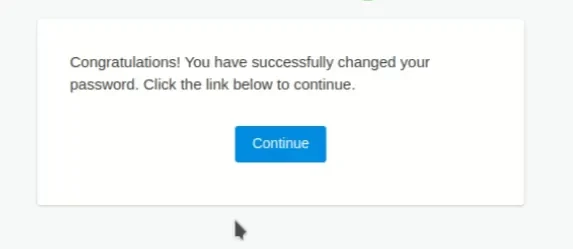
The fake page and the auto-submitting code snippet, and the successful result.
Step 4: Confirm the reset
The chain ends with the message Password Changed Successfully, shown on the password reset form.
At that point the attacker knows the victim's new password and can sign in as them.
Root cause
The chain depends on three separate mistakes, each of which would be less serious alone:
- The OAuth redirect endpoint takes a
redirect_urland, in the report, redirects toexample.com. - The login page can be framed, so an attacker page can display the genuine login form and capture what is typed into it.
- The password reset form accepts a request without a CSRF token, and it also asks for the current password, which the clickjacking step supplies.
The report does not describe the server-side code, so the exact reason the CSRF token is missing, and whether any other defence such as SameSite cookies or origin checks was present, is not stated. The report also does not say whether the login page sets X-Frame-Options or a Content-Security-Policy frame-ancestors directive; the clickjacking finding implies neither was effective.
Impact
An attacker who can get a victim to open the crafted link and type their email and current password into the framed login page can change that victim's password to one the attacker chooses, and then take over the account. The attack requires user interaction: the victim has to enter credentials and click login. The report presents this as a real-life attack scenario rather than a purely automated one.
The submission was a duplicate, but the researcher was rewarded for the chained approach.
Fix
The report does not say what the vendor changed. Based on the three weaknesses, the fixes would be:
- Validate
redirect_urlagainst an allowlist of permitted destinations, or reject external values. - Send
X-Frame-Options: DENY(orSAMEORIGINwhere framing is needed) and a Content-Security-Policyframe-ancestorsdirective on the login page. - Require a CSRF token on the password reset form and reject requests without a valid one.
Variants to test
- OAuth or SSO redirect parameters. Try values such as
redirect_url,return,nextandcallbackwith an external host. A positive result is a302whoseLocationpoints to the external host. - Framing of authentication pages. Load the login, password reset and MFA pages inside an iframe from another origin. A positive result is the page rendering inside the frame.
- State-changing forms without tokens. Intercept password change, email change and MFA enrolment requests and replay them without the token or with a token from another session. A positive result is the change being applied.
- Sensitive forms that ask for the current password. Check whether the current password is verified server-side and whether the request can be replayed from another origin. A positive result is a reset succeeding from a cross-site request when the current password is known.
- Chains. Where an open redirect and a framable login page exist on the same target, test whether the redirect can deliver a victim to an attacker page that frames the login and forwards the captured values to a tokenless form.
What happened, in plain words
A security researcher was hunting for bugs on a website. To protect the site's privacy, the report calls it example.com, so we do not know the real product or what it does. What we do know is that the site had three separate weaknesses, and the researcher joined them together like links in a chain to take over another person's account.
The three weaknesses were:
- An open redirection. The site had a link that would send a visitor to another website, even though the link started on the real site's own address.
- A login page that could be framed (clickjacking). The real login page could be framed inside another page (clickjacking), so a visitor could be tricked into typing into it.
- A password reset form with no CSRF protection. The form that changes a password had no CSRF token, the special secret code that proves a request came from the real site.
The password reset form on its own was not enough, because it also asked for the victim's current password. The password reset form, for example, also asked for the victim's current password, which an attacker would not normally know. But by chaining the three, the researcher could get the victim to type their current password into a fake page, and then quietly feed it into the real reset form. The victim's password would be changed to one the attacker chose.
The researcher submitted this to the bug bounty programme. It was marked as a duplicate (someone else had already reported the same issue), but the programme still paid a reward because the researcher had shown the bugs chained together as a realistic attack, not just listed them separately.
The image above is the researcher's own summary of the chain: open redirection plus clickjacking plus CSRF leads to account takeover.
The three bugs, explained from zero
Before we walk through the attack, here is what each of the three weaknesses means, in everyday terms.
Open redirection
Imagine a receptionist at a building who will walk you to any room you name, no questions asked. If you say "take me to the bank across the street", they will. That is an open redirect: a website takes a destination from the address bar (the part after ?) and sends the visitor there without checking whether the destination is allowed.
Open Redirection Open redirection vulnerabilities arise when an application incorporates user-controllable data into the target of a redirection in an unsafe way. An attacker can construct a URL within the application that causes a redirection to an arbitrary external domain.
Why it matters: a link that begins with the real site's address looks trustworthy. A victim is far more likely to click https://www.example.com/... than a link to a strange domain.
Clickjacking
Imagine someone places a transparent sheet over a picture of a button, and you think you are pressing the picture but you are actually pressing the real button underneath. Clickjacking works the same way in a browser: the attacker's page loads the real site's page inside a frame (an iframe, a small window embedded in another page) and positions it so the victim clicks or types into the real page without realising.
Clickjacking Clickjacking is an interface-based attack in which a user is tricked into clicking on actionable content on a hidden website by clicking on some other content in a decoy website
Why it matters: the victim sees what looks like a normal login form, but it is the genuine login page of the real site, sitting inside the attacker's page.
CSRF (Cross-Site Request Forgery)
Imagine a bank that accepts a written instruction to move money as long as it is on the bank's own notepaper, without checking who signed it. CSRF is the web version: a website accepts a request that changes something (a password, an email address, a setting) without checking that the request really came from its own pages.
CSRF Cross-site request forgery (also known as CSRF) is a web security vulnerability that allows an attacker to induce users to perform actions that they do not intend to perform. It allows an attacker to partly circumvent the same origin policy, which is designed to prevent different websites from interfering with each other.
Why it matters: if a form has no CSRF protection, an attacker's page can submit it on the victim's behalf, as long as the victim's browser is signed in to the real site.
Source for the three definitions above: https://portswigger.net/
How the researcher found the bugs
The researcher browsed the site with a tool called Burp Suite. Burp Suite is a program that sits between your browser and the website and lets you see and change every request and response. Think of it as a pair of glasses that lets you read the letters being passed between you and the site.
While browsing, the researcher noticed several open redirections, some pages that could be framed, a page with no CSRF token, and other related issues. Most of these were out of scope, meaning the bug bounty programme had said they were not eligible for a reward. So the researcher kept looking.
The CSRF-vulnerable page was the password reset form. This is the page where a signed-in user changes their password. At first it looked like it could be exploited directly: just submit the form from another site and the password changes. But when the researcher looked at the required inputs, the form also asked for the current password. That is a deliberate defence: an attacker who does not know the current password cannot complete the reset.
After some discussion, the researcher concluded that when a password confirmation is required, CSRF cannot be exploited directly. So another route was needed.
The login page, however, was vulnerable to clickjacking, and an open redirection was already available. The idea was to combine them: send the victim through the open redirect to a page that frames the real login page, capture the email and current password the victim types there, and feed those values straight into the password reset form with JavaScript. The victim's password would then become the attacker's password.
The attack, step by step
Step 1: Send the victim to the attacker's page through the target's own link
The open redirect on the target is used to send the victim to a page the attacker controls, but with the link starting on the target's own domain:
https://www.example.com/?option=oauthredirect&redirect_url=https://example.com
Line by line:
https://www.example.com/is the real site's address. This is what the victim sees first, and it is why the link looks trustworthy.?starts the query string, the part of a URL that carries extra information.option=oauthredirecttells the site which feature to use. OAuth is a common way for sites to let you sign in with another service ("Sign in with Google" is an example). Theoauthredirectoption is the part of that feature that sends the user back to wherever they came from.&separates one parameter from the next.redirect_url=https://example.comis the destination. In the report, this URL redirects toexample.com. That is the open redirection.
Because the link begins with the target's host, a victim is much more likely to click it than a link to an unknown domain.
Step 2: Host a fake login page that frames the real one
The attacker's page uses clickjacking against the real login page. The researcher built it from a public clickjacking proof of concept (a small demonstration page) at https://github.com/shifa123/clickjackingpoc, and notes that the real login page can be used here, hosted somewhere and reached through the target's own redirect.
The images above show the fake login page being created and what it looks like. It is presented as a login form. When the victim enters their credentials there, the values are passed by JavaScript into the password reset form. JavaScript is the programming language that runs inside a web page and can read what is typed and send it somewhere else.
The report says the CSRF proof of concept generated by Burp Suite during a password reset can be combined with this page, so the reset happens in one click after the credentials are entered. A proof of concept here is a small HTML page that automatically submits a form to the real site, as if the victim had filled it in themselves.
The image above shows the login page as it appears inside the attack.
Step 3: Submit the captured credentials to the password reset form
The password reset endpoint used in the chain is:
https://www.example.com/etcetc?etc=abcd&Target=PasswordResetForm¶ms=test
Line by line:
https://www.example.com/is again the real site./etcetcis a placeholder path in the report; the real path is not given.?etc=abcdis a placeholder parameter; again, the real name and value are not given.&Target=PasswordResetFormnames the form the request is aimed at: the password reset form.¶ms=testis another placeholder parameter.
This is the page the report identifies as vulnerable to CSRF. The victim's email and current password, captured in step 2, are submitted here. The report states that when the victim enters the email and current password and clicks login, the password is reset to the password chosen by the attacker.
The images above show the fake page with the auto-submitting code snippet, and the successful result.
Step 4: Confirm the reset
The chain ends with the message Password Changed Successfully, shown on the password reset form.
At that point the attacker knows the victim's new password and can sign in as them.
Why the chain works
The chain depends on three separate mistakes, each of which would be less serious alone:
- The OAuth redirect endpoint takes a
redirect_urland, in the report, redirects toexample.com. - The login page can be framed, so an attacker's page can display the genuine login form and capture what is typed into it.
- The password reset form accepts a request without a CSRF token, and it also asks for the current password, which the clickjacking step supplies.
The report does not describe the server-side code, so the exact reason the CSRF token is missing, and whether any other defence such as SameSite cookies or origin checks was present, is not stated. The report also does not say whether the login page sets X-Frame-Options or a Content-Security-Policy frame-ancestors directive; the clickjacking finding implies neither was effective.
What an attacker could do with this
An attacker who can get a victim to open the crafted link and type their email and current password into the framed login page can change that victim's password to one the attacker chooses, and then take over the account. The attack requires the victim to interact: they have to enter credentials and click login. The report presents this as a realistic attack scenario rather than a purely automated one.
The submission was a duplicate, but the researcher was rewarded for the chained approach.
How to fix it
The report does not say what the vendor changed. Based on the three weaknesses, the fixes would be:
- Check
redirect_urlagainst an allowlist of permitted destinations, or reject external values. - Send
X-Frame-Options: DENY(orSAMEORIGINwhere framing is needed) and a Content-Security-Policyframe-ancestorsdirective on the login page. These are response headers, small pieces of information the server sends with the page, that tell the browser whether the page may be framed. - Require a CSRF token on the password reset form and reject requests without a valid one.
Other places to look for the same pattern
- OAuth or SSO redirect parameters. Try values such as
redirect_url,return,nextandcallbackwith an external host. A positive result is a302(a redirect response) whoseLocationheader points to the external host. - Framing of authentication pages. Load the login, password reset and MFA pages inside an iframe from another origin. A positive result is the page rendering inside the frame. MFA means multi-factor authentication, the second step (such as a code from a phone) after the password.
- State-changing forms without tokens. Intercept password change, email change and MFA enrolment requests and replay them without the token or with a token from another session. A positive result is the change being applied.
- Sensitive forms that ask for the current password. Check whether the current password is verified on the server and whether the request can be replayed from another origin. A positive result is a reset succeeding from a cross-site request when the current password is known.
- Chains. Where an open redirect and a framable login page exist on the same target, test whether the redirect can deliver a victim to an attacker page that frames the login and forwards the captured values to a tokenless form.
Lessons the researcher took away
- Stay motivated.
- Do not rush yourself.
- Try to understand things.
- Do not leave too early.
The researcher adds a quote from Kapil Dev: "Like people says, taste the success once… tongue want more."
Glossary
- Account takeover: when an attacker gains control of someone else's account, usually by learning or changing their password.
- Allowlist: a list of values that are explicitly permitted; anything not on the list is rejected.
- Burp Suite: a tool that sits between a browser and a website so you can see and change the requests and responses.
- Clickjacking: tricking a user into clicking or typing into a real page that is hidden inside an attacker's page.
- Content-Security-Policy: a response header that tells the browser which sources of content (scripts, frames, images) are allowed on a page.
- CSRF (Cross-Site Request Forgery): making a victim's browser send a request that changes something on a site, without the victim intending it.
- CSRF token: a secret value that a form includes and the server checks, so a request from another site cannot succeed.
- Duplicate: a bug report that describes an issue someone else has already reported.
- Endpoint: a specific address on a server that handles a particular request.
- Frame / iframe: a small window inside a web page that loads another page.
- JavaScript: the programming language that runs inside web pages and can read input and send requests.
- MFA (Multi-Factor Authentication): a second proof of identity after the password, such as a code from a phone.
- OAuth: a standard way for a site to let you sign in using another service, and to send you back to where you came from afterwards.
- Open redirection: a link on a site that sends the visitor to any external destination the attacker chooses.
- Out of scope: not eligible for a reward under a bug bounty programme's rules.
- Parameter: a named value in a URL, after the
?, such asredirect_url=.... - Password reset form: the page where a signed-in user changes their password.
- Proof of concept (PoC): a small demonstration that shows a bug can be exploited.
- Query string: the part of a URL after the
?that carries parameters. - SameSite cookie: a cookie setting that limits when the browser sends the cookie with requests coming from other sites.
- Same origin policy: a browser rule that stops one website from reading data belonging to another.
- 302: an HTTP status code meaning "redirect", sent with a
Locationheader naming the destination. - X-Frame-Options: a response header that tells the browser whether a page may be shown inside a frame.