Cache poisoning of wget
A hidden header, x-forwarded-scheme, could be used to poison the cache so that requests to the site would redirect to an attacker-controlled domain. The impact was limited because the redirect only worked with command-line tools like curl and wget, not browsers.
 Published on medium.com
Another interesting case of cache poisoning (you can read about the first one here). This one, however, isn’t as “sexy” as the previous one.
The full write-up lives on its author's site
It belongs to its author, so we link to it rather than copy it. The other two tabs are our own rewrites, checked against it.
Context
This is a story about web cache poisoning found while browsing a target website, and about a poisoned response that only some clients ever see. The poisoned entry is an open redirect: a visitor to website.com is sent to whatever host the attacker puts in a hidden header. The report calls it "an open redirect, but better", and the initial impact is described as a version of denial of service, not by crashing the server but by redirecting people to another website, with possible additional phishing impact depending on various factors.
The author points to an earlier write-up of theirs, "Cache poisoning with XSS: a peculiar case", and warns that this second case is not as "sexy" as the first. The whole story turns on a disagreement between Burp and real browsers about how a response is presented.
Setup
The tooling is deliberately ordinary. The default approach to bug hunting is to browse the target website with Burp as a proxy. If the WAF is kind enough not to block it, Param Miner is left enabled with the box to attempt cache poison checked.
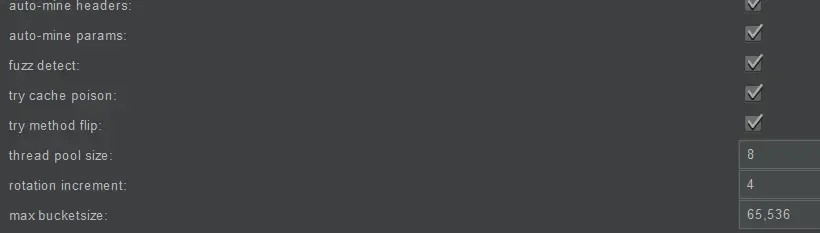
That combination, a proxy, an extension that guesses unkeyed inputs, and the cache poison option, is what surfaced the finding. The report gives no versions for Burp, Param Miner or any browser, and no details about the target beyond the placeholder website.com.
Finding it
After browsing the target and running all sorts of tests with nothing to show for it, the author went back to review. The Burp Pro dashboard showed that Param Miner had found something. Past experience said it was too early to get excited, so the finding was reviewed and additional tests were run to make sure it was not the dreaded false positive.
What came out of that review was a cache poison that behaved as an open redirect. Visiting website.com would redirect the visitor to whatever was specified in a hidden header. The header in question is x-forwarded-scheme.
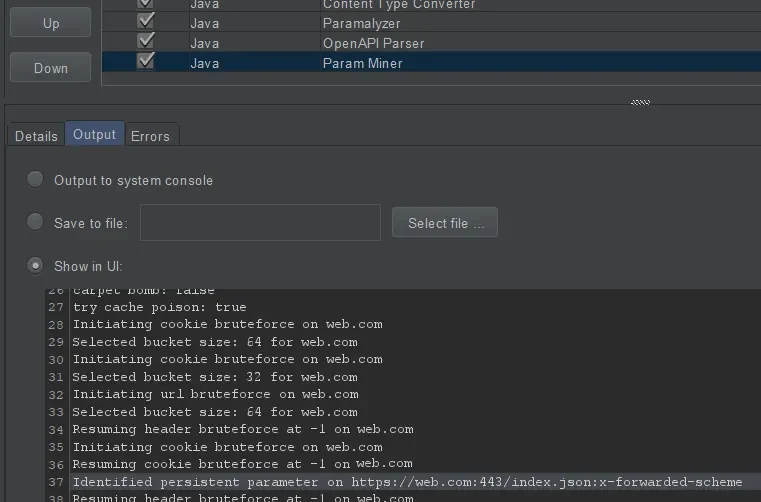
The screenshot is a real world example of the cache poison detection, edited to hide the affected company.
Exploitation
Step 1: poison the cache with curl
The attack is performed with curl, and it has to be repeated multiple times, or wrapped in a loop:
curl — header “x-forwarded-scheme: https://burpcollab.net" [https://website.com/](https://website.com/)
The command sends a request to https://website.com/ carrying the x-forwarded-scheme header with the value https://burpcollab.net. The value is meant to be a scheme such as https, and the report notes the header is actually http or https. The report notes that the request must be repeated, or looped, for the poison to take.
Step 2: observe the poisoned response
The results, as the report lists them:
curl https://website.com/shows the content ofhttps://burpcollab.netwget https://website.com/saves a file with the content ofhttps://burpcollab.net
After the poisoning request, curl shows and wget saves the collaborator's content.
Step 3: try the same thing in a browser
The missing piece of the PoC is the same result in a browser. It is missing not because it would take masterful editing with a gif or a YouTube clip, but because it does not work with browsers. The author tried all browsers and always got the same boring response.
This is the core of the write-up: Burp Repeater and the browser do not always agree on how to present the response to the issued request, especially when the request carries an XSS payload. In Repeater the response can show, even inside HTML code, that the payload was not encoded, and "Show response in browser" may even result in the XSS firing, yet it can still be a false positive. The only way to be sure is to attempt that URL with that payload directly inside Firefox, Chrome and the rest, and if it still fires in one or more of those browsers, it is time to write a report. Otherwise it gets complicated, and this is one of those complicated cases.
Root cause
The poisoned behaviour comes from the x-forwarded-scheme header, which the report describes as actually being http or https, similar to x-forwarded-proto. The report describes the header as actually being http or https, similar to x-forwarded-proto, and the poisoned response redirects to a host derived from its value.
The value is not a free-form URL, and that shapes the payload. Instead of https://website.com/ with the value https://burpcollab.net, the result is a redirect to https://burpcollab.net://website.com rather than to https://website.com/ or http://website.com/. Burp Collaborator is configured to ignore all sorts of malformed requests, so the ://website.com part is ignored and the collaborator still receives the interaction. The suggested solution is a payload that ends with # or %23, depending on how it is interpreted on the other end.
A further limitation is that the attacker's website has to be SSL/HTTPS; it does not work with HTTP for whatever reason.
Impact
The poisoned entry redirects visitors of website.com to a host chosen by the attacker. The report frames the initial impact as a form of denial of service: not by crashing the server, but by denying the service through redirecting people to another website. Additional impact could be phishing, depending on various factors.
The practical reach is narrow. The poison only manifests in curl and wget; the author did not bother trying telnet and similar clients, and browsers never showed it. To exploit it, an attacker would have to somehow trick the victim into using wget to access the website in question, and then into opening the downloaded HTML file without verifying its content, while that file would in fact contain XSS payloads as per BeEF or similar, giving the attacker some control over the victim's browser. The author calls that scenario so far fetched, and admits to having tried selling it as such, writing painful reproduction steps and a scenario straight out of a Hollywood movie, while being fairly sure it was simply writing and typing exercises. The report does not record a bounty; the author did get some nice kudos points.
Fix
The report does not say what the target changed. The report does not say what the target changed or how the issue was fixed.
Variants to test
- Other scheme and protocol headers. Send
x-forwarded-scheme,x-forwarded-protoand similar headers with an attacker host as the value and watch for a redirect or a rewritten body. A positive result is a response that points at your host and is then served to a fresh request without the header. - Param Miner with cache poison enabled. Browse the target through Burp with the extension running and the cache poison option checked, then review the dashboard findings and confirm each one by hand before believing it. A positive result is a finding that reproduces on a clean request after the poisoning request.
- Client disagreement. For any candidate, repeat the request in curl, in wget and in Firefox and Chrome. A positive result is a payload that fires in a real browser, not only in Repeater or in "Show response in browser"; if only curl and wget are affected, treat the finding as hard to sell.
- Terminating the appended path. Where the value is concatenated into a URL, try payloads ending in
#or%23so the rest of the constructed URL is dropped. A positive result is a redirect to exactly your host with no trailing path from the target. - HTTPS-only behaviour. Test the attacker host over both HTTP and HTTPS. A positive result is a poison that works with an HTTPS collaborator; the report found HTTP did not work for whatever reason.
Not all bugs can be bounty worthy, but bug hunting is for fun and profit, not just profit, unless that profit is also knowledge. The author's reference for the topic is PortSwigger's material on web cache poisoning.
What happened, in plain words
A security researcher was testing a website for bugs. While browsing it through a tool called Burp Suite, an extension called Param Miner spotted something interesting: the website could be made to redirect visitors to another site, chosen by the attacker. The trick was a hidden request header called x-forwarded-scheme. After the researcher sent requests carrying that header, curl and wget received the collaborator's content instead of the site's.
The catch is that this only worked for two command-line programs, curl and wget, and never for real web browsers. So the bug was real, but hard to turn into something an ordinary victim would ever experience. The researcher describes the impact as a kind of denial of service (visitors get sent away from the site) with possible phishing potential, and admits the exploitation scenario is far fetched. The report does not record a bounty; the author did get some kudos points.
This is a beginner-friendly walkthrough of that story. Every tool and term is explained from scratch, and every command is copied exactly as it appeared.
Background: the ideas you need first
Before the story makes sense, here are the concepts it relies on, explained from zero.
- A web request and a response. When you type an address into a browser, the browser sends a request to a server, and the server sends back a response (usually a web page). The request and response are made of lines of text, and some of those lines are called headers: small labelled pieces of information, like a shipping label on a parcel. A header has a name and a value, for example
x-forwarded-scheme: https. - A proxy. A proxy is a program that sits between your browser and the website. Your browser talks to the proxy, and the proxy talks to the website, so you can see and change every request and response. Burp Suite is a popular proxy used by security testers. Think of it as an interceptor who opens every letter before delivering it, and lets you rewrite it.
- Burp Repeater. A feature inside Burp that lets you take a single request, edit it, send it again and again, and read the response each time. It is like a test bench for one request.
- Param Miner. An extension (an add-on) for Burp that automatically tries lots of extra headers and parameters on requests, looking for ones the server reacts to but does not expect. It is like a person trying every key on a keyring to see which one opens a door.
- A WAF. A Web Application Firewall: a filter in front of a website that blocks requests it considers suspicious. If the WAF is aggressive, it may block your testing tools too.
- A cache. A cache is a storage layer that keeps a copy of a response so it can be served again quickly to the next visitor, without asking the server to build it again. Think of a restaurant keeping a few pre-made sandwiches under the counter: the next customer gets one instantly, but if someone tampered with the sandwiches, everyone gets the tampered version.
- Web cache poisoning. This is the vulnerability class in this story. If an attacker can make the cache store a response that contains something the attacker controls, then every later visitor who receives that cached copy gets the attacker's version. The attacker has effectively poisoned the shared stock of sandwiches.
- Cache key. The cache decides which stored response to hand out based on a cache key, usually the URL. If a header influences the response but is not part of the cache key, the cache cannot tell the difference between a request with that header and one without it. That mismatch is what makes poisoning possible.
- An open redirect. A redirect is when a server tells your browser "the page you want is over there, go to this other address instead". An open redirect is when the server will redirect you to any address an attacker supplies, not just to addresses on its own site. Attackers use this for phishing: the link looks like it belongs to the trusted site, but it lands you somewhere else.
- Denial of service (DoS). Normally this means making a service unavailable, for example by crashing it or flooding it. Here the author uses the phrase loosely: the service is "denied" because visitors are redirected away from it.
- Phishing. Tricking someone into visiting a fake site or handing over information, usually by making the fake look trustworthy.
- XSS (cross-site scripting). A bug where an attacker gets their own code (usually JavaScript) to run inside another person's browser on a trusted website. The code can then do things on the victim's behalf.
- BeEF. A tool (the Browser Exploitation Framework) that, once XSS is achieved, lets an attacker control the victim's browser in various ways.
- curl and wget. Two command-line programs for fetching things from the internet.
curlprints what it downloads to your screen;wgetsaves it to a file. Neither is a browser: they do not render pages, run JavaScript, or follow redirects the way a browser does. - Burp Collaborator. A service that gives you a unique address (here
burpcollab.net) and records any request that reaches it. It is a way to prove that a server actually contacted an address you control. It is configured to ignore malformed requests. - SSL/HTTPS. HTTPS is the encrypted version of HTTP, the protocol browsers use to talk to websites. A site is "SSL/HTTPS" when it is served over that encrypted connection, shown by the padlock in the address bar.
The setup
The tooling in this story is deliberately ordinary. The researcher's default approach to bug hunting is to browse the target website with Burp as a proxy. If the WAF is kind enough not to block it, Param Miner is left enabled, with the box to attempt cache poison checked.
The screenshot shows that setup: Burp acting as the proxy, Param Miner running, and the cache poison option ticked. That combination, a proxy plus an extension that guesses hidden inputs plus the cache poison option, is what surfaced the finding. The report gives no versions for Burp, Param Miner or any browser, and no details about the target beyond the placeholder website.com.
Finding it
After browsing the target and running all sorts of tests with nothing to show for it, the researcher went back to review. The Burp Pro dashboard showed that Param Miner had found something. Past experience said it was too early to get excited, so the finding was reviewed and additional tests were run to make sure it was not the dreaded false positive. A false positive is a result that looks like a bug but is not one: the tool got excited, but the server did not actually behave the way the tool thought.
What came out of that review was a cache poison that behaved as an open redirect. Visiting website.com would redirect the visitor to whatever was specified in a hidden header. The header in question is x-forwarded-scheme.
The screenshot is a real world example of the cache poison detection, edited to hide the affected company.
Exploitation
Step 1: poison the cache with curl
The attack is performed with curl, and it has to be repeated multiple times, or wrapped in a loop:
curl — header “x-forwarded-scheme: https://burpcollab.net" [https://website.com/](https://website.com/)
Line by line, in plain words:
curlis the command-line program that fetches a URL and prints the result.— headeris meant to tell curl to add a header to the request. (The command is copied exactly as it appears in the report; in a real shell the flag would normally be written differently, but that is how it was published.)“x-forwarded-scheme: https://burpcollab.net"is the header being added. Its name isx-forwarded-scheme, and its value ishttps://burpcollab.net, the attacker-controlled address that the poisoned response will redirect to.[https://website.com/](https://website.com/)is the target URL, written in Markdown link form in the report.
The report says the request has to be repeated multiple times, or wrapped in a loop. Repeating the request is like knocking on the door several times until someone answers.
Step 2: observe the poisoned response
The results, as the report lists them:
curl https://website.com/shows the content ofhttps://burpcollab.netwget https://website.com/saves a file with the content ofhttps://burpcollab.net
In plain words: after the poisoning request, a fresh curl request to the site no longer returns the site's own page; it returns the collaborator's content. And wget, which saves what it downloads to a file, saves a file containing the collaborator's content. After the poisoning request, curl shows and wget saves the collaborator's content.
Step 3: try the same thing in a browser
The missing piece of the proof of concept is the same result in a browser. It is missing not because it would take masterful editing with a gif or a YouTube clip, but because it does not work with browsers. The researcher tried all browsers and always got the same boring response.
This is the core of the write-up: Burp Repeater and the browser do not always agree on how to present the response to the issued request, especially when the request carries an XSS payload. In Repeater the response can show, even inside HTML code, that the payload was not encoded, and "Show response in browser" may even result in the XSS firing, yet it can still be a false positive. The only way to be sure is to attempt that URL with that payload directly inside Firefox, Chrome and the rest, and if it still fires in one or more of those browsers, it is time to write a report. Otherwise it gets complicated, and this is one of those complicated cases.
Why does this matter so much? Because a bug that only shows up in a testing tool is not a bug a real victim can be hit by. The browser is the judge: if the browser does not behave the way the tool claims, the finding is not exploitable in the real world.
Root cause
The poisoned behaviour comes from the x-forwarded-scheme header, which the report describes as actually being http or https, similar to x-forwarded-proto. The report describes the header as actually being http or https, similar to x-forwarded-proto, and the poisoned response redirects to a host derived from its value.
In plain words: the server reads the header, uses it to build the address it will redirect to, and then the cache saves that redirect without noticing that the header was involved. The next visitor, who sends no such header, still gets the poisoned redirect.
The value is not a free-form URL, and that shapes the payload. Instead of https://website.com/ with the value https://burpcollab.net, the result is a redirect to https://burpcollab.net://website.com rather than to https://website.com/ or http://website.com/. Burp Collaborator is configured to ignore all sorts of malformed requests, so the ://website.com part is ignored and the collaborator still receives the interaction. The suggested solution is a payload that ends with # or %23, depending on how it is interpreted on the other end.
Why does the # help? In a URL, the # marks the start of a fragment, a part that the browser treats as a label inside the page and does not send to the server. If the payload ends with #, everything the server appends after it is effectively cut off, so the redirect lands exactly on the attacker's host with no trailing path from the target.
A further limitation is that the attacker's website has to be SSL/HTTPS; it does not work with HTTP for whatever reason.
Impact
The poisoned entry redirects visitors of website.com to a host chosen by the attacker. The report frames the initial impact as a form of denial of service: not by crashing the server, but by denying the service through redirecting people to another website. Additional impact could be phishing, depending on various factors.
The practical reach is narrow. The poison only manifests in curl and wget; the researcher did not bother trying telnet and similar clients, and browsers never showed it. To exploit it, an attacker would have to somehow trick the victim into using wget to access the website in question, and then into opening the downloaded HTML file without verifying its content, while that file would in fact contain XSS payloads as per BeEF or similar, giving the attacker some control over the victim's browser. The author calls that scenario so far fetched, and admits to having tried selling it as such, writing painful reproduction steps and a scenario straight out of a Hollywood movie, while being fairly sure it was simply writing and typing exercises. The report does not record a bounty; the author did get some nice kudos points.
In plain words: for the bug to hurt anyone, the victim would have to be using a command-line downloader instead of a browser, and then open the downloaded file without checking it. That is not how ordinary people use the web, which is why the finding is hard to sell.
Fix
The report does not say what the target changed. The report does not say what the target changed or how the issue was fixed.
In plain words: do not let a header supplied by the visitor decide where the site sends people, and if a header does influence the response, make the cache aware of it so that one visitor's request cannot change what everyone else receives.
Variants to test
If you want to look for similar bugs yourself, here are the same ideas, explained for a beginner:
- Other scheme and protocol headers. Send
x-forwarded-scheme,x-forwarded-protoand similar headers with an attacker host as the value and watch for a redirect or a rewritten body. A positive result is a response that points at your host and is then served to a fresh request without the header. In plain words: try other headers that look like they tell the server which protocol to use, and see whether the server believes them. - Param Miner with cache poison enabled. Browse the target through Burp with the extension running and the cache poison option checked, then review the dashboard findings and confirm each one by hand before believing it. A positive result is a finding that reproduces on a clean request after the poisoning request. In plain words: let the tool suggest candidates, but always verify yourself.
- Client disagreement. For any candidate, repeat the request in curl, in wget and in Firefox and Chrome. A positive result is a payload that fires in a real browser, not only in Repeater or in "Show response in browser"; if only curl and wget are affected, treat the finding as hard to sell. In plain words: the browser is the real test.
- Terminating the appended path. Where the value is concatenated into a URL, try payloads ending in
#or%23so the rest of the constructed URL is dropped. A positive result is a redirect to exactly your host with no trailing path from the target. In plain words: use the fragment marker to cut off whatever the server adds after your address. - HTTPS-only behaviour. Test the attacker host over both HTTP and HTTPS. A positive result is a poison that works with an HTTPS collaborator; the report found HTTP did not work for whatever reason. In plain words: try both, because the server may only accept the encrypted version.
Not all bugs can be bounty worthy, but bug hunting is for fun and profit, not just profit, unless that profit is also knowledge. The author's reference for the topic is PortSwigger's material on web cache poisoning.
Glossary
- BeEF: the Browser Exploitation Framework, a tool that lets an attacker control a victim's browser once XSS has been achieved.
- Burp Collaborator: a service that gives you a unique address and records any request that reaches it, used to prove a server contacted you.
- Burp Repeater: a Burp feature for editing and resending a single request and reading the response.
- Burp Suite: a popular proxy tool used by security testers to intercept and modify web traffic.
- Cache: a storage layer that keeps copies of responses so later visitors get them quickly.
- Cache key: the piece of information (usually the URL) the cache uses to decide which stored response to hand out.
- Cache poisoning: making a cache store a response the attacker controls, so later visitors receive it.
- curl: a command-line program that fetches a URL and prints the result.
- Denial of service (DoS): making a service unavailable to its users, here by redirecting them away rather than crashing the server.
- False positive: a result that looks like a bug but is not one.
- Header: a labelled piece of information sent with a web request or response, such as
x-forwarded-scheme. - HTTPS / SSL: the encrypted version of HTTP, shown by the padlock in the address bar.
- Open redirect: a redirect that will send a visitor to any address an attacker supplies.
- Param Miner: a Burp extension that automatically tries extra headers and parameters to find hidden inputs.
- Phishing: tricking someone into visiting a fake site or handing over information by making the fake look trustworthy.
- Proxy: a program that sits between your browser and a website so you can see and change the traffic.
- Redirect: a server instruction telling the browser to go to a different address.
- WAF: a Web Application Firewall, a filter in front of a website that blocks requests it considers suspicious.
- wget: a command-line program that downloads a URL and saves it to a file.
- XSS (cross-site scripting): a bug where an attacker's code runs inside another person's browser on a trusted website.



