The Importance of keeping up to date, or how I found an interesting bug thanks to a tweet
A stored cross-site scripting vulnerability existed in the MathJax component of Jupyter Notebook, allowing an attacker to inject malicious code that would execute when a victim viewed a shared notebook. The attacker could share the notebook to trigger the XSS in other users' browsers.
 Published on medium.com
During your bug hunting adventures, you may find yourself deep in the cyber mud. Shower of ones and zeros getting you soaked.
The full write-up lives on its author's site
It belongs to its author, so we link to it rather than copy it. The other two tabs are our own rewrites, checked against it.
Context
This is a story about a stored XSS found on a bug bounty program whose site ran on Django and shipped a Jupyter Notebook component. The report does not name the program or the exact host, so I will describe the target only as far as the text goes: a web application built on Django, with Jupyter Notebook available as part of its functionality, and with MathJax used for rendering mathematical content inside notebooks.
The feature that mattered is the notebook itself. A Jupyter Notebook renders cell content, including LaTeX through MathJax, and notebooks can be shared. That sharing is what turns a rendering flaw into a stored XSS: the payload lives in the notebook, and anyone who opens the shared notebook runs it.
Setup
There is no special setup described. The researcher was working a new bug bounty program with the usual tooling: a browser, Burp Suite for observing traffic, and manual clicking through the application. No accounts, roles, versions or configuration details are given in the report.
The precondition was that the target used Jupyter Notebook and that the necessary MathJax support for the payload was present.
Finding it
The first phase was ordinary reconnaissance. I clicked through the application, watched the Burp history, and tried to understand what the site does: its role, how it is meant to be used, and how it is meant to respond to user activity. I then tried the usual XSS payloads, Django-related bugs (the site was built on Django), and fuzzed user inputs that looked promising. Some small bugs turned up, but nothing that mattered.
Given the number and complexity of the functions on the site, the absence of anything interesting was itself suspicious. I could not work out what I was missing, and the doubt turned into the mental wall the article is named after: the feeling of not being good enough to get through it.
I stepped away from the target temporarily. While getting ready to watch a movie, I scrolled through Twitter, following both bug bounty hunters and accounts that mostly retweet others, on the principle that useful information can come from unexpected places. I was only planning to bookmark a few write-ups, perhaps new WAF bypasses, and get back to the film. Instead I came across this tweet:
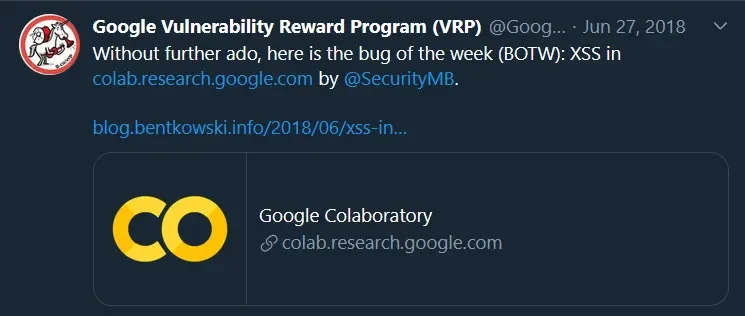
Because it was an XSS in something Google, I clicked the link immediately to see the payload. The linked write-up turned out to be about Jupyter Notebook, and the target site also had Jupyter Notebook. The movie waited.
Exploitation
Step 1: confirm the vulnerable component is present
Before trying anything, I reminded myself that the implementation of Jupyter on the target could differ from the one in the write-up, and that the bug described there might already have been patched. So the first step was to verify that the necessary support for the payload existed on the target.

The support was there. The affected part was MathJax. That still left the possibility that it had been patched at some point, so the next step was to actually try it.
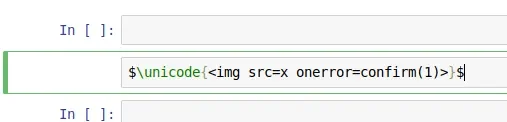
Step 2: enter the payload
I entered the payload into the notebook:
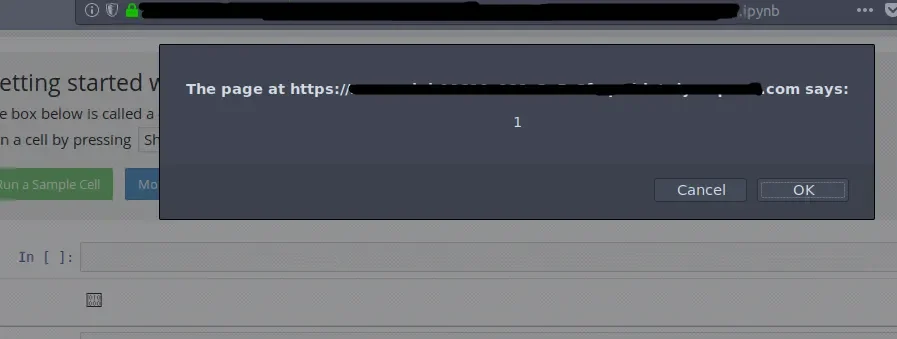
Step 3: observe execution
And it worked:
Step 4: confirm it is stored
After reloading the page, the XSS triggered again. That made it stored XSS rather than a one-off reflection. Combined with the ability to share the XSS-ed notebook, that was a good result for the bug report. To rule out some temporary encoding or decoding artefact, I refreshed the page a few more times and logged out and back in. The payload kept firing.
Root cause
The report attributes the affected part to MathJax inside Jupyter Notebook, following the mechanism described in the linked write-up. In other words, the notebook rendering path passed content into MathJax in a way that allowed script execution, and the notebook stored that content, so the payload persisted and re-executed on every load. The report does not show the underlying code or the exact parsing path, so the precise mistake in the implementation is not stated here.
Existing defences did not stop it. The site was built on Django, and the usual Django-related probes and standard XSS payloads had already failed during reconnaissance, which suggests the ordinary input handling was not the weak point. The flaw sat in the notebook and MathJax rendering, a component separate from the ordinary input handling tested earlier.
Impact
A payload stored in a notebook executes in the browser of anyone who opens it. Because the notebook can be shared, the payload reaches other users through the normal sharing flow, and it fires again on every reload and across logout and login.
Fix
The component to address is the MathJax rendering path in Jupyter Notebook: the version in use should be brought up to a release where the issue described in the linked write-up is fixed, and notebook content should not be able to reach a script execution context through the maths renderer.
Variants to test
- Check whether the target runs Jupyter Notebook at all, for example by looking for notebook URLs or the notebook UI during normal browsing. A positive result is a reachable notebook interface or a rendered notebook page.
- Verify MathJax support by entering ordinary LaTeX in a cell and confirming it renders as mathematics. A positive result is rendered maths output rather than raw text.
- Try the payload from the linked write-up in a notebook cell, following the same order as here: confirm support first, then test. A positive result is script execution in the notebook page.
- Reload the page after a successful trigger. A positive result is the payload firing again, which shows the content is stored rather than reflected.
- Log out and log back in, then reopen the notebook. A positive result is the payload still firing, ruling out a temporary encoding or decoding effect.
- Confirm the notebook can be shared, since the report notes that sharing the XSS-ed notebook was possible.
- Remember that implementations differ between deployments, so treat a failure on one Jupyter instance as inconclusive and check the version and MathJax configuration before concluding it is patched.
What happened, in plain words
A security researcher was testing a bug bounty program (a scheme where companies pay people for finding security holes in their websites). The website was built with a tool called Django and also included a component called Jupyter Notebook, which lets people write and share documents that mix text, code and maths. The researcher spent a long time clicking around and trying common attacks but found nothing serious. Then, while scrolling through Twitter before watching a film, they saw a tweet about a similar bug in Google's version of Jupyter Notebook. They followed the link, read the technique, and realised the target site also used Jupyter Notebook. They tested the technique on the target, and it worked: they could store a small script in a notebook that would run in the browser of anyone who opened that notebook. That kind of bug is called stored cross-site scripting (XSS). The report does not name the program or the exact web address.
The wall
The researcher joined a new bug bounty program and started exploring. They clicked through the site, watched the traffic in a tool called Burp Suite (which records the requests and responses between browser and server), and tried to understand what the site does and how it is meant to behave. They tried the usual XSS payloads (small pieces of code designed to make a browser run a script), tried bugs related to Django (the framework the site was built on), and fuzzed inputs (sent random or unexpected values) that looked promising. They found only small, unimportant issues.
Given how many features the site had, finding nothing felt wrong. The researcher began to doubt their own skill, and that doubt became the mental wall the article is named after: the feeling of being stuck and not good enough to get through.
The dynamite that made a decent hole in the wall
The researcher stepped away from the target for a while. While getting ready to watch a film, they scrolled through Twitter, following both bug bounty hunters and accounts that mostly retweet others, because useful information can come from unexpected places. They planned only to bookmark a few write-ups, perhaps new ways to bypass a WAF (web application firewall, a filter that blocks malicious requests), and then go back to the film. Instead they saw this tweet:
Because the tweet was about an XSS in something made by Google, the researcher clicked the link immediately to see the payload. The linked write-up was about Jupyter Notebook, and the target site also had Jupyter Notebook. The film was postponed.
Mr. Gorbachev, tear down this wall
Before trying anything, the researcher reminded themselves that the target's implementation of Jupyter might differ from the one in the write-up, and that the bug might already have been fixed. So the first step was to check that the target actually supported the payload described in the link.
The support was there. The affected part was MathJax (a library that displays mathematical formulas in a web page). But it could still have been patched at some point, so the next step was to try the payload for real.
PoC
A PoC (proof of concept) is a small demonstration that a bug is real. The researcher entered the payload into a notebook cell:
And it worked:
After reloading the page, the XSS triggered again. That meant the payload was stored (saved on the server) rather than reflected (echoed back once). Because the notebook could be shared, the payload would also run for anyone who opened the shared notebook, which made the bug report stronger. To rule out a temporary encoding or decoding glitch, the researcher refreshed the page a few more times and logged out and back in. The payload kept firing.
Root cause
The report attributes the affected part to MathJax inside Jupyter Notebook, following the mechanism in the linked write-up. In plain terms, the notebook's rendering path passed content into MathJax in a way that allowed a script to run, and the notebook stored that content, so the payload persisted and re-executed on every load. The report does not show the underlying code or the exact parsing path, so the precise mistake in the implementation is not stated here.
Existing defences did not stop it. The site was built on Django, and the usual Django-related probes and standard XSS payloads had already failed during reconnaissance, which suggests the ordinary input handling was not the weak point. The flaw sat in the notebook and MathJax rendering, a component separate from the ordinary input handling tested earlier.
Impact
A payload stored in a notebook executes in the browser of anyone who opens it. Because the notebook can be shared, the payload reaches other users through the normal sharing flow, and it fires again on every reload and across logout and login.
Fix
The component to address is the MathJax rendering path in Jupyter Notebook: the version in use should be brought up to a release where the issue described in the linked write-up is fixed, and notebook content should not be able to reach a script execution context through the maths renderer.
Variants to test
- Check whether the target runs Jupyter Notebook at all, for example by looking for notebook URLs or the notebook UI during normal browsing. A positive result is a reachable notebook interface or a rendered notebook page.
- Verify MathJax support by entering ordinary LaTeX in a cell and confirming it renders as mathematics. A positive result is rendered maths output rather than raw text.
- Try the payload from the linked write-up in a notebook cell, following the same order as here: confirm support first, then test. A positive result is script execution in the notebook page.
- Reload the page after a successful trigger. A positive result is the payload firing again, which shows the content is stored rather than reflected.
- Log out and log back in, then reopen the notebook. A positive result is the payload still firing, ruling out a temporary encoding or decoding effect.
- Confirm the notebook can be shared, since the report notes that sharing the XSS-ed notebook was possible.
- Remember that implementations differ between deployments, so treat a failure on one Jupyter instance as inconclusive and check the version and MathJax configuration before concluding it is patched.
Glossary
- Bug bounty program: A scheme where an organisation pays people for reporting security vulnerabilities in its systems.
- Django: A free, open-source web framework written in Python that helps build websites quickly.
- Jupyter Notebook: An open-source web application that lets you create and share documents containing live code, equations, visualisations and text.
- MathJax: A JavaScript library that displays mathematical notation in web browsers.
- XSS (cross-site scripting): A vulnerability where an attacker can inject a script into a web page viewed by other users, so the script runs in their browsers.
- Stored XSS: An XSS where the malicious script is saved on the server (for example in a notebook) and runs every time the page is loaded.
- Reflected XSS: An XSS where the malicious script is immediately returned by the server in response to a request, without being stored.
- Payload: The piece of code or data an attacker sends to exploit a vulnerability.
- Burp Suite: A tool used by security testers to intercept and inspect the traffic between a browser and a web server.
- Fuzzing: Sending random or unexpected inputs to a program to see how it reacts and whether it crashes or misbehaves.
- WAF (web application firewall): A filter that monitors and blocks malicious HTTP traffic to a web application.
- PoC (proof of concept): A small demonstration that a vulnerability exists and can be exploited.
- LaTeX: A typesetting system often used for mathematical and scientific documents; MathJax renders LaTeX in web pages.
- Session: A period of interaction between a user and a website, often maintained by a cookie or token so the site remembers who you are.
- Cookie: A small piece of data stored by the browser and sent to the website with each request, often used to keep you logged in.
- Token: A piece of data, similar to a cookie, used to authenticate a user or a request.




