Automating reflected XSS with burp-suite Intruder
The author found that a parameter reflected input inside an HTML tag but was blocked by a WAF and encoding on the main domain. By testing the same endpoint on other domains and other parameters using Burp Intruder, they found multiple reflected XSS issues.
 Published on notifybugme.medium.com
My name is Santosh Kumar Sha, I’m a Security Researcher/Ethical Hacker from India(Assam). In this article, I will be Describing how i found multiple reflected XSS using burp-suite intruder.
The full write-up lives on its author's site
It belongs to its author, so we link to it rather than copy it. The other two tabs are our own rewrites, checked against it.
Context
This is a write-up by Santosh Kumar Sha (@killmongar1996) about finding multiple reflected XSS issues with Burp Suite Intruder and automating the search across subdomains. The target is anonymised in the article as xxx.com (the author says to assume the target name is example.com), with everything in scope:
*In-scope : .xxx.com
The feature involved is an endpoint that reflects user input inside an HTML tag. On the main domain the reflection was present, but a WAF blocked XSS payloads and encoded special characters, which the author describes as very hard to bypass.
Setup
The author lists the following tools:
- Subfinder (https://github.com/projectdiscovery/subfinder)
- httpx (https://github.com/projectdiscovery/httpx)
- gau (Corben), https://github.com/lc/gau
- waybackurls (tomnomnom), https://github.com/tomnomnom/waybackurls
- Burpsuite, https://portswigger.net/burp
No accounts, roles or versions are given. The precondition is a target whose whole wildcard scope (*.xxx.com) is in scope, so that the same endpoint can be tested on every subdomain.
Finding it
While doing some automation the author received an invite for a new target. Browsing the main domain, an endpoint was found that reflected input inside an HTML tag. Injecting XSS payloads there failed: the WAF blocked them and special characters were encoded, limiting XSS. The author tried multiple encoding and decoding techniques, multiple WAF bypass payloads and some custom payloads, with no success. Because the endpoint sat on the main domain, bypassing the WAF and the encoding was very hard.
The idea that moved things forward was to try the same endpoint on other domains, and to check for other parameters that might be vulnerable and had been missed.
Exploitation
Step 1: Collect subdomains from archives and passive sources
subfinder -d xxx.com silent
gau -subs xxx.com
waybackurls xxx.com
Subfinder enumerates subdomains, gau pulls URLs for the domain and its subdomains from web archives, and waybackurls does the same from the Wayback Machine. Because the chance of missing a subdomain still exists, the author runs gau, waybackurls and subfinder and saves the output to files:
gau -subs xxx.com | unfurl domains>> vul1.txt
waybackurls xxx.com | unfurl domains >> vul2.txt
subfinder -d xxx.com -silent >> vul3.txt
unfurl domains reduces each URL to its domain, so the three files hold domains rather than full URLs.
Step 2: Merge and deduplicate the subdomains
cat vul1.txt vul2.txt vul3.txt | sort -u >> unique_sub.txt
All unique domains end up in unique_sub.txt.
Step 3: Build a custom parameter wordlist
gau -subs xxx.com | grep "=" | sed 's/.*.?//' | sed 's/&/\n/' | sed 's/=.*//' >> param1.txt
waybackurls xxx.com | grep "=" | sed 's/.*.?//' | sed 's/&/\n/' | sed 's/=.*//' | sort -u >> param2.txt
cat param1.txt param2.txt | sort -u >> param.txt
The pipeline keeps only URLs containing =, splits query strings on &, strips the values after =, and deduplicates the result. The output is a list of unique parameter names in param.txt, harvested from real archived URLs rather than from a generic wordlist.
Step 4: Automate the search with Burp Suite Intruder
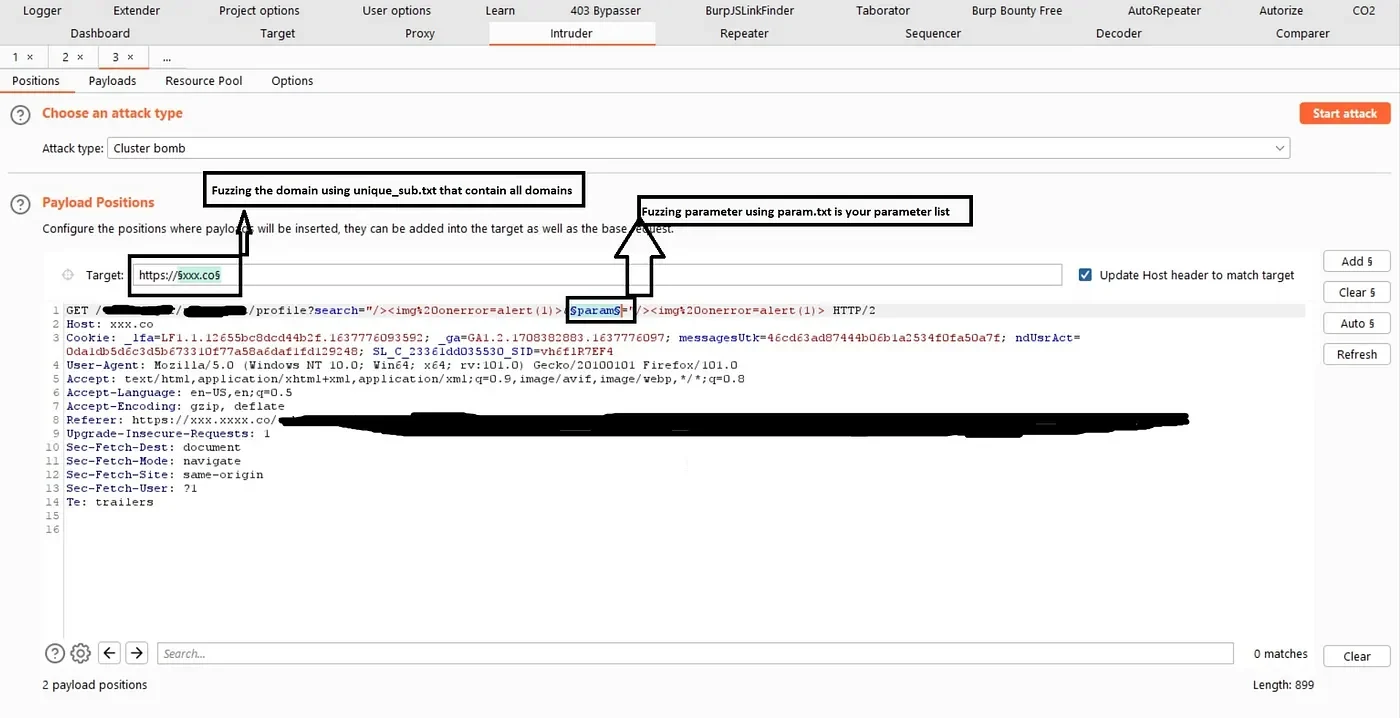
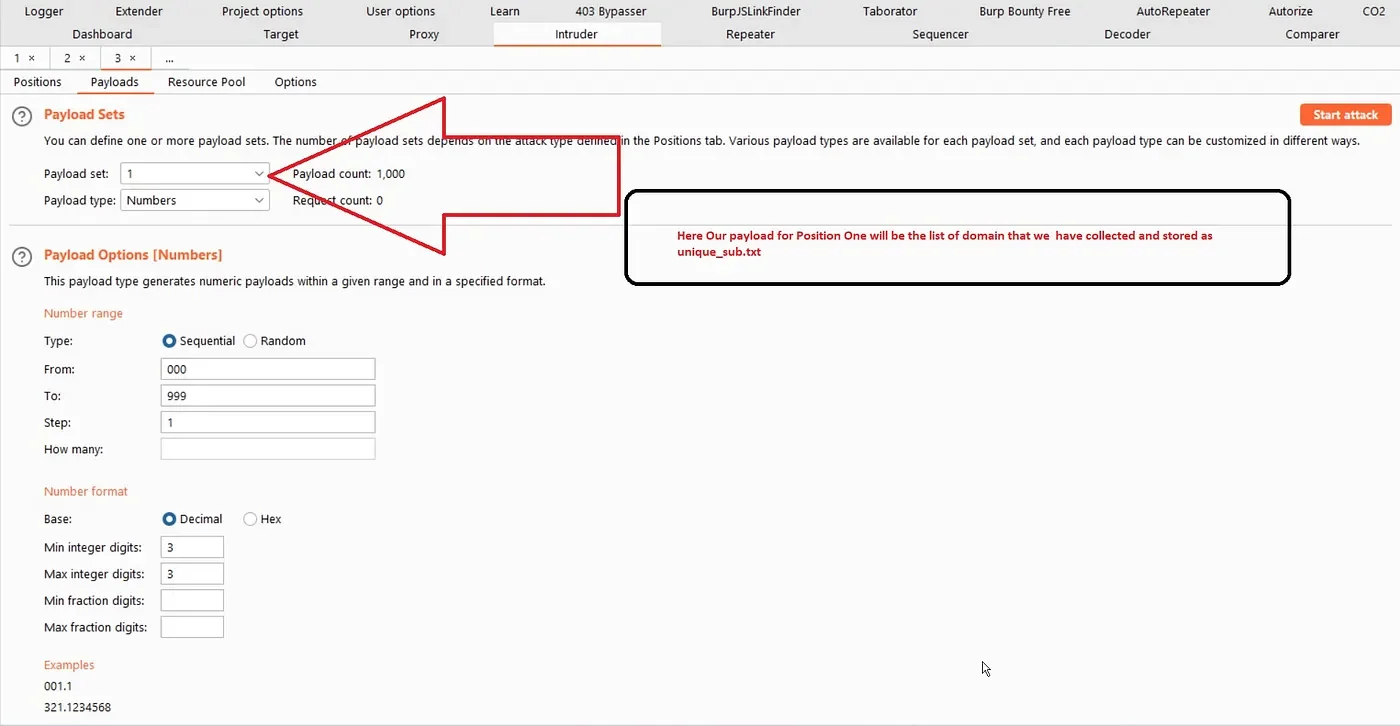
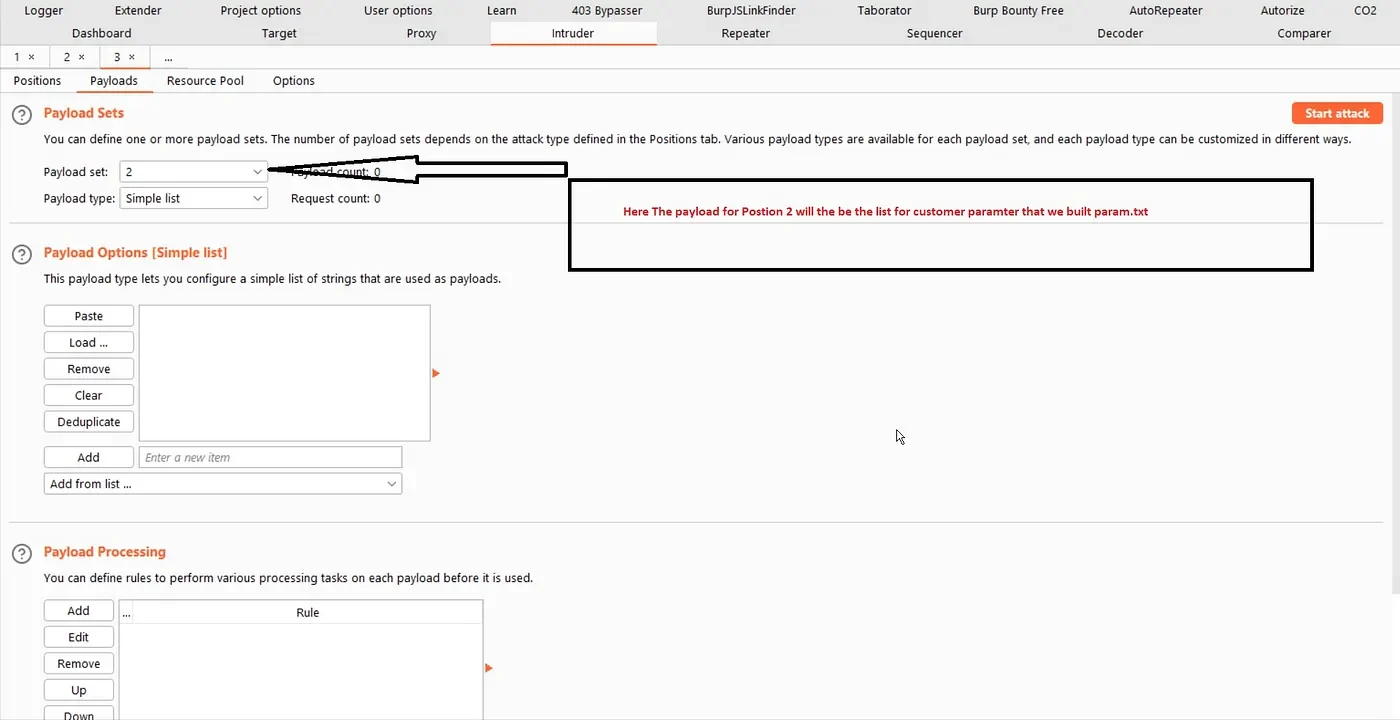
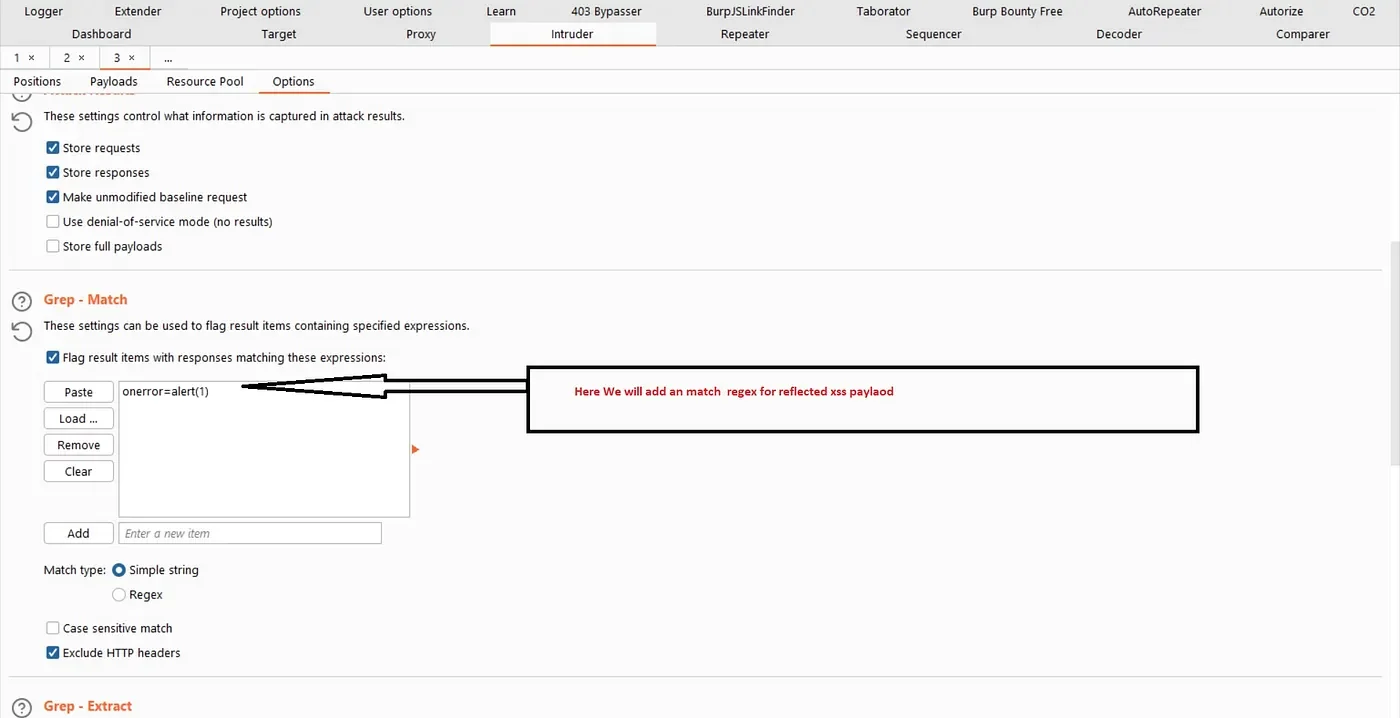
With a unique domain list and a custom parameter list, the author set up Intruder to fuzz the endpoint across domains and parameters at the same time. The article shows the Burp process in a series of screenshots rather than as raw requests.
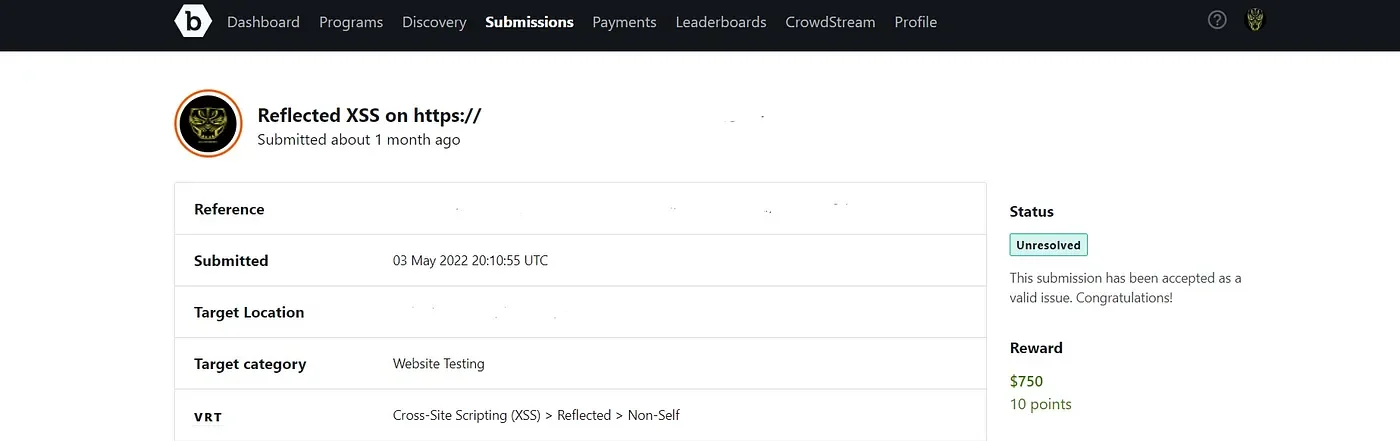
Using this method the author found multiple reflected XSS issues. All of them were reported in a single report, and because they shared the same root cause the reward was paid once only.
Root cause
The endpoint reflects user input inside an HTML tag. On the main domain the WAF and the encoding of special characters prevented exploitation, The author tried the same endpoint on other domains and other parameters, and found multiple reflected XSS issues. The report does not describe the server-side code, so the exact reason the other domains behaved differently is not stated;
Impact
An attacker could execute script in the context of the affected subdomains through a crafted link containing the vulnerable parameter. The author does not describe which users or data were exposed, and the report gives no CVSS score or severity. The practical limit is that the issue is reflected: it requires a victim to open a crafted URL, and It is reflected, so it requires a victim to open a crafted URL.
Fix
The report does not say what was changed.
Variants to test
- Take an endpoint that reflects input but is protected on the main domain and replay the same request against every subdomain in scope.
- Harvest parameter names from archived URLs with gau and waybackurls and fuzz them against the endpoint.
- Run the domain and parameter lists together in Intruder so each combination is tried.
- Try the encoding and WAF bypass payloads that failed on the main domain against the other hosts.
- Report all instances that share one root cause together, as the author did, rather than as separate reports.
What happened, in plain words
A security researcher found a type of bug called reflected XSS on a website. XSS stands for Cross-Site Scripting. In simple terms, it means a website takes something a visitor types or sends (for example, part of a web address) and puts it back into the page without cleaning it first. If an attacker can put a small piece of code into that spot, the victim's browser will run it as if the website itself had written it. A common everyday comparison: imagine a noticeboard where visitors can pin notes, and the person in charge copies whatever is written on a note straight onto the official board without checking it. Someone could write an official-looking instruction on a note and it would end up on the board as if the staff had written it.
The researcher first found a place on the main website where his input came back in the page, but a WAF (Web Application Firewall, a filter that inspects incoming requests and blocks suspicious ones, like a security guard at the door checking bags) blocked his attack code and also encoded special characters. Encoding means turning characters like < and > into harmless text so the browser does not treat them as code. He tried many tricks to get past the filter and failed.
Then he had a simple idea: try the same endpoint on other domains and check for other parameters he might have missed. A subdomain is a smaller site under the main one, for example shop.example.com under example.com. He collected as many subdomains as he could, collected the names of parameters used across the site, and used a tool called Burp Suite Intruder to try the same attack against many subdomains and many parameters automatically. He found several reflected XSS issues this way. He reported them all in one report because they had the same root cause, and was rewarded once only.
The target is anonymised in the article as xxx.com, and the author says to assume the target name is example.com. Everything under the wildcard scope was in scope:
*In-scope : .xxx.com
The * is a wildcard meaning "any subdomain". So the whole family of subdomains was fair game to test.
The tools, and what each one does
Before the steps, here is what each tool is, in plain words. A command-line tool is a program you run by typing a command in a terminal window instead of clicking buttons.
- Subfinder (https://github.com/projectdiscovery/subfinder): a program that looks for subdomains of a domain using public sources. Think of it as asking many public directories "does this company have any other addresses?"
- httpx (https://github.com/projectdiscovery/httpx): a program that checks which of those addresses actually respond on the web. It is like knocking on each door to see if anyone is home.
- gau (Corben), https://github.com/lc/gau: "Get All URLs". It asks public web archives (services that keep copies of old web pages) for every URL ever seen for a domain. An archive is like a library of old snapshots of the web.
- waybackurls (tomnomnom), https://github.com/tomnomnom/waybackurls: does a similar job, pulling old URLs from the Wayback Machine, which is the best-known web archive.
- Burp Suite (https://portswigger.net/burp): a toolkit for testing websites. It sits between your browser and the site, so you can see and change every request. Intruder is one of its features: it takes a request and automatically repeats it many times, swapping in different values each time. Think of a forms letter where one blank is filled in differently for each copy, and the tool posts all the copies for you.
No accounts, roles or software versions are given in the report.
The story behind the bug
While doing some automation work, the author received an invite for a new target. Browsing the main domain, he found an endpoint that reflected his input inside an HTML tag. An endpoint is a specific address on a server that does a particular job, like a counter in a shop: you go to that counter for that service. HTML is the language web pages are written in; a tag is a labelled piece of the page such as a paragraph or a link. If your input lands inside a tag without being cleaned, you may be able to add your own tag, and a script tag is what makes XSS work.
Injecting XSS payloads there failed. A payload is the actual text an attacker sends to try to trigger the bug. The WAF blocked them and special characters were encoded, which limits XSS. The author tried multiple encoding and decoding techniques, multiple WAF bypass payloads and some custom payloads, with no success. Because the endpoint sat on the main domain, getting past the WAF and the encoding was very hard.
The idea that moved things forward was to try the same endpoint on other domains, and to check for other parameters that might be vulnerable and had been missed. A parameter is a named value in a web address, the part after a ?, for example ?name=value. Websites often use parameters to pass search terms, page numbers or user choices. If a parameter is reflected in the page, it is a candidate for XSS.
Step 1: Collect subdomains from archives and passive sources
First, gather as many subdomains as possible. The author ran these three commands:
subfinder -d xxx.com silent
gau -subs xxx.com
waybackurls xxx.com
Line by line:
subfinder -d xxx.com silentasks Subfinder to find subdomains ofxxx.com. The-dflag means "domain". The wordsilentasks for a quieter output, without extra decoration.gau -subs xxx.comasks gau to return URLs forxxx.comand its subdomains. The-subsflag means "include subdomains".waybackurls xxx.comasks waybackurls to return archived URLs forxxx.com.
Why three tools? Each one sees a different slice of the public record. Using several increases the chance of finding a subdomain that one tool alone would miss. The author notes that the chance of missing a subdomain still exists, so he does not want to rely on a single source.
Because of that, he pipes subfinder into waybackurls to get every domain for every subdomain that exists, and saves the output to files:
gau -subs xxx.com | unfurl domains>> vul1.txt
waybackurls xxx.com | unfurl domains >> vul2.txt
subfinder -d xxx.com -silent >> vul3.txt
Line by line:
- The vertical bar
|is a pipe. It takes the output of the program on the left and feeds it as input to the program on the right. Think of a pipe carrying water from one bucket to the next. unfurl domainsis a helper that reduces each full URL to just its domain name. A full URL likehttps://shop.example.com/page?x=1becomesshop.example.com. This matters because the next steps need domain names, not long addresses.>>means "append to this file". Sovul1.txt,vul2.txtandvul3.txtcollect the results, each from a different source.subfinder -d xxx.com -silentis the same subdomain search as before, with the-silentflag written in full.
Why save to files? Because the next step needs to combine and sort them, and files let you keep the results and rerun later steps without repeating the slow searches.
Step 2: Merge and deduplicate the subdomains
cat vul1.txt vul2.txt vul3.txt | sort -u >> unique_sub.txt
Line by line:
catprints the contents of the listed files one after another. It is like emptying three boxes into one pile.sort -usorts the lines and removes duplicates. The-umeans "unique". This is important because the same subdomain will often appear in more than one source.>> unique_sub.txtappends the cleaned list to a file calledunique_sub.txt.
The result is one list of unique domains. The author calls this the unique subdomain list.
Step 3: Build a custom parameter wordlist
A wordlist is simply a list of words or names to try. Here the words are parameter names. Instead of guessing common names, the author harvests real parameter names from archived URLs, which is smarter because those names are known to be used by the target.
gau -subs xxx.com | grep "=" | sed 's/.*.?//' | sed 's/&/\n/' | sed 's/=.*//' >> param1.txt
waybackurls xxx.com | grep "=" | sed 's/.*.?//' | sed 's/&/\n/' | sed 's/=.*//' | sort -u >> param2.txt
cat param1.txt param2.txt | sort -u >> param.txt
Line by line for the first command:
gau -subs xxx.comgets archived URLs as before.grep "="keeps only lines that contain an equals sign. An equals sign is a strong hint that the URL has a parameter, because parameters look likename=value.sed 's/.*.?//'is a find-and-replace.sedis a stream editor, a tool that edits text as it flows through. The pattern.*.?matches everything up to and including the first?, and replaces it with nothing. The?is where the query string starts in a URL, so this strips the address and keeps the query part.sed 's/&/\n/'replaces the&character with a newline. In a URL,&separates one parameter from the next, so this puts each parameter on its own line.sed 's/=.*//'removes everything from the=onwards, leaving only the parameter name.>> param1.txtappends the result to a file.
The second command does the same with waybackurls, and adds sort -u to remove duplicates before saving to param2.txt.
The third command combines both files, sorts them and removes duplicates, saving the final list to param.txt.
The output is a list of unique parameter names in param.txt, harvested from real archived URLs rather than from a generic wordlist. Why does this matter? Because a generic list may miss names that are specific to this target, and those unusual names are exactly where bugs often hide.
Step 4: Automate the search with Burp Suite Intruder
Now the author has a unique domain list and a custom parameter list. He sets up Intruder to fuzz the endpoint across domains and parameters at the same time. Fuzzing means sending many slightly different inputs automatically to see which one causes an interesting response.
The article shows the Burp process in a series of screenshots rather than as raw requests.
Using this method the author found multiple reflected XSS issues. All of them were reported in a single report, and because they shared the same root cause the reward was paid once only.
Why the bug existed
The endpoint reflects user input inside an HTML tag. On the main domain the WAF and the encoding of special characters prevented exploitation, The author tried the same endpoint on other domains and other parameters, and found multiple reflected XSS issues. The report does not describe the server-side code, so the exact reason the other domains behaved differently is not stated. Output encoding is the act of converting dangerous characters into safe text before putting them in a page, like putting a cover over a sharp edge.
What an attacker could do
An attacker could execute script in the context of the affected subdomains through a crafted link containing the vulnerable parameter. In plain words, the attacker sends a victim a link. When the victim clicks it, the victim's browser runs the attacker's code as if it came from the website. That code could, in principle, do things the website is allowed to do in that browser. The author does not describe which users or data were exposed, and the report gives no CVSS score or severity. CVSS is a standard scoring system for how serious a vulnerability is.
The practical limit is that the issue is reflected: it requires a victim to open a crafted URL. It is not stored on the server for every visitor. It is reflected, so it requires a victim to open a crafted URL.
How to fix it
The report does not say what was changed. In everyday terms: if the main shop has a security guard at the door, the back entrances need one too.
Variants to test
If you want to try this approach yourself, here are the variations the author's method suggests:
- Take an endpoint that reflects input but is protected on the main domain and replay the same request against every subdomain in scope.
- Harvest parameter names from archived URLs with gau and waybackurls and fuzz them against the endpoint.
- Run the domain and parameter lists together in Intruder so each combination is tried.
- Try the encoding and WAF bypass payloads that failed on the main domain against the other hosts.
- Report all instances that share one root cause together, as the author did, rather than as separate reports.
Glossary
- XSS (Cross-Site Scripting): a bug where a website puts untrusted input into a page without cleaning it, so an attacker's code can run in a victim's browser.
- Reflected XSS: XSS where the malicious input comes back in the response to the same request, usually via a crafted link, rather than being stored on the server.
- WAF (Web Application Firewall): a filter that inspects incoming web requests and blocks ones that look malicious.
- Encoding (output encoding): converting special characters into safe text so the browser does not treat them as code.
- Subdomain: a smaller site under a main domain, such as
shop.example.comunderexample.com. - Wildcard scope: a scope written with
*, meaning every subdomain is allowed to be tested. - Endpoint: a specific address on a server that performs a particular function.
- HTML: the language web pages are written in.
- Tag: a labelled piece of an HTML page, such as a paragraph or a link.
- Payload: the actual text an attacker sends to try to trigger a bug.
- Parameter: a named value in a web address, usually after a
?, in the formname=value. - Command-line tool: a program run by typing a command in a terminal instead of clicking buttons.
- Pipe (
|): a way to feed the output of one program into another. - Append (
>>): adding output to the end of a file instead of overwriting it. - Wordlist: a list of words or names to try, used as input for automated testing.
- Fuzzing: sending many slightly different inputs automatically to see which one causes an interesting response.
- Burp Suite: a toolkit for testing websites that sits between your browser and the site so you can see and change requests.
- Intruder: a Burp Suite feature that repeats a request many times with different values filled in automatically.
- Archive: a service that keeps old snapshots of web pages and URLs.
- Wayback Machine: the best-known web archive.
- CVSS: a standard scoring system for how serious a vulnerability is.
- Root cause: the underlying reason a bug exists, as opposed to each individual place it shows up.




