Chaining vulnerabilities lead to account takeover
The password reset API reflected a user-controlled 'to' parameter in the reset link, and two internal open redirects allowed an attacker to redirect the reset secret code to their own host. Combined with missing rate limiting and lack of code invalidation, an attacker could force a victim to click a poisoned reset link and take over their account.

In this write-up, I will explain how I was able to chain five vulnerabilities that led to one link click account takeover.
The full write-up lives on its author's site
It belongs to its author, so we link to it rather than copy it. The other two tabs are our own rewrites, checked against it.
Context
The target was a private bug bounty program, referred to in the write-up as target.com. The application exposed its functionality through several separate APIs, and the researcher focused on the main authentication methods, in particular sign-in and reset-password. The reset-password flow is the usual one: the user submits a request, the server emails a link containing a secret code, and following that link lets the user set a new password.
The write-up attributes the whole chain to a wrong application of the reset-password method via the API and other internal functions. Five issues were chained: two internal open redirects, injection of resources into the reset-password link, a lack of rate limiting on the reset-password method, and a failure to invalidate the reset-password secret code.
Setup
The researcher was doing recon against the target and testing the main API methods with their own account. No special roles, tooling or versions are described. The only precondition is an account on the target so that a reset-password request can be triggered and the resulting email inspected.
Finding it
The sign-in method showed nothing unusual. The researcher then reset their own account password through the reset-password method and noticed a to JSON parameter in the request that looked out of place. Checking the reset-password email confirmed that the value of this parameter is reflected in the reset-password link. Further requests confirmed the reflection was consistent.
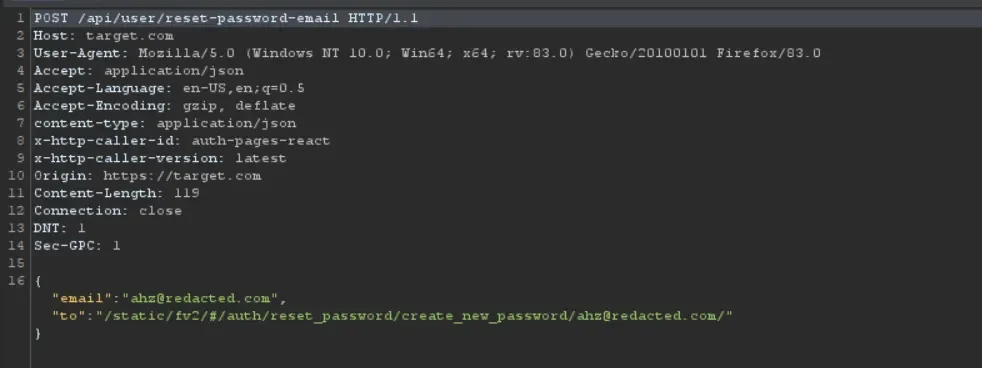
The reset-password request, showing the to JSON parameter.

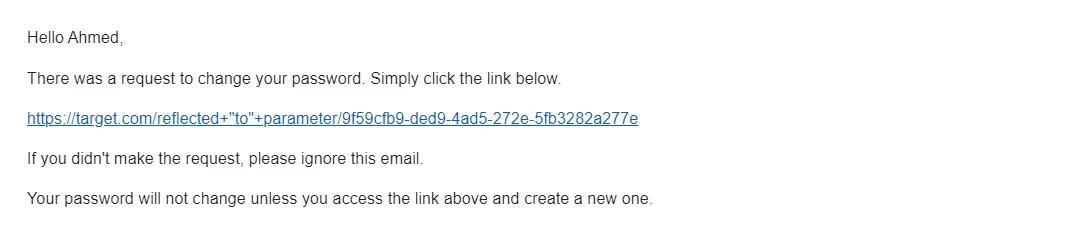
The reset-password email, where the parameter is reflected in the link.
A further reset-password email confirming the reflection.
Exploitation
Step 1: Try to inject a host directly
The first idea was to turn the reflection into an open redirect so that the reset-password secret code would leak. The researcher tried Host header injection through the Host header, the Referer header and the Origin header, and also tried host injection inside the to JSON parameter value. None of these succeeded in injecting an attacker-controlled host. That meant an internal open redirect on the same target host was needed to leak the reset-password secret code.
Step 2: Find internal open redirects
After testing other methods and functionalities, the researcher identified two internal open redirects in these endpoints:
https://target.com/api/otc/login?response_type=code&client_id=web&redirect_uri=https://host/https://target.com/api/oidc/preauthorized?response_type=code&client_id=web&redirect_uri=https://host/
The report lists these two endpoints as internal open redirects. These redirects also leaked another secret code, which the researcher notes is a vulnerability by itself, but the decision was to escalate the chain into a one-click account takeover instead.
Step 3: Put the redirect into the reset-password link
One of the open redirects was injected into the reset-password link through the value of the to JSON parameter.
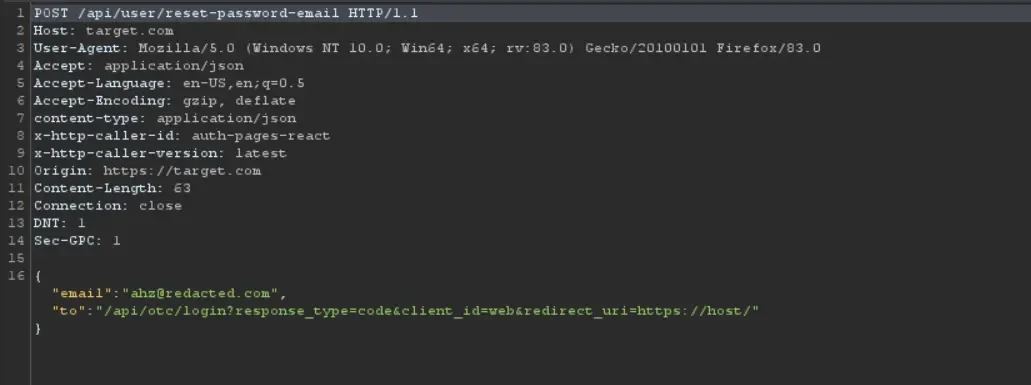
The reset-password request with the open redirect placed in the to parameter.
With that in place, a single click on the reset-password link in the email redirected both the reset-password secret code and the other secret code to the researcher's own host.
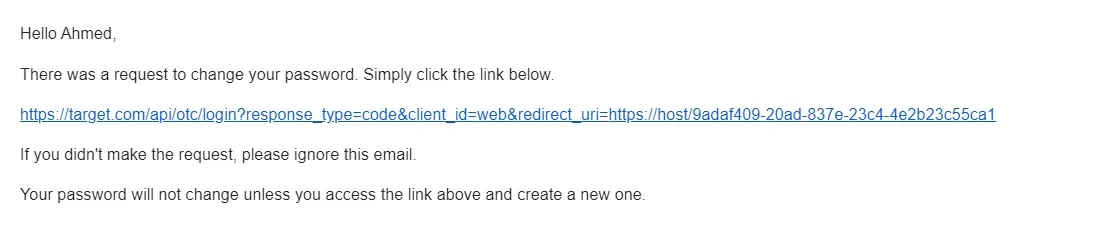
The reset-password email containing the poisoned link.

The request received on the researcher's host: the code in the path is the reset-password secret code, and the code in the query string is the other secret code.
Step 4: Force the click with a flood of emails
While testing the reset-password method, the researcher found two more issues that made it realistic to get a victim to click the poisoned link. The first is the absence of rate limiting on the reset-password method: more than 2000 requests could be sent, which floods the victim's inbox and pushes them to click the poisoned reset-password link, leaking the reset-password secret code.
Step 5: Reuse the leaked code
The second issue is that the reset-password secret code is never invalidated. The leaked code could be used as many times as the attacker wanted. It stayed valid even if the user requested another reset-password code and reset their password, so the code leaked to the attacker's host remained usable.
Root cause
The chain rests on the reset-password API reflecting the to value into the reset-password link, combined with two internal open redirects on the same host. The reset-password method also lacks rate limiting, and the reset-password secret code is not invalidated even after a new code is requested and the password reset. The write-up frames all of this as a wrong application of the reset-password method via the API and other internal functions; the exact code-level cause is not shown.
Impact
An attacker can take over a victim's account with one click on a reset-password link. The researcher triggered reset-password requests with a poisoned to value, sent more than 2000 requests to flood the inbox, and received both the reset-password secret code and the other secret code on their own host. Because the reset-password code is never invalidated, the attacker can use it even after the victim has requested a new code and reset their password. The attack requires the victim to click the link; the email flood is what the researcher used to encourage that click.
Fix
The write-up does not describe any fix applied by the program. Based on the issues found, the reset-password API should not reflect an unvalidated to value into the reset-password link, the internal endpoints should not accept arbitrary redirect_uri values, the reset-password method should be rate limited, and reset-password secret codes should be invalidated after use and when a new code is issued.
Variants to test
- Look for extra JSON parameters in reset-password requests, such as a
tofield, and check whether their value appears in the emailed link. A positive result is the value reflected verbatim in the link. - Try Host, Referer and Origin header injection on the reset-password request. A positive result is the emailed link pointing at your host.
- Search the same host for endpoints that take a
redirect_uriparameter, such as login and authorisation endpoints. A positive result is a redirect to a host you control. - Chain a found open redirect into the reflected parameter and click the emailed link. A positive result is a request to your host carrying the reset-password code in the path and any other code in the query string.
- Send a large number of reset-password requests for one account. A positive result is no throttling or blocking after thousands of requests.
- Use a reset-password code, then request a new one and reset the password, then reuse the old code. A positive result is the old code still working.
What happened, in plain words
A security researcher found a way to take over someone else's account on a website by getting that person to click a single link in an email. The link looked like a normal "reset your password" email from the site, but it was quietly rigged so that the secret code inside it was sent to the researcher instead of staying with the site.
To pull this off, the researcher did not need one big flaw. They needed five small ones, stacked on top of each other like dominoes. Each flaw on its own is a problem, and together they gave a one-click account takeover. Together they do.
The five flaws were:
- Two places on the site that would happily forward a visitor to any web address someone asked for (these are called open redirects).
- A password reset form that copied a value supplied by the person making the request straight into the emailed link (resource injection into the reset-password link).
- No limit on how many password reset emails could be requested, so an attacker could flood a victim's inbox.
- A reset code that never stopped working, even after it had been used or replaced.
The researcher reported all of this to a private bug bounty program, which the write-up calls target.com. A bug bounty program is a scheme where a company invites outside researchers to look for security problems and report them, often for a reward. "Private" means only invited researchers can take part.

The write-up opens with the researcher's own summary of the chain: five vulnerabilities leading to a one-click account takeover.
Before going further, one important note from the researcher: all of these problems came from the way the site applied its password reset feature through its API and other internal functions. An API (Application Programming Interface) is the set of doors a website's own pages, and sometimes other programs, use to talk to its servers. When you fill in a form on a website, your browser usually sends the details to one of these doors behind the scenes. If a door is built carelessly, it can be abused even when the visible page looks fine.
The setup
The researcher was doing recon. Recon, short for reconnaissance, is the early stage of security testing where you look around a target to understand how it is built: what pages exist, what APIs it uses, how it handles logins. It is like walking around a building before trying any doors, noting where the entrances are.
During recon, the researcher noticed the application used several different APIs to handle its features. So they decided to test the main ones: sign-in and reset-password. These are the two most sensitive doors on any site, because they are the ones that decide who you are.
The sign-in method looked normal. Nothing odd there. So the researcher moved on to the reset-password method and reset their own account password to see what happened.
A quick word on how password reset normally works, because the whole story depends on it. You click "forgot password", type your email address, and the site sends you an email containing a link. That link has a long random string in it, called a secret code or token. A token is simply a temporary password-like string that proves you are allowed to do something. When you click the link, the site checks the token and, if it matches, lets you set a new password. The token is the key to your account for a short while, so if anyone else gets hold of it, they can set a new password too and lock you out.
Finding it
After resetting their own password, the researcher looked closely at the request their browser had sent and spotted something strange: a JSON parameter called to.
JSON (JavaScript Object Notation) is a common way of formatting data so that programs can read it easily. It looks like a list of labels and values, for example "name": "value". A parameter is just one of those labelled values: a piece of information being sent along with the request. So a to parameter is a field labelled to with some value in it.
Why did this matter? Because a password reset request has no obvious reason to contain a field called to. It looked out of place, and out-of-place fields are exactly what a tester looks for. The researcher then checked the reset-password email that arrived and confirmed that the value of this to parameter was being copied into the reset-password link itself.
The reset-password request, showing the to JSON parameter.
This image shows the request the researcher captured, with the to field visible among the data being sent. In plain terms: the browser told the server "reset the password, and by the way, here is a to value". The server accepted it without complaint.
The reset-password email, where the parameter is reflected in the link.
This image shows the email that arrived. The important part is the link: whatever was in the to field now appears inside the reset-password link. When a value you supply comes back to you inside a page or a link, that is called reflection. Reflection is not automatically a vulnerability, but it becomes dangerous when the reflected value ends up somewhere that controls where a browser goes, or what data gets sent where.
A further reset-password email confirming the reflection.
The researcher sent more reset requests to be sure this was not a one-off. It was not: the value kept appearing in the link every time. Confirming a finding with repeat tests matters, because a single odd result can be a caching quirk or a coincidence.
Exploitation
Step 1: Try to inject a host directly
The first idea was to turn that reflection into an open redirect, so that the reset-password secret code would leak. An open redirect is a feature on a website that sends you to another web address, where the address is supplied by whoever made the request. Sites use them legitimately, for example "after logging in, send me back to the page I came from". The problem is that if the site does not check the destination, an attacker can make the site forward people to a site the attacker controls. It is like a receptionist who will walk you to any address you name, including a stranger's house.
To get the site to send the reset link to the researcher's own server, the researcher tried several tricks:
- Host header injection through the Host header.
- The same through the Referer header.
- The same through the Origin header.
- Host injection inside the
toJSON parameter value.
A header is a small piece of extra information your browser attaches to every request, a bit like the label on an envelope. The Host header says which website you are asking for. The Referer header says which page you came from. The Origin header says which site the request originates from. Host header injection means putting a different address into that label, hoping the server trusts it and uses it when building links, such as the reset link in the email.
None of these worked. The researcher could not get their own host into the link that way. That told them something useful: the site was not blindly trusting those headers. So the only remaining route was to find an open redirect already sitting on the same target host, which could then be used to leak the reset-password secret code.
Step 2: Find internal open redirects
After testing other methods and functionalities, the researcher found two internal open redirects, in these endpoints:
https://target.com/api/otc/login?response_type=code&client_id=web&redirect_uri=https://host/https://target.com/api/oidc/preauthorized?response_type=code&client_id=web&redirect_uri=https://host/
An endpoint is simply a specific address on a server that does a particular job, like a counter in a building that handles one kind of request. This line contains two such addresses, one after the other.
Reading it piece by piece:
https://target.com/api/otc/loginis the first endpoint. The/api/part tells you it is one of the application's API doors.?response_type=codeis a parameter telling the endpoint what kind of answer is wanted: a code.&client_id=webis another parameter, naming which client is asking. Here it isweb.&redirect_uri=https://host/is the important one.redirect_urimeans "the address to send the user to afterwards". The value here ishttps://host/, a placeholder for a host the researcher controls.- Then the same pattern repeats for the second endpoint,
https://target.com/api/oidc/preauthorized, again withresponse_type=code,client_id=webandredirect_uri=https://host/.
Both endpoints are internal open redirects, as the report lists them. That is the open redirect. These redirects also leaked another secret code, which the researcher notes is a vulnerability by itself. But rather than stop there, the decision was to escalate the chain into a one-click account takeover. Escalate means to take a small finding and build on it until it does something much more serious.
Step 3: Put the redirect into the reset-password link
Now the pieces come together. One of the open redirects was placed into the reset-password link through the value of the to JSON parameter.
The reset-password request with the open redirect placed in the to parameter.
This image shows the same reset-password request as before, except the to value is no longer harmless: it is the open redirect address. Because the site copies the to value into the emailed link, the emailed link now points at the site's own redirect endpoint, which in turn will forward the visitor to the researcher's host.
With that in place, a single click on the reset-password link in the email sent both the reset-password secret code and the other secret code to the researcher's own host.
The reset-password email containing the poisoned link.
This image shows the email as the victim would see it. The link in the email carries the open redirect, so following it hands the secret codes to the attacker. But following it hands the secret codes to the attacker.
The request received on the researcher's host: the code in the path is the reset-password secret code, and the code in the query string is the other secret code.
This image shows the researcher's own server receiving the visit. The address of the incoming request contains two codes. The one in the path (the part of the address after the host name, before any question mark) is the reset-password secret code. The one in the query string (the part after the question mark) is the other secret code. Both leaked to the attacker in one click.
Step 4: Force the click with a flood of emails
There is an obvious weakness in the plan so far: the victim has to click the link. Most people ignore password reset emails they did not ask for. So the researcher looked for a way to make clicking more likely, and found two more issues while testing the reset-password method.
The first is the absence of rate limiting on the reset-password method. Rate limiting is a cap on how often someone can do something in a given time, like a bouncer who only lets you through the door a few times a minute. Without it, the researcher could send more than 2000 requests. That floods the victim's inbox with reset emails, which is annoying enough to push them to click the poisoned reset-password link just to make it stop, and that click leaks the reset-password secret code. The researcher describes this flood as a way to DDOS the user email. A denial-of-service attack, or DoS, means overwhelming a service with so much traffic that it stops working properly; here the target is the victim's inbox rather than a server.
Step 5: Reuse the leaked code
The second issue is that the reset-password secret code is never invalidated. Invalidating a code means marking it as used up, so it cannot be used again. Here the reset-password secret code was not invalidated, even after a new code was requested and the password reset.
The leaked code could be used as many times as the attacker wanted. It stayed valid even if the user requested another reset-password code and reset their password. So the code that leaked to the attacker's host remained usable, which means the attacker could still take over the account after the victim thought they had sorted things out.
Root cause
The chain rests on the reset-password API reflecting the to value into the reset-password link. In other words, the site took a value from the person making the request and put it into a link without checking it was safe. That was combined with two internal open redirects on the same host. The reset-password method also lacks rate limiting, and issued secret codes are not invalidated after use or after a new code is issued. The write-up frames all of this as a wrong application of the reset-password method via the API and other internal functions; the exact code-level cause is not shown.
Impact
An attacker can take over a victim's account with one click on a reset-password link. The researcher triggered reset-password requests with a poisoned to value, sent more than 2000 requests to flood the inbox, and received both the reset-password secret code and the other secret code on their own host. Because the reset-password code is never invalidated, the attacker can use it even after the victim has requested a new code and reset their password. The attack requires the victim to click the link; the email flood is what the researcher used to encourage that click.
Fix
The write-up does not describe any fix applied by the program. Based on the issues found, the reset-password API should not reflect an unvalidated to value into the reset-password link, the internal endpoints should not accept arbitrary redirect_uri values, the reset-password method should be rate limited, and reset-password secret codes should be invalidated after use and when a new code is issued.
Variants to test
If you want to look for the same kind of chain yourself, these are the checks the researcher's approach suggests. Each one is a small experiment with a clear pass or fail.
- Look for extra JSON parameters in reset-password requests, such as a
tofield, and check whether their value appears in the emailed link. A positive result is the value reflected verbatim in the link. - Try Host, Referer and Origin header injection on the reset-password request. A positive result is the emailed link pointing at your host.
- Search the same host for endpoints that take a
redirect_uriparameter, such as login and authorisation endpoints. A positive result is a redirect to a host you control. - Chain a found open redirect into the reflected parameter and click the emailed link. A positive result is a request to your host carrying the reset-password code in the path and any other code in the query string.
- Send a large number of reset-password requests for one account. A positive result is no throttling or blocking after thousands of requests.
- Use a reset-password code, then request a new one and reset the password, then reuse the old code. A positive result is the old code still working.
Timeline
Report (Nov 23rd). First response (Nov 24th).
Glossary
- API (Application Programming Interface): the set of addresses and rules a website's pages, or other programs, use to talk to its servers behind the scenes.
- Bug bounty program: a scheme where a company invites outside researchers to find and report security problems, often for a reward. A private program is open only to invited researchers.
- Recon (reconnaissance): the early stage of testing where you explore a target to understand how it is built before trying anything.
- Endpoint: a specific address on a server that handles one particular kind of request.
- JSON (JavaScript Object Notation): a common text format for data, made of labels and values, that programs can read easily.
- Parameter: one labelled piece of information sent along with a request, such as
toorredirect_uri. - Header: a small piece of extra information attached to every web request, like a label on an envelope. The Host header names the site being requested, the Referer header names the page you came from, and the Origin header names the site the request originates from.
- Host header injection: putting a different address into the Host header, hoping the server trusts it and uses it when building links.
- Token / secret code: a long random string that acts like a temporary key, proving you are allowed to do something, such as reset a password.
- Reflection: when a value you supplied comes back to you inside a page, a link or a response.
- Open redirect: a feature that sends a visitor to a web address supplied by whoever made the request, without checking the destination.
redirect_uri: a parameter that tells an endpoint where to send the user afterwards.- Escalate: to take a small finding and build on it until it causes something much more serious.
- Rate limiting: a cap on how often an action can be performed in a given time.
- DoS / DDOS (denial of service): overwhelming a service with so much traffic that it stops working properly. Here the flood targets a victim's email inbox.
- Invalidating a code: marking a code as used up so it can no longer be used.
- Account takeover: gaining control of someone else's account, for example by setting a new password they do not know.
- Root cause: the underlying reason a vulnerability exists, as opposed to its visible symptom.

