Chrome Sandbox Escape: CVE-2026–134401 Explained Simply
Chrome's Variations component had an improper input validation flaw that could let a specially crafted HTML page execute code outside the browser sandbox. An attacker could use this to steal sessions and passwords or drop malware, though Google has not published the exact trigger and no in-the-wild exploitation is confirmed.

Cybersecurity
The full write-up lives on its author's site
It belongs to its author, so we link to it rather than copy it. The other two tabs are our own rewrites, checked against it.
Context
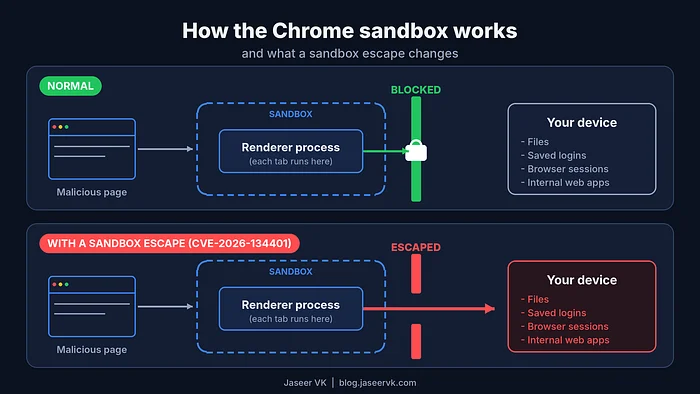
Chrome runs every tab in a restricted process called the renderer. The operating system limits what that process can do: it cannot freely read your files, run programs, or touch other apps. The locked room that holds the renderer is the sandbox, and it is Chrome's last line of defence.
Seriously compromising a Chrome user takes two bugs. The first takes over the renderer. The second escapes the sandbox. CVE-2026-134401 is about that second step: a critical flaw in Chrome's Variations component that could let a malicious web page walk out of the sandbox.
Variations is Chrome's feature switchboard. Google uses it to turn features on for a small group of users before a full rollout, the way a restaurant tests a new dish on three tables before adding it to the menu. Chrome receives instructions about which feature to serve to which user. Because the component controls Chrome's behaviour, it must check every input carefully.
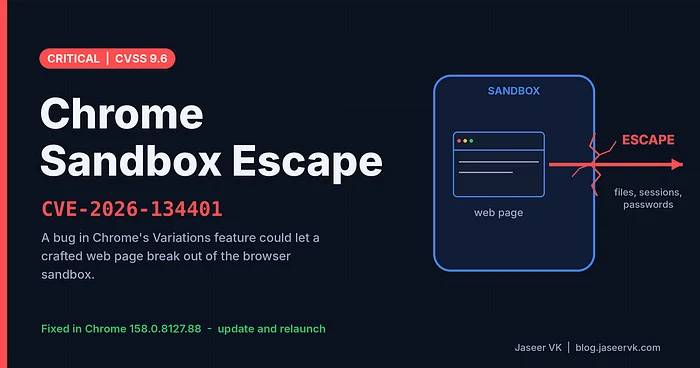
The quick facts as published:
| Field | Value |
|---|---|
| CVE | CVE-2026-134401 |
| Product | Google Chrome (desktop) |
| Component | Variations |
| Bug type | Improper input validation (CWE-20) |
| Severity | Critical, CVSS 3.1 score 9.6 |
| Reported | 28 Aug 2026, found by Google itself |
| Patched | 23 Nov 2026 (Stable channel) |
| Exploited in the wild? | Not confirmed (not in CISA KEV) |
Setup
The affected versions are those below 158.0.8127.88. Open a new tab and type chrome://version. If the number starts below 158.0.8127.88, the browser is affected.
Affected and fixed versions:
- Chrome on Windows: versions before 158.0.8127.88 are affected. Fixed in 158.0.8127.88 or .89.
- Chrome on macOS: versions before 158.0.8127.88 are affected. Fixed in 158.0.8127.88 or .89.
- Chrome on Linux: versions before 158.0.8127.88 are affected. Fixed in 158.0.8127.88.
Edge, Brave, Opera, Vivaldi and Electron apps share Chromium code but follow their own update schedules. A Chrome fix does not prove they are patched. Extended Stable, mobile and ChromeOS have no clear public status, so check Google's release notes for those.
Finding it
The bug is improper input validation: the code trusted data without checking it properly. Chrome failed to properly check something in the Variations code, and a specially crafted HTML page could use that gap to potentially run code outside the sandbox.
The analogy in the write-up is an airport guard who checks boarding passes but misses a fake one, letting the passenger walk straight into a restricted area.
Google has not published the exact trigger, and the bug report is restricted while people update. The CVE says "potentially execute code": it describes what the flaw could allow, not a demonstrated attack. Anyone claiming a step-by-step exploit for this CVE today is guessing.
Exploitation
The record gives few details, so the published walkthrough is a typical attack shape rather than a reproduced chain.
Step 1: Lure the victim
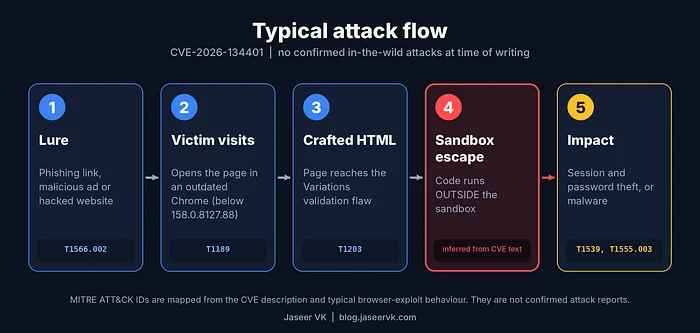
Lure (phishing link / malicious ad / hacked website) ↓Victim opens the page in an outdated Chrome ↓Crafted HTML triggers the Variations flaw ↓Code runs OUTSIDE the sandbox ↓Steal sessions and passwords, or drop malware
The chain starts with a phishing link, a malicious ad or a hacked website. The victim opens the page in an outdated Chrome. The crafted HTML triggers the Variations flaw, code runs outside the sandbox, and the attacker steals sessions and passwords or drops malware.
A worked example from the write-up: a user gets a message saying "Your parcel is on hold, check here", taps the link in an outdated Chrome, sees a blank page and thinks nothing of it. In the background, his browser sessions and saved logins could now be exposed.
Step 2: Map the stages to ATT&CK
The write-up maps the chain to MITRE ATT&CK as follows:
- Delivery: T1566.002, Spearphishing Link
- Initial access: T1189, Drive-by Compromise
- Exploitation: T1203, Exploitation for Client Execution
- After escape: T1539, Steal Web Session Cookie, and T1555.003, Credentials from Web Browsers
These mappings come from the CVE description and typical browser-exploit behaviour. They are not confirmed attack reports.
Root cause
The defect is improper input validation in the Variations component: the code trusted data without checking it properly, and a specially crafted HTML page could use that gap to potentially run code outside the sandbox. The CVE classifies it as CWE-20, improper input validation.
The exact trigger is not public, so how the crafted page reaches the Variations code is not described in the record.
Impact
The CVSS 3.1 score is 9.6, which is high for two reasons given in the write-up: the attack works over the network, needs no login, and takes low skill, and "scope changed" means the damage goes beyond Chrome itself.
Code outside the sandbox runs with your user's privileges, not as admin or root by default. Even so, that reaches your files, browser sessions, and internal web apps. Exploitation in the wild is not confirmed, and the CVE is not in CISA KEV.
Fix
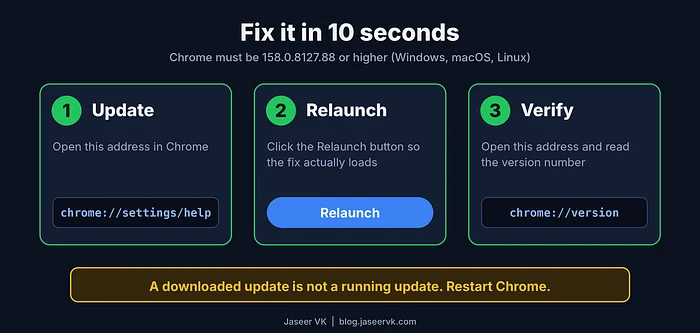
The issue was patched on 23 Nov 2026 in the Stable channel. The update is the fix, and there is no official workaround.
- Open chrome://settings/help. Chrome will download the update.
- Click Relaunch.
- Open chrome://version and confirm you see 158.0.8127.88 or higher.
On Linux:
sudo apt update && sudo apt install --only-upgrade google-chrome-stablegoogle-chrome --version
The trap most people miss: a downloaded update is not a running update. If Chrome has been open for days without a restart, you are still running the old version.
For IT teams: push the update, then enforce a relaunch deadline using Chrome's RelaunchNotification policy. Measure how many browsers run below 158.0.8127.88, not how many received the update.
Until the update can be applied, the write-up suggests reducing risk only: don't open unknown links, especially from messages and email; turn on Enhanced Protection in Chrome's Safe Browsing settings; avoid using admin accounts or sensitive logins in the outdated browser; and remove extensions you don't need. These measures do not remove the bug.
For blue teams, exploit signals are low-fidelity, so correlate them with browser version and browsing activity:
- A Chrome crash followed by chrome.exe spawning cmd.exe, powershell.exe, rundll32.exe, or an unsigned binary.
- A non-browser process touching Chrome's cookie or "Login Data" files.
- Browsers still running below 158.0.8127.88 after the relaunch deadline.
If a compromise is suspected: isolate the machine, revoke browser and SaaS sessions from a clean device, and rotate credentials used on it.
Variants to test
- Other Chromium-based browsers. Check Edge, Brave, Opera, Vivaldi and Electron apps for their own fixed builds. Check Edge, Brave, Opera, Vivaldi and Electron apps for their own fixed builds. A Chrome fix alone proves nothing for them.
- Extended Stable, mobile and ChromeOS. Compare installed builds against Google's release notes. Compare installed builds against Google's release notes.
- Relaunch compliance. Query the fleet for the running version rather than the downloaded one. Query the fleet for the running version rather than the downloaded one.
- Detection coverage. Test whether your EDR alerts on a Chrome crash followed by chrome.exe spawning cmd.exe, powershell.exe, rundll32.exe or an unsigned binary, and on a non-browser process reading Chrome's cookie or "Login Data" files. Test whether your EDR alerts on a Chrome crash followed by chrome.exe spawning cmd.exe, powershell.exe, rundll32.exe or an unsigned binary, and on a non-browser process reading Chrome's cookie or "Login Data" files.
What happened, in plain words
Chrome is probably open on your device right now. Open a new tab and type chrome://version. If the number starts below 158.0.8127.88, keep reading.
Imagine you invite a stranger into your house. You lock them in the guest room. Even if they are up to no good, they cannot reach your bedroom, your documents, or your wallet.
Chrome does the same with every website. That locked guest room is called the sandbox.
CVE-2026-134401 is a critical bug that could let a malicious web page walk out of that room.
A CVE is a public catalogue number for a known security flaw. Think of it as a case number the police give to a crime, so everyone can refer to the same incident. This one is CVE-2026-134401.
Here are the quick facts as published:
| Field | Value |
|---|---|
| CVE | CVE-2026-134401 |
| Product | Google Chrome (desktop) |
| Component | Variations |
| Bug type | Improper input validation (CWE-20) |
| Severity | Critical, CVSS 3.1 score 9.6 |
| Reported | 28 Aug 2026, found by Google itself |
| Patched | 23 Nov 2026 (Stable channel) |
| Exploited in the wild? | Not confirmed (not in CISA KEV) |
A few of those words need unpacking before anything else makes sense.
- Product means the piece of software with the flaw. Here it is the desktop version of Google Chrome, the browser you are probably using to read this.
- Component means the part inside that software. Chrome is made of many parts, and this bug lives in one called Variations. We will come back to it.
- Bug type is the category of mistake. This one is improper input validation, which we will explain with an example.
- Severity is how bad it is. Critical is the top of the scale. CVSS is a scoring system that turns the seriousness of a flaw into a number from 0 to 10, so 9.6 is very high.
- Reported is when the flaw was found. Google found it itself, on 28 Aug 2026.
- Patched is when Google released a fixed version, on 23 Nov 2026.
- Exploited in the wild? asks whether real attackers have been seen using it. The answer here is not confirmed. CISA KEV is a public list of flaws that are known to be used in real attacks; this CVE is not on it.
Let's break it down step by step.
1. What is the Chrome sandbox?
Every tab runs in a restricted process called the renderer. A process is a running program, and every tab runs in a restricted process called the renderer.
The operating system limits what the renderer can do. It cannot freely read your files, run programs, or touch other apps. The locked room that holds the renderer is the sandbox, and it is Chrome's last line of defence.
The write-up draws the difference like this:
Normal:Website → [ Renderer inside sandbox ] ║ wall ║ Your files, passwords, OSSandbox escape:Website → [ Renderer ] ──── breaks through ────→ Your files, passwords, OS
Line by line:
- Normal: shows the everyday case. A website reaches the renderer, the renderer sits inside the sandbox, and a wall separates it from your files, passwords and operating system. The operating system, or OS, is the software that runs the whole machine, such as Windows, macOS or Linux.
- Sandbox escape: shows the bad case. The website reaches the renderer, and the renderer breaks through the wall to reach your files, passwords and OS.
Attackers need two things to seriously hurt a Chrome user. First they need a bug to take over the renderer. Then they need a second bug to escape the sandbox. This CVE is about that second step.
Why two? Because the first bug only gets the attacker into the guest room. The wall is still there. The second bug is what gets them out of the room and into the rest of the house.
2. What is Variations?
Variations is Chrome's feature switchboard. Google uses it to turn features on for a small group of users before a full rollout.
Think of a restaurant testing a new dish on three tables before adding it to the menu. Chrome gets instructions about which dish to serve to which user. Those instructions are what Variations handles.
Because this component controls Chrome's behaviour, it must check every input carefully. An input is any piece of information coming in from outside, such as a setting or a message telling Chrome what to do.
3. What is the bug?
The bug is improper input validation: the code trusted data without checking it properly.
Here is the comparison from the write-up. An airport guard checks boarding passes but misses a fake one. The passenger walks straight into a restricted area. Here, Chrome failed to properly check something in the Variations code. A specially crafted HTML page could use that gap to potentially run code outside the sandbox.
HTML is the language web pages are written in. A crafted page is one built on purpose to trigger a specific flaw, rather than an ordinary page you would stumble on by accident.
What we do not know yet: Google has not published the exact trigger, and the bug report is restricted while people update. The CVE also says "potentially execute code". It describes what the flaw could allow, not a demonstrated attack. Anyone claiming a step-by-step exploit for this CVE today is guessing.
4. Attack techniques
The record gives few details, but a typical attack would look like this:
Lure (phishing link / malicious ad / hacked website) ↓Victim opens the page in an outdated Chrome ↓Crafted HTML triggers the Variations flaw ↓Code runs OUTSIDE the sandbox ↓Steal sessions and passwords, or drop malware
Line by line:
- Lure: the attacker gets the victim to a page they control. The three routes listed are a phishing link, a malicious ad, or a hacked website. Phishing means a message that pretends to be from someone you trust, such as a delivery company, to make you click. A malicious ad is an advert that leads to an attack page. A hacked website is a legitimate site that an attacker has broken into and planted code on.
- Victim opens the page in an outdated Chrome: The affected versions are those below 158.0.8127.88, which is why the version number at the start matters.
- Crafted HTML triggers the Variations flaw: the page is built to send the bad instruction that the switchboard fails to check.
- Code runs OUTSIDE the sandbox: the second bug does its job, and the attacker is now out of the guest room.
- Steal sessions and passwords, or drop malware: this is the payoff. A session is the state of being logged in to a site; if an attacker steals it, they can act as you without knowing your password. Malware is any software installed on your machine to do harm.
A worked example from the write-up: a user gets a message saying "Your parcel is on hold, check here". He taps the link in an outdated Chrome. He sees a blank page and thinks nothing of it. In the background, his browser sessions and saved logins could now be exposed.
MITRE ATT&CK mapping: MITRE ATT&CK is a public catalogue of attacker techniques, a shared vocabulary for describing how an attack works. The write-up maps this chain as follows:
- Delivery: T1566.002, Spearphishing Link. Delivery is how the attack reaches the victim, and this entry covers a link sent in a targeted message.
- Initial access: T1189, Drive-by Compromise. Initial access is how the attacker first gets a foothold, and this entry covers an attack that runs just by visiting a page.
- Exploitation: T1203, Exploitation for Client Execution. This entry covers turning a flaw in software on the victim's machine into running code there.
- After escape: T1539, Steal Web Session Cookie, and T1555.003, Credentials from Web Browsers. A cookie is a small piece of data a site stores in your browser to remember you, and a session cookie is what keeps you logged in. Credentials are your usernames and passwords. These two entries cover taking both.
These mappings come from the CVE description and typical browser-exploit behaviour. They are not confirmed attack reports.
5. Who is affected?
The score of 9.6 is high for two reasons. The attack works over the network, needs no login, and takes low skill. And "scope changed" means the damage goes beyond Chrome itself.
Each of those deserves a plain explanation:
- Works over the network means the attacker does not need to be at your computer. A web page is enough.
- Needs no login means the attacker does not need an account on your machine or on Chrome.
- **Low skill means the attack is not hard to carry out.
- Scope changed is a CVSS term. It means the flaw affects more than the component it lives in. Here, the damage goes beyond Chrome itself.
Affected and fixed versions:
- Chrome on Windows: versions before 158.0.8127.88 are affected. Fixed in 158.0.8127.88 or .89.
- Chrome on macOS: versions before 158.0.8127.88 are affected. Fixed in 158.0.8127.88 or .89.
- Chrome on Linux: versions before 158.0.8127.88 are affected. Fixed in 158.0.8127.88.
A version number is just a label for a release, read left to right. Anything lower than 158.0.8127.88 is affected; the fixed versions are listed above.
Check separately:
- Edge, Brave, Opera, Vivaldi and Electron apps. These are other browsers and programs built on the same underlying code as Chrome, called Chromium. They share Chromium code but follow their own update schedules. A Chrome fix does not prove they are patched.
- Extended Stable, mobile and ChromeOS. Extended Stable is a slower update track for organisations. ChromeOS is the operating system on Chromebooks. There is no clear public status for these, so check Google's release notes.
Impact: code outside the sandbox runs with your user's privileges, not as admin or root by default. Privileges are the permissions an account has. Your everyday account can open your files and use your logged-in sessions, but it cannot change system-wide settings. Admin, or root on Linux, is the more powerful account. Even without admin, the attacker reaches your files, browser sessions, and internal web apps. An internal web app is a site your organisation runs for staff only, such as a timesheet or intranet page.
6. Remediation (the real fix)
Remediation means actually removing the flaw, as opposed to reducing the risk around it.
- Open chrome://settings/help. Chrome will download the update.
- Click Relaunch.
- Open chrome://version and confirm you see 158.0.8127.88 or higher.
Step 1 is a special address you type into Chrome's address bar, the same place you type a website name. It opens Chrome's own update page rather than a website. Step 2 closes and reopens the browser so the new version actually starts running. Step 3 is the check: you look at the number and compare it with the fixed version.
On Linux:
sudo apt update && sudo apt install --only-upgrade google-chrome-stablegoogle-chrome --version
Line by line:
- sudo runs the command with administrator rights, which installing software needs.
- apt update refreshes the list of available software versions, so the machine knows what is current.
- && means run the next command only if the previous one succeeded.
- apt install --only-upgrade google-chrome-stable installs the newer Chrome package if one is available, without installing anything new that was not already there.
- google-chrome --version prints the version number, so you can confirm the result.
The trap most people miss: a downloaded update is not a running update. If Chrome has been open for days without a restart, you are still running the old version. The fix is on disk, but the browser in memory is the old one.
For IT teams: push the update, then enforce a relaunch deadline using Chrome's RelaunchNotification policy. A policy is a setting an organisation can impose on browsers it manages. Measure how many browsers run below 158.0.8127.88, not how many received the update. Counting downloads tells you nothing about what is actually protecting people.
7. Mitigation (if you cannot update right now)
Mitigation means reducing the risk while the real fix is not yet applied. There is no official workaround. The update is the fix. Until you can apply it:
- Do not open unknown links, especially from messages and email.
- Turn on Enhanced Protection in Chrome's Safe Browsing settings. Safe Browsing is Chrome's built-in warning system for dangerous sites, and Enhanced Protection is its stronger mode.
- Avoid using admin accounts or sensitive logins in the outdated browser.
- Remove extensions you do not need. An extension is a small add-on installed in the browser, and each one is extra code that could carry its own flaws.
These only reduce risk. They do not remove the bug.
8. Blue team: what to watch
A blue team is the defensive side of security, the people who watch for and respond to attacks. Exploit signals are low-fidelity, meaning they produce many false alarms, so correlate them with browser version and browsing activity. Correlate means look at several signals together rather than trusting one alone.
- A Chrome crash followed by chrome.exe spawning cmd.exe, powershell.exe, rundll32.exe, or an unsigned binary. Spawning means one program starts another. cmd.exe and powershell.exe are Windows command tools, and rundll32.exe is a Windows helper that runs code from libraries. An unsigned binary is a program without a valid digital signature, meaning its origin cannot be verified. A browser crashing and then starting command tools is not normal behaviour.
- A non-browser process touching Chrome's cookie or "Login Data" files. "Login Data" is the file where Chrome keeps saved logins. A program that is not Chrome reading it is suspicious.
- Browsers still running below 158.0.8127.88 after the relaunch deadline. This is the simplest signal: the fix has not taken effect.
If you suspect a compromise: isolate the machine, revoke browser and SaaS sessions from a clean device, and rotate credentials used on it. To isolate means disconnect it from the network so the attacker cannot reach further. To revoke a session means cancel the login so the stolen cookie stops working. SaaS means software you use over the internet rather than install, such as webmail or an online office suite. To rotate credentials means change the passwords, so the old ones are useless.
Variants to test
If you look after machines, these are the checks worth running.
- Other Chromium-based browsers. Check Edge, Brave, Opera, Vivaldi and Electron apps for their own fixed builds. Check Edge, Brave, Opera, Vivaldi and Electron apps for their own fixed builds. A Chrome fix alone proves nothing for them.
- Extended Stable, mobile and ChromeOS. Compare installed builds against Google's release notes. Compare installed builds against Google's release notes. A channel is an update track, such as the normal Stable one or the slower Extended Stable one.
- Relaunch compliance. Query the fleet for the running version rather than the downloaded one. A fleet is the collection of machines an organisation manages. Query the fleet for the running version rather than the downloaded one.
- Detection coverage. Test whether your EDR alerts on a Chrome crash followed by chrome.exe spawning cmd.exe, powershell.exe, rundll32.exe or an unsigned binary, and on a non-browser process reading Chrome's cookie or "Login Data" files. EDR is endpoint detection and response, software that watches individual computers for suspicious behaviour. Test whether your EDR alerts on a Chrome crash followed by chrome.exe spawning cmd.exe, powershell.exe, rundll32.exe or an unsigned binary, and on a non-browser process reading Chrome's cookie or "Login Data" files.
Conclusion
CVE-2026-134401 is a reminder that the sandbox is Chrome's last line of defence, and one validation mistake in a setup component can put that line at risk. No attacks are confirmed, but the safe habit is simple: update and relaunch.
Glossary
- Admin (root): the most powerful account on a computer, able to change system-wide settings. Root is the Linux name for it.
- Affected version: a release of software that contains the flaw.
- Blue team: the defensive side of security, watching for and responding to attacks.
- Channel: an update track for a browser, such as Stable or Extended Stable.
- Chromium: the open-source browser code that Chrome, Edge, Brave, Opera and Vivaldi are built on.
- CISA KEV: a public list of flaws known to be used in real attacks.
- Component: a part inside a larger piece of software.
- Cookie: a small piece of data a site stores in your browser to remember you; a session cookie keeps you logged in.
- Correlate: look at several signals together rather than trusting one alone.
- Credentials: usernames and passwords.
- CVE: a public catalogue number for a known security flaw.
- CVSS: a scoring system that turns the seriousness of a flaw into a number from 0 to 10.
- CWE-20: the catalogue entry for improper input validation.
- EDR: endpoint detection and response, software that watches individual computers for suspicious behaviour.
- Enhanced Protection: the stronger mode of Chrome's Safe Browsing warning system.
- Extension: a small add-on installed in a browser.
- Fleet: the collection of machines an organisation manages.
- HTML: the language web pages are written in.
- Improper input validation: trusting data from outside without checking it properly.
- Input: any piece of information coming into a program from outside.
- Isolate: disconnect a machine from the network so an attacker cannot reach further.
- Malware: software installed on a machine to do harm.
- MITRE ATT&CK: a public catalogue of attacker techniques, used as a shared vocabulary.
- Mitigation: reducing risk while the real fix is not yet applied.
- Operating system (OS): the software that runs the whole machine, such as Windows, macOS or Linux.
- Patch: a released fix for a flaw.
- Phishing: a message pretending to be from someone you trust, to make you click.
- Policy: a setting an organisation imposes on browsers it manages.
- Privileges: the permissions an account has.
- Process: a running program.
- Remediation: actually removing the flaw, as opposed to reducing the risk around it.
- Renderer: the restricted process that runs a browser tab.
- Revoke a session: cancel a login so a stolen cookie stops working.
- Rotate credentials: change passwords so the old ones are useless.
- SaaS: software used over the internet rather than installed, such as webmail.
- Safe Browsing: Chrome's built-in warning system for dangerous sites.
- Sandbox: the locked room that holds the renderer and limits what it can do.
- Sandbox escape: a bug that lets code break out of the sandbox.
- Scope changed: a CVSS term meaning the flaw affects more than the component it lives in.
- Session: the state of being logged in to a site.
- Severity: how bad a flaw is, often expressed as a CVSS score.
- Spawning: one program starting another.
- Unsigned binary: a program without a valid digital signature, so its origin cannot be verified.
- Variations: Chrome's feature switchboard, which tells the browser which features to turn on for which users.
- Version number: a label for a software release, read left to right.


