Cloud SSRF Exploitation
The application's attachment download feature accepted a base64-encoded URL and fetched it without validation, allowing an attacker to make the server request the AWS instance metadata endpoint and obtain IAM credentials. The attacker then used those credentials to access the AWS console and also exploited a path traversal to read local files.
 Published on medium.com
Today I’m going to talk about the Server-side request forgery (SSRF) vulnerability and how I managed to exploit it in a realistic environment.
The full write-up lives on its author's site
It belongs to its author, so we link to it rather than copy it. The other two tabs are our own rewrites, checked against it.
Context
This write-up describes a Server-side request forgery (SSRF) vulnerability found in a ticketing system and how it was turned into access to the target's AWS infrastructure. The feature involved is the attachment upload on ticket creation: when a user attaches a file to a ticket, the application sends it to another instance, and the /download path points to a URL with the attached file encoded in base64. That URL construction is the entry point for everything that follows.
The author frames the work as a realistic environment rather than a lab, and the chain runs from the attachment feature to the EC2 instance metadata service, to AWS credentials, to the AWS console, and finally to a path traversal that reads /etc/passwd.
Setup
The report does not describe accounts, roles or versions used on the target. The tools named are:
- A browser and the ticketing application itself, used to open tickets with attachments.
- Base64 encoding and decoding, used both to inspect the download URL and to craft the payloads.
- Pacu, the open-source AWS exploitation framework created and maintained by Rhino Security Labs, used with the discovered credentials to find out privileges and try to escalate them.
The cloud part of the chain depends on the server being able to reach an EC2 metadata service and on the credentials exposed there being usable.
Finding it
The researcher starts from the attachment flow. In the tested system it is possible to insert attachments when opening tickets, so that is where the analysis begins.
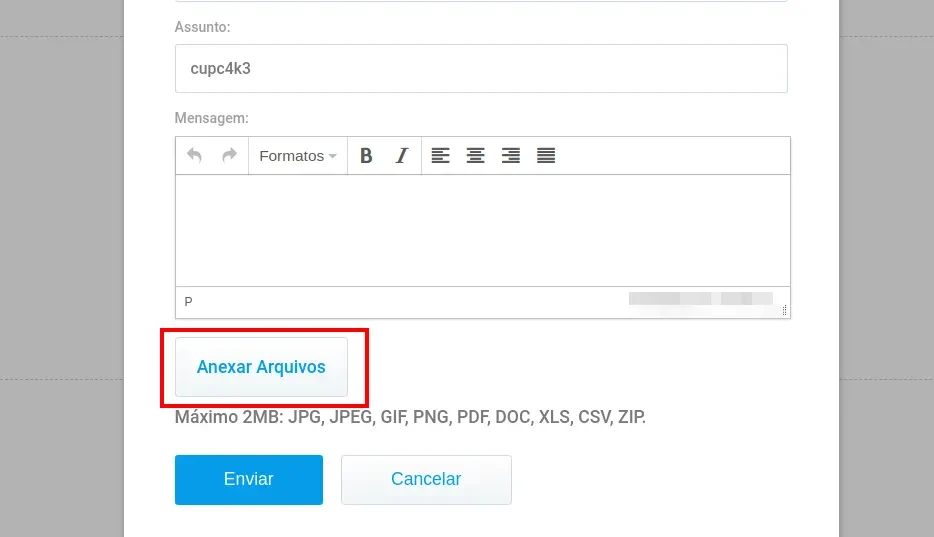
When a file is attached, the application sends it to another instance, and the /download path points to a URL with the attached file encoded in base64. Looking at the application source code, the researcher located the download path and decoded the base64 value, which revealed the domain to which the file was sent.
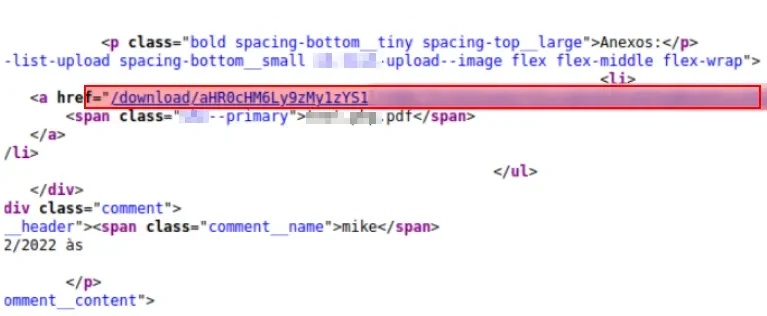
Application source code
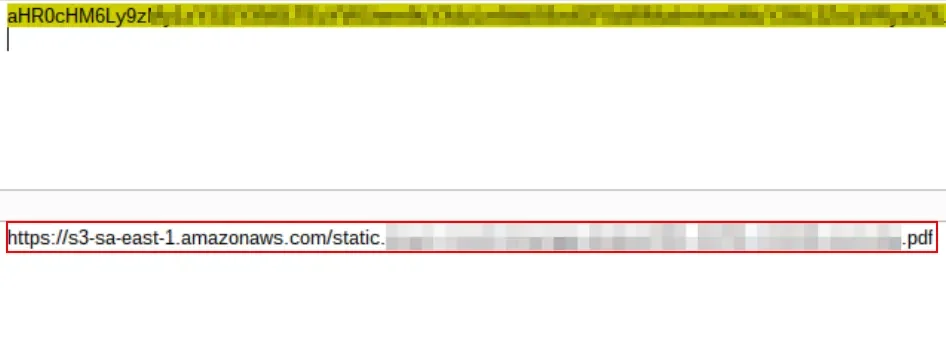
Base64 Decode
The observation that mattered: the download path pointed to a URL encoded in base64, and it was possible to base64 encode another domain and force the server to make the request. If another domain can be base64 encoded in the same place, the server can be forced to make the request instead of the client. That is the SSRF.
Exploitation
Step 1: Reach the EC2 metadata service
Metadata of AWS EC2 instances can be retrieved from the VM by accessing http://[redacted]. That address is a magic IP in the cloud world: AWS, Azure, Google, DigitalOcean and others use it so cloud resources can find out metadata about themselves. Some providers add constraints, for example Google requires the Metadata-Flavor: Google header and refuses requests carrying an X-Forwarded-For header. AWS has no constraints.
Sending a GET request to the following endpoint dumps a list of roles attached to the current EC2 instance:
http://[redacted]/latest/meta-data/iam/security-credentials/
After base64 encoding that URL, the researcher was able to obtain the target's AWS access credentials.
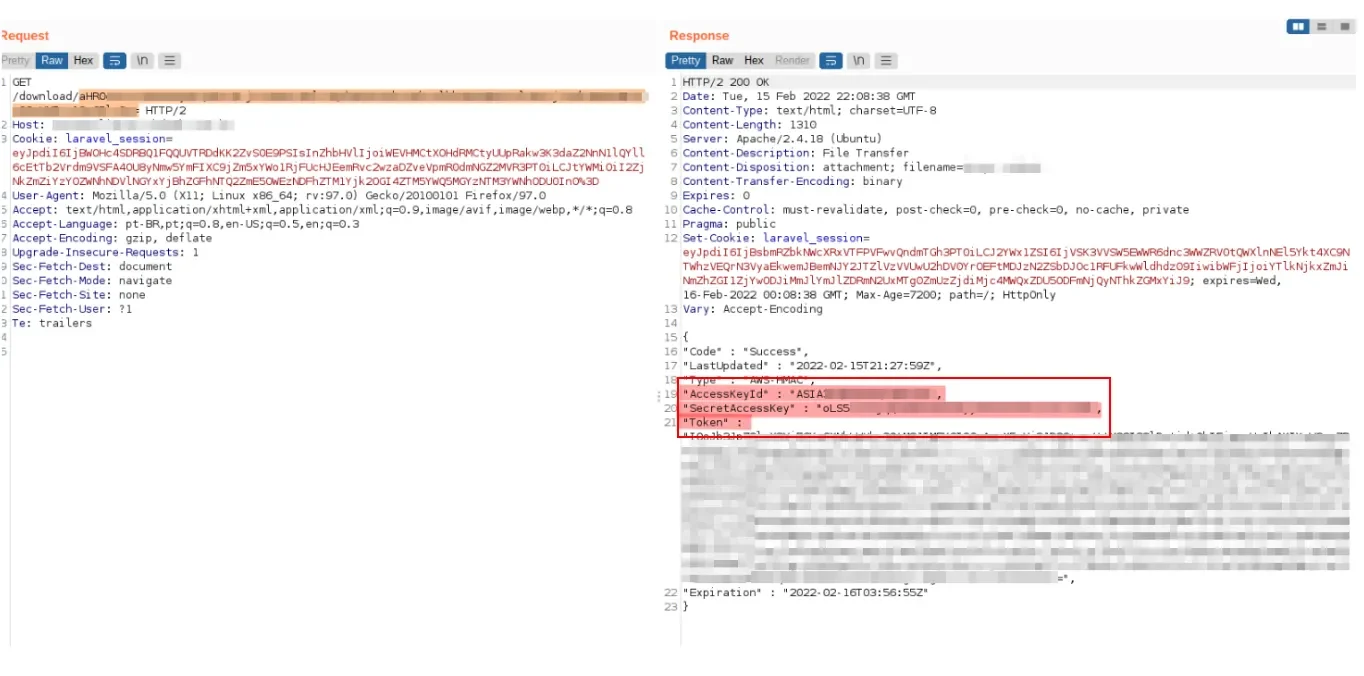
AWS Credentials
Step 2: Use the credentials with Pacu
Pacu can be used with the discovered credentials to find out privileges and try to escalate them. The report describes Pacu as an open-source AWS exploitation framework designed for offensive security testing against cloud environments; its modules enable a range of attacks, including user privilege escalation, backdooring of IAM users, attacking vulnerable Lambda functions, and much more.
Through Pacu it was possible to access the AWS console via browser.
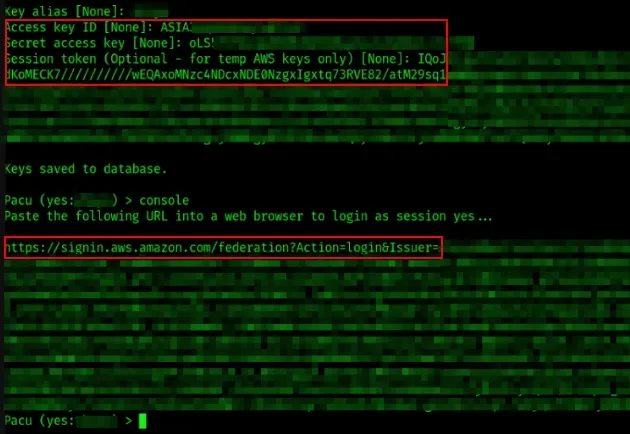
Getting console access via Pacu
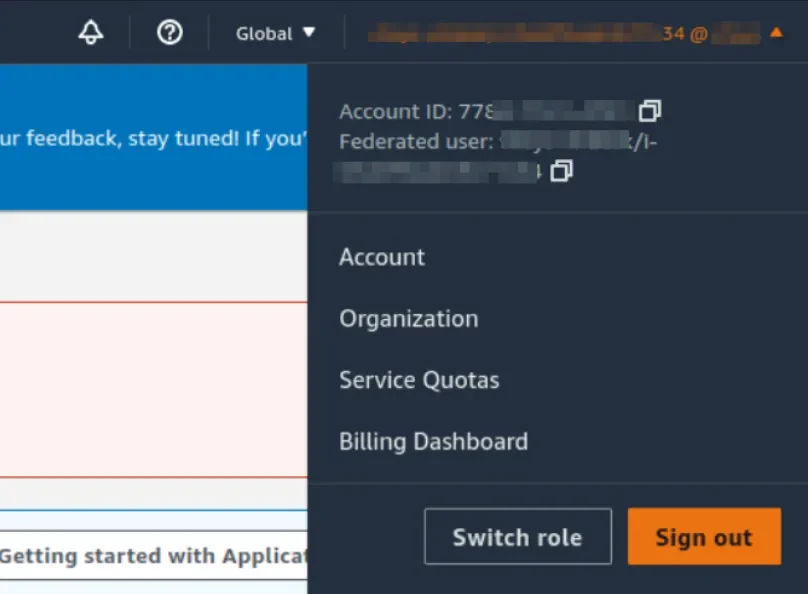
AWS Console Access
The researcher gained access to the AWS console where the target's infrastructure was accessed.
Step 3: Path traversal to read local files
Finally, the researcher exploited a path traversal by encoding /etc/passwd, obtaining system information.
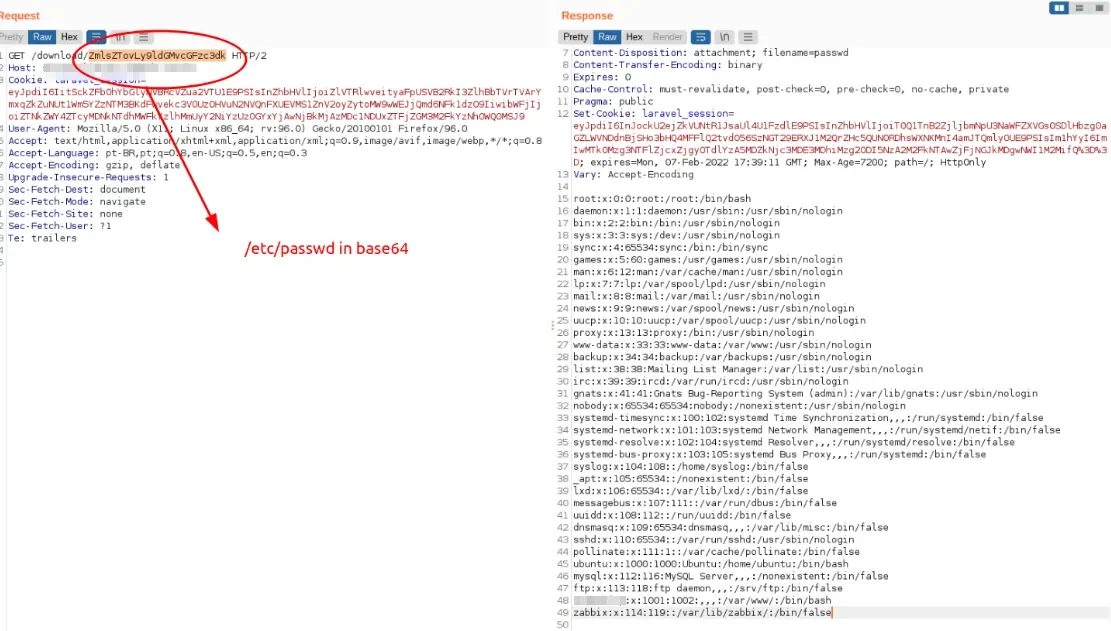
“/etc/passwd” base64 encoded
Extra: pivoting
Beyond compromising the AWS cloud environment, the target can be explored locally through pivoting. Pivoting is a set of techniques used during red team and pentest engagements that use attacker-controlled hosts as logical network hops to amplify network visibility. It is possible to discover and scan new hosts on new networks the victim is connected to.
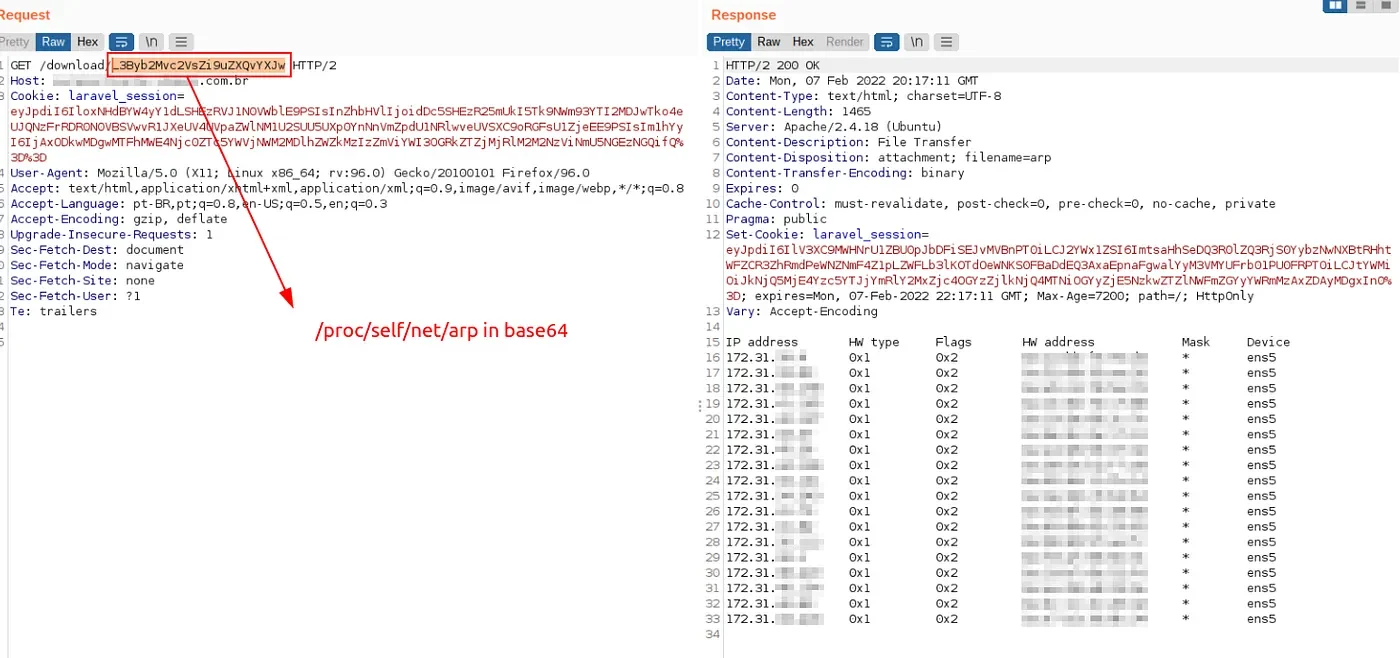
Root cause
The application base64 decodes a value and fetches the resulting URL server-side. SSRF flaws occur whenever a web application fetches a remote resource without validating the user-supplied URL, which lets an attacker coerce the application into sending a crafted request to an unexpected destination, even when a firewall, VPN or other network access control list (ACL) protects the network.
The cloud side of the root cause is the metadata service design. Instance metadata is data about an instance used to configure and manage it, divided into categories such as host name, events and security groups. The metadata service was designed to be accessible only from within the instance, but there is no additional access control preventing unauthorised access from a compromised application running on the EC2 instance itself. Application vulnerabilities such as SSRF and XML External Entity Injection may be exploited to gain access to the metadata service. AWS's lack of request constraints, unlike Google's header requirement, means a plain GET from the vulnerable server is enough.
IMDSv2 addresses part of this: version 2 of the Instance Metadata Service uses session-based authentication. With session-oriented requests you create a session token that defines the session duration, between one second and six hours; during that duration the same token can be used for subsequent requests, and after it expires a new token must be created. The report does not say which metadata version the target used.
Impact
Under the conditions seen here, an attacker who can attach a file to a ticket can make the server fetch a base64-encoded destination of their choosing. Against the EC2 metadata endpoint this yielded the AWS access credentials of the instance role, and with Pacu those credentials gave browser access to the AWS console and therefore to the target's infrastructure. A path traversal also allowed reading /etc/passwd, and pivoting could be used to discover and scan new hosts on networks the victim is connected to. The report does not quantify how many credentials, accounts or hosts were affected.
Fix
Based on the described behaviour, the fix belongs in the download path: the server should not fetch a URL supplied by the client. The destination should be resolved server-side from a stored attachment identifier, and any outbound fetch should be restricted to an allowlist of expected hosts, with redirects and access to link-local addresses such as [redacted] blocked. On the AWS side, IMDSv2 with session tokens raises the bar for this class of attack, and the exposed role's permissions should be limited so that stolen credentials cannot reach the console.
Variants to test
- Other base64-carried URLs. Look for parameters, paths or headers whose value decodes to a URL, as with
/downloadhere. A positive result is the server fetching a host you control that it should never contact. - Direct URL parameters. Try the same destinations in plain URL parameters on upload, import, preview and webhook features. A positive result is a response body or timing difference that reflects the fetched content.
- Cloud metadata endpoints. Request
http://[redacted]/latest/meta-data/iam/security-credentials/through the injection point. A positive result is a role name and, on the role path, credentials in the response. - Provider-specific constraints. On non-AWS targets, repeat with the headers the provider requires, for example
Metadata-Flavor: Google, and check whetherX-Forwarded-Foris refused. A positive result is metadata returned despite the constraint. - Path traversal through the same encoder. Encode
/etc/passwdas in the report. A positive result is file contents in the response. - IMDSv2 behaviour. If the metadata service requires a session token, test whether the application can be made to perform the token PUT followed by the GET. A positive result is metadata returned after a token exchange the attacker did not perform directly.
- Pivoting. Use the SSRF to reach internal addresses and scan for other hosts. A positive result is responses from hosts not reachable from the internet.
What happened, in plain words
A company ran a help desk system: a website where customers or staff open support tickets and can attach files to them. When you attach a file, the application sends it to another instance, and the /download path points to a URL with the attached file encoded in base64. That link contains the address of the second computer, scrambled with a technique called base64 so it looks like a long string of letters and numbers.
The researcher realised that another domain could be base64 encoded and the server forced to make the request. If you scramble a different address and put it in the same place, the website's server obediently goes and fetches that address for you. This is called Server-side request forgery, or SSRF: you make the server send a request on your behalf, to a place you are not allowed to reach yourself.
The researcher pointed the server at a special address that only exists inside cloud computers, [redacted]. In Amazon's cloud (AWS), every virtual machine can ask that address questions about itself, including "what login credentials do I have?". After base64 encoding the metadata URL, the researcher obtained the target's AWS access credentials. With a free tool called Pacu, those credentials were turned into a login to the AWS web console, which is the control panel for the company's cloud infrastructure. Finally, a path traversal was exploited by encoding /etc/passwd, obtaining system information.
The picture above is the opening image of the write-up, introducing the topic: an SSRF vulnerability exploited in a realistic environment.
The vulnerability, explained from zero
A web application is a program that runs on a computer somewhere and answers requests from your browser. When you click a link or submit a form, your browser sends a request to that computer, and the computer sends back a page. Normally the computer only does what its own code tells it to do.
SSRF breaks that assumption. Some features need the server to fetch something from the internet on your behalf: for example, "import this image from a URL" or "download this file and attach it to my ticket". If the server takes the URL from you and fetches it without checking where it points, you can make the server visit places your browser could never reach. The server sits inside the company's network, behind firewalls and VPNs, so it can often reach internal machines that are invisible from the outside.
A useful comparison: imagine a hotel concierge who will fetch anything you ask for from anywhere in the building. You are a guest and cannot enter the staff-only floors. But if you ask the concierge to go to the staff room and read out what is written on the whiteboard, the concierge will happily do it, because the concierge has a key and you do not. The concierge is the vulnerable server; the staff-only floors are the internal network.
The write-up states the definition directly: SSRF flaws occur whenever a web application is fetching a remote resource without validating the user-supplied URL. It allows an attacker to coerce the application to send a crafted request to an unexpected destination, even when protected by a firewall, VPN, or another type of network access control list (ACL).
A firewall is a filter that decides which network traffic is allowed in or out. A VPN is a private tunnel that connects a computer to a company network as if it were physically inside. An ACL, access control list, is a list of rules saying who or what may reach which resource. All three protect a network from outside visitors. None of them protect against a request that comes from a trusted machine inside the network, which is exactly what an SSRF produces.
Finding it: the attachment feature
The researcher started where any user starts: opening a ticket and attaching a file. In the tested system it is possible to insert attachments when opening tickets, so that is where the analysis begins.
The image above shows the attachment step in the ticketing application, the feature that became the entry point.
When a file is attached, the application sends it to another instance, and the /download path points to a URL with the attached file encoded in base64. To understand that sentence, you need two ideas.
An instance, in cloud language, is a virtual computer rented from a provider. The ticketing application runs on one instance; the file storage runs on another. The application talks to the storage instance over the network, just as your browser talks to a website.
Base64 is a way of writing any data using only ordinary letters, digits and a couple of symbols. It is not encryption: anyone can decode it instantly, and it hides nothing. Its purpose is to let binary data, like an image, travel safely inside text, such as inside a URL. A short example: the text hello becomes aGVsbG8= in base64. You can try this in any online base64 tool; decoding reverses it exactly.
So the download link looked something like a normal web address followed by a long scrambled string. That string, once decoded, was the address of the storage instance plus the file name. Analysing the application's source code, the researcher located the download path and decoded the string.
Application source code
The image above shows the relevant part of the application source code, where the download path is built.
Base64 Decode
The image above shows the decoded value: the domain to which the file was sent.
A domain is the human-readable name of a computer on the internet, like example.com. Seeing a domain in the decoded value told the researcher that the server was reading an address out of that scrambled string and then going to fetch it. The critical question followed immediately: what happens if the scrambled string contains a different domain?
The answer was that the server would fetch that different domain too: it was possible to base64 encode another domain and force the server to make the request. If another domain can be base64 encoded in the same place, the server can be forced to make the request instead of the client. That is the SSRF.
The cloud metadata service
Before using the trick, the researcher explains what the target inside the cloud is. Instance metadata is data about your instance that you can use to configure or manage the running instance. Instance metadata is divided into categories, for example, host name, events, and security groups.
In plain words: every cloud virtual machine has a small built-in information desk. You can ask it your own name, your network settings, which permissions you have been given, and more. The information desk is meant only for the machine itself, not for the outside world.
A security group is a set of firewall rules attached to a cloud instance, deciding which network traffic may reach it.
The write-up quotes the access rule: you can access instance metadata from a running instance using one of the following methods. The report then discusses the two versions of that service.
Version 1 and its security concern
The metadata service was designed to be accessible only from within the instance. However, there is no additional access control to prevent unauthorized access from a compromised application running on the EC2 instance itself. Application vulnerabilities such as Server Side Request Forgery, XML External Entity Injection etc. may be exploited to gain access to the metadata service.
EC2 is Amazon's service for renting virtual machines. XML External Entity Injection, usually shortened to XXE, is another class of bug where a program is tricked into reading files or fetching addresses while processing a specially crafted XML document. The point is the same as with SSRF: the vulnerable program is inside the machine, so the information desk answers it without asking questions.
Version 2
The version 2 of the Instance Metadata Service uses session based authentication. IMDSv2 uses session-oriented requests. With session-oriented requests, you create a session token that defines the session duration, which can be a minimum of one second and a maximum of six hours. During the specified duration, you can use the same session token for subsequent requests. After the specified duration expires, you must create a new session token to use for future request.
A token here is a short-lived pass: you ask for one, you get a string of characters, and you show it with every later request until it expires. The comparison is a cloakroom ticket. You hand in your coat, receive a numbered ticket, and can only collect the coat by showing that ticket. Without the ticket, no coat. IMDSv2 works the same way: a plain request without a valid token is refused, which makes a simple SSRF fetch much less useful. The report does not say which metadata version the target used.
Step 1: reaching the metadata service
Metadata of the basic virtual machines from AWS (called EC2) can be retrieved from the VM accessing the url: http://[redacted]
The IP address [redacted] is a magic IP in the cloud world. AWS, Azure, Google, DigitalOcean and others use this to allow cloud resources to find out metadata about themselves. Some, such as Google, have additional constraints on the requests, such as requiring it to use Metadata-Flavor: Google as an HTTP header and refusing requests with an X-Forwarded-For header. AWS has no constraints.
An IP address is the numeric address of a computer on a network, the equivalent of a street address. The range starting with 169.254 is special: it is reserved for machines to talk to themselves or to a directly connected neighbour, and it is never routed across the internet. That is why it is called a magic IP: it always means "this machine's own information desk", no matter which cloud you are in.
An HTTP header is a small labelled line that travels with every web request, carrying extra information such as the browser type or a login token. Metadata-Flavor: Google is a header Google's metadata service demands, so that a random request cannot reach it by accident. X-Forwarded-For is a header that proxies add to record the original client's address; Google refuses requests that carry it, to stop proxied requests from reaching the metadata service. AWS asks for neither, so a plain request from the vulnerable server is enough.
Sending a GET request to the following endpoint dumps a list of roles that are attached to the current EC2 instance:
http://[redacted]/latest/meta-data/iam/security-credentials/
Line by line, in plain words:
http://is the protocol, the language browsers and servers use to exchange pages and data.[redacted]is the magic address of the metadata service, as explained above./latest/meta-data/is the folder of general information about the instance./iam/points to the identity and access management section, the part that describes permissions./security-credentials/lists the roles attached to the instance.
A role, in AWS, is a set of permissions that a machine or a person can temporarily borrow. Instead of storing a permanent username and password on the machine, AWS gives the machine temporary credentials for its role. A GET request is simply a request that asks for something, as opposed to a POST request, which submits something. Typing an address into your browser's address bar sends a GET request.
After base64 encoding that URL, the researcher was able to obtain the target's AWS access credentials.
AWS Credentials
The image above shows the AWS credentials returned by the metadata service: the temporary keys belonging to the instance's role.
Why this step was taken: the researcher did not need to guess anything. The metadata service is documented, the address is fixed, and the only work was to scramble the address with base64 and put it where the application expected a scrambled address. The application then did the fetching from inside the cloud network, where the metadata service is reachable.
Step 2: using the credentials with Pacu
Pacu can be used with the discovered credentials to find out your privileges and try to escalate privileges.
What is Pacu? Pacu is an open-source AWS exploitation framework, designed for offensive security testing against cloud environments. Created and maintained by Rhino Security Labs, Pacu allows penetration testers to exploit configuration flaws within an AWS account, using modules to easily expand its functionality. Current modules enable a range of attacks, including user privilege escalation, backdooring of IAM users, attacking vulnerable Lambda functions, and much more.
A few of those words need unpacking. Open source means the program's code is public and anyone can download and inspect it. A framework is a collection of ready-made tools that share a common interface. A module is one of those tools, focused on a single job. Privilege escalation means gaining more permissions than you were given, for example turning a limited account into an administrator. IAM, identity and access management, is AWS's system for users, roles and permissions. Backdooring an IAM user means adding a hidden way to log in as that user later. Lambda is AWS's service for running small pieces of code on demand without managing a server.
Through the Pacu tool, it was possible to access the AWS console via browser:
Getting console access via Pacu
The image above shows Pacu being used to obtain console access.
Access to the AWS console where we access the infrastructure of our target.
AWS Console Access
The image above shows the AWS console itself, the web control panel where the target's cloud infrastructure is managed.
Why this step was taken: credentials alone are just strings of characters. Pacu turns them into something usable, in this case a browser session in the AWS console, which is the graphical control panel for the whole cloud account. From there the researcher could see and manage the target's infrastructure.
Step 3: reading a local file with path traversal
Finally, we were able to exploit the "Path Traversal" vulnerability by encoding /etc/passwd and thus obtaining system information.
"/etc/passwd" base64 encoded
The image above shows /etc/passwd encoded in base64, the value that was placed in the same download mechanism.
Path traversal is a related bug: a program is given a file name and uses it without checking it, so a name that points outside the intended folder is accepted. On a Linux machine, /etc/passwd is a standard file that lists the user accounts. Despite the name, it does not normally contain passwords; it holds account names and basic settings, which is why the write-up calls the result system information. The path traversal was exploited by encoding /etc/passwd, and system information was obtained.
Why this step was taken: it shows that the flaw was not limited to fetching web addresses. The same unchecked input could be used to reach the server's own disk, which is a separate and serious problem.
Extra: pivoting
Beyond compromising the AWS cloud environment, the target can be explored locally through pivoting. Pivoting is a set of techniques used during red team and pentest engagements which make use of attacker-controlled hosts as logical network hops with the aim of amplifying network visibility. It is possible to discover and scan new hosts on new networks that your alleged victim is connected to.
A red team is a group of security professionals who attack a company on purpose, with permission, to test its defences. A pentest, penetration test, is a similar authorised attack, usually shorter and more focused. A logical network hop is an intermediate machine that traffic passes through. Scanning means probing addresses to see which machines answer and which services they run.
The comparison: if you can make the concierge walk to any floor, you can also ask the concierge to note down which room numbers exist on each floor. You never leave the lobby, but you map the whole building. In the same way, the vulnerable server becomes a starting point for reaching machines that are not visible from the internet.
The image above illustrates the pivoting idea: using the compromised server as a stepping stone to discover other hosts on the victim's networks.
Why it worked: the root cause
The application base64 decodes a value and fetches the resulting URL server-side. SSRF flaws occur whenever a web application fetches a remote resource without validating the user-supplied URL, which lets an attacker coerce the application into sending a crafted request to an unexpected destination, even when a firewall, VPN or other network access control list (ACL) protects the network.
The cloud side of the root cause is the metadata service design. Instance metadata is data about an instance used to configure and manage it, divided into categories such as host name, events and security groups. The metadata service was designed to be accessible only from within the instance, but there is no additional access control preventing unauthorised access from a compromised application running on the EC2 instance itself. Application vulnerabilities such as SSRF and XML External Entity Injection may be exploited to gain access to the metadata service. AWS's lack of request constraints, unlike Google's header requirement, means a plain GET from the vulnerable server is enough.
IMDSv2 addresses part of this: version 2 of the Instance Metadata Service uses session-based authentication. With session-oriented requests you create a session token that defines the session duration, between one second and six hours; during that duration the same token can be used for subsequent requests, and after it expires a new token must be created.
What the impact was
Under the conditions seen here, an attacker who can attach a file to a ticket can make the server fetch a base64-encoded destination of their choosing. Against the EC2 metadata endpoint this yielded the AWS access credentials of the instance role, and with Pacu those credentials gave browser access to the AWS console and therefore to the target's infrastructure. A path traversal also allowed reading /etc/passwd, and pivoting could be used to discover and scan new hosts on networks the victim is connected to. The report does not quantify how many credentials, accounts or hosts were affected.
How it should be fixed
The report does not state what was changed. Based on the described behaviour, the fix belongs in the download path: the server should not fetch a URL supplied by the client. The destination should be resolved server-side from a stored attachment identifier, and any outbound fetch should be restricted to an allowlist of expected hosts, with redirects and access to link-local addresses such as [redacted] blocked. On the AWS side, IMDSv2 with session tokens raises the bar for this class of attack, and the exposed role's permissions should be limited so that stolen credentials cannot reach the console.
An allowlist is the opposite of a blocklist: instead of listing what is forbidden, you list the few destinations that are permitted and refuse everything else. A redirect is a server's instruction to the browser or client to go to a different address; if redirects are followed freely, an allowlisted address can bounce the request to a forbidden one.
Variants to test
If you want to look for the same class of bug yourself, these are the checks the write-up suggests, in plain terms.
- Other base64-carried URLs. Look for parameters, paths or headers whose value decodes to a URL, as with
/downloadhere. A positive result is the server fetching a host you control that it should never contact. - Direct URL parameters. Try the same destinations in plain URL parameters on upload, import, preview and webhook features. A positive result is a response body or timing difference that reflects the fetched content.
- Cloud metadata endpoints. Request
http://[redacted]/latest/meta-data/iam/security-credentials/through the injection point. A positive result is a role name and, on the role path, credentials in the response. - Provider-specific constraints. On non-AWS targets, repeat with the headers the provider requires, for example
Metadata-Flavor: Google, and check whetherX-Forwarded-Foris refused. A positive result is metadata returned despite the constraint. - Path traversal through the same encoder. Encode
/etc/passwdas in the report. A positive result is file contents in the response. - IMDSv2 behaviour. If the metadata service requires a session token, test whether the application can be made to perform the token PUT followed by the GET. A positive result is metadata returned after a token exchange the attacker did not perform directly.
- Pivoting. Use the SSRF to reach internal addresses and scan for other hosts. A positive result is responses from hosts not reachable from the internet.
A webhook is a feature where one service automatically calls another when something happens, for example notifying a chat tool when a ticket is created. A PUT request is a request that sends data to a server to create or replace something; IMDSv2 uses one to obtain the session token.
Glossary
- ACL (access control list): a list of rules saying who or what may reach a given resource.
- Allowlist: a list of the few destinations or actions that are permitted, with everything else refused.
- AWS: Amazon Web Services, Amazon's cloud platform for renting computers, storage and services.
- AWS console: the web control panel used to manage an AWS account.
- Base64: a way of writing any data using ordinary characters, used to carry binary data inside text such as URLs; it is not encryption.
- Credentials: the keys or tokens that prove an identity and grant access.
- Domain: the human-readable name of a computer on the internet, such as
example.com. - EC2: Amazon's service for renting virtual machines.
- Firewall: a filter that decides which network traffic is allowed in or out.
- Framework: a collection of ready-made tools sharing a common interface.
- GET request: a request that asks a server for something, as opposed to submitting data.
- Header (HTTP header): a small labelled line sent with a web request or response, carrying extra information.
- IAM: identity and access management, AWS's system for users, roles and permissions.
- IMDSv1 / IMDSv2: version 1 and version 2 of the AWS instance metadata service; version 2 requires a session token.
- Instance: a virtual computer rented from a cloud provider.
- Instance metadata: information a cloud instance can ask about itself, such as host name, events and security groups.
- IP address: the numeric address of a computer on a network.
- Lambda: AWS's service for running small pieces of code on demand without managing a server.
- Link-local address: an address in the 169.254 range, reachable only from the local machine or a directly connected neighbour.
- Metadata service: the built-in information desk of a cloud instance, reachable at
[redacted]on AWS. - Module: one focused tool inside a framework.
- Open source: software whose code is public and can be downloaded and inspected.
- Pacu: an open-source AWS exploitation framework created and maintained by Rhino Security Labs.
- Path traversal: a bug where a file name supplied by a user is used without checking, allowing files outside the intended folder to be read.
- Pentest (penetration test): an authorised, focused attack on a system to test its defences.
- Pivoting: using a compromised machine as a stepping stone to reach and scan other machines on its networks.
- Privilege escalation: gaining more permissions than were originally granted.
- PUT request: a request that sends data to a server to create or replace something.
- Red team: security professionals who attack a company on purpose, with permission, to test its defences.
- Redirect: a server's instruction to a client to go to a different address.
- Role: in AWS, a set of permissions that a machine or person can temporarily borrow.
- Security group: a set of firewall rules attached to a cloud instance.
- Session token: a short-lived pass that must be shown with later requests until it expires.
- SSRF (Server-side request forgery): a bug where a server fetches a user-supplied address without validating it, letting an attacker make the server send requests to unexpected destinations.
- Token: a string of characters used as proof of identity or permission, often short-lived.
- VPN: a private tunnel that connects a computer to a company network as if it were physically inside.
- Webhook: a feature where one service automatically calls another when an event happens.
- XXE (XML External Entity Injection): a bug where a program processing XML is tricked into reading files or fetching addresses.




