CORS Finding | I Almost Skipped This Target Until I Did This…
One backend instance behind a Cloudflare load balancer reflected any Origin header and allowed credentials, while other instances did not. An attacker could loop requests until routed to the misconfigured instance, then read an authenticated victim's cross-origin responses.
 Published on medium.com
Cors
The full write-up lives on its author's site
It belongs to its author, so we link to it rather than copy it. The other two tabs are our own rewrites, checked against it.
Context
This write-up covers a Cross-Origin Resource Sharing (CORS) misconfiguration found during a penetration test. The application sat behind a Cloudflare Load Balancer that distributed incoming traffic across several backend instances. The report does not name the target, the product or the affected endpoint, and it does not describe what the endpoint normally does beyond returning CORS headers. What matters is the behaviour of those headers: on some responses the endpoint reflected an arbitrary Origin value and allowed credentials, and on others it did not.
The author frames the finding as an example of why a single HTTP response should not be treated as the absolute truth when testing modern web architectures.
Setup
The tooling was a CORS scanner written by the author, CORS-X, used during reconnaissance, and Burp Suite for manual verification through Repeater. No versions, accounts or roles are given. The only precondition that matters is that the target was load balanced across multiple backends with differing configurations.
Finding it
During reconnaissance the CORS scanner flagged an endpoint as vulnerable. According to the tool, the endpoint was reflecting arbitrary origins and allowing credentials.
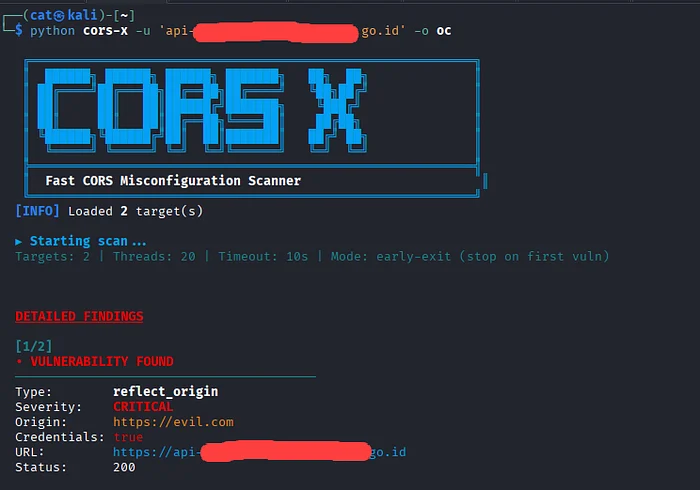
The screenshot shows the vulnerability as identified by the tool.
To verify manually, the author intercepted the request, added the header below, and sent it to Repeater:
Origin: https://evil.com
The first response came back completely normal: no Access-Control-Allow-Origin (ACAO) reflecting the payload, or ACAO: * without Access-Control-Allow-Credentials: true.
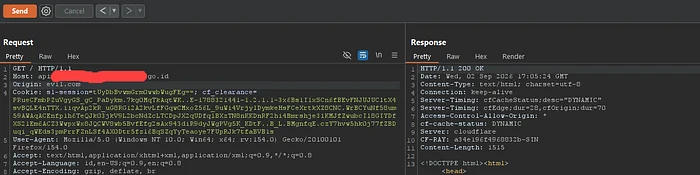
The screenshot shows that first response.
At this point the finding looked like a false positive. The author trusted the scanner, knowing how it works under the hood and that it rarely produces false positives, so instead of moving on the Send button in Repeater was pressed repeatedly:
- Request 1: safe.
- Request 2: safe.
- Request 3: safe.
- Request 4: safe.
- Request 5: vulnerable.
On that fifth request the response headers changed completely.
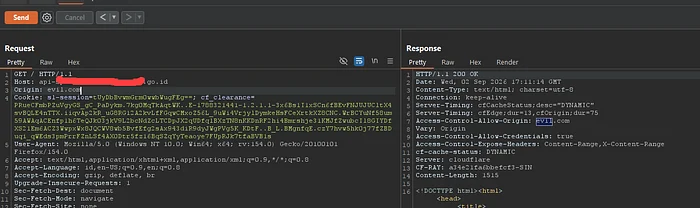
The screenshot shows the response after sending the request multiple times.
Exploitation
Step 1: send the request with a foreign Origin
The request carries the attacker-controlled origin:
Origin: https://evil.com
On a correctly configured backend this produces either no ACAO header reflecting the value, or ACAO: * without credentials, which the browser will not expose to a credentialed cross-origin read.
Step 2: repeat the identical request
The same request is sent repeatedly from Repeater. The first four responses are safe. The fifth returns headers that reflect the supplied origin and allow credentials, which is the vulnerable combination. The report does not reproduce the exact response headers, only states that they changed completely and that the misconfigured instance returned ACAO: https://evil.com together with ACAC: true.
Step 3: exploit from a malicious page
With a backend that reflects the Origin and sets ACAC: true, an attacker can host a malicious HTML page containing a JavaScript payload. When an authenticated victim visits it, the script sends cross-origin requests to the vulnerable endpoint. Because routing is dynamic, the script has to send the request in a loop until it lands on the misconfigured instance. Once it does, the browser allows the attacker to read the victim's sensitive data from the response.
Root cause
The application was behind a Cloudflare Load Balancer that routed traffic to multiple backend instances, and those instances did not have synchronised configurations. The author illustrates this with two guards at a building entrance: Guard A follows procedure and rejects unauthorised access, while Guard B works from outdated instructions, perhaps a leftover staging configuration, and waves anyone through. A single failed request only means the load balancer picked Guard A; repeated requests eventually reach Guard B.
The architecture diagram in the report shows the two configurations side by side:
Request: Origin: https://evil.com ↓Load Balancer (Cloudflare) picks a random backend instance ↓┌─────────────────────────────────────────────────────────────┐│ ││ Instance A (Production) Instance B (Staging/Old) ││ ┌───────────────────┐ ┌───────────────────┐ ││ │ CORS Config: │ │ CORS Config: │ ││ │ origin: '*' │ │ origin: true │ ││ │ (Wildcard, no │ │ (Reflects input, │ ││ │ credentials) │ │ credentials ON) │ ││ └───────────────────┘ └───────────────────┘ ││ ↓ ↓ ││ ACAO: * ACAO: https://evil.com ││ (Browser blocks) ACAC: true ││ (Browser ALLOWS) ← VULN ││ │└─────────────────────────────────────────────────────────────┘
Instance A uses a wildcard origin with no credentials, which the browser blocks for credentialed reads. Instance B reflects whatever arrives in the Origin header and sets ACAC: true, which lets any attacker routed to that instance bypass the Same-Origin Policy (SOP). The report does not say how the staging configuration ended up in the load-balanced pool.
Impact
An attacker who can get a victim to load a malicious page can read sensitive data from the vulnerable endpoint on behalf of that authenticated victim, provided the request is routed to the misconfigured instance. The loop-until-hit approach makes that condition reachable in practice. The report does not quantify the data exposed, name the affected users, or state a severity or bounty.
Fix
Based on the root cause, the obvious measure is to bring every instance in the load-balanced pool onto the same CORS configuration, so that no backend reflects arbitrary origins with credentials enabled, and to remove leftover staging configurations from production routing.
Variants to test
- Repeat a single CORS probe many times against any load-balanced target. A positive result is a response that suddenly reflects your
Originand setsAccess-Control-Allow-Credentials: trueafter earlier responses did not. - Compare responses across repeated requests for other headers that depend on per-instance configuration, such as security headers or cache directives. A positive result is any header that changes between identical requests.
- Test endpoints behind CDNs and load balancers with several backends, including staging or older instances that may still be in the pool. A positive result is a backend whose behaviour differs from the production baseline.
- When a scanner reports a CORS issue that a single manual request cannot reproduce, keep sending the request before dismissing it. A positive result is the vulnerable header combination appearing on any later attempt.
What happened, in plain words
A security researcher was testing a website for a common misconfiguration called CORS. CORS is a set of rules that browsers use to decide whether a web page from one site is allowed to read data from another site. When those rules are too loose, a malicious page can read private data from a site where you are logged in.
The researcher used a tool that scans for this problem. The tool said the site was vulnerable. But when the researcher checked by hand, the first few responses looked safe. Most people would have moved on and called it a false alarm. Instead, the researcher kept sending the same request over and over. On the fifth try, the response changed and showed the vulnerability was real.
The reason was that the site was behind a load balancer: a system that spreads incoming requests across several copies of the same application. Some copies had the correct security settings, and at least one copy had old, unsafe settings. A single request might hit a safe copy. Repeated requests eventually hit the unsafe one.
This write-up explains that story step by step, for someone who has never done security testing before.
Background: what you need to know first
Before walking through the steps, here are the ideas the story depends on. Each one is explained from zero.
What a web request and a response are
When you type an address into your browser, the browser sends a request to a server. The server sends back a response. A request has a method (like GET, which means "give me this page"), a URL, and headers. Headers are extra lines of information, like labels on a parcel. A response also has headers, plus the content (the page, the data, and so on).
What an API is
An API is a way for one piece of software to talk to another. Think of a restaurant: the menu is the API. You do not walk into the kitchen; you tell the waiter what you want, and the kitchen sends back a dish. On the web, an API is often a URL that returns data (often in a format called JSON) rather than a full web page. Websites use APIs to load your profile, your messages, your settings, and so on.
What a cookie or token is
When you log in to a website, the server gives your browser a small piece of data called a cookie (or sometimes a token). Your browser sends it back with every request to that site. It is like a wristband at an event: it proves you already checked in, so you do not have to show your ID at every door. Because the cookie proves who you are, any page that can make your browser send it and then read the answer can act as you.
What the Same-Origin Policy (SOP) is
The Same-Origin Policy is a rule built into browsers. An "origin" is the combination of protocol, host and port, for example https://example.com. The policy says: a page from one origin cannot read the response of a request to a different origin. This stops a malicious site from silently reading your bank data while you are logged in. Without it, any website you visit could fetch data from any other website using your cookies.
What CORS is
CORS (Cross-Origin Resource Sharing) is the controlled way to relax the Same-Origin Policy. A server can send special response headers that tell the browser: "It is fine for this other origin to read my response." The two headers that matter here are:
Access-Control-Allow-Origin(often shortened to ACAO): which origin is allowed to read the response. It can be a specific origin, or*meaning anyone.Access-Control-Allow-Credentials(often shortened to ACAC): whether the browser may include cookies (credentials) in the cross-origin request and let the page read the response.
The dangerous combination is when the server reflects whatever origin the request asks for (so any site is allowed) and also allows credentials. Then any malicious page can read private data from the site on behalf of a logged-in user.
What a load balancer is
A load balancer is a traffic director. When many requests arrive, it spreads them across several copies of the application, called backend instances, so no single copy is overwhelmed. Think of a supermarket with several checkout tills: a queue manager sends each customer to whichever till is free. If one till has a broken card reader, most customers pay fine, but some are sent to the broken one. In the same way, if one backend instance has different settings from the others, some requests get the safe behaviour and some get the unsafe behaviour.
What Burp Suite and Repeater are
Burp Suite is a tool used by security testers to look at and change web traffic. Repeater is one part of it: you give it a request, and it sends that request and shows you the response. You can press Send again and again to see whether the response changes. It is like a photocopier that also lets you tweak the paper before copying.
What a CORS scanner is
A CORS scanner is a program that automatically sends requests with different Origin headers and checks the responses for unsafe CORS settings. The researcher in this story wrote one called CORS-X. The scanner is the smoke detector; Burp Repeater is where you go to confirm there is actually a fire.
The discovery: trusting the tool
During reconnaissance (the early phase of testing, where you map out what a target has), the researcher's CORS scanner flagged an endpoint as vulnerable. An endpoint is a specific URL that an application responds to. According to the tool, the endpoint was reflecting arbitrary origins and allowing credentials: in other words, it was echoing back whatever Origin the request contained and saying that cookies were allowed.
The screenshot shows the vulnerability as identified by the tool.
A cautious tester does not take a scanner's word for it. Scanners can be wrong in both directions: they can miss real problems, and they can report problems that are not there (false positives). So the next step was to check by hand.
The researcher opened Burp Suite, intercepted the request (paused it before it went to the server so it could be edited), added the header below, and sent it to Repeater:
Origin: https://evil.com
This header tells the server: "Pretend this request comes from https://evil.com." The domain evil.com is a stand-in for any attacker-controlled site. If the server answers by allowing https://evil.com to read the response with credentials, then a real attacker's page could do the same.
The first response came back completely normal. There was no Access-Control-Allow-Origin header reflecting the payload, or there was ACAO: * without Access-Control-Allow-Credentials: true. In plain terms: either the server did not say "evil.com is allowed", or it said "anyone is allowed" but also said "but not with cookies". Both of those are safe, because the browser will not let a malicious page read private data.
The screenshot shows that first response.
At this point the finding looked like a false positive. A reasonable person would close the tab and move on. But the researcher knew how the scanner works internally and knew it rarely produces false positives. So instead of moving on, the Send button in Repeater was pressed repeatedly:
- Request 1: safe.
- Request 2: safe.
- Request 3: safe.
- Request 4: safe.
- Request 5: vulnerable.
On that fifth request the response headers changed completely.
The screenshot shows the response after sending the request multiple times.
Why keep pressing Send? Because the researcher trusted the scanner and knew it rarely produces false positives. If only some of them were misconfigured, a single request could easily land on a safe one. Repeating the identical request is a way to sample different backends.
Exploitation
Step 1: send the request with a foreign Origin
The request carries the attacker-controlled origin:
Origin: https://evil.com
Line by line: Origin is the header name. https://evil.com is the value. The browser normally sets this header automatically to the page's own origin; here the tester sets it by hand to simulate a request coming from an attacker's site. On a correctly configured backend this produces either no ACAO header reflecting the value, or ACAO: * without credentials. In both cases the browser will not expose the response to a credentialed cross-origin read, so the attack fails.
Step 2: repeat the identical request
The same request is sent repeatedly from Repeater. The first four responses are safe. The fifth returns headers that reflect the supplied origin and allow credentials, which is the vulnerable combination. The report does not reproduce the exact response headers, only states that they changed completely and that the misconfigured instance returned ACAO: https://evil.com together with ACAC: true.
In plain words: on the fifth try, the server said "yes, https://evil.com may read this response, and yes, cookies are allowed". That is the unsafe combination. The likely reason it appeared only on the fifth try is that the load balancer routed the earlier requests to safe backends and this one to an unsafe backend.
Step 3: exploit from a malicious page
With a backend that reflects the Origin and sets ACAC: true, an attacker can host a malicious HTML page containing a JavaScript payload. When an authenticated victim visits it, the script sends cross-origin requests to the vulnerable endpoint. Because routing is dynamic, the script has to send the request in a loop until it lands on the misconfigured instance. Once it does, the browser allows the attacker to read the victim's sensitive data from the response.
Why does the loop matter? Because the attacker cannot control which backend the load balancer picks. By sending many requests, the attacker's script increases the chance of hitting the unsafe one. It is like trying a door repeatedly in a building where most doors are locked but one is not: eventually you find the open one.
Root cause
The application was behind a Cloudflare Load Balancer that routed traffic to multiple backend instances, and those instances did not have synchronised configurations. The author illustrates this with two guards at a building entrance: Guard A follows procedure and rejects unauthorised access, while Guard B works from outdated instructions, perhaps a leftover staging configuration, and waves anyone through. A single failed request only means the load balancer picked Guard A; repeated requests eventually reach Guard B.
A staging configuration is a setup used while building and testing a site before it goes live. It often has security turned off for convenience. If such a configuration ends up in the live pool, it becomes a hole.
The architecture diagram in the report shows the two configurations side by side:
Request: Origin: https://evil.com ↓Load Balancer (Cloudflare) picks a random backend instance ↓┌─────────────────────────────────────────────────────────────┐│ ││ Instance A (Production) Instance B (Staging/Old) ││ ┌───────────────────┐ ┌───────────────────┐ ││ │ CORS Config: │ │ CORS Config: │ ││ │ origin: '*' │ │ origin: true │ ││ │ (Wildcard, no │ │ (Reflects input, │ ││ │ credentials) │ │ credentials ON) │ ││ └───────────────────┘ └───────────────────┘ ││ ↓ ↓ ││ ACAO: * ACAO: https://evil.com ││ (Browser blocks) ACAC: true ││ (Browser ALLOWS) ← VULN ││ │└─────────────────────────────────────────────────────────────┘
Reading the diagram from the top: a request arrives with Origin: https://evil.com. The load balancer picks a random backend instance. Instance A is the production configuration: it uses a wildcard origin (*) with no credentials, which the browser blocks for credentialed reads. Instance B is a staging or old configuration: it reflects whatever arrives in the Origin header and sets ACAC: true, which lets any attacker routed to that instance bypass the Same-Origin Policy (SOP). The report does not say how the staging configuration ended up in the load-balanced pool.
Impact
An attacker who can get a victim to load a malicious page can read sensitive data from the vulnerable endpoint on behalf of that authenticated victim, provided the request is routed to the misconfigured instance. The loop-until-hit approach makes that condition reachable in practice. The report does not quantify the data exposed, name the affected users, or state a severity or bounty.
In everyday terms: if you are logged in to the site and you visit the attacker's page, the attacker's script can keep asking the site for your data until it gets a backend that says yes, and then it can read the answer. The victim does not see anything unusual.
Fix
The report does not describe a fix or a remediation that was applied. Based on the root cause, the obvious measure is to bring every instance in the load-balanced pool onto the same CORS configuration, so that no backend reflects arbitrary origins with credentials enabled, and to remove leftover staging configurations from production routing.
Variants to test
- Repeat a single CORS probe many times against any load-balanced target. A positive result is a response that suddenly reflects your
Originand setsAccess-Control-Allow-Credentials: trueafter earlier responses did not. - Compare responses across repeated requests for other headers that depend on per-instance configuration, such as security headers or cache directives. A positive result is any header that changes between identical requests.
- Test endpoints behind CDNs and load balancers with several backends, including staging or older instances that may still be in the pool. A positive result is a backend whose behaviour differs from the production baseline.
- When a scanner reports a CORS issue that a single manual request cannot reproduce, keep sending the request before dismissing it. A positive result is the vulnerable header combination appearing on any later attempt.
Glossary
- API: a way for one piece of software to talk to another, often a URL that returns data rather than a web page.
- Backend instance: one copy of an application running on a server; a load balancer spreads requests across several of them.
- Burp Suite: a tool for inspecting and modifying web traffic during security testing.
- Burp Repeater: the part of Burp Suite that lets you send the same request repeatedly and see each response.
- CORS (Cross-Origin Resource Sharing): a set of response headers that let a browser relax the Same-Origin Policy in a controlled way.
- CORS-X: a CORS scanner written by the author of the report.
- Cookie: a small piece of data a site stores in your browser after you log in, sent back with each request to prove who you are.
- Credentials: in CORS, cookies and similar data that identify the user;
Access-Control-Allow-Credentials: truemeans the browser may include them in a cross-origin request and let the page read the response. - Cross-origin request: a request from a page on one origin to a different origin.
- Endpoint: a specific URL that an application responds to.
- False positive: a scanner report of a problem that is not actually there.
- Header: an extra line of information in a request or response, such as
OriginorAccess-Control-Allow-Origin. - JSON: a text format for structured data, commonly returned by APIs.
- Load balancer: a system that spreads incoming requests across several backend instances.
- Origin: the combination of protocol, host and port, for example
https://example.com. - Reconnaissance: the early phase of testing, where you map out what a target has.
- Same-Origin Policy (SOP): a browser rule that stops a page from one origin reading responses from another origin.
- Staging configuration: a setup used while building and testing a site before it goes live, often with security relaxed.
- Token: a piece of data, similar to a cookie, that proves identity or grants access.
- Vulnerable: having a weakness that an attacker can use.



