# CORS Misconfiguration on an OTP Endpoint
An OTP endpoint reflected arbitrary origins in its CORS headers and allowed credentials, so a page on another site could read parts of the response. The exposed data was limited to phone number, country code and some CAPTCHA parameters; no account takeover was shown.
 Published on medium.com
Bug Bounty
The full write-up lives on its author's site
It belongs to its author, so we link to it rather than copy it. The other two tabs are our own rewrites, checked against it.
Context
This write-up covers a CORS misconfiguration found on an OTP (one-time password) endpoint. OTP endpoints are the part of an authentication flow that issues or verifies the short codes sent to a user, and they typically handle data tied to a phone number, such as the number itself, its country code, and parameters used to drive a CAPTCHA challenge.
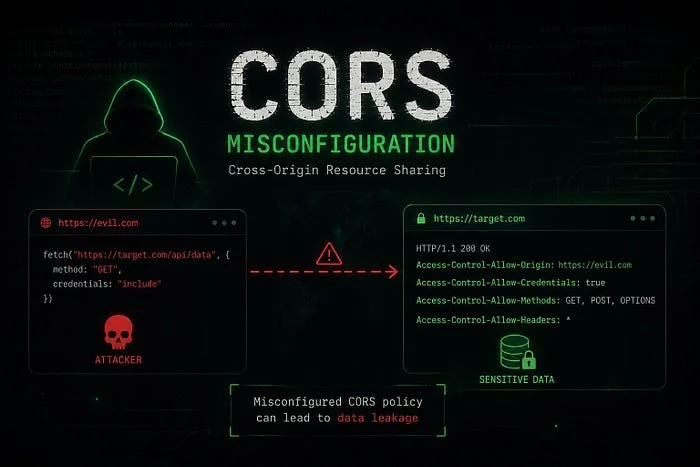
While testing such an endpoint, the researcher found that the server reflected an arbitrary external origin in its CORS response headers. The response included Access-Control-Allow-Origin and Access-Control-Allow-Credentials set to true, which together let a page on an attacker-controlled origin make credentialed cross-origin requests and read parts of the response.
Setup
The report does not describe the target application, the accounts used, the tooling, or any version numbers. What it does state is the approach: the researcher wrote a small JavaScript proof of concept to check whether a cross-origin request could read the response, and ran it against the OTP endpoint. No specific browser, proxy or script is named.
Finding it
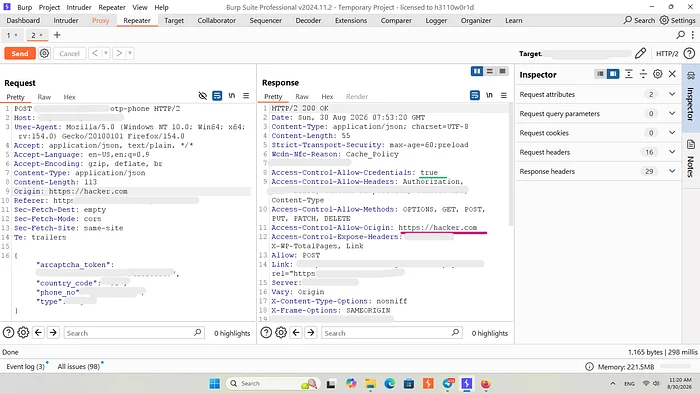
The starting point was the OTP endpoint itself. The server reflected an external origin in Access-Control-Allow-Origin and also returned Access-Control-Allow-Credentials: true. That combination is the signal that matters: reflecting an arbitrary origin means any site can be named as allowed, and allowing credentials means the browser will attach the victim's cookies to the request and expose the response body to the calling script.
Exploitation
Step 1: Confirm cross-origin readability
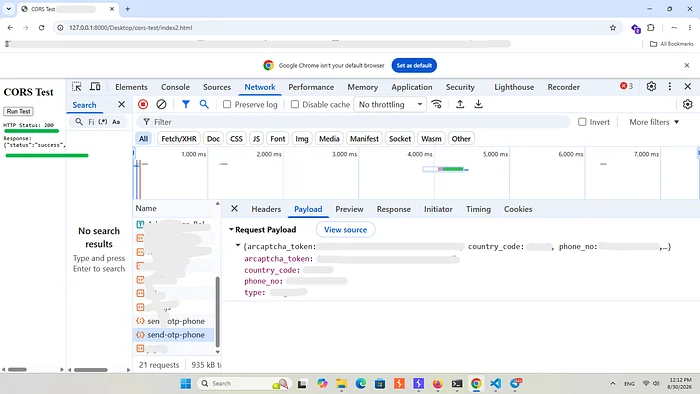
The researcher wrote a simple JavaScript proof of concept to verify cross-origin access. Running it confirmed that parts of the response were readable from an external origin. The report does not include the script itself, the request, or the raw response headers, so the exact origin used and the full header set are not shown.
Step 2: Inspect what was exposed
The readable portion of the response contained the phone number, the country code, and some CAPTCHA-related parameters. These are the fields the researcher was able to pull across the origin boundary.
Step 3: Establish the limit
The researcher could not access highly sensitive account information and could not demonstrate account takeover. The exposure stopped at the fields listed above.
Root cause
The server reflects whatever origin the request carries into Access-Control-Allow-Origin instead of checking it against a list of trusted origins, and it pairs that with Access-Control-Allow-Credentials: true. Because the reflected origin is accepted as valid, the browser's same-origin policy offers no protection: the response is handed to the calling script along with any credentials the browser sends.
Impact
The result was limited information disclosure. The exposed information included the phone number, country code and some CAPTCHA-related parameters. The researcher rates severity as low to medium, depending on how sensitive the data returned by the affected endpoint is, and separately lists the severity as Medium. No account takeover was achieved, and highly sensitive account information was not reachable.
Fix
The recommendation is to allow only trusted origins, avoid reflecting arbitrary origins, enable credentials only when they are actually required, and review the CORS configuration on other authentication-related endpoints. The report does not say whether any of this was applied.
Variants to test
- A positive result is your origin echoed back rather than a fixed trusted value or no CORS header at all.
- A positive result is the body being readable, not just the headers being returned.
- A positive result is any origin you control being treated as trusted.
- Apply the same checks to other authentication-related endpoints, since the recommendation calls for reviewing them. A positive result is the same reflection and credential combination on any of those paths.
What happened, in plain words
A security researcher was testing a website's login flow, specifically the part that sends and checks one-time passwords (OTPs). An OTP is the short code, usually a few digits, that a site texts or emails to you so it can be sure it is really you logging in. While testing that part of the site, the researcher found a configuration mistake in how the site's server handles requests coming from other websites. That mistake let a page on a different website read some of the information the OTP endpoint sent back. The information that leaked was limited: a phone number, its country code, and some parameters connected to a CAPTCHA challenge. The researcher could not reach highly sensitive account information and could not take over an account. The severity was rated low to medium, and separately listed as Medium.
The image above is the header of the article as it appears on Medium, with the title "CORS Misconfiguration on an OTP Endpoint" and the author's name.
The ideas you need first
Before the details make sense, here are a few everyday ideas.
A server and a browser. When you visit a website, your browser asks a computer somewhere else (the server) for pages and data. The server answers. Most of the time this is invisible to you.
An API. Think of an API as a service counter. Your browser does not walk into the kitchen; it asks at the counter for a specific thing, and the counter hands back exactly that thing. A website's login page uses APIs behind the scenes: one to send you an OTP, one to check the OTP you typed, and so on.
An OTP endpoint. An endpoint is one specific address at that counter, dedicated to one job. The OTP endpoint is the part of the login flow that issues or verifies the short codes sent to a user. Because it deals with phone numbers, it naturally handles data tied to a phone number: the number itself, its country code, and parameters used to drive a CAPTCHA challenge. A CAPTCHA is the little puzzle ("tick the traffic lights") meant to prove a human is present.
A cookie or token. When you log in, the server gives your browser a small piece of data, a cookie or token, that acts like a wristband at an event. On every later request your browser shows the wristband so the server knows who you are without asking for your password again. These are called credentials.
The same-origin policy. Browsers have a built-in safety rule: a page loaded from one website is not allowed to read data from a different website. "Origin" means the combination of protocol, host and port, roughly "which site this page came from". Without this rule, any page you open could quietly read your bank's data while you are logged in there. The rule is the reason a random page cannot simply fetch your email inbox.
CORS. Sometimes a site genuinely wants to let another origin read its data, for example a shop's main site calling its own API on a different subdomain. CORS (Cross-Origin Resource Sharing) is the mechanism that lets the server say "yes, this other origin is allowed". The server does this with response headers, which are small labelled lines of information sent alongside the actual data. The two headers that matter here are:
Access-Control-Allow-Origin: which origin is allowed to read the response.Access-Control-Allow-Credentials: whether the browser may attach the user's credentials (cookies, tokens) to the cross-origin request and let the calling script read the response.
The vulnerability class. A CORS misconfiguration means the server's answer to "who is allowed?" is wrong. In the dangerous version, the server simply repeats back whatever origin asked, instead of checking it against a list of trusted origins. Combined with allowing credentials, that means any website can be named as allowed, and the browser will attach the victim's cookies and hand the response to that website's script. The browser's safety rule is effectively switched off for that endpoint.
Setup
The report does not describe the target application, the accounts used, the tooling, or any version numbers. What it does state is the approach: the researcher wrote a small JavaScript proof of concept to check whether a cross-origin request could read the response, and ran it against the OTP endpoint. No specific browser, proxy or script is named.
A proof of concept (POC) is a small, deliberately minimal piece of code whose only job is to show that a suspected problem is real. It is not a finished attack tool; it is evidence.
Finding it
The starting point was the OTP endpoint itself. The server reflected an external origin in the Access-Control-Allow-Origin header and also returned Access-Control-Allow-Credentials: true.
Why does that matter? Two things had to be true at once:
- Reflecting an arbitrary origin. If the server echoes back whatever origin asked, then any site can be named as allowed. There is no allow-list, no check, no "are you one of ours?".
- Allowing credentials. If the server also says credentials are allowed, the browser will attach the victim's cookies to the request and expose the response body to the calling script.
Either one alone is much less serious. Together, they mean a page on an attacker-controlled origin can make credentialed cross-origin requests and read parts of the response. That combination is the signal that matters.
Exploitation
Step 1: Confirm cross-origin readability
The researcher wrote a simple JavaScript proof of concept to verify cross-origin access. Running it confirmed that parts of the response were readable from an external origin.
The reason for this step is simple: seeing the headers is a hint, but the real question is whether a script on another site can actually read the data. Headers can be present and still not lead to readable data, depending on how the browser and the server behave. So the researcher checked the end result, not just the symptoms.
The report does not include the script itself, the request, or the raw response headers, so the exact origin used and the full header set are not shown.
Step 2: Inspect what was exposed
The readable portion of the response contained the phone number, the country code, and some CAPTCHA-related parameters. These are the fields the researcher was able to pull across the origin boundary.
In plain terms: a page on another site could read back those specific fields from the OTP endpoint's response. The researcher then looked at exactly which fields came through, because the impact depends entirely on what is in them.
The image above sits next to the description of the exposed information: phone number, country code, and CAPTCHA-related parameters.
Step 3: Establish the limit
The researcher could not access highly sensitive account information and could not demonstrate account takeover. The exposure stopped at the fields listed above.
This step matters because it keeps the finding honest. Account takeover means an attacker gains control of someone else's account, for example by resetting the password or stealing a session. That did not happen here. The researcher drew a clear line around what was and was not reachable, and reported only what was proven.
Root cause
The server reflects whatever origin the request carries into Access-Control-Allow-Origin instead of checking it against a list of trusted origins, and it pairs that with Access-Control-Allow-Credentials: true.
In everyday terms: someone set the counter to answer everyone who asks, rather than checking membership first, and also allowed the answer to include personal details.
Because the reflected origin is accepted as valid, the browser's same-origin policy offers no protection: the response is handed to the calling script along with any credentials the browser sends. The safety rule is not broken by the attacker; the server has told the browser, in effect, that this other site is fine.
Impact
The result was limited information disclosure. The exposed information included the phone number, country code and some CAPTCHA-related parameters.
So the attacker needs the victim to visit a page the attacker controls while logged in to the target site.
The researcher rates severity as low to medium, depending on how sensitive the data returned by the affected endpoint is, and separately lists the severity as Medium. No account takeover was achieved, and highly sensitive account information was not reachable.
The image above appears alongside the impact and severity discussion.
Fix
The recommendation is to allow only trusted origins, avoid reflecting arbitrary origins, enable credentials only when they are actually required, and review the CORS configuration on other authentication-related endpoints.
In plain words:
- Allow only trusted origins. Keep a list of the sites that are genuinely supposed to read this endpoint, and check against it.
- Avoid reflecting arbitrary origins. Do not simply copy the incoming origin into the response header.
- Enable credentials only when required. If a response does not need the user's cookies, do not tell the browser to send them.
- Review other authentication-related endpoints. Other authentication-related endpoints are the same kind of sensitive surface, so the same mistake may exist there.
The report does not say whether any of this was applied.
Variants to test
If you want to look for the same class of mistake on a system you are authorised to test, these are the checks the write-up points to. Each one is a variation on the same question: does the server trust origins it should not, and does it allow credentials at the same time?
- A positive result is your origin echoed back rather than a fixed trusted value or no CORS header at all.
- A positive result is the body being readable, not just the headers being returned.
- A positive result is any origin you control being treated as trusted.
- Apply the same checks to other authentication-related endpoints, since the recommendation calls for reviewing them. A positive result is the same reflection and credential combination on any of those paths.
Conclusion
This case shows that even simple OTP endpoints can expose user information if CORS is improperly configured. The lesson for a beginner is that the browser's same-origin protection is only as strong as the server's CORS answers: a server that says yes to everyone, and yes to credentials, has effectively removed that protection for its own data.
Glossary
- API: a defined way for one piece of software to ask another for data or actions, like a service counter with specific items on the menu.
- Endpoint: one specific address in an API, dedicated to one job, such as sending an OTP or verifying one.
- OTP (one-time password): a short code sent to a user, valid once, used to prove identity during login.
- CAPTCHA: a challenge meant to distinguish humans from automated programs, often a small puzzle.
- Cookie: a small piece of data a site stores in your browser so it can recognise you on later requests.
- Token: similar to a cookie, a piece of data proving who you are, sent with requests.
- Credentials: the cookies or tokens a browser attaches to a request to identify the logged-in user.
- Origin: the combination of protocol, host and port that identifies which site a page came from.
- Same-origin policy: the browser rule that a page from one origin may not read data from another origin.
- CORS (Cross-Origin Resource Sharing): the mechanism by which a server tells the browser that certain other origins are allowed to read its responses.
- Response header: a small labelled line of information the server sends alongside the actual data.
Access-Control-Allow-Origin: the CORS header naming which origin may read the response.Access-Control-Allow-Credentials: the CORS header saying whether the browser may attach credentials and expose the response to the calling script.- CORS misconfiguration: a wrong CORS setup, such as reflecting any origin or allowing credentials unnecessarily.
- Reflecting an origin: copying the origin from the request straight into the response header without checking it.
- Cross-origin request: a request made by a page on one origin to a different origin.
- Proof of concept (POC): a small piece of code written only to demonstrate that a suspected problem is real.
- Information disclosure: a flaw that lets someone see data they should not be able to see.
- Account takeover: an attacker gaining control of another person's account.
- Severity: a rating of how serious a finding is, here described as low to medium and separately listed as Medium.



