CORS Misconfiguration on: How a Single Reflected Header Can Expose User Data | by Samadhan Shimple
The profile endpoint reflected any supplied Origin header into the CORS allow-origin response while also allowing credentials. A malicious site could therefore make authenticated cross-origin requests and read or change a logged-in victim's profile data.
 Published on medium.com
Cyber Security
The full write-up lives on its author's site
It belongs to its author, so we link to it rather than copy it. The other two tabs are our own rewrites, checked against it.
Context
Cross-Origin Resource Sharing (CORS) is a browser mechanism that lets a web application relax the Same-Origin Policy (SOP) in a controlled way. Configured correctly, it enables legitimate cross-origin communication while keeping users safe. Configured incorrectly, it can silently hand authenticated user data to any malicious website on the internet.
The target described here is example.in, a web application with user accounts and a profile feature. The profile update endpoint is PUT /api/user/update-profile. During a security assessment of the application, the researcher found a CORS misconfiguration on the profile update endpoint: the server reflects an arbitrary, attacker-controlled Origin header into the Access-Control-Allow-Origin response header while also returning Access-Control-Allow-Credentials: true.
Setup
The assessment required only a normal account on the application and an intercepting proxy. The steps in the report are:
- Create an account on
https://example.in. - Navigate to the profile update feature.
- Capture the request in Burp and send it to Repeater.
- Change the
Originheader fromhttps://example.intohttps://evil.com.
No specific tool versions, roles or other preconditions are given.
Finding it
The researcher describes the issue as a classic but high-impact CORS misconfiguration on the profile update endpoint. The signal is the combination of two response headers: an Access-Control-Allow-Origin that echoes whatever origin the client sent, and Access-Control-Allow-Credentials: true. Together they mean a malicious site can make credentialed cross-origin requests on behalf of a logged-in victim and read the response.
The vulnerability summary in the report is:
| Field | Detail |
|---|---|
| Vulnerability Type | CORS Misconfiguration (Origin Reflection) |
| Category | Broken Access Control / Security Misconfiguration (OWASP A01:2021 / A05:2021) |
| Severity | High |
| Endpoint | PUT /api/user/update-profile |
Exploitation
Step 1: Create an account and reach the profile update feature
The researcher registers on https://example.in and navigates to the profile update page. This provides an authenticated session and the request that the profile feature sends.
Step 2: Capture the request and send it to Repeater
The profile update request is captured in Burp and sent to Repeater so the headers can be edited and the request replayed.
Step 3: Change the Origin header
The Origin header is changed from https://example.in to https://evil.com.
Step 4: Observe the reflected headers
The response shows:
Access-Control-Allow-Origin: https://example.in
Access-Control-Allow-Credentials: true
According to the report, the server reflects the supplied origin and also allows credentials. The researcher concludes that this is a CORS misconfiguration.
Step 5: The request and response shown in the report
The report includes the following request:
GET /api/user/profile HTTP/1.1Host: victim.comOrigin: https://evil.comCookie: session=...
and the following response:
HTTP/1.1 200 OKAccess-Control-Allow-Origin: https://evil.comAccess-Control-Allow-Credentials: true
In the request, Origin: https://evil.com is the attacker-controlled origin, and the Cookie header carries a session. In the response, Access-Control-Allow-Origin: https://evil.com echoes that origin, and Access-Control-Allow-Credentials: true tells the browser that the response may be exposed to a credentialed cross-origin request. The report does not show a response body.
Proof of concept
The report's proof of concept is a screenshot:
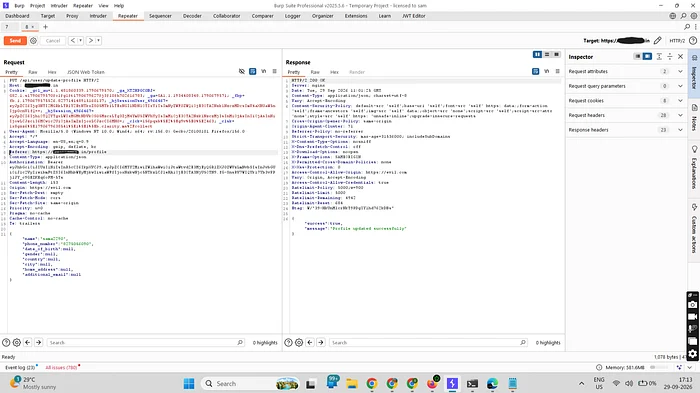
Root cause
The server reflects any supplied Origin header into Access-Control-Allow-Origin and simultaneously sets Access-Control-Allow-Credentials: true. The expected behaviour, as stated in the report, is that the server should validate the Origin header against a strict allowlist of trusted origins. For an untrusted origin such as https://evil.com, it should not reflect that origin in Access-Control-Allow-Origin and should not allow credentialed access.
Because the reflected origin is combined with credentialed access, a malicious page can issue credentialed cross-origin requests and read the response. The report does not describe the server-side code or framework responsible, so the exact implementation mistake is not shown.
Impact
An attacker who lures a logged-in victim to a malicious page can:
- Read sensitive profile data: name, phone number, email, address, date of birth, gender, city and country.
- Modify the victim's profile: change name, phone number and address.
- Chain with other endpoints: if the same CORS policy applies globally, the attacker can read or modify any authenticated API response.
- Bypass CSRF protections: CORS reflection plus credentials effectively defeats the same-origin policy, enabling full account takeover in severe cases.
- Exfiltrate data at scale: a single malicious page can harvest data from every visitor who is logged into
example.in.
Because the misconfiguration affects a state-changing endpoint (PUT /api/user/update-profile), the impact is not limited to data theft. An attacker could silently alter a victim's profile, potentially leading to account takeover if the profile data is used for identity verification or password recovery.
Fix
The report states the expected behaviour rather than a specific patch: the server should validate the Origin header against a strict allowlist of trusted origins.
Variants to test
- Send an arbitrary
Originsuch ashttps://evil.comto other authenticated endpoints. A positive result isAccess-Control-Allow-Originechoing that origin together withAccess-Control-Allow-Credentials: true. - Test state-changing endpoints, not just read endpoints, since the report's endpoint is a
PUTprofile update. A positive result is the same reflection on a request that modifies data. - Check whether the policy applies globally across the API. A positive result is the same reflected origin and credentials on endpoints beyond the profile feature.
- Test with a session cookie present. A positive result is
Access-Control-Allow-Originechoing the origin together withAccess-Control-Allow-Credentials: true.
References
- OWASP Top 10:2021, A01: Broken Access Control
- OWASP Top 10:2021, A05: Security Misconfiguration
- MDN Web Docs, Cross-Origin Resource Sharing (CORS)
- PortSwigger Web Security Academy, CORS Misconfigurations
Disclaimer: This analysis is based on a security assessment of the described application. All testing was performed within the scope of authorized security research. The information is shared for educational and defensive purposes only.
What happened, in plain words
A website called example.in lets people create accounts and keep a profile: name, phone number, email, address, date of birth, gender, city and country. Like most modern sites, the pages you see are built by a small program running in your browser, and that program fetches the actual data from the server behind the scenes. The address it talks to is called an API endpoint, for example PUT /api/user/update-profile to save changes to your profile.
Browsers have a safety rule that stops one website from quietly reading data from another website using your logged-in session. That rule is called the Same-Origin Policy. There is a controlled way for a site to relax the rule, called CORS, and the site has to say explicitly which other sites are allowed in. example.in got that permission wrong: it told the browser that any site was allowed, including a site an attacker controls, and it also said that the visitor's login credentials could be sent along. The result is that a malicious page could read a victim's profile and change it, while the victim is logged in.
This article walks through the finding from the beginning, explaining each idea as it appears.
Background: the ideas you need
What an API is
Think of a restaurant. The menu and the waiter are the API: you ask for something in a fixed way, and the kitchen (the server) sends it back. In a web application, the API is a set of addresses (endpoints) that accept requests and return data, usually in a machine-readable format rather than a pretty web page. The browser-side program calls these endpoints on your behalf.
What a cookie is
When you log in, the server gives your browser a small piece of text called a session cookie. Your browser stores it and sends it back automatically with every later request to that site. That is how the server knows the request comes from you and not from a stranger. In the request shown later, the cookie appears as Cookie: session=.... Anyone who has that cookie can act as you, which is why it is treated as a secret.
What an origin is
An origin is the combination of protocol, host and port: https://example.in is one origin, https://evil.com is another. Two pages on different origins are, from the browser's point of view, strangers to each other.
What the Same-Origin Policy is
Browsers refuse to let a page from one origin read responses from another origin by default. This is what stops a random website you visit from opening your bank's API in the background and reading your balance. It is a rule enforced by the browser, not by the server.
What CORS is
Sometimes a site genuinely needs to let another origin read its data, for example when a company runs its front end on one domain and its API on another. CORS (Cross-Origin Resource Sharing) is the mechanism for that. The browser sends an Origin header saying where the request came from, and the server answers with headers saying whether that origin is allowed. Configured correctly, CORS enables legitimate cross-origin communication while keeping users safe. Configured incorrectly, it can silently hand authenticated user data to any malicious website on the internet.
Two response headers matter here:
Access-Control-Allow-Origintells the browser which origin may read the response.Access-Control-Allow-Credentials: truetells the browser that cookies and other credentials may be included and the response exposed to the calling page.
If a server echoes back whatever origin the caller sent, and also allows credentials, then the browser's protection is effectively switched off for that endpoint.
What the vulnerability class means
This is a security misconfiguration: nothing in the code is broken in the usual sense, but a setting is too permissive. The report also files it under broken access control, because the effect is that people can reach data and actions they should not be able to reach. The report labels the severity High.
The target and the feature
The target described here is example.in, a web application with user accounts and a profile feature. The profile update endpoint is PUT /api/user/update-profile. The researcher found a CORS misconfiguration on the profile update endpoint: the server reflects an arbitrary, attacker-controlled Origin header into the Access-Control-Allow-Origin response header while also returning Access-Control-Allow-Credentials: true.
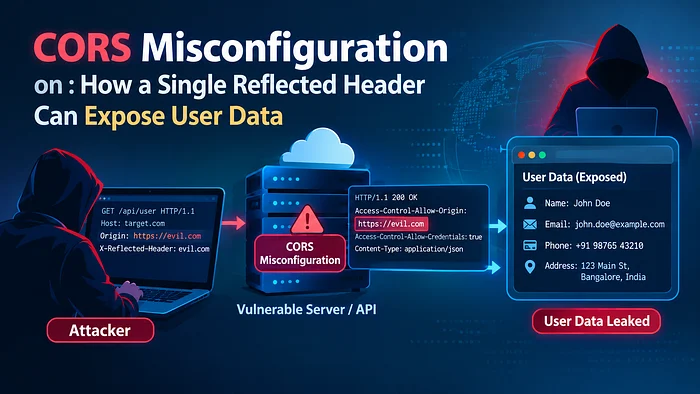
The image sits at the top of the write-up, under the title and the author's name.
Setting up
The assessment required only a normal account on the application and an intercepting proxy. A proxy here means a tool that sits between your browser and the server and lets you pause a request, look at it, edit it and send it again. The report names Burp, and specifically its Repeater feature, which is the part of the tool where you edit a captured request and resend it as many times as you like.
The steps in the report are:
- Create an account on
https://example.in. - Navigate to the profile update feature.
- Capture the request in Burp and send it to Repeater.
- Change the
Originheader fromhttps://example.intohttps://evil.com.
Why each step: creating an account gives you a logged-in session, so the requests you capture carry a real cookie, exactly as a victim's would. Visiting the profile update page makes the browser send the request the feature normally uses, which is the request you want to study. Sending it to Repeater lets you change one header at a time and watch what the server does. Changing Origin to a domain the site does not own is the actual test: you are pretending to be a malicious site and seeing whether the server still says yes.
No specific tool versions, roles or other preconditions are given.
Finding it
The researcher describes the issue as a classic but high-impact CORS misconfiguration on the profile update endpoint. The signal is the combination of two response headers: an Access-Control-Allow-Origin that echoes whatever origin the client sent, and Access-Control-Allow-Credentials: true. Together they mean a malicious site can make credentialed cross-origin requests on behalf of a logged-in victim and read the response.
In everyday terms: the server was asked "may evil.com read this?" and it answered "yes, and it may bring the user's login cookie too". A correct server would answer "no" to any origin that is not on its list.
The vulnerability summary in the report is:
| Field | Detail |
|---|---|
| Vulnerability Type | CORS Misconfiguration (Origin Reflection) |
| Category | Broken Access Control / Security Misconfiguration (OWASP A01:2021 / A05:2021) |
| Severity | High |
| Endpoint | PUT /api/user/update-profile |
"Origin reflection" is the name for this specific mistake: the server takes the origin it was given and reflects it straight back instead of checking it against a list.
Exploitation
Step 1: Create an account and reach the profile update feature
The researcher registers on https://example.in and navigates to the profile update page. This provides an authenticated session and the request that the profile feature sends. Without an account there is no cookie, and without a cookie the test would not show whether a logged-in victim's data is exposed.
Step 2: Capture the request and send it to Repeater
The profile update request is captured in Burp and sent to Repeater so the headers can be edited and the request replayed. Replaying the same request repeatedly is how you isolate one variable, here the Origin header, and see its effect.
Step 3: Change the Origin header
The Origin header is changed from https://example.in to https://evil.com. https://evil.com is a stand-in for any site an attacker might run; the point is that it is not the application's own origin.
Step 4: Observe the reflected headers
The response shows:
Access-Control-Allow-Origin: https://example.in
Access-Control-Allow-Credentials: true
Line by line:
Access-Control-Allow-Origin: https://example.inis the server's answer about which origin may read the response. The researcher's conclusion is that the server reflects the supplied origin and also allows credentials, which makes it a CORS misconfiguration.Access-Control-Allow-Credentials: truesays that cookies may be sent with the cross-origin request and the response may be read by the calling page. On its own this header is not a bug; combined with a reflected origin it is.
Step 5: The request and response shown in the report
The report includes the following request:
GET /api/user/profile HTTP/1.1Host: victim.comOrigin: https://evil.comCookie: session=...
Line by line, as the report presents it:
GET /api/user/profile HTTP/1.1is the request line: the methodGET(read something), the path of the endpoint (the profile read endpoint), and the HTTP version.Host: victim.comnames the server the request is addressed to.Origin: https://evil.comis the attacker-controlled origin: the browser is saying the request was started by a page onevil.com.Cookie: session=...carries a session. The value is elided in the report.
and the following response:
HTTP/1.1 200 OKAccess-Control-Allow-Origin: https://evil.comAccess-Control-Allow-Credentials: true
Line by line:
HTTP/1.1 200 OKis the status line: the server accepted the request and is answering normally.Access-Control-Allow-Origin: https://evil.comechoes the attacker's origin back. This is the reflection: the server did not check the origin against a list, it simply repeated it.Access-Control-Allow-Credentials: truepermits the response to be exposed to a credentialed cross-origin request, so the malicious page can read what comes back.
In the request, Origin: https://evil.com is the attacker-controlled origin, and the Cookie header carries a session. In the response, Access-Control-Allow-Origin: https://evil.com echoes that origin, and Access-Control-Allow-Credentials: true tells the browser that the response may be exposed to a credentialed cross-origin request. The report does not show a response body.
Proof of concept
The report's proof of concept is a screenshot:
The screenshot is placed after the references list, under the heading POC, with the line "Please Refer screenshot as follows."
Root cause
The server reflects any supplied Origin header into Access-Control-Allow-Origin and simultaneously sets Access-Control-Allow-Credentials: true. The expected behaviour, as stated in the report, is that the server should validate the Origin header against a strict allowlist of trusted origins. For an untrusted origin such as https://evil.com, it should not reflect that origin in Access-Control-Allow-Origin and should not allow credentialed access.
An allowlist, in everyday terms, is a guest list at a door: the person at the door checks your name against the list and turns you away if you are not on it, rather than writing down whatever name you give and letting you in. Reflection is the opposite of a guest list.
Because the reflected origin is combined with credentialed access, a malicious page can issue credentialed cross-origin requests and read the response. The report does not describe the server-side code or framework responsible, so the exact implementation mistake is not shown.
Impact
An attacker who lures a logged-in victim to a malicious page can:
- Read sensitive profile data: name, phone number, email, address, date of birth, gender, city and country.
- Modify the victim's profile: change name, phone number and address.
- Chain with other endpoints: if the same CORS policy applies globally, the attacker can read or modify any authenticated API response.
- Bypass CSRF protections: CORS reflection plus credentials effectively defeats the same-origin policy, enabling full account takeover in severe cases.
- Exfiltrate data at scale: a single malicious page can harvest data from every visitor who is logged into
example.in.
A note on the CSRF point: CSRF (Cross-Site Request Forgery) is an older class of attack where a malicious page makes your browser send a request to another site without being able to read the answer. The usual defences assume the attacker cannot read responses. Here the attacker can read them, so those defences no longer help.
Because the misconfiguration affects a state-changing endpoint (PUT /api/user/update-profile), the impact is not limited to data theft. An attacker could silently alter a victim's profile, potentially leading to account takeover if the profile data is used for identity verification or password recovery. "State-changing" simply means the request changes something on the server rather than only reading it; PUT is the method normally used for that.
Fix
The report states the expected behaviour rather than a specific patch: the server should validate the Origin header against a strict allowlist of trusted origins.
Variants to test
If you want to look for the same mistake elsewhere, these are the directions the report points to:
- Send an arbitrary
Originsuch ashttps://evil.comto other authenticated endpoints. A positive result isAccess-Control-Allow-Originechoing that origin together withAccess-Control-Allow-Credentials: true. - Test state-changing endpoints, not just read endpoints, since the report's endpoint is a
PUTprofile update. A positive result is the same reflection on a request that modifies data. - Check whether the policy applies globally across the API. A positive result is the same reflected origin and credentials on endpoints beyond the profile feature.
- Test with a session cookie present. A positive result is
Access-Control-Allow-Originechoing the origin together withAccess-Control-Allow-Credentials: true.
References
- OWASP Top 10:2021, A01: Broken Access Control
- OWASP Top 10:2021, A05: Security Misconfiguration
- MDN Web Docs, Cross-Origin Resource Sharing (CORS)
- PortSwigger Web Security Academy, CORS Misconfigurations
Disclaimer: This analysis is based on a security assessment of the described application. All testing was performed within the scope of authorized security research. The information is shared for educational and defensive purposes only.
Glossary
- API: the set of addresses a web application's front end uses to ask the server for data or to send changes.
- Endpoint: one specific address in an API, such as
/api/user/profile, together with the method used to call it. - HTTP method: the verb at the start of a request, such as
GETto read orPUTto update. - Request: the message a browser sends to a server, made of a request line, headers and sometimes a body.
- Response: the message a server sends back, made of a status line, headers and sometimes a body.
- Header: a named line in a request or response carrying extra information, such as
OriginorCookie. - Cookie: a small piece of text a site stores in your browser and that your browser sends back automatically, often used to keep you logged in.
- Session: the logged-in state tied to your cookie; whoever holds the cookie can act as you.
- Origin: the combination of protocol, host and port, for example
https://example.in. - Same-Origin Policy (SOP): the browser rule that stops a page on one origin from reading responses from another origin.
- CORS (Cross-Origin Resource Sharing): the mechanism by which a server tells the browser which other origins may read its responses.
Originheader: the header a browser sends to say which origin started the request.Access-Control-Allow-Origin: the response header saying which origin is allowed to read the response.Access-Control-Allow-Credentials: the response header saying whether cookies may be sent and the response exposed to a cross-origin caller.- Origin reflection: a misconfiguration where the server copies the caller's
OriginintoAccess-Control-Allow-Origininstead of checking it against a list. - Allowlist: a fixed list of values that are permitted, with everything else refused.
- Credentialed request: a cross-origin request that carries the user's cookies or other login data.
- Security misconfiguration: a weakness caused by a setting that is too permissive rather than by broken code.
- Broken access control: a weakness where someone can reach data or actions they should not be allowed to reach.
- CSRF (Cross-Site Request Forgery): an attack where a malicious page makes your browser send a request to another site; normally the attacker cannot read the reply.
- State-changing request: a request that modifies data on the server rather than only reading it.
- Account takeover: an attack in which someone else gains control of a victim's account.
- Exfiltration: copying data out of a system to a place the attacker controls.
- Intercepting proxy: a tool placed between browser and server that lets you pause, inspect, edit and resend requests.
- Burp Repeater: the part of the Burp proxy tool where a captured request can be edited and sent again.
- Proof of concept (POC): evidence that a vulnerability is real, here a screenshot.
- OWASP Top 10: a widely used list of the most common categories of web application security risk.



