CORS Misconfiguration -> PII Leak
The web application reflected any supplied Origin header in its Access-Control-Allow-Origin response and allowed credentialed GET requests, so an attacker could read a logged-in user's personal data from another site. The author demonstrated this with a proof-of-concept that fetched the user's details and displayed them.

The original lives on medium.com
We do not hold its text, so we link to it rather than copy it. The other two tabs are our own rewrites, checked against it.
Context
The target was a website on a bug bounty program that the researcher chose not to name, so the program identity is kept out of the write-up. The feature in scope is the user profile: the site has a login and sign-up portal, and once signed in a user can edit their own information. The edit is performed with a PATCH request, and the response to that request carries an access-control-allow-origin header whose value is https://devportal.redacted.com.
That header is the whole story. Cross-origin resource sharing lets a browser relax the same-origin policy for a specific origin, so a response that names an origin in access-control-allow-origin can be read by JavaScript running on that origin. If the server reflects an origin the attacker controls, and also allows credentials, then a page on the attacker's site can read authenticated responses on behalf of a logged-in victim.
Setup
- Basic recon on the main page. Nothing much was found, but a login and sign-up portal were noted for later testing.
- An account was created on the website. The researcher notes that the email address used was a temporary one.
- Traffic was intercepted after sign-up. Nothing stood out at that point.
- The user information edit flow was exercised, which produced the interesting request.
For the later testing the researcher used Firefox developer tools to edit and resend requests, noting that Burp Suite would work equally well. The proof of concept was hosted locally.
Finding it
Editing user information produced a PATCH request whose response included the access-control-allow-origin header set to https://devportal.redacted.com. Seeing a CORS header on a response that returns user data is the signal to test whether the allowed origin is fixed or reflected.
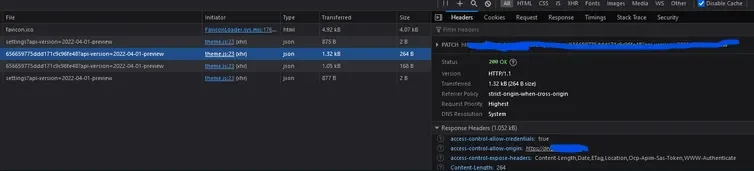
The screenshot shows the request and response pair. Two questions followed from it:
- It is a
PATCHrequest, does it acceptGET? - Are we able to put our own domain inside of the header?
Both were answered by editing the request before it went to the server.
Exploitation
Step 1: add an Origin header and switch the method
The request was modified in Firefox developer tools: an Origin header was added with the value https://test.com, the origin the researcher wanted to see reflected, and the request method was changed from PATCH to GET to see whether a valid response still came back.
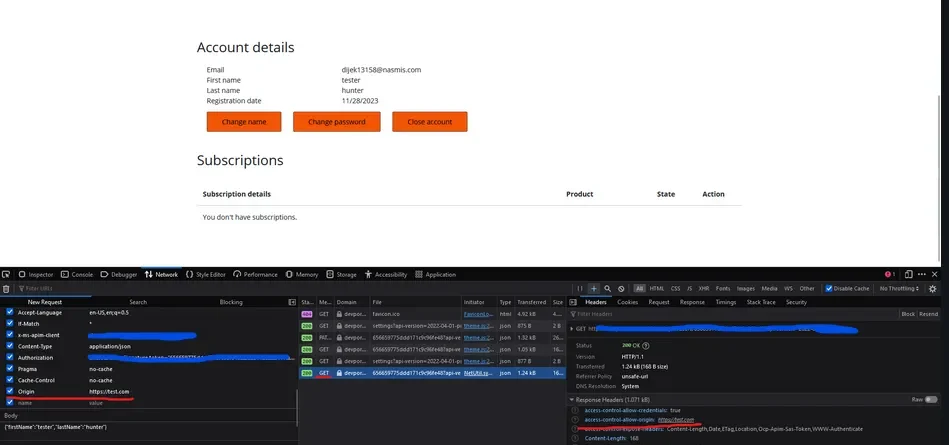
The screenshot shows the test account details in the top section and the developer tools in the bottom half. On the left, underlined in red, is the added Origin header with the value https://test.com. In the middle, the word GET is underlined, marking the changed request method. On the right, https://test.com is reflected in the access-control-allow-origin header.
So the endpoint accepts GET, and the allowed origin is taken from the request rather than fixed. That is the misconfiguration.
Step 2: build the proof of concept
The researcher notes that a CORS PoC can be found on GitHub and supplies the one used here:
<html> <body> <div id="demo"> <h1>CORS PoC by Boogsta</h1> <h2>Please press below the button below to connect your accont to our service!</h2> <button type="button" onclick="cors()">Exploit</button> </div> <script> function cors() { var xhr = new XMLHttpRequest(); xhr.onreadystatechange = function() { if (this.readyState == 4 && this.status == 200) { document.getElementById("demo").innerHTML = alert(this.responseText); } }; xhr.open("GET", "https://devportal.redacted.com/", true); xhr.withCredentials = true; xhr.send(); } </script> </body> </html>
The important parts:
xhr.open("GET", "https://devportal.redacted.com/", true)sends a cross-originGETto the target. The researcher notes that where it sayshttps://devportal.redacted.comis where the target's domain goes.xhr.withCredentials = truemakes the browser attach the victim's cookies to the cross-origin request.- The
onreadystatechangehandler checks forreadyState == 4andstatus == 200, then putsthis.responseTextinto the page viaalert. ReadingresponseTextonly works if the response's CORS headers permit the requesting origin, so a successful alert is the proof. - The button and heading are social engineering dressing: the page asks the visitor to press a button to "connect your accont to our service".
Step 3: host the page and trigger it
The page was hosted locally.

The screenshot shows the hosted PoC page with its heading, the instruction text and the Exploit button.
Pressing Exploit produced the following request:
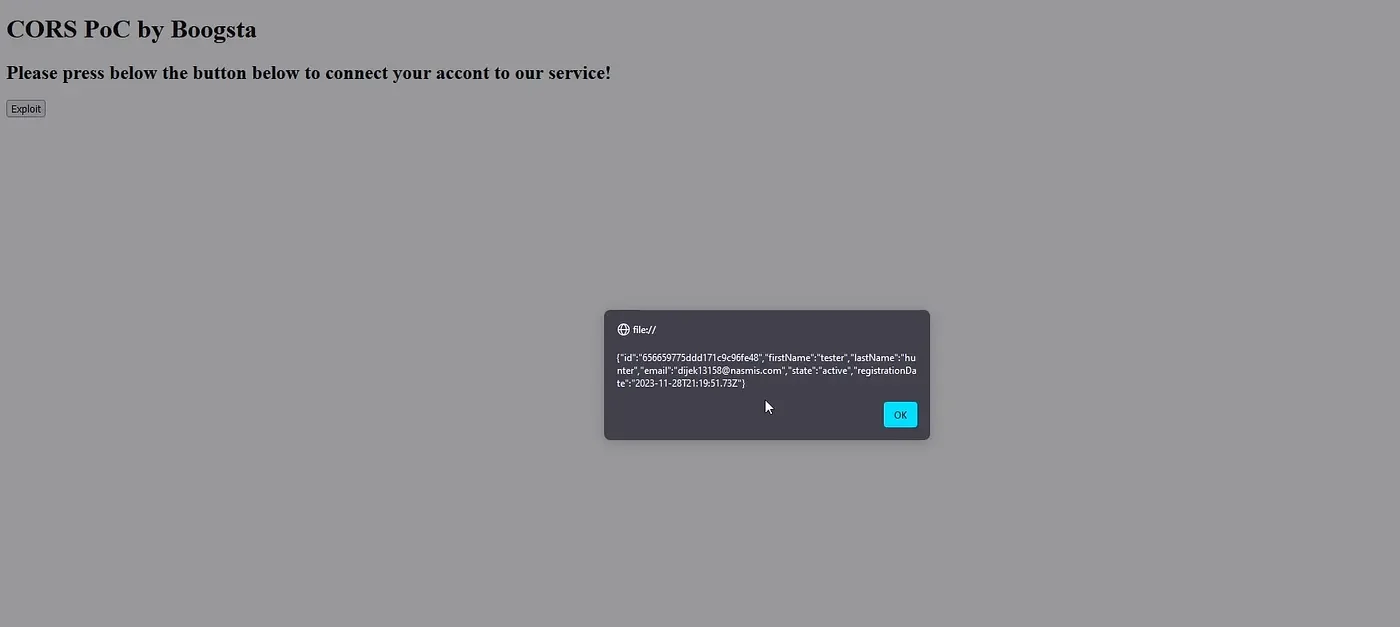
The screenshot shows the cross-origin request generated by the PoC after pressing Exploit.
The report was submitted and came back as a duplicate. The researcher treats it as a valid find regardless.
Root cause
The server builds access-control-allow-origin from the Origin header supplied by the caller instead of checking it against a fixed allowlist, and it does so on an endpoint that returns the user's own data. Because the value is reflected, any origin gets read access. The report does not show the access-control-allow-credentials header, and the PoC sets withCredentials = true. The endpoint also answers GET, not only PATCH.
Impact
An attacker can leak PII from the website by getting a logged-in victim to load a page the attacker controls. The researcher notes that a real attack would not look like the PoC: it would be more realistic and believable, and would have no pop-up. The stolen data would most likely be sent to a server for later use. The report classes the finding as P3.
Fix
The report does not describe a fix. The change required is to stop reflecting arbitrary origins: compare the Origin header against a fixed allowlist of trusted origins and only return access-control-allow-origin for those, keeping credentialed access limited to origins that genuinely need it.
Variants to test
- Send an
Originheader with your own domain on any authenticated endpoint and look for it echoed inaccess-control-allow-origin. A positive result is your domain reflected back. - Try a
nullorigin, which browsers send from sandboxed iframes and some local files. A positive result isaccess-control-allow-origin: null. - Try a lookalike origin such as
https://target.com.attacker.comorhttps://attacker-target.comwhere the check is a naive prefix or substring match. A positive result is the lookalike reflected. - Change the method from the one the UI uses to
GETand resend. A positive result is a valid response with the CORS header still present. - Confirm the read is real by loading a page like the PoC above from a different origin with
withCredentials = trueand checking whetherresponseTextis accessible. A positive result is the response body appearing in the attacker's page.
What happened, in plain words
A security researcher found a website that had a small configuration mistake in how it talked to web browsers. Because of that mistake, a page on another website could potentially read the personal information of a logged-in user. The researcher built a tiny web page to prove it, reported the bug, and was told someone else had already reported the same thing. This article walks through the whole thing from the beginning, assuming you have never done security testing before.
Some background you need first
Before the story makes sense, here are a few ideas explained from scratch.
A website and a browser. When you type an address into your browser, the browser asks a server for a page. The server sends back HTML (the page structure), and the browser draws it on screen. Every time you click something or fill in a form, the browser sends another request to the server and gets another response.
An API. Think of a restaurant. The menu and the dining room are the website you see. The kitchen is the server where the data lives. The waiter who carries your order to the kitchen and brings the food back is the API. You do not walk into the kitchen yourself; you tell the waiter what you want and the waiter brings it. On the web, the waiter is a set of addresses (called endpoints) that the browser talks to behind the scenes. When you edit your profile, your browser is not reloading the whole page; it is sending a small request to an API endpoint that says "change this user's details".
HTTP methods. Every request has a method, which is a verb telling the server what kind of action you want. GET means "give me something" (like reading a page). PATCH means "change part of something" (like updating one field in your profile). POST usually means "create something new". These are just words in the request; the server decides what to do with them.
Headers. A request or response is not only the content; it also carries a list of labels called headers. Think of them as the notes written on the outside of a parcel: who sent it, what is inside, how it should be handled. One header you will meet in this story is Origin, which tells the server which website the request came from. Another is access-control-allow-origin, which the server uses to answer that question.
Cookies and sessions. When you log in to a website, the server gives your browser a small piece of data called a cookie. Your browser stores it and sends it back with every later request to that same site. The cookie is how the server recognises you: "ah, this is the person who logged in five minutes ago". Without the cookie, the server treats you as a stranger. Cookies are what make a logged-in session work.
Same-origin policy. Browsers have a safety rule: JavaScript running on one website is not allowed to read data from a different website. If it could, then any page you visit could quietly open your bank's website in the background, read your account balance, and send it to the attacker. The rule that prevents this is called the same-origin policy. An "origin" is the combination of protocol, domain and port, so https://example.com and https://other.com are different origins.
CORS. Sometimes a website genuinely needs to let another origin read its data. For example, a company might have a main site and a separate developer portal, and the portal needs to fetch data from the main site. To allow this, browsers support a mechanism called Cross-Origin Resource Sharing, or CORS. The server adds a header to its response saying "this particular other origin is allowed to read me". The header is access-control-allow-origin, and its value is the origin that is being let in. If the server says access-control-allow-origin: https://devportal.redacted.com, then JavaScript running on https://devportal.redacted.com may read the response. Any other origin is still blocked by the browser.
The vulnerability class. A CORS misconfiguration is when the server gets this wrong. The most common mistake is to take whatever origin the browser sends in the Origin header and copy it straight back into access-control-allow-origin. That is like a bouncer who lets in anyone who says their own name at the door. If the server also allows cookies to travel with the request (a setting called credentials), then a page on the attacker's site can read the logged-in user's data. That is the bug in this report.
PII. Personal Identifiable Information. Anything that identifies a real person: name, email address, phone number, address, and so on. Leaking it is a privacy problem and often a legal one.
Bug bounty program. A company invites outside researchers to test its systems and pays them for reporting real security bugs. The researcher in this story chose not to name the program, so the company's identity is kept out of the write-up.
The setup
- The researcher started with basic recon on the main page. Recon means looking around a website the way a curious visitor would: reading pages, following links, seeing what features exist. Nothing much turned up, but there was a login and a sign-up portal, which was noted for later testing.
- An account was created on the website. The researcher used a temporary email address for this, which is a sensible habit when testing: you do not want your real inbox tied to a throwaway account.
- Traffic was intercepted after sign-up. Intercepting means watching the requests and responses that pass between the browser and the server, so you can see what is really being sent rather than only what the page shows. Nothing stood out at that point.
- The user information edit flow was exercised, meaning the researcher went into the profile settings and changed something. That produced the interesting request.
For the later testing the researcher used Firefox developer tools to edit and resend requests. Firefox developer tools are built into the browser: you press a key, a panel opens, and you can inspect and modify the traffic. The researcher notes that Burp Suite, a separate tool for the same job, would work equally well. The proof of concept page was hosted locally, meaning it ran on the researcher's own computer rather than on the internet.
Finding it
Editing user information produced a PATCH request. The response to that request included the header access-control-allow-origin with the value https://devportal.redacted.com. Seeing a CORS header on a response that returns user data is the signal to start testing: is the allowed origin fixed, or is it copied from whatever the caller sends?
The screenshot shows the request and the response side by side. The request is the PATCH that updates the user's details, and the response carries the CORS header naming https://devportal.redacted.com. Two questions followed from that:
- It is a
PATCHrequest, does it acceptGET? - Are we able to put our own domain inside of the header?
Both questions were answered by editing the request before it went to the server. The first matters because a GET is the simplest kind of cross-origin request a browser can make; if the endpoint answers GET, an attacker's page can trigger it with almost no effort. The second matters because if the server copies the origin from the request, then any origin, including the attacker's, gets read access.
Exploitation
Step 1: add an Origin header and switch the method
The request was modified in Firefox developer tools. An Origin header was added with the value https://test.com, which is the origin the researcher wanted to see reflected back. The request method was changed from PATCH to GET to see whether a valid response still came back.
The screenshot shows the test account details in the top section and the developer tools in the bottom half. On the left, underlined in red, is the added Origin header with the value https://test.com. In the middle, the word GET is underlined, marking the changed request method. On the right, https://test.com is reflected in the access-control-allow-origin header.
So the endpoint accepts GET, and the allowed origin is taken from the request rather than fixed. That is the misconfiguration. The server is effectively saying to any website that asks: yes, you may read this user's data.
Step 2: build the proof of concept
A proof of concept, or PoC, is a small piece of code that demonstrates a bug is real rather than theoretical. The researcher notes that a CORS PoC can be found on GitHub and supplies the one used here:
<html> <body> <div id="demo"> <h1>CORS PoC by Boogsta</h1> <h2>Please press below the button below to connect your accont to our service!</h2> <button type="button" onclick="cors()">Exploit</button> </div> <script> function cors() { var xhr = new XMLHttpRequest(); xhr.onreadystatechange = function() { if (this.readyState == 4 && this.status == 200) { document.getElementById("demo").innerHTML = alert(this.responseText); } }; xhr.open("GET", "https://devportal.redacted.com/", true); xhr.withCredentials = true; xhr.send(); } </script> </body> </html>
Line by line, in plain words:
<html> <body>opens the page, the same way any web page starts.<div id="demo">creates a box on the page with the namedemo, so the script can find it later and put text inside it.<h1>CORS PoC by Boogsta</h1>is a large heading naming the author of the PoC.<h2>Please press below the button below to connect your accont to our service!</h2>is a line of text asking the visitor to press a button. This is social engineering dressing: it makes the page look like a friendly service rather than an attack. The spelling mistake is in the original.<button type="button" onclick="cors()">Exploit</button>draws a button labelledExploit. When it is clicked, the browser runs the function calledcors().<script>starts the JavaScript section.function cors() {defines that function.var xhr = new XMLHttpRequest();creates an object calledxhr, which is the browser's built-in way of sending a request from JavaScript without reloading the page.xhr.onreadystatechange = function() {says: every time the state of the request changes, run this small function.if (this.readyState == 4 && this.status == 200) {checks two things.readyState == 4means the request has finished.status == 200means the server answered successfully. Only then does the next line run.document.getElementById("demo").innerHTML = alert(this.responseText);takes the body of the response,this.responseText, and shows it in a pop-up withalert. If the pop-up appears with real data inside, the browser allowed the page to read the response, which is the proof of the bug.};closes the small function.xhr.open("GET", "https://devportal.redacted.com/", true);prepares aGETrequest to the target address. The researcher notes that where it sayshttps://devportal.redacted.comis where the target's domain goes. Thetrueat the end means the request runs in the background without freezing the page.xhr.withCredentials = true;is the crucial line. It tells the browser to attach the victim's cookies to this cross-origin request. Without it, the request would arrive at the server as a stranger and return nothing useful.xhr.send();actually sends the request.}closes thecorsfunction, and the closing tags end the script, body and page.
The important parts, restated: the open call sends a cross-origin GET to the target; withCredentials = true makes the browser attach the victim's cookies; the handler checks for a finished, successful response and then shows responseText in an alert. Reading responseText only works if the response's CORS headers permit the requesting origin, so a successful alert is the proof. The button and heading are there to make the page look convincing to a victim.
Step 3: host the page and trigger it
The page was hosted locally, on the researcher's own machine.
The screenshot shows the hosted PoC page with its heading, the instruction text and the Exploit button. It looks like an ordinary, if slightly clumsy, web page. That is the point: a real attack would look the same way.
Pressing Exploit produced the following request:
The screenshot shows the cross-origin request generated by the PoC after pressing Exploit.
The report was submitted and came back as a duplicate, meaning someone else had already reported the same bug. The researcher treats it as a valid find regardless.
Root cause
The server builds access-control-allow-origin from the Origin header supplied by the caller instead of checking it against a fixed allowlist, and it does so on an endpoint that returns the user's own data. Because the value is reflected, any origin gets read access. The report does not show the access-control-allow-credentials header, and the PoC sets withCredentials = true. The endpoint also answers GET, not only PATCH. A preflight is an extra check the browser sometimes sends before a cross-origin request; a plain GET with cookies does not trigger one, so the attack goes through without any warning step.
Impact
An attacker can leak PII from the website by getting a logged-in victim to load a page the attacker controls. The researcher notes that a real attack would not look like the PoC: it would be more realistic and believable, and would have no pop-up. The stolen data would most likely be sent to a server for later use. The report classes the finding as P3.
Fix
The report does not describe a fix. The change required is to stop reflecting arbitrary origins: compare the Origin header against a fixed allowlist of trusted origins and only return access-control-allow-origin for those, keeping credentialed access limited to origins that genuinely need it. In everyday terms, the bouncer should check names against a guest list instead of believing whatever name is spoken at the door.
Variants to test
If you want to try this kind of bug yourself, here are the variations worth trying. Each one is a small change to the request you send.
- Send an
Originheader with your own domain on any authenticated endpoint and look for it echoed inaccess-control-allow-origin. A positive result is your domain reflected back. - Try a
nullorigin, which browsers send from sandboxed iframes and some local files. A positive result isaccess-control-allow-origin: null. - Try a lookalike origin such as
https://target.com.attacker.comorhttps://attacker-target.comwhere the check is a naive prefix or substring match. A positive result is the lookalike reflected. - Change the method from the one the UI uses to
GETand resend. A positive result is a valid response with the CORS header still present. - Confirm the read is real by loading a page like the PoC above from a different origin with
withCredentials = trueand checking whetherresponseTextis accessible. A positive result is the response body appearing in the attacker's page.
Glossary
- API: the set of addresses a website's own pages use to talk to its server behind the scenes, like a waiter carrying orders to a kitchen.
- Browser: the program you use to visit websites, such as Firefox or Chrome.
- Bug bounty program: a scheme where a company invites outside researchers to test its systems and pays them for reporting real security bugs.
- Burp Suite: a separate tool for inspecting and modifying web traffic, an alternative to the browser's built-in developer tools.
- Cookie: a small piece of data a website stores in your browser after you log in, sent back with later requests so the server recognises you.
- CORS (Cross-Origin Resource Sharing): a browser mechanism that lets a server name other origins that are allowed to read its responses.
- Credentials: in this context, the cookies that identify a logged-in user and travel with a request.
- Endpoint: a specific address on a server that performs a particular action, such as updating a user's profile.
- Firefox developer tools: a panel built into the Firefox browser for inspecting and editing requests and responses.
- GET: an HTTP method meaning "give me something", used for reading data.
- Header: a labelled piece of information attached to a request or response, like a note on the outside of a parcel.
- HTTP method: the verb in a request that says what kind of action is wanted, such as
GET,PATCHorPOST. - Intercept: to capture and inspect the traffic passing between a browser and a server.
- JavaScript: the programming language that runs inside web pages and can send requests without reloading the page.
- Origin: the combination of protocol, domain and port that identifies where a page came from, such as
https://example.com. - PATCH: an HTTP method meaning "change part of something", used for updating a record.
- PII (Personal Identifiable Information): data that identifies a real person, such as a name, email address or phone number.
- PoC (proof of concept): a small piece of code that demonstrates a bug is real rather than theoretical.
- Preflight: an extra check a browser sometimes sends before a cross-origin request; a plain
GETwith cookies does not trigger one. - Recon: looking around a website the way a curious visitor would, to see what features exist.
- Same-origin policy: the browser rule that stops JavaScript on one website from reading data from a different website.
- Session: the period during which a server recognises you as logged in, kept alive by a cookie.
- Social engineering: tricking a person into doing something, such as pressing a button, by making it look harmless or helpful.
- Temporary email address: a throwaway inbox used for testing so your real email is not tied to a test account.
withCredentials: a setting on a JavaScript request that tells the browser to attach the user's cookies to a cross-origin request.XMLHttpRequest: the browser's built-in object for sending requests from JavaScript without reloading the page.



