Critical NoSQL Injection in Password Reset endpoint leading to Full ATO
The password reset endpoint accepted a JSON object instead of a string for the token field, allowing a MongoDB query operator to match any valid reset token. An attacker could reset a victim's password without knowing the token and take over the account.
 Published on medium.com
In this blog, I’m gonna share how I found a critical security vulnerability that led to a complete takeover of a victim’s account while testing a password reset feature.
The full write-up lives on its author's site
It belongs to its author, so we link to it rather than copy it. The other two tabs are our own rewrites, checked against it.
Context
The target was a web application with the usual features: account creation, login, password reset, blog posting and comments. The author refers to it as redacted.com and walks through the same flow on a local lab setup so the steps are easy to follow.
The stack was a Node.js and Express backend using body-parser to handle JSON requests, with MongoDB and Mongoose for storage. The feature under test was the password reset. Normally a user requests a reset for their email address, the application assigns a reset token to the account, and the user completes the reset by sending that token back to the backend, which checks it against the stored token before saving a new password.
The vulnerability was a NoSQL injection in that reset check: because the backend passed the token field straight into a MongoDB query without checking its type, an attacker could send a query operator object instead of a text token and reset any account that had a valid reset token, without knowing the victim's password or token.
Setup
No special tooling is named beyond a repeater (the author says "craft this POST request in repeater"), and no versions are given. The preconditions that matter are:
- The application parses JSON request bodies with
body-parser, which keeps JSON objects as objects. - The reset handler reads
email,tokenandpasswordfrom the parsed body and usestokendirectly in a Mongoose query. - The victim account has an active, unexpired reset token stored, which the attacker can arrange by triggering a reset for the victim's email address.
- The attacker can learn the victim's email address. In this application, emails could be enumerated by inspecting users' comments on the blog.
The application had an open repository, so the vulnerable handler could be read directly rather than inferred from outside.
Finding it
Reading the reset handler in the open repository showed that the JSON body was parsed and sent straight into the database query with no check that token was a string:
app.use(bodyParser.json({ limit: '5mb' }));

const { email, token, password } = req.body; // no type check

User.findOne(
  {
    email,
    'resetTokens.token': token,
    'resetTokens.expires': { $gt: now }
  },
  (err, user) => {
    user.password = password;
    user.save();
  }
);
Because body-parser keeps JSON objects as objects, a value such as {"$ne": "x"} reaches MongoDB as an operator rather than as text. MongoDB's $ne means "not equal to", so the query becomes "find a token that is not equal to x", which matches any valid token in existence. The server never checks that token is a string before querying, so the real victim token is not needed at all. Once the query matches an account with a valid reset token, the handler saves the supplied password over the victim's account.
Exploitation
Step 1: Victim registers an account
The victim creates an account on the application in the normal way.
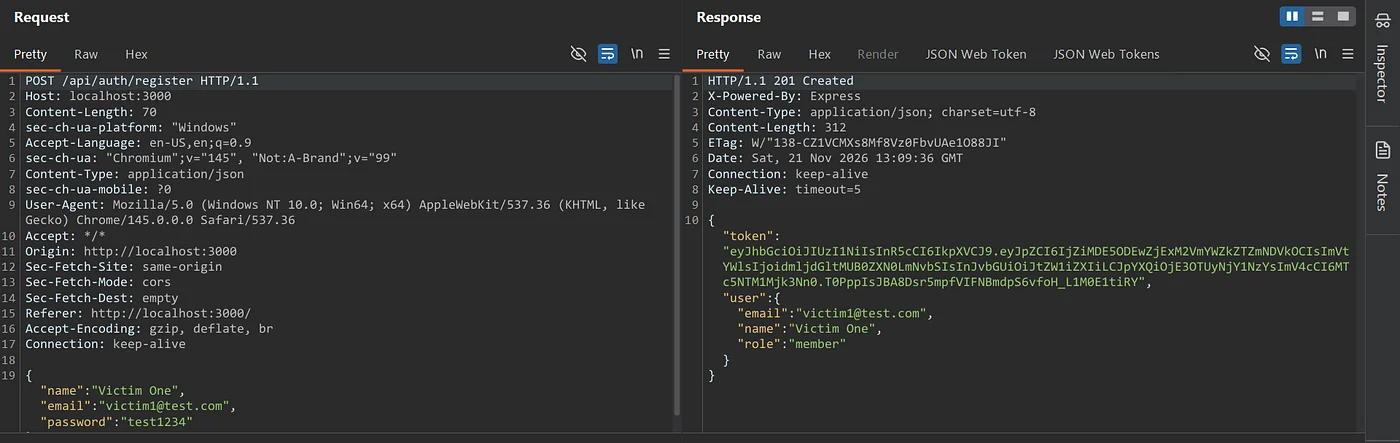
The screenshot shows the request and response for account creation.
Step 2: Trigger a reset for the victim
As the attacker, trigger a password reset for the victim user using their email address, so a fresh reset token is assigned to their account. The victim's email can be enumerated by inspecting their comments on the blog.
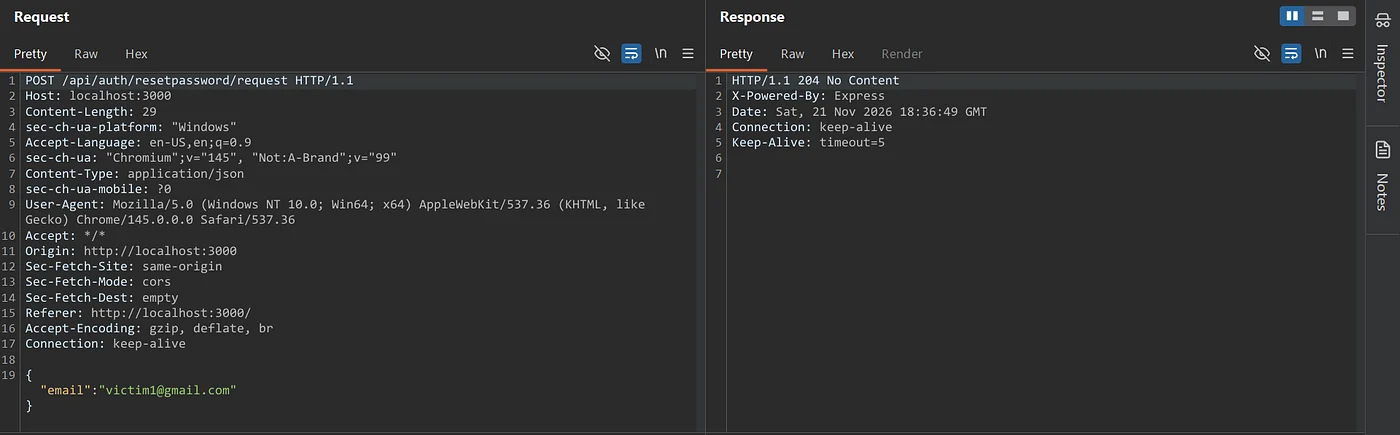
The screenshot shows that a valid reset token was just generated and stored for the victim's account.
Step 3: Send the crafted reset request
Craft a POST request in repeater to the endpoint /resetpassword/reset with "token": {"$ne": "x"} and a chosen new password, for example "password": "Hacked123":
{
  "email": "[redacted]",
  "token": {"$ne": "x"},
  "password": "Hacked123"
}
The email selects the account, the token object is interpreted by MongoDB as an operator that matches any stored token not equal to x, and password is the value the handler writes to the matched account.
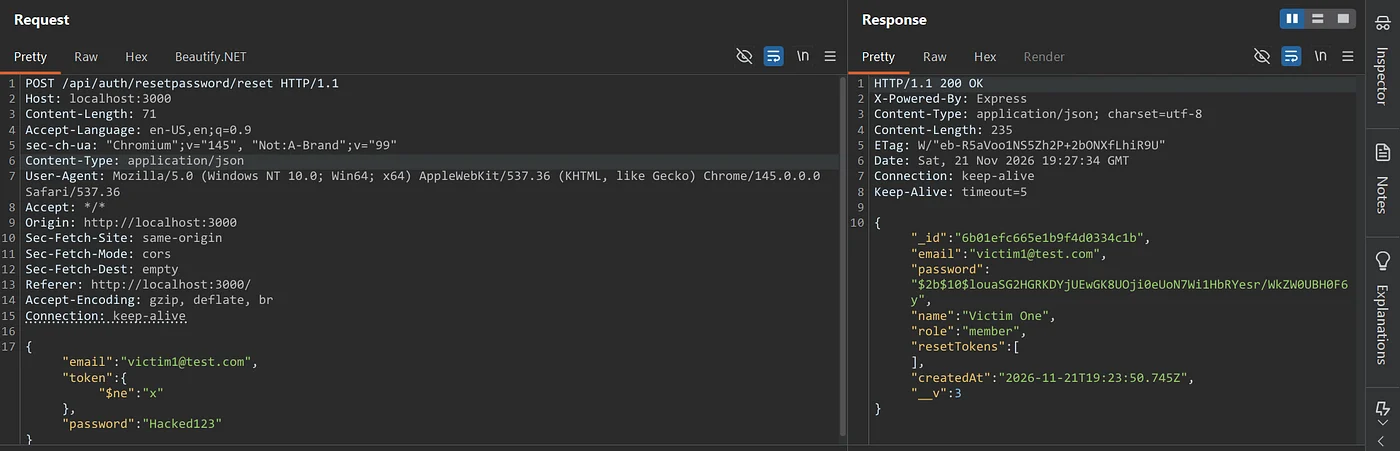
The screenshot shows the crafted request and its response.
Step 4: Log in with the new password
Try logging into the victim's account using the newly set password.
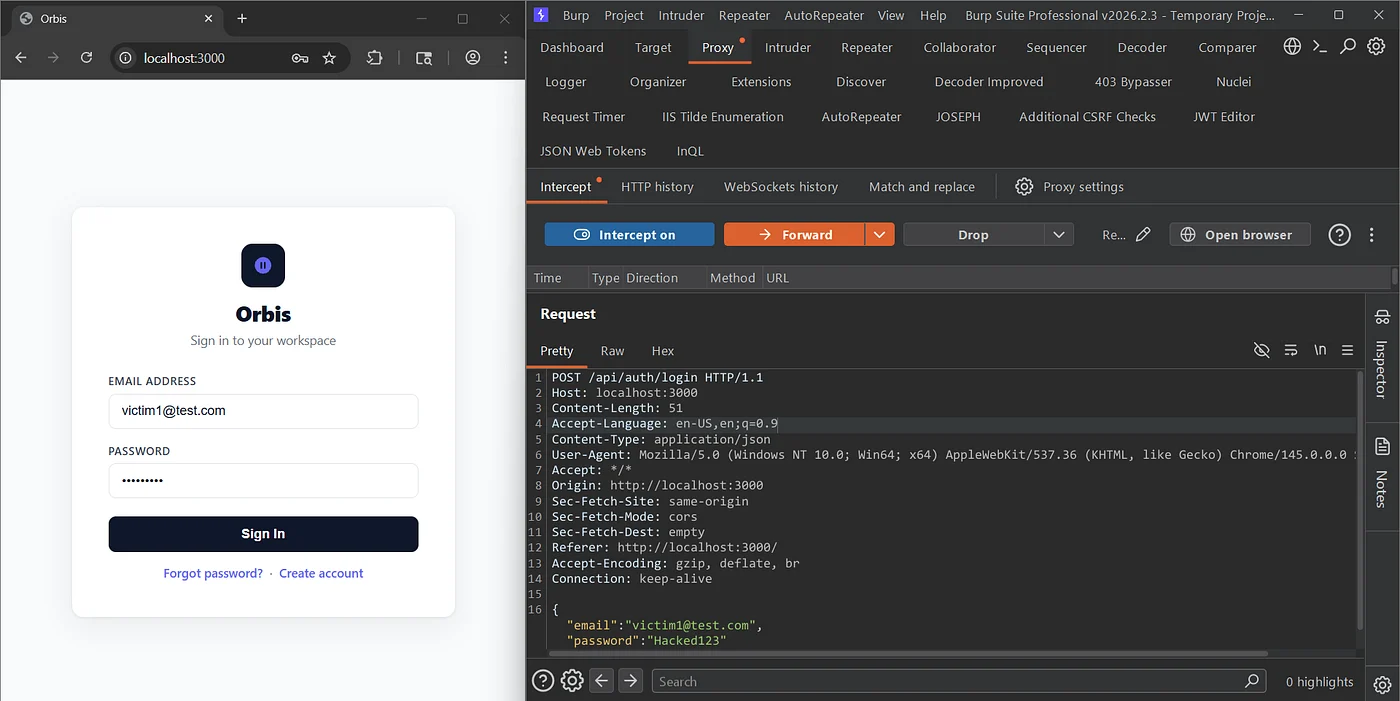
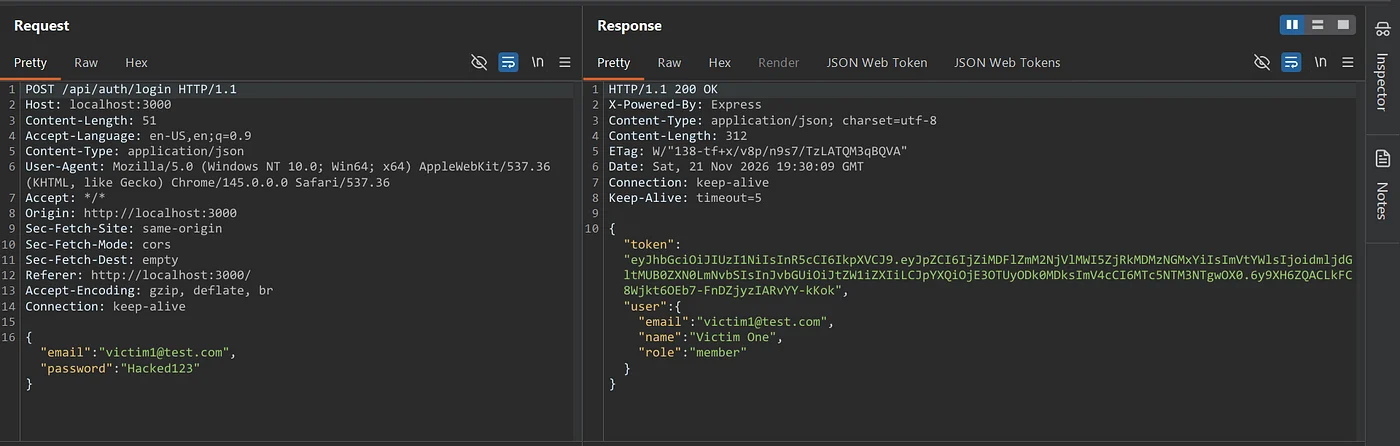
The second screenshot is captioned "Boom!!!!".
Step 5: Confirm the takeover
The login succeeds, confirming access to the victim's account.
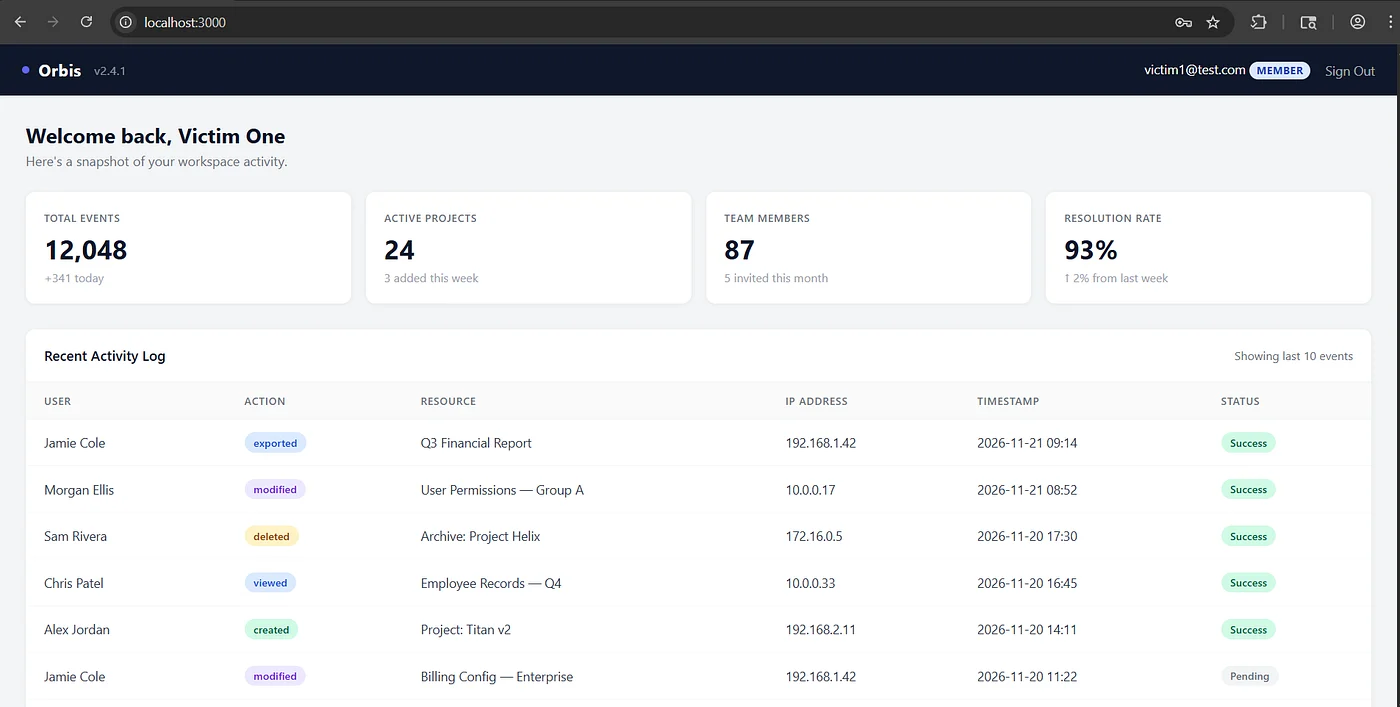

The final screenshot is captioned "Hacked !!".
Why the JSON body works when the reset link uses a URL token
A natural objection is that the reset token sent to the victim is placed in a URL like reset/{token}, so how does putting {"$ne": "x"} into a JSON body help? The frontend UI does not talk to MongoDB directly. It takes the token from the URL and sends a JSON request to a backend API endpoint containing email, token and a new password to complete the reset. Because that backend parses JSON bodies and drops token straight into the database query without checking its type, the attacker can skip the victim's email link and the URL token entirely and send the JSON POST request directly to the backend endpoint with "token": {"$ne": "x"}, so MongoDB treats it as an operator and matches the active token sitting in the database.
By contrast, if a backend endpoint read the token straight from the URL path as a plain string rather than from a parsed JSON body, sending a JSON operator object in the body would not work the same way. Here the backend reads token from the JSON payload and passes it raw into the query, which lets the crafted body bypass the token check completely.
Root cause
The mistake is a missing type check on a user-controlled value that is passed into a database query. body-parser faithfully turns a JSON object into a JavaScript object, and the handler destructures token from req.body and places it directly into the User.findOne filter. Mongoose and MongoDB interpret an object with keys beginning with $ as an operator expression, so {"$ne": "x"} changes the semantics of the query from an equality check to a match-anything check. The expiry condition ('resetTokens.expires': { $gt: now }) still applies, which is why the attack needs an active token on the account, but it does not require knowing that token.
Nothing in the shown code validates the type of token, rejects operator keys, or compares a hashed token. The application's own use of $gt in the same query shows that operator objects are expected in this query layer, which is exactly what makes the injected object effective.
Impact
- Full account takeover: an attacker can overwrite a victim's password without knowing the current password or accessing the reset token, then log straight into the account.
- No email access needed: although the reset link or token goes to the victim's email, the attacker bypasses the inbox and hits the backend reset endpoint directly with
{"$ne": "x"}. - Easy targeting: because victim emails can be enumerated through comments on blog posts, an attacker does not need to guess target accounts before launching the attack.
- Risk to sensitive data and actions: once inside the account, the attacker can access private data, change account settings, or perform actions as that user.
The attack requires that the target account has a valid, unexpired reset token at the time of the request, which the attacker can cause by triggering a reset for the victim's email. The author does not state how long tokens remain valid.
Fix
The author's recommendation is to enforce strict string validation on token, such as typeof token === "string" or a schema validator like Zod or Joi, and to sanitise out $ or . keys, for example with express-mongo-sanitize, so objects like {"$ne": "x"} are rejected before reaching MongoDB. The author also recommends requiring a non-empty string, comparing a hashed token rather than the raw input, and invalidating the token right after a successful reset. The report does not say which of these the application adopted.
Variants to test
- Other operator objects in the same field. Try
{"$gt": ""},{"$regex": ".*"}or{"$exists": true}in place of{"$ne": "x"}. A positive result is a successful reset or a response indicating the token matched without a real token being supplied. - Other JSON body fields used in queries. Apply the same object substitution to
email, an OTP field, a user ID or a coupon code. A positive result is a query that matches a record it should not, visible as a successful login, reset or redemption. - Login endpoints. Send
{"username": {"$ne": null}, "password": {"$ne": null}}style bodies where the backend builds a query from the parsed body. A positive result is authentication as a user without valid credentials. - Query-string and form parsers. Test whether the framework's query parser or a form parser also produces nested objects (for example
token[$ne]=x). A positive result is the same operator behaviour through a different content type. - Token read from the URL path. Confirm the contrast case: if the endpoint takes the token from the path as a string, the JSON operator body should not work. A positive result there would indicate a different parsing path worth investigating.
Hunting notes
This class of bug hides wherever a JSON body field is passed into a MongoDB query without a type check. Password reset, login, OTP verification, invitation codes and any endpoint that looks up a record by a value supplied by the client are the obvious places. The signals during recon are a Node.js and Express stack with body-parser or express.json, MongoDB and Mongoose, and an endpoint that accepts email plus token plus password in a JSON body. An open repository makes the check quick: look for destructuring from req.body followed by a query filter that uses those values directly, and for the absence of typeof checks or schema validation.
For impact, the author demonstrated the full chain: create a victim account, trigger a reset so a token exists, send the operator payload, then log in with the chosen password and show the victim's session. That end-to-end proof, with screenshots of the request, the response and the successful login, is what turns a suspicious query into an accepted account takeover.
What happened, in plain words
A website had a password reset feature. You know the one: you forget your password, you type your email address, the site emails you a special link, and that link lets you set a new password. The link contains a long random string called a token, which proves you own the email address.
The researcher found that the backend endpoint that completes the reset could be tricked. Instead of sending a real token, he sent a small piece of JSON (a text format for data) that told the database, in effect, "match any token that is not the letter x". The database obeyed, matched the victim's real token, and the site then saved whatever new password the attacker had chosen. The attacker could then log in as the victim. This is called account takeover.
The bug class is NoSQL injection. "NoSQL" is a family of databases that do not use tables with rows and columns; MongoDB is one of them. "Injection" means that user-supplied input is interpreted as instructions rather than as plain data. Here the instruction was a MongoDB query operator, $ne, which means "not equal to".
The author calls the real site redacted.com and walks through the same vulnerability flow using a local lab setup. The application had the usual features: account creation, login, password reset, blog posting and comments. Its backend was built with Node.js and Express (a JavaScript server framework), used body-parser to read JSON request bodies, and stored data in MongoDB through Mongoose (a library that helps Node.js talk to MongoDB).
The pieces you need to know
Before the steps, a few everyday comparisons for the terms used throughout.
- Server and client. The server is the computer that runs the website; the client is your browser. When you fill in a form, your browser sends a request to the server, and the server sends back a response.
- API endpoint. An API is a way for one program to talk to another. An endpoint is a specific address on the server, like a counter in a shop, that accepts a particular kind of request. The endpoint in this story is
/resetpassword/reset. - JSON. A text format for structured data, built from curly braces, names and values. It looks like
{"name": "value"}. Servers commonly accept JSON in the body of a request. - Request body. The part of an HTTP request that carries data, as opposed to the URL or the headers. When you submit a form, the data you typed travels in the body.
- Token. A long random string that acts like a temporary key. In a password reset, the token is proof that whoever holds it can set a new password for that account. It is sent to the victim's email address.
- Database query. A question the server asks the database, such as "find the user whose email is this and whose reset token is that".
- Query operator. A special keyword in a database query that changes the meaning of a comparison.
$nemeans "not equal to";$gtmeans "greater than". They start with a dollar sign. - Type check. A check that a value is of the expected kind, for example that
tokenreally is text and not an object. Without it, a server may accept a structured value where it expected a simple string. - Repeater. A tool (in Burp Suite) that lets you write a request by hand, send it, and read the response. It is useful when you want to change one detail of a request without using the website's forms.
The vulnerable code
The application had an open repository, meaning its source code was publicly readable. The researcher could therefore read the reset handler instead of guessing how it worked. The handler looked like this:
app.use(bodyParser.json({ limit: '5mb' }));

const { email, token, password } = req.body; // no type check

User.findOne(
  {
    email,
    'resetTokens.token': token,
    'resetTokens.expires': { $gt: now }
  },
  (err, user) => {
    user.password = password;
    user.save();
  }
);
Line by line, in plain words:
app.use(bodyParser.json({ limit: '5mb' }));tells the server to read JSON request bodies, up to 5 megabytes.body-parserturns the JSON text into JavaScript objects. If the JSON contains an object, it stays an object; it is not flattened into text.const { email, token, password } = req.body;takes three fields out of the parsed body and gives them names. The comment// no type checkis the author's note that nothing verifies what kind of value each field is.User.findOne({ ... })asks the database for one user matching a filter.email,means the user's email must equal the supplied email.'resetTokens.token': token,means the stored reset token must equal the supplied token. This is the dangerous line:tokengoes into the query exactly as it arrived.'resetTokens.expires': { $gt: now }means the token's expiry time must be greater than the current time, so only unexpired tokens match.$gtis a MongoDB operator, which shows that this query layer understands operator objects.- The callback receives the matched user and runs
user.password = password; user.save();, which overwrites the password with whatever was supplied and saves it.
Because body-parser keeps a JSON object as an object, a value such as {"$ne": "x"} reaches MongoDB as an operator rather than as text. MongoDB reads $ne as "not equal to", so the token condition becomes "find a token that is not equal to x". Any real, unexpired token satisfies that. The server never checks that token is a string, so the attacker does not need the victim's real token at all. Once the query matches an account, the handler saves the attacker's password over the victim's.
Steps of reproduction
Step 1: The victim registers an account
The victim creates an account in the normal way. This gives the attacker a target account to take over.
The screenshot shows the request and response for account creation.
Step 2: Trigger a reset for the victim
As the attacker, trigger a password reset for the victim's email address. This makes the application generate a fresh reset token and store it on the victim's account. The attacker does this because the attack needs an active token to exist on the account; the attacker does not need to know its value, only to make sure one is there.
The victim's email address can be found by reading the comments the victim left on the blog. Here the comments allowed the attacker to enumerate emails, meaning to collect them one by one.
The screenshot shows that a valid reset token was just generated and stored for the victim's account.
Step 3: Send the crafted reset request
Using repeater, craft a POST request to the endpoint /resetpassword/reset. The body contains the victim's email, the operator object in place of the token, and a new password chosen by the attacker:
{
  "email": "[redacted]",
  "token": {"$ne": "x"},
  "password": "Hacked123"
}
What each part does:
"email": "[redacted]"selects the account to reset. This is the victim's address."token": {"$ne": "x"}is the injection. Instead of a string, it is an object with the MongoDB operator$ne. The database reads it as "any token that is not equal to x", which matches the victim's real token."password": "Hacked123"is the value the handler will write into the matched account.
The screenshot shows the crafted request and its response.
Step 4: Log in with the new password
Now try to log in to the victim's account with the password that was just set. This step checks whether the reset actually changed the account's password.
The second screenshot is captioned "Boom!!!!".
Step 5: Confirm the takeover
The login succeeds, which confirms access to the victim's account.
The final screenshot is captioned "Hacked !!".
Why a JSON body works when the reset link uses a URL token
A fair question is: the reset token is normally placed in a URL like reset/{token}, so why does putting {"$ne": "x"} into a JSON body help?
The frontend (the part of the site you see in the browser) does not talk to MongoDB directly. It takes the token from the URL and sends a JSON request to a backend API endpoint containing email, token and a new password. That backend request is what actually completes the reset. Because the backend parses JSON bodies and puts token straight into the database query without checking its type, the attacker can skip the victim's email link and the URL token entirely. He sends the JSON POST request directly to the backend endpoint with "token": {"$ne": "x"}, so MongoDB treats it as an operator and matches the active token sitting in the database.
By contrast, if a backend endpoint read the token straight from the URL path as a plain string rather than from a parsed JSON body, sending a JSON operator object in the body would not work the same way. Here the backend reads token from the JSON payload and passes it raw into the query, which lets the crafted body bypass the token check completely.
Root cause
The mistake is a missing type check on a value the user controls, which is then passed into a database query. body-parser faithfully turns a JSON object into a JavaScript object, and the handler takes token from req.body and places it directly into the User.findOne filter. Mongoose and MongoDB interpret an object whose keys begin with $ as an operator expression, so {"$ne": "x"} changes the query from an equality check to a match-anything check. The expiry condition ('resetTokens.expires': { $gt: now }) still applies, which is why the attack needs an active token on the account, but it does not require knowing that token.
Nothing in the shown code validates the type of token, rejects operator keys, or compares a hashed token. The application's own use of $gt in the same query shows that operator objects are expected in this query layer, which is exactly what makes the injected object effective.
Impact
- Full account takeover: an attacker can overwrite a victim's password without knowing the current password or accessing the reset token, then log straight into the account.
- No email access needed: although the reset link or token goes to the victim's email, the attacker bypasses the inbox and hits the backend reset endpoint directly with
{"$ne": "x"}. - Easy targeting: because victim emails can be enumerated through comments on blog posts, an attacker does not need to guess target accounts before launching the attack.
- Risk to sensitive data and actions: once inside the account, the attacker can access private data, change account settings, or perform actions as that user.
The attack requires that the target account has a valid, unexpired reset token at the time of the request, which the attacker can cause by triggering a reset for the victim's email. The author does not state how long tokens remain valid.
Fix
The author's recommendation is to enforce strict string validation on token, such as typeof token === "string" or a schema validator like Zod or Joi, and to sanitise out $ or . keys, for example with express-mongo-sanitize, so objects like {"$ne": "x"} are rejected before reaching MongoDB. The author also recommends requiring a non-empty string, comparing a hashed token rather than the raw input, and invalidating the token right after a successful reset. The report does not say which of these the application adopted.
Variants to test
- Other operator objects in the same field. Try
{"$gt": ""},{"$regex": ".*"}or{"$exists": true}in place of{"$ne": "x"}. A positive result is a successful reset or a response indicating the token matched without a real token being supplied. - Other JSON body fields used in queries. Apply the same object substitution to
email, an OTP field, a user ID or a coupon code. A positive result is a query that matches a record it should not, visible as a successful login, reset or redemption. - Login endpoints. Send
{"username": {"$ne": null}, "password": {"$ne": null}}style bodies where the backend builds a query from the parsed body. A positive result is authentication as a user without valid credentials. - Query-string and form parsers. Test whether the framework's query parser or a form parser also produces nested objects (for example
token[$ne]=x). A positive result is the same operator behaviour through a different content type. - Token read from the URL path. Confirm the contrast case: if the endpoint takes the token from the path as a string, the JSON operator body should not work. A positive result there would indicate a different parsing path worth investigating.
Hunting notes
This class of bug hides wherever a JSON body field is passed into a MongoDB query without a type check. Password reset, login, OTP verification, invitation codes and any endpoint that looks up a record by a value supplied by the client are the obvious places. The signals during recon are a Node.js and Express stack with body-parser or express.json, MongoDB and Mongoose, and an endpoint that accepts email plus token plus password in a JSON body. An open repository makes the check quick: look for destructuring from req.body followed by a query filter that uses those values directly, and for the absence of typeof checks or schema validation.
For impact, the author demonstrated the full chain: create a victim account, trigger a reset so a token exists, send the operator payload, then log in with the chosen password and show the victim's session. That end-to-end proof, with screenshots of the request, the response and the successful login, is what turns a suspicious query into an accepted account takeover.
Glossary
- Account takeover (ATO): gaining control of another person's account, usually by changing their password or session.
- API: a way for one program to talk to another, often over HTTP.
- API endpoint: a specific address on a server that accepts a particular kind of request.
- body-parser: a Node.js library that reads the body of an HTTP request and turns JSON text into JavaScript objects.
- Client: the program you use, such as your browser, that sends requests to a server.
- Database query: a question the server asks the database to find or change records.
- Endpoint: see API endpoint.
- Enumeration: collecting items one by one, for example gathering email addresses from public comments.
- Express: a JavaScript framework for building web servers on Node.js.
- Frontend: the part of a website that runs in your browser and that you see and interact with.
- Hashed token: a token stored in a scrambled form so that the original cannot easily be recovered from the stored value.
- HTTP request: a message a client sends to a server, with a method (such as GET or POST), a URL, headers and sometimes a body.
- Injection: a vulnerability where user input is interpreted as instructions by another system, such as a database.
- JSON: a text format for structured data using curly braces, names and values.
- MongoDB: a popular NoSQL database that stores data as documents.
- Mongoose: a Node.js library that helps code define models and run queries against MongoDB.
- Node.js: a runtime that lets JavaScript run on a server.
- NoSQL: a family of databases that do not use tables with rows and columns.
- NoSQL injection: injection where input is interpreted as a database query operator or structure rather than as plain data.
- Operator: a special keyword in a database query that changes how a comparison works, such as
$ne(not equal) or$gt(greater than). - Password reset token: a long random string sent to a user's email that proves they may set a new password.
- POST request: an HTTP request method commonly used to send data to the server, for example a form submission.
- Query operator: see operator.
- Repeater: a tool in Burp Suite for writing and sending HTTP requests by hand and reading the responses.
- Request body: the part of an HTTP request that carries data, such as form fields or JSON.
- Response: the message a server sends back to a client.
- Root cause: the underlying mistake in the code that makes a vulnerability possible.
- Server: the computer that runs the website and answers requests.
- Session: the state that keeps you logged in across requests, usually tied to a cookie or token.
- Token: a string that acts as a key or proof, such as a password reset token or a session token.
- Type check: a check that a value is of the expected kind, such as a string rather than an object.
- URL path: the part of a URL after the domain, such as
/resetpassword/reset. - Zod / Joi: libraries for validating the shape and types of data in JavaScript.


