Cross Site Request Forgery Critical Exploitable IN Infected Site?
A settings endpoint that adds a user to an account accepted requests without properly validating the CSRF token, so a forged request could add an attacker-controlled user. The reporter also found a URL parameter that reflected a supplied address, and used it to host the forged form on the victim site itself, which they claim led to full account takeover.
 Published on medium.com
In this request To Add Another User To Account To Obtain Permission to Access The victim’s Account
The full write-up lives on its author's site
It belongs to its author, so we link to it rather than copy it. The other two tabs are our own rewrites, checked against it.
Context
The target was a private program on HackerOne. The report does not name the program or the product, and the host names in the requests have been changed to evilwite.com and x.website.infected, so treat them as placeholders. The feature involved is the user management page of the application: an authenticated user can add another user to the account, which grants that new user permission to access the account. The request that performs this action is a form post to /users/settings/.
The researcher describes the finding as a CSRF vulnerability, but not the usual kind, and says it was combined with HTTP parameter pollution.
Setup
What the report shows is a single authenticated session against the application, with a proxy in front of the browser so that requests can be inspected and replayed. The HTTP history of that proxy is where the second half of the bug was found. The researcher also needed a free hosting account (000webhost is named) to host the proof-of-concept page, and the application had to be reachable from the victim's browser for the final step.
The request that adds a user looks like this:
POST /users/settings/ HTTP/1.1
Host: evilwite.com
User-Agent: Mozilla/5.0 (X11; Linux x86_64; rv:60.0) Gecko/20100101 Firefox/60.0
Accept: text/html,application/xhtml+xml,application/xml;q=0.9,*/*;q=0.8
Accept-Language: en-US,en;q=0.5
Accept-Encoding: gzip, deflate
Content-Type: application/x-www-form-urlencoded
Content-Length: 239
Connection: close
Upgrade-Insecure-Requests: 1

ThisAction=AddUser&NextAction=Insert&new_user_email=attackeremail%40evil.com&first_name=mesbah&last_name=mesbah&phone=01032764848&csrf_token=[redacted]%2Fe%2F2P7%[redacted]%3D%3D
The body carries the action (ThisAction=AddUser, NextAction=Insert), the details of the user to be added (email, first name, last name, phone) and a csrf_token. The token is the interesting part.
Finding it
The first observation was that the csrf_token value in the request is not validated. The report states plainly that the csrf_token is not validated, and the screenshots show the request with the token in place and the user added. The report states this plainly, and the two screenshots below show the request with the token in place and the resulting state of the account.
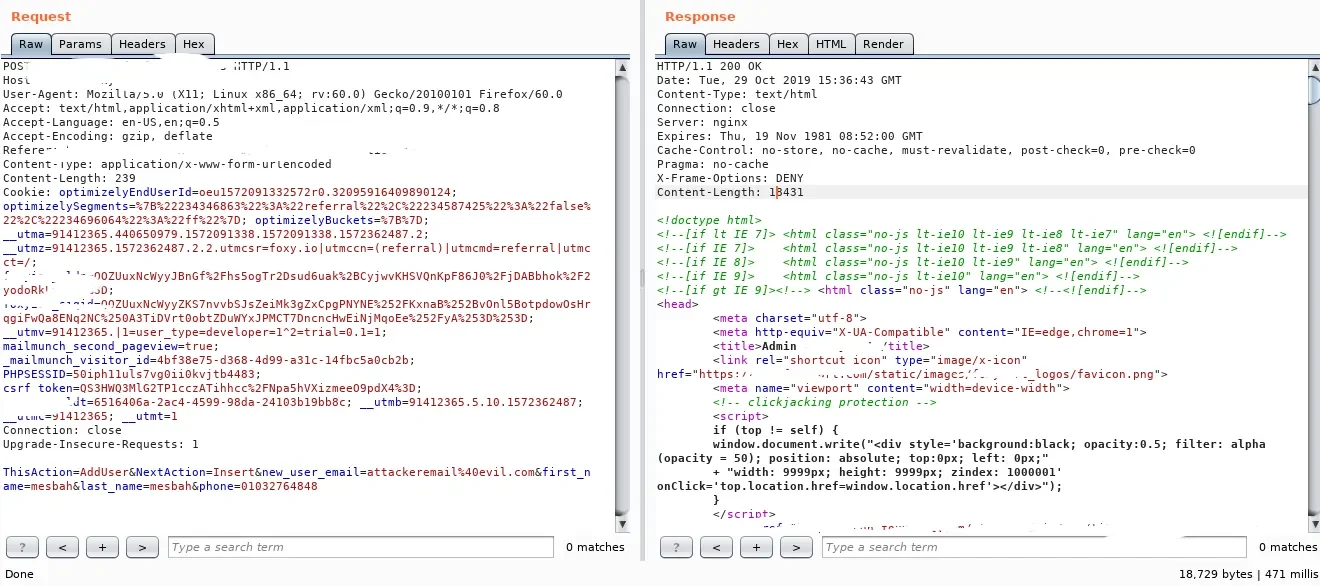

With no validation of the token, the add-user action could be triggered from another origin, so a CSRF proof of concept was straightforward to build:
<html>
<body>
<script>history.pushState(‘’, ‘’, ‘/’)</script>
<form action=”https://x.website.infected/settings/users" method=”POST”>
<input type=”hidden” name=”ThisAction” value=”AddUser” />
<input type=”hidden” name=”NextAction” value=”Insert” />
<input type=”hidden” name=”new_user_email” value=”attackeremail@evil.com” />
<input type=”hidden” name=”first_name” value=”mesbah” />
<input type=”hidden” name=”last_name” value=”mesbah” />
<input type=”hidden” name=”phone” value=”01032764848" />
<input type=”submit” value=”Submit request” />
</form>
</body>
</html>
The form posts the same fields to the settings endpoint, with the attacker's email address as the new user. The HTML entities (_ for underscore, @ for @, . for dot) are just an encoding of the field names and values; the browser decodes them before submitting.
That alone is a working CSRF, but it still requires the victim to visit the attacker's page. The second half of the report came from browsing the proxy's HTTP history and noticing a parameter named url on the site. Whatever value was put into it was printed back in the response. The researcher tested cross-site scripting on it and it did not work. After thinking about it for a few minutes, the next test was to put another website into the parameter:
https://x.website.infected/public/repositry?url=https://y.website.infected/
This is the shape of the parameter: a full URL is accepted as its value.
Exploitation
Step 1: confirm the token is not checked
The add-user request carried a csrf_token that the server did not validate, and the account gained the new user. The account gained the new user. This is the precondition for everything that follows: the server-side check that should tie the request to the victim's session either does not exist or does not compare the submitted value with anything.
Step 2: build the CSRF form
The HTML above is a form that posts the same fields to the settings endpoint. It targets https://x.website.infected/settings/users with method="POST" and the same field names as the original request. Because the token is not validated, no token field is needed in the form at all.
Step 3: find the url parameter
In the proxy history, a request to /public/repositry takes a url parameter, and the value is reflected in the response. XSS did not work, so the reflection is not directly script-executable. The next idea was to point the parameter at a page the researcher controls.
Step 4: host the payload
A free hosting account was created and the CSRF page was uploaded to it. The parameter was then changed from the original site's URL to the researcher's host:
The report says this worked on the site after the parameter was pointed at the researcher's host.
Step 5: make the page submit itself
A window.onload function was added to the page so that the form is submitted as soon as the page loads, without any interaction from the victim. The report does not include the final version of that script; it only says the function was added to submit the request.
The result, in the researcher's words, is a full account takeover, performed by the infected site rather than by the attacker.
Root cause
Two mistakes combine here.
- The CSRF token is not validated. The server accepts the add-user request regardless of the token's value, so the anti-CSRF defence is present in the form but not enforced. Likely the check is missing entirely, or the submitted value is never compared with the value stored for the session.
- The
urlparameter on/public/repositrylets a caller make the application load content from an arbitrary external host. The report does not say how the value is used, only that a URL placed in the parameter is printed in the response and that pointing it at the researcher's host worked. Whatever the mechanism, it turns the target's own origin into a delivery vehicle for the attacker's page.
The combination matters because a plain CSRF page on an attacker's domain depends on the victim clicking a link to that domain. With the url parameter, the link the victim receives is on the target's domain, which is far more likely to be trusted and opened.
Impact
An attacker who can get a victim to load the crafted URL can add an account of the attacker's choosing to the victim's account, with the permissions that the add-user feature grants. The report describes this as full account takeover. The conditions are that the victim is authenticated to the application and loads the crafted URL; no other interaction is described.
The report notes that the vulnerability was reported and triaged, and that the site had not yet paid at the time of writing.
Fix
Validate the CSRF token server-side: compare the submitted csrf_token with the value bound to the victim's session and reject the request when they do not match. A token that is present in the form but never checked provides no protection.
For the url parameter, do not let the application fetch or embed arbitrary external URLs. Restrict it to an allowlist of expected hosts, or remove the parameter if it is not needed.
Variants to test
- Token present but unchecked. Submit the add-user (or any state-changing) request with a modified or empty
csrf_tokenand see whether the action still succeeds. A positive result is the account state changing despite an invalid token. - Token checked against the wrong thing. Send a token from a different session, or a token from a different action, and see whether it is accepted. A positive result is acceptance of a token that does not belong to the current session and action.
- URL parameters that fetch remote content. Look for parameters named
url,redirect,next,image,fetchor similar in proxy history and point them at a host you control. A positive result is your page being loaded or its content appearing in the response. - Reflection without script execution. When a parameter reflects but XSS does not fire, try loading a full page from your host through it, as was done here. A positive result is your HTML rendering inside the target's page.
- Chaining with self-submitting forms. Combine any confirmed CSRF with any same-origin delivery primitive, and add
window.onloadso the form submits without user interaction. A positive result is the state change happening after the victim merely loads a URL on the target's domain. - HTTP parameter pollution. Where a parameter appears more than once, or where the application merges values from the query string and the body, try supplying the parameter twice with different values. A positive result is the server acting on a value the client did not intend, or a validation check seeing one value while the action uses another.
What happened, in plain words
A security researcher was testing a website that was part of a private bug bounty program on HackerOne. A bug bounty program is an arrangement where a company invites independent researchers to look for security problems in its systems and pays them for reporting what they find. The report does not name the program or the product, and the host names in the requests have been changed to placeholders such as evilwite.com and x.website.infected, so treat those names as stand-ins.
The researcher found a Cross Site Request Forgery (CSRF) vulnerability, but not the ordinary kind. CSRF is a trick where an attacker makes a victim's own browser send a request to a site the victim is already logged in to, so the site believes the request came from the victim. The researcher describes the finding as a CSRF vulnerability, but not the usual kind, and says it was combined with HTTP parameter pollution.
The feature involved is the user management page of the application. A logged-in user can add another user to the account, and that new user then has permission to access the account. The request that performs this action is a form post to /users/settings/. The researcher's own words for the result were a full account takeover: the attacker gets control of the victim's account.
The request that adds a user
Before explaining the attack, it helps to understand what a normal request looks like. When you fill in a form on a website and press a button, your browser sends an HTTP request to the server. HTTP is the language browsers and servers use to talk to each other. A request has a method (such as GET or POST), a path (the part of the site being addressed), a set of headers (extra information about the request) and a body (the data being sent).
The request that adds a user looks like this:
POST /users/settings/ HTTP/1.1
Host: evilwite.com
User-Agent: Mozilla/5.0 (X11; Linux x86_64; rv:60.0) Gecko/20100101 Firefox/60.0
Accept: text/html,application/xhtml+xml,application/xml;q=0.9,*/*;q=0.8
Accept-Language: en-US,en;q=0.5
Accept-Encoding: gzip, deflate
Content-Type: application/x-www-form-urlencoded
Content-Length: 239
Connection: close
Upgrade-Insecure-Requests: 1

ThisAction=AddUser&NextAction=Insert&new_user_email=attackeremail%40evil.com&first_name=mesbah&last_name=mesbah&phone=01032764848&csrf_token=[redacted]%2Fe%2F2P7%[redacted]%3D%3D
Line by line:
POST /users/settings/ HTTP/1.1says this is a POST request (a request that sends data and can change something on the server) to the path/users/settings/, using version 1.1 of HTTP.Host: evilwite.comtells the server which site the request is for. One server can host many sites, so this header picks one.User-Agent: Mozilla/5.0 ... Firefox/60.0identifies the browser that sent the request. Here it is Firefox 60 on 64-bit Linux.Accept: ...lists the kinds of response the browser is willing to receive, mostly HTML and XML here.Accept-Language: en-US,en;q=0.5says the browser prefers US English.Accept-Encoding: gzip, deflatesays the browser can accept compressed responses.Content-Type: application/x-www-form-urlencodedsays the body is form data encoded in the standard way:name=valuepairs joined by&.Content-Length: 239says the body is 239 bytes long.Connection: closeasks the server to close the connection after the response.Upgrade-Insecure-Requests: 1tells the server the browser would prefer an encrypted (HTTPS) version of the page if one exists.- The blank line separates the headers from the body.
- The body is the actual form data:
ThisAction=AddUserandNextAction=Insertsay what action to perform,new_user_email,first_name,last_nameandphonegive the details of the user to be added, andcsrf_tokenis a long random-looking value.
That last field is the interesting part. A CSRF token is a secret value that a website puts into its forms so that only pages served by that website can submit them. The idea is simple: the server remembers a token for your session, and when a form comes back it checks that the token matches. An attacker's page on another site cannot read your token, so it cannot forge a valid request. A session, by the way, is the server's memory of who you are after you log in, usually kept alive by a cookie, which is a small piece of data your browser stores and sends back with every request to that site.
Finding it
The first observation was that the csrf_token value in the request is not validated. The report states plainly that the csrf_token is not validated, and the screenshots show the request with the token in place and the user added. The report states this plainly, and the two screenshots below show the request with the token in place and the resulting state of the account.
With no validation of the token, the add-user action could be triggered from another origin, so a CSRF proof of concept was straightforward to build. An origin here means the combination of scheme, host and port that a page comes from; a page on one origin is not normally allowed to read data from another. A proof of concept (PoC) is a small demonstration that proves a vulnerability is real.
<html>
<body>
<script>history.pushState(‘’, ‘’, ‘/’)</script>
<form action=”https://x.website.infected/settings/users" method=”POST”>
<input type=”hidden” name=”ThisAction” value=”AddUser” />
<input type=”hidden” name=”NextAction” value=”Insert” />
<input type=”hidden” name=”new_user_email” value=”attackeremail@evil.com” />
<input type=”hidden” name=”first_name” value=”mesbah” />
<input type=”hidden” name=”last_name” value=”mesbah” />
<input type=”hidden” name=”phone” value=”01032764848" />
<input type=”submit” value=”Submit request” />
</form>
</body>
</html>
Line by line:
<html>and<body>are the usual opening tags of a web page.<script>history.pushState(‘’, ‘’, ‘/’)</script>runs a small piece of JavaScript.history.pushStatechanges the address shown in the browser's URL bar without loading a new page.<form action=”https://x.website.infected/settings/users" method=”POST”>starts a form that will send its data to the settings endpoint on the target site using POST.- Each
<input type=”hidden” ... />is a field the victim never sees.nameis the field name the server expects andvalueis what gets sent. The fields mirror the original request:ThisActionset toAddUser,NextActionset toInsert, and the new user's email, first name, last name and phone. - The odd-looking
_,@and.are HTML entities._is an underscore,@is the@sign and.is a dot. The browser decodes them before submitting, sonew_user_emailbecomesnew_user_emailandattackeremail@evil.combecomes[redacted]. They are just an encoding of the field names and values. <input type=”submit” value=”Submit request” />is the button that submits the form.- The closing tags end the form, body and page.
Notice what is missing: there is no csrf_token field at all. Because the token is not validated, the form does not need one. That alone is a working CSRF, but it still requires the victim to visit the attacker's page. The second half of the report came from browsing the proxy's HTTP history. A proxy is a tool that sits between your browser and the internet, recording every request and response so you can inspect and replay them later. In that history, the researcher noticed a parameter named url on the site. A parameter is a named value attached to a URL, usually after a ?, that the server reads. Whatever value was put into this one was printed back in the response. The researcher tested cross-site scripting on it and it did not work. Cross-site scripting (XSS) is a vulnerability where an attacker gets their own JavaScript to run inside another site's page; if the url value had been reflected in a way the browser executed as code, XSS would have worked.
After thinking about it for a few minutes, the next test was to put another website into the parameter:
https://x.website.infected/public/repositry?url=https://y.website.infected/
This is the shape of the parameter: a full URL is accepted as its value. The part before the ? is the page being requested, and url= followed by a web address is the value being handed to it.
Exploitation
Step 1: confirm the token is not checked
The add-user request carried a csrf_token that the server did not validate, and the account gained the new user. The account gained the new user. This is the precondition for everything that follows: the server-side check that should tie the request to the victim's session either does not exist or does not compare the submitted value with anything. In everyday terms, the form asks for a password but the door opens whether or not the password is right.
Step 2: build the CSRF form
The HTML above is a form that posts the same fields to the settings endpoint. It targets https://x.website.infected/settings/users with method="POST" and the same field names as the original request. Because the token is not validated, no token field is needed in the form at all. The purpose of this step is to turn the add-user action into a page that any browser can submit on the victim's behalf.
Step 3: find the url parameter
In the proxy history, a request to /public/repositry takes a url parameter, and the value is reflected in the response. XSS did not work, so the reflection is not directly script-executable. The next idea was to point the parameter at a page the researcher controls. The reasoning is: if the site will fetch and show whatever address I give it, I can make the site show my page instead of its own content.
Step 4: host the payload
A free hosting account was created and the CSRF page was uploaded to it. Free hosting means a service that gives you space on a web server at no cost; 000webhost is the one named in the report. The parameter was then changed from the original site's URL to the researcher's host:
The report says this worked on the site after the parameter was pointed at the researcher's host.
Step 5: make the page submit itself
A window.onload function was added to the page so that the form is submitted as soon as the page loads, without any interaction from the victim. window.onload is a JavaScript event that fires when the page has finished loading; putting code inside it means the code runs automatically at that moment. The report does not include the final version of that script; it only says the function was added to submit the request.
The result, in the researcher's words, is a full account takeover, performed by the infected site rather than by the attacker. The attacker never has to get the victim to visit the attacker's own domain, which is the part victims are usually warned about.
Root cause
Two mistakes combine here.
- The CSRF token is not validated. The server accepts the add-user request regardless of the token's value, so the anti-CSRF defence is present in the form but not enforced. Likely the check is missing entirely, or the submitted value is never compared with the value stored for the session.
- The
urlparameter on/public/repositrylets a caller make the application load content from an arbitrary external host. The report does not say how the value is used, only that a URL placed in the parameter is printed in the response and that pointing it at the researcher's host worked. Whatever the mechanism, it turns the target's own origin into a delivery vehicle for the attacker's page.
The combination matters because a plain CSRF page on an attacker's domain depends on the victim clicking a link to that domain. With the url parameter, the link the victim receives is on the target's domain, which is far more likely to be trusted and opened. Think of it as a forged letter: a plain CSRF is a letter with a stranger's return address, while this version has the victim's own bank's return address on the envelope.
Impact
An attacker who can get a victim to load the crafted URL can add an account of the attacker's choosing to the victim's account, with the permissions that the add-user feature grants. The report describes this as full account takeover. The conditions are that the victim is authenticated to the application and loads the crafted URL; no other interaction is described.
The report notes that the vulnerability was reported and triaged, and that the site had not yet paid at the time of writing. Triaged means the program accepted the report as valid and put it into its workflow.
Fix
Validate the CSRF token server-side: compare the submitted csrf_token with the value bound to the victim's session and reject the request when they do not match. A token that is present in the form but never checked provides no protection.
For the url parameter, do not let the application fetch or embed arbitrary external URLs. Restrict it to an allowlist of expected hosts, or remove the parameter if it is not needed. An allowlist is a list of things that are explicitly permitted, with everything else refused.
Variants to test
- Token present but unchecked. Submit the add-user (or any state-changing) request with a modified or empty
csrf_tokenand see whether the action still succeeds. A positive result is the account state changing despite an invalid token. - Token checked against the wrong thing. Send a token from a different session, or a token from a different action, and see whether it is accepted. A positive result is acceptance of a token that does not belong to the current session and action.
- URL parameters that fetch remote content. Look for parameters named
url,redirect,next,image,fetchor similar in proxy history and point them at a host you control. A positive result is your page being loaded or its content appearing in the response. - Reflection without script execution. When a parameter reflects but XSS does not fire, try loading a full page from your host through it, as was done here. A positive result is your HTML rendering inside the target's page.
- Chaining with self-submitting forms. Combine any confirmed CSRF with any same-origin delivery primitive, and add
window.onloadso the form submits without user interaction. A positive result is the state change happening after the victim merely loads a URL on the target's domain. - HTTP parameter pollution. Where a parameter appears more than once, or where the application merges values from the query string and the body, try supplying the parameter twice with different values. A positive result is the server acting on a value the client did not intend, or a validation check seeing one value while the action uses another.
Glossary
- Bug bounty program: an arrangement where a company invites independent researchers to find security problems in its systems and pays them for reporting what they find.
- Cross Site Request Forgery (CSRF): a trick where an attacker makes a victim's own browser send a request to a site the victim is already logged in to, so the site believes the request came from the victim.
- HTTP parameter pollution: a technique where a parameter is supplied more than once, or from more than one place, so that different parts of the application see different values.
- HTTP: the language browsers and servers use to talk to each other.
- Request: a message a browser sends to a server asking for something or sending data.
- Method: the type of request, such as GET (fetch something) or POST (send data and possibly change something).
- Path: the part of a URL that identifies the page or endpoint being addressed.
- Header: extra information attached to a request or response, such as the browser type or the content type.
- Body: the data carried inside a request or response.
- Host: the site name a request is addressed to.
- User-Agent: a header that identifies the browser and operating system that sent the request.
- Content-Type: a header that says how the body is formatted, for example form data.
- Content-Length: a header that says how many bytes the body contains.
- Session: the server's memory of who you are after you log in.
- Cookie: a small piece of data your browser stores for a site and sends back with every request to that site.
- CSRF token: a secret value placed in a form so that only pages served by the same site can submit it; the server checks it against the value stored for your session.
- Origin: the combination of scheme, host and port that a page comes from; pages from one origin are not normally allowed to read data from another.
- Proof of concept (PoC): a small demonstration that proves a vulnerability is real.
- Proxy: a tool that sits between your browser and the internet, recording every request and response so you can inspect and replay them.
- Parameter: a named value attached to a URL, usually after a
?, that the server reads. - Cross-site scripting (XSS): a vulnerability where an attacker gets their own JavaScript to run inside another site's page.
- JavaScript: the programming language that runs in web pages and makes them interactive.
- HTML entity: a code such as
_that represents a character (here an underscore) and is decoded by the browser. window.onload: a JavaScript event that fires when a page has finished loading, so code inside it runs automatically.- Free hosting: a service that gives you space on a web server at no cost.
- Account takeover: a situation where an attacker gains control of a victim's account.
- Allowlist: a list of things that are explicitly permitted, with everything else refused.
- Triaged: accepted by a bug bounty program as a valid report and put into its workflow.

