CSRF Bypass Using Domain Confusion Leads To ATO
The application did not enforce the JSON content type and relied on the Referer header for CSRF protection, which could be bypassed by crafting a URL that confused the domain check. An attacker could change a victim's phone number, leading to account takeover.

Hello everyone, it’s Osama (W4lT3R) again! I wanted to share a recent finding with you where I successfully bypassed the CSRF protection mechanism in a bug bounty program, collaborating With Ahmed Elmalky.
The full write-up lives on its author's site
It belongs to its author, so we link to it rather than copy it. The other two tabs are our own rewrites, checked against it.
Context
This is a write-up of a private bug bounty finding by Osama Aly (W4lT3R), working with Ahmed Elmalky. The program is private, so the target is referred to throughout as example.com, and the account area under test is account.example.com.
The feature at the centre of the report is the account settings area: changing the phone number, the username, the real name, connecting and disconnecting linked platforms, and creating, deleting or editing API keys. The application exposes these actions through .json endpoints, for example account.example.com/login.json, and the requests carry JSON bodies.
The goal the researcher set was an account takeover (ATO). Changing the victim's phone number is enough for that, so the phone change function became the test case for everything that follows.
Setup
The only setup described is registering a new account and logging in to the main application. From there the researcher clicked through every button available while recording traffic with Burp Suite, then reviewed the HTTP history.
No versions, frameworks or server details are given in the report.
Finding it
Reviewing the captured history produced three observations:
- All requests call a
.jsonendpoint, e.g.account.example.com/login.json. - Requests are sent in JSON format.
- No request carries a CSRF header.
The initial conclusion was that the application would not be vulnerable to CSRF, because a cross-site page cannot set the Content-Type header to application/json under the Same-Origin Policy. The researcher moved on to look for other bugs, and came back to the CSRF idea about thirty minutes later.
The reasoning that reopened it: a CSRF attack is possible if the server does not check the Content-Type header and does not enforce application/json. The Change Phone Number function was chosen to test that, since a successful phone change gives an ATO.
Exploitation
Step 1: check whether the server enforces the content type
The researcher checked whether the application verifies the Content-Type header at all, using the Change Phone Number function. The phone number changed successfully, which the report illustrates with a screenshot.
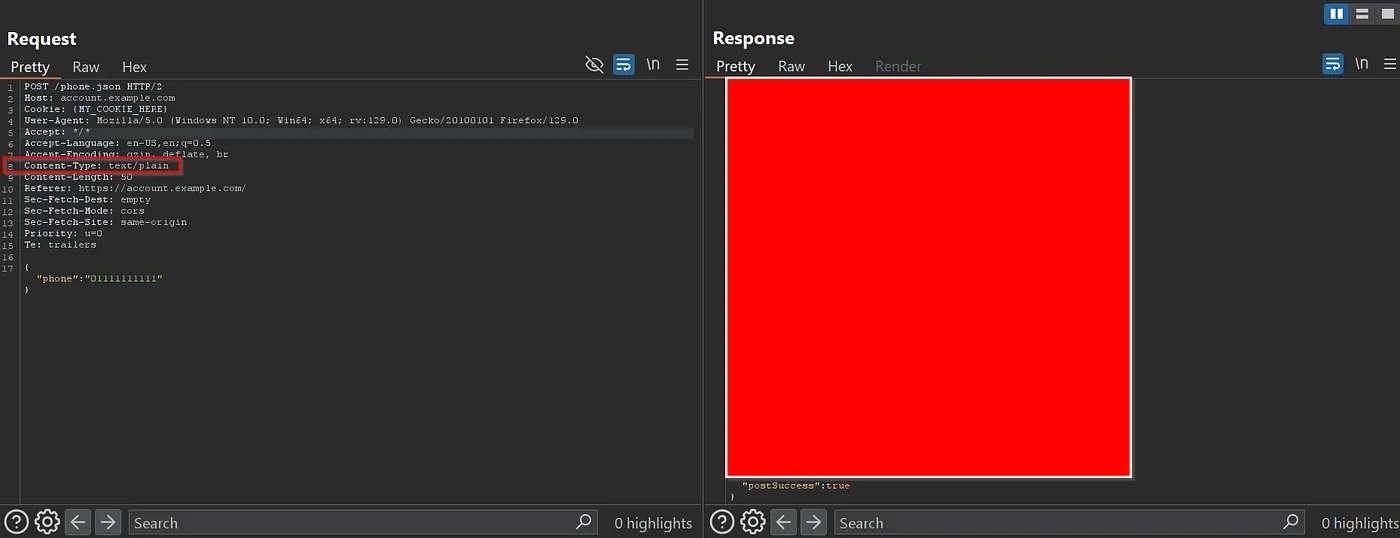
Step 2: check whether the JSON body tolerates extra parameters
The next question was whether the body must follow a specific pattern, or whether useless parameters can be added without breaking the request. The test was to add a random parameter with a random value, "a":"test", and the request still worked.
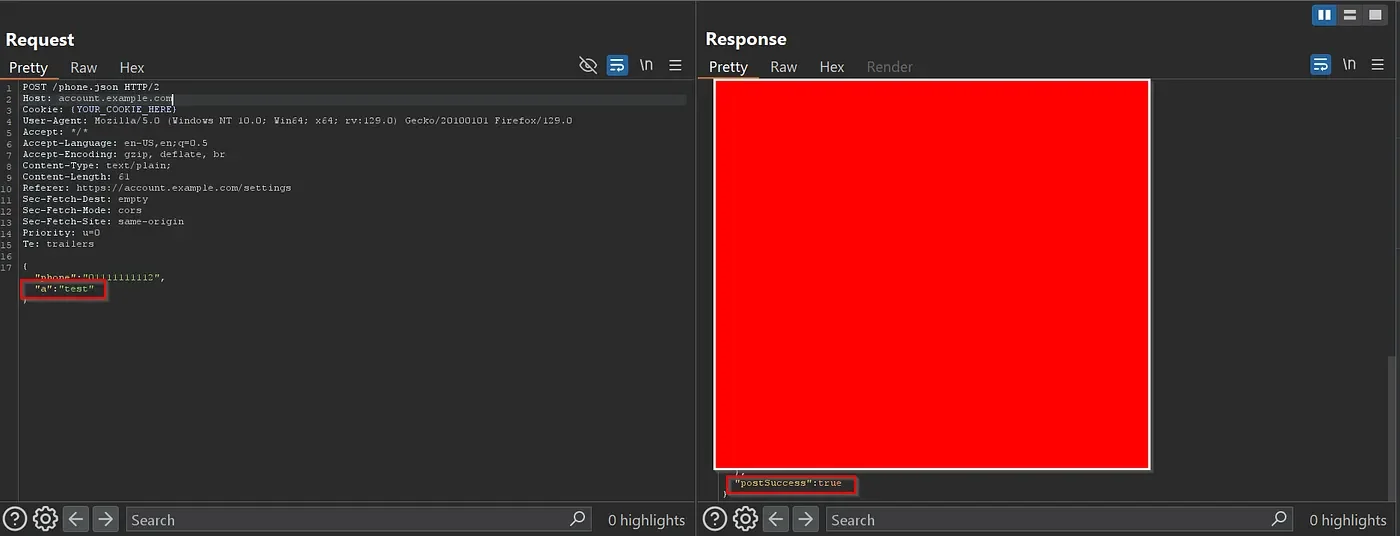
Step 3: first proof of concept
A simple POC form was built with enctype="text/plain" and the JSON body placed in a hidden input:
<html> <head><meta name="referrer" content="unsafe-url"></head> <body> <script>history.pushState('', '', '/')</script> <form name="hacker" method="POST" action="https://account.example.com/phone.json" enctype="text/plain"> <input type="hidden" name= '{"_formName":"change-phone","phone":"01111111118"}'> </form> <script> document.forms[0].submit(); </script> </body></html>
This produces the following body:

The body is not valid JSON. When a form is submitted, every input is expected to have both a name and a value, formatted as name=value. With only a name attribute, the browser appends an = and an empty value, which corrupts the JSON.
Step 4: make the body valid JSON again
The fix is to give the input a value as well, and to use the extra parameter to absorb the = that the browser inserts. The name attribute holds the intended body, a random parameter takes the next = symbol as its value, and the value attribute is set to }:
<input type="hidden" name= '{"phone":"01111111118","a":"' value='"}'>
This produces a correctly formatted JSON body:
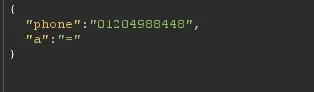
Step 5: the full exploit, and the first failure
The complete exploit at this stage:
<html> <head><meta name="referrer" content="unsafe-url"></head> <body> <script>history.pushState('', '', '/')</script> <form name="hacker" method="POST" action="https://account.example.com/phone.json" enctype="text/plain"> <input type="hidden" name= '{"phone":"01111111118","a":"' value='"}'> </form> <script> document.forms[0].submit(); </script> </body></html>
Because the whole application worked the same way, the researcher expected every function to be CSRF-vulnerable. The exploit was tried, and it did not work.
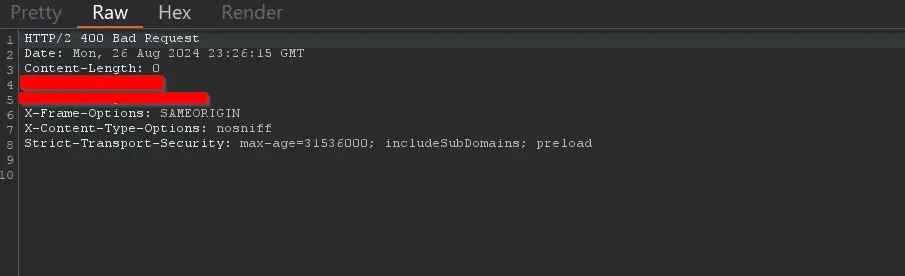
Step 6: compare the two requests
The exploit request and the Repeater request from Burp Suite were compared. The body was the same, so the body was not the problem. The cookie was sent successfully, so the SameSite flag was not the problem either. The headers were checked one by one:
Origin: not the cause.Content-Type: not the cause.Referrer: the cause. It has to contain the application domain for the request to work.
Since the check is on the Referrer header, there was still a way through: host the exploit on an attacker server, set the header with the history.pushState function in JavaScript, and exploit the bug from there. What was needed was domain confusion, making the server believe the referrer belongs to its own domain when it does not.
Step 7: domain confusion tests
The following referrer values were tried, and all failed:
evilaccount.example.comevil.com/account.example.comaccount.exampleevil.comaccount.exampleevil.com[redacted]evil.com#account.example.com
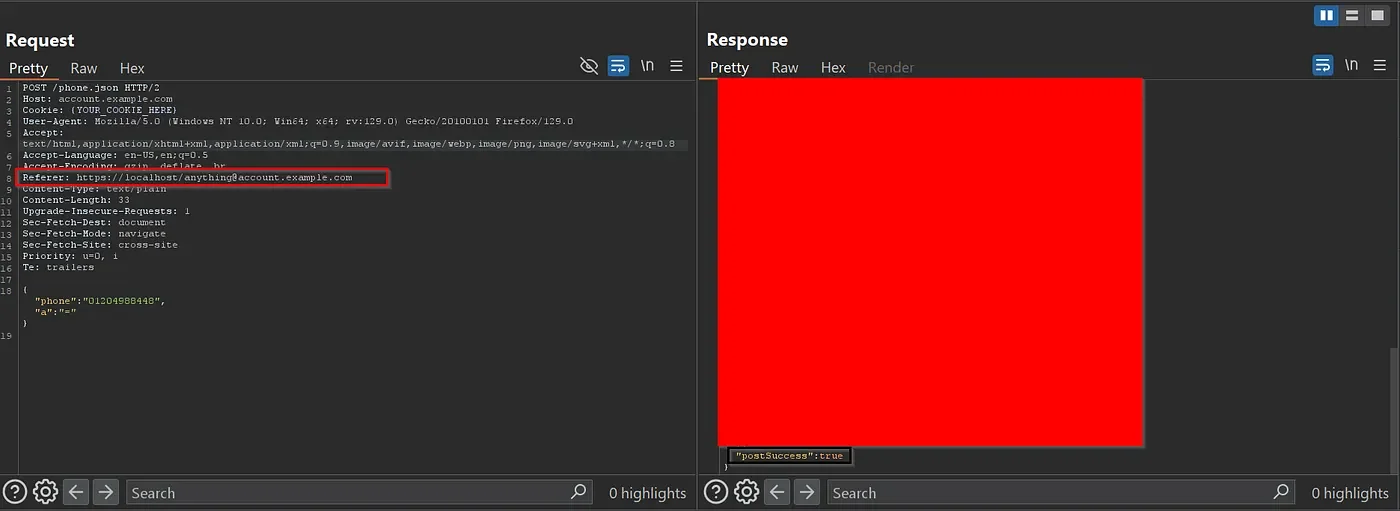
The application does not validate the occurrence of the domain in the header, yet a value such as [redacted] works. A value such as [redacted] works, which the researcher notes is normal.

So the domain is considered valid. The next hypothesis: what if the check only looks at what comes after the @ symbol? The candidate value is:
https://evil.com/[redacted]
This was tried in Repeater, and it worked.
Step 8: final exploit
The final payload sets the referrer path with history.pushState before submitting the form:
<html> <head><meta name="referrer" content="unsafe-url"></head> <body> <script>history.pushState('', '', '/')</script> <form name="hacker" method="POST" action="https://account.example.com/phone.json" enctype="text/plain"> <input type="hidden" name= '{"phone":"01111111118","a":"' value='"}'> </form> <script> history.pushState("", "", "/[redacted]") document.forms[0].submit(); </script> </body></html>
Because the whole application worked the same way, it became vulnerable to CSRF.
Root cause
Three weaknesses combine here.
First, the server does not enforce the Content-Type header. It accepts a form submission sent as text/plain, which a cross-site page can produce, instead of rejecting anything that is not application/json.
Second, the JSON parser tolerates extra parameters, so the attacker can add a dummy key to absorb the = that the browser inserts between the input name and value, and still end up with a syntactically valid JSON body.
Third, the CSRF defence is a Referrer header check; the researcher hypothesised it only looks at what comes after the @ symbol, and a value of that form was accepted. A URL of the form https://evil.com/[redacted] therefore passes, because the substring after the @ is the application domain. The check accepted a referrer whose host was not the application's own domain.
Impact
The report lists the following actions as reachable through the bypass:
- Change Account Phone Number, leading to ATO
- Change Account Username
- Change Account Real Name
- Connect/Disconnect Account From Platforms
- Create/Delete/Edit API Key With Full Permissions On Account
- 2 More Functions
One additional observation: by activating MFA using authenticator apps, only a request containing the attacker's MFA secret key and OTP is needed. This enables MFA on the victim's account, after which the victim can no longer log in.
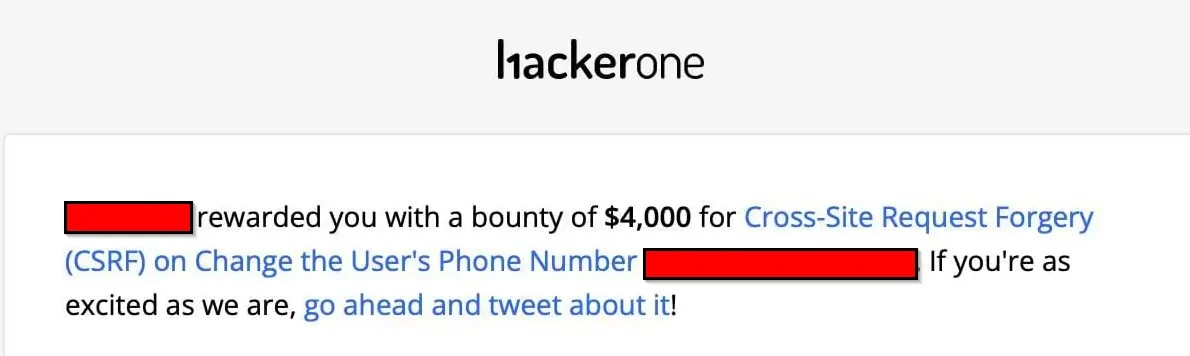
The Change Phone Number report was marked critical (9.0 to 10.0) because it leads to Account Takeover. The reward was 4000 USD. The other reports were marked as duplicates of the Change Phone Number report because they share the same root cause.
Fix
The report does not describe what the program changed or recommend a fix. Enforcing Content-Type: application/json on JSON endpoints and rejecting bodies that are not valid JSON would also remove the primitive that makes the form-based exploit possible.
Variants to test
- Referrer or Origin checks that match substrings. Try values where the trusted domain appears after
@, in the path, in the query or in the fragment, for examplehttps://evil.com/[redacted],https://evil.com/?example.comorhttps://evil.com/#example.com. A positive result is a state-changing request that succeeds from an attacker-controlled page. - JSON endpoints that accept
text/plain. Replay a JSON request withContent-Type: text/plainand a body that is still valid JSON. If the action succeeds, the endpoint can be targeted with a form-based CSRF payload. - JSON bodies that ignore unknown keys. Add a random parameter such as
"a":"test"to a working request. If it still succeeds, thename/valuetrick for producing valid JSON through a form is available. - Referrer checks that only look at the path. Set the referrer with
history.pushStateto a path containing the trusted domain, as in/[redacted], and submit the form. A positive result is the request being accepted. - MFA enrolment endpoints. Check whether an MFA activation request can be sent cross-site with the attacker's
secret keyandOTP, which would lock the victim out of the account.
What happened, in plain words
A security researcher, Osama Aly (also known as W4lT3R), working with Ahmed Elmalky, found a way to take over other people's accounts on a private bug bounty program. The program is private, so the site is called example.com throughout, and the account area under test is account.example.com.
Here is the short version. A website can be tricked into performing actions on behalf of a logged-in user by another website the user visits. That class of attack is called CSRF, and websites usually defend against it. This site had a defence, but the defence could be fooled. The researcher found that the site checked a header called Referrer to decide whether a request was legitimate, and that check only looked at the part of the address after an @ symbol. By crafting an address like https://evil.com/[redacted], the attacker's own site could make the check pass. Once that was possible, the attacker could change the victim's phone number, and from there take over the account.
The reward was 4000 USD, and the report was marked critical because it leads to account takeover.
The target and the feature
The program is private, so the researcher refers to it as example.com. The area under test is account.example.com, which is the account settings part of the site.
The features involved are the usual account settings actions:
- changing the phone number
- changing the username
- changing the real name
- connecting and disconnecting linked platforms
- creating, deleting or editing API keys
The application exposes these actions through .json endpoints, for example account.example.com/login.json. An endpoint is simply a specific address on a server that does one thing. The .json suffix is a naming convention: it tells you the server expects and returns data in JSON format.
JSON is a way of writing structured data as text, using curly braces, quotes and colons. A JSON body is the chunk of data sent along with a request, describing what the user wants to do. For example, a phone change request might carry a body like {"phone":"01111111118"}.
The goal the researcher set was an account takeover, usually shortened to ATO. That means logging in as the victim, or otherwise gaining control of their account. Changing the victim's phone number is enough for that, because the phone number is often used to reset the password or receive login codes. So the phone change function became the test case for everything that follows.
Setup
The only setup described is registering a new account and logging in to the main application. From there the researcher clicked through every button available while recording the traffic with Burp Suite.
Burp Suite is a tool that sits between your browser and the website and records every request and response. Think of it as a notebook that writes down every conversation your browser has with the site, so you can read it later and replay any of it.
No versions, frameworks or server details are given in the report.
Finding it
Reviewing the captured history produced three observations:
- All requests call a
.jsonendpoint, e.g.account.example.com/login.json. - Requests are sent in JSON format.
- No request carries a CSRF header.
A CSRF header is a special value that a site adds to requests to prove the request came from its own pages and not from somewhere else. If no request carries one, the site must be relying on some other defence.
The initial conclusion was that the application would not be vulnerable to CSRF, because a cross-site page cannot set the Content-Type header to application/json under the Same-Origin Policy.
The Content-Type header tells the server what format the body is in. The Same-Origin Policy is a browser rule: a page from one site cannot freely read or send data to another site. In practice, a page on evil.com cannot make the browser send a request with Content-Type: application/json to account.example.com, because the browser restricts which headers a cross-site page can set. So the researcher assumed the JSON format itself was a defence, moved on to look for other bugs, and came back to the CSRF idea about thirty minutes later.
The reasoning that reopened it: a CSRF attack is possible if the server does not check the Content-Type header and does not enforce application/json. In other words, if the server accepts a body that looks like JSON but arrives with a content type the browser will happily send cross-site, the defence disappears. The Change Phone Number function was chosen to test that, since a successful phone change gives an ATO.
Exploitation
Step 1: check whether the server enforces the content type
The Change Phone Number request was replayed with a content type other than application/json. Replaying means sending the same request again, possibly with small changes, using Burp Suite's Repeater tool. The phone number changed successfully, which the report illustrates with a screenshot.
The report places a screenshot here after the phone number changed. The point of this step is simple: if the server had rejected the request because the content type was wrong, the CSRF idea would have died here. It did not reject it, so the researcher could keep going.
Step 2: check whether the JSON body tolerates extra parameters
The next question was whether the body must follow a specific pattern, or whether useless parameters can be added without breaking the request. A parameter here means one key and value pair inside the JSON body, like "phone":"01111111118". The test was to add a random parameter with a random value, "a":"test", and the request still worked.
Why does this matter? Because of how HTML forms work, which is the trick used later. A form submission always sends data as name=value pairs. To make a form produce a valid JSON body, the attacker needs a spare parameter to absorb the = sign the browser inserts. If the server rejected unknown keys, that trick would not work. It accepted them, so the trick was available.
Step 3: first proof of concept
A proof of concept, or POC, is a small demonstration that the bug is real. Here it is a web page the attacker hosts, which submits a form to the target site on behalf of the visitor.
A simple POC form was built with enctype="text/plain" and the JSON body placed in a hidden input:
<html> <head><meta name="referrer" content="unsafe-url"></head> <body> <script>history.pushState('', '', '/')</script> <form name="hacker" method="POST" action="https://account.example.com/phone.json" enctype="text/plain"> <input type="hidden" name= '{"_formName":"change-phone","phone":"01111111118"}'> </form> <script> document.forms[0].submit(); </script> </body></html>
Line by line:
<html>,<head>,<body>are the usual skeleton of a web page.<meta name="referrer" content="unsafe-url">tells the browser to send the full address of the page in theReferrerheader when the form is submitted. Normally browsers trim this down for privacy; this tag asks for the full value.<script>history.pushState('', '', '/')</script>changes the address shown in the browser bar to/without reloading the page. This is a way to control what theReferrerheader will contain.<form ... method="POST" action="https://account.example.com/phone.json" enctype="text/plain">creates a form that will send a POST request to the phone change endpoint.enctype="text/plain"tells the browser to send the form data as plain text rather than the usual URL-encoded format. This is the key trick: plain text is a content type the browser will send cross-site.<input type="hidden" name= '{"_formName":"change-phone","phone":"01111111118"}'>is a hidden field. Itsnameattribute contains the JSON body the attacker wants the server to receive. There is novalueattribute.document.forms[0].submit()submits the form automatically, without the visitor clicking anything.
This produces the following body:
The body is not valid JSON. When a form is submitted, every input is expected to have both a name and a value, formatted as name=value. With only a name attribute, the browser appends an = and an empty value, which corrupts the JSON. The browser appends an = and an empty value, which corrupts the JSON.
Step 4: make the body valid JSON again
The fix is to give the input a value as well, and to use the extra parameter to absorb the = that the browser inserts. The name attribute holds the intended body, a random parameter takes the next = symbol as its value, and the value attribute is set to }:
<input type="hidden" name= '{"phone":"01111111118","a":"' value='"}'>
Line by line:
name=holds the start of the JSON body, ending with an open quote for the dummy parameter"a":".value='"}'holds the closing quote and the closing curly brace.- When the browser joins them with
=, the result is{"phone":"01111111118","a":"="}. The=that the browser inserted becomes the value of the dummy parametera, and the JSON stays valid.
This produces a correctly formatted JSON body:
Step 5: the full exploit, and the first failure
The complete exploit at this stage:
<html> <head><meta name="referrer" content="unsafe-url"></head> <body> <script>history.pushState('', '', '/')</script> <form name="hacker" method="POST" action="https://account.example.com/phone.json" enctype="text/plain"> <input type="hidden" name= '{"phone":"01111111118","a":"' value='"}'> </form> <script> document.forms[0].submit(); </script> </body></html>
This is the same page as before, with the fixed input. Because the whole application worked the same way, the researcher expected every function to be CSRF-vulnerable. The exploit was tried, and it did not work.
This is the moment where the assumption breaks. The body was valid, the content type was accepted, and yet the request was rejected. Something else was checking the request.
Step 6: compare the two requests
The exploit request and the Repeater request from Burp Suite were compared. The body was the same, so the body was not the problem. The cookie was sent successfully, so the SameSite flag was not the problem either.
A cookie is a small piece of data the browser stores for a site and sends back with every request. It is how the site knows who you are after you log in. The SameSite flag is a cookie setting that controls whether the cookie is sent on cross-site requests. If the cookie had not been sent, the site would not have known who the user was, and the attack would have failed for that reason. It was sent, so that was not the cause.
The headers were checked one by one:
Origin: not the cause.Content-Type: not the cause.Referrer: the cause. It has to contain the application domain for the request to work.
The Origin header tells the server which site the request came from. The Referrer header tells the server which page the user was on when the request was made. Here the site was checking the Referrer and requiring it to contain its own domain.
Since the check is on the Referrer header, there was still a way through: host the exploit on an attacker server, set the header with the history.pushState function in JavaScript, and exploit the bug from there. What was needed was domain confusion, making the server believe the referrer belongs to its own domain when it does not.
Domain confusion means crafting a value that a naive check reads as the trusted domain, while a browser or a user would read it as the attacker's domain. The everyday comparison is a letter addressed to "Alice, care of Bob": a careless reader sees Alice's name and delivers it to Alice, while the address actually says Bob.
Step 7: domain confusion tests
The following referrer values were tried, and all failed:
evilaccount.example.comevil.com/account.example.comaccount.exampleevil.comaccount.exampleevil.com[redacted]evil.com#account.example.com
Each of these is an attempt to make the trusted domain appear in the referrer while the actual site is evil.com. The first puts the trusted domain as a prefix of the attacker's subdomain. The second puts it in the path. The third and fourth put it as a suffix of the attacker's domain. The fifth uses the @ symbol, which in a URL separates the user information from the host. The sixth uses the # fragment, which browsers do not send to the server at all.
The application does not validate the occurrence of the domain in the header, yet a value such as [redacted] works. A value such as [redacted] works, which the researcher notes is normal.
So the domain is considered valid. The next hypothesis: what if the check only looks at what comes after the @ symbol? The candidate value is:
https://evil.com/[redacted]
This was tried in Repeater, and it worked.
Why does this work? In a URL, the part before the @ is user information and the part after it is the host. A correct parser reads this URL as "host example.com, with user information evil.com/test". A naive check that just looks for the trusted domain after the @ sees example.com and accepts it. The attacker's page is on evil.com, but the referrer string contains example.com in the position the check looks at.
Step 8: final exploit
The final payload sets the referrer path with history.pushState before submitting the form:
<html> <head><meta name="referrer" content="unsafe-url"></head> <body> <script>history.pushState('', '', '/')</script> <form name="hacker" method="POST" action="https://account.example.com/phone.json" enctype="text/plain"> <input type="hidden" name= '{"phone":"01111111118","a":"' value='"}'> </form> <script> history.pushState("", "", "/[redacted]") document.forms[0].submit(); </script> </body></html>
Line by line, the only change from the previous version is the line history.pushState("", "", "/[redacted]"). It changes the address shown in the browser bar to a path that contains @account.example.com. When the form is submitted, the browser sends that address in the Referrer header. The server's check sees account.example.com after the @ and accepts the request. The attacker's page is still on evil.com, but the referrer string now passes the check.
Because the whole application worked the same way, it became vulnerable to CSRF.
Root cause
Three weaknesses combine here.
First, the server does not enforce the Content-Type header. It accepts a form submission sent as text/plain, which a cross-site page can produce, instead of rejecting anything that is not application/json.
Second, the JSON parser tolerates extra parameters, so the attacker can add a dummy key to absorb the = that the browser inserts between the input name and value, and still end up with a syntactically valid JSON body.
Third, the CSRF defence is a Referrer header check; the researcher hypothesised it only looks at what comes after the @ symbol, and a value of that form was accepted. A URL of the form https://evil.com/[redacted] therefore passes, because the substring after the @ is the application domain. The check accepted a referrer whose host was not the application's own domain.
Impact
The report lists the following actions as reachable through the bypass:
- Change Account Phone Number, leading to ATO
- Change Account Username
- Change Account Real Name
- Connect/Disconnect Account From Platforms
- Create/Delete/Edit API Key With Full Permissions On Account
- 2 More Functions
An API key is a long secret string that lets a program act on your account without a password. If an attacker can create one with full permissions, they can keep access even after the victim changes their password.
One additional observation: by activating MFA using authenticator apps, only a request containing the attacker's MFA secret key and OTP is needed. This enables MFA on the victim's account, after which the victim can no longer log in.
MFA means multi-factor authentication: a second proof of identity, usually a six-digit code from an app. The secret key is the shared secret the app uses to generate those codes, and the OTP is one of the codes. If the attacker enrols their own authenticator app on the victim's account, the victim is locked out because only the attacker can produce the codes.
The Change Phone Number report was marked critical (9.0 to 10.0) because it leads to Account Takeover. The reward was 4000 USD. The other reports were marked as duplicates of the Change Phone Number report because they share the same root cause.
Fix
The report does not describe what the program changed or recommend a fix. Enforcing Content-Type: application/json on JSON endpoints and rejecting bodies that are not valid JSON would also remove the primitive that makes the form-based exploit possible.
Variants to test
- Referrer or Origin checks that match substrings. Try values where the trusted domain appears after
@, in the path, in the query or in the fragment, for examplehttps://evil.com/[redacted],https://evil.com/?example.comorhttps://evil.com/#example.com. A positive result is a state-changing request that succeeds from an attacker-controlled page. - JSON endpoints that accept
text/plain. Replay a JSON request withContent-Type: text/plainand a body that is still valid JSON. If the action succeeds, the endpoint can be targeted with a form-based CSRF payload. - JSON bodies that ignore unknown keys. Add a random parameter such as
"a":"test"to a working request. If it still succeeds, thename/valuetrick for producing valid JSON through a form is available. - Referrer checks that only look at the path. Set the referrer with
history.pushStateto a path containing the trusted domain, as in/[redacted], and submit the form. A positive result is the request being accepted. - MFA enrolment endpoints. Check whether an MFA activation request can be sent cross-site with the attacker's
secret keyandOTP, which would lock the victim out of the account.
Glossary
- API: a set of addresses on a server that programs and pages can call to do things, like change a phone number.
- API key: a long secret string that lets a program act on an account without a password.
- ATO (Account Takeover): gaining control of someone else's account, for example by changing their phone number or password.
- Burp Suite: a tool that records, inspects and replays the requests between a browser and a website.
- Cookie: a small piece of data the browser stores for a site and sends back with every request, used to remember who is logged in.
- CSRF (Cross-Site Request Forgery): tricking a logged-in user's browser into sending a request to a site the user did not intend to act on.
- CSRF header: a special value added to requests to prove they came from the site's own pages.
- Content-Type: a header that says what format the body of a request is in, such as
application/jsonortext/plain. - Domain confusion: crafting a value that a naive check reads as the trusted domain while it actually points elsewhere.
- Endpoint: a specific address on a server that performs one action.
- enctype: an HTML form attribute that sets how the form data is encoded when sent.
- Header: extra information sent alongside a request or response, such as the content type or the referrer.
- history.pushState: a JavaScript function that changes the address in the browser bar without reloading the page.
- HTML form: the part of a web page that collects data and sends it to a server when submitted.
- JSON: a text format for structured data using braces, quotes and colons.
- MFA (Multi-Factor Authentication): a second proof of identity, usually a code from an app, on top of a password.
- Origin: a header that says which site a request came from.
- OTP (One-Time Password): a short code that is valid once, usually generated by an authenticator app.
- Parameter: one key and value pair inside a request body, like
"phone":"01111111118". - POC (Proof of Concept): a small demonstration that a bug is real.
- POST: an HTTP method used to send data to a server, typically to change something.
- Referrer: a header that says which page the user was on when the request was made.
- Repeater: a Burp Suite tool for sending the same request again with changes.
- Same-Origin Policy: a browser rule that stops a page from one site freely reading or sending data to another site.
- SameSite: a cookie setting that controls whether the cookie is sent on cross-site requests.
- Secret key: the shared secret an authenticator app uses to generate one-time codes.
- text/plain: a content type for plain text, which a browser will send cross-site.
- URL: the address of a page or resource, made of parts such as scheme, host, path and fragment.
- User information: the part of a URL before the
@symbol, which a correct parser does not treat as the host.

