CSRF to Full Account Takeover
The site did not validate the CSRF token or the current password on the change email and change password functions, and also accepted requests without a required header. An attacker could change a victim's email and password via a CSRF attack, leading to full account takeover.
 Published on medium.com
I am Ashraf Harb and will be publishing my first Write-up about a CSRF issue that I was able to escalate To Account Takeover
The full write-up lives on its author's site
It belongs to its author, so we link to it rather than copy it. The other two tabs are our own rewrites, checked against it.
Context
This is a write-up of a cross-site request forgery (CSRF) issue that the author, Ashraf Harb (@ashrafharb97), escalated to full account takeover. The target is a private site, referred to throughout as target.com. The report does not name the product or describe what the site does beyond the account features it exercises: a change email function, a change password function, a password reset function and a logout function.
Every form submitted through the site carries a parameter called authenticity_token in the request body, intended as protection against CSRF.
Setup
The report does not describe any accounts, roles, tools or versions. The only precondition that matters is that a victim is logged in to target.com and visits an HTML page controlled by the attacker. The forms are submitted with Content-Type: application/x-www-form-urlencoded, which is the content type a cross-site HTML form can produce without any preflight, so a plain HTML page is enough to send the requests.
Finding it
The author's starting observation is a common misconfiguration: a CSRF token that is present in the form but not validated on the server side. The test was to modify the authenticity_token value, or delete it from the request entirely, and see whether the request was still accepted.
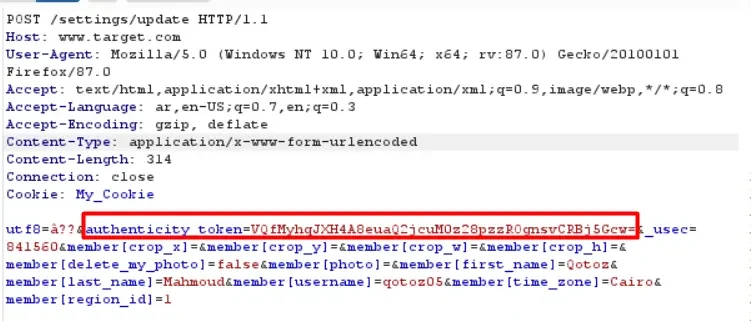
The image shows a form submission with the authenticity_token parameter in the body. The doubt was confirmed: no validation existed on the CSRF token, and no other measure was in place as protection against CSRF. Combined with the application/x-www-form-urlencoded content type, nothing stopped the request from being forged cross-site.
Rather than build a proof of concept against a low-impact function, the author chose a function with higher impact: changing the email address, which leads to account takeover.
Exploitation
Step 1: Change email, current password requirement
When testing CSRF against the change email function, the author noticed difficulties that could make the attack fail.
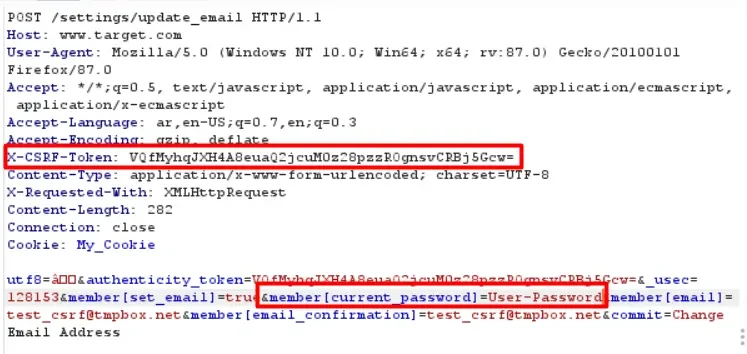
The first obstacle is that the user must enter the current password in order to change the email linked to the account. To check whether the parameter value is validated on the server side, the author tried an invalid password, and it was validated: the request did not succeed with a wrong value.
The next attempt was to delete the parameter completely from the request and observe the server response. The request succeeded.
Step 2: Change email, request header requirement
A second obstacle was a request header that existed as protection against CSRF. The author deleted it from the request, the request was accepted, and the email change took effect.
At this point the author had account takeover: the email of any user could be changed once that user visited an HTML page containing the CSRF proof of concept, and the password could then be reset using the reset password function.
Step 3: Change password
The author then looked at the change password function. It behaved the same as change email: it requires the user to enter the current password, and deleting the current password parameter from the request still succeeds.
With both functions forgeable, a single HTML proof of concept can change the victim account's email and password with one visit to the malicious page.
Step 4: Terminate the session
The site did not log the user out after changing the password. The author therefore added a final part to the code to log the victim out and terminate the active session.
Attack workflow
The HTML exploit code performs three actions in order:
- Change the email of the victim account to
[redacted]. - Change the account password to
Csrfattack-00. - Log the user out.
The report lists the exploit code under an 'HTML Exploit Code' heading and then gives the workflow below.
Root cause
The authenticity_token parameter is sent in the body of every form but is not validated on the server side. The same applies to the request header used as a second CSRF protection on the change email function: removing it does not stop the request. Because the forms accept application/x-www-form-urlencoded, a cross-site HTML form can reproduce the requests without any restriction from the browser.
The current password check on the change email and change password functions is also bypassable by removing the parameter: the request succeeds without it.
Impact
Full account takeover. An attacker who gets a logged-in victim to visit a page containing the proof of concept can change the victim's email address to one the attacker controls, change the password, and terminate the victim's session. With the email changed, the attacker can then use the reset password function to take over the account.
Fix
The measures it implies are: validate the authenticity_token on the server side for every state-changing request, enforce the CSRF protection header rather than treating it as optional, and reject requests that omit the current password parameter instead of processing them.
Variants to test
- Remove the CSRF token from a state-changing request and resend it. A positive result is that the action still takes effect.
- Replace the CSRF token with an arbitrary value and resend. A positive result is the same: the action succeeds.
- Remove the custom CSRF protection header from the request. A positive result is that the server accepts the request without it.
- Remove the current password parameter from a change email or change password request. A positive result is that the change is applied without the password being supplied.
- Submit a wrong current password. A positive result here is a failure, which confirms the value is validated when present; the bypass is in the missing parameter, not in a wrong one.
- Build a cross-site HTML form that posts to the change email and change password endpoints with
application/x-www-form-urlencoded, then check whether the victim's email and password change after a single visit. - Check whether the session survives a password change. If it does, add a logout request to the chain so the victim's active session is terminated.
What happened, in plain words
A security researcher, Ashraf Harb (@ashrafharb97), found a way to take over any user account on a private website (called target.com in the report) by getting the user to visit a malicious web page. The attack works because the site's forms include a security token but never check it on the server, and because the site accepts a type of form submission that any web page can send. The researcher could change a victim's email address and password without knowing the current password, and then log the victim out. This is called a CSRF (cross-site request forgery) attack leading to full account takeover.
Background: what is CSRF?
CSRF stands for Cross-Site Request Forgery. Imagine you are logged in to your bank's website in one browser tab. In another tab, you open a malicious page. That page contains a hidden form that automatically submits a request to your bank, for example to transfer money. Because your browser still has your bank's login cookie, the bank thinks the request came from you. The malicious page never sees your cookie; it just makes your browser send the request. That is CSRF: an attacker tricks your browser into sending a request you did not intend.
To stop CSRF, websites often include a secret value called a CSRF token in every form. The server checks that the token matches the one it gave you. A malicious page cannot read the token (because of browser security rules), so it cannot forge a valid request. But if the server does not actually check the token, the protection is useless.
The target and the token
The researcher was testing a private site, referred to as target.com. The report does not describe what the site does beyond having account features: change email, change password, password reset, and logout.
Every form submitted through the site includes a parameter called authenticity_token in the request body. This is meant to be the CSRF protection.
The image shows a form submission with the authenticity_token parameter in the body. The researcher suspected that the server might not validate this token. A common mistake is to include the token in the form but never check it on the server side. So the test was simple: modify the token value, or delete it entirely, and see if the request still goes through.
The suspicion was correct: there was no validation of the CSRF token, and no other CSRF protection was in place. Also, the forms use Content-Type: application/x-www-form-urlencoded, which is the content type a normal HTML form can send from any website without any special permission from the browser. That means a malicious page can easily send the same requests.
Why choose the change email function?
Instead of building a proof of concept against a low-impact function, the researcher chose a function that would have a bigger effect: changing the email address. If an attacker can change the email address on an account, they can then use the password reset function to take over the account.
Step 1: Change email and the current password requirement
When testing CSRF against the change email function, the researcher found some difficulties that could make the attack fail.
The first obstacle: the user must enter their current password to change the email linked to the account. To check whether the password is validated on the server, the researcher tried an invalid password. The server rejected it, so the password value is checked when it is present.
The next attempt was to delete the password parameter completely from the request and see what the server did. The request succeeded.
Step 2: Change email and the request header requirement
A second obstacle was a request header that existed as protection against CSRF. The researcher deleted that header from the request, and the request was still accepted, and the email change took effect.
At this point, the researcher had account takeover: the email of any user could be changed once that user visited an HTML page containing the CSRF proof of concept. Then the password could be reset using the reset password function.
Step 3: Change password
The researcher then looked at the change password function. It behaved the same as change email: it requires the user to enter the current password, and deleting the current password parameter from the request still succeeds.
With both functions forgeable, a single HTML proof of concept can change the victim account's email and password with one visit to the malicious page.
Step 4: Terminate the session
The site did not log the user out after changing the password. So the researcher added a final part to the code to log the victim out and terminate the active session. The report does not explain why the logout step was added.
Attack workflow
The HTML exploit code performs three actions in order:
- Change the email of the victim account to
[redacted]. - Change the account password to
Csrfattack-00. - Log the user out.
The report lists the exploit code under an 'HTML Exploit Code' heading and then gives the workflow below.
Root cause
The authenticity_token parameter is sent in the body of every form but is not validated on the server side. The same applies to the request header used as a second CSRF protection on the change email function: removing it does not stop the request. Because the forms accept application/x-www-form-urlencoded, a cross-site HTML form can reproduce the requests without any restriction from the browser.
The current password check on the change email and change password functions is also bypassable by removing the parameter: the request succeeds without it.
Impact
Full account takeover. An attacker who gets a logged-in victim to visit a page containing the proof of concept can change the victim's email address to one the attacker controls, change the password, and terminate the victim's session. With the email changed, the attacker can then use the reset password function to take over the account.
Fix
The measures it implies are: validate the authenticity_token on the server side for every state-changing request, enforce the CSRF protection header rather than treating it as optional, and reject requests that omit the current password parameter instead of processing them.
Variants to test
- Remove the CSRF token from a state-changing request and resend it. A positive result is that the action still takes effect.
- Replace the CSRF token with an arbitrary value and resend. A positive result is the same: the action succeeds.
- Remove the custom CSRF protection header from the request. A positive result is that the server accepts the request without it.
- Remove the current password parameter from a change email or change password request. A positive result is that the change is applied without the password being supplied.
- Submit a wrong current password. A positive result here is a failure, which confirms the value is validated when present; the bypass is in the missing parameter, not in a wrong one.
- Build a cross-site HTML form that posts to the change email and change password endpoints with
application/x-www-form-urlencoded, then check whether the victim's email and password change after a single visit. - Check whether the session survives a password change. If it does, add a logout request to the chain so the victim's active session is terminated.
Glossary
- CSRF (Cross-Site Request Forgery): an attack that tricks a logged-in user's browser into sending an unwanted request to a website the user is authenticated on.
- CSRF token: a secret value included in forms to prove the request came from the site's own pages, not from a malicious page.
- authenticity_token: the name of the CSRF token parameter used by the target site.
- Content-Type: an HTTP header that tells the server what format the request body is in, such as
application/x-www-form-urlencoded. - application/x-www-form-urlencoded: the format a normal HTML form uses to send data, which any website can produce without special browser permissions.
- Request header: extra information sent with an HTTP request, such as cookies or custom headers.
- Account takeover: gaining control of another user's account, often by changing their email or password.
- Proof of concept (PoC): a demonstration that an attack is possible, often a simple HTML page that triggers the vulnerability.
- Session: a period during which a user is logged in; the server remembers the user via a cookie or token.
- Password reset function: a feature that lets a user reset their password, usually by sending a link to their email address.
- State-changing request: a request that modifies data on the server, such as changing an email or password.
- Endpoint: a specific URL that an application responds to, such as the URL for changing an email.
- Parameter: a named value sent in a request, like
authenticity_tokenorcurrent_password. - Server-side validation: checking data on the server, as opposed to in the browser, to ensure it meets rules.
- HTML form: a set of input fields on a web page that can be submitted to a server.
- Browser security rules: restrictions like the same-origin policy that prevent a page from reading data from another site, but do not prevent sending requests.

